
【mapreudce】6.对Nginx的access日志进行数据清洗,我们提取出文件数据的ip,时间,url
1.首先我们需要一个util辅助类
package cn.cutter.demo.hadoop.mapreduce.nginxlog.util;

import java.text.ParseException;

import java.text.SimpleDateFormat;

import java.util.Date;

import java.util.Locale;

/**

 * @ClassName AccessLogUtil

 * @Description

 * @Author xiaof

 * @Date 2019/5/15 22:07

 * @Version 1.0

 **/

public class AccessLogUtil {

    public static final SimpleDateFormat FORMAT = new SimpleDateFormat(

            "d/MMM/yyyy:HH:mm:ss", Locale.ENGLISH);

    public static final SimpleDateFormat dateformat1 = new SimpleDateFormat(

            "yyyyMMddHHmmss");/**

     * 解析英文时间字符串

     *

     * @param string

     * @return

     * @throws ParseException

     */

    private static Date parseDateFormat(String string) {

        Date parse = null;

        try {

            parse = FORMAT.parse(string);

        } catch (ParseException e) {

            e.printStackTrace();

        }

        return parse;

    }

    /**

     * 解析日志的行记录

     *

     * @param line

     * @return 数组含有5个元素,分别是ip、时间、url、状态、流量,请求来源

     */

    public static String[] parse(String line) {

        String ip = parseIP(line);

        String time = parseTime(line);

        String url = parseURL(line);

        String status = parseStatus(line);

        String traffic = parseTraffic(line);

        String sourcePath = parseSource(line);

        return new String[] { ip, time, url, status, traffic, sourcePath };

    }

    private static String parseTraffic(String line) {

//        final String trim = line.substring(line.lastIndexOf("-") + 1)

//                .trim();

        int start = line.indexOf("\"");

        int second = line.indexOf("\"", start + 1);

        int three = line.indexOf("\"", second + 1);

        final String trim = line.substring(second + 1, three)

                .trim();

        String traffic = trim.split(" ")[1];

        return traffic;

    }

    private static String parseStatus(String line) {

        int start = line.indexOf("\"");

        int second = line.indexOf("\"", start + 1);

        int three = line.indexOf("\"", second + 1);

        final String trim = line.substring(second + 1, three)

                .trim();

        String status = trim.split(" ")[0];

        return status;

    }

    private static String parseURL(String line) {

        final int first = line.indexOf("\"");

        final int second = line.indexOf("\"", first + 1);

        final int last = line.lastIndexOf("\"");

        String url = line.substring(first + 1, second);

        return url;

    }

    private static String parseTime(String line) {

        final int first = line.indexOf("[");

        final int last = line.indexOf("+0800]");

        String time = line.substring(first + 1, last).trim();

        Date date = parseDateFormat(time);

        return dateformat1.format(date);

    }

    private static String parseIP(String line) {

        String ip = line.substring(0, line.indexOf("-")).trim();

        return ip;

    }

    private static String parseSource(String line) {

        final int end = line.lastIndexOf("\"");

        final int start = line.lastIndexOf("\"", end - 1);

        String sourcePath = line.substring(start + 1, end).trim();

        return sourcePath;

    }

    public static void main(String args[]) {

        String s1 = "10.25.24.133 - admin [07/Mar/2019:14:19:53 +0800] \"GET /oss-eureka-server/console HTTP/1.1\" 200 21348 \"http://218.200.65.200:9425/oss-web/main.jsp\" \"Mozilla/5.0 (Windows NT 10.0; Win64; x64) AppleWebKit/537.36 (KHTML, like Gecko) Chrome/70.0.3538.77 Safari/537.36\"\n";

        String result[] = AccessLogUtil.parse(s1);

        for(int i = 0; i < result.length; ++i) {

            System.out.println(result[i]);

        }

    }

}
2.map类
package cn.cutter.demo.hadoop.mapreduce.nginxlog.map;

import cn.cutter.demo.hadoop.mapreduce.nginxlog.util.AccessLogUtil;

import org.apache.hadoop.io.LongWritable;

import org.apache.hadoop.io.Text;

import org.apache.hadoop.mapreduce.Mapper;

import java.io.IOException;

/**

 * @ProjectName: cutter-point

 * @Package: cn.cutter.demo.hadoop.mapreduce.nginxlog.map

 * @ClassName: NginxAccessLogMap

 * @Author: xiaof

 * @Description: ${description}

 * @Date: 2019/5/17 11:12

 * @Version: 1.0

 */

public class NginxAccessLogCleanMap extends Mapper<LongWritable, Text, LongWritable, Text> {

    Text outputValue = new Text();

    @Override

    protected void map(LongWritable key, Text value, Context context) throws IOException, InterruptedException {

        //解析没行数据,获取不同的数据

        String data[] = AccessLogUtil.parse(value.toString());

        //组装前三个数据信息,输出到combine

        outputValue.set(data[0] + "\t" + data[1] + "\t" + data[2]);

        context.write(key, outputValue);

    }

}
3.reduce类
package cn.cutter.demo.hadoop.mapreduce.nginxlog.reduce;

import org.apache.hadoop.io.LongWritable;

import org.apache.hadoop.io.NullWritable;

import org.apache.hadoop.io.Text;

import org.apache.hadoop.mapreduce.Reducer;

import java.io.IOException;

/**

 * @ProjectName: cutter-point

 * @Package: cn.cutter.demo.hadoop.mapreduce.nginxlog.reduce

 * @ClassName: NginxAccessLogReduce

 * @Author: xiaof

 * @Description: 进行数据清洗

 * @Date: 2019/5/17 11:21

 * @Version: 1.0

 */

public class NginxAccessLogCleanReduce extends Reducer<LongWritable, Text, Text, NullWritable> {

    @Override

    protected void reduce(LongWritable key, Iterable<Text> values, Context context) throws IOException, InterruptedException {

        //循环所有遍历到的数据并输出

        for(Text v : values) {

            context.write(v, NullWritable.get());

        }

    }

}
4.启动类
package cn.cutter.demo.hadoop.mapreduce.nginxlog;

import cn.cutter.demo.hadoop.mapreduce.nginxlog.map.NginxAccessLogCleanMap;

import cn.cutter.demo.hadoop.mapreduce.nginxlog.reduce.NginxAccessLogCleanReduce;

import org.apache.hadoop.conf.Configuration;

import org.apache.hadoop.fs.FileSystem;

import org.apache.hadoop.fs.Path;

import org.apache.hadoop.io.LongWritable;

import org.apache.hadoop.io.NullWritable;

import org.apache.hadoop.io.Text;

import org.apache.hadoop.mapreduce.Job;

import org.apache.hadoop.mapreduce.lib.input.FileInputFormat;

import org.apache.hadoop.mapreduce.lib.output.FileOutputFormat;

import org.apache.hadoop.util.GenericOptionsParser;

import java.io.IOException;

import java.net.URI;

import java.net.URISyntaxException;

/**

 * @ProjectName: cutter-point

 * @Package: cn.cutter.demo.hadoop.mapreduce.nginxlog

 * @ClassName: NginxAccessLogClean

 * @Author: xiaof

 * @Description: hadoop jar ./cutter-point-service1.jar NginxAccessLogClean /user/xiaof/nginx /user/xiaof/nginx/output

 * @Date: 2019/5/17 11:25

 * @Version: 1.0

 */

public class NginxAccessLogClean {

    public static void main(String args[]) throws IOException, URISyntaxException, ClassNotFoundException, InterruptedException {

        System.out.println("进入NginxAccessLogClean方法");

        Configuration conf = new Configuration();

//        conf.set("mapreduce.job.jar", "cutter-point-service1.jar"); //其中mr01.jar是你的导出的jar文件名。

        conf.set("fs.default.name", "hdfs://jyh-zhzw-inline-27:9000");

        conf.set("dfs.client.use.datanode.hostname", "true");

        GenericOptionsParser optionsParser = new GenericOptionsParser(conf, args);

        String[] remainingArgs = optionsParser.getRemainingArgs();

        //输出参数

        for(int i = 0; i < remainingArgs.length; ++i) {

            System.out.println(remainingArgs[i]);

        }

        Job job = Job.getInstance(conf, NginxAccessLogClean.class.getName());

        job.setJarByClass(NginxAccessLogClean.class);

        job.setMapperClass(NginxAccessLogCleanMap.class);

        job.setMapOutputKeyClass(LongWritable.class);

        job.setMapOutputValueClass(Text.class);

        job.setReducerClass(NginxAccessLogCleanReduce.class);

        job.setOutputKeyClass(Text.class);

        job.setOutputValueClass(NullWritable.class);

        // 清理已存在的输出文件

        FileInputFormat.setInputPaths(job, remainingArgs[0]);

        FileOutputFormat.setOutputPath(job, new Path(remainingArgs[1]));

        FileSystem fs = FileSystem.get(new URI(remainingArgs[0]), conf);

        Path outPath = new Path(remainingArgs[1]);

        if (fs.exists(outPath)) {

            fs.delete(outPath, true);

        }

        boolean success = job.waitForCompletion(true);

        if(success){

            System.out.println("Clean process success!");

        }

        else{

            System.out.println("Clean process failed!");

        }

    }

}
数据源:
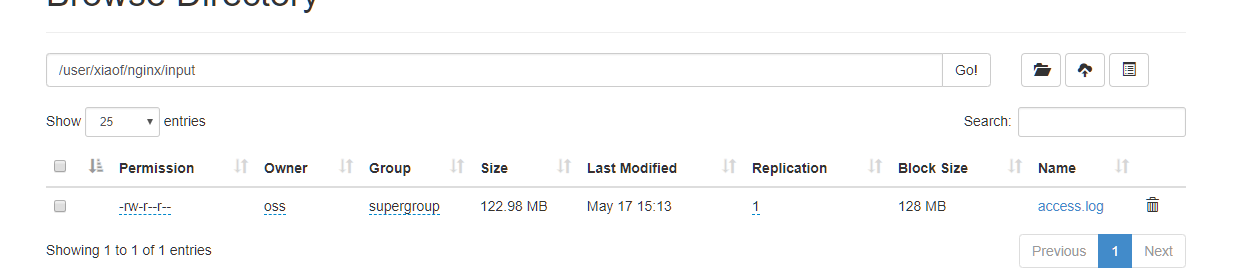
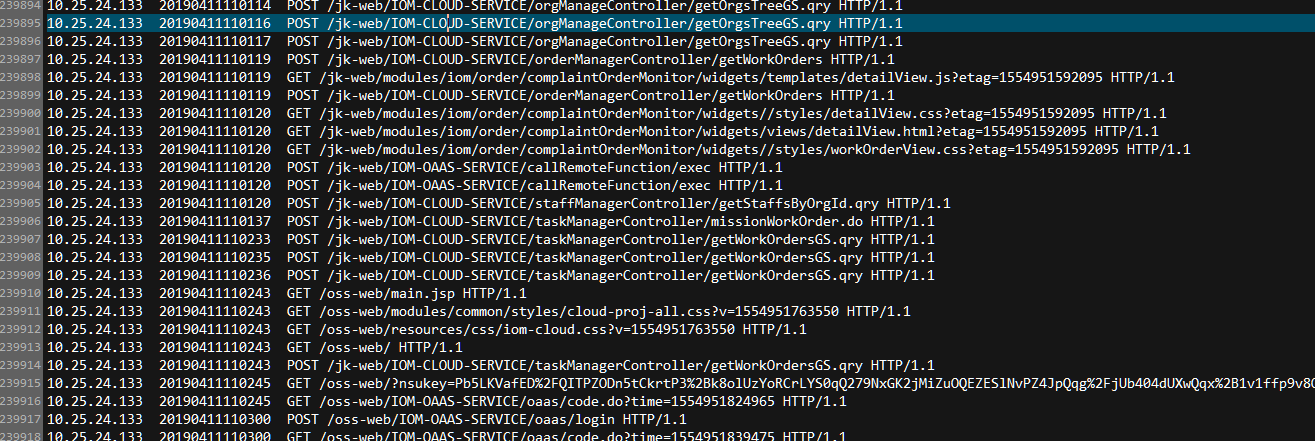
我们文件原始数据格式展示

我们清洗之后数据展示
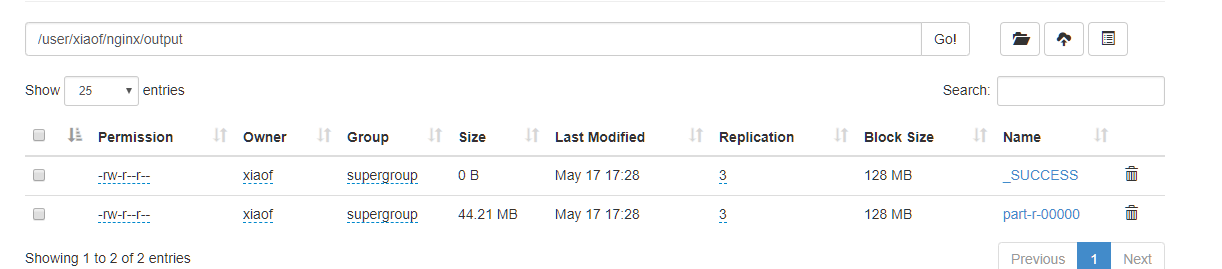
展示数据
【mapreudce】6.对Nginx的access日志进行数据清洗,我们提取出文件数据的ip,时间,url的更多相关文章
- filebeat获取nginx的access日志配置
filebeat获取nginx的access日志配置 产生nginx日志的服务器即生产者服务器配置: 拿omp.chinasoft.com举例: .nginx.conf主配置文件添加日志格式 log_ ...
- 命令stat anaconda-ks.cfg会显示出文件的三种时间状态(已加粗):Access、Modify、Change。这三种时间的区别将在下面的touch命令中详细详解:
7.stat命令 stat命令用于查看文件的具体存储信息和时间等信息,格式为"stat 文件名称". stat命令可以用于查看文件的存储信息和时间等信息,命令stat anacon ...
- Nginx的Access日志记录的时机
想当然了,所以犯了一个低级的错误... nginx的access访问日志可以记录下访问到nginx的相关信息.包含请求地址,请求路径,返回码,请求的处理时间等信息.. 然后问题来了,这个日志是什么时候 ...
- Nginx 分析access日志文件
Nginx Access Log日志统计分析常用命令 IP相关统计 统计IP访问量 awk '{print $1}' access.log | sort -n | uniq | wc -l 查看某一时 ...
- 禁用nginx的access日志
修改nginx.conf 找到access_log: access_log /dev/null; 或者access_log off
- elk收集分析nginx access日志
elk收集分析nginx access日志 首先elk的搭建按照这篇文章使用elk+redis搭建nginx日志分析平台说的,使用redis的push和pop做队列,然后有个logstash_inde ...
- 通过Nginx,Tomcat访问日志(access log)记录请求耗时
一.Nginx通过$upstream_response_time $request_time统计请求和后台服务响应时间 nginx.conf使用配置方式: log_format main '$remo ...
- 解决nginx access日志中400 bad request 错误(转)
在access.log中有大量400错误,并以每天几百M的速度增加,占用大量空间.tail -f /opt/nginx/logs/access.log 116.236.228.180 - - [15/ ...
- nginx access 日志位置
nginx access 日志位置 /var/log/nginx tail -f access.log
随机推荐
- 02_01Graph_Session
import numpy as npimport tensorflow as tfnp.random.seed(42)"""学习:1.图的创建2.tf.constant( ...
- java的集合类【Map(映射)、List(列表)与Set(集)比较】
https://baike.baidu.com/item/java%E9%9B%86%E5%90%88%E7%B1%BB/4758922?fr=aladdin https://www.cnblogs. ...
- 004 API约定
在具体的学习前,我还是决定学一下,REST风格中在ES中的约定. 1.多重索引 先准备数据: 如果不小心,json里的值写错了,修改过来,重新执行即可. PUT index1/_doc/1 { &qu ...
- js 解析 JSON 数据
JSON 数据如下: { "name": "mkyong", , "address": { "streetAddress" ...
- 终于解决了python 3.x import cv2 “ImportError: DLL load failed: 找不到指定的模块” 及“pycharm关于cv2没有代码提示”的问题
终于解决了python 3.x import cv2 “ImportError: DLL load failed: 找不到指定的模块” 及“pycharm关于cv2没有代码提示”的问题 参考 :h ...
- 实战二:LoadRunner创建一个测试脚本
问题一:执行脚本浏览器不能自动启动??? 原因:loadrunner11只支持IE9以下浏览器和火狐低版本浏览器 解决办法:1.IE浏览器取消勾选[启用第三方浏览器扩展]启动IE,从[工具]进入[In ...
- netty5自定义私有协议实例
一般业务需求都会自行定义私有协议来满足自己的业务场景,私有协议也可以解决粘包和拆包问题,比如客户端发送数据时携带数据包长度,服务端接收数据后解析消息体,获取数据包长度值,据此继续获取数据包内容.我们来 ...
- Spring cloud微服务安全实战-3-1 API安全 常见的安全机制
不考虑微服务这种复杂的环境下,只是写一个简单的api的时候,如何来保证api的安全. 什么是API
- 转 RAC srvctl 管理命令
https://czmmiao.iteye.com/blog/1762900 https://blog.csdn.net/weeknd/article/details/72358218 ------- ...
- LeetCode_392. Is Subsequence
392. Is Subsequence Easy Given a string s and a string t, check if s is subsequence of t. You may as ...