
div双击全屏,再双击恢复到原来的状态vue,js来做
需求是这样的:
有四个视频,视频是在4个区域,点击之后就全屏
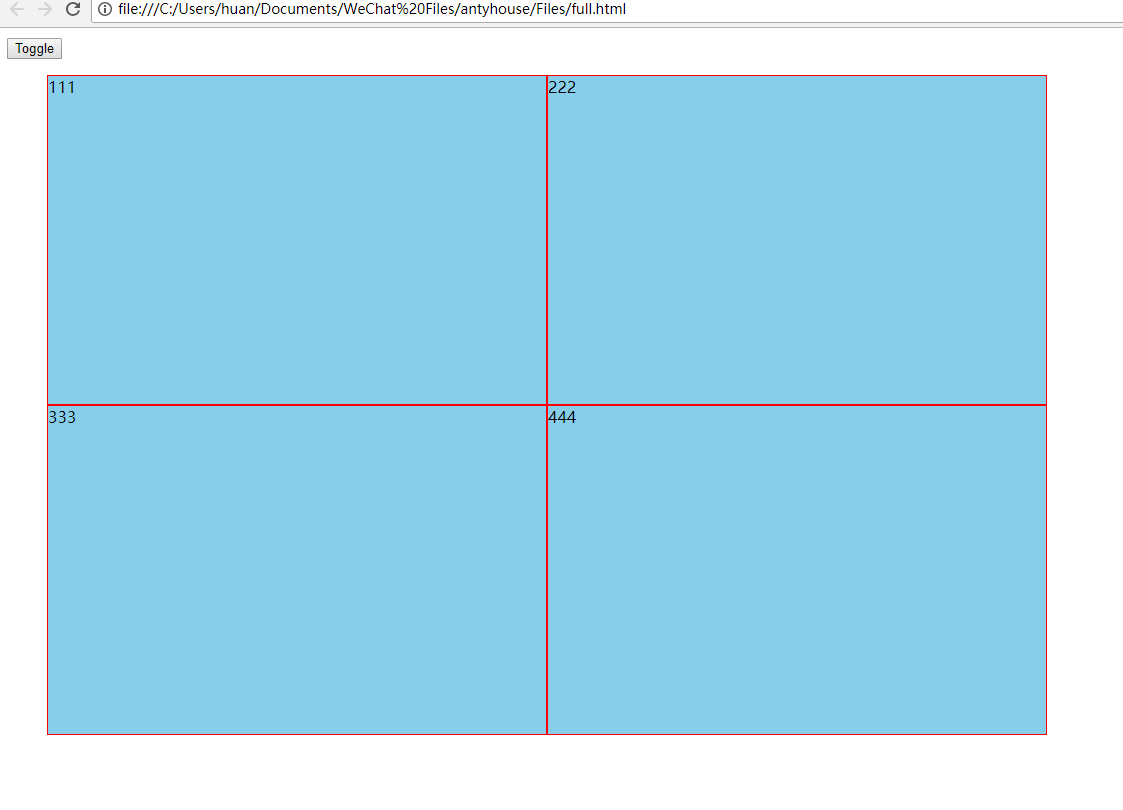
<!DOCTYPE html>

<html lang="en">

<head>

    <meta charset="UTF-8">

    <meta name="viewport" content="width=device-width, initial-scale=1.0">

    <meta http-equiv="X-UA-Compatible" content="ie=edge">

    <title>Document</title>

    <style>

        .fade-enter-active, .fade-leave-active {

           transition: opacity .5s;

        }

        .fade-enter, .fade-leave-to /* .fade-leave-active below version 2.1.8 */ {

          opacity: ;

        }

        .getHello{

            width:400px;

            height: 400px;

            background-color: skyblue;

        }

        body,html{

            width: %;

            height: %;

        }

        ul{

            width: 1000px;

            height: 660px;

        }

        li{

            width: %;

            height: %;

            float: left;

            list-style: none;

            background: skyblue;

            box-sizing: border-box;

            border: 1px solid red

        }

        .clearfix::after{

            content: '';

            height: ;

            line-height: ;

            display: block;

            clear: both;

            visibility: hidden;

        }

    </style>

</head>

<body>

    <!--mvvm里面的v-->

    <div id="demo">

    <button v-on:click="show = !show" >

        Toggle

    </button>

    <transition name="fade">

         <ul class="clearfix">

            <!--<li ref="fenpin" v-for="item in items" :key="item.id" @dblclick="dbClick($event)"></li>-->

             <li ref="fenpin"  @dblclick="dbClick1($event)" :style="{width:width1,height:height1}" v-if="one2"></li>

             <li ref="fenpin"  @dblclick="dbClick2($event)" :style="{width:width2,height:height2}" v-if="two2"></li>

             <li ref="fenpin"  @dblclick="dbClick3($event)" :style="{width:width3,height:height3}"  v-if="three2"> </li>

             <li ref="fenpin"  @dblclick="dbClick4($event)" :style="{width:width4,height:height4}"  v-if="four2"></li>

        </ul>

        <!--<p v-if="show" class="getHello" v-on:dblclick="Open()" ref="good" :style="{width:width,height:height}" @keydown="bopy($event)">hello</p>-->

    </transition>

    </div>

    <script src="./node_modules/vue/dist/vue.js"></script>

    <script >

        //这是mvvm里面的vm

        // window.onload=function(){

         window.onload = function () {

         var vm=new Vue({

            el: '#demo',

            data: {

                show: true,

                width1:"50%",

                height1:"50%",

                width2:"50%",

                height2:"50%",

                 width3:"50%",

                height3:"50%",

                 width4:"50%",

                height4:"50%",

                items:{

                    key1:'one',

                    key2:'two',

                    key3:'three',

                    key4:'four',

                },

                one2:true,

                two2:true,

                three2:true,

                four2:true,

            },

            methods: {

                Open: function () {

                    if(this.width=="400px"){

                         console.log()

                        this.width="100%"

                        this.height="100vh"

                    }else{

                        this.width="400px"

                        this.height="400px"

                    }

                },

                bopy:function(ev){

                    console.log(,ev)

                },

                dbClick1:function (e){

                    console.log(e.target);

                    if(this.width1=="50%"){

                        this.two2=false;

                        this.three2=false;

                        this.four2=false;

                        this.width1="100%";

                        this.height1="100%";

                    }else{

                        this.two2=true;

                        this.three2=true;

                        this.four2=true;

                        this.width1="50%";

                        this.height1="50%";

                    }

                },

                dbClick2:function (e){

                    if(this.width2=="50%"){

                        this.one2=false;

                        this.three2=false;

                        this.four2=false;

                        this.width2="100%";

                        this.height2="100%";

                    }else{

                        this.one2=true;

                        this.three2=true;

                        this.four2=true;

                        this.width2="50%";

                        this.height2="50%";

                    }

                },

                dbClick3:function (e){

                    if(this.width3=="50%"){

                        this.one2=false;

                        this.two2=false;

                        this.four2=false;

                        this.width3="100%";

                        this.height3="100%";

                    }else{

                        this.two2=true;

                        this.one2=true;

                        this.four2=true;

                        this.width3="50%";

                        this.height3="50%";

                    }

                },

                dbClick4:function (e){

                    if(this.width4=="50%"){

                        this.one2=false;

                        this.two2=false;

                        this.three2=false;

                        this.width4="100%";

                        this.height4="100%";

                    }else{

                        this.two2=true;

                        this.one2=true;

                        this.three2=true;

                        this.width4="50%";

                        this.height4="50%";

                    }

                },

           },

         })

        }

    </script>

</body>

</html>
div双击全屏,再双击恢复到原来的状态vue,js来做的更多相关文章
- iOS 多个播放器同时播放,双击全屏,单击退出全屏
前言:公司需求如下:点击一个按钮播放一个视频,最多同时播放4个:双击某视频让其全屏,单击再恢复原来的样子.IOS的播放器有两种,MPMoviePlayerController,AVAudioPlaye ...
- VC一些经验系列:《平均绘画矩形图,双击全屏》
1.RGB宏报错 RGB宏是这样的, #define RGB(r,g,b) ((COLORREF)(((BYTE)(r)|((WORD)((BYTE)(g))<<8))| ...
- div的全屏与退出全屏
div的全屏与退出全屏 作用:将div全屏与退出全屏,一般播放器使用较多. html按钮: <button onclick="showFull();"> 全屏 < ...
- C#中如何禁止WindowsMediaPlayer双击全屏显示
问题描述:在项目中使用WindowsMediaPlayer播放视频时,双击会出现视频全屏的效果,而且视频恢复后会暂停,除非再次双击返回后才能正常播放.那么如何禁止WindowsMediaPlayer的 ...
- div 自动全屏高度
最近做一个页面,需要一个div自动铺满全屏,但是高度总是难以搞定.查资料为:需要从html body到div 需要 设置 高度属性 为100%
- 解决ubuntu下firefox的flash全屏后不能恢复问题 ZT
sudo mkdir /etc/adobe echo "OverrideGPUValidation=true" >~/mms.cfg sudo mv ~/mms.cfg /e ...
- video 全屏,播放,隐藏控件。
requestFullscreen全屏具体实现 1.进入全屏 function full(ele) { if (ele.requestFullscreen) { ele.requestFullscre ...
- QT中关于窗口全屏显示与退出全屏的实现
近期在学习QT时遇到了很多问题这也是其中一个,个人通过在各种书籍和网络上的查阅找到了一些关于这方面的答案,希望能给大家一些帮助. 首先,在QT中对于窗口显示常用的有这么几个方法可以调用: Qt全屏显示 ...
- HTML5全屏浏览器兼容方案
最近一个项目有页面全屏的的需求,搜索了下有HTML5的全屏API可用,不过各浏览器的支持不一样. 标准 webkit Firefox IE Element.requestFullscreen() ...
随机推荐
- python-socket并发-解决tcp粘包问题
粘包问题 tcp协议才会有粘包问题,udp协议没有粘包问题. 因为tcp协议是将需要传输的内容先读入缓存里,然后在一点点传,受接收方字符限制,并不能一次传输完成,第二次就会将第一次剩下的部分+第二次的 ...
- isolate两三事
1.1. 第一步:创建并握手 如前所述,Isolate 不共享任何内存并通过消息进行交互,因此,我们需要找到一种方法在「调用者」与新的 isolate 之间建立通信. 每个 Isolate 都暴露了一 ...
- JavaScript函数参数传递
Hello,今天和大家分享下JS中的一个基本概念:函数参数传递! 先来看看一个DEMO var str="hello world"; function func(s){ s=&qu ...
- Android Room 使用案例
本内容主要介绍 Android 中使用 Room 保存数据到本地数据库的方法. 以下是 Android Room 的官方介绍文档: Room Persistence Library(Room 库的简 ...
- 关于Tomcat服务器中的协议及请求过程
关于Tomcat服务器中采用的协议:在Tomcat的server.xml文件中可以找到如下几个Connector <!-- 1. HTTP --> <Connector port=& ...
- 【zookeeper】apache-zookeeper-3.5.5的安装测试
下载:apache-zookeeper-3.5.5.tar.gz 进入zookeeper安装目录查看lib文件夹和zookeeper-3.5.5.jar是否存在,如果没有需要手动添加,不然启动时会报错 ...
- 2018-2019 ACM-ICPC Nordic Collegiate Programming Contest (NCPC 2018)- D. Delivery Delays -二分+最短路+枚举
2018-2019 ACM-ICPC Nordic Collegiate Programming Contest (NCPC 2018)- D. Delivery Delays -二分+最短路+枚举 ...
- 安装k8s,使用root帐号的初始化脚本
现在稳定性差不多了.可以总结一下了. 真正使用时,有几个地方,还是确认一下,再正式运行吧. #!/bin/bash # Version V0. ---: ;fi K8S_VERSION="1 ...
- python处理yml
#pip install pyyamlimport yaml #yaml文件转成字典 with open('a.yml','rb')as f: res = yaml.load(f,Loader=yam ...
- 《少年先疯队》第八次团队作业:Alpha冲刺第五天
前言 第五天冲刺会议 时间:2019.6.18 地点:宿舍 5.1 今日完成任务情况以及遇到的问题. 5.1.1今日完成任务情况 姚玉婷:会员查询消费记录功能的实现 马丽莎:昨天 ...