
Linux磁盘分区、格式化和挂载
一、查看磁盘使用
[root@iZ88rvassw1Z ~]# df -h

Filesystem      Size  Used Avail Use% Mounted on

/dev/vda1        40G  2.3G   36G   7% /

tmpfs           1.9G     0  1.9G   0% /dev/shm
二、查看磁盘分区
[root@iZ88rvassw1Z ~]# fdisk -l

Disk /dev/vda: 42.9 GB, 42949672960 bytes

255 heads, 63 sectors/track, 5221 cylinders

Units = cylinders of 16065 * 512 = 8225280 bytes

Sector size (logical/physical): 512 bytes / 512 bytes

I/O size (minimum/optimal): 512 bytes / 512 bytes

Disk identifier: 0x00078f9c

   Device Boot      Start         End      Blocks   Id  System

/dev/vda1   *           1        5222    41940992   83  Linux

Disk /dev/vdb: 1099.5 GB, 1099511627776 bytes

16 heads, 63 sectors/track, 2130440 cylinders

Units = cylinders of 1008 * 512 = 516096 bytes

Sector size (logical/physical): 512 bytes / 512 bytes

I/O size (minimum/optimal): 512 bytes / 512 bytes

Disk identifier: 0x00000000
目前系统存在了两块磁盘,分别为“/dev/vda”和“/dev/vdb”;
“/dev/vda”已经存在了一个分区“/dev/vda1”;
“/dev/vda1”没有分区。
三、磁盘分区命令
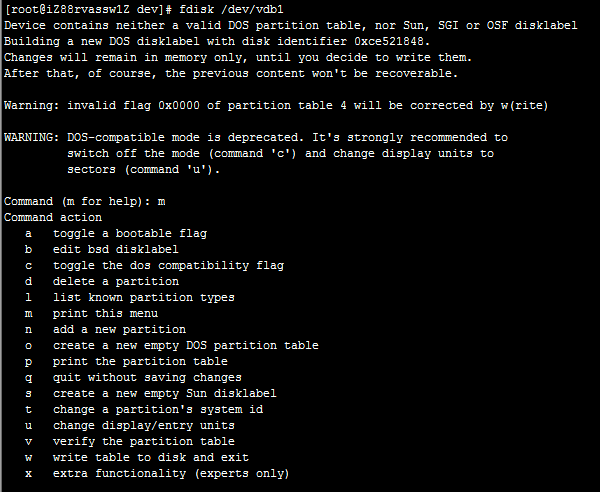
四、执行分区操作
[root@iZ88rvassw1Z ~]# fdisk /dev/vdb

Device contains neither a valid DOS partition table, nor Sun, SGI or OSF disklabel

Building a new DOS disklabel with disk identifier 0x3d7d21d6.

Changes will remain in memory only, until you decide to write them.

After that, of course, the previous content won't be recoverable.

Warning: invalid flag 0x0000 of partition table 4 will be corrected by w(rite)

WARNING: DOS-compatible mode is deprecated. It's strongly recommended to

         switch off the mode (command 'c') and change display units to

         sectors (command 'u').

Command (m for help): p

Disk /dev/vdb: 1099.5 GB, 1099511627776 bytes

16 heads, 63 sectors/track, 2130440 cylinders

Units = cylinders of 1008 * 512 = 516096 bytes

Sector size (logical/physical): 512 bytes / 512 bytes

I/O size (minimum/optimal): 512 bytes / 512 bytes

Disk identifier: 0x3d7d21d6

   Device Boot      Start         End      Blocks   Id  System

Command (m for help): n

Command action

   e   extended

   p   primary partition (1-4)

p

Partition number (1-4): 1

First cylinder (1-2130440, default 1):

Using default value 1

Last cylinder, +cylinders or +size{K,M,G} (1-2130440, default 2130440):

Using default value 2130440

Command (m for help): p

Disk /dev/vdb: 1099.5 GB, 1099511627776 bytes

16 heads, 63 sectors/track, 2130440 cylinders

Units = cylinders of 1008 * 512 = 516096 bytes

Sector size (logical/physical): 512 bytes / 512 bytes

I/O size (minimum/optimal): 512 bytes / 512 bytes

Disk identifier: 0x3d7d21d6

   Device Boot      Start         End      Blocks   Id  System

/dev/vdb1               1     2130440  1073741728+  83  Linux

Command (m for help): n

Command action

   e   extended

   p   primary partition (1-4)

p

Partition number (1-4): 2

No free sectors available

Command (m for help): w

The partition table has been altered!

Calling ioctl() to re-read partition table.

Syncing disks.

[root@iZ88rvassw1Z ~]#
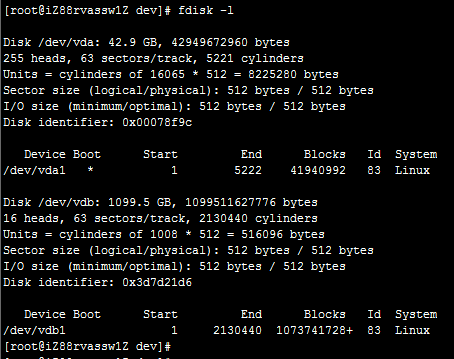
再次查看分区:
五、查看原有分区格式
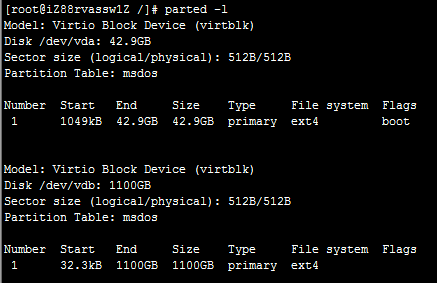
为ext4格式。
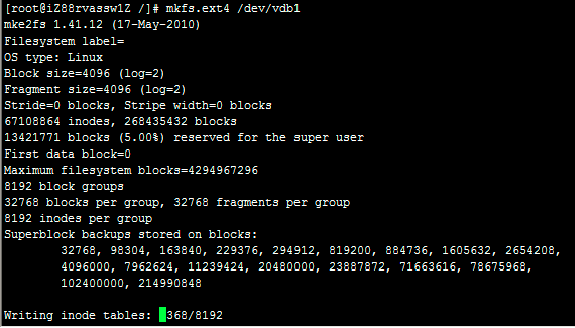
六、格式化分区
七、挂载分区
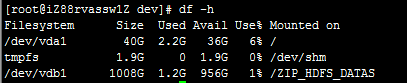
八、开机自动挂载
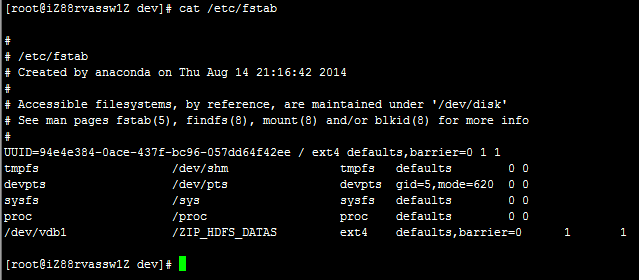
修改/etc/fstab,添加记录即可。
Linux磁盘分区、格式化和挂载的更多相关文章
- linux增加硬盘 磁盘分区格式化及挂载
nux磁盘分区格式化及挂载 意义: 给linux 系统服务器扩容, 加一块硬盘 实验环境: virtualBox虚拟软件 + centos6.5 第一步: 添加硬件 硬盘 (我这里用virtualB ...
- Linux磁盘分区/格式化/挂载(树莓派3挂载硬盘)
[前言] 本文将要讲解的功能为Linux环境下对磁盘进行操作.包括分区.格式化.挂载外接移动存储设备等. 该文的写作背景为本人的树莓派需要外接一个固态硬盘作为存储设备,因此,便开始了一系列的折腾. [ ...
- Linux磁盘分区/格式化/挂载目录
分区及挂载目录 以CentOS7.2为例,一般我们服务端应用部署前需要确认部署机的磁盘空间及挂载目录.操作如下: 如上图,如果操作系统是新装的,未挂盘的话需要先挂载盘.操作如下: fdisk -l # ...
- linux硬盘分区格式化及挂载
1.硬盘的接口类型 硬盘的接口一般分为两种,一种是IDE并行接口,一种是SATA串行接口, 在linux上面IDE接口的硬盘被识别为/dev/hd[a-z]这样的设备,其中hdc表示光驱设备,这是因为 ...
- linux磁盘分区格式化-fdisk命令工具
本文主要讲述使用fdisk工具对磁盘进行分区和格式化的方法 首先要明确分区是针对磁盘进行的操做,磁盘分区会创建分区表,类似vda,sda的是磁盘,vda1,sda1的是分区 1.查看磁盘分区状态 1. ...
- Linux磁盘分区格式化和扩容
Note:根据各系统上磁盘的类型不同,磁盘命名规则也会不同:例如/dev/xvd,/dev/sd,/dev/vd,/dev/hd 目录 磁盘格式化 MBR格式 GPT分区 磁盘扩容 MBR格式扩容 G ...
- 【linux磁盘分区--格式化】fdisk,parted,mkfs.ext3
磁盘分区完成后,一般就需要对分区进行格式化 磁盘分区命令主要有两个: fdisk :最大支持不超过2T分区: parted :支持GPT,适用于大容量分区: 分区指令的选择: 在RHEL系统上,用fd ...
- centos 磁盘分区格式化与挂载
1 查看系统里硬盘信息fdisk -l 2 磁盘分区fdisk /dev/sdc输入m显示帮助a:命令指定启动分区:d:命令删除一个存在的分区:l:命令显示分区ID号的列表:m:查看fdisk命令帮助 ...
- Linux磁盘分区与格式化
磁盘分区格式说明 linux分区不同于windows linux下分区标示: 例如:hda1 hd这两个字母表示分区所在的设备类型,hd标示IDE类型硬盘,sd表示SCSI类型硬盘 第三字母a标示硬盘 ...
- Linux磁盘分区和挂载
Linux磁盘分区和挂载 分区 分区的方式: mbr分区 最多支持4个主分区 系统只能安装到主分区上 扩展分区要占用一个主分区 MBR最大支持2TB,但拥有最好的兼容性 gtp分区 支持无线多个主分区 ...
随机推荐
- 随机森林、gbdt算法
http://blog.csdn.net/songzitea/article/details/10035757 http://blog.csdn.net/holybin/article/details ...
- HNU 12834 Thread Tree
递归输出即可了 #include<bits/stdc++.h> using namespace std; struct tree{ int dot; string s; } ...
- 限制input的输入类型
1.只能输入和粘贴汉字 <input onkeyup="value=value.replace(/[^\u4E00-\u9FA5]/g,'')" onbeforepaste= ...
- webpack-Targets(构建目标)
构建目标(Targets) 因为服务器和浏览器代码都可以用 JavaScript 编写,所以 webpack 提供了多种构建目标(target),你可以在你的 webpack 配置中设置. webpa ...
- 精通CSS:高级Web标准解决方式(第2版)
精通CSS:高级Web标准解决方式(第2版) 跳转至: 导航. 搜索 层叠重要度:(也就是说.用户!important能够覆盖inline style) !important.用户>作者.最后是 ...
- 各种“GND”
资料来自网上,把个人觉得靠谱的摘取下来 1.地分类: a)直流地:直流电路“地”,零电位参考点: b)交流地:交流电的零线.要与地线区别开,不过,有时候拉电入户之前会把地线和零线接在一起: c)功率地 ...
- 链接脚本在编程中的高级运用之二——执行时库和C++特性支持
我们在链接脚本在编程中的高级运用之中的一个可变长数组中已经讲述了编译链接的原理,并且以uboot命令为例具体介绍链接脚本怎样实现可变长数组. 本章在前者的基础上继续讲述链接脚本在执行时库中的高级应用技 ...
- javaScript定义函数的三种方式&变量的作用域
一.函数定义 方式1.普通方式定义函数 function 函数名(參数n){ 函数体 } function add(a,b){ return a+b; } 方式2.直接量定义函数 var 函数名=fu ...
- oracle的日期蛋
一切都是扯鸡巴蛋. 在网上查oracle的日期函数用法,得到一大堆语法,林林总总,都是扯鸡巴蛋,没能解决我的问题. 其实,我想写这么一条语句:查找某个日期(不含时分秒)产生或有关的记录.咋写? SQL ...
- Django初识二
1,在django中用于提交的form表单中的三要素: 1.1>form标签要有action和method,上传文件需要额外指定的enctype 1.2>获取用户输入的标签要有name属性 ...