
OLE/COM Object Viewer
OLE/COM Object Viewer
摘AutoIt Help
The "OLE/COM Object Viewer" is a very handy tool to get a peek on all COM objects currently installed on your system. It is part of the Windows 2000 resource kit and can be downloaded for free from:http://www.microsoft.com/downloads/details.aspx?familyid=5233b70d-d9b2-4cb5-aeb6-45664be858b6&displaylang=en
The setup of this program is a bit awkward. It will not create any start menu icon for you. Instead, a file calledoleview.exewill be installed in theC:\Program Files\Resource Kitdirectory (default install).
When runningoleview.exe, some systems will complain about a missing file callediviewers.dll. This file is required, but strangely enough not included in the latest setup. You can obtain this dll from an older version of oleview.exe at:http://download.microsoft.com/download/2/f/1/2f15a59b-6cd7-467b-8ff2-f162c3932235/ovi386.exe. It will install the files by default to the C:\MSTOOLS\BIN directory. You only need the file iviewer.dll. Copy it to the same directory where oleview.exe resides, then register the dll using the command line:regsvr32 iviewers.dll.
Let's do an example with the Oleviewer. Run it and follow this tree:Object Classes->Grouped by Component Category->Control->Microsoft Web Browser. 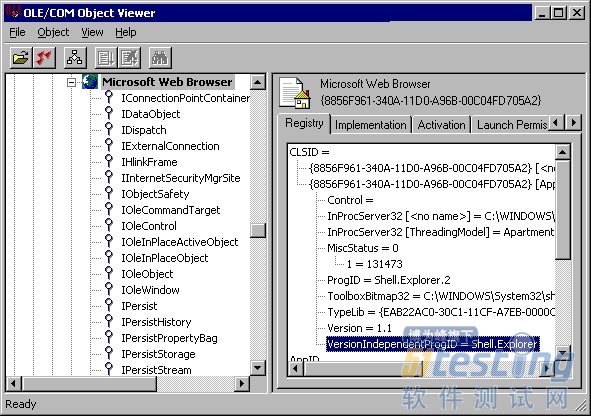
In the left column you see all COM Interfaces that have been defined for this object. We talk about those later. Take a closer look at the right column. It contains a lot of information to use this object in an AutoIt script. Most important is the "VersionIndependentProgID". This is the name to be used in an ObjCreate, ObjGet or ObjEvent function. Furthermore it contains the directory and filename that contains the object. This can be an EXE, a DLL or an OCX file.InProcServer32means that the object runs in the same thread as your script. (in-process). When you see LocalServer32,the object runs as a separate process. The object must also contain a type library (the lines following "TypeLib="), otherwise it can't be used in an AutoIt script.
The interfaces in the left column are used for several ways of interacting with the object. Some are used for storage (IStorage, IPersist), others for embedding in a GUI (IOleObject, IOleControl). AutoIt uses the IDispatchinterface for automation. This interface 'exposes' all scriptable methods and properties that the object supports. If it does not exist, you can't use the object in an AutoIt script.
Let's take a look at this interface. Right-click on the nameIDispatchand choose "View..." from the context menu. Then click the "View TypeInfo..." button. (Note: if this button is grayed out, you did not have registered theiviewers.dllfile, or the object does not have a type library)
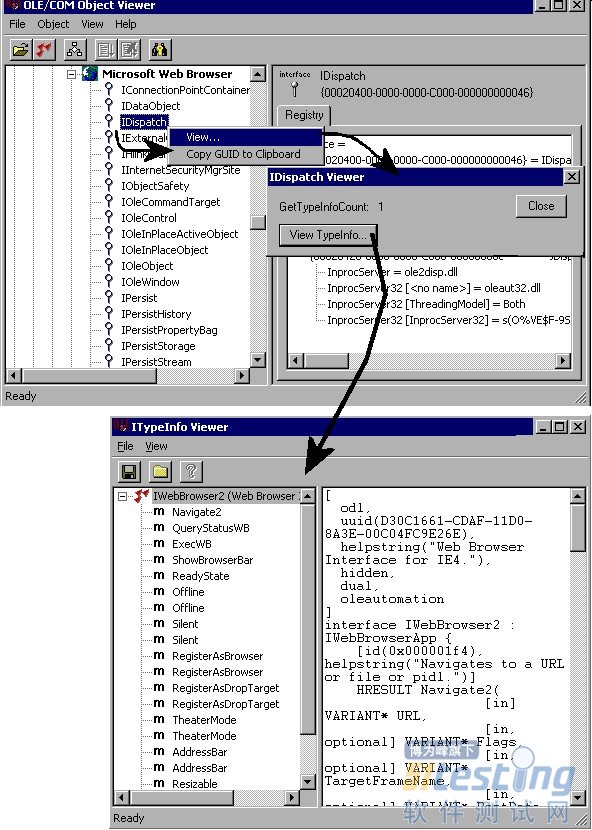
The "ITypeInfo Viewer" window does only show the information that is provided with the object. If the developer decides not to include a help file, you will only see the names of the method/properties and nothing else. The "Microsoft Web Browser" type library is however quite extensive. Just click an item in the left column, and a description will be shown at the right. Sometimes you have to browse through "Inherited Interfaces" to retrieve more methods for the object.
The syntax of the described methods/properties are in C/C++ style. A property described as "HRESULT Resizable([in] VARIANT_BOOL pbOffline)", has to be rewritten in AutoIt like: $Resizable=$Object.Resizable ($Object holds the object created with ObjCreate or ObjGet).
使用 OLE/COM 对象查看器
通过读取控件的类型库,OLE/COM 对象查看器使您得以查看控件的接口。
使用 OLE/COM 对象查看器
单击“工具”菜单上的“OLE/COM 对象查看器”或在命令行上键入“oleview”,启动 OLE/COM 对象查看器。
从“Object Classes”下的“Grouped by Component Category”打开“Automation Objects”文件夹,显示所有已注册的自动化对象。
向下滚动并选择其中一个控件。右窗格中会出现几个选项卡,由该控件实现的接口显示在“注册表”选项卡中。
如果右击左窗格中的控件并选择“查看类型信息”,ITypeInfo 查看器将显示重建后的 .idl 或 .odl 文件。
如果展开左窗格中的控件节点,将看到对象中的接口列表。如果单击某接口,该接口的注册表项将显示在右窗格中。
如果右击某接口并单击“查看”,OLE/COM 对象查看器将显示一个对话框来显示该接口的 GUID,和一个用于查看类型库信息(如果该信息可用)的选项。选择“查看类型信息”将在 ITypeInfo 查看器中显示特定于该接口的重建 .idl 文件的一部分。
在 ITypeInfo 查看器中,展开目录树视图并单击接口成员将在右窗格中显示访问器方法签名。
OLE/COM Object Viewer的更多相关文章
- OLE/COM 对象查看器 & OLE常用术语
"OLE/COM Object Viewer"(OLE/COM 对象查看器)查看你系统上安装的所有 COM 对象时,是一个非常便利的工具. 它是 Windows 2000 资源套件 ...
- Win7 64下Visual C++ 6.0不兼容
Win7 64下Visual C++ 6.0不兼容 安装VSE6.0: 1.运行setup.exe安装程序,会弹出如下的的 程序兼容性助手 提示框,这个是Win7在警告用户vc6存在兼容性问题:此程序 ...
- 查看 activex 组件的方法
查看 activex 组件的方法 可以使用的工具COMRaider 直接安装 并选择对应的类型即可查看相关的信息,比OLE/COM Object Viewer 简洁方便. 具体的操作如下: 随意选择一 ...
- 十年MFC经历认识的Microsoft技术 [转]
十年MFC经历认识的Microsoft技术[原创] 孙辉 自从2005年3月8日下午16时“十年MFC经历认识的Microsoft技术”以帖子的方式发表于CSDN论坛后,引起了许多网友得好评,使得笔者 ...
- VC-关于VC++ 6.0的那些事儿
Microsoft Visual C++,(简称Visual C++.MSVC.VC++或VC)微软公司的C++开发工具,具有集成开发环境,可提供编辑C语言,C++以及C++/CLI等编程语言.VC+ ...
- Windows 7下载安装 Visual C++ 6.0(VC6) 全程图解
说实话我也一直没有试过,所以也想当然的认为Win7下就不能安装VC6,压根就100%不兼容?一直使用高版本的VS(如VS2008和现在用的VS2010)的我今天亲身在Win7下安装一次试试. 注:文中 ...
- 仿迅雷播放器教程 -- 十年经验大牛对MFC的认识 (7)
由于上一个教程做界面用的是MFC,所以这里不得不说一下MFC的历史,请看正文: 原文链接:http://blog.csdn.net/sunhui/article/details/319551 作者 ...
- 【转】VC6在Win7下打开文件崩溃问题
http://www.cnblogs.com/Leon5/archive/2011/08/24/2152670.html 1.微软针对这个问题发布了一个补丁包.下载地址 2.下载之后是一个源码包,解压 ...
- 要使用C#实现一个ActiveX控件
要使用C#实现一个ActiveX控件,需要解决三个问题: 1.使.NET组件能够被COM调用 2.在客户机上注册后,ActiveX控件能通过IE的安全认证 3.未在客户机上注册时,安装包能通过IE的签 ...
随机推荐
- Linux启动过程笔记
Linux启动过程 1.启动流程(BIOS->MBR:Boot Code->引导GRUB->载入内核->运行init->runlevel) 2./boot/grub/下有 ...
- 作为iOS程序员,最核心的60%能力有哪些?
作为iOS程序员,最核心的60%能力有哪些? 一个合格的iOS程序员需要掌握多少核心技能?你和专业的开发工程师的差距有多大?你现在的水平能开发一个功能完整性能高效的iOS APP吗?一起来看看下面 ...
- Vim经常使用技巧总结2
我的主力博客:半亩方塘 1. 在光标所在行查找字符在普通模式下用 f{char} 命令,光标会移动到该字符所在的位置.向下反复查找在普通模式下用 ;,向上回退查找用 , 2. 在光标所在行查找与替换在 ...
- FIR300M刷openwrt
淘宝看到一款FIR300M路由器,当时只要19.9元.图便宜就买了. Hardware Architecture: MIPS Vendor: MediaTek (Ralink) Bootloader: ...
- C++游戏系列2:角色装备武器
很多其它见:C++游戏系列文件夹 知识点:类的组合,A类的数据成员.是B类的对象,或B类的对象.做A类的数据成员 [项目-带武器的游戏角色] 设计一个武器类,其数据成员至少要有武器名.威力,还能够加上 ...
- mac下配置eclipse的maven环境
转自:http://www.cnblogs.com/yqskj/archive/2013/03/30/2990292.html 1.下载maven的bin包,解压,配置到环境变量里面去 1). 首先到 ...
- RDLC后台自己定义报表模板
首先封装一个公共类,统一来操作RDLC报表 using System; using System.Collections.Generic; using System.Linq; using Syste ...
- java随记2
1.Arrays java8里新添加了parallelSort等parallel开头的方法,表示利用cpu并行的能力 2.面向对象 如果继承树里的某个类要被初始化时,系统将会同时初始化该类的所有父类 ...
- because joins aren’t as important.
“MongoDB wasn’t designed in a lab. We built MongoDB from our own experiences building large-scale, h ...
- queue — A synchronized queue class
https://docs.python.org/3.6/library/queue.html https://github.com/python/cpython/blob/3.6/Lib/queue. ...