
OLE/COM Object Viewer
OLE/COM Object Viewer
摘AutoIt Help
The "OLE/COM Object Viewer" is a very handy tool to get a peek on all COM objects currently installed on your system. It is part of the Windows 2000 resource kit and can be downloaded for free from:http://www.microsoft.com/downloads/details.aspx?familyid=5233b70d-d9b2-4cb5-aeb6-45664be858b6&displaylang=en
The setup of this program is a bit awkward. It will not create any start menu icon for you. Instead, a file calledoleview.exewill be installed in theC:\Program Files\Resource Kitdirectory (default install).
When runningoleview.exe, some systems will complain about a missing file callediviewers.dll. This file is required, but strangely enough not included in the latest setup. You can obtain this dll from an older version of oleview.exe at:http://download.microsoft.com/download/2/f/1/2f15a59b-6cd7-467b-8ff2-f162c3932235/ovi386.exe. It will install the files by default to the C:\MSTOOLS\BIN directory. You only need the file iviewer.dll. Copy it to the same directory where oleview.exe resides, then register the dll using the command line:regsvr32 iviewers.dll.
Let's do an example with the Oleviewer. Run it and follow this tree:Object Classes->Grouped by Component Category->Control->Microsoft Web Browser. 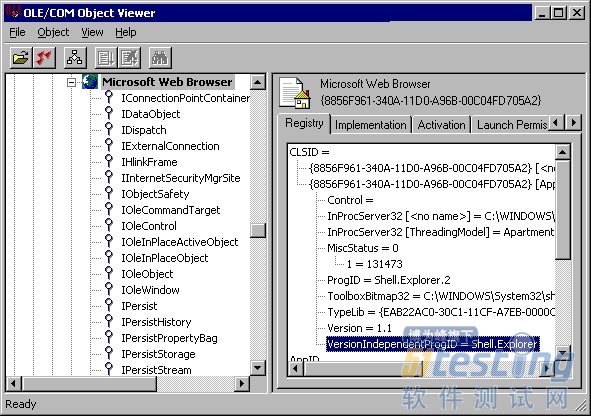
In the left column you see all COM Interfaces that have been defined for this object. We talk about those later. Take a closer look at the right column. It contains a lot of information to use this object in an AutoIt script. Most important is the "VersionIndependentProgID". This is the name to be used in an ObjCreate, ObjGet or ObjEvent function. Furthermore it contains the directory and filename that contains the object. This can be an EXE, a DLL or an OCX file.InProcServer32means that the object runs in the same thread as your script. (in-process). When you see LocalServer32,the object runs as a separate process. The object must also contain a type library (the lines following "TypeLib="), otherwise it can't be used in an AutoIt script.
The interfaces in the left column are used for several ways of interacting with the object. Some are used for storage (IStorage, IPersist), others for embedding in a GUI (IOleObject, IOleControl). AutoIt uses the IDispatchinterface for automation. This interface 'exposes' all scriptable methods and properties that the object supports. If it does not exist, you can't use the object in an AutoIt script.
Let's take a look at this interface. Right-click on the nameIDispatchand choose "View..." from the context menu. Then click the "View TypeInfo..." button. (Note: if this button is grayed out, you did not have registered theiviewers.dllfile, or the object does not have a type library)
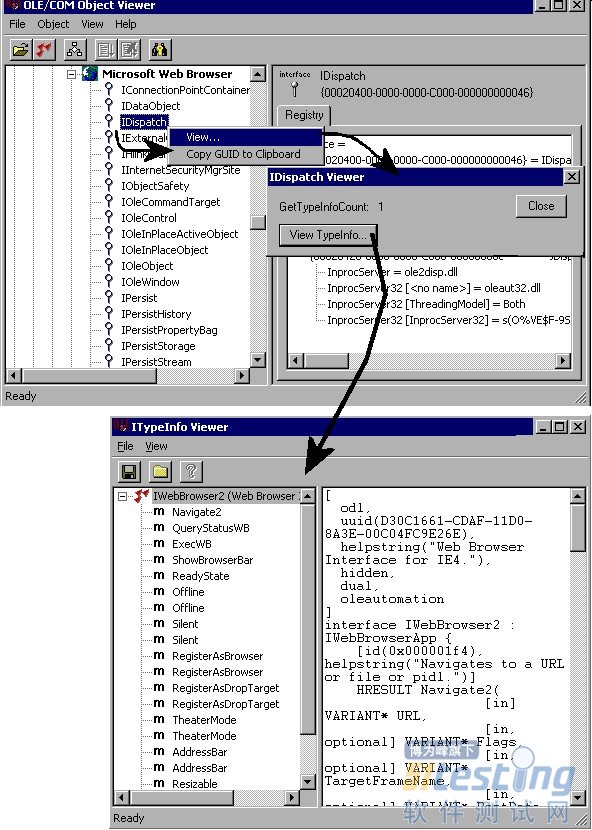
The "ITypeInfo Viewer" window does only show the information that is provided with the object. If the developer decides not to include a help file, you will only see the names of the method/properties and nothing else. The "Microsoft Web Browser" type library is however quite extensive. Just click an item in the left column, and a description will be shown at the right. Sometimes you have to browse through "Inherited Interfaces" to retrieve more methods for the object.
The syntax of the described methods/properties are in C/C++ style. A property described as "HRESULT Resizable([in] VARIANT_BOOL pbOffline)", has to be rewritten in AutoIt like: $Resizable=$Object.Resizable ($Object holds the object created with ObjCreate or ObjGet).
使用 OLE/COM 对象查看器
通过读取控件的类型库,OLE/COM 对象查看器使您得以查看控件的接口。
使用 OLE/COM 对象查看器
单击“工具”菜单上的“OLE/COM 对象查看器”或在命令行上键入“oleview”,启动 OLE/COM 对象查看器。
从“Object Classes”下的“Grouped by Component Category”打开“Automation Objects”文件夹,显示所有已注册的自动化对象。
向下滚动并选择其中一个控件。右窗格中会出现几个选项卡,由该控件实现的接口显示在“注册表”选项卡中。
如果右击左窗格中的控件并选择“查看类型信息”,ITypeInfo 查看器将显示重建后的 .idl 或 .odl 文件。
如果展开左窗格中的控件节点,将看到对象中的接口列表。如果单击某接口,该接口的注册表项将显示在右窗格中。
如果右击某接口并单击“查看”,OLE/COM 对象查看器将显示一个对话框来显示该接口的 GUID,和一个用于查看类型库信息(如果该信息可用)的选项。选择“查看类型信息”将在 ITypeInfo 查看器中显示特定于该接口的重建 .idl 文件的一部分。
在 ITypeInfo 查看器中,展开目录树视图并单击接口成员将在右窗格中显示访问器方法签名。
OLE/COM Object Viewer的更多相关文章
- OLE/COM 对象查看器 & OLE常用术语
"OLE/COM Object Viewer"(OLE/COM 对象查看器)查看你系统上安装的所有 COM 对象时,是一个非常便利的工具. 它是 Windows 2000 资源套件 ...
- Win7 64下Visual C++ 6.0不兼容
Win7 64下Visual C++ 6.0不兼容 安装VSE6.0: 1.运行setup.exe安装程序,会弹出如下的的 程序兼容性助手 提示框,这个是Win7在警告用户vc6存在兼容性问题:此程序 ...
- 查看 activex 组件的方法
查看 activex 组件的方法 可以使用的工具COMRaider 直接安装 并选择对应的类型即可查看相关的信息,比OLE/COM Object Viewer 简洁方便. 具体的操作如下: 随意选择一 ...
- 十年MFC经历认识的Microsoft技术 [转]
十年MFC经历认识的Microsoft技术[原创] 孙辉 自从2005年3月8日下午16时“十年MFC经历认识的Microsoft技术”以帖子的方式发表于CSDN论坛后,引起了许多网友得好评,使得笔者 ...
- VC-关于VC++ 6.0的那些事儿
Microsoft Visual C++,(简称Visual C++.MSVC.VC++或VC)微软公司的C++开发工具,具有集成开发环境,可提供编辑C语言,C++以及C++/CLI等编程语言.VC+ ...
- Windows 7下载安装 Visual C++ 6.0(VC6) 全程图解
说实话我也一直没有试过,所以也想当然的认为Win7下就不能安装VC6,压根就100%不兼容?一直使用高版本的VS(如VS2008和现在用的VS2010)的我今天亲身在Win7下安装一次试试. 注:文中 ...
- 仿迅雷播放器教程 -- 十年经验大牛对MFC的认识 (7)
由于上一个教程做界面用的是MFC,所以这里不得不说一下MFC的历史,请看正文: 原文链接:http://blog.csdn.net/sunhui/article/details/319551 作者 ...
- 【转】VC6在Win7下打开文件崩溃问题
http://www.cnblogs.com/Leon5/archive/2011/08/24/2152670.html 1.微软针对这个问题发布了一个补丁包.下载地址 2.下载之后是一个源码包,解压 ...
- 要使用C#实现一个ActiveX控件
要使用C#实现一个ActiveX控件,需要解决三个问题: 1.使.NET组件能够被COM调用 2.在客户机上注册后,ActiveX控件能通过IE的安全认证 3.未在客户机上注册时,安装包能通过IE的签 ...
随机推荐
- C#Unicode和Utf-8
Unicode(统一码.万国码.单一码)是一种在计算机上使用的字符编码.Unicode 是为了解决传统的字符编码方案的局限而产生的,它为每种语言中的每个字符设定了统一并且唯一的二进制编码,以满足跨语言 ...
- 用python编写的简易端口扫描器
#coding = utf-8 ''' python 3.4 通过简单的TCP端口连接来判断指定IP是否开放了指定端口. ''' import socket import optparse impor ...
- 【特征检測】BRIEF特征点描写叙述算法
简单介绍 BRIEF是2010年的一篇名为<BRIEF:Binary Robust Independent Elementary Features>的文章中提出,BRIEF是对已检測到的特 ...
- Swift中字符串转化为Class的方法
Swift中字符串转化为Class的方法 在开发中有时候会根据字符串进行对应类的转化,这样我们就可以动态根据服务器返回的字段,动态的加载类,比如优酷,微博等APP会在节假日等动态的TabBar.这样可 ...
- Java程序员从笨鸟到菜鸟之(十五)Html基础积累总结(下)
本文来自:曹胜欢博客专栏.转载请注明出处:http://blog.csdn.net/csh624366188 一:表格 1.表格的基本语法 <table>...</table> ...
- lint (software)
lint (software) - Wikipedia https://en.wikipedia.org/wiki/Lint_(software) A linter or lint refers to ...
- $.ajax 使用详解
Jquery在异步提交方面封装的很好,直接用AJAX非常麻烦,Jquery大大简化了我们的操作. $.post.$.get是一些简单的方法,如果要处理复杂的逻辑,还是需要用到jQuery.ajax() ...
- 使用jsoncpp解析生成json
在此站点下载jsoncpp(https://sourceforge.net/projects/jsoncpp/这个站点的版本较旧) 在电脑上安装Python,运行amalgamate.py,生成的di ...
- CVE-2015-7547漏洞分析从原因到利用到补丁(非常适合小白)【转】
本文转载自:http://blog.csdn.net/u012406115/article/details/72232535 一. 漏洞概述 CVE漏洞链接:http://www.cv ...
- dedecms中去除首页index.html的方法
本文介绍了dedecms中去除首页index.html的方法,有需要的朋友参考下. dedecms织梦cms建站程序输入地址后,而打开的实际地址后面有个index.html. 这里分享下两种解决方 ...