
Django打造大型企业官网(三)
四、前端首页
4.1.导航条实现
(1)templates/new/index.html
<!DOCTYPE html>
<html lang="en">
<head>
<meta charset="UTF-8">
<title>知了课堂</title>
<link rel="stylesheet" href="../../dist/css/index.min.css">
<link rel="stylesheet" href="//at.alicdn.com/t/font_1239817_3xfonheuqlv.css">
</head>
<body>
<header class="header">
<div class="container"> <div class="logo-box">
<a href="/"></a>
</div> <ul class="nav">
<li class="active"><a href="/">资讯</a></li>
<li><a href="/">创业课堂</a></li>
<li><a href="/">企业服务</a></li>
<li><a href="/">搜索</a></li>
</ul> <div class="auth-box">
<i class="icon-person iconfont"></i>  
<a href="#">登录</a>
<a href="#">注册</a>
</div> </div>
</header>
</body>
</html>
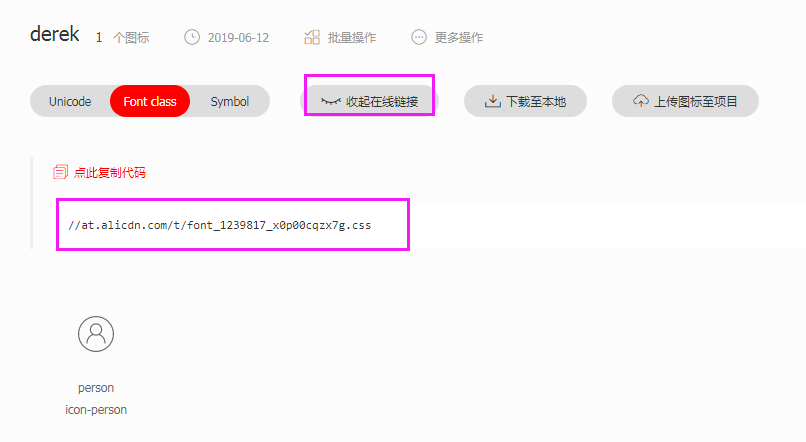
阿里云图标网站:https://www.iconfont.cn/
搜索person-->>添加入库-->>添加至项目-->>编辑图标-->>放大-->>仅保存-->>查看在线链接
(2)src/css/init.scss
清除浏览器默认样式
html,body,h1,h2,h3,h4,h5,h6,div,dl,dt,dd,ul,ol,li,p,blockquote,pre,hr,figure,table,caption,th,td,form,fieldset,legend,input,button,textarea,menu{margin:;padding:;}

header,footer,section,article,aside,nav,hgroup,address,figure,figcaption,menu,details{display:block;}

table{border-collapse:collapse;border-spacing:;}

caption,th{text-align:left;font-weight:normal;}

html,body,fieldset,img,iframe,abbr{border:;}

i,cite,em,var,address,dfn{font-style:normal;}

[hidefocus],summary{outline:;}

li{list-style:none;}

h1,h2,h3,h4,h5,h6,small{font-size:100%;}

sup,sub{font-size:83%;}

pre,code,kbd,samp{font-family:inherit;}

q:before,q:after{content:none;}

textarea{overflow:auto;resize:none;}

label,summary{cursor:default;}

a,button{cursor:pointer;}

h1,h2,h3,h4,h5,h6,em,strong,b{font-weight:bold;}

del,ins,u,s,a,a:hover{text-decoration:none;}

body,textarea,input,button,select,keygen,legend{font:12px/1.14 arial,\5b8b\4f53;color:#333;outline:;}

body{background:#fff;}

a,a:hover{color:#333;}
(3)src/css/constants.scss
放一些常量
$pageWidth: 1170px
(3)src/css/index.scss
@import "init.scss";

@import "constants.scss";

.header{

    width: 100%;

    height: 64px;

    background: #3a3a3a;

    .container{

        width: $pageWidth;

        height: 100%;

        margin: 0 auto;

        overflow: hidden;

        .logo-box{

            width: 140px;

            height: 49px;

            background: url("https://www.xfz.cn/static/build/images/logo.png") no-repeat;

            margin-top: 8px;

            float: left;

            a{

                display: block;

                width: 100%;

                height: 100%;

            }

        }

        .nav{

            margin-left: 128px;

            float: left;

            li{

                float: left;

                margin-right: 40px;

                line-height: 64px;

                height: 64px;

                box-sizing: border-box;

                font-size: 22px;

                a{

                    color: #fff;

                }

                &.active{

                    border-bottom: 5px solid #5c87d9;

                }

            }

        }

        .auth-box{

            float: right;

            line-height: 64px;

            height: 64px;

            color: #fff;

            .iconfont{

                color: #fff;

                font-size: 20px;

            }

            a{

                color: #fff;

                font-size: 22px;

            }

        }

    }

}
导航条效果

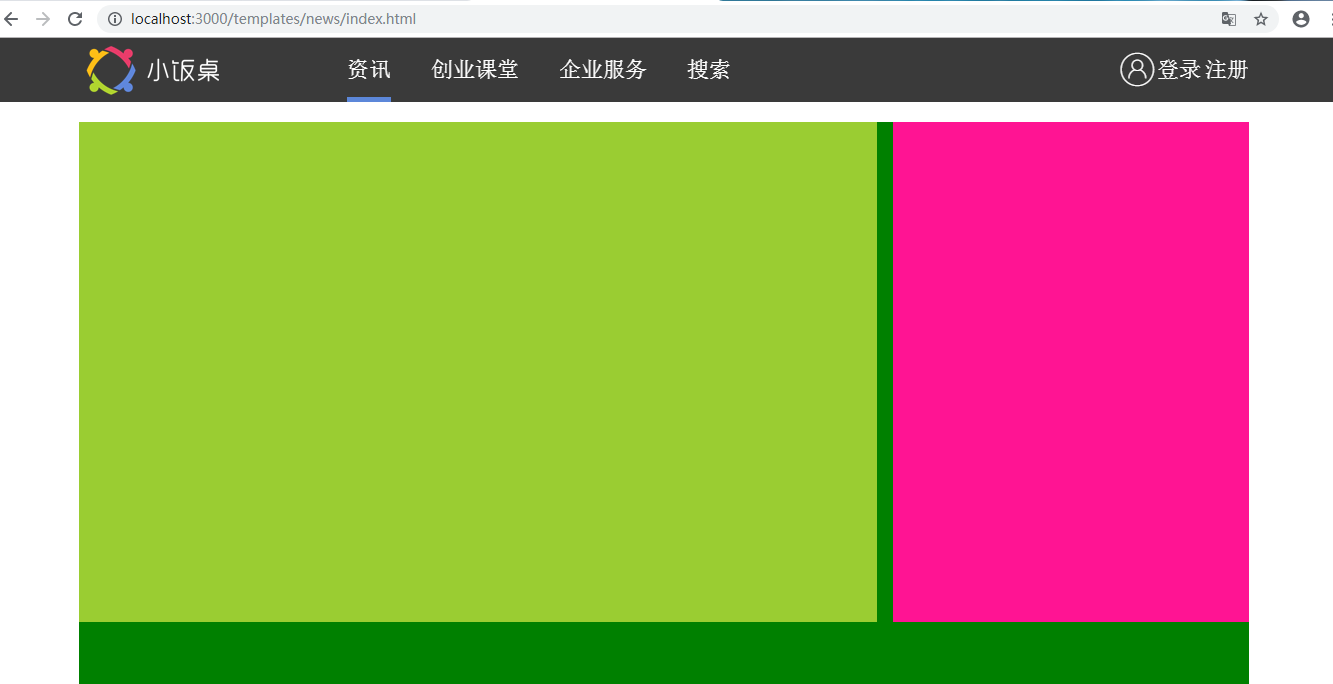
4.2.主题盒子布局
templates/news/index.html
<div class="main">

        <div class="wrapper">

            <div class="news-wrapper"></div>

            <div class="sidebar-wrapper"></div>

        </div>

    </div>
src/css/index.scss
.main{

    width: 100%;

    margin-top: 84px;

    .wrapper{

        width: $pageWidth;

        margin: 0 auto;

        background: green;

        height: 1000px;

        overflow: hidden;

        .news-wrapper{

            float: left;

            width: 798px;

            height: 500px;

            background: yellowgreen;

        }

        .sidebar-wrapper{

            float: right;

            width: 356px;

            height: 500px;

            background: deeppink;

        }

    }

}
固定导航条
src/css/index.scss
.header{

    width: 100%;

    height: 64px;

    background: #3a3a3a;

    position: fixed;

    left:;

    right:;

    top:;
效果
Django打造大型企业官网(三)的更多相关文章
- 超细讲解Django打造大型企业官网
本文为知了课堂黄勇老师讲的<超细讲解Django打造大型企业官网>的笔记. 第一章 Django预热 1.创建virtualenv虚拟环境 2.URL组成部分详解 3.Django介绍 4 ...
- Django打造大型企业官网
第1章 Django预热 1-为什么需要虚拟环境 2-virtualenv创建虚拟环境 3-virtualenvwrapper使用 4-URL组成部分讲解 5-课程准备工作 6-Django介绍 第2 ...
- Django打造大型企业官网(二)
三.项目环境搭建 3.1.创建项目环境和安装包 创建django项目 mkvirtualenv DjangoProject workon DjangoProject pip install -i ht ...
- Django打造大型企业官网(八)
4.16.侧边栏标题和广告位布局完成 templates/news/index.html <div class="sidebar-wrapper"> <div c ...
- Django打造大型企业官网(七)
4.13.新闻列表tab栏布局完成 templates/news/index.html <div class="list-outer-group"> <ul cl ...
- Django打造大型企业官网(六)
4.9.根据轮播图个数修改小圆点数量 src/js/index.js function Banner() { this.bannerWidth = 798; } Banner.prototype.in ...
- Django打造大型企业官网(五)
4.6.切换轮播图的箭头样式以及显示和隐藏 templates/news/index.html <span class="arrow left-arrow">‹< ...
- Django打造大型企业官网(四)
4.3.轮播图布局和样式 templates/news/index.html <div class="news-wrapper"> <div class=&quo ...
- Django打造大型企业官网(一)
一.nvm的安装 (1)下载:nvm1.16 (2)安装完成后添加环境变量 C:\Users\Administrator\AppData\Roaming\nvm (3)修改settings.txt,将 ...
随机推荐
- 10 Steps To be a senior programmer
What 软件工程师的职业生涯要历经以下几个阶段:初级.中级,最后才是高级.这篇文章主要是讲如何通过 10 个步骤助你成为一名高级软件工程师. Why 得到更多的报酬!因为你的薪水会随着你水平的提高而 ...
- 第2节 mapreduce深入学习:9、手机上行流量排序
还是上次那个例子,需求二:上行流量倒序排序(递减排序) 分析,以需求一的输出数据作为排序的输入数据,自定义FlowBean,以FlowBean为map输出的key,以手机号作为Map输出的value, ...
- 阿里云部署flask
https://www.cnblogs.com/Ray-liang/p/4173923.html
- jquery.form.min.js
/*! * jQuery Form Plugin * version: 3.51.0-2014.06.20 * Requires jQuery v1.5 or later * Copyright (c ...
- 「 Luogu P1122 」 最大子树和
# 题目大意 真讨厌题面写的老长老长的. 这个题的意思就是给定一棵无根树,每个节点都有一个美丽值(可能是负数),可以删掉一些边来删除某些点,现在要求你求出可以删掉任意条边的情况下,这个树上的剩余节点的 ...
- VIM命令大全(图+文)
在命令状态下对当前行用== (连按=两次), 或对多行用n==(n是自然数)表示自动缩进从当前行起的下面n行.你可以试试把代码缩进任意打乱再用n==排版,相当于一般IDE里的code format.使 ...
- 【thinking in java】反射
前言 反射是框架设计的灵魂,使用的前提条件:必须先得到字节码的Class,Class类用于表示字节码,字节码即是.class文件 概述 JAVA反射机制:在程序运行的过程中,对于任意一个类,都可以知道 ...
- [Python3网络爬虫开发实战] 1.9.2-Scrapyd的安装
Scrapyd是一个用于部署和运行Scrapy项目的工具,有了它,你可以将写好的Scrapy项目上传到云主机并通过API来控制它的运行. 既然是Scrapy项目部署,基本上都使用Linux主机,所以本 ...
- MapReduce架构与执行流程
一.MapReduce是用于解决什么问题的? 每一种技术的出现都是用来解决实际问题的,否则必将是昙花一现,那么MapReduce是用来解决什么实际的业务呢? 首先来看一下MapReduce官方定义: ...
- TCP传输的三次握手四次挥手策略
为了准确无误地数据送达目标处,TCP协议采用了三次握手策略.用TCP协议把数据包送出去后,TCP不会对传送后的情况置之不理,它一定会向对方确认是否成功送达.握手中使用了TCP的标志:SYN和ACK 发 ...