
Configuring Your EMS Server or EMS Console Server on Windows/Linux
EMS Configuration Files
RAD Studio provides the scripts to render the web-browser console, the EMS server configuration file and the script to create the EMS database, and the stand-alone applications to run the EMS Console Server and the EMS Server.
In C:\Program Files (x86)\Embarcadero\Studio\19.0\ObjRepos\en\EMS folder you can find:
- webresources folder: This folder contains scripts to render the web-browser console. You can customize the appearance of your EMS Console Server by modifying the layouts, templates and styles defined here.
- emsserver.ini file: This is a template for the EMS server configuration file (for the EMS Server and for the EMS Console Server).
- EMS Database creation files:
- emsmserver.sql and emsserver.sql files. SQL script files to create the EMS Database.
- EMSMSERVER.IB and EMSSERVER.IB files. License template files to create the EMS Database.
The stand-alone applications (EMSDevConsole.exe and EMSDevServer.exe) are located in the following folders:
- Windows 32-bit:
C:\Program Files (x86)\Embarcadero\Studio\19.0\bin - Windows 64-bit:
C:\Program Files (x86)\Embarcadero\Studio\19.0\bin64
Configuring Your EMS Environment for the First Time
The EMSDevServer.exe and EMSDevConsole.exe programs only run the setup wizard when there is no registry key or if the emsserver.ini file does not exist.
- Note: For a production environment, you need to set up the Interbase EMS database properly before running the EMS Setup Wizard.
To start the EMS Setup Wizard:
- Locate one of the following stand-alone applications on your system, and double-click:
-
- EMSDevConsole.exe: The EMS Console opens with a confirmation dialog.
- EMSDevServer.exe: The EMS Server opens with a confirmation dialog.
-
- Click Yes to run the configuration EMS Setup Wizard. The EMS Setup Wizard opens to create a new EMS database.
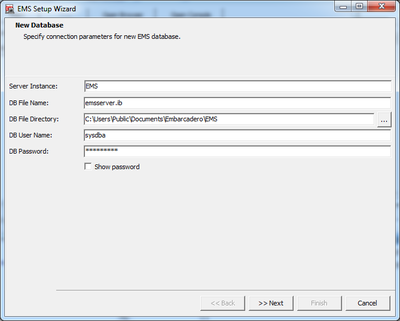
- The New Database page opens.
- Enter the following values on the New Database page to specify its connection parameters:
- Server Instance: Specify the InterBase instance that hosts the EMS database. Leave it blank for a developer environment; for a production environment use
EMS- Note: See EMS Database Requirements for a Production Environment on Windows for more information.
- DB File Name: emsserver.ib
- DB File Directory: The default path is
C:\Users\Public\Documents\Embarcadero\EMS - DB User Name:
sysdbaas the parameter by default. - DB Password:
masterkeyas the parameter by default.- Note: Select Show password to see the unencrypted password.
- Click Next.
- Server Instance: Specify the InterBase instance that hosts the EMS database. Leave it blank for a developer environment; for a production environment use
- Enter the following values on the New Database page to specify its connection parameters:
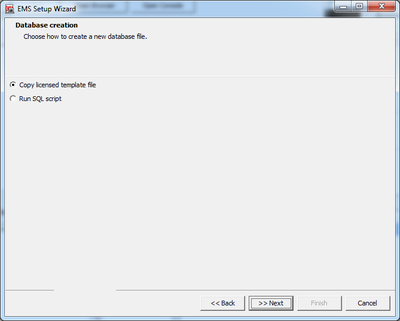
- The Database creation page opens.
- Select how to create the new EMS database from the delivered files.
- Copy the license template file.
- Run the SQL script.
- Click Next.
- Select how to create the new EMS database from the delivered files.
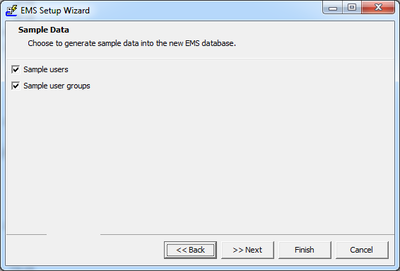
- The Sample Data page opens.
- Select one or more options indicating the sample data to be generated in the EMS database.
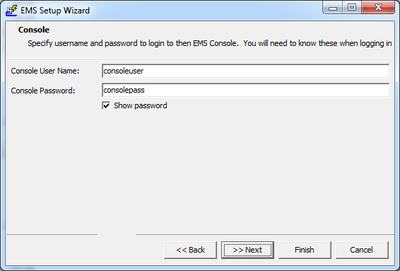
- Click Next. The Console page opens.
- Specify a Console User Name and a Console Password. The default values are:
consoleuserandconsolepass.- Note: The user name and password are saved in the emsserver.ini file in plain text.
- Specify a Console User Name and a Console Password. The default values are:
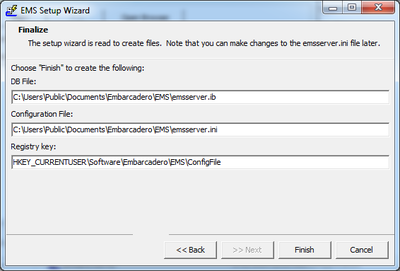
- Click Next. The Finalize page opens.
- Click Finish to create the following files in the default path:
C:\Users\Public\Documents\Embarcadero\EMS- DB File: The EMS Database file (emsserver.ib). You need to have an InterBase server running.
- Configuration File: The EMS Server configuration file (emsserver.ini).
- Registry Key: The EMS Registry key on the system.
- Click Finish to create the following files in the default path:
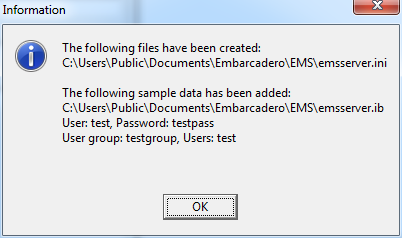
- An Information wizard appears with the files created and the data added to the database. Click OK.
If you are planning to have the EMS Server and the EMS Console running on different servers, you need a configuration file (.ini) on each server.
In this scenario, you need to configure the .ini file on the Console Server to access the Interbase database on the EMS Server.
Running the Setup Wizard
You can run the setup wizard again as follows:
- Open the command prompt (cmd.exe).
- Type the following command:
emsdevserver -setup
- Open the command prompt (cmd.exe).
- Navigate to the EMSDevServer.exe folder:
- Windows 32-bit:
C:\Program Files (x86)\Embarcadero\Studio\19.0\bin - Windows 64-bit:
C:\Program Files (x86)\Embarcadero\Studio\19.0\bin64
- Windows 32-bit:
- Type the following command:
EMSDevServer.exe -setup
http://docwiki.embarcadero.com/RADStudio/Tokyo/en/Configuring_Your_EMS_Server_or_EMS_Console_Server_on_Windows
http://docwiki.embarcadero.com/RADStudio/Tokyo/en/Setting_Up_Your_EMS_Console_Server?utm_source=Facebook_Organic&utm_medium=social
Configuring Your EMS Server or EMS Console Server on Windows/Linux的更多相关文章
- 数据库备份还原工具EMS SQL Angel for SQL Server发布1.3版本
EMS公司,是专门从事企业数据库以及内置于多层次客户服务器结构自动化开发.其EMS SQL Angel for SQL Server工具,便是SQL Servers数据库数据备份还原工具,并且还能使用 ...
- TITLE: BizTalk Server 2013 Administration Console
TITLE: BizTalk Server 2013 Administration Console------------------------------ Could not store tran ...
- ./bin/console server:run Surprise! There are no commands defined in the "server" namespace.
Let's start the built-in web server: ./bin/console server:run Surprise! There are no commands defi ...
- Add And Reset a Federation Server to a Federation Server Farm adfs ad
Applies To: Active Directory Federation Services (AD FS) 2.0 After you install the Active Directory ...
- Server Tomcat v7.0 Server at localhost was unable to start within 45 seconds
错误:Server Tomcat v7.0 Server at localhost was unable to start within 45 seconds 错误提示就是我们限定了部署的时间导致的错 ...
- Step by step Install a Local Report Server and Remote Report Server Database
原创地址:http://www.cnblogs.com/jfzhu/p/4012097.html 转载请注明出处 前面的文章<Step by step SQL Server 2012的安装 &g ...
- Server Tomcat v7.0 Server at localhost was unable to&nbs 报错问题解决
在eclipse启动tomcat时遇到超时45秒的问题: Server Tomcat v7.0 Server at localhost was unable to start within 45 se ...
- Comparison of SQL Server Compact, SQLite, SQL Server Express and LocalDB
Information about LocalDB comes from here and SQL Server 2014 Books Online. LocalDB is the full SQL ...
- Server Tomcat v6.0 Server at localhost was unable to start within 45 seconds...
仰天长啸 Server Tomcat v6.0 Server at localhost was unable to start within 45 seconds... 当启动tomcat时候出现 ...
随机推荐
- 【DFS求树的最大二分匹配+输入外挂】HDU 6178 Monkeys
http://acm.hdu.edu.cn/showproblem.php?pid=6178 [题意] 给定一棵有n个结点的树,现在有k个猴子分布在k个结点上,我们可以删去树上的一些边,使得k个猴子每 ...
- Vmware error:无法获得 VMCI 驱动程序的版本: 句柄无效。
error:无法获得 VMCI 驱动程序的版本: 句柄无效.驱动程序“vmci.sys”的版本不正确.请尝试重新安装 VMware Workstation.开启模块 DevicePowerOn 的操作 ...
- 洛谷 [P3480] KAM-Pebbles
博弈论转化 本题的限制条件很多,我们尝试转化, 我们发现,定义 c[i] 为第 i 堆可以取得数量,如果第 i 堆取出了 x ,那么 c[i] - x , c[i + 1] + x 我们发现这是一个反 ...
- Python 可变对象与不可变对象
1. 不可变(immutable):int.字符串(string).float.(数值型number).元组(tuple) 可变(mutable):字典型(dictionary).列表型(list) ...
- Scrapy学习-9-FromRequest
用FromRequest模拟登陆知乎网站 实例 默认登陆成功以后的请求都会带上cookie # -*- coding: utf-8 -*- import re import json import d ...
- ScrollPic.js——图片左右滚动插件
自己在做项目的时候刚好遇到了图片做左右滚动的项目,发现ScrollPic.js这个插件还是很好用的,一般的浏览器都支持,也可以做成bootstrap样式: 首先需要下载ScrollPic.js这个插件 ...
- Post Content_Length exceeds the limit
2017.12,公司市场专员反馈我在公司开发与维护的iOS包内审系统在上传ipa包文件的时候报错了.经过调试发现原来是因为上传的文件太大导致报错(由下图可知,接收方允许的最大请求内容为128M,但我们 ...
- AC日记——友好城市 洛谷 P2782
题目背景 无 题目描述 有一条横贯东西的大河,河有笔直的南北两岸,岸上各有位置各不相同的N个城市.北岸的每个城市有且仅有一个友好城市在南岸,而且不同城市的友好城市不相同.没对友好城市都向政府申请在河上 ...
- JS实现根据密码长度 显示安全条
原文:http://www.open-open.com/code/view/1431324883763 //根据密码长度显示安全条 <ul class="clear"> ...
- linux系统(ubuntu14.04)安装mentohust完毕校园网锐捷认证
近来升级电脑又一次做了系统.再次面临这linux系统下的各种校园网上网限制. 我在这里採用了mentohust来完毕锐捷认证. 这里我们选择Mentohust取代锐捷. Mentohust 是由华中科 ...