
MySQL索引与Index Condition Pushdown(二)
实验
先从一个简单的实验开始直观认识ICP的作用。
安装数据库
首先需要安装一个支持ICP的MariaDB或MySQL数据库。我使用的是MariaDB 5.5.34,如果是使用MySQL则需要5.6版本以上。
Mac环境下可以通过brew安装:
brew install mairadb
其它环境下的安装请参考MariaDB官网关于下载安装的文档。
导入示例数据
与前文一样,我们使用Employees Sample Database,作为示例数据库。完整示例数据库的下载地址为:https://launchpad.net/test-db/employees-db-1/1.0.6/+download/employees_db-full-1.0.6.tar.bz2。
将下载的压缩包解压后,会看到一系列的文件,其中employees.sql就是导入数据的命令文件。执行
mysql -h[host]-u[user]-p < employees.sql
就可以完成建库、建表和load数据等一系列操作。此时数据库中会多一个叫做employees的数据库。库中的表如下:
MariaDB[employees]> SHOW TABLES;
+---------------------+
|Tables_in_employees|
+---------------------+
| departments |
| dept_emp |
| dept_manager |
| employees |
| salaries |
| titles |
+---------------------+
6 rows inset(0.00 sec)
我们将使用employees表做实验。
建立联合索引
employees表包含雇员的基本信息,表结构如下:
MariaDB[employees]> DESC employees.employees;
+------------+---------------+------+-----+---------+-------+
|Field|Type|Null|Key|Default|Extra|
+------------+---------------+------+-----+---------+-------+
| emp_no |int(11)| NO | PRI | NULL ||
| birth_date | date | NO || NULL ||
| first_name | varchar(14)| NO || NULL ||
| last_name | varchar(16)| NO || NULL ||
| gender |enum('M','F')| NO || NULL ||
| hire_date | date | NO || NULL ||
+------------+---------------+------+-----+---------+-------+
6 rows inset(0.01 sec)
这个表默认只有一个主索引,因为ICP只能作用于二级索引,所以我们建立一个二级索引:
ALTER TABLE employees.employees ADD INDEX first_name_last_name (first_name, last_name);
这样就建立了一个first_name和last_name的联合索引。
查询
为了明确看到查询性能,我们启用profiling并关闭query cache:
SET profiling =1;
SET query_cache_type =0;
SET GLOBAL query_cache_size =0;
然后我们看下面这个查询:
MariaDB[employees]> SELECT * FROM employees WHERE first_name='Mary' AND last_name LIKE '%man';
+--------+------------+------------+-----------+--------+------------+
| emp_no | birth_date | first_name | last_name | gender | hire_date |
+--------+------------+------------+-----------+--------+------------+
|254642|1959-01-17|Mary|Botman| M |1989-11-24|
|471495|1960-09-24|Mary|Dymetman| M |1988-06-09|
|211941|1962-08-11|Mary|Hofman| M |1993-12-30|
|217707|1962-09-05|Mary|Lichtman| F |1987-11-20|
|486361|1957-10-15|Mary|Oberman| M |1988-09-06|
|457469|1959-07-15|Mary|Weedman| M |1996-11-21|
+--------+------------+------------+-----------+--------+------------+
根据MySQL索引的前缀匹配原则,两者对索引的使用是一致的,即只有first_name采用索引,last_name由于使用了模糊前缀,没法使用索引进行匹配。我将查询联系执行三次,结果如下:
+----------+------------+---------------------------------------------------------------------------+
|Query_ID|Duration|Query|
+----------+------------+---------------------------------------------------------------------------+
|38|0.00084400| SELECT * FROM employees WHERE first_name='Mary' AND last_name LIKE '%man'|
|39|0.00071800| SELECT * FROM employees WHERE first_name='Mary' AND last_name LIKE '%man'|
|40|0.00089600| SELECT * FROM employees WHERE first_name='Mary' AND last_name LIKE '%man'|
+----------+------------+---------------------------------------------------------------------------+
然后我们关闭ICP:
SET optimizer_switch='index_condition_pushdown=off';
在运行三次相同的查询,结果如下:
+----------+------------+---------------------------------------------------------------------------+
|Query_ID|Duration|Query|
+----------+------------+---------------------------------------------------------------------------+
|42|0.00264400| SELECT * FROM employees WHERE first_name='Mary' AND last_name LIKE '%man'|
|43|0.01418900| SELECT * FROM employees WHERE first_name='Mary' AND last_name LIKE '%man'|
|44|0.00234200| SELECT * FROM employees WHERE first_name='Mary' AND last_name LIKE '%man'|
+----------+------------+---------------------------------------------------------------------------+
有意思的事情发生了,关闭ICP后,同样的查询,耗时是之前的三倍以上。下面我们用explain看看两者有什么区别:
MariaDB[employees]> EXPLAIN SELECT * FROM employees WHERE first_name='Mary' AND last_name LIKE '%man';
+------+-------------+-----------+------+----------------------+----------------------+---------+-------+------+-----------------------+
| id | select_type | table | type | possible_keys | key | key_len |ref| rows |Extra|
+------+-------------+-----------+------+----------------------+----------------------+---------+-------+------+-----------------------+
|1| SIMPLE | employees |ref| first_name_last_name | first_name_last_name |44|const|224|Using index condition |
+------+-------------+-----------+------+----------------------+----------------------+---------+-------+------+-----------------------+
1 row inset(0.00 sec)
MariaDB[employees]> EXPLAIN SELECT * FROM employees WHERE first_name='Mary' AND last_name LIKE '%man';
+------+-------------+-----------+------+----------------------+----------------------+---------+-------+------+-------------+
| id | select_type | table | type | possible_keys | key | key_len |ref| rows |Extra|
+------+-------------+-----------+------+----------------------+----------------------+---------+-------+------+-------------+
|1| SIMPLE | employees |ref| first_name_last_name | first_name_last_name |44|const|224|Usingwhere|
+------+-------------+-----------+------+----------------------+----------------------+---------+-------+------+-------------+
1 row inset(0.00 sec)
前者是开启ICP,后者是关闭ICP。可以看到区别在于Extra,开启ICP时,用的是Using index condition;关闭ICP时,是Using where。
其中Using index condition就是ICP提高查询性能的关键。下一节说明ICP提高查询性能的原理。
原理
ICP的原理简单说来就是将可以利用索引筛选的where条件在存储引擎一侧进行筛选,而不是将所有index access的结果取出放在server端进行where筛选。
以上面的查询为例,在没有ICP时,首先通过索引前缀从存储引擎中读出224条first_name为Mary的记录,然后在server段用where筛选last_name的like条件;而启用ICP后,由于last_name的like筛选可以通过索引字段进行,
那么存储引擎内部通过索引与where条件的对比来筛选掉不符合where条件的记录,这个过程不需要读出整条记录,同时只返回给server筛选后的6条记录,因此提高了查询性能。
下面通过图两种查询的原理详细解释。
关闭ICP
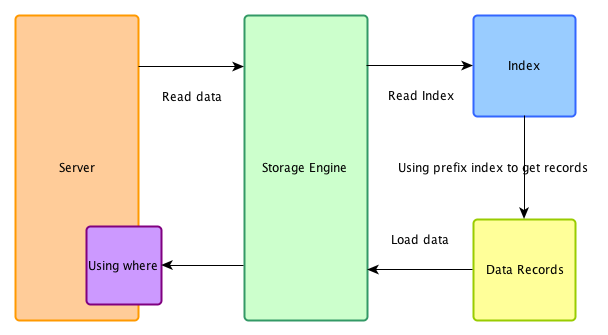
在不支持ICP的系统下,索引仅仅作为data access使用。
开启ICP
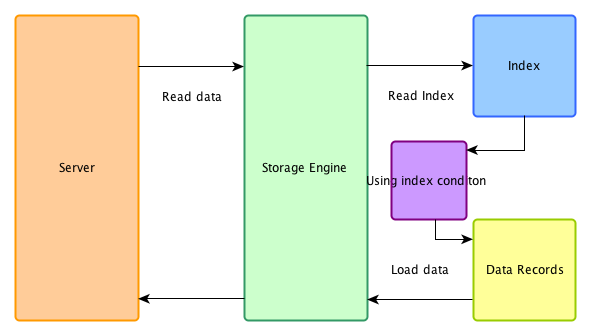
在ICP优化开启时,在存储引擎端首先用索引过滤可以过滤的where条件,然后再用索引做data access,被index condition过滤掉的数据不必读取,也不会返回server端。
注意事项
有几个关于ICP的事情要注意:
ICP只能用于二级索引,不能用于主索引。
也不是全部where条件都可以用ICP筛选,如果某where条件的字段不在索引中,当然还是要读取整条记录做筛选,在这种情况下,仍然要到server端做where筛选。
ICP的加速效果取决于在存储引擎内通过ICP筛选掉的数据的比例。
参考
[1] https://mariadb.com/kb/en/index-condition-pushdown/
[2] http://dev.mysql.com/doc/refman/5.6/en/index-condition-pushdown-optimization.html
官方文档:
The idea behind index condition pushdown
In disk-based storage engines, making an index lookup is done in two steps, like shown on the picture:
Index Condition Pushdown optimization tries to cut down the number of full record reads by checking whether index records satisfy part of the WHERE condition that can be checked for them:
(在存储引擎端首先用索引过滤可以过滤的where条件)
How much speed will be gained depends on - How many records will be filtered out - How expensive it was to read them
The former depends on the query and the dataset. The latter is generally bigger when table records are on disk and/or are big, especially when they have blobs.
转自:http://ourmysql.com/archives/1351
MySQL索引与Index Condition Pushdown(二)的更多相关文章
- MySQL索引与Index Condition Pushdown
实际上,这个页面所讲述的是在MariaDB 5.3.3(MySQL是在5.6)开始引入的一种叫做Index Condition Pushdown(以下简称ICP)的查询优化方式.由于本身不是一个层面的 ...
- MySQL索引与Index Condition Pushdown(employees示例)
实验 先从一个简单的实验开始直观认识ICP的作用. 安装数据库 首先需要安装一个支持ICP的MariaDB或MySQL数据库.我使用的是MariaDB 5.5.34,如果是使用MySQL则需要5.6版 ...
- 浅析MySQL中的Index Condition Pushdown (ICP 索引条件下推)和Multi-Range Read(MRR 索引多范围查找)查询优化
本文出处:http://www.cnblogs.com/wy123/p/7374078.html(保留出处并非什么原创作品权利,本人拙作还远远达不到,仅仅是为了链接到原文,因为后续对可能存在的一些错误 ...
- MySQL 查询优化之 Index Condition Pushdown
MySQL 查询优化之 Index Condition Pushdown Index Condition Pushdown限制条件 Index Condition Pushdown工作原理 ICP的开 ...
- MySQL ICP(Index Condition Pushdown)特性
一.SQL的where条件提取规则 在ICP(Index Condition Pushdown,索引条件下推)特性之前,必须先搞明白根据何登成大神总结出一套放置于所有SQL语句而皆准的where查询条 ...
- 【mysql】关于Index Condition Pushdown特性
ICP简介 Index Condition Pushdown (ICP) is an optimization for the case where MySQL retrieves rows from ...
- MySQL 5.6 Index Condition Pushdown
ICP(index condition pushdown)是mysql利用索引(二级索引)元组和筛字段在索引中的where条件从表中提取数据记录的一种优化操作.ICP的思想是:存储引擎在访问索引的时候 ...
- MySQL 中Index Condition Pushdown (ICP 索引条件下推)和Multi-Range Read(MRR 索引多范围查找)查询优化
一.ICP优化原理 Index Condition Pushdown (ICP),也称为索引条件下推,体现在执行计划的上是会出现Using index condition(Extra列,当然Extra ...
- MySQL 优化之 ICP (index condition pushdown:索引条件下推)
ICP技术是在MySQL5.6中引入的一种索引优化技术.它能减少在使用 二级索引 过滤where条件时的回表次数 和 减少MySQL server层和引擎层的交互次数.在索引组织表中,使用二级索引进行 ...
随机推荐
- Music in Car CodeForces - 746F
Music in Car CodeForces - 746F 题意很难懂啊... 题意:http://blog.csdn.net/a838502647/article/details/74831793 ...
- 122 Best Time to Buy and Sell Stock II 买卖股票的最佳时机 II
假设有一个数组,它的第 i 个元素是一个给定的股票在第 i 天的价格.设计一个算法来找到最大的利润.你可以完成尽可能多的交易(多次买卖股票).然而,你不能同时参与多个交易(你必须在再次购买前出售股票) ...
- MongoDB学习笔记~监控Http请求的消息链
在微服务架构里,你的一个任务可以需要经过多次中转,去多个接口获取数据,而在这个过程中,出现问题后的解决就成了一个大难点,你无法定位它的问题,这时,大叔的分布式消息树就出现了,费话不多说,主要看一下实现 ...
- Ionic之数据绑定ng-model
ionic 完美的融合下一代移动框架,ionic 基于Angular语法,支持 Angularjs 的特性.但是我在开发的时候,遇到了坑.因为之后用的就是angularjs,so 理所当然的以为代码应 ...
- 毕业设计:主界面(ViewPager + FragmentPagerAdapter)
一.主要思路 应用程序的主界面包含三个部分:顶部标题栏.底部标识栏和中间的内容部分.顶部标题栏内容基本不变,用于显示当前模块或者整个应用的名称:底部既能标识出当前Page,又能通过触发ImageBut ...
- Ajax的项目搭建
在搭建Ajax项目之前,首先我们的安装nginx,因为Ajax是基于nginx来运行的, 1.安装nginx 和基本的语法 http://nginx.org/ 上面的nginx的官网,下载直接安装就好 ...
- android开发工具eclipse的安装与配置
l开发主要应用Eclipse 3.7版本. l辅助工具为jdk.Androidsdk Android环境搭建 –1.1.JDK安装 –1.2.Eclipse安装 –1.3.Android SDK安 ...
- 【opencv】imread CV_LOAD_IMAGE_GRAYSCALE
转灰度图的操作很多,但是opencv中的CV_LOAD_IMAGE_GRAYSCALE的具体操作为: gray = 0.299 * r + 0.587 * g + 0.114 * b 然后,小数点部分 ...
- Android(java)学习笔记186:多媒体之视频播放器
1. 这里我们还是利用案例演示视频播放器的使用: (1)首先,我们看看布局文件activity_main.xml,如下: <RelativeLayout xmlns:android=" ...
- 解决for循环下变量显示一致的问题
for(var i=0;i<10;i++){ setTimeOut(function(){ console.log("i:",i); },100) } 上面显示的打印出来结果 ...