
css nth-child 的应用
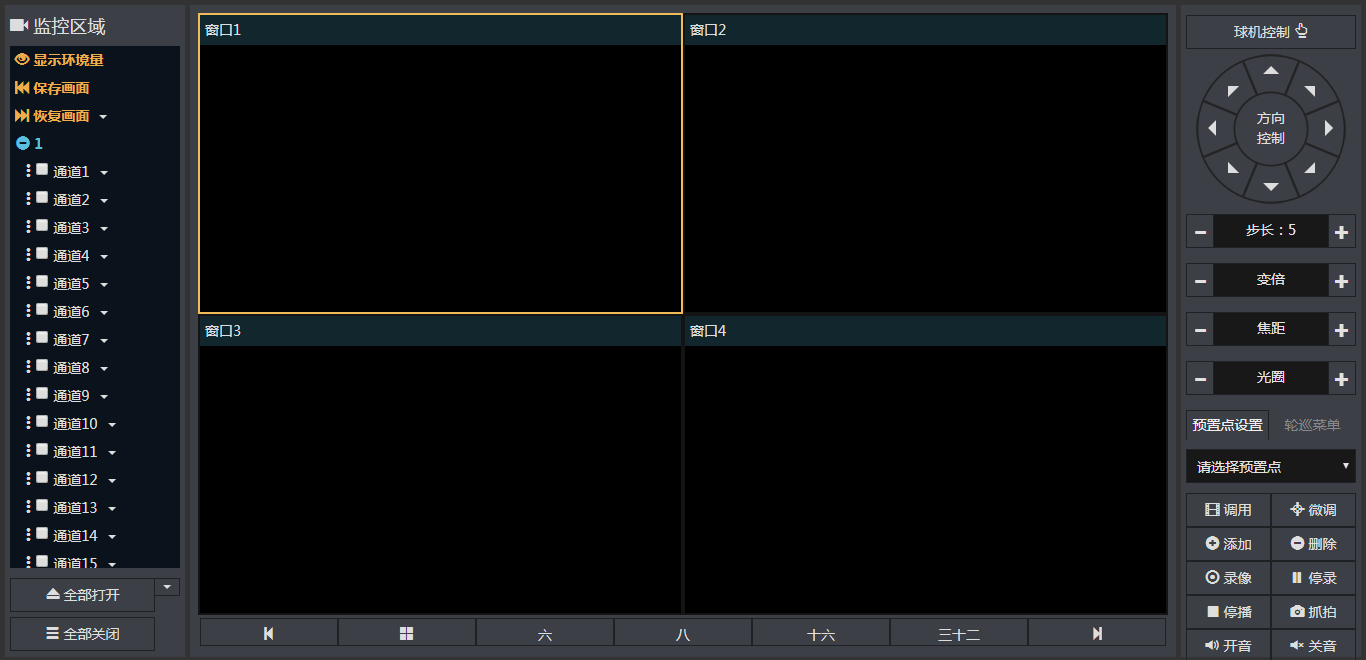
最近改视频监控页面,由于窗口比较多,以前是通过计算窗口大小位置来处理页面布局的,其实还是比较麻烦,而且偶尔会有页面位置错乱的现象,虽然只是及其偶尔的现象,但总归是不好。
计算窗口位置的代码:
/*监控窗口高度自动*/

    web.gridHeight = function (num) {

        var floorX = function(a, b){

            var x = a / b;

            x = Math.floor(x);

            return x;

        };

        var a = $('#camera-wrap');

        var b = num;

        var c = $('#camera-wrap').height();

        var wi = $('#camera-wrap').width();

        var index = a.find('.camera-item.active').data('index');

        if (index > b) {

            a.find('.camera-item:first').click();

        }

        $.each(a.find('.camera-item'), function (i) {

            var t = $(this);

            if (i < b) {

                t.hasClass("hidden") && t.removeClass("hidden");

            } else {

                t.hasClass("hidden") || t.addClass("hidden");

            }

        });

        var d = a.find('.camera-item:visible');

        var borderWi = 4;

        if (b == '4') {

            var bhe = floorX(c, 2);

            var bwi = floorX(wi, 2);

            d.height(bhe - 30 - borderWi);

            d.width(bwi - borderWi);

        }

        if (b == '6') {

            var bhe = floorX(c, 3);

            var bwi = floorX(wi, 3);

            a.find('.camera-item:first').height(bhe * 2 - 30 - borderWi - 1);

            a.find('.camera-item:first').width(bwi * 2 - borderWi);

            a.find('.camera-item:visible:not(:first)').height(bhe - 30 - borderWi);

            a.find('.camera-item:visible:not(:first)').width(bwi - borderWi);

        }

        if (b == '8') {

            var bhe = floorX(c, 4);

            var bwi = floorX(wi, 4);

            a.find('.camera-item:first').height(bhe * 3 - 30 - borderWi - 1);

            a.find('.camera-item:first').width(bwi * 3 - borderWi);

            a.find('.camera-item:visible:not(:first)').height(bhe - 30 - borderWi);

            a.find('.camera-item:visible:not(:first)').width(bwi - borderWi);

        }

        if (b == '16') {

            var bhe = floorX(c, 4);

            var bwi = floorX(wi, 4);

            d.height(bhe - 30 - borderWi);

            d.width(bwi - borderWi);

        }

        if (b == '32') {

            var bhe = floorX(c, 4);

            var bwi = floorX(wi, 8);

            d.height(bhe - 30 - borderWi);

            d.width(bwi - borderWi);

        }

    };
/*监控窗口全屏或还原*/

    web.cameraFull = function (elem) {

        var t = elem;

        if (t.hasClass('fix')) {

            t.removeClass('fix').attr('style', '').height(web.position.cameraH).width(web.position.cameraW);

        } else {

            web.position.cameraX = t.position().left;

            web.position.cameraY = t.position().top;

            web.position.cameraW = t.width();

            web.position.cameraH = t.height();

            t.addClass('fix').css({

                'top': '5px',

                'left': '5px',

                'right': '0',

                'bottom': '0',

                'height': $('.container-center').height() - 5,

                'width':$('.container-center').width()

            });

        }

    };

    web.position = {

        cameraX: '0',

        cameraY: '0',

        cameraW: '0',

        cameraH: '0',

        gridsL: '0',

        gridsR: '0'

    };
效果
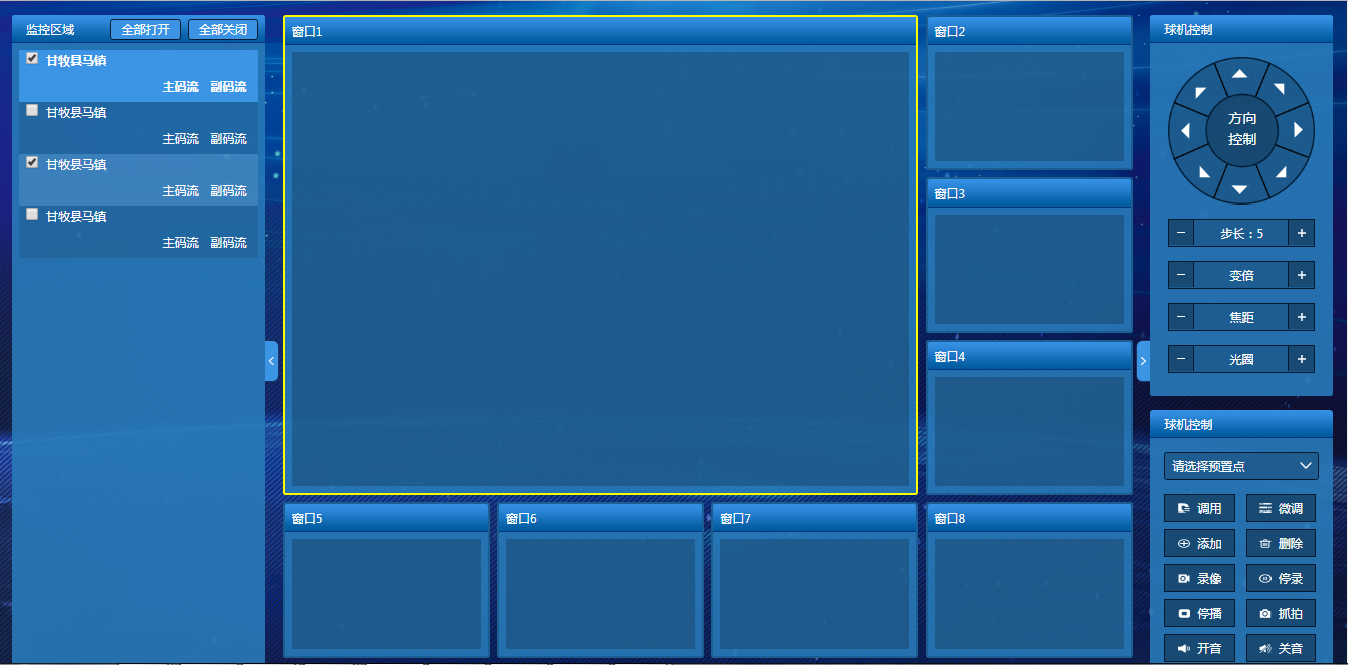
现在改页面样式,顺带改下实现布局的方案,改用css控制窗口的显示不显示,以及窗口显示的大小和位置
.realtime-page .content .center .videos .wind {

    position: relative;

    display: inline-block;

    width: 50%;

    height: 50%;

    padding: 0 0.13rem 0.25rem 0.13rem;

    box-sizing: border-box;

}

.realtime-page .content .center .videos.six .wind {

    position: relative;

    display: inline-block;

    width: 33%;

    height: 33%;

    padding: 0 0.13rem 0.13rem 0.13rem;

    box-sizing: border-box;

}

.realtime-page .content .center .videos.six .wind:nth-child(1) {

    width: 66%;

    height: 66%;

}

.realtime-page .content .center .videos.six .wind:nth-child(2) {

    position: absolute;

    top: 0;

    left: 66%;

}

.realtime-page .content .center .videos.eight .wind {

    position: relative;

    display: inline-block;

    width: 25%;

    height: 25%;

    padding: 0 0.13rem 0.13rem 0.13rem;

    box-sizing: border-box;

}

.realtime-page .content .center .videos.eight .wind:nth-child(1) {

    width: 75%;

    height: 75%;

}

.realtime-page .content .center .videos.eight .wind:nth-child(2) {

    position: absolute;

    top: 0;

    left: 75%;

}

.realtime-page .content .center .videos.eight .wind:nth-child(3) {

    position: absolute;

    top: 25%;

    left: 75%;

}

.realtime-page .content .center .videos.sixteen .wind {

    position: relative;

    display: inline-block;

    width: 25%;

    height: 25%;

    box-sizing: border-box;

    padding: 0 0.13rem 0.13rem 0.13rem;

}

.realtime-page .content .center .videos.thirty-two .wind {

    position: relative;

    display: inline-block;

    width: 12.5%;

    height: 25%;

    box-sizing: border-box;

    padding: 0 0.13rem 0.13rem 0.13rem;

}

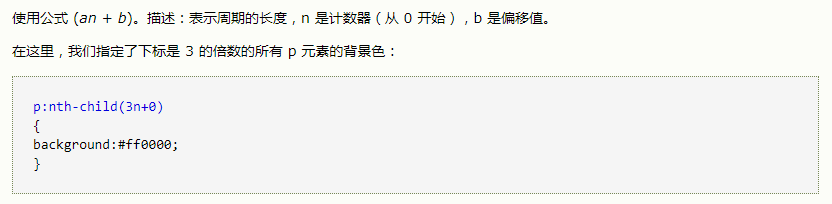
.realtime-page .content .center .videos.four .wind:nth-child(1n+5) {

    display: none;

}

.realtime-page .content .center .videos.six .wind:nth-child(1n+7) {

    display: none;

}

.realtime-page .content .center .videos.eight .wind:nth-child(1n+9) {

    display: none;

}

.realtime-page .content .center .videos.sixteen .wind:nth-child(1n+17) {

    display: none;

}
这样一来逻辑上的控制就少了,让样式归样式,控制归控制,整体结构清晰了很多,而且css控制的样式没有出现过页面错乱的情况,完美。
css nth-child 的应用的更多相关文章
- HTML、CSS部分
要点:对Web标准的理解.浏览器差异.CSS基本功:布局.盒子模型.选择器优先级及使用.HTML5.CSS3.移动端开发 技术等 1.Doctype作用? 严格模式与混杂模式-如何触发这两种模式,区分 ...
- CSS 基础总结
CSS基础 Doctype 声明位于文档中的最前面,处于 标签之前.告知浏览器的解析器,用什么文档类型 规范来解析这个文档. 在标准模式中,浏览器根据规范呈现页面: 在混杂模式中,页面以一种比较宽松的 ...
- html/css杂题
1.css选择器:详细(http://www.ruanyifeng.com/blog/2009/03/css_selectors.html) 派生选择器:按标签 类别选择器:按class ID选择器: ...
- CSS的引入方式及CSS选择器
一 CSS介绍 现在的互联网前端分三层: a.HTML:超文本标记语言.从语义的角度描述页面结构. b.CSS:层叠样式表.从审美的角度负责页面样式. c.JS:JavaScript .从交互的角度描 ...
- CSS选择器分类总结
一.选择器语法及其意义(pattern and meaning) Pattern Meaning CSS level E an element of type E 标记选择器,匹配所有标签名为E的元素 ...
- 前端html,css基础总结
0.1.css引入界面的方式: 内联式:通过标签的style属性,在标签上直接写样式. <div style="width:100px; height:100px; backgroun ...
- web前端总结面试问题<CSS&HTML问题>
一个父元素div,一个未知宽度.高度的子元素div [上下左右居中方法总结] //1.position布局,position设为absolute,其他同情景一 2.display:table 父级元素 ...
- 最基础的CSS面试题
1.Doctype作用是什么?严格模式与混杂模式分别是如何触发这两种模式的,区分它们有何意义? (1)<!DOCTYPE>声明位于文档中的最前面,处于<html>标签之前.告知 ...
- css selector regexp css选择器 正则表达式 css 参考手册
jQuery 选择元素 a.text-success, a.text-danger, a.text-primary, a.text-info $("a[class^=text-]" ...
- CSS/CSS3语法新特性笔记
CSS层叠样式表 三大特性 层叠性:相同的样式会覆盖 继承性:属性可向下继承 优先级:范围越小权重越高 选择器 基础选择器 标签选择器 1 body { 2 color:#fff; 3 } 类选择器 ...
随机推荐
- Maticsoft Code Generator
源码:https://github.com/easonjim/MaticsoftCodeGenerator bug提交:https://github.com/easonjim/MaticsoftCod ...
- [转]《MEF程序设计指南》博文汇总
在MEF之前,人们已经提出了许多依赖注入框架来解决应用的扩展性问题,比如OSGI 实现以Spring 等等.在 Microsoft 的平台上,.NET Framework 自身内部包含组件模型和 Sy ...
- Install nginx-clojure on CentOS 7
Install nginx-clojure on CentOS 7 1. install open-jdk-7 sudo yum install java-1.7.0-openjdk-devel 2. ...
- 异常:”未处理System.TypeLoadException“
1.问题由来: 在敲系统时原来的已有的类都能正常的执行,可是当加入一个新的实体类CancelCard的时候系统执行时显示错误例如以下: watermark/2/text/aHR0cDovL2J ...
- 解决Mysql存储中文的问题
Mysql无法存储中文或者中文乱码,当然是编码的问题.你可以mysql -u root -p进入Mysql命令行环境,然后输入命令查看当前编码格式: mysql> show variables ...
- ganglia收集hbase的metrics
Ganglia 是 UC Berkeley 发起的一个开源监视项目,设计用于測量数以千计的节点.每台计算机都执行一个收集和发送度量数据(如处理器速度.内存使用量等)的名为 gmond 的守护进程.它将 ...
- ADO.NET .net core2.0添加json文件并转化成类注入控制器使用 简单了解 iTextSharp实现HTML to PDF ASP.NET MVC 中 Autofac依赖注入DI 控制反转IOC 了解一下 C# AutoMapper 了解一下
ADO.NET 一.ADO.NET概要 ADO.NET是.NET框架中的重要组件,主要用于完成C#应用程序访问数据库 二.ADO.NET的组成 ①System.Data → DataTable, ...
- MySQL中採用类型varchar(20)和varchar(255)对性能上的影响
1.MySQL建立索引时假设没有限制索引的大小,索引长度会默认採用的该字段的长度.也就是说varchar(20)和varchar(255)相应的索引长度分别为20*3(utf-8)(+2+1),255 ...
- TwoSum leetcode
class Solution { public: vector<int> twoSum(vector<int>& nums, int target) { vector& ...
- java无状态登录实现方式之ThreadLocal+Cookie
注:本文提到的无状态指的是无需session完毕认证.取用户封装信息. 无状态的优点: 1.多应用单点登录:在多应用的时候仅仅需在登录server登录后.各子应用无需再次登录. 2.多server集群 ...