
基于html实现一个todolist待办事项
index.html
<!DOCTYPE html>

<html lang="en">

<head>

    <meta charset="UTF-8">

    <title>todolist</title>

    <link rel="stylesheet" type="text/css" href="css/01.css">

</head>

<body>

    <div class="container">

        <!-- top nav    start-->

        <div class="nav">

            <div class="topNav">

                <h3>TodoList</h3>

                <form id="form" action='javascript:postaction()' method='post'>

                    <input type="text" name="todoList" id="inputTodo" placeholder="输入内容" required="required" autocomplete="off">

                </form>

            </div>

        </div>

        <!-- top nav   end -->

        <!-- todo list   start -->

        <div class="todo">

            <div class="lists">

                <div class="todoNav" id="todoNav">

                    <span class="title1">正在进行</span>

                    <span class="todoCount" id="todoCount">0</span>

                </div>

                <div class="todoList">

                    <ul id="todoList">

                        <!-- 动态添加li -->

                        <!-- <li><input type="checkbox" name="" checked="checked">事项内容<span>-</span></li> -->

                    </ul>

                </div>

            </div>

        </div>

        <!-- todo list   end -->

        <!-- done list start -->

        <div class="done">

            <div class="lists1">

                <div class="doneNav">

                    <span class="title2">已经完成</span>

                    <span class="doneCount" id="doneCount">0</span>

                </div>

                <div class="doneList">

                    <ul id="doneList">

                        <!-- 动态添加li -->

                        <!-- <li>3hsjhdjshdjhdjskas</li> -->

                    </ul>

                </div>

            </div>

        </div>

        <!-- done list end -->

        <!-- site foot -->

        <div class="siteFoot">

            <div class="foot">

                <p>Copyright © 2014 todolist.cn <a style="color: #8c9796;" href="javascript:clear()">clear</a></p>

            </div>

        </div>

    </div>

</body>

<script type="text/javascript" src="js/jquery-3.3.1.js"></script>

<script type="text/javascript" src="js/01.js"></script>

</html>
01.css
*{

    padding:0;

    margin:0;

}

body{

    background: #dfe1e1;

}

ul{

    list-style: none;

}

.container{}

/*top nav*/

.nav{

    width: 100%;

    height: 50px;

    background: rgba(0,0,0,0.7);

}

.topNav{

    width: 600px;

    height: 26px;

    color: white;

    margin:auto;

    /*line-height: 50px;*/

    padding-top: 12px;

    padding-bottom: 12px;

}

.topNav h3{

    float: left;

}

.topNav input{

    float: right;

    width: 380px;

    height: 24px;

    box-shadow: 1px 1px 10px #dfe1e1 inset;

    border-radius: 10px;

}

/*todo list*/

.todo{

    width: 100%;

    height: 100%;

}

.lists{

    width: 600px;

    height: 100%;

    padding: 20px 0 10px 0;

    margin:auto;

}

.todoNav{

    width: 600px;

    height: 30px;

}

.title1{

    width: 300px;

    height: 18px;

    font-size: 18px;

    font-weight: bold;

    color: black;

    float: left;

    line-height: 18px;

/*    margin-top: 20px;

    margin-bottom: 10px;*/

}

.todoCount{

    width: 18px;

    height: 18px;

    border-radius: 50%;

    font-size: 13px;

    font-weight: bold;

    color: black;

    float: right;

    text-align: center;

    line-height: 18px;

    background: #82b5b2;

    /*margin-top: 20px;

    margin-bottom: 10px;*/

}

.todoList{

    width: 600px;

}

.todoList ul{

    width: 600px;

    margin:auto;

}

.todoList li{

    width: 587px;

    height: 30px;

    padding:0 5px;

    margin:5px 0;

    background: white;

    line-height:30px;

    border-top-left-radius: 5px;

    border-bottom-left-radius: 5px;

    border-left:3px solid #0b423e;

}

/*done list*/

.done{

    width: 100%;

    height: 100%;

}

.lists1{

    width: 600px;

    height: 100%;

    padding: 20px 0 10px 0;

    margin:auto;

}

.doneNav{

    width: 600px;

    height: 30px;

}

.title2{

    width: 300px;

    height: 18px;

    font-size: 18px;

    font-weight: bold;

    color: black;

    float: left;

    line-height: 18px;

    /*margin-top: 20px;

    margin-bottom: 10px;*/

}

.doneCount{

    width: 18px;

    height: 18px;

    border-radius: 50%;

    font-size: 13px;

    font-weight: bold;

    color: black;

    float: right;

    text-align: center;

    line-height: 18px;

    background: #82b5b2;

    /*margin-top: 20px;

    margin-bottom: 10px;*/

}

.doneList{

    width: 600px;

}

.doneList ul{

    width: 600px;

    margin:auto;

}

.doneList li{

    width: 587px;

    height: 30px;

    padding:0 5px;

    margin:5px 0;

    background: white;

    line-height:30px;

    border-top-left-radius: 5px;

    border-bottom-left-radius: 5px;

    border-left:3px solid #0b423e;

}

/*site foot*/

.siteFoot{

    width: 100%;

    height: 100%;

}

.foot{

    width: 600px;

    height: 30px;

    margin:auto;

    text-align: center;

    line-height: 30px;

}

.content{

    width: 500px;

    height: 27px;

    color: black;

    font-size: 15px;

    background: white;

    line-height:27px;

    border: none;

}

.content:hover{

    border: 1px solid skyblue;

}

.listSpan{

    width: 18px;

    height: 18px;

    border-radius: 50%;

    font-size: 13px;

    font-weight: bold;

    color: black;

    float: right;

    text-align: center;

    line-height: 18px;

    background: #82b5b2;

    margin-top:6px;

}

.listSpan:hover{

    cursor:pointer;

}

.checkBox{

    width: 18px;

    height: 18px;

    margin-top:8px;

}
01.js
//将数据存储在浏览器localStorage

// 数据格式: todoList:[{"li":inputContent,"status":true/false}]

// 打开浏览器时,从浏览器中读取数据、显示数据

//触发post时:1、从浏览器读取数据,新增数据,将数据写回浏览器  2、在页面上新增一条内容

//修改数据:1、从浏览器读取数据,修改数据,将数据写回浏览器  页面显示

//删除数据:1、从浏览器读取数据,删除数据,将数据写回浏览器  页面显示

//todo>>>>done:读取数据,修改状态为true,写回浏览器,

//done>>>>todo:读取数据,修改状态为true,写回浏览器,  在todo里面增加一条内容

//清除所有

function clear(){

    localStorage.clear();

    showList();

}

//浏览器页面显示列表

function showList(){

    var todoList = document.getElementById("todoList");

    var doneList = document.getElementById("doneList");

    var todoCount = document.getElementById("todoCount");

    var doneCount = document.getElementById("doneCount");

    var data = localStorage.getItem("todoList");

    var todoList1 = "";

    var doneList1 = "";

    var count1 = 0;

    var count2 = 0;

    if(data!=null){

        data=JSON.parse(data);

        for(var i=data.length-1; i>=0; i--){

            if(data[i].status){

                // console.log(data[i].li);

                doneList1 += "<li id='li-" + i +"'><input class='checkBox' type='checkbox' style='float:left;' checked='checked' onchange='change(" + i + ",true)'>" +

                "<input class='content' type='text' style='float:left;' id='" + i + "' value=" + data[i].li + " onchange='update(" + i + ")'>" +

                 "<span class='listSpan' style='float:right;' onclick=remove(" +i + ")>" + "-</span></li>";

                count2++;

            }else{

                // console.log(data);

                todoList1 += "<li id='li-" + i +"'><input class='checkBox' type='checkbox' style='float:left;' onchange='change(" + i + ",false)'>" +

            "<input class='content' type='text' style='float:left;' id='" + i + "' value=" + data[i].li +" onchange='update(" + i + ")'>" +

             "<span class='listSpan' style='float:right;' onclick=remove(" +i + ")>" + "-</span></li>";

            count1++;

            // todoCount= Number(todoCount.innerText);

            }

        }

        todoList.innerHTML = todoList1;

        doneList.innerHTML = doneList1;

        doneCount.innerText = count2;

        todoCount.innerText = count1;

    }else{

        todoList.innerHTML = "";

        doneList.innerHTML = "";

        todoCount.innerText = 0;

        doneCount.innerText = 0;

    }

}

//change todolist and donelist

function change(id,val){

    var data = loadData();

    if(val){

        var li = document.getElementById("li-"+id);

        var checkbox = li.children[0];

        checkbox.innerHTML = "<input class='checkBox' type='checkbox' style='float:left;' onchange='change(" + id + ",false)'>";

        var doneCount = new Number(document.getElementById("doneCount").innerText);

        doneCount.innerText = doneCount-1;

        data[id].status = false;

        saveData(data);

        showList();

    }else{

        var li = document.getElementById("li-"+id);

        var checkbox = li.children[0];

        checkbox.innerHTML = "<input class='checkBox' type='checkbox' checked='checked' style='float:left;' onchange='change(" + id + ",true)'>";

        var todoCount = new Number(document.getElementById("todoCount").innerText);

        todoCount.innerText = todoCount-1;

        data[id].status = true;

        saveData(data);

        showList();

    }

}

//编辑

function update(id){

    var data = loadData();

    var newItem = document.getElementById(new String(id));  //被修改的数据

    console.log(data[id]);

    console.log(newItem);

    data[id].li = newItem.value;

    saveData(data);

}

//删除

function remove(n){

    var data = loadData();

    data.splice(n,1);

    saveData(data);

    showList();

}

//保存数据

function saveData(data){

    data = JSON.stringify(data);

    localStorage.setItem("todoList", data);

    // console.log("sava",JSON.parse(localStorage.getItem("todoList")));

}

//读取数据

function loadData(){

    var data = localStorage.getItem("todoList");

    var emptyArray = [];

    // console.log(data);

    if(data==null){

        // console.log(2);

        return emptyArray;

    }else {

        // console.log(1);

        return JSON.parse(data);

    }

}

//提交表单

function postaction(){

    // localStorage.clear();

    var inputTodo = document.getElementById("inputTodo");

    if(inputTodo.value == "") {

        alert("内容不能为空");

    }else{

        //读取数据

        var data=loadData();

        // console.log(data);

        // console.log(typeof data);

        var todo={"li":inputTodo.value,"status":false};

        //新增

        data.push(todo);

        // console.log("push", data);

        // 保存

        saveData(data);

        var form=document.getElementById("form");

        form.reset();

        //页面新增数据

        showList();

    }

}

window.onload = function(){

    showList();

}
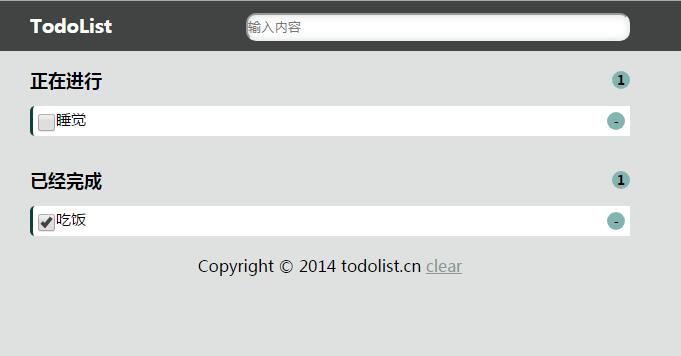
效果:
基于html实现一个todolist待办事项的更多相关文章
- js仿toDoList(待办事项)练习
JS的一个小练习 展示成果 话不多说 html骨架 <!DOCTYPE html> <html lang="en"> <head> <me ...
- todolist待办事项
使用html/css原生js实现待办事项列表: 支持添加待办事项,删除待办事项,切换待办事项的状态(正在进行,已经完成) 支持对正在进行以及已经完成事项编辑(单击内容即可编辑) 源代码:链接:http ...
- vue todolist待办事项完整
<template> <div id="app"> <input type="text" v-model='todo' @keyd ...
- Vue 事件结合双向数据绑定实现todolist 待办事项 已经完成 和进行中
<template> <div id="app"> <input type="text" v-model='todo' @keyd ...
- vue2.* 事件结合双向数据绑定、模块化以及封装Storage实现todolist 待办事项 已经完成 和进行中持久化 06
ceshi.vue <template> <div id="app"> <input type='text' v-model='todo' @keyd ...
- vue.js--基础 事件结合双向数据绑定实现todolist 待办事项 已经完成 和进行中,键盘事件
<template> <div id="app"> <h1>{{ msg }}</h1> <input type=" ...
- Angular待办事项应用2
todo组件 接上一篇,在根目录创建todo组件 命令行输入:ng g c todo 得到 文件结构 修改默认路由为todo: 然后打开浏览器:http://localhost:4200/ ,查看,t ...
- jQuery模仿ToDoList实现简单的待办事项列表
功能:在文本框中输入待办事项按下回车后,事项会出现在未完成列表中:点击未完成事项前边的复选框后,该事项会出现在已完成列表中,反之亦然:点击删除按钮会删除该事项:双击事项可以修改事项的内容.待办事项的数 ...
- Go For It ,一个灵活的待办事项列表程序
导读 Go For It,是我们开源工具系列中的第十个工具,它将使你在 2019 年更高效,它在 Todo.txt 系统的基础上构建,以帮助你完成更多工作. 每年年初似乎都有疯狂的冲动想提高工作效率. ...
随机推荐
- 在IDEA里gradle配置和使用
在IDEA里gradle配置和使用 在IDEA里gradle配置和使用 前言 Windows环境IDEA配置gradle 配置系统环境变量 下载 配置环境变量 测试 idea配置 gradle仓库设置 ...
- 题解报告:hdu1205吃糖果(插空法)
题目链接:http://acm.hdu.edu.cn/showproblem.php?pid=1205 Problem Description HOHO,终于从Speakless手上赢走了所有的糖果, ...
- ASP.NET CORE 使用 EF CORE访问数据库
asp.net core通过ef core来访问数据库,这里用的是代码优先,通过迁移来同步数据库与模型. 环境:vs2017,win10,asp.net core 2.1 一.从建立asp.net c ...
- 2016/10/29 Action类中execute方法的使用
第一步:先配置web.xml文件 <filter> <filter-name>struts2</filter-name> <filter-class>o ...
- python_one-day
python入门_(1) 作者:_晓冬 归档:学习笔记 2017/9/9 目 录 第1章 练习... 1 1.1 格式化输出... 1 1.2 流程控制if..else. 1 1.3 流程控制whi ...
- mysql自动获取时间日期
实现方式: 1.将字段类型设为 TIMESTAMP 2.将默认值设为 CURRENT_TIMESTAMP 举例应用: 1.MySQL 脚本实现用例 --添加CreateTime 设置默认时间 C ...
- Oracle Mysql的jdbc连接
Oracle和MySql的jdbc或连接池中的连接,写下来以便随时参考 Oracle: driverClassName=oracle.jdbc.driver.OracleDriver url=jdbc ...
- 【CSS】3种CSS方法设置元素垂直水平居中
1. 宽高固定 设置要水平垂直居中的 div 的 position 为 absolute,left:50%; margin-left为负的这个元素宽度的一半,同理,top:50%;margin-top ...
- Win7 32位 遇到微软 silverlight 5.0安装失败的解决办法
刚开始,也是尝试下载安装,多次都是到99%,提示安装失败! 也查找了很多网上朋友分享的办法,还是不行.重新建立一个管理员账号,还是不行. 后来反复不断的测试,找到原因了,安装99%不成功,但是卸载程序 ...
- C/C++ new/delete []、内存泄漏、动态数组
一.概念 new/delete是用于动态分配和撤销内存的运算符.new/delete是c++里才有的,c中是用malloc和free,c++虽然也可以用,但是不建议用.当我们使用关键字new在堆上动态 ...