
基于html实现一个todolist待办事项
index.html
<!DOCTYPE html>

<html lang="en">

<head>

    <meta charset="UTF-8">

    <title>todolist</title>

    <link rel="stylesheet" type="text/css" href="css/01.css">

</head>

<body>

    <div class="container">

        <!-- top nav    start-->

        <div class="nav">

            <div class="topNav">

                <h3>TodoList</h3>

                <form id="form" action='javascript:postaction()' method='post'>

                    <input type="text" name="todoList" id="inputTodo" placeholder="输入内容" required="required" autocomplete="off">

                </form>

            </div>

        </div>

        <!-- top nav   end -->

        <!-- todo list   start -->

        <div class="todo">

            <div class="lists">

                <div class="todoNav" id="todoNav">

                    <span class="title1">正在进行</span>

                    <span class="todoCount" id="todoCount">0</span>

                </div>

                <div class="todoList">

                    <ul id="todoList">

                        <!-- 动态添加li -->

                        <!-- <li><input type="checkbox" name="" checked="checked">事项内容<span>-</span></li> -->

                    </ul>

                </div>

            </div>

        </div>

        <!-- todo list   end -->

        <!-- done list start -->

        <div class="done">

            <div class="lists1">

                <div class="doneNav">

                    <span class="title2">已经完成</span>

                    <span class="doneCount" id="doneCount">0</span>

                </div>

                <div class="doneList">

                    <ul id="doneList">

                        <!-- 动态添加li -->

                        <!-- <li>3hsjhdjshdjhdjskas</li> -->

                    </ul>

                </div>

            </div>

        </div>

        <!-- done list end -->

        <!-- site foot -->

        <div class="siteFoot">

            <div class="foot">

                <p>Copyright © 2014 todolist.cn <a style="color: #8c9796;" href="javascript:clear()">clear</a></p>

            </div>

        </div>

    </div>

</body>

<script type="text/javascript" src="js/jquery-3.3.1.js"></script>

<script type="text/javascript" src="js/01.js"></script>

</html>
01.css
*{

    padding:0;

    margin:0;

}

body{

    background: #dfe1e1;

}

ul{

    list-style: none;

}

.container{}

/*top nav*/

.nav{

    width: 100%;

    height: 50px;

    background: rgba(0,0,0,0.7);

}

.topNav{

    width: 600px;

    height: 26px;

    color: white;

    margin:auto;

    /*line-height: 50px;*/

    padding-top: 12px;

    padding-bottom: 12px;

}

.topNav h3{

    float: left;

}

.topNav input{

    float: right;

    width: 380px;

    height: 24px;

    box-shadow: 1px 1px 10px #dfe1e1 inset;

    border-radius: 10px;

}

/*todo list*/

.todo{

    width: 100%;

    height: 100%;

}

.lists{

    width: 600px;

    height: 100%;

    padding: 20px 0 10px 0;

    margin:auto;

}

.todoNav{

    width: 600px;

    height: 30px;

}

.title1{

    width: 300px;

    height: 18px;

    font-size: 18px;

    font-weight: bold;

    color: black;

    float: left;

    line-height: 18px;

/*    margin-top: 20px;

    margin-bottom: 10px;*/

}

.todoCount{

    width: 18px;

    height: 18px;

    border-radius: 50%;

    font-size: 13px;

    font-weight: bold;

    color: black;

    float: right;

    text-align: center;

    line-height: 18px;

    background: #82b5b2;

    /*margin-top: 20px;

    margin-bottom: 10px;*/

}

.todoList{

    width: 600px;

}

.todoList ul{

    width: 600px;

    margin:auto;

}

.todoList li{

    width: 587px;

    height: 30px;

    padding:0 5px;

    margin:5px 0;

    background: white;

    line-height:30px;

    border-top-left-radius: 5px;

    border-bottom-left-radius: 5px;

    border-left:3px solid #0b423e;

}

/*done list*/

.done{

    width: 100%;

    height: 100%;

}

.lists1{

    width: 600px;

    height: 100%;

    padding: 20px 0 10px 0;

    margin:auto;

}

.doneNav{

    width: 600px;

    height: 30px;

}

.title2{

    width: 300px;

    height: 18px;

    font-size: 18px;

    font-weight: bold;

    color: black;

    float: left;

    line-height: 18px;

    /*margin-top: 20px;

    margin-bottom: 10px;*/

}

.doneCount{

    width: 18px;

    height: 18px;

    border-radius: 50%;

    font-size: 13px;

    font-weight: bold;

    color: black;

    float: right;

    text-align: center;

    line-height: 18px;

    background: #82b5b2;

    /*margin-top: 20px;

    margin-bottom: 10px;*/

}

.doneList{

    width: 600px;

}

.doneList ul{

    width: 600px;

    margin:auto;

}

.doneList li{

    width: 587px;

    height: 30px;

    padding:0 5px;

    margin:5px 0;

    background: white;

    line-height:30px;

    border-top-left-radius: 5px;

    border-bottom-left-radius: 5px;

    border-left:3px solid #0b423e;

}

/*site foot*/

.siteFoot{

    width: 100%;

    height: 100%;

}

.foot{

    width: 600px;

    height: 30px;

    margin:auto;

    text-align: center;

    line-height: 30px;

}

.content{

    width: 500px;

    height: 27px;

    color: black;

    font-size: 15px;

    background: white;

    line-height:27px;

    border: none;

}

.content:hover{

    border: 1px solid skyblue;

}

.listSpan{

    width: 18px;

    height: 18px;

    border-radius: 50%;

    font-size: 13px;

    font-weight: bold;

    color: black;

    float: right;

    text-align: center;

    line-height: 18px;

    background: #82b5b2;

    margin-top:6px;

}

.listSpan:hover{

    cursor:pointer;

}

.checkBox{

    width: 18px;

    height: 18px;

    margin-top:8px;

}
01.js
//将数据存储在浏览器localStorage

// 数据格式: todoList:[{"li":inputContent,"status":true/false}]

// 打开浏览器时,从浏览器中读取数据、显示数据

//触发post时:1、从浏览器读取数据,新增数据,将数据写回浏览器  2、在页面上新增一条内容

//修改数据:1、从浏览器读取数据,修改数据,将数据写回浏览器  页面显示

//删除数据:1、从浏览器读取数据,删除数据,将数据写回浏览器  页面显示

//todo>>>>done:读取数据,修改状态为true,写回浏览器,

//done>>>>todo:读取数据,修改状态为true,写回浏览器,  在todo里面增加一条内容

//清除所有

function clear(){

    localStorage.clear();

    showList();

}

//浏览器页面显示列表

function showList(){

    var todoList = document.getElementById("todoList");

    var doneList = document.getElementById("doneList");

    var todoCount = document.getElementById("todoCount");

    var doneCount = document.getElementById("doneCount");

    var data = localStorage.getItem("todoList");

    var todoList1 = "";

    var doneList1 = "";

    var count1 = 0;

    var count2 = 0;

    if(data!=null){

        data=JSON.parse(data);

        for(var i=data.length-1; i>=0; i--){

            if(data[i].status){

                // console.log(data[i].li);

                doneList1 += "<li id='li-" + i +"'><input class='checkBox' type='checkbox' style='float:left;' checked='checked' onchange='change(" + i + ",true)'>" +

                "<input class='content' type='text' style='float:left;' id='" + i + "' value=" + data[i].li + " onchange='update(" + i + ")'>" +

                 "<span class='listSpan' style='float:right;' onclick=remove(" +i + ")>" + "-</span></li>";

                count2++;

            }else{

                // console.log(data);

                todoList1 += "<li id='li-" + i +"'><input class='checkBox' type='checkbox' style='float:left;' onchange='change(" + i + ",false)'>" +

            "<input class='content' type='text' style='float:left;' id='" + i + "' value=" + data[i].li +" onchange='update(" + i + ")'>" +

             "<span class='listSpan' style='float:right;' onclick=remove(" +i + ")>" + "-</span></li>";

            count1++;

            // todoCount= Number(todoCount.innerText);

            }

        }

        todoList.innerHTML = todoList1;

        doneList.innerHTML = doneList1;

        doneCount.innerText = count2;

        todoCount.innerText = count1;

    }else{

        todoList.innerHTML = "";

        doneList.innerHTML = "";

        todoCount.innerText = 0;

        doneCount.innerText = 0;

    }

}

//change todolist and donelist

function change(id,val){

    var data = loadData();

    if(val){

        var li = document.getElementById("li-"+id);

        var checkbox = li.children[0];

        checkbox.innerHTML = "<input class='checkBox' type='checkbox' style='float:left;' onchange='change(" + id + ",false)'>";

        var doneCount = new Number(document.getElementById("doneCount").innerText);

        doneCount.innerText = doneCount-1;

        data[id].status = false;

        saveData(data);

        showList();

    }else{

        var li = document.getElementById("li-"+id);

        var checkbox = li.children[0];

        checkbox.innerHTML = "<input class='checkBox' type='checkbox' checked='checked' style='float:left;' onchange='change(" + id + ",true)'>";

        var todoCount = new Number(document.getElementById("todoCount").innerText);

        todoCount.innerText = todoCount-1;

        data[id].status = true;

        saveData(data);

        showList();

    }

}

//编辑

function update(id){

    var data = loadData();

    var newItem = document.getElementById(new String(id));  //被修改的数据

    console.log(data[id]);

    console.log(newItem);

    data[id].li = newItem.value;

    saveData(data);

}

//删除

function remove(n){

    var data = loadData();

    data.splice(n,1);

    saveData(data);

    showList();

}

//保存数据

function saveData(data){

    data = JSON.stringify(data);

    localStorage.setItem("todoList", data);

    // console.log("sava",JSON.parse(localStorage.getItem("todoList")));

}

//读取数据

function loadData(){

    var data = localStorage.getItem("todoList");

    var emptyArray = [];

    // console.log(data);

    if(data==null){

        // console.log(2);

        return emptyArray;

    }else {

        // console.log(1);

        return JSON.parse(data);

    }

}

//提交表单

function postaction(){

    // localStorage.clear();

    var inputTodo = document.getElementById("inputTodo");

    if(inputTodo.value == "") {

        alert("内容不能为空");

    }else{

        //读取数据

        var data=loadData();

        // console.log(data);

        // console.log(typeof data);

        var todo={"li":inputTodo.value,"status":false};

        //新增

        data.push(todo);

        // console.log("push", data);

        // 保存

        saveData(data);

        var form=document.getElementById("form");

        form.reset();

        //页面新增数据

        showList();

    }

}

window.onload = function(){

    showList();

}
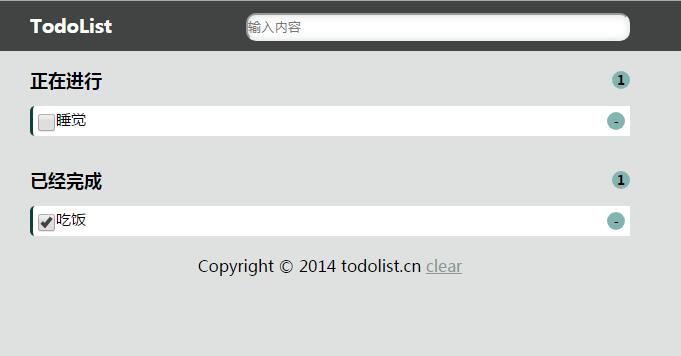
效果:
基于html实现一个todolist待办事项的更多相关文章
- js仿toDoList(待办事项)练习
JS的一个小练习 展示成果 话不多说 html骨架 <!DOCTYPE html> <html lang="en"> <head> <me ...
- todolist待办事项
使用html/css原生js实现待办事项列表: 支持添加待办事项,删除待办事项,切换待办事项的状态(正在进行,已经完成) 支持对正在进行以及已经完成事项编辑(单击内容即可编辑) 源代码:链接:http ...
- vue todolist待办事项完整
<template> <div id="app"> <input type="text" v-model='todo' @keyd ...
- Vue 事件结合双向数据绑定实现todolist 待办事项 已经完成 和进行中
<template> <div id="app"> <input type="text" v-model='todo' @keyd ...
- vue2.* 事件结合双向数据绑定、模块化以及封装Storage实现todolist 待办事项 已经完成 和进行中持久化 06
ceshi.vue <template> <div id="app"> <input type='text' v-model='todo' @keyd ...
- vue.js--基础 事件结合双向数据绑定实现todolist 待办事项 已经完成 和进行中,键盘事件
<template> <div id="app"> <h1>{{ msg }}</h1> <input type=" ...
- Angular待办事项应用2
todo组件 接上一篇,在根目录创建todo组件 命令行输入:ng g c todo 得到 文件结构 修改默认路由为todo: 然后打开浏览器:http://localhost:4200/ ,查看,t ...
- jQuery模仿ToDoList实现简单的待办事项列表
功能:在文本框中输入待办事项按下回车后,事项会出现在未完成列表中:点击未完成事项前边的复选框后,该事项会出现在已完成列表中,反之亦然:点击删除按钮会删除该事项:双击事项可以修改事项的内容.待办事项的数 ...
- Go For It ,一个灵活的待办事项列表程序
导读 Go For It,是我们开源工具系列中的第十个工具,它将使你在 2019 年更高效,它在 Todo.txt 系统的基础上构建,以帮助你完成更多工作. 每年年初似乎都有疯狂的冲动想提高工作效率. ...
随机推荐
- XML 基础学习
在w3school看到了XML的教程,想到以前工作学习中也接触到了XML,但只是简单搜索了解了下,没有认真去学习XML的基础,所以现在认真看下其基础部分,并写篇博客作为笔记记录下. XML 简介 XM ...
- [UOJ388]配对树
题解 贪心+线段树 首先如果我们知道了哪些点是关键点应该怎么搞 显然最小的匹配方案所有的边至多被经过一次 可以考虑每条边的贡献 因为我们要贡献尽量小 所以我们尽量让每条边经过的人尽量少 那么每条边被经 ...
- 贪心 UVALive 6832 Bit String Reordering
题目传送门 /* 贪心:按照0或1开头,若不符合,选择后面最近的进行交换.然后选取最少的交换次数 */ #include <cstdio> #include <algorithm&g ...
- 线程间的参数传递 分类: linux c/c++ 2014-06-15 17:48 607人阅读 评论(0) 收藏
在多线程编程中,常常需要从主线程传递参数给子线程或在主线程中获得子线程的计算结果, 若使用全局变量实现,必然需要对临界区保护,因此导致大量的切换工作造成效率的低下: 而利用进程间的参数传递可以解决这一 ...
- d3学习笔记
(1)使用enter()函数. 当要创建新的绑定数据的元素,必须使用enter().这个方法会分析当前选择的DOM元素和传给它的数据,如果数据值比对应的DOM元素多,就创建一个新的占位元素.然后把这个 ...
- 关于tomcat一些简介
window下,在tomcat的bin目录下,用cmd输入startup.bat 即可启动tomcat 成功启动Tomcat后,通过访问http://localhost:8080/便可以使用Tomca ...
- [转][ASP.NET MVC]如何定制Numeric属性/字段验证消息
本文转自:http://www.cnblogs.com/artech/archive/2012/02/13/NumericPropertyValidation.html 对于一个Numeric属性/字 ...
- Java_JDBC连接数据库
package com.accp.dao; import java.sql.Connection; import java.sql.DriverManager; import java.sql.Pre ...
- Partial(部分方法,局部方法),virtual(虚方法),abstract(抽象方法)
Partial 部分方法顾明思议是方法的一部分,不完整的,在ide编译时候,会将所有部分方法加载到一起统一编译,如果分部方法没有被实现,编译器就不会.对他们进行编译. 局部类型的限制 (1) 局部类型 ...
- 手写一套迷你版HTTP服务器
本文主要介绍如何通过netty来手写一套简单版的HTTP服务器,同时将关于netty的许多细小知识点进行了串联,用于巩固和提升对于netty框架的掌握程度. 服务器运行效果 服务器支持对静态文件css ...