
MVC中使用MVCPager简单分页
一、建立数据库以及建立MVC项目
自己随便建立一个数据库,并且添加数据。我建立的数据库如下。
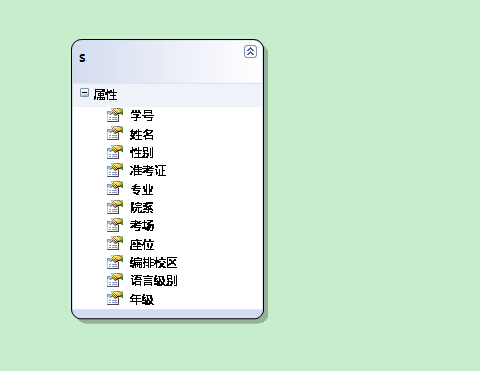
二、建立LINQ to SQL映射。

然后一步步点确定
三、编写代码
在Controllers中建立控制器,模板为空。建立的项目如下:
要添加视图Index

在Controller中选中Index 并且添加视图, 模板选中List, 如下

注意后台要添加对MvcPager的程序集引用,后台代码如下:
using Webdiyer.WebControls.Mvc;
 public class StudentController : Controller

    {

        //

        // GET: /Student/

        public ActionResult Index(int id=1)

        {

           Models.StudentEntityDataContext student= new Models.StudentEntityDataContext();

           IQueryable<Models.S> p = from c in student.S

                                    select c;

           PagedList<Models.S> m = p.ToPagedList(id,10);

            return View(m);

        }

    }
前台代码如下:
@model PagedList<MvcApplication1.Models.S>

@{

    Layout = null;

}

@using Webdiyer.WebControls.Mvc;  //添加对程序集的引用

<!DOCTYPE html>

<html>

<head>

    <title>Index</title>

// 控制分页的CSS样式

    <style type="text/css">

        table, td

        {

            font: 100% Arial, Helvetica, sans-serif;

        }

        table

        {

            width: 100%;

            border-collapse: collapse;

            margin: 1em 0;

        }

        th, td

        {

            text-align: left;

            padding: .5em;

            border: 1px solid #fff;

        }

        th

        {

            background: #328aa4;

            color: #fff;

        }

        td

        {

            background: #e5f1f4;

        }

        /*div布局*/

        .div float

        {

            float: left;

            width: 50%;

        }

        #div pages

        {

            height: 300px;

        }

        /*分页工具栏样式*/

        .pages

        {

            color: #045FB4;

            font-weight: bold;

            font-size: 14px;

        }

        .pages .item

        {

            padding: 1px 6px;

            font-size: 14px;

        }

        /*号码页数*/

        .pages .cpb

        {

            color: #045FB4;

            padding: 1px 6px;

            font-size: 13px;

        }

        /*当前页数*/

        .pages a

        {

            text-decoration: none;

            padding: 0 5px;

            border: 1px solid #BDBDBD;

            margin: 0 2px;

            color: #000;

            font-weight: normal;

        }

        .pages a:hover

        {

            background-color: #0174DF;

            color: #fff;

            border: 1px solid #0174DF;

            text-decoration: none;

            font-weight: normal;

        }

        </style>

</head>

<body>

    <p>

        @Html.ActionLink("Create New", "Create")

    </p>

    <table>

        <tr>

            <th>

                学号

            </th>

            <th>

                姓名

            </th>

            <th>

                 性别

            </th>

            <th>

                准考证

            </th>

            <th>

                专业

            </th>

            <th>

                院系

            </th>

            <th>

                考场

            </th>

            <th>

                座位

            </th>

            <th>

                编排校区

            </th>

            <th>

                语言级别

            </th>

            <th>

                年级

            </th>

            <th></th>

        </tr>

    @foreach (var item in Model) {

        <tr>

            <td>

                @Html.DisplayFor(modelItem => item.学号)

            </td>

            <td>

                @Html.DisplayFor(modelItem => item.姓名)

            </td>

            <td>

                @Html.DisplayFor(modelItem => item.性别)

            </td>

            <td>

                @Html.DisplayFor(modelItem => item.准考证)

            </td>

            <td>

                @Html.DisplayFor(modelItem => item.专业)

            </td>

            <td>

                @Html.DisplayFor(modelItem => item.院系)

            </td>

            <td>

                @Html.DisplayFor(modelItem => item.考场)

            </td>

            <td>

                @Html.DisplayFor(modelItem => item.座位)

            </td>

            <td>

                @Html.DisplayFor(modelItem => item.编排校区)

            </td>

            <td>

                @Html.DisplayFor(modelItem => item.语言级别)

            </td>

            <td>

                @Html.DisplayFor(modelItem => item.年级)

            </td>

            <td>

                @Html.ActionLink("Edit", "Edit", new { /* id=item.PrimaryKey */ }) |

                @Html.ActionLink("Details", "Details", new { /* id=item.PrimaryKey */ }) |

                @Html.ActionLink("Delete", "Delete", new { /* id=item.PrimaryKey */ })

            </td>

        </tr>

    }

    </table>

//这里是分页的控制

  <div>

 @Html.AjaxPager(Model, new PagerOptions() { CssClass = "pages", PageIndexParameterName = "id",

    ShowPageIndexBox = true, PageIndexBoxType = PageIndexBoxType.TextBox, ShowGoButton = true,

    PageIndexBoxWrapperFormatString="转到{0}"}, new AjaxOptions() { UpdateTargetId = "dvOrders" })

    </div>

</body>

</html>
四、最终分页效果

代码下载地址: http://download.csdn.net/detail/luoyangwyb/7581651
MvcPager官方下载网址:http://mvcpager.codeplex.com/releases/view/47201
Demo的示例网址:http://en.webdiyer.com/
MVC中使用MVCPager简单分页的更多相关文章
- ASP.NET MVC中使用MvcPager异步分页+在分页中复选框下一页上一页也保持选中
ASP.NET MVC 分页使用的是作者杨涛的MvcPager分页控件 地址:http://www.webdiyer.com/mvcpager/demos/ajaxpaging/ 这个分页控件在里面 ...
- FineUIMvc随笔(6)对比WebForms和MVC中表格的数据库分页
声明:FineUIMvc(基础版)是免费软件,本系列文章适用于基础版. 通过对比WebForms和MVC中表格数据库分页代码的不同,可以对 MVC 中的数据流转有更加深入的了解. WebForms 中 ...
- asp.net mvc 中 一种简单的 URL 重写
asp.net mvc 中 一种简单的 URL 重写 Intro 在项目中想增加一个公告的功能,但是又不想直接用默认带的那种路由,感觉好low逼,想弄成那种伪静态化的路由 (别问我为什么不直接静态化, ...
- MVC001之mvcpager简单分页
描述:用mvcpager实现简单分页功能 参考网址: http://www.cnblogs.com/iamlilinfeng/archive/2013/03/11/2951460.html http: ...
- asp.net -mvc框架复习(5)-ASP.NET MVC中的视图简单使用
1.视图分类 ASPX视图(现在讲解) Razor视图(后面讲解) ASPX 视图: 2.@page指令 作用:页面的声明 要求:必须放在第一行,常用指令属性如下: 3.服务器端内嵌语法 小脚本:在A ...
- 【MVC】使用MvcPager进行分页
1.添加引用: mvcPager 版本高的提供的功能也更多. 注:下载了第一个,但是里面的一些字段是只读的.(eg:PagedList<T> .TotalItemCount)这是不符合的. ...
- MVC中验证码的简单使用
首先新建一个MVC项目 添加类:验证码帮助类(ValidateCodeHelper) using System; using System.Collections.Generic; using Sys ...
- .net mvc中一种简单的工作流的设计
开篇前的废话:工作流是我们在做互联网应用开发时经常需要用到的一种技术,复杂的工作流我们基本是借助一些开源的 工作流项目来做,比如 ccflow等,但是有时候,我们只需要实现一些简单的工作流流程,这时候 ...
- mvc中hangfire全局简单配置
public void Configuration(IAppBuilder app) { ConfigureAuth(app); //指定使用Sql ...
随机推荐
- ==和equals的差别
== 和 Equals 的差别 1. == 是一个运算符. 2.Equals则是string对象的方法.能够.(点)出来. 我们比較无非就是这两种 1.基本数据类型比較 2.引用对象比較 1.基本数据 ...
- 2016/05/25 get和post的区别
get是从服务器上获取数据,post是向服务器传送数据. get是把参数数据队列加到提交表单的ACTION属性所指的URL中,值和表单内各个字段一一对应,在URL中可以看到.post是通过HTTP ...
- mysql 5.5安装不对容易出现问题
按照正常步骤安装完了mysql 5.5之后,再运行一下bin目录中的mysqlinstanceconfig.exe,重置一下密码!!!! 重置密码的地方:modify security setting ...
- 怎样快速刪除Word中超链接?
有时我们从网上down了一些资料,存到Word文档里,会发现一些文字和图片带有超链接.这其实是Word自动修改功能引起的麻烦,那么,有什么办法可以把这些超链接快速批量删掉吗? 步骤/方法 1 按键盘上 ...
- zTree 基本用法
[简介] zTree 是利用 JQuery 的核心代码,实现一套能完成大部分常用功能的 Tree 插件 兼容 IE.FireFox.Chrome 等浏览器 在一个页面内可同时生成多个 Tree 实例 ...
- java操作CMD命令
import java.io.InputStream; import java.io.OutputStream; import java.io.PrintWriter; public class CM ...
- YTU 1004: 1、2、3、4、5...
1004: 1.2.3.4.5... 时间限制: 1000 Sec 内存限制: 64 MB 提交: 1275 解决: 343 题目描述 浙江工商大学校园里绿树成荫,环境非常舒适,因此也引来一批动物 ...
- I.MX6 Android stlport 使用
/****************************************************************** * I.MX6 Android stlport 使用 * 说明: ...
- 【ZJOI 2008】 生日聚会
[题目链接] 点击打开链接 [算法] 动态规划 f[i][j][x][y]表示当前选了i个男生,j个女生,男生与女生差最大为x,女生与男生差最大为y的方案数 转移很显然,笔者不再赘述 [代码] #in ...
- softmax regression in c++
#include <iostream>#include <vector>#include <cmath>#include <algorithm>#inc ...