
iOS Programming UISplitViewController
iOS Programming UISplitViewController
The iPad, on the other hand, has plenty of screen space to present both views using a built-in class called UISplitViewController.
iPad 有足够的屏幕空间来展现两个view用built-in 类称为UISplitViewController。
UISplitViewController is an iPad-only class that presents two view controllers in a master-detail relationship.
UISplitViewController 是iPad-only类,展现两个view controller 在master-detail 关系中。
The master view controller occupies a small strip on the lefthand side of the screen, and the detail view controller occupies the rest of the screen.
master view controller 占据了一个小的屏幕在左侧,detail view controller 占据了剩余的屏幕。
You will also make Nerdfeed a universal application and have it continue to use a UINavigationController when run on the iPhone.
1. Splitting Up Nerdfeed
Creating a UISplitViewController is simple since you have already learned about navigation controllers and tab bar controllers.
When you initialize a split view controller, you pass it an array of view controllers just like with a tab bar controller.
当你initialize 一个split view controller ,你就给他传递了一列 view controllers 就像一个tab bar controller.
In application:didFinishLaunchingWithOptions:, check whether the device is an iPad before instantiating a UISplitViewController. The UISplitViewController class does not exist on the iPhone, and trying to create an instance of UISplitViewController will cause an exception to be thrown.
在application:didFinishLaunchingWithOptions:(NSDictionary*)launchOptions中检查设备是否是iPad应用在实例化UISplitViewController之前。
// Check to make sure we are running on the iPad
if ([UIDevice currentDevice].userInterfaceIdiom == UIUserInterfaceIdiomPad) {
// webViewController must be in navigation controller; you will see why
later
UINavigationController *detailNav =
[[UINavigationController alloc] initWithRootViewController:wvc];
UISplitViewController *svc = [[UISplitViewController alloc] init];
// Set the delegate of the split view controller to the detail VC
// You will need this later - ignore the warning for now
svc.delegate = wvc;
svc.viewControllers = @[masterNav, detailNav];
// Set the root view controller of the window to the split view controller
self.window.rootViewController = svc; }
else {
// On non-iPad devices, just use the navigation controller
self.window.rootViewController = masterNav;
}
A split view controller must have both the master and the detail view controller when it is created.
一个split view controller 一定即要有master 和detail view controller 当创建的时候。

This is how a UISplitViewController works: in landscape mode, there master view controller is shown in a small strip on the left hand side of the screen and the detail view controller takes over the rest of the screen.
UISplitViewController在landscape 模式,master view controller 在左侧的一个小的地方展现,detail view controller 占据了屏幕的其他地方。
To address this problem, when a row is tapped, you need to check whether the BNRCoursesViewController is a member of a split view controller and, if it is, take a different action.
为了定位这个问题,当一行被选中后,你需要检查BNRCoursesViewController是否是split view controller 的一员,如果是,就要采取不同的动作。
You can send the message splitViewController to any UIViewController, and if that view controller is part of a split view controller it will return a pointer to the split view controller
你可以向splitViewController 发送消息给任何UIViewController ,如果view controller 是split view controller 的一部分,它将返回一个指针指向split view controller .

Otherwise, it returns nil.
否则就会返回nil。
View controllers are smart: a view controller will return this pointer if it is a member of the split view controller's array or if it belongs to another controller that is a member of a split view controller's array (as is the case with both BNRCoursesViewController and
BNRWebViewController).
View controllers 很聪明:view controller 将返回这个指针,如果他是split view controller 的一员或它属于另外一个controller ,它是split view controller 的成员。
In BNRCoursesViewController.m, locate the method tableView:didSelectRowAtIndexPath:. At the top of this method, check for a split view controller before pushing the BNRWebViewController onto the navigation stack.
在这个方法的开始,在把BNRWebViewController推到navigation stack 之前,先检查一下split view controller .
if (!self.splitViewController) {
[self.navigationController pushViewController:self.webViewController
animated:YES];
}
Now, if the BNRCoursesViewController is not in a split view controller, you assume the device is not an iPad and BNRCoursesViewController pushes the BNRWebViewController onto the navigation controller's stack.
If BNRCoursesViewController is in a split view controller, then it is left to the UISplitViewController to place the BNRWebViewController on the screen.
2 Displaying the Master View Controller in Portrait Mode
在portrait mode 下显示master view controller
UISplitViewController lets you do just that by supplying its delegate with a UIBarButtonItem.
UISplitViewController 让你做这些通过提供它的delegate用UIBarButtonItem。
Tapping this button shows the master view controller in a specialized UIPopoverController
点击这个button 将会在specialized UIPopoverController 中展现master view controller .

In your code, whenever a detail view controller was given to the split view controller, that detail
view controller was set as the split view controller's delegate.
在你的代码中,当一个detail
view controller 被给定了split view controller ,detail view controller 被设置为split view controller 的delegate.
As the delegate, the detail view controller will get a pointer to the UIBarButtonItem when rotating to portrait mode.
作为一个delegate,detail view controller 将会有一个指向UIBarButtonItem的指针当在portrait mode .
In BNRWebViewController.h, add this declaration:
@interface BNRWebViewController : UIViewController
<UISplitViewControllerDelegate>
In BNRWebViewController.m, implement the following delegate method to place the bar button item in the BNRWebViewController's navigation item.
BNRWebViewController.m方法中,实现下面的委托方法来放置bar button item 到BNRWebViewController的navigation item中。
- (void)splitViewController:(UISplitViewController *)svc willHideViewController:(UIViewController *)aViewController
withBarButtonItem:(UIBarButtonItem *)barButtonItem forPopoverController:(UIPopoverController *)pc
{
// If this bar button item does not have a title, it will not appear at all
barButtonItem.title = @"Courses";
// Take this bar button item and put it on the left side of the nav item
self.navigationItem.leftBarButtonItem = barButtonItem;
}
Notice that you explicitly set the title of the button. If the button does not have a title, it will not appear at all.
注意到你明确的设置了button的标题。如果button 没有title,你将完全不会显示。
If the master view controller's navigationItem has a title, then the button will be automatically set to that title.
如果master view controller 的navigationItem 有一个title ,那么button 将会自动设为那个title。
Rotate to portrait mode, and you will see the bar button item appear on the left of the navigation bar. Tap that button, and the master view controller's view will appear in a UIPopoverController.
在navigation bar 的左侧,你就会看到bar button item.点击这个button,master view controller 的view就会显示在UIPopoverController中。
This bar button item is why we always had you put the detail view controller inside a navigation controller.
这个bar button item 是为什么我们总是把detail view controller 放在一个navigation controller 里面的原因。
You do not have to use a navigation controller to put a view controller in a split view controller, but it makes using the bar button item much easier.
你不需要必须使用navigation controller 来放置在split view controller中的一个view controller ,但是那样会使用bar button item 更容易。
There are two small issues left to address with your Courses button. First, when the device is rotated back to landscape mode, the button is still there.
现在有两个小问题,首先,当你的设备旋转到landscape mode ,button仍然在哪儿。
To remove it, the delegate needs to respond to another message from the UISplitViewController.
为了移除这些,delegate 需要响应另一个消息从UISplitViewController .
Implement this delegate method in BNRWebViewController.m.
- (void)splitViewController:(UISplitViewController *)svc willShowViewController:(UIViewController *)aViewController
invalidatingBarButtonItem:(UIBarButtonItem *)barButtonItem
{
// Remove the bar button item from the navigation item
// Double check that it is the correct button, even though we know it is if (barButtonItem == self.navigationItem.leftBarButtonItem) {
self.navigationItem.leftBarButtonItem = nil; }
}
The Courses button will now appear and disappear as you rotate between portrait and landscape modes.
3 Universalizing Nerdfeed 通用的Nerdfeed
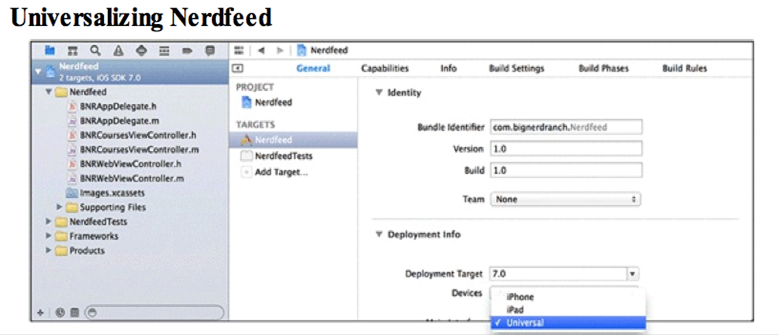
(1)As you built Nerdfeed, you were careful about the device differences in the classes used.
(2)Nerdfeed is still a relatively simple application. It is always easier to universalize an application early in development. As an application grows, its details get buried in the massive pile of code. Finding and fixing issues as you are writing code is much easier than coming back later. Details are harder to find, and there is the risk of breaking what already works.
iOS Programming UISplitViewController的更多相关文章
- Head First iOS Programming
内部分享: Head First iOS Programming http://www.slideshare.net/tedzhaoxa/head-first-ios-programming-4606 ...
- iOS Programming Recipe 6: Creating a custom UIView using a Nib
iOS Programming Recipe 6: Creating a custom UIView using a Nib JANUARY 7, 2013 BY MIKETT 12 COMMENTS ...
- iOS Programming Autorotation, Popover Controllers, and Modal View Controllers
iOS Programming Autorotation, Popover Controllers, and Modal View Controllers 自动旋转,Popover 控制器,Moda ...
- iOS Programming Controlling Animations 动画
iOS Programming Controlling Animations 动画 The word "animation" is derived from a Latin wor ...
- iOS Programming UIStoryboard 故事板
iOS Programming UIStoryboard In this chapter, you will use a storyboard instead. Storyboards are a f ...
- iOS Programming NSUserDefaults
iOS Programming NSUserDefaults When you start an app for the first time, it uses its factory settin ...
- iOS Programming Localization 本地化
iOS Programming Localization 本地化 Internationalization is making sure your native cultural informatio ...
- iOS Programming State Restoration 状态存储
iOS Programming State Restoration 状态存储 If iOS ever needs more memory and your application is in the ...
- iOS Programming UIWebView 2
iOS Programming UIWebView 1 Instances of UIWebView render web content. UIWebView可以显示web content. In ...
随机推荐
- memmove 和 memcopy
1.memmove 函数原型:void *memmove(void *dest, const void *source, size_t count) 返回值说明:返回指向dest的void *指针 参 ...
- C项目实践--家庭财务管理系统
1.功能需求分析 家庭财务管理系统给家庭成员提供了一个管理家庭财务的平台,系统可以对家庭成员的收入和支出进行增加,删除.修改和查询等操作,并能统计总收入和总支出.其主要功能需求描述如下: (1)系统主 ...
- JavaScript基础简要
JavaScript 引用外部js : <script src="2.js"type="text/javascript"></scri ...
- MkDocs -- Project documentation with Markdown
/************************************************************************ * MkDocs -- Project docume ...
- BZOJ2874 训练士兵 主席树
[啊 首先 这是道权限题,然后本人显然是没有权限的 23咳3] 最近数据结构做的越来越少..然后 就跟上次一样 ,一做就是三四种不同写法. 等价的题面: 最近GY大神在sc2的天梯中被神族虐得很惨, ...
- linux 忘记root(这里以centos 6.5为例)密码的解决办法
在使用linux的过程中有时候会忘记root用户的密码(尤其是进行交接而文档内容不全的时候),这个时候我们就可以进入单用户模式来重置root用户密码.下面来讲解重置root密码的方式,也可以说是破解r ...
- 【WebRTC音频预处理单元APM的整体编译及使用 - android】
前言 在写[单独编译使用WebRTC的音频处理模块 - android]一文之前,就一直想直接把WebRTC的音频处理引擎VoE整个儿编译出来供自己的项目使用,但限于技术拙劣.时间紧迫,所以没能成功. ...
- (转)ASP.NET 4.0 尚未在 Web 服务器上注册
安装vs2010的时候忘记先安装IIS7了,导致出现了这个问题.经过网络查询发现解决方法如下: 运行:cmd命令,进入命令管理器, 输入:cd C:\\WINDOWS\\Microsoft.NET\\ ...
- Linux 软链接 硬链接 ln命令(简约说明版)
注意:路径使用绝对路径!! 解决方法: 当我们需要在不同的目录下用到同一个文件时,会用到以下命令. 命令:ln 作用:为某一个文件在另外一个位置建立一个同步的链接 语法:ln [option] 源文件 ...
- PHP中的连贯操作
连贯操作有什么好处?就是多行操作可以在一行之内完成,要进行连贯操作的方法必须返回$this,也就是当前类的对象实例,然后就可以进行连贯操作了,具体的实现代码如下所示. <?php /** * p ...