
Open Dynamics Engine for Linux 安装笔记
下载
在Bitbucket上可以下载到最新的版本(截止目前为0.14版)
或者直接用wget下载
wget "https://bitbucket.org/odedevs/ode/downloads/ode-0.14.tar.gz"
编译
假设安装到/usr下
# 解压

tar xf ode-0.14.tar.gz

cd ode-0.14

# 依赖安装

sudo apt install automake -y

# 配置

./bootstrap

./configure --prefix=/usr --enable-double-precision --enable-static=PKGS --with-drawstuff=X11 --with-trimesh=opcode --enable-demos --enable-libccd

# --prefix=/usr  安装到/usr下,不加这一项则默认安装到/usr/local下

# --enable-double-precision  启用双精度浮点数

# --enable-static=PKGS 生成静态链接库

# --with-drawstuff=X11  启用极简图形库,基于X11

# --enable-demos  例子啦╮(╯▽╰)╭

# --enable-libccd 碰撞检测库

make   # 编译啦╮(╯_╰)╭
安装
sudo make install   # 安装啦

echo '╮(╯▽╰)╭'
注意,由于drawstuff没有默认安装_(:3」∠)_,因此需要手动安装。
sudo mkdir /usr/include/drawstuff

sudo cp ./include/drawstuff/drawstuff.h ./include/drawstuff/version.h /usr/include/drawstuff

sudo cp ./drawstuff/src/.lib/libdrawstuff.a ./drawstuff/src/.lib/libdrawstuff.la /usr/lib

# 更新库缓存

sudo ldconfig
使用库
drawstuff在链接时需要同时链接X11、GL、GLU、m这些库,若使用cmake,可以添加这一句:
target_link_libraries(target ode drawstuff X11 GLU GL m)
另外,drawstuff需要贴图,有自带的,位于<ode-0.14>/drawstuff/textures/下。需要自行复制到工程目录下。
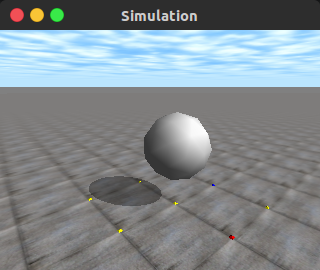
测试代码
来源:HOWTO simple bouncing sphere - ODE Wiki
#include <ode/ode.h>

#include <drawstuff/drawstuff.h>

// dynamics and collision objects

static dWorldID world;

static dSpaceID space;

static dBodyID body;

static dGeomID geom;

static dMass m;

static dJointGroupID contactgroup;

// this is called by dSpaceCollide when two objects in space are

// potentially colliding.

static void nearCallback (void *data, dGeomID o1, dGeomID o2)

{

    dBodyID b1 = dGeomGetBody(o1);

    dBodyID b2 = dGeomGetBody(o2);

    dContact contact;

    contact.surface.mode = dContactBounce | dContactSoftCFM;

    // friction parameter

    contact.surface.mu = dInfinity;

    // bounce is the amount of "bouncyness".

    contact.surface.bounce = 0.9;

    // bounce_vel is the minimum incoming velocity to cause a bounce

    contact.surface.bounce_vel = 0.1;

    // constraint force mixing parameter

    contact.surface.soft_cfm = 0.001;

    if (int numc = dCollide (o1,o2,1,&contact.geom,sizeof(dContact))) {

        dJointID c = dJointCreateContact (world,contactgroup,&contact);

        dJointAttach (c,b1,b2);

    }

}

// start simulation - set viewpoint

static void start()

{

    static float xyz[3] = {2.0f,-2.0f,1.7600f};

    static float hpr[3] = {140.000f,-17.0000f,0.0000f};

    dsSetViewpoint (xyz,hpr);

}

// simulation loop

static void simLoop (int pause)

{

    const dReal *pos;

    const dReal *R;

    // find collisions and add contact joints

    dSpaceCollide (space,0,&nearCallback);

    // step the simulation

    dWorldQuickStep (world,0.01);

    // remove all contact joints

    dJointGroupEmpty (contactgroup);

    // redraw sphere at new location

    pos = dGeomGetPosition (geom);

    R = dGeomGetRotation (geom);

    dsDrawSphereD( pos,  R, dGeomSphereGetRadius (geom));

}

int main (int argc, char **argv)

{

    // setup pointers to drawstuff callback functions

    dsFunctions fn;

    fn.version = DS_VERSION;

    fn.start = &start;

    fn.step = &simLoop;

    fn.stop = 0;

    fn.command = 0;

    fn.path_to_textures = "../textures";   // 注意贴图路径!

    dInitODE ();

    // create world

    world = dWorldCreate ();

    space = dHashSpaceCreate (0);

    dWorldSetGravity (world,0,0,-9.8);

    dWorldSetCFM (world,1e-5);

    dCreatePlane (space,0,0,1,0);

    contactgroup = dJointGroupCreate (0);

    // create object

    body = dBodyCreate (world);

    geom = dCreateSphere (space,0.5);

    dMassSetSphere (&m,1,0.5);

    dBodySetMass (body,&m);

    dGeomSetBody (geom,body);

    // set initial position

    dBodySetPosition (body,0,0,5);

    // run simulation

    dsSimulationLoop (argc,argv,320,240,&fn);

    // clean up

    dJointGroupDestroy (contactgroup);

    dSpaceDestroy (space);

    dWorldDestroy (world);

    dCloseODE();

    return 0;

}
References
[1] ODE Wiki, Manual: Install and Use,http://ode-wiki.org/wiki/index.php?title=Manual:_Install_and_Use, 2013-05-05
[2] ODE Wiki, HOWTO simple bouncing sphere, http://ode-wiki.org/wiki/index.php?title=HOWTO_simple_bouncing_sphere, 2012-01-08
[3] 小胖, 在 Ubuntu 14.04 下安装 Open Dynamics Engine (ODE) 0.14, http://czhou.cc/2016/04/29/install-ode-on-ubuntu/, 2016-04-29
Open Dynamics Engine for Linux 安装笔记的更多相关文章
- Gentoo(贱兔)Linux安装笔记
网上对于Gentoo Linux 的教程少之又少,所以这里我将自己的安装记录贴出来 希望对正在研究Gentoo 的小伙伴们有帮助! 1.确认连接到互联网,使用net-setup工具配置网络 roo ...
- 开始使用gentoo linux——gentoo安装笔记(上)
gentoo linux安装笔记(上) 家里有一台破旧的富士通笔记本,08年至今质量依然杠杠的,但是性能已经不能和现代超极本同日而语,装上了ubuntu更是不敢恭维,别提gnome和kde的linux ...
- 开始使用gentoo linux——gentoo安装笔记(下)
gentoo安装笔记(下) 上一章,已经对操作系统安装做了充分准备,并且已经从livecd(u盘系统)切换进入了gentoo安装环境中. 不过现在才是真正的开始!打起精神!这可不是在装ubuntu! ...
- Linux:Gentoo系统的安装笔记(三)
这期笔记将是gentoo安装的最后一期了,虽然已经配置内核了,但是也要完成剩下的安装步骤,这离安装完成已经不远了,继续加油!!! 如果中断了安装,请看第二期的笔记进行恢复安装,但请重新编译一次内核,否 ...
- Linux:Gentoo系统的安装笔记(一)
这次我选择安装Gentoo,用来做我学习的笔记.这次我是使用虚拟机安装Gentoo,一是方便操作,二是可以看着手册,一边看一边操作,严格按照手册上的步骤执行,一般是不会出现问题的. 查看手册最好学会看 ...
- Linux 学习笔记 1 使用最小的系统,从分区安装系统开始
我们常用的linux系统在安装过程中大多都省略了对系统进行分区的操作,以至于后期,不了解什么是分区以及分区当中最基本的一些概念, 我们不说最细的知识,只求了解这个过程,那直接步入正题,开始第一节的学习 ...
- [linux笔记]理清linux安装程序用到的(configure, make, make install)
我作为一名经常和linux打交道的程序员,每次在linux安装软件都祈求可以用——apt-get,yum,brew等应用程序管理器安装,有的时候事与愿违,你只能自己编译安装-wtf,说好的美丽世界呢? ...
- linux学习笔记2:linux 下java开发的软件安装
一.java ee开发环境的搭建 1.jdk的安装步骤 (1)首先必须要有安装文件,具体的可以去相关网站上下载,并制作iso文件 (2)将制作的iso文件挂载到linux系统上,并在虚拟机上将iso文 ...
- linux安装oracle笔记
linux安装oracle .增大swap空间,内存大于8G后swap跟内存同等大小即可 mkdir /home/swap cd /home/swap mkswap swapfile swapon s ...
随机推荐
- php调用whois接口域名查询
由两部分组成,一个index.php文件,一个whois的接口文件: <html> <head> <title>域名到期查询</title> <s ...
- Struts2的一个问题: 找不到struts.xml的路径问题
一. 最近在学习Struts2的一些知识,在使用Struts2搭建框架的时候,部署到服务器上的时候出现上面的问题: 三月 19, 2016 1:43:24 下午 org.apache.tomcat.u ...
- 周末“干活”之 Mesos Meetup
周末两天都是大雾霾天,作为运营也不能在家宅,告别了技术就得腿儿勤点儿. 非常感谢 Linker 的 Sam Chen 和 数人科技 的 CTO 共同组织的Mesos Meetup,OneAPM 最帅的 ...
- GridView使用CommandField删除列实现删除时提示确认框
在.net2005提供的GridView中我们可以直接添加一个CommandField删除列完后在它的RowDeleting事件中完成删除 GridView在使用CommandField删除时弹出提示 ...
- 图片缩放时java.lang.IllegalArgumentException: pointerIndex out of range解决方案
版权声明:本文为博主原创文章,未经博主允许不得转载. 06-03 20:45:24.143: E/AndroidRuntime(1230): FATAL EXCEPTION: main06-03 20 ...
- 创建安卓app的30个经验教训
在添加任何第三方party之前,请三思:这真的是一个成熟的项目吗? 如果一个东西用户看不到,就不要绘制它! 除非真的需要,否则别使用数据库: 达到65k方法数限制来的非常快,真的,非常快!不过 mul ...
- Inventory > INV.MTL_MATERIAL_TRANSACTIONS Show Error Msg: ORA-20100: File lxxx.tmp creation for FND_FILE failed.
Fixed Step. 1. Backup error data CREATE TABLE MMT_BACKUP_0805 AS SELECT * FROM INV.MTL_MATERIAL_T ...
- Using innodb_large_prefix to avoid ERROR #1071,Specified key was too long; max key length is 1000 bytes
Using innodb_large_prefix to avoid ERROR 1071 单列索引限制上面有提到单列索引限制767,起因是256×3-1.这个3是字符最大占用空间(ut ...
- ADDED_TO_STAGE 多次被调用
var mca:MovieClip=new MCA(); mca.addEventListener(Event.ADDED_TO_STAGE,addStageEvent); function addS ...
- poj2079
根据凸包的单峰性质,穷举第一个顶点然后先更新第三个顶点,再更新第二个顶点 ..] of longint; ans,n,t,k,i,j:longint; function cross(i,j,k:lon ...