
iOS在Cocoa Touch Static Library使用CocoaPods
1、在XCode中新建静态库工程:DDLogLib。
2、添加对外暴露接口的头文件DDLogLibHeader.h

3、命令行进入DDLogLib目录,运行pod init,并修改Podfile
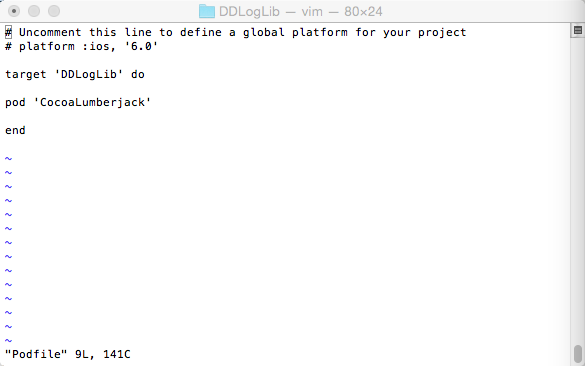
4、运行pod install,并打开DDLogLib.xcworkspace。
5、运行pod spec create DDLogLib,创建DDLogLib.podspec文件,并编辑。
# Be sure to run `pod spec lint DDLogLib.podspec' to ensure this is a
# valid spec and to remove all comments including this before submitting the spec.
#
# To learn more about Podspec attributes see http://docs.cocoapods.org/specification.html
# To see working Podspecs in the CocoaPods repo see https://github.com/CocoaPods/Specs/
#
Pod::Spec.new do |s|
# ――― Spec Metadata ―――――――――――――――――――――――――――――――――――――――――――――――――――――――――― #
#
# These will help people to find your library, and whilst it
# can feel like a chore to fill in it's definitely to your advantage. The
# summary should be tweet-length, and the description more in depth.
#
s.name = "DDLogLib"
s.version = "0.0.1"
s.summary = "A short description of DDLogLib."
s.description = <<-DESC
A longer description of DDLogLib in Markdown format.
* Think: Why did you write this? What is the focus? What does it do?
* CocoaPods will be using this to generate tags, and improve search results.
* Try to keep it short, snappy and to the point.
* Finally, don't worry about the indent, CocoaPods strips it!
DESC
s.homepage = "http://EXAMPLE/DDLogLib"
# s.screenshots = "www.example.com/screenshots_1.gif", "www.example.com/screenshots_2.gif"
# ――― Spec License ――――――――――――――――――――――――――――――――――――――――――――――――――――――――――― #
#
# Licensing your code is important. See http://choosealicense.com for more info.
# CocoaPods will detect a license file if there is a named LICENSE*
# Popular ones are 'MIT', 'BSD' and 'Apache License, Version 2.0'.
#
s.license = "MIT (example)"
# s.license = { :type => "MIT", :file => "FILE_LICENSE" }
# ――― Author Metadata ――――――――――――――――――――――――――――――――――――――――――――――――――――――――― #
#
# Specify the authors of the library, with email addresses. Email addresses
# of the authors are extracted from the SCM log. E.g. $ git log. CocoaPods also
# accepts just a name if you'd rather not provide an email address.
#
# Specify a social_media_url where others can refer to, for example a twitter
# profile URL.
#
s.author = { "hu5675" => "hu5675@126.com" }
# Or just: s.author = "hu5675"
# s.authors = { "hu5675" => "hu5675@126.com" }
# s.social_media_url = "http://twitter.com/hu5675"
# ――― Platform Specifics ――――――――――――――――――――――――――――――――――――――――――――――――――――――― #
#
# If this Pod runs only on iOS or OS X, then specify the platform and
# the deployment target. You can optionally include the target after the platform.
#
# s.platform = :ios
# s.platform = :ios, "5.0"
# When using multiple platforms
# s.ios.deployment_target = "5.0"
# s.osx.deployment_target = "10.7"
# s.watchos.deployment_target = "2.0"
# ――― Source Location ―――――――――――――――――――――――――――――――――――――――――――――――――――――――――― #
#
# Specify the location from where the source should be retrieved.
# Supports git, hg, bzr, svn and HTTP.
#
s.source = { :git => "http://EXAMPLE/DDLogLib.git", :tag => "0.0.1" }
# ――― Source Code ―――――――――――――――――――――――――――――――――――――――――――――――――――――――――――――― #
#
# CocoaPods is smart about how it includes source code. For source files
# giving a folder will include any swift, h, m, mm, c & cpp files.
# For header files it will include any header in the folder.
# Not including the public_header_files will make all headers public.
#
s.source_files = "DDLogLib", "DDLogLib/**/*.{h,m}"
s.exclude_files = "DDLogLib/Exclude"
s.public_header_files = "DDLogLib/**/*.h"
# ――― Resources ―――――――――――――――――――――――――――――――――――――――――――――――――――――――――――――――― #
#
# A list of resources included with the Pod. These are copied into the
# target bundle with a build phase script. Anything else will be cleaned.
# You can preserve files from being cleaned, please don't preserve
# non-essential files like tests, examples and documentation.
#
# s.resource = "icon.png"
s.resources = "DDLogLib/Resources/*.png"
# s.preserve_paths = "FilesToSave", "MoreFilesToSave"
# ――― Project Linking ―――――――――――――――――――――――――――――――――――――――――――――――――――――――――― #
#
# Link your library with frameworks, or libraries. Libraries do not include
# the lib prefix of their name.
#
s.framework = "SystemConfiguration"
# s.frameworks = "SomeFramework", "AnotherFramework"
# s.library = "iconv"
# s.libraries = "iconv", "xml2"
# ――― Project Settings ――――――――――――――――――――――――――――――――――――――――――――――――――――――――― #
#
# If your library depends on compiler flags you can set them in the xcconfig hash
# where they will only apply to your library. If you depend on other Podspecs
# you can include multiple dependencies to ensure it works.
# s.requires_arc = true
# s.xcconfig = { "HEADER_SEARCH_PATHS" => "$(SDKROOT)/usr/include/libxml2" }
s.dependency "CocoaLumberjack"
#s.dependency "other lib"
6、新建工程DDLogLibAPP,与DDLogLib保持在同一目录,命令行进入DDLogLibAPP,运行pod init,并编辑。
# Uncomment this line to define a global platform for your project
# platform :ios, '6.0'
target 'DDLogLibAPP' do
pod 'DDLogLib', :path => '../DDLogLib'
end
target 'DDLogLibAPPTests' do
end
target 'DDLogLibAPPUITests' do
end
7、运行pod install,并打开DDLogLibAPP.xcworkspace编译。
8、在DDLogLib实现printABC方法。
DDLogLib.m
#import "DDLogLib.h"
#import "DDLog.h"
#import "DDFileLogger.h"
#import "DDTTYLogger.h"
static int ddLogLevel = LOG_LEVEL_INFO;
@implementation DDLogLib
- (void)printABC{
NSLog(@"ABC");
DDLogFileManagerDefault *logFileManager = [[DDLogFileManagerDefault alloc] init];
DDFileLogger* _fileLogger = [[DDFileLogger alloc] initWithLogFileManager:logFileManager];
_fileLogger.rollingFrequency = 60 * 60 * 24; // 24 hour rolling
_fileLogger.logFileManager.maximumNumberOfLogFiles = 7; // a weeks worth
//#ifdef DEBUG
[DDLog addLogger:[DDTTYLogger sharedInstance]];// this is log to xcode window.
//#else
[DDLog addLogger:_fileLogger];
//#endif
DDLogInfo(@"DDLog ABC");
}
@end
DDLogLib.h
#import <Foundation/Foundation.h>
@interface DDLogLib : NSObject
- (void)printABC;
@end
9、在DDLogLibAPP中调用。
#import "AppDelegate.h"
#import <DDLogLib/DDLogLib.h>
@interface AppDelegate ()
@end
@implementation AppDelegate
- (BOOL)application:(UIApplication *)application didFinishLaunchingWithOptions:(NSDictionary *)launchOptions {
// Override point for customization after application launch.
DDLogLib* logLib = [[DDLogLib alloc] init];
[logLib printABC];
return YES;
}
10、运行DDLogLibAPP,一切正常。
11、在DDLogLibAPP中直接使用DDLog。
#import "AppDelegate.h"
#import <DDLogLib/DDLogLib.h>
#import <DDLog.h>
#import <DDFileLogger.h>
#import <DDTTYLogger.h>
static int ddLogLevel = LOG_LEVEL_INFO;
@interface AppDelegate ()
@end
@implementation AppDelegate
- (BOOL)application:(UIApplication *)application didFinishLaunchingWithOptions:(NSDictionary *)launchOptions {
// Override point for customization after application launch.
//app 通过静态库调用
// DDLogLib* logLib = [[DDLogLib alloc] init];
// [logLib printABC];
//app 直接调用
DDLogFileManagerDefault *logFileManager = [[DDLogFileManagerDefault alloc] init];
DDFileLogger* _fileLogger = [[DDFileLogger alloc] initWithLogFileManager:logFileManager];
_fileLogger.rollingFrequency = 60 * 60 * 24; // 24 hour rolling
_fileLogger.logFileManager.maximumNumberOfLogFiles = 7; // a weeks worth
//#ifdef DEBUG
[DDLog addLogger:[DDTTYLogger sharedInstance]];// this is log to xcode window.
//#else
[DDLog addLogger:_fileLogger];
//#endif
DDLogInfo(@"application ABC");
return YES;
}
12、运行正常打印。
iOS在Cocoa Touch Static Library使用CocoaPods的更多相关文章
- ios中静态库的创建和使用、制作通用静态库(Cocoa Touch Static Library)
创建静态库可能出于以下几个理由: 1.你想将工具类代码或者第三方插件快捷的分享给其他人而无需拷贝大量文件.2.你想让一些通用代码处于自己的掌控之下,以便于修复和升级.3.你想将库共享给其他人,但不想让 ...
- 使用Xcode 5创建Cocoa Touch Static Library(静态库)
转自:http://blog.csdn.net/jymn_chen/article/details/21036035 首先科普一下静态库的相关知识: 程序编译一般需经预处理.编译.汇编和链接几个步骤. ...
- iOS制作Static Library(静态库),实现多工程的连编
在iOS开发中,我们会发现一些偏底层或基础代码是直接可以复用的,当我们换一个项目,改变的只需要是偏上层的业务逻辑代码,所以我们可以把这部分基础代码制作为一个静态库static library,并不断扩 ...
- iOS 元件组件-创建静态库static library
概述 在项目开发的过程中,经常使用静态库文件.例如两个公司之间业务交流,不可能把源代码都发送给另一个公司,这时候将私密内容打包成静态库,别人只能调用接口,而不能知道其中实现的细节. 库是一些没有mai ...
- Cocoa Touch事件处理流程--响应者链
Cocoa Touch事件处理流程--响应者链 作者:wangzz 原文地址:http://blog.csdn.net/wzzvictory/article/details/9264335 转载请注明 ...
- Cocoa Touch(一)开发基础:Xcode概念、目录结构、设计模式、代码风格
Xcode相关概念: 概念:project 指一个项目,该项目会负责管理软件产品的全部源代码文件.全部资源文件.相关配置,一个Project可以包含多个Target. 概念:target 一个targ ...
- Swift—Cocoa Touch设计模式-备
目标(Target)与动作(Action)是iOS和OS X应用开发的中事件处理机制. 问题提出 如图所示是一个ButtonLabelSample案例设计原型图,其中包含一个标签和一个按钮,当点击 ...
- UI - Cocoa Touch框架
Cocoa Touch 层 Cocoa Touch层包括创建 iOS应用程序所需的关键框架. 上至实现应用程序可视界面,下至与高级系统服务交互.都须要该层技术提供底层基础.在开发应用程序的时候.请尽可 ...
- iOS 快捷下载和安装并使用CocoaPods
CocoaPods是什么? 当你开发iOS应用时,会经常使用到很多第三方开源类库,比如JSONKit,AFNetWorking等等.可能某个类库又用到其他类库,所以要使用它,手动一个个去下载所需类库十 ...
随机推荐
- 关于javascript
Client-Language-----------------------JavaScript/Object-C/Java/C# HTML5 DOM/Template/Data/Ajax/Regul ...
- poj2228
这显然是一道环形dp的题目 处理环形我们都是要转化为线性来做 一般有这么两种方法处理 复制一段到最后 (比如说noip的能量项链) 考查环形对dp的影响然后分类讨论(比如bzoj1040) 这道题我们 ...
- 线段树(维护最大值):HDU Billboard
Billboard Time Limit: 20000/8000 MS (Java/Others) Memory Limit: 32768/32768 K (Java/Others)Total ...
- 【最小生成树】Codeforces 707B Bakery
题目链接: http://codeforces.com/problemset/problem/707/B 题目大意: 给你N个点M条无向边,其中有K个面粉站,现在一个人要在不是面粉站的点上开店,问到面 ...
- 动软代码生成器 可用于生成Entity层,可更改模板 /codesmith 也可以
动软代码生成器官方下载地址:http://www.maticsoft.com/download.aspx 教程:http://jingyan.baidu.com/article/219f4bf7dfd ...
- baidu面试题
百度:http://blog.chinaunix.net/uid-26602509-id-3306451.html http://lvwenwen.iteye.com/blog/1504379
- 实时控制软件第一次作业--CNC软件系统分析
作者:李君威U201310747 一.该系统有哪些强实时功能需求?需要对哪些实时事件进行实时响应,对允许的实时延迟的数量级进行估计. 答:在数控系统中,位置控制.插补计算.紧急控制等严格实时性任务需要 ...
- Android Intent简介
Intent对象主要用来在Android程序的Activity,Service和BroadcastReceiver这3大组件之间传输数据,而针对这3大组件,有独立的Intent传输机制,分别如下:1. ...
- 在Quick-cocos2dx中使用云风pbc解析Protocol Buffers,支持win、mac、ios、android
本例主要介绍 如何将 pbc 集成到quick-cocos2dx框架中,让我们的cocos2dx客户端Lua拥有编解码Protocol Buffers能力. 参考: 云风pbc的用法: http:// ...
- [Angular 2] Using Pipes to Filter Data
Pipes allow you to change data inside of templates without having to worry about changing it in the ...