
Android项目开发全程(四)-- 将网络返回的json字符串轻松转换成listview列表
前面几篇博文介绍了从项目搭建到获取网络字符串,对一个项目的前期整体工作进行了详细的介绍,本篇接着上篇介绍一下怎么样优雅将网络返回的json字符串轻松转换成listview列表。
先上图,看一下效果。
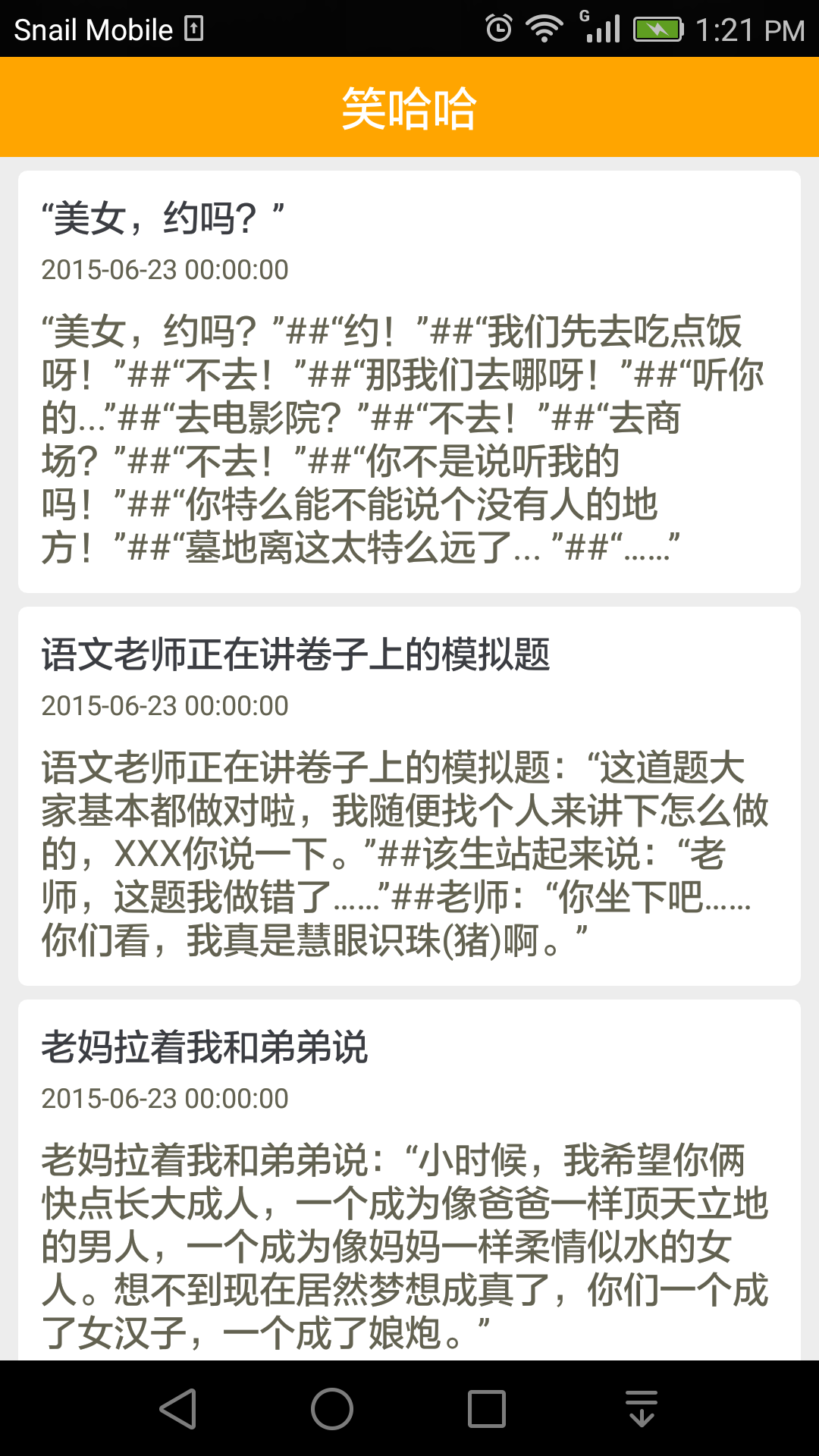
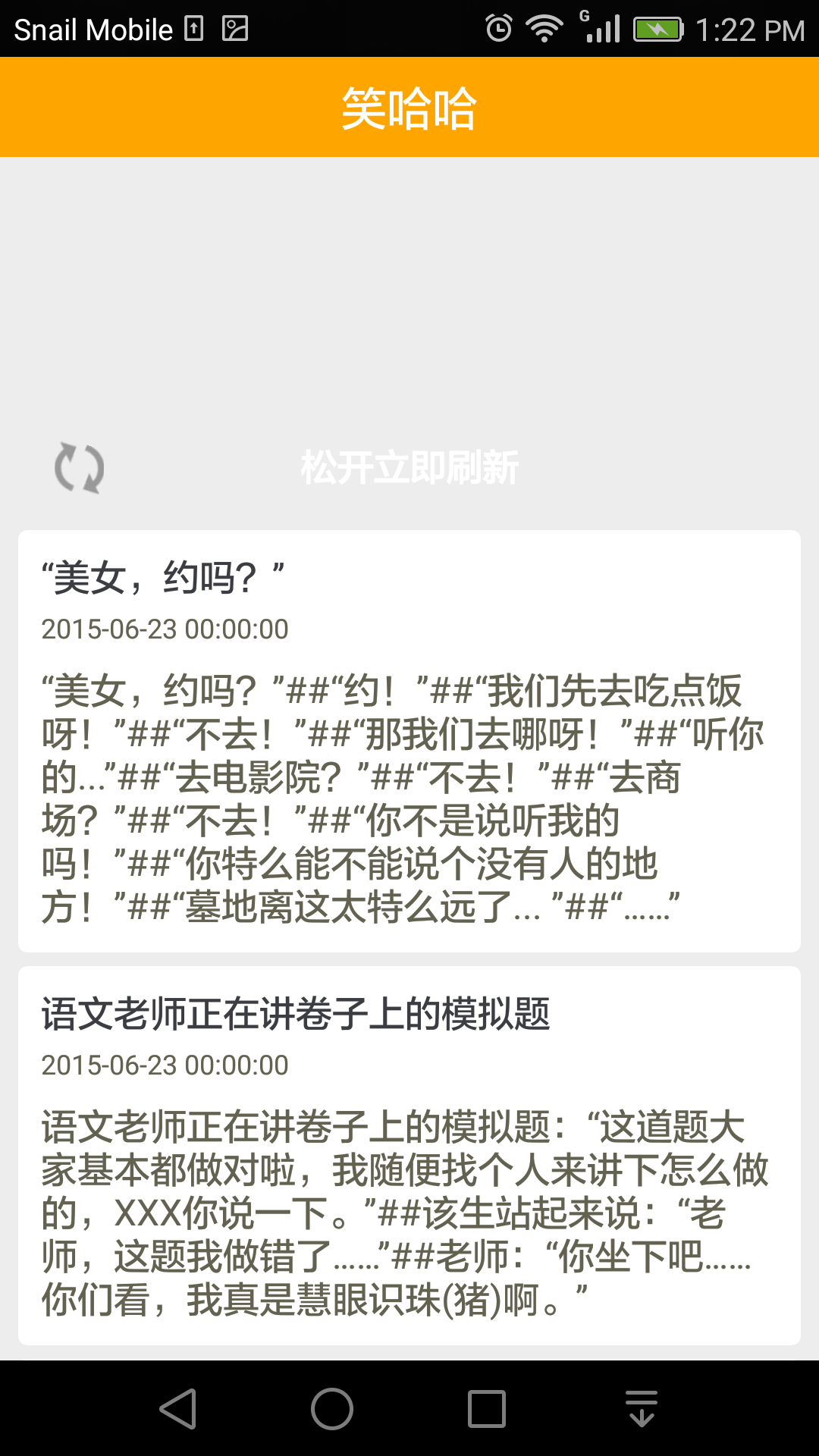
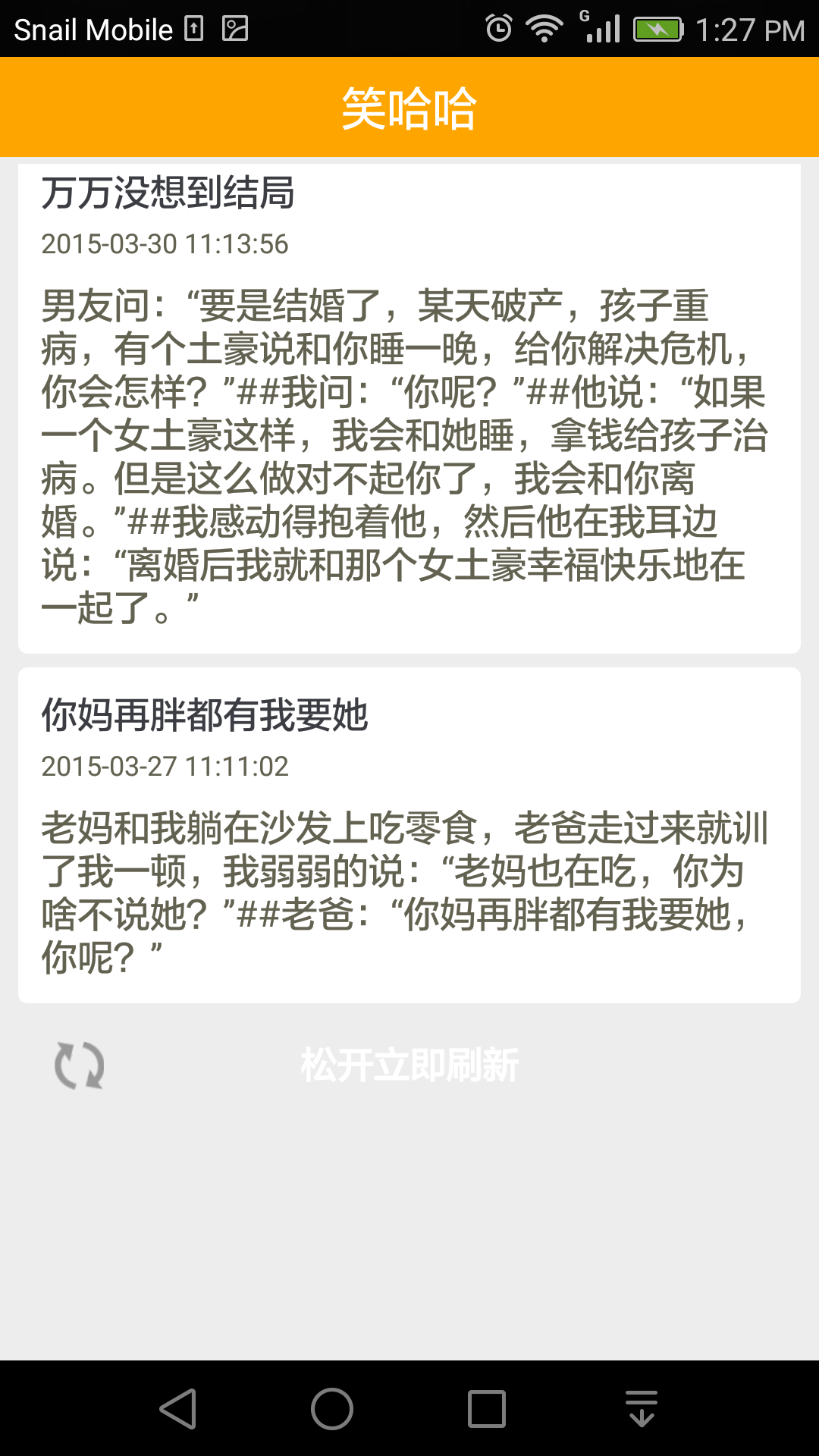
包括下拉刷新和上拉加载更多两个功能,怎样还算可以吧~,比起前几篇博文中的那一大片一大片的“乱码”看起来是不是舒服多了。
一、对界面面布局
1、Android默认的标题栏不太好看,咱们需要换成自己的。在AndroidManifest.xml文件中将APP主题设为NoTitleBar
 <application

         android:allowBackup="true"

         android:icon="@drawable/ic_launcher"

         android:label="@string/app_name"

         android:theme="@android:style/Theme.NoTitleBar" >

 </application>
2、然后在每个局部文件中加上自己创建的标题,为了以后便于管理,最好将标题作为一个单独的布局文件(title_layout.xml),然后通过include引用。
 <LinearLayout xmlns:android="http://schemas.android.com/apk/res/android"

     xmlns:tools="http://schemas.android.com/tools"

     android:layout_width="match_parent"

     android:layout_height="44dp"

     android:orientation="horizontal" >

     <TextView

         android:id="@+id/app_title"

         android:layout_width="fill_parent"

         android:layout_height="44dp"

         android:gravity="center"

         android:background="#FFA500"

         android:textColor="#FFF"

         android:textSize="20dp"

         android:text="@string/app_name" />

 </LinearLayout>
3、创建主界面(activity_main.xml)
 <LinearLayout xmlns:android="http://schemas.android.com/apk/res/android"

     xmlns:tools="http://schemas.android.com/tools"

     android:layout_width="match_parent"

     android:layout_height="match_parent"

     android:background="#ededed"

     android:orientation="vertical" >

     <!--引用标题栏-->

     <include layout="@layout/title_layout"/>

     <!-- 第三方类库的listview,可下拉刷新,上拉加载更多 -->

     <com.handmark.pulltorefresh.library.PullToRefreshListView

         android:id="@+id/pull_refresh_list"

         android:layout_width="fill_parent"

         android:layout_height="fill_parent"

         android:layout_weight="1.0"

         android:layout_marginTop="3dp"

         android:cacheColorHint="#00000000"

         android:divider="@null"

         android:fadingEdge="none"

         android:fastScrollEnabled="false"

         android:footerDividersEnabled="false"

         android:headerDividersEnabled="false"

         android:scrollbars="none"

         android:smoothScrollbar="true"/>

 </LinearLayout>
这里通过include引用了title_layout.xml文件,listview控件使用的第三方类库PullToRefresh,下载时会一并给出。
4、创建listview的item布局(item_main.xml)
 <LinearLayout xmlns:android="http://schemas.android.com/apk/res/android"

     xmlns:tools="http://schemas.android.com/tools"

     android:layout_width="match_parent"

     android:layout_height="wrap_content"

     android:paddingTop="3dp"

     android:paddingBottom="3dp"

     android:paddingLeft="8dp"

     android:paddingRight="8dp"

     android:orientation="vertical" >

     <LinearLayout

         android:layout_width="match_parent"

         android:layout_height="wrap_content"

         android:padding="10dp"

         android:background="@drawable/bg_shape"

         android:orientation="vertical" >

         <TextView

             android:id="@+id/tv_title"

             android:layout_width="fill_parent"

             android:layout_height="wrap_content"

             android:singleLine="true"

             android:textColor="#3b3d42"

             android:textSize="16dp" />

         <TextView

             android:id="@+id/tv_time"

             android:layout_width="fill_parent"

             android:layout_height="wrap_content"

             android:layout_marginTop="3dp"

             android:textColor="#636251"

             android:textSize="12dp" />

         <TextView

             android:id="@+id/tv_content"

             android:layout_width="fill_parent"

             android:layout_height="wrap_content"

             android:textColor="#636251"

             android:textSize="16dp"

             android:layout_marginTop="8dp" />

     </LinearLayout>

 </LinearLayout>
二、创建Adapter(MainAdapter.java)
 public class MainAdapter extends BaseAdapter {

     private Context context;

     private List<Map<String, Object>> list;

     private LayoutInflater inflater;

     public MainAdapter(Context context, List<Map<String, Object>> list) {

         this.context = context;

         inflater = inflater.from(context);

         this.list = list;

     }

     @Override

     public int getCount() {

         return list.size();

     }

     @Override

     public Object getItem(int arg0) {

         return list.get(arg0);

     }

     @Override

     public long getItemId(int arg0) {

         return arg0;

     }

     @Override

     public View getView(int position, View convertView, ViewGroup parent) {

         Holder holder = null;

         Map<String, Object> map = list.get(position);

         if(holder == null){

             holder = new Holder();

             convertView = inflater.inflate(R.layout.item_main, null);

             holder.title = (TextView) convertView.findViewById(R.id.tv_title);

             holder.time = (TextView) convertView.findViewById(R.id.tv_time);

             holder.content = (TextView) convertView.findViewById(R.id.tv_content);

             convertView.setTag(holder);

         }

         holder.title.setText(map.get("title").toString());

         holder.time.setText(map.get("publishDate").toString());

         holder.content.setText(map.get("content").toString());

         return convertView;

     }

     class Holder {

         public TextView title;

         public TextView time;

         public TextView content;

     }

 }
这里的MainAdapter继承了BaseAdapter,为listview提供适配器。
三、在MainActivity操作数据(分步讲解)
1、初始化pullRefreshList(是一个PullToRefreshListView,第三方类库PullToRefresh,可上拉刷新,下拉加载更多)
 //初始化pullRefreshList

     public void initListView(){

         pullRefreshList.setMode(Mode.BOTH);

         layoutProxy = pullRefreshList.getLoadingLayoutProxy(true, false);

         layoutProxy.setPullLabel("下拉刷新");

         layoutProxy.setReleaseLabel("松开立即刷新");

         layoutProxy.setRefreshingLabel("正在载入");

         layoutProxybottom = pullRefreshList.getLoadingLayoutProxy(false, true);

         layoutProxybottom.setPullLabel("上拉加载更多");

         layoutProxybottom.setReleaseLabel("松开立即刷新");

         layoutProxybottom.setRefreshingLabel("正在载入");

         pullRefreshList.setOnRefreshListener(new MyRefresh());

         listView = pullRefreshList.getRefreshableView();

         lists = new ArrayList<Map<String,Object>>();

         adapter = new MainAdapter(getApplicationContext(), lists);

         listView.setAdapter(adapter);

     }
2、设置pullRefreshList的刷新监听器,当上拉是表示刷新,将参数page设为第一页,提交请求。当下拉时表示加载更多,将page+1,然后提交请求。
 class MyRefresh implements OnRefreshListener2<ListView>{

     //上拉是回调此方法

         @Override

         public void onPullDownToRefresh(PullToRefreshBase<ListView> refreshView) {

             page = 1;

             getNetData.getLaughBy360(REQUEST_360LAUGH_CODE, page + "");

         }

     //下拉时回调此方法

         @Override

         public void onPullUpToRefresh(PullToRefreshBase<ListView> refreshView) {

             if(page < 34){  //目前接口中一个有34页数据

                 page += 1;

                 getNetData.getLaughBy360(REQUEST_360LAUGH_CODE, page + "");

                 mHandler.sendEmptyMessage(DIALOG_SHOW);

             } else {

                 pullRefreshList.onRefreshComplete();

                 Toast.makeText(getApplicationContext(), "已经是最后一页了", Toast.LENGTH_SHORT).show();

             }

         }

     }
3、在网络请求的回调方法中,利用jackson工具的ObjectMapper可以很容易的将json字符串转换成Map(也可根据需要转换成List、对象等等)
 public void onCallBackSuccessed(int notify, String result) {

         if(notify == REQUEST_360LAUGH_CODE){

             try {

                 //使用Jackson工具的ObjectMapper直接将json字符串转换成Map格式

                 Map<String, Object> map = objectMapper.readValue(result, Map.class);

                 List<Map<String, Object>> list = (List<Map<String, Object>>) map.get("jokes");

                 if(page == 1) {

                     lists.clear();

                 }

                 if(list.size() == 0){

                     Toast.makeText(getApplicationContext(), "木有笑话了", Toast.LENGTH_SHORT).show();

                 } else {

                     lists.addAll(list);

                     //改变adapter数据

                     adapter.notifyDataSetChanged();

                 }

             } catch (JsonParseException e) {

                 e.printStackTrace();

             } catch (JsonMappingException e) {

                 e.printStackTrace();

             } catch (IOException e) {

                 e.printStackTrace();

             }

         }

         mHandler.sendEmptyMessage(DIALOG_CONCEL);

         pullRefreshList.onRefreshComplete();

     }
分析一下,这里每次从网络上获取的结果转成后都先加入到一个临时的list中,当page=1时,说明此事是上拉刷新或者首次请求。这时候将直接将lists清空来接受最新数据,当page !=1 时说明是加载更多的请求,无需清空lists,如果新返回的数据不为空则将list加入到lists中,然后通知adapter数据改变。
别忘了设置onRefreshComplete完成刷新状态。
最后,整个的MainActivity.java如下:
 package com.laughdemo.main;

 import java.io.IOException;

 import java.util.ArrayList;

 import java.util.List;

 import java.util.Map;

 import net.tsz.afinal.annotation.view.ViewInject;

 import org.codehaus.jackson.JsonParseException;

 import org.codehaus.jackson.map.JsonMappingException;

 import android.os.Bundle;

 import android.widget.ListView;

 import android.widget.Toast;

 import com.handmark.pulltorefresh.library.ILoadingLayout;

 import com.handmark.pulltorefresh.library.PullToRefreshBase;

 import com.handmark.pulltorefresh.library.PullToRefreshBase.Mode;

 import com.handmark.pulltorefresh.library.PullToRefreshBase.OnRefreshListener2;

 import com.handmark.pulltorefresh.library.PullToRefreshListView;

 import com.laughdemo.adapter.MainAdapter;

 import com.laughdemo.http.DataCallBack;

 import com.laughdemo.http.GetNetData;

 import com.laughdemo.utils.Constants;

 /**

  * 主窗体类

  * @author 刘伟 2015.7.3

  */

 public class MainActivity extends BaseActivity implements Constants, DataCallBack{

     final String TAG = "MainActivity";

     GetNetData getNetData;

     MainAdapter adapter;

     private int page = 1;

     ListView listView;

     List<Map<String, Object>> lists;

     private ILoadingLayout layoutProxy;

     private ILoadingLayout layoutProxybottom;

     @ViewInject(id=R.id.pull_refresh_list) PullToRefreshListView pullRefreshList;

     @Override

     protected void onCreate(Bundle savedInstanceState) {

         super.onCreate(savedInstanceState);

         setContentView(R.layout.activity_main);

         initListView();

         getNetData = new GetNetData(this);

         getNetData.getLaughBy360(REQUEST_360LAUGH_CODE, page + "");

         mHandler.sendEmptyMessage(DIALOG_SHOW);

     }

     //初始化pullRefreshList

     public void initListView(){

         pullRefreshList.setMode(Mode.BOTH);

         layoutProxy = pullRefreshList.getLoadingLayoutProxy(true, false);

         layoutProxy.setPullLabel("下拉刷新");

         layoutProxy.setReleaseLabel("松开立即刷新");

         layoutProxy.setRefreshingLabel("正在载入");

         layoutProxybottom = pullRefreshList.getLoadingLayoutProxy(false, true);

         layoutProxybottom.setPullLabel("上拉加载更多");

         layoutProxybottom.setReleaseLabel("松开立即刷新");

         layoutProxybottom.setRefreshingLabel("正在载入");

         pullRefreshList.setOnRefreshListener(new MyRefresh());

         listView = pullRefreshList.getRefreshableView();

         lists = new ArrayList<Map<String,Object>>();

         adapter = new MainAdapter(getApplicationContext(), lists);

         listView.setAdapter(adapter);

     }

     class MyRefresh implements OnRefreshListener2<ListView>{

         @Override

         public void onPullDownToRefresh(PullToRefreshBase<ListView> refreshView) {

             page = 1;

             getNetData.getLaughBy360(REQUEST_360LAUGH_CODE, page + "");

         }

         @Override

         public void onPullUpToRefresh(PullToRefreshBase<ListView> refreshView) {

             if(page < 34){

                 page += 1;

                 getNetData.getLaughBy360(REQUEST_360LAUGH_CODE, page + "");

                 mHandler.sendEmptyMessage(DIALOG_SHOW);

             } else {

                 pullRefreshList.onRefreshComplete();

                 Toast.makeText(getApplicationContext(), "已经是最后一页了", Toast.LENGTH_SHORT).show();

             }

         }

     }

     @Override

     public void onCallBackSuccessed(int notify, String result) {

         if(notify == REQUEST_360LAUGH_CODE){

             try {

                 //使用Jackson工具的ObjectMapper直接将json字符串转换成Map格式

                 Map<String, Object> map = objectMapper.readValue(result, Map.class);

                 List<Map<String, Object>> list = (List<Map<String, Object>>) map.get("jokes");

                 if(page == 1) {

                     lists.clear();

                 }

                 if(list.size() == 0){

                     Toast.makeText(getApplicationContext(), "木有笑话了", Toast.LENGTH_SHORT).show();

                 } else {

                     lists.addAll(list);

                     //改变adapter数据

                     adapter.notifyDataSetChanged();

                 }

             } catch (JsonParseException e) {

                 e.printStackTrace();

             } catch (JsonMappingException e) {

                 e.printStackTrace();

             } catch (IOException e) {

                 e.printStackTrace();

             }

         }

         mHandler.sendEmptyMessage(DIALOG_CONCEL);

         pullRefreshList.onRefreshComplete();

     }

     @Override

     public void onCallBackFailed(int notify) {

         mHandler.sendEmptyMessage(DIALOG_CONCEL);

         pullRefreshList.onRefreshComplete();

         Toast.makeText(getApplicationContext(), "网络连接失败", Toast.LENGTH_LONG).show();

     }

 }
到这里,这个小项目的整个流程也可以算是介绍完了。有需要项目源码的可以直接留下邮箱索要,也可以去下载:http://download.csdn.net/detail/u012950035/8871581
本篇博文是在前几篇的基础上接着做的,如有不明白的地方还需参考前几篇:
Android项目开发全程(四)-- 将网络返回的json字符串轻松转换成listview列表的更多相关文章
- Android项目开发全程(三)-- 项目的前期搭建、网络请求封装是怎样实现的
在前两篇博文中已经做了铺垫,下面咱们就可以用前面介绍过的内容开始做一个小项目了(项目中会用到Afinal框架,不会用Afinal的童鞋可以先看一下上一篇博文),正所谓麻雀虽小,五脏俱全,这在里我会尽量 ...
- Android项目开发全程(二)--Afinal用法简单介绍
本篇博文接上篇的<Android项目开发全程(一)--创建工程>,主要介绍一下在本项目中用到的一个很重要的框架-Afinal,由于本系列博文重点是项目开发全程,所以在这里就先介绍一下本项目 ...
- linux下bom头导致的php调用php接口 返回的json字符串 无法转成 数组,即json字符串无法解码的问题
今天很是郁闷,写了一个php接口,返回的是标准的json字符串,但是调用的php 就是无法json_decode(),返回错误码为4,最后终于找到原因,原来是蒙一个文件中有bom头,最后采用一个命令 ...
- Android项目开发全程(一)--创建工程
每个程序员都知道,项目工程的整体架构对开发有着决定性的影响,在后续的开发工作中,能不能有效的减少代码的重复量和有效的人员分工取决于前期工程整体的架构.刚参加工作还不到一个月就意识到之前做的项目在架构方 ...
- ajax请求(二),后台返回的JSon字符串的转换
ajax请求,json的转换 $.ajax({ url : "../folder/isExistAddFolder.do?t="+new Date(), type : 'POST' ...
- 仿LOL项目开发第四天
---恢复内容开始--- 仿LOL项目开发第四天 by草帽 上节讲了几乎所有的更新版本的逻辑,那么这节课我们来补充界面框架的搭建的讲解. 我们知道游戏中的每个界面都有自己的一个类型:比如登陆界面,创建 ...
- 【转】android应用开发全程实录-你有多熟悉listview?---不错
原文网址:http://www.cnblogs.com/noTice520/archive/2011/12/05/2276379.html 今天给大家带来<android应用开发全程实录> ...
- android应用开发全程实录-你有多熟悉listview
http://blog.csdn.net/notice520/article/details/7040962 今天给大家带来<android应用开发全程实录>中关于listview和ada ...
- Android项目开发填坑记-Fragment的onBackPressed
Github版 CSDN版 知识背景 Fragment在当前的Android开发中,有两种引用方式,一个是 Android 3.0 时加入的,一个是supportV4包中的.这里简称为Fragment ...
随机推荐
- 现代密码学应用的范例-PGP
PGP(Pretty Good Privacy),是一个基于RSA公钥加密体系的邮件加密软件. 产生背景: 电子邮件在传输中使用SMTP协议存在这样的问题 1.无法保证邮件在传输过程中不被人偷看 2. ...
- [开发环境] Ubuntu12.04 Telnet服务设置
Ubuntu12.04默认未启用Telnet服务,配置Telnet服务步骤如下: 1. 安装和配置 安装openbsd-inetd: #sudo apt-get install openbsd-ine ...
- python 中对list做减法操作
问题描述:假设我有这样两个list, 一个是list1,list1 = [1, 2, 3, 4, 5] 一个是list2,list2 = [1, 4, 5] ...
- 从IT的角度思考BIM(三):敏捷开发
人们看到了远处BIM的美丽胜景和阻挡在眼前的宽广河流.有些人自信满满地跳入河中打算孤身游过彼岸,可是却失败了.有些人匆匆忙忙地造了船胡乱地滑向彼岸,可是也失败了. 要如何继续这段探索之旅? 无论是&l ...
- loadView 与 ViewDidLoad
每个ios开发者对loadView和viewDidLoad肯定都很熟悉,虽然这两个函数使用上真的是非常简单,但是和类似的initWithNibName/awakeFromNib/initWithCod ...
- Aircrack-ng官方文档翻译[中英对照]---Airmon-ng
Aircrack-ng官方文档翻译---Airmon-ng Description[简介] This script can be used to enable monitor mode on wire ...
- EasyUI 调用getSelections方法只能获取到一行的原因
$('#tt').datagrid({ url: 'GetDataJosn', title: 'DataGrid', width: 800, height: 300, pageSize: 10, id ...
- Hibernate 注解 没有加@Column一样会在数据库创建这些字段
Hibernate 注解 没有加@Column一样会在数据库创建这些字段 如下一个注解类: package com.hyy.hibernate.one_to_many.domain; import j ...
- Android 连接tomcat模拟登陆账号
<LinearLayout xmlns:android="http://schemas.android.com/apk/res/android" xmlns:tools=&q ...
- USB Type-C“三剑客”: 连接器、控制器和电缆
USB Type-C™是最新的有关电缆布线的USB连接器标准.您会看到,从笔记本电脑.智能手机.闪存到视频系统,这些设备上有一个小型可逆的Type-C连接器.由于Type-C电缆既可以给主机和设备提供 ...