
C#总结项目《影院售票系统》编写总结一
C#学习经历从基本语法结构到窗体再到面向对象终于走完了.NET初级程序员的道路,做为品德优良好学生更不能落下课程的总结项目-某某鸟《影院售票系统》。用了大概一天半的时间做完这个练手项目,先上效果截图一张
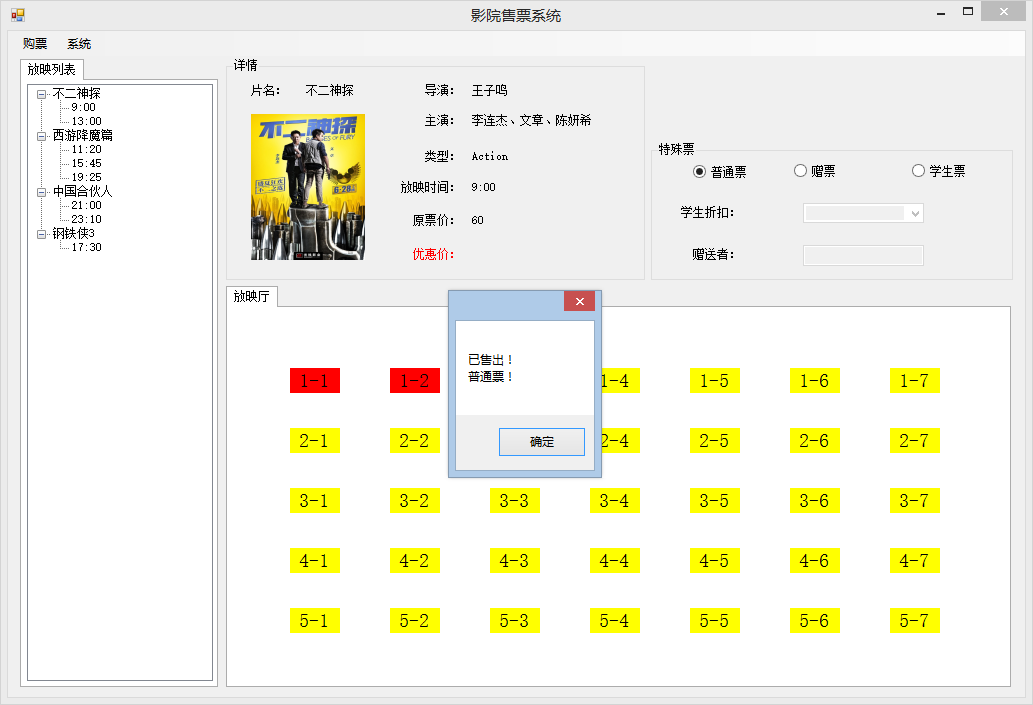
抽出时间做些这个对目前的我来说算不小的项目。
用到的知识点有:面向对象思想、TreeView、XML读取、File文件流、泛型集合,这里面对我来说难度最大的是面向对象与泛型集合的结合,看来学习一门编程语言的难点还是在设计思想上。
再来介绍一下项目需求:在影片列表中选择某个时段的一场电影,单击座位选择一个种类的电影票,并创建电影,计算价格并打印影票信息,然后该座位被置为红色表示已经售出。
影院每天更新放映列表,系统支持实时查看,包括电影放映场次时间、电影概况。
影院提供三类影票:普通票、赠票和学生票(赠票免费;学生票有折扣)
允许用户查看某场次座位的售出情况
支持购票,并允许用户选座
用户可以选择场次、影票类型及空闲座位进行购票,并打印电影票
系统可以保存销售情况,并允许对其进行恢复
二.问题分析
1.系统开发步骤
(1)明确需求
(2)设计类
(3)创建项目
(4)确定编码顺序
1.主窗体
2.查看新放映列表
3.查看电影介绍
4.查看影票票价
5.查看放映厅座位
6.购票和打印电影票
7.继续购票
(5)测试
三、类的设计
1.Seat:保存影院的座位信息,主要属性如下
座位号(SeatNum):string类型
座位卖出状态颜色(Color):System.Drawing.Color类型
2.Movie:电影类
电影名(MovieName):string类型
海报图片路径(Poster):string类型
导演名(Director):string类型
主演(Actor):string类型
电影类型(MovieType):MovieType自定义枚举类型
定价(Price):int类型
3.Ticket:电影票父类,保存电影票信息
放映场次(ScheduleItem):ScheduleItem自定义类
所属座位对象(Seat):Seat自定义类型
票价(Price):int类型
计算票价的虚方法CalcPrice()
打印售票信息的虚方法Print()
显示当前售出票信息的虚方法Show()
4.StudentTicket:学生票子类,继承父类Ticket
学生票的折扣(Discount):int类型
重写父类计算票价CalcPrice
重写父类打印售票信息的Print()
重写父类显示当前出票信息的Show()方法
5.FreeTicket:赠票子类,继承父类Ticket
获得赠票者的名字属性(CustomerName):string类型
重写父类计算票价CalcPrice()
重写父类打印售票信息Print()
重写父类显示当前出票信息Show()
6.ScheduleItem:影院每天计划放映计划的场次,保存每场电影的信息
放映时间属性(Time):string类型
本场所放映电影属性(Movie):Movie自定义类型
7.Schedule:放映计划类
放映场次属性(Items):自定义泛型集合Dictionary<string,ScheduleItem>
读取XML文件获取放映计划集合的LoadItems()方法
8.Cinema:影院类,保存放映计划和座位类
座位集合属性(Seat):自定义泛型集合Dictionary<string,Seat>
放映计划Schedule:Schedule自定义类型
已售出电影票的集合(SoldTicket):自定义泛型集合List<Ticket>
保存和读取售票情况的Save()和Load()方法
献上这9个类的代码,根据依赖编写类的顺序,不能完全按照上面顺序
 using System;

 using System.Collections.Generic;

 using System.Linq;

 using System.Text;

 using System.Threading.Tasks;

 using System.Drawing;

 namespace 影院售票系统

 {

     /// <summary>

     /// 保存影院的座位信息

     /// </summary>

     public class Seat

     {

         public Seat() { }

         public Seat(string seatNum,Color color)

         {

             this.SeatNum = seatNum;

             this.Color = color;

         }

         private string _seatNum;

         /// <summary>

         /// 座位号

         /// </summary>

         public string SeatNum

         {

             get { return _seatNum; }

             set { _seatNum = value; }

         }

         private Color _color;

         /// <summary>

         /// 座位卖出状态颜色

         /// </summary>

         public Color Color

         {

             get { return _color; }

             set { _color = value; }

         }

     }

 }
Seat
 using System;

 using System.Collections.Generic;

 using System.Linq;

 using System.Text;

 using System.Threading.Tasks;

 namespace 影院售票系统

 {

     /// <summary>

     /// 电影类

     /// </summary>

     public class Movie

     {

         private string _movieName;

         /// <summary>

         /// 电影名

         /// </summary>

         public string MovieName

         {

             get { return _movieName; }

             set { _movieName = value; }

         }

         private string _poster;

         /// <summary>

         /// 海报图片名

         /// </summary>

         public string Poster

         {

             get { return _poster; }

             set { _poster = value; }

         }

         private string _director;

         /// <summary>

         /// 导演名

         /// </summary>

         public string Director

         {

             get { return _director; }

             set { _director = value; }

         }

         private string _actor;

         /// <summary>

         /// 主演

         /// </summary>

         public string Actor

         {

             get { return _actor; }

             set { _actor = value; }

         }

         private int _price;

         /// <summary>

         /// 定价

         /// </summary>

         public int Price

         {

             get { return _price; }

             set { _price = value; }

         }

         /// <summary>

         /// 电影类型

         /// </summary>

         public MovieType MovieType { get; set; }

     }

     /// <summary>

     /// 电影类型,1喜剧2战争3爱情

     /// </summary>

     public enum MovieType

     {

         /// <summary>

         /// 动作片

         /// </summary>

         Action = ,

         /// <summary>

         /// 战争片

         /// </summary>

         War = ,

         /// <summary>

         /// 爱情片

         /// </summary>

         Comedy =

     }

 }
Movie
 using System;

 using System.Collections.Generic;

 using System.Linq;

 using System.Text;

 using System.Threading.Tasks;

 using System.Windows.Forms;

 using System.IO;

 namespace 影院售票系统

 {

     /// <summary>

     /// 电影票父类

     /// </summary>

     public class Ticket

     {

         public Ticket() { }

         public Ticket(ScheduleItem sch,Seat seat)

         {

             this.ScheduItem = sch;

             this.Seat = seat;

         }

         private Seat _seat = new Seat();

         /// <summary>

         /// 所属座位

         /// </summary>

         public Seat Seat

         {

             get { return _seat; }

             set { _seat = value; }

         }

         private int _price;

         /// <summary>

         /// 票价

         /// </summary>

         public int Price

         {

             get { return _price; }

             set { _price = value; }

         }

         /// <summary>

         /// 放映场次

         /// </summary>

         public ScheduleItem ScheduItem { get; set; }

         /// <summary>

         /// 计算票价

         /// </summary>

         public virtual void CalcPrice()

         {

             this.Price = ScheduItem.Movie.Price;

         }

         /// <summary>

         /// 打印售票信息

         /// </summary>

         public virtual void Print()

         {

             string info = string.Format("************************************************\n\t青鸟影院\n------------------------------------------------\n电影名:\t{0}\n时间:\t{1}\n座位号:\t{2}\n价格:\t{3}\n************************************************", this.ScheduItem.Movie.MovieName, this.ScheduItem.Time, this.Seat.SeatNum, this.Price);

             MessageBox.Show(info);

             //存到文件中

             string fileName = this.ScheduItem.Time.Replace(":", "-")+" "+this.Seat.SeatNum+".txt";

             FileStream fs = new FileStream(fileName,FileMode.Create);

             StreamWriter sw = new StreamWriter(fs);

             sw.Write(info);

             sw.Close();

             fs.Close();

         }

         /// <summary>

         /// 显示当前售票信息

         /// </summary>

         public virtual void Show()

         {

             string info = string.Format("已售出!\n普通票!");

             MessageBox.Show(info);

         }

     }

 }
Ticket
 using System;

 using System.Collections.Generic;

 using System.Linq;

 using System.Text;

 using System.Threading.Tasks;

 using System.Windows.Forms;

 using System.IO;

 namespace 影院售票系统

 {

     /// <summary>

     /// 学生票

     /// </summary>

     public class StudentTicket : Ticket

     {

         public StudentTicket() { }

         public StudentTicket(ScheduleItem sch, Seat seat, int discount)

             : base(sch, seat)

         {

             this.Discount = discount;

         }

         private int _discount;

         /// <summary>

         /// 学生票的折扣

         /// </summary>

         public int Discount

         {

             get { return _discount; }

             set { _discount = value; }

         }

         /// <summary>

         /// 计算学生票价

         /// </summary>

         public override void CalcPrice()

         {

             this.Price =this.ScheduItem.Movie.Price* Discount / ;

         }

         /// <summary>

         /// 打印学生票的售票信息

         /// </summary>

         public override void Print()

         {

             string info = string.Format("************************************************\n\t青鸟影院(学生)\n------------------------------------------------\n电影名:\t{0}\n时间:\t{1}\n座位号:\t{2}\n价格:\t{3}\n************************************************", this.ScheduItem.Movie.MovieName, this.ScheduItem.Time, this.Seat.SeatNum, this.Price);

             MessageBox.Show(info);

             //存到文件中

             string fileName = this.ScheduItem.Time.Replace(":", "-") + " " + this.Seat.SeatNum + ".txt";

             FileStream fs = new FileStream(fileName, FileMode.Create);

             StreamWriter sw = new StreamWriter(fs);

             sw.Write(info);

             sw.Close();

             fs.Close();

         }

         /// <summary>

         /// 显示当前售出票信息

         /// </summary>

         public override void Show()

         {

             string info = string.Format("已售出!\n{0}折学生票!",this.Discount);

             MessageBox.Show(info);

         }

     }

 }
StudentTicket
 using System;

 using System.Collections.Generic;

 using System.Linq;

 using System.Text;

 using System.Threading.Tasks;

 using System.Windows.Forms;

 using System.IO;

 namespace 影院售票系统

 {

     /// <summary>

     /// 赠票

     /// </summary>

     public class FreeTicket:Ticket

     {

         public FreeTicket() { }

         public FreeTicket(ScheduleItem sch,Seat seat,string name)

         {

             this.Seat = seat;

             this.CustomerName = name;

             this.ScheduItem = sch;

         }

         private string _customerName;

         /// <summary>

         /// 获得赠票者的名字

         /// </summary>

         public string CustomerName

         {

             get { return _customerName; }

             set { _customerName = value; }

         }

         /// <summary>

         /// 计算票价

         /// </summary>

         public override void CalcPrice()

         {

             this.Price = ;

         }

         /// <summary>

         /// 打印售票信息

         /// </summary>

         public override void Print()

         {

             string info = string.Format("************************************************\n\t青鸟影院(赠票)\n------------------------------------------------\n电影名:\t{0}\n时间:\t{1}\n座位号:\t{2}\n姓名:\t{3}\n************************************************", this.ScheduItem.Movie.MovieName, this.ScheduItem.Time, this.Seat.SeatNum, this.CustomerName);

             MessageBox.Show(info);

             //存到文件中

             string fileName = this.ScheduItem.Time.Replace(":", "-") + " " + this.Seat.SeatNum + ".txt";

             FileStream fs = new FileStream(fileName, FileMode.Create);

             StreamWriter sw = new StreamWriter(fs);

             sw.Write(info);

             sw.Close();

             fs.Close();

         }

         /// <summary>

         /// 显示当前售出票信息

         /// </summary>

         public override void Show()

         {

             MessageBox.Show("已售出!\n赠票!");

         }

     }

 }
FreeTicket
 using System;

 using System.Collections.Generic;

 using System.Linq;

 using System.Text;

 using System.Threading.Tasks;

 namespace 影院售票系统

 {

     /// <summary>

     /// 影院每天计划放映的场次,保存每场电影的信息

     /// </summary>

     public class ScheduleItem

     {

         private string _time;

         /// <summary>

         /// 放映时间

         /// </summary>

         public string Time

         {

             get { return _time; }

             set { _time = value; }

         }

         private Movie _movie = new Movie();

         /// <summary>

         /// 本场放映的电影

         /// </summary>

         public Movie Movie

         {

             get { return _movie; }

             set { _movie = value; }

         }

         private List<Ticket> _soldTickets=new List<Ticket>();

         private Dictionary<string, Seat> _seats=new Dictionary<string,Seat>();

         /// <summary>

         /// 本场次的座位状态

         /// </summary>

         public Dictionary<string, Seat> Seats

         {

             get { return _seats; }

             set { _seats = value; }

         }

     }

 }
ScheduleItem
 using System;

 using System.Collections.Generic;

 using System.Linq;

 using System.Text;

 using System.Threading.Tasks;

 using System.Xml;

 namespace 影院售票系统

 {

     /// <summary>

     /// 放映计划类,保存影院当天的放映计划集合

     /// </summary>

     public class Schedule

     {

         /// <summary>

         /// 放映场次

         /// </summary>

         public Dictionary<string, ScheduleItem> Items = new Dictionary<string, ScheduleItem>();

         /// <summary>

         /// 读取XML文件获取放映计划集合

         /// </summary>

         public void LoadItems()

         {

             Items.Clear();

             XmlDocument xml = new XmlDocument();

             xml.Load("ShowList.xml");

             XmlElement root = xml.DocumentElement;

             foreach (XmlNode item in root.ChildNodes)

             {

                 Movie movie = new Movie();

                 movie.MovieName = item["Name"].InnerText;

                 movie.Poster = item["Poster"].InnerText;

                 movie.Director = item["Director"].InnerText;

                 movie.Actor = item["Actor"].InnerText;

                 switch (item["Type"].InnerText)

                 {

                     case "Action":

                         movie.MovieType = MovieType.Action;

                         break;

                     case "War":

                         movie.MovieType = MovieType.War;

                         break;

                     case "Comedy":

                         movie.MovieType = MovieType.Comedy;

                         break;

                 }

                 movie.Price = Convert.ToInt32(item["Price"].InnerText);

                 if (item["Schedule"].HasChildNodes)

                 {

                     foreach (XmlNode item2 in item["Schedule"].ChildNodes)

                     {

                         ScheduleItem schItem = new ScheduleItem();

                         schItem.Time = item2.InnerText;

                         schItem.Movie = movie;

                         Items.Add(schItem.Time, schItem);

                     }

                 }

             }

         }

     }

 }
Schedule
 using System;

 using System.Collections.Generic;

 using System.Linq;

 using System.Text;

 using System.Threading.Tasks;

 namespace 影院售票系统

 {

     /// <summary>

     /// 影院类

     /// </summary>

     public class Cinema

     {

         private Dictionary<string, Seat> _seats = new Dictionary<string, Seat>();

         /// <summary>

         /// 座位集合

         /// </summary>

         public Dictionary<string, Seat> Seats

         {

             get { return _seats; }

             set { _seats = value; }

         }

         private Schedule _schedule = new Schedule();

         /// <summary>

         /// 放映计划

         /// </summary>

         public Schedule Schedule

         {

             get { return _schedule; }

             set { _schedule = value; }

         }

         private List<Ticket> _soldTickets=new List<Ticket>();

         /// <summary>

         /// 已经售出的票

         /// </summary>

         public List<Ticket> SoldTickets

         {

             get { return _soldTickets; }

             set { _soldTickets = value; }

         }

         /// <summary>

         /// 保存售票信息到文件中

         /// </summary>

         public void Save()

         {

             //Save和Load的代码在窗体的代码实现了

         }

         /// <summary>

         /// 从文件中读取售票信息

         /// </summary>

         public void Load() { }

     }

 }
Cinema
 using System;

 using System.Collections.Generic;

 using System.Linq;

 using System.Text;

 using System.Threading.Tasks;

 namespace 影院售票系统

 {

     /// <summary>

     /// 工具类

     /// </summary>

     public class TicketUtil

     {

         /// <summary>

         /// 创建电影票

         /// </summary>

         /// <returns></returns>

         public static Ticket CreateTicket(ScheduleItem sch,Seat seat,int discount,string customerName,string type)

         {

             Ticket ticket=null;

             switch (type)

             {

                 case "StudentTicket":

                     ticket = new StudentTicket(sch,seat,discount);

                     break;

                 case "FreeTicket":

                     ticket = new FreeTicket(sch,seat,customerName);

                     break;

                 default:

                     ticket = new Ticket(sch,seat);

                     break;

             }

             return ticket;

         }

     }

 }
TicketUtil
明天将继续更新-电影院座位的动态绘制、电影信息绑定到窗体中展现出来,也望各路大神出手斧正不合理的代码(不要涉及分层开发,我们在学,以后会用分层开发实现其他的项目)
C#总结项目《影院售票系统》编写总结一的更多相关文章
- C#编写影院售票系统(A project with a higher amount of gold )
项目需求: 影院售票系统 1.基础设施 放映厅 座位集合 2.一个海报------------>放映计划 3.售票设置----------->观影 领域模型:程序中提炼出的实体 4.从电影 ...
- C#编写影院售票系统(A project with a higher amount of gold )(2:相关代码)
此篇文章为项目代码,,,需要项目需求 ,思路分析与窗体效果请访问:http://www.cnblogs.com/lsy131479/p/8367304.html 项目类图: 影院类: using Sy ...
- 「影院售票系统」 · Java Swing + MySQL JDBC开发
目录 文档说明: 一.语言和环境 二.实现功能 三.数据库设计 四.具体要求及推荐实现步骤 五.注意事项 六.评分标准 实现代码: 一.数据库: 二.Java Swing: com.ynavc.Bea ...
- C#总结项目《影院售票系统》编写总结完结篇
回顾:昨天总结了影院售票系统核心部分-售票,整个项目也就完成了2/3了,需求中也要求了对销售信息的保存,今天就继续总结销售信息的保存以及加载销售信息. 分析:退出程序时将已售出票集合中的对象循环写入到 ...
- C#总结项目《影院售票系统》编写总结三
昨天总结了动态绘制控件.票类型的切换以及数据在窗体中的展现.今天继续总结,自己喜欢的就去做吧,让别人说去吧,省的自己再留下什么后悔遗憾,噢耶,加油! 今天总结项目中最核心的部分--购票.座位颜色状态的 ...
- C#总结项目《影院售票系统》编写总结二
昨天发布了总结项目的第一篇,需求分析以及类的搭建,今天继续更新,动态绘制控件.票类型的切换以及数据在窗体中的展现. 先从简单的开始,票类型的切换. 分析: 1.当点击普通票时 学生折扣和赠送者是禁用的 ...
- 《MySQL数据操作与查询》- 综合项目 - 航空售票系统
Mysql & SqlServer综合项目需求 1.系统整体功能 系统需支持以下功能: 维护客户信息.航班信息和票务信息 支持客户按多种条件组合查询航班信息和票务信息 支持客户根据票务信息订购 ...
- 努力做一个优秀的programmer [ C# 影院售票系统]
Cinema.cs类 [Serializable] // 电影院类 public class Cinema { public Cinema() { //二进制 SoldTickets = new Li ...
- 浅谈C#中一种类插件系统编写的简单方法(插件间、插件宿主间本身不需要通信)
文章版权由作者李晓晖和博客园共有,若转载请于明显处标明出处:http://www.cnblogs.com/naaoveGIS/. 1.背景 三年多前还在上研时,用C#+反射机制写过插件系统,后来又用M ...
随机推荐
- php100视频教程解压密码
php100-75-vip.rar 解压密码:php100-18293-2938-2839-348-#php100-76_u.rar 解压密码:php100-18634-6254-1001-283-# ...
- Octopress 之 Mac 版环境配置
前提条件: 1.安装了 Git2.用 rbenv 或 RVM 安装了 Ruby 1.9.3 以上版本3.安装了 ExecJS 的一种支持 JavaScript 运行环境 一.安装 Octopress ...
- Spring与Oauth2整合示例 spring-oauth-server
原文地址:http://www.oschina.net/p/spring-oauth-server?fromerr=vpTctDBF
- Keil_C51程序调试过程
调试一般都是在发生错误与意外的情况下使用的.如果程序能正常执行,调试很多时候都是用不上的.所以,最高效率的程序开发还是程序员自己做好规范,而不是指望调试来解决问题. 单片机的程序调试分为两种,一种是使 ...
- 内存管理(memory allocation内存分配)
Memory management is the act of managing computer memory. The essential requirement of memory manage ...
- 14.7.2 Changing the Number or Size of InnoDB Redo Log Files 改变InnoDB Redo Log Files的数量和大小
14.7.2 Changing the Number or Size of InnoDB Redo Log Files 改变InnoDB Redo Log Files的数量和大小 改变 InnoDB ...
- 【HDOJ】2279 File Search Tool
显然适用字典树建树,串长和模式串都很小,所以直接递归搜索.同时,适用bk标记当前的查询次数(排除不同模式的多次查询成功,如*t*).需要主要的是,居然存在同名文件!!!. /* 2279 */ #in ...
- bzoj1306
非常好的一道搜索题首先没有别的好办法就只能搜,基于对称性我只要搜对角线上半部分即可然后有些惯用的剪枝啦什么的,具体见程序然后代码很短,然后TLE了(但好像也有人过了)然后就不知道怎么优化了,看到CLJ ...
- Different Ways to Add Parentheses——Leetcode
Given a string of numbers and operators, return all possible results from computing all the differen ...
- C++之拷贝构造函数
为什么要引入拷贝构造函数?(提出问题) 作用:创建一个对象的同时,使用一个已经存在的对象给另一个对象赋值 做比较:拷贝构造函数:对象被创建 + 用一个已经存在的对象 进行初始化 拷贝赋值函数:对象已 ...