
android 双向滑动 seekbar
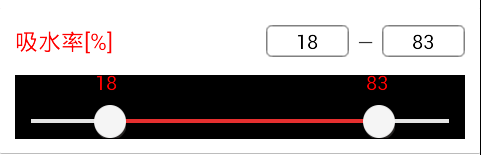
package xxxxxxxxx

import android.content.Context;

import android.content.res.Resources;

import android.graphics.Canvas;

import android.graphics.Color;

import android.graphics.Paint;

import android.graphics.drawable.Drawable;

import android.util.AttributeSet;

import android.view.MotionEvent;

import android.view.View;

import java.math.BigDecimal;

import com.zjcpo.mobileapp.R;

public class SeekBarPressure extends View {

    private static final String TAG = "SeekBarPressure";

    private static final int CLICK_ON_LOW = ;      //点击在前滑块上

    private static final int CLICK_ON_HIGH = ;     //点击在后滑块上

    private static final int CLICK_IN_LOW_AREA = ;

    private static final int CLICK_IN_HIGH_AREA = ;

    private static final int CLICK_OUT_AREA = ;

    private static final int CLICK_INVAILD = ;

    /*

     * private static final int[] PRESSED_STATE_SET = {

     * android.R.attr.state_focused, android.R.attr.state_pressed,

     * android.R.attr.state_selected, android.R.attr.state_window_focused, };

     */

    private static final int[] STATE_NORMAL = {};

    private static final int[] STATE_PRESSED = {

            android.R.attr.state_pressed, android.R.attr.state_window_focused,

    };

    private Drawable hasScrollBarBg;        //滑动条滑动后背景图

    private Drawable notScrollBarBg;        //滑动条未滑动背景图

    private Drawable mThumbLow;         //前滑块

    private Drawable mThumbHigh;        //后滑块

    private int mScollBarWidth;     //控件宽度=滑动条宽度+滑动块宽度

    private int mScollBarHeight;    //滑动条高度

    private int mThumbWidth;        //滑动块宽度

    private int mThumbHeight;       //滑动块高度

    private double mOffsetLow = ;     //前滑块中心坐标

    private double mOffsetHigh = ;    //后滑块中心坐标

    private int mDistance = ;      //总刻度是固定距离 两边各去掉半个滑块距离

    private int mThumbMarginTop = ;   //滑动块顶部距离上边框距离,也就是距离字体顶部的距离

    private int mFlag = CLICK_INVAILD;

    private OnSeekBarChangeListener mBarChangeListener;

    private double defaultScreenLow = ;    //默认前滑块位置百分比

    private double defaultScreenHigh = ;  //默认后滑块位置百分比

    private boolean isEdit = false;     //输入框是否正在输入

    public SeekBarPressure(Context context) {

        this(context, null);

    }

    public SeekBarPressure(Context context, AttributeSet attrs) {

        this(context, attrs, );

    }

    public SeekBarPressure(Context context, AttributeSet attrs, int defStyle) {

        super(context, attrs, defStyle);

//        this.setBackgroundColor(Color.BLACK);

        Resources resources = getResources();

        notScrollBarBg = resources.getDrawable(R.drawable.seekbarpressure_bg_progress);

        hasScrollBarBg = resources.getDrawable(R.drawable.seekbarpressure_bg_normal);

        mThumbLow = resources.getDrawable(R.drawable.seekbarpressure_thumb);

        mThumbHigh = resources.getDrawable(R.drawable.seekbarpressure_thumb);

        mThumbLow.setState(STATE_NORMAL);

        mThumbHigh.setState(STATE_NORMAL);

        mScollBarWidth = notScrollBarBg.getIntrinsicWidth();

        mScollBarHeight = notScrollBarBg.getIntrinsicHeight();

        mThumbWidth = mThumbLow.getIntrinsicWidth();

        mThumbHeight = mThumbLow.getIntrinsicHeight();

    }

    //默认执行,计算view的宽高,在onDraw()之前

    protected void onMeasure(int widthMeasureSpec, int heightMeasureSpec) {

        int width = measureWidth(widthMeasureSpec);

//        int height = measureHeight(heightMeasureSpec);

        mScollBarWidth = width;

        mOffsetHigh = width - mThumbWidth / ;

        mOffsetLow = mThumbWidth / ;

        mDistance = width - mThumbWidth;

        mOffsetLow = formatDouble(defaultScreenLow /  * (mDistance ))+ mThumbWidth / ;

        mOffsetHigh = formatDouble(defaultScreenHigh /  * (mDistance)) + mThumbWidth / ;

        setMeasuredDimension(width, mThumbHeight + mThumbMarginTop+);

    }

    private int measureWidth(int measureSpec) {

        int specMode = MeasureSpec.getMode(measureSpec);

        int specSize = MeasureSpec.getSize(measureSpec);

        //wrap_content

        if (specMode == MeasureSpec.AT_MOST) {

        }

        //fill_parent或者精确值

        else if (specMode == MeasureSpec.EXACTLY) {

        }

        return specSize;

    }

    private int measureHeight(int measureSpec) {

        int specMode = MeasureSpec.getMode(measureSpec);

        int specSize = MeasureSpec.getSize(measureSpec);

        int defaultHeight = ;

        //wrap_content

        if (specMode == MeasureSpec.AT_MOST) {

        }

        //fill_parent或者精确值

        else if (specMode == MeasureSpec.EXACTLY) {

            defaultHeight = specSize;

        }

        return defaultHeight;

    }

    protected void onLayout(boolean changed, int l, int t, int r, int b) {

        super.onLayout(changed, l, t, r, b);

    }

    protected void onDraw(Canvas canvas) {

        super.onDraw(canvas);

        Paint text_Paint = new Paint();

        text_Paint.setTextAlign(Paint.Align.CENTER);

        text_Paint.setColor(Color.RED);

        text_Paint.setTextSize();

        int aaa = mThumbMarginTop + mThumbHeight /  - mScollBarHeight / ;

        int bbb = aaa + mScollBarHeight;

        //白色,不会动

        notScrollBarBg.setBounds(mThumbWidth / , aaa, mScollBarWidth - mThumbWidth / , bbb);

        notScrollBarBg.draw(canvas);

        //蓝色,中间部分会动

        hasScrollBarBg.setBounds((int)mOffsetLow, aaa, (int)mOffsetHigh, bbb);

        hasScrollBarBg.draw(canvas);

        //前滑块

        mThumbLow.setBounds((int)(mOffsetLow - mThumbWidth / ), mThumbMarginTop, (int)(mOffsetLow + mThumbWidth / ), mThumbHeight + mThumbMarginTop);

        mThumbLow.draw(canvas);

        //后滑块

        mThumbHigh.setBounds((int)(mOffsetHigh - mThumbWidth / ), mThumbMarginTop, (int)(mOffsetHigh + mThumbWidth / ), mThumbHeight + mThumbMarginTop);

        mThumbHigh.draw(canvas);

        double progressLow = formatDouble((mOffsetLow - mThumbWidth / ) *  / mDistance);

        double progressHigh = formatDouble((mOffsetHigh - mThumbWidth / ) *  / mDistance);

//            Log.d(TAG, "onDraw-->mOffsetLow: " + mOffsetLow + "  mOffsetHigh: " + mOffsetHigh   + "  progressLow: " + progressLow + "  progressHigh: " + progressHigh);

        canvas.drawText((int) progressLow + "", (int)mOffsetLow -  - , , text_Paint);

        canvas.drawText((int) progressHigh + "", (int)mOffsetHigh - , , text_Paint);

        if (mBarChangeListener != null) {

            if (!isEdit) {

                mBarChangeListener.onProgressChanged(this, progressLow, progressHigh);

            }

        }

    }

    @Override

    public boolean onTouchEvent(MotionEvent e) {

        //按下

        if (e.getAction() == MotionEvent.ACTION_DOWN) {

            if (mBarChangeListener != null) {

                mBarChangeListener.onProgressBefore();

                isEdit = false;

            }

            mFlag = getAreaFlag(e);

//            Log.d(TAG, "e.getX: " + e.getX() + "mFlag: " + mFlag);

//            Log.d("ACTION_DOWN", "------------------");

            if (mFlag == CLICK_ON_LOW) {

                mThumbLow.setState(STATE_PRESSED);

            } else if (mFlag == CLICK_ON_HIGH) {

                mThumbHigh.setState(STATE_PRESSED);

            } else if (mFlag == CLICK_IN_LOW_AREA) {

                mThumbLow.setState(STATE_PRESSED);

                //如果点击0-mThumbWidth/2坐标

                if (e.getX() <  || e.getX() <= mThumbWidth/) {

                    mOffsetLow = mThumbWidth/;

                } else if (e.getX() > mScollBarWidth - mThumbWidth/) {

//                    mOffsetLow = mDistance - mDuration;

                    mOffsetLow = mThumbWidth/ + mDistance;

                } else {

                    mOffsetLow = formatDouble(e.getX());

//                    if (mOffsetHigh<= mOffsetLow) {

//                        mOffsetHigh = (mOffsetLow + mDuration <= mDistance) ? (mOffsetLow + mDuration)

//                                : mDistance;

//                        mOffsetLow = mOffsetHigh - mDuration;

//                    }

                }

            } else if (mFlag == CLICK_IN_HIGH_AREA) {

                mThumbHigh.setState(STATE_PRESSED);

//                if (e.getX() < mDuration) {

//                    mOffsetHigh = mDuration;

//                    mOffsetLow = mOffsetHigh - mDuration;

//                } else if (e.getX() >= mScollBarWidth - mThumbWidth/2) {

//                    mOffsetHigh = mDistance + mThumbWidth/2;

                if(e.getX() >= mScollBarWidth - mThumbWidth/) {

                    mOffsetHigh = mDistance + mThumbWidth/;

                } else {

                    mOffsetHigh = formatDouble(e.getX());

//                    if (mOffsetHigh <= mOffsetLow) {

//                        mOffsetLow = (mOffsetHigh - mDuration >= 0) ? (mOffsetHigh - mDuration) : 0;

//                        mOffsetHigh = mOffsetLow + mDuration;

//                    }

                }

            }

            //设置进度条

            refresh();

            //移动move

        } else if (e.getAction() == MotionEvent.ACTION_MOVE) {

//            Log.d("ACTION_MOVE", "------------------");

            if (mFlag == CLICK_ON_LOW) {

                if (e.getX() <  || e.getX() <= mThumbWidth/) {

                    mOffsetLow = mThumbWidth/;

                } else if (e.getX() >= mScollBarWidth - mThumbWidth/) {

                    mOffsetLow = mThumbWidth/ + mDistance;

                    mOffsetHigh = mOffsetLow;

                } else {

                    mOffsetLow = formatDouble(e.getX());

                    if (mOffsetHigh - mOffsetLow <= ) {

                        mOffsetHigh = (mOffsetLow <= mDistance+mThumbWidth/) ? (mOffsetLow) : (mDistance+mThumbWidth/);

                    }

                }

            } else if (mFlag == CLICK_ON_HIGH) {

                if (e.getX() <  mThumbWidth/) {

                    mOffsetHigh = mThumbWidth/;

                    mOffsetLow = mThumbWidth/;

                } else if (e.getX() > mScollBarWidth - mThumbWidth/) {

                    mOffsetHigh = mThumbWidth/ + mDistance;

                } else {

                    mOffsetHigh = formatDouble(e.getX());

                    if (mOffsetHigh - mOffsetLow <= ) {

                        mOffsetLow = (mOffsetHigh >= mThumbWidth/) ? (mOffsetHigh) : mThumbWidth/;

                    }

                }

            }

            //设置进度条

            refresh();

            //抬起

        } else if (e.getAction() == MotionEvent.ACTION_UP) {

//            Log.d("ACTION_UP", "------------------");

            mThumbLow.setState(STATE_NORMAL);

            mThumbHigh.setState(STATE_NORMAL);

            if (mBarChangeListener != null) {

                mBarChangeListener.onProgressAfter();

            }

            //这两个for循环 是用来自动对齐刻度的,注释后,就可以自由滑动到任意位置

//            for (int i = 0; i < money.length; i++) {

//                 if(Math.abs(mOffsetLow-i* ((mScollBarWidth-mThumbWidth)/ (money.length-1)))<=(mScollBarWidth-mThumbWidth)/(money.length-1)/2){

//                     mprogressLow=i;

//                     mOffsetLow =i* ((mScollBarWidth-mThumbWidth)/(money.length-1));

//                     invalidate();

//                     break;

//                }

//            }

//

//            for (int i = 0; i < money.length; i++) {

//                  if(Math.abs(mOffsetHigh-i* ((mScollBarWidth-mThumbWidth)/(money.length-1) ))<(mScollBarWidth-mThumbWidth)/(money.length-1)/2){

//                      mprogressHigh=i;

//                       mOffsetHigh =i* ((mScollBarWidth-mThumbWidth)/(money.length-1));

//                       invalidate();

//                       break;

//                }

//            }

        }

        return true;

    }

    public int getAreaFlag(MotionEvent e) {

        int top = mThumbMarginTop;

        int bottom = mThumbHeight + mThumbMarginTop;

        if (e.getY() >= top && e.getY() <= bottom && e.getX() >= (mOffsetLow - mThumbWidth / ) && e.getX() <= mOffsetLow + mThumbWidth / ) {

            return CLICK_ON_LOW;

        } else if (e.getY() >= top && e.getY() <= bottom && e.getX() >= (mOffsetHigh - mThumbWidth / ) && e.getX() <= (mOffsetHigh + mThumbWidth / )) {

            return CLICK_ON_HIGH;

        } else if (e.getY() >= top

                && e.getY() <= bottom

                && ((e.getX() >=  && e.getX() < (mOffsetLow - mThumbWidth / )) || ((e.getX() > (mOffsetLow + mThumbWidth / ))

                && e.getX() <= ((double) mOffsetHigh + mOffsetLow) / ))) {

            return CLICK_IN_LOW_AREA;

        } else if (e.getY() >= top

                && e.getY() <= bottom

                && (((e.getX() > ((double) mOffsetHigh + mOffsetLow) / ) && e.getX() < (mOffsetHigh - mThumbWidth / )) || (e

                .getX() > (mOffsetHigh + mThumbWidth/) && e.getX() <= mScollBarWidth))) {

            return CLICK_IN_HIGH_AREA;

        } else if (!(e.getX() >=  && e.getX() <= mScollBarWidth && e.getY() >= top && e.getY() <= bottom)) {

            return CLICK_OUT_AREA;

        } else {

            return CLICK_INVAILD;

        }

    }

    //更新滑块

    private void refresh() {

        invalidate();

    }

    //设置前滑块的值

    public void setProgressLow(double  progressLow) {

        this.defaultScreenLow = progressLow;

        mOffsetLow = formatDouble(progressLow /  * (mDistance ))+ mThumbWidth / ;

        isEdit = true;

        refresh();

    }

    //设置后滑块的值

    public void setProgressHigh(double  progressHigh) {

        this.defaultScreenHigh = progressHigh;

        mOffsetHigh = formatDouble(progressHigh /  * (mDistance)) + mThumbWidth / ;

        isEdit = true;

        refresh();

    }

    public void setOnSeekBarChangeListener(OnSeekBarChangeListener mListener) {

        this.mBarChangeListener = mListener;

    }

    //回调函数,在滑动时实时调用,改变输入框的值

    public interface OnSeekBarChangeListener {

        //滑动前

        public void onProgressBefore();

        //滑动时

        public void onProgressChanged(SeekBarPressure seekBar, double progressLow,

                                      double progressHigh);

        //滑动后

        public void onProgressAfter();

    }

/*    private int formatInt(double value) {

        BigDecimal bd = new BigDecimal(value);

        BigDecimal bd1 = bd.setScale(0, BigDecimal.ROUND_HALF_UP);

        return bd1.intValue();

    }*/

    public static double formatDouble(double pDouble) {

        BigDecimal bd = new BigDecimal(pDouble);

        BigDecimal bd1 = bd.setScale(, BigDecimal.ROUND_HALF_UP);

        pDouble = bd1.doubleValue();

        return pDouble;

    }

}
2、布局调用 xxx.xml
        <com.xxx.SeekBarPressure

            android:id="@+id/seekBar_tg2"

            android:layout_width="match_parent"

            android:layout_height="wrap_content"

            android:layout_alignParentTop="true"

            android:layout_marginBottom="10dp"

            android:layout_marginLeft="10dp"

            android:layout_marginRight="10dp" />
3、在Activity中实现XxxActivity.class
seekBarPressures = (SeekBarPressure) findViewById(R.id.seekBar_tg2);

        seekBarPressures.setOnSeekBarChangeListener(new SeekBarPressure.OnSeekBarChangeListener() {

            @Override

            public void onProgressBefore() {

                isScreen = true;

            }

            @Override

            public void onProgressChanged(SeekBarPressure seekBar, double progressLow, double progressHigh) {

                    editTexts_min.setText((int) progressLow + "");

                    editTexts_max.setText((int) progressHigh + "");

            }

            @Override

            public void onProgressAfter() {

                isScreen = false;

            }

         });
注意:seekBar的父容器必须LinearLayout,别问我为什么,我也不知道。反正如果是Rinearlayout的话,滑动会不正常,我曹了,为这问题搞了整整3个小时
android 双向滑动 seekbar的更多相关文章
- Android双向滑动菜单完全解析,教你如何一分钟实现双向滑动特效
转载请注明出处:http://blog.csdn.net/guolin_blog/article/details/9671609 记得在很早之前,我写了一篇关于Android滑动菜单的文章,其中有一个 ...
- 【转】Android双向滑动菜单完全解析,教你如何一分钟实现双向滑动特效
转载请注明出处:http://blog.csdn.net/guolin_blog/article/details/9671609 记得在很早之前,我写了一篇关于Android滑动菜单的文章,其中有一个 ...
- Android 侧滑(双向滑动菜单)效果
下面看看我们如何使用它,达到我们想要的效果 public class MainActivity extends Activity { /** * 双向滑动菜单布局 */ private SliderM ...
- 超酷的Android 侧滑(双向滑动菜单)效果
下面看看我们如何使用它,达到我们想要的效果 public class MainActivity extends Activity { /** * 双向滑动菜单布局 */ private SliderM ...
- android之SlideMenu双向滑动
开始动手之前先来讲一下实现原理,在一个Activity的布局中需要有三部分,一个是左侧菜单的布局,一个是右侧菜单的布局,一个是内容布局.左侧菜单居屏幕左边缘对齐,右侧菜单居屏幕右边缘对齐,然后内容布局 ...
- [Android学习笔记]SeekBar的使用
一.SeekBar滑动条的使用 xml声明: <SeekBar android:id="@+id/seekbar" android:layout_width="20 ...
- android去掉滑动到顶部和底部的阴影
android去掉滑动到顶部和底部的阴影 <ListView android:id="@+id/listView" android:layout_width="ma ...
- Android ListView滑动过程中图片显示重复错乱闪烁问题解决
最新内容建议直接访问原文:Android ListView滑动过程中图片显示重复错乱闪烁问题解决 主要分析Android ListView滚动过程中图片显示重复.错乱.闪烁的原因及解决方法,顺带提及L ...
- Android——拖动条SeekBar
1.activity_seekbar.xml <?xml version="1.0" encoding="utf-8"?><LinearLay ...
随机推荐
- VS2012 直接浏览网页时报错
VS2012 直接浏览网页时报错 "托管管道模式不能为集成" 只要在configuration文件里面添加 <system.webServer> < ...
- java log日志的输出。
在Spring框架中添加日志功能: pom.xml <dependency> <groupId>log4j</groupId> <artifactId> ...
- sqlserver临时表排序问题
在2005和2008中,如果将有序的记录插入临时表,则从临时表查看出来的记录是有序的(不使用Order by也是有序状态) 但从2012开始,即使插入的记录集是有序的,查看出来的结果变得无序了,需要依 ...
- 插入排序算法--直接插入算法,折半排序算法,希尔排序算法(C#实现)
插入排序算法主要分为:直接插入算法,折半排序算法(二分插入算法),希尔排序算法,后两种是直接插入算法的改良.因此直接插入算法是基础,这里先进行直接插入算法的分析与编码. 直接插入算法的排序思想:假设有 ...
- Webservice学习之——即时发布与定制发布
一.工具 myEclipse tomcat 6.0 以上版本 axis-bin-1_4.zip 二.即时发布 1.解压 axis-bin-1_4.zip 2.axis-bin-1_4.zip\axi ...
- kafka环境搭建2-broker集群+zookeeper集群(转)
原文地址:http://www.jianshu.com/p/dc4770fc34b6 zookeeper集群搭建 kafka是通过zookeeper来管理集群.kafka软件包内虽然包括了一个简版的z ...
- Ext.Net学习笔记14:Ext.Net GridPanel Grouping用法
Ext.Net学习笔记14:Ext.Net GridPanel Grouping用法 Ext.Net GridPanel可以进行Group操作,例如: 如何启用Grouping功能呢?只需要在Grid ...
- linux 搭建pptpd vpn(转,备忘)
1.第一步需要安装PPTP,以用来提供VPN服务.sudo apt-get install pptpd注:如果有问题的话比如提示找不到之类的,apt-get update 一下应该就可以了,然后再来一 ...
- Spring学习之代理
Spring的核心就是IOC和AOP IOC就是控制反转: 就是用配置文件的方式给javabean 赋值. 正常的在程序里;用new 的方式创建一个对象的时候,他就固定了值, 如果是注入的方式的话 ...
- ubuntu tengine 安装
参考文章:http://wangyan.org/blog/install-openssl-from-source.html http://www1.site90.com/Linux/405.html ...