
C#操作SQL Server中的Image类型数据
该例子是一个对SQL Server数据类型的一个操作例子,具有写入、读取功能。
1:准备数据库
1)创建数据库 Test
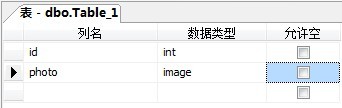
2)创建表 Table_1 (分别有2个字段:id(Int)、photo(Image))
如图:
2:用C#进行读写操作,完整代码如下:
- using System;
- using System.Collections.Generic;
- using System.ComponentModel;
- using System.Data;
- using System.Drawing;
- using System.Linq;
- using System.Text;
- using System.Windows.Forms;
- using System.Data.SqlClient;
- using System.IO;
- namespace imageTest
- {
- public partial class Form1 : Form
- {
- public Form1()
- {
- InitializeComponent();
- }
- private void btn_brewse_Click(object sender, EventArgs e)
- {
- OpenFileDialog op = new OpenFileDialog();
- op.Title = "浏览图像文件";
- op.Filter = "图像文件(*.jpg)|*.jpg";
- op.ShowDialog();
- txt_ImageAddress.Text = op.FileName;
- }
- private void btn_Insert_Click(object sender, EventArgs e)
- {
- FileStream fs = new FileStream(txt_ImageAddress.Text,FileMode.Open,FileAccess.Read);
- byte[] byteArray = new byte[fs.Length];
- fs.Read(byteArray,0,Convert.ToInt32(fs.Length));
- fs.Close();
- string connectionStr = "Server=.;Database=Test;Uid=sa;Pwd=123456";
- SqlConnection conn = new SqlConnection(connectionStr);
- conn.Open();
- SqlCommand cmd = new SqlCommand("INSERT INTO Table_1(photo) VALUES(@photo)",conn);
- SqlParameter parmeter = new SqlParameter("@photo", SqlDbType.Image);
- parmeter.Value = byteArray;
- cmd.Parameters.Add(parmeter);
- int result = cmd.ExecuteNonQuery();
- if (result > 0)
- MessageBox.Show("插入成功");
- conn.Close();
- }
- private void btn_ReadImage_Click(object sender, EventArgs e)
- {
- string connectionStr = "Server=.;Database=Test;Uid=sa;Pwd=123456";
- SqlConnection conn = new SqlConnection(connectionStr);
- conn.Open();
- SqlCommand cmd = new SqlCommand("SELECT * FROM Table_1",conn);
- SqlDataReader dr = cmd.ExecuteReader();
- dr.Read();
- byte[] image = (byte[])dr["photo"];
- conn.Close();
- if (image.Length == 0)
- return;
- string photoUrl = Environment.CurrentDirectory + "\\1.jpg";
- FileStream fs = new FileStream(photoUrl, FileMode.OpenOrCreate, FileAccess.Write);
- BinaryWriter bw = new BinaryWriter(fs);
- bw.BaseStream.Write(image, 0, image.Length);
- bw.Flush();
- bw.Close();
- picbox_image.ImageLocation = photoUrl;
- }
- }
- }
效果如图:

完整项目(包含数据库文件)下载地址:http://download.csdn.net/source/3576866
C#操作SQL Server中的Image类型数据的更多相关文章
- delphi 转换sql server 中的 bit类型
FieldByName('e').AsBoolean = false 其中e为 sql server 中的bit类型.
- 快速查看SQL Server 中各表的数据量以及占用空间大小
快速查看SQL Server 中各表的数据量以及占用空间大小. CREATE TABLE #T (NAME nvarchar(100),ROWS char(20),reserved varchar(1 ...
- 浅析SQL Server 中的SOS_SCHEDULER_YIELD类型的等待
本文出处:http://www.cnblogs.com/wy123/p/6856802.html 进程的状态转换 在说明SOS_SCHEDULER_YIELD等待之前,先简要介绍一下进程的状态(迷迷糊 ...
- SQL Server中时间段查询和数据类型转换
不知道什么时候对数据独有情种,也许是因为所学专业的缘故,也许是在多年的工作中的亲身经历,无数据,很多事情干不了,数据精度不够,也很多事情干不了,有一次跟一个朋友开玩笑说,如果在写论文的时候,能有一份独 ...
- 【SQL Server数据迁移】64位的机器:SQL Server中查询ORACLE的数据
从SQL Server中查询ORACLE中的数据,可以在SQL Server中创建到ORACLE的链接服务器来实现的,但是根据32位 .64位的机器和软件, 需要用不同的驱动程序来实现. 在64位的机 ...
- 【SQL Server数据迁移】32位的机器:SQL Server中查询ORACLE的数据
从SQL Server中查询ORACLE中的数据,可以在SQL Server中创建到ORACLE的链接服务器来实现的,但是根据32位 .64位的机器和软件,需要用不同的驱动程序来实现. 在32位的机器 ...
- 将SQL SERVER中查询到的数据导成一个Excel文件
-- ====================================================== T-SQL代码: EXEC master..xp_cmdshell 'bcp 库名. ...
- 向SQL Server中导入Excel的数据
1. 手动界面导入Excel数据 同 https://jingyan.baidu.com/article/ce09321b9a0e252bff858ff9.html 首先打开并登陆sql serve ...
- SQL Server中的uniqueidentifier类型
uniqueidentifier类型可以配合T-SQL中的newid和newsequentialid来生成唯一标识符,具体区别如下(摘抄自微软官方文档). Nonsequential GUIDs: Y ...
随机推荐
- spring整合hibernate,在获取sessionFactory的时候报错,求解决办法!!
applicationContext.xml文件 <!-- 开启扫包 --> <context:component-scan base-package="cn.edu&qu ...
- POJ 1840 Eqs(hash)
题意 输入a1,a2,a3,a4,a5 求有多少种不同的x1,x2,x3,x4,x5序列使得等式成立 a,x取值在-50到50之间 直接暴力的话肯定会超时的 100的五次方 10e了都 ...
- Kindeditor 修改内容时如何不让 及 <> 被自动转义
$html = str_replace(' ', ' ', $html); $html = str_replace('>', '>', $html); $html ...
- yii2学习笔记
之前看过Yii2框架,也在其他框架实现其Gii手脚架功能,现在开始使用Yii做项目,顺便记录一下学习笔记 先推荐一个网址 Yii2速查表(中文版)http://nai8.me/tool-sc.html ...
- python 基础1.1--windows/linux 下安装python
一.windows下安装python 1>windows上python后缀是.msi的,下载下来后,直接双击运行.会在c盘生成python.exe的文件,把python.exe的文件加入到win ...
- Mac版 Intellij IDEA 激活
第一步:修改这两个文件夹 进入跳转路径,输入 /private/etc/ 点击[前往] 同时加上: # Intellij IDEA0.0.0.0 account.jetbrains.com 第二部:在 ...
- SAP 第四代增强-BTE
第四代BTE实例详解:http://blog.csdn.net/wbin9752/article/details/7954922 第三代增强(BADI实例详解) :http://blog.csdn.n ...
- Builder 模式初探
Builder 模式是一步一步创建一个复杂对象的创建型模式,它允许用户在不知道内部构建细节的情况下,可以更精细的控制对象的构造流程.该模式是为了将构建复杂对象的过程和它的部件解耦,使得构建过程和部件的 ...
- debian7 amd64版本添加对x86包的支持
dpkg --add-architecture i386apt-get updateapt-get install ia32-libs ia32-libs-gtk
- 《CSS权威指南(第三版)》---第七章 基本视觉格式化
主要知识记录: 1.给一个元素指定内容区宽度,如果设置了内边距,边框和外边距,这些因素都会影响CSS的width属性. 2.在水平格式化的7个属性中,width,margin-left,margin- ...