
Spring框架中的@Import、@ImportResource注解
spring@Import
- @Import注解在4.2之前只支持导入配置类
- 在4.2,@Import注解支持导入普通的java类,并将其声明成一个bean
使用场景:
import注解主要用在基于java代码显式创建bean的过程中,用于将多个分散的java config配置类融合成一个更大的config类。其实除了 import注解外,还有 importResource注解,其作用都类似。配置类的组合主要发生在跨模块或跨包的配置类引用过程中。
示例1:
<beans xmlns="http://www.springframework.org/schema/beans"

    xmlns:xsi="http://www.w3.org/2001/XMLSchema-instance"

    xsi:schemaLocation="http://www.springframework.org/schema/beans

    http://www.springframework.org/schema/beans/spring-beans-2.5.xsd">

    <import resource="config/customer.xml"/>

    <import resource="config/scheduler.xml"/>

</beans>
package com.yiibai.config;

import org.springframework.context.annotation.Configuration;

import org.springframework.context.annotation.Import;

@Configuration

@Import({ CustomerConfig.class, SchedulerConfig.class })

public class AppConfig {

}
在列表中,@Import 是被用来整合所有在@Configuration注解中定义的bean配置。这其实很像我们将多个XML配置文件导入到单个文件的情形。@Import注解实现了相同的功能。本文会介绍使用@Import注解来导入spring工程中的JavaConfig文件.
在下面的例子中,我创建了两个配置文件,然后导入到主配置文件中。最后使用主配置文件来创建context.
示例2:spring4.2之前导入配置类
//Car.java

package javabeat.net.basic;

public interface Car {

    public void print();

}

//Toyota.java

package javabeat.net.basic;

import org.springframework.stereotype.Component;

@Component

public class Toyota implements Car{

    public void print(){

        System.out.println("I am Toyota");

    }

}

//Volkswagen.java

package javabeat.net.basic;

import org.springframework.stereotype.Component;

@Component

public class Volkswagen implements Car{

    public void print(){

        System.out.println("I am Volkswagen");

    }

}

//JavaConfigA.java

package javabeat.net.basic;

import org.springframework.context.annotation.Bean;

import org.springframework.context.annotation.Configuration;

@Configuration

public class JavaConfigA {

    @Bean(name="volkswagen")

    public Car getVolkswagen(){

        return new Volkswagen();

    }

}

//JavaConfigB.java

package javabeat.net.basic;

import org.springframework.context.annotation.Bean;

import org.springframework.context.annotation.Configuration;

@Configuration

public class JavaConfigB {

    @Bean(name="toyota")

    public Car getToyota(){

        return new Toyota();

    }

}

//ParentConfig.java

package javabeat.net.basic;

import org.springframework.context.annotation.Configuration;

import org.springframework.context.annotation.Import;

@Configuration

@Import({JavaConfigA.class,JavaConfigB.class})

public class ParentConfig {

    //Any other bean definitions

}

//ContextLoader.java

package javabeat.net.basic;

import org.springframework.context.annotation.AnnotationConfigApplicationContext;

public class ContextLoader {

    public static void main (String args[]){

        AnnotationConfigApplicationContext context = new AnnotationConfigApplicationContext(ParentConfig.class);

        Car car = (Toyota)context.getBean("toyota");

        car.print();

        car = (Volkswagen)context.getBean("volkswagen");

        car.print();

        context.close();

    }

}
程序执行输出
I am Toyata
I am Volkswagen
示例3:spring4.2之后导入普通java bean
package com.dxz.imports;

import org.springframework.context.annotation.Configuration;

import org.springframework.context.annotation.Import;

@Configuration

@Import(DemoService.class) // 在spring 4.2之前是不不支持的

public class DemoConfig {

}

package com.dxz.imports;

public class DemoService {

    public void doSomething() {

        System.out.println("everything is all fine");

    }

}

package com.dxz.imports;

import org.springframework.context.annotation.AnnotationConfigApplicationContext;

public class Test {

    public static void main(String[] args) {

        AnnotationConfigApplicationContext context = new AnnotationConfigApplicationContext("com.dxz.imports");

        DemoService ds = context.getBean(DemoService.class);

        ds.doSomething();

    }

}
结果:
everything is all fine
总结
本文作者介绍了@Import注解的使用。这个注解帮助我们将多个配置文件(可能是按功能分,或是按业务分)导入到单个主配置中,以避免将所有配置写在一个配置中。
二、@ImportResource
相当于:
<import resource="applicationContext-democonfig2.xml" />
示例4:
学习如何使用@ImportResource 和 @Value 注解进行资源文件读取
例子:
先创建一个MyDriverManager类(模拟读取数据库配置信息)
package com.dxz.imports4;

public class MyDriverManager {

    public MyDriverManager(String url, String username, String password) {

        System.out.println("url : " + url);

        System.out.println("username : " + username);

        System.out.println("password : " + password);

    }

}
创建StoreConfig
package com.dxz.imports4;

import org.springframework.beans.factory.annotation.Value;

import org.springframework.context.annotation.Bean;

import org.springframework.context.annotation.Configuration;

import org.springframework.context.annotation.ImportResource;

@Configuration

@ImportResource("classpath:applicationContext-democonfig2.xml")

public class StoreConfig {

    @Value("${url}")

    private String url;

    @Value("${username}")

    private String username;

    @Value("${password}")

    private String password;

    @Bean

    public MyDriverManager myDriverManager() {

        return new MyDriverManager(url, username, password);

    }

}
XML配置(context:property-placeholder 指定资源文件的位置)applicationContext-democonfig2.xml
<?xml version="1.0" encoding="UTF-8"?>

<beans xmlns="http://www.springframework.org/schema/beans"

    xmlns:xsi="http://www.w3.org/2001/XMLSchema-instance" xmlns:context="http://www.springframework.org/schema/context"

    xsi:schemaLocation="http://www.springframework.org/schema/beans

            http://www.springframework.org/schema/beans/spring-beans-4.1.xsd

            http://www.springframework.org/schema/context

            http://www.springframework.org/schema/context/spring-context-4.1.xsd">

    <context:property-placeholder location="classpath:config4.properties" />

    <context:component-scan base-package="com.dxz.imports4">

    </context:component-scan>

</beans>
创建资源文件config4.properties
url=127.0.0.1

username=root

password=123456
单元测试:
package com.dxz.imports4;

import org.junit.Test;

import org.springframework.context.ApplicationContext;

import org.springframework.context.support.ClassPathXmlApplicationContext;

public class UnitTest {

    @Test

    public void test() {

        ApplicationContext context = new ClassPathXmlApplicationContext("classpath:applicationContext-democonfig2.xml");

        MyDriverManager service = (MyDriverManager) context.getBean("myDriverManager");

        System.out.println(service.getClass().getName());

    }

}
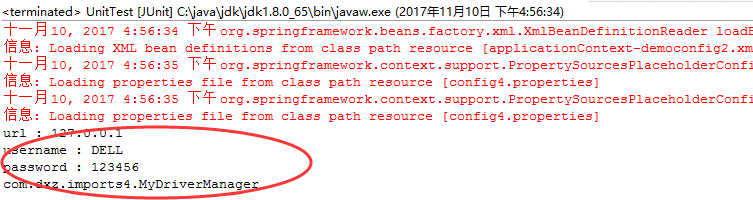
结果:
Spring框架中的@Import、@ImportResource注解的更多相关文章
- spring框架中的@Import注解
spring框架中的@Import注解 Spring框架中的@Import注解 在之前的文章中,作者介绍了Spring JavaConfig. 这是除了使用传统的XML文件之外,spring带来的新的 ...
- Spring框架中的AOP技术----注解方式
利用AOP技术注解的方式对功能进行增强 CustomerDao接口 package com.alphajuns.demo1; public interface CustomerDao { public ...
- Spring框架入门之基于Java注解配置bean
Spring框架入门之基于Java注解配置bean 一.Spring bean配置常用的注解 常用的有四个注解 Controller: 用于控制器的注解 Service : 用于service的注解 ...
- spring框架学习(五)注解
注解Annotation,是一种类似注释的机制,在代码中添加注解可以在之后某时间使用这些信息.跟注释不同的是,注释是给我们看的,Java虚拟机不会编译,注解也是不编译的,但是我们可以通过反射机制去读取 ...
- Spring框架中 配置c3p0连接池 完成对数据库的访问
开发准备: 1.导入jar包: ioc基本jar jdbcTemplate基本jar c3p0基本jar 别忘了mysql数据库驱动jar 原始程序代码:不使用配置文件方式(IOC)生成访问数据库对象 ...
- Spring框架中ModelAndView、Model、ModelMap区别
原文地址:http://www.cnblogs.com/google4y/p/3421017.html SPRING框架中ModelAndView.Model.ModelMap区别 注意:如果方法 ...
- Spring框架中的定时器 使用和配置
Spring框架中的定时器 如何使用和配置 转载自:<Spring框架中的定时器 如何使用和配置>https://www.cnblogs.com/longqingyang/p/554543 ...
- 细说shiro之五:在spring框架中集成shiro
官网:https://shiro.apache.org/ 1. 下载在Maven项目中的依赖配置如下: <!-- shiro配置 --> <dependency> <gr ...
- Spring5源码解析-Spring框架中的单例和原型bean
Spring5源码解析-Spring框架中的单例和原型bean 最近一直有问我单例和原型bean的一些原理性问题,这里就开一篇来说说的 通过Spring中的依赖注入极大方便了我们的开发.在xml通过& ...
随机推荐
- oracle序列sequence
序列 定义一个序列,自动产生连续的整数.也称序列生成器(sequence generator)产生序列号.在多用户环境下该序列生成器特别有用,可生成各返回序列号而不需要磁盘I/O或事务封锁.序列号为O ...
- 模式识别之svm()---支持向量机svm 简介1995
转自:http://www.blogjava.net/zhenandaci/archive/2009/02/13/254519.html 作者:Jasper 出自:http://www.blogjav ...
- API自动化测试利器——Postman
自从开始做API开发之后,我就在寻找合适的API测试工具.一开始不是很想用Chrome扩展,用的WizTools的工具,后来试过一次Postman之后就停不下来了,还买了付费的Jetpacks.推出T ...
- cf-341C Iahub and Permutations
C. Iahub and Permutations time limit per test 1 second memory limit per test 256 megabytes input sta ...
- TCP交换数据流——Nagle算法简单记录
Nagle算法: 该算法提出的目的是想解决网络中大量的小的TCP数据包造成网络拥塞的问题,举个例子,当客户端要发送一个字节的TCP数据包到服务器时,我们实际上产生了41字节长的分组:包括20字节的IP ...
- linux rz sz命令
rz是receive zmodem的缩写,sz是send zmodem的缩写. 传输文件使用的是zmodem协议,所以叫zmodem. r和s是以服务器为主体的,服务器接收就是r,服务器发送就是s.
- SP1437 Longest path in a tree(树的直径)
应该是模板题了吧 定义: 树的直径是指一棵树上相距最远的两个点之间的距离. 方法:我使用的是比较常见的方法:两边dfs,第一遍从任意一个节点开始找出最远的节点x,第二遍从x开始做dfs找到最远节点的距 ...
- 我的Android进阶之旅------>使用ThumbnailUtils类获取视频的缩略图
今天看了一段代码,是关于获取视频的缩略图的,让我认识了一个ThumbnailUtils类,代码如下. Bitmap bitmap = ThumbnailUtils.createVideoThumbna ...
- 如何使用RadioGroup和RadioButton实现FragmentTabHost导航效果?
目录: 一.概述 最近在做一个新闻类结合社区的APP的时候,需要添加一个侧滑菜单的效果,考虑到可以使用DrawerLayout布局,但是问题是使用了 DrawerLayout布局后,主页内容应该是一个 ...
- Java for LeetCode 116 Populating Next Right Pointers in Each Node
Given a binary tree struct TreeLinkNode { TreeLinkNode *left; TreeLinkNode *right; TreeLinkNode *nex ...