
MVC缓存
朋友炒股两个月赚了10万,我帮他推广一下公众号,把钱用来投资总比放银行连通货膨胀都跑不过里强, 硬核离职,在家炒股 ,这是他每天的日志,有些经验是花钱也买不到的。
一、MVC缓存简介
缓存是将信息(数据或页面)放在内存中以避免频繁的数据库存储或执行整个页面的生命周期,直到缓存的信息过期或依赖变更才再次从数据库中读取数据或重新执行页面的生命周期。在系统优化过程中,缓存是比较普遍的优化做法和见效比较快的做法。
MVC缓存本质上还是.NET的一套缓存体系,只不过该缓存体系应用在了MVC框架上。下面的示例把缓存应用在MVC上。
缓存的常用场景:
数据被频繁的使用,并且很少发生变化或对即时性的要求不高。
二、Control缓存
Control缓存即是把缓存应用到整个Control上,该Control下的所有Action都会被缓存起来。Control缓存的粒度比较粗,应用也比较少些。
 using System;

 using System.Collections.Generic;

 using System.Linq;

 using System.Web;

 using System.Web.Mvc;

 namespace MvcCache.Control.Controllers

 {

     [OutputCache(Duration = )]

     public class ControlController : Controller

     {

         //

         // GET: /Home/

         public ActionResult Index()

         {

             ViewBag.CurrentTime = System.DateTime.Now;

             return View();

         }

         public ActionResult Index1()

         {

             ViewBag.CurrentTime = System.DateTime.Now;

             return View();

         }

     }

 }
在名为Control的Control中加入了OutputCache,并设置持续时间为10秒(Duration=10),即每10秒后过期当再次触发时更新缓存。下面是View中的代码,打印ViewBag的时间。
 @{

     ViewBag.Title = "Index";

 }

 <h2>@ViewBag.CurrentTime</h2>

 @{

     ViewBag.Title = "Index1";

 }

 <h2>@ViewBag.CurrentTime</h2>

三、Action缓存
即把缓存用到Action上,Action缓存为比较常用的缓存方式,该方式粒度细一些。使用方法类似Control缓存。
 using System;

 using System.Collections.Generic;

 using System.Linq;

 using System.Web;

 using System.Web.Mvc;

 namespace MvcCache.Control.Controllers

 {

     //Control不加缓存

     public class ActionController : Controller

     {

         //该Index的Action加缓存

         [OutputCache(Duration = )]

         public ActionResult Index()

         {

             ViewBag.CurrentTime = System.DateTime.Now;

             return View();

         }

         //该Action不加缓存

         public ActionResult Index1()

         {

             ViewBag.CurrentTime = System.DateTime.Now;

             return View();

         }

     }

 }
Index加入了缓存,而Index1没有加。此时Index1每次刷新页面都会取到当前的时间并打印。
 @{

     ViewBag.Title = "Index";

 }

 <h2>@ViewBag.CurrentTime</h2>

 @{

     ViewBag.Title = "Index1";

 }

 <h2>@ViewBag.CurrentTime</h2>

四、使用配置文件
当我们需要将N个Control或Action加入缓存,并且缓存的参数是一致的情况下,我们可以把相关的设置放到Web.config中,并在程序中加入相应的配置。
 <?xml version="1.0" encoding="utf-8"?>

 <!--

   For more information on how to configure your ASP.NET application, please visit

   http://go.microsoft.com/fwlink/?LinkId=169433

   -->

 <configuration>

   <appSettings>

     <add key="webpages:Version" value="2.0.0.0" />

     <add key="webpages:Enabled" value="false" />

     <add key="PreserveLoginUrl" value="true" />

     <add key="ClientValidationEnabled" value="true" />

     <add key="UnobtrusiveJavaScriptEnabled" value="true" />

   </appSettings>

   <system.web>

     <!--配置缓存-->

     <caching>

       <outputCacheSettings>

         <outputCacheProfiles>

           <add name="TestConfigCache" duration="10"/>

         </outputCacheProfiles>

       </outputCacheSettings>

     </caching>

     <!--配置缓存-->

     <httpRuntime targetFramework="4.5" />

     <compilation debug="true" targetFramework="4.5" />

     <pages>

       <namespaces>

         <add namespace="System.Web.Helpers" />

         <add namespace="System.Web.Mvc" />

         <add namespace="System.Web.Mvc.Ajax" />

         <add namespace="System.Web.Mvc.Html" />

         <add namespace="System.Web.Routing" />

         <add namespace="System.Web.WebPages" />

       </namespaces>

     </pages>

   </system.web>

   <system.webServer>

     <validation validateIntegratedModeConfiguration="false" />

     <handlers>

       <remove name="ExtensionlessUrlHandler-ISAPI-4.0_32bit" />

       <remove name="ExtensionlessUrlHandler-ISAPI-4.0_64bit" />

       <remove name="ExtensionlessUrlHandler-Integrated-4.0" />

       <add name="ExtensionlessUrlHandler-ISAPI-4.0_32bit" path="*." verb="GET,HEAD,POST,DEBUG,PUT,DELETE,PATCH,OPTIONS" modules="IsapiModule" scriptProcessor="%windir%\Microsoft.NET\Framework\v4.0.30319\aspnet_isapi.dll" preCondition="classicMode,runtimeVersionv4.0,bitness32" responseBufferLimit="0" />

       <add name="ExtensionlessUrlHandler-ISAPI-4.0_64bit" path="*." verb="GET,HEAD,POST,DEBUG,PUT,DELETE,PATCH,OPTIONS" modules="IsapiModule" scriptProcessor="%windir%\Microsoft.NET\Framework64\v4.0.30319\aspnet_isapi.dll" preCondition="classicMode,runtimeVersionv4.0,bitness64" responseBufferLimit="0" />

       <add name="ExtensionlessUrlHandler-Integrated-4.0" path="*." verb="GET,HEAD,POST,DEBUG,PUT,DELETE,PATCH,OPTIONS" type="System.Web.Handlers.TransferRequestHandler" preCondition="integratedMode,runtimeVersionv4.0" />

     </handlers>

   </system.webServer>

 </configuration>
配置缓存节只需要将其放在system.web节下即可,下面是使用的方法
 using System;

 using System.Collections.Generic;

 using System.Linq;

 using System.Web;

 using System.Web.Mvc;

 namespace MvcCache.Control.Controllers

 {

     public class ConfigController : Controller

     {

         //TestConfigCache为在配置文件中配置的缓存节

         [OutputCache(CacheProfile = "TestConfigCache")]

         public ActionResult Index()

         {

             ViewBag.CurrentTime = System.DateTime.Now;

             return View();

         }

     }

 }
注:当Control与Action都应用了缓存时,以Action的缓存为主。
五、OutputCache参数简介
下面代码为mvc4的OutputCache的定义,由于使用的是英文版本IDE和框架,因此注释全部为英文。后面的讲解主要讲解常用的属性,对于缓存依赖这个重点内容在下面单独讲解使用方法。
如果想了解各个属性的详细说明及使用请查阅MSDN,链接地址如下:https://msdn.microsoft.com/zh-cn/library/system.web.mvc.outputcacheattribute.aspx
 using System;

 using System.Web.UI;

 namespace System.Web.Mvc

 {

     // Summary:

     //     Represents an attribute that is used to mark an action method whose output

     //     will be cached.

     [AttributeUsage(AttributeTargets.Class | AttributeTargets.Method, Inherited = true, AllowMultiple = false)]

     public class OutputCacheAttribute : ActionFilterAttribute, IExceptionFilter

     {

         // Summary:

         //     Initializes a new instance of the System.Web.Mvc.OutputCacheAttribute class.

         public OutputCacheAttribute();

         // Summary:

         //     Gets or sets the cache profile name.

         //

         // Returns:

         //     The cache profile name.

         public string CacheProfile { get; set; }

         //

         // Summary:

         //     Gets or sets the child action cache.

         //

         // Returns:

         //     The child action cache.

         public static System.Runtime.Caching.ObjectCache ChildActionCache { get; set; }

         //

         // Summary:

         //     Gets or sets the cache duration, in seconds.

         //

         // Returns:

         //     The cache duration.

         public int Duration { get; set; }

         //

         // Summary:

         //     Gets or sets the location.

         //

         // Returns:

         //     The location.

         public OutputCacheLocation Location { get; set; }

         //

         // Summary:

         //     Gets or sets a value that indicates whether to store the cache.

         //

         // Returns:

         //     true if the cache should be stored; otherwise, false.

         public bool NoStore { get; set; }

         //

         // Summary:

         //     Gets or sets the SQL dependency.

         //

         // Returns:

         //     The SQL dependency.

         public string SqlDependency { get; set; }

         //

         // Summary:

         //     Gets or sets the vary-by-content encoding.

         //

         // Returns:

         //     The vary-by-content encoding.

         public string VaryByContentEncoding { get; set; }

         //

         // Summary:

         //     Gets or sets the vary-by-custom value.

         //

         // Returns:

         //     The vary-by-custom value.

         public string VaryByCustom { get; set; }

         //

         // Summary:

         //     Gets or sets the vary-by-header value.

         //

         // Returns:

         //     The vary-by-header value.

         public string VaryByHeader { get; set; }

         //

         // Summary:

         //     Gets or sets the vary-by-param value.

         //

         // Returns:

         //     The vary-by-param value.

         public string VaryByParam { get; set; }

         // Summary:

         //     Returns a value that indicates whether a child action cache is active.

         //

         // Parameters:

         //   controllerContext:

         //     The controller context.

         //

         // Returns:

         //     true if the child action cache is active; otherwise, false.

         public static bool IsChildActionCacheActive(ControllerContext controllerContext);

         //

         // Summary:

         //     This method is an implementation of System.Web.Mvc.IActionFilter.OnActionExecuted(System.Web.Mvc.ActionExecutedContext)

         //     and supports the ASP.NET MVC infrastructure. It is not intended to be used

         //     directly from your code.

         //

         // Parameters:

         //   filterContext:

         //     The filter context.

         public override void OnActionExecuted(ActionExecutedContext filterContext);

         //

         // Summary:

         //     This method is an implementation of System.Web.Mvc.IActionFilter.OnActionExecuting(System.Web.Mvc.ActionExecutingContext)

         //     and supports the ASP.NET MVC infrastructure. It is not intended to be used

         //     directly from your code.

         //

         // Parameters:

         //   filterContext:

         //     The filter context.

         public override void OnActionExecuting(ActionExecutingContext filterContext);

         //

         // Summary:

         //     This method is an implementation of System.Web.Mvc.IExceptionFilter.OnException(System.Web.Mvc.ExceptionContext)

         //     and supports the ASP.NET MVC infrastructure. It is not intended to be used

         //     directly from your code.

         //

         // Parameters:

         //   filterContext:

         //     The filter context.

         public void OnException(ExceptionContext filterContext);

         //

         // Summary:

         //     This method is an implementation of System.Web.Mvc.IResultFilter.OnResultExecuted(System.Web.Mvc.ResultExecutedContext)

         //     and supports the ASP.NET MVC infrastructure. It is not intended to be used

         //     directly from your code.

         //

         // Parameters:

         //   filterContext:

         //     The filter context.

         public override void OnResultExecuted(ResultExecutedContext filterContext);

         //

         // Summary:

         //     Called before the action result executes.

         //

         // Parameters:

         //   filterContext:

         //     The filter context, which encapsulates information for using System.Web.Mvc.AuthorizeAttribute.

         //

         // Exceptions:

         //   System.ArgumentNullException:

         //     The filterContext parameter is null.

         public override void OnResultExecuting(ResultExecutingContext filterContext);

     }

 }
常用属性:
1)CacheProfile:缓存使用的配置文件的缓存名称。
2)Duration:缓存时间,以秒为单位,这个除非你的Location=None,可以不添加此属性,其余时候都是必须的。
3)OutputCacheLocation:枚举类型,缓存的位置。当设置成None时,所有缓存将失效,默认为Any。
Any:页面被缓存在浏览器、代理服务器端和web服务器端;
Client:缓存在浏览器;
DownStream:页面被缓存在浏览器和任何的代理服务器端;
Server:页面被缓存在Web服务器端;
None:页面不缓存;
ServerAndClient:页面被缓存在浏览器和web服务器端;
4)VaryByParam:用于多个输出缓存的字符串列表,并以分号进行分隔。默认时,该字符串与GET方法传递的参数或与POST方法传递的变量相对应。当被设置为多个参数时,输出缓存将会为每个参数都准备一个与之相对应的文档版本。可能值包括none,*,以及任何有效的查询串或POST参数名称。
如果您不想要为不同的已缓存内容指定参数,可以将其设置为none。如果想要指定所有的已缓存内容参数,可以设置为*。
六、缓存依赖
SqlDependency:一个值,用于标识操作的输出缓存所依赖的一组数据库名称和表名称对。SqlCacheDependency 类在所有受支持的 SQL Server 版本 (7.0, 2000, 2005) 上监视特定的 SQL Server 数据库表,数据库表发生更改时,将自动删除缓存项,并向 Cache 中添加新版本的项。
概念理解起来很简单,主要是如何应用。下面为应用实例。示例说明:数据库为本地数据库,库名:wcfDemo(写wcf教程时用的库,懒了,直接用了),监听表名:user。缓存时间为:3600秒即一小时。数据库依赖周期为500毫秒,即每0.5秒监听下数据库是否有变化,如果有变化则立即更新缓存。
第一步:建立Control,测试代码如下:
 using System;

 using System.Collections.Generic;

 using System.Linq;

 using System.Web;

 using System.Web.Mvc;

 namespace MvcCache.Control.Controllers

 {

     public class SqlDependencyController : Controller

     {

         [OutputCache(CacheProfile = "SqlDependencyCache")]

         public ActionResult Index()

         {

             ViewBag.CurrentTime = System.DateTime.Now;

             return View();

         }

     }

 }
第二步,在配置文件中配置CacheProfile为SqlDependencyCache的节,并且配置缓存对数据库的依赖。
 <?xml version="1.0" encoding="utf-8"?>

 <!--

   For more information on how to configure your ASP.NET application, please visit

   http://go.microsoft.com/fwlink/?LinkId=169433

   -->

 <configuration>

   <!--数据库连接字符串-->

   <connectionStrings>

     <add name="Conn" connectionString="server=localhost;database=wcfDemo;uid=sa;pwd=123456;" providerName="System.Data.SqlClient"/>

   </connectionStrings>

   <!--数据库连接字符串-->

   <appSettings>

     <add key="webpages:Version" value="2.0.0.0" />

     <add key="webpages:Enabled" value="false" />

     <add key="PreserveLoginUrl" value="true" />

     <add key="ClientValidationEnabled" value="true" />

     <add key="UnobtrusiveJavaScriptEnabled" value="true" />

   </appSettings>

   <system.web>

     <!--配置缓存-->

     <caching>

       <sqlCacheDependency><!--缓存的数据库依赖节-->

         <databases>

           <add name="UserCacheDependency" connectionStringName="Conn" pollTime="500"/><!--Conn:数据库连接字符串的名称,name随便启名,缓存节会用到-->

         </databases>

       </sqlCacheDependency>

       <outputCacheSettings>

         <outputCacheProfiles>

           <add name="SqlDependencyCache" duration="3600" sqlDependency="UserCacheDependency:user"/><!--UserCacheDependency:数据库依赖配置节的名称,user:数据库中需要监听的表名称-->

         </outputCacheProfiles>

       </outputCacheSettings>

     </caching>

     <!--配置缓存-->

     <httpRuntime targetFramework="4.5" />

     <compilation debug="true" targetFramework="4.5" />

     <pages>

       <namespaces>

         <add namespace="System.Web.Helpers" />

         <add namespace="System.Web.Mvc" />

         <add namespace="System.Web.Mvc.Ajax" />

         <add namespace="System.Web.Mvc.Html" />

         <add namespace="System.Web.Routing" />

         <add namespace="System.Web.WebPages" />

       </namespaces>

     </pages>

   </system.web>

   <system.webServer>

     <validation validateIntegratedModeConfiguration="false" />

     <handlers>

       <remove name="ExtensionlessUrlHandler-ISAPI-4.0_32bit" />

       <remove name="ExtensionlessUrlHandler-ISAPI-4.0_64bit" />

       <remove name="ExtensionlessUrlHandler-Integrated-4.0" />

       <add name="ExtensionlessUrlHandler-ISAPI-4.0_32bit" path="*." verb="GET,HEAD,POST,DEBUG,PUT,DELETE,PATCH,OPTIONS" modules="IsapiModule" scriptProcessor="%windir%\Microsoft.NET\Framework\v4.0.30319\aspnet_isapi.dll" preCondition="classicMode,runtimeVersionv4.0,bitness32" responseBufferLimit="0" />

       <add name="ExtensionlessUrlHandler-ISAPI-4.0_64bit" path="*." verb="GET,HEAD,POST,DEBUG,PUT,DELETE,PATCH,OPTIONS" modules="IsapiModule" scriptProcessor="%windir%\Microsoft.NET\Framework64\v4.0.30319\aspnet_isapi.dll" preCondition="classicMode,runtimeVersionv4.0,bitness64" responseBufferLimit="0" />

       <add name="ExtensionlessUrlHandler-Integrated-4.0" path="*." verb="GET,HEAD,POST,DEBUG,PUT,DELETE,PATCH,OPTIONS" type="System.Web.Handlers.TransferRequestHandler" preCondition="integratedMode,runtimeVersionv4.0" />

     </handlers>

   </system.webServer>

 </configuration>
注意:
1)由于是缓存对数据库的依赖,此外必须包含connectionStrings的节。
2)<add name="UserCacheDependency" connectionStringName="Conn" pollTime="500"/>
connectionStringName:数据库连接字符串的名称
pollTime:监听数据库变化的周期,以毫秒为单位。即每500毫秒查看下数据库是否有变化。
3)<add name="SqlDependencyCache" duration="3600" sqlDependency="UserCacheDependency:user"/>
sqlDependency:数据依赖的节的名称+冒号+数据表名称(小写)。如果这个依赖会用到多个表,则用分号间隔开,如下所示UserCacheDependency:user;UserCacheDependency:user1
第三步:启用该数据库表的缓存依赖通知功能
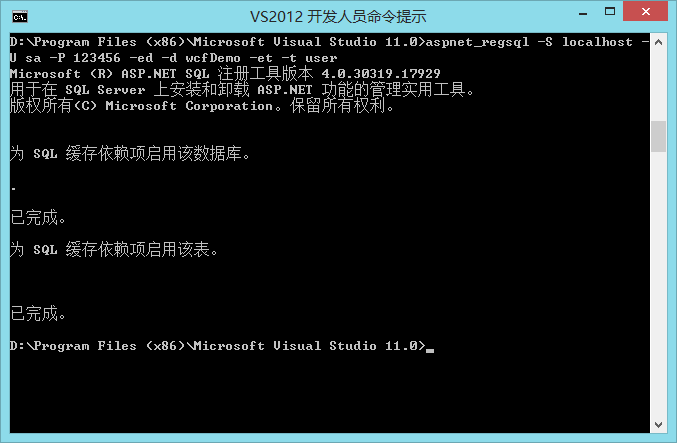
打开vs命令工具行,输入:aspnet_regsql -S localhost -U sa -P 123456 -ed -d wcfDemo -et -t user
-S localhost:数据库地址
-U sa:数据库登录名
-P 123456:数据库登录密码
-d wcfDemo:数据库的名称
-t user:表名称(小写)
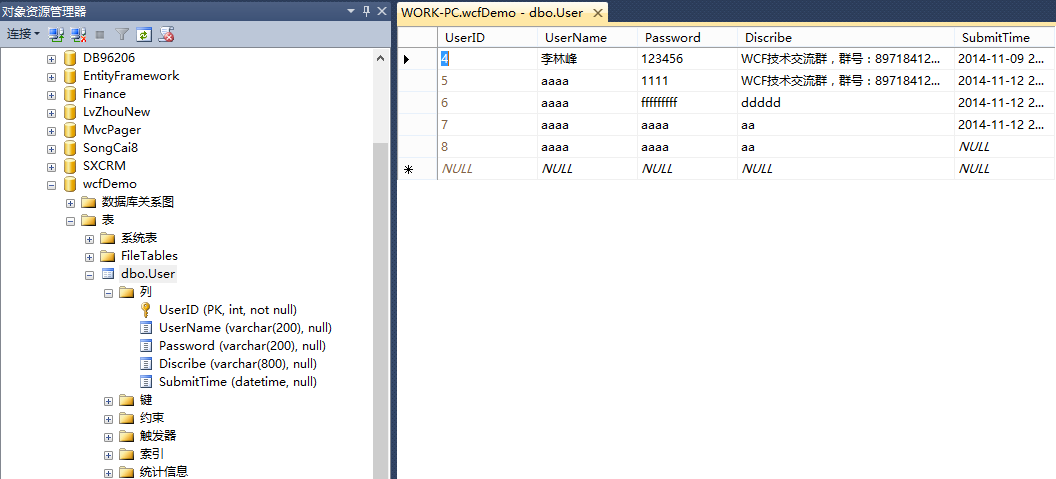
因为只是监听是否发生数据变化,因此表结构随意,下面的我的表结构:
第四步:测试程序,上面的例子只打印了当前时间,如果不加入缓存依赖的情况下,1小时之内都应该运行出的结果都是当前时间,每次Ctrl+F5强制刷新浏览器时不发生任务变化。当加入缓存依赖后,只要对数据库的数据进行任意修改都会更新缓存的时间,即更改数据后再刷新浏览器时会看到时间在变化。
七、代码下载
八、系列教程
8.无废话MVC入门教程八[MvcPager分页控件的使用]
版权:http://www.cnblogs.com/iamlilinfeng
MVC缓存的更多相关文章
- MVC 缓存
MVC 缓存 http://blog.zhaojie.me/2009/09/aspnet-mvc-fragment-cache-1.html redis http://www.cnblogs.com ...
- MVC缓存OutPutCache学习笔记 (二) 缓存及时化VaryByCustom
<MVC缓存OutPutCache学习笔记 (一) 参数配置> 本篇来介绍如何使用 VaryByCustom参数来实现缓存的及时化.. 根据数据改变来及时使客户端缓存过期并更新.. 首先更 ...
- MVC缓存OutPutCache学习笔记 (一) 参数配置
OutPutCache 参数详解 Duration : 缓存时间,以秒为单位,这个除非你的Location=None,可以不添加此属性,其余时候都是必须的. Location : 缓存放置的位置; 该 ...
- MVC缓存03,扩展方法实现视图缓存
关于缓存,先前尝试了: ● 在"MVC缓存01,使用控制器缓存或数据层缓存"中,分别在控制器和Data Access Layer实现了缓存 ● 在"MVC缓存02,使用数 ...
- MVC缓存02,使用数据层缓存,添加或修改时让缓存失效
在"MVC缓存01,使用控制器缓存或数据层缓存"中,在数据层中可以设置缓存的有效时间.但这个还不够"智能",常常希望在编辑或创建的时候使缓存失效,加载新的数据. ...
- MVC缓存OutputCacheAttribute 类提高网站效率(转)
原文转自:http://www.cnblogs.com/iamlilinfeng/p/4419362.html 命名空间: System.Web.Mvc 程序集: System.Web.Mvc(在 ...
- MVC缓存技术
一.MVC缓存简介 缓存是将信息(数据或页面)放在内存中以避免频繁的数据库存储或执行整个页面的生命周期,直到缓存的信息过期或依赖变更才再次从数据库中读取数据或重新执行页面的生命周期.在系统优化过程中, ...
- MVC缓存,使用数据层缓存,添加或修改时让缓存失效
在"MVC缓存01,运用控制器缓存或数据层缓存"中,在数据层中可以设置缓存的有用时刻.但这个还不够"智能",常常期望在修改或创立的时分使缓存失效,加载新的数据. ...
- MVC 缓存1
MVC 缓存 为什么要讲缓存.缓存到底有什么作用? 下面我们来说一个场景我们有一个首页菜单的布局基本是不会经常发生的变化,如果动态生成的 Web 页被频繁请求并且构建时需要耗用大量的系统资源,那么,如 ...
随机推荐
- 在IIS8.5的环境下配置WCF的Restful Service
今天在客户的环境中(Windows Server 2012 R2 + IIS 8.5)搭建Call WCF Restful Service的功能,发现了几个环境配置的问题,记录如下: 1):此环境先安 ...
- 设计模式 之 原型模式(ProtoType)
什么时原型模式 或 原型模式的定义: 用原型实例来指定创建对象的种类,并通过拷贝这些原型创建新的对象. 原型模式的特点: 1),它是面向接口编程, 2),原型模式的新对象是对原型实例的一个克隆 ...
- mysql 表被锁时,需要执行的命令
1. 错误代码:1100 Table 't_depart_info' was not locked with LOCK TABLES的解决方法 unlock tables;
- linux中安装mysql数据库
遇到ERROR 2002 (HY000): Can't connect to local MySQL server through socket '/var/lib/mysql/mysql.sock' ...
- Android自定义组件
[参考的原文地址] http://blog.csdn.net/l1028386804/article/details/47101387效果图: 实现方式: 一:自定义一个含有EditText和Butt ...
- ChannelHandler
ChannelHandler功能介绍 ChannelHandler类似于Servlet的Filter过滤器,负责对I/O事件或者I/O操作进行拦截和处理,它可以选择性地拦截和处理自己感兴趣的事件,也可 ...
- intellij 调试spark scala 程序 报错
spark用的是cdh spark-2.0.1 package main.scala import org.apache.spark.rdd.RDD import org.apache.spark.{ ...
- [Leetcode] Contains Duplicate III
Given an array of integers, find out whether there are two distinct indices i and j in the array suc ...
- HTML常用标签总结
HTML 的常用标签总结 <font size="字体大小1-7" color="red或0xff00ff" face="字体类型(楷体等)&q ...
- 非交织YUV格式转换
本文为自己写的从非交织yuv420转换出yuv444,yuv422h,yuv422v和手动裁剪422h,422v图片的代码 #include <fcntl.h> #include < ...