
TP5之页面跳转样式
1、效果图

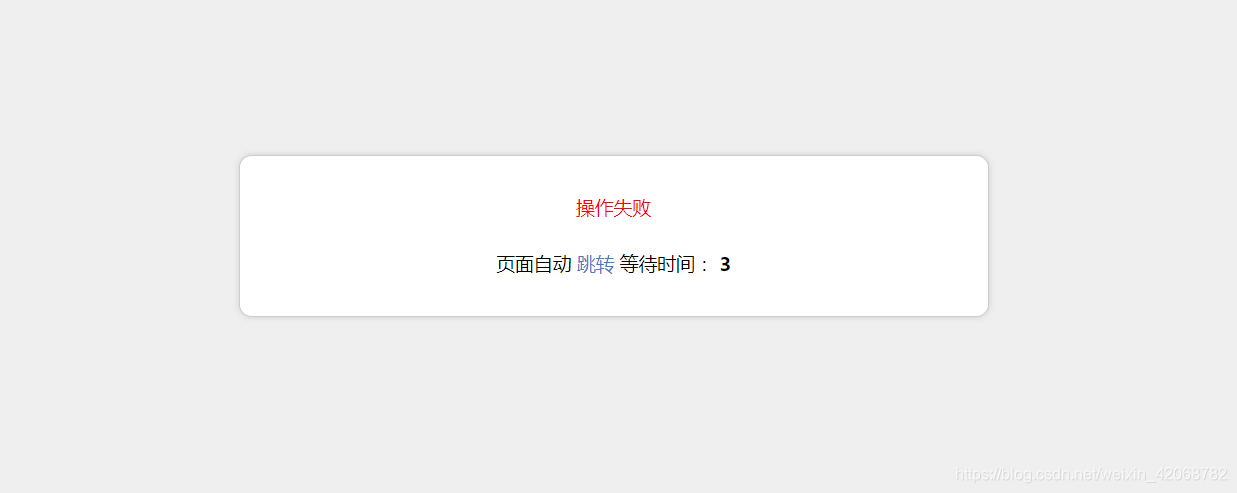
2、上干货
- 为了增加对移动设备的支持,在 /application/common.php加入以下函数:
 function isMobile()

 {

     if (isset ($_SERVER['HTTP_X_WAP_PROFILE']))

     {

         return true;

     }

     if (isset ($_SERVER['HTTP_VIA']))

     {

         return stristr($_SERVER['HTTP_VIA'], "wap") ? true : false;

     }

     if (isset ($_SERVER['HTTP_USER_AGENT']))

     {

         $clientkeywords = array ('nokia',

             'sony',

             'ericsson',

             'mot',

             'samsung',

             'htc',

             'sgh',

             'lg',

             'sharp',

             'sie-',

             'philips',

             'panasonic',

             'alcatel',

             'lenovo',

             'iphone',

             'ipod',

             'blackberry',

             'meizu',

             'android',

             'netfront',

             'symbian',

             'ucweb',

             'windowsce',

             'palm',

             'operamini',

             'operamobi',

             'openwave',

             'nexusone',

             'cldc',

             'midp',

             'wap',

             'mobile'

             );

         if (preg_match("/(" . implode('|', $clientkeywords) . ")/i", strtolower($_SERVER['HTTP_USER_AGENT'])))

         {

             return true;

         }

     }

     if (isset ($_SERVER['HTTP_ACCEPT']))

     {

         if ((strpos($_SERVER['HTTP_ACCEPT'], 'vnd.wap.wml') !== false) && (strpos($_SERVER['HTTP_ACCEPT'], 'text/html') === false || (strpos($_SERVER['HTTP_ACCEPT'], 'vnd.wap.wml') < strpos($_SERVER['HTTP_ACCEPT'], 'text/html'))))

         {

             return true;

         }

     }

     return false;

 }
替换模板( 找到文件 /thinkphp/tpl/dispatch_jump.tpl ,删除里面的全部代码,加入下面代码)
 {__NOLAYOUT__}<!DOCTYPE html PUBLIC "-//W3C//DTD XHTML 1.0 Transitional//EN" "http://www.w3.org/TR/xhtml1/DTD/xhtml1-transitional.dtd">

 <html xmlns="http://www.w3.org/1999/xhtml">

 <head>

 <meta name="viewport" content="width=device-width, initial-scale=1.0, minimum-scale=0.5, maximum-scale=2.0, user-scalable=yes" />

     <meta http-equiv="Content-Type" content="text/html; charset=utf-8" />

     <title>跳转提示</title>

     <?php if(isMobile()==true){?>

     <style type="text/css">

         body, h1, h2, p,dl,dd,dt{margin: 0;padding: 0;font: 15px/1.5 微软雅黑,tahoma,arial;}

         body{background:#efefef;}

         h1, h2, h3, h4, h5, h6 {font-size: 100%;cursor:default;}

         ul, ol {list-style: none outside none;}

         a {text-decoration: none;color:#447BC4}

         a:hover {text-decoration: underline;}

         .ip-attack{width:100%; margin:200px auto 0;}

         .ip-attack dl{ background:#fff; padding:30px; border-radius:10px;border: 1px solid #CDCDCD;-webkit-box-shadow: 0 0 8px #CDCDCD;-moz-box-shadow: 0 0 8px #cdcdcd;box-shadow: 0 0 8px #CDCDCD;}

         .ip-attack dt{text-align:center;}

         .ip-attack dd{font-size:16px; color:#333; text-align:center;}

         .tips{text-align:center; font-size:14px; line-height:50px; color:#999;}

     </style>

 <?php }else{ ?>

 <style type="text/css">

         body, h1, h2, p,dl,dd,dt{margin: 0;padding: 0;font: 15px/1.5 微软雅黑,tahoma,arial;}

         body{background:#efefef;}

         h1, h2, h3, h4, h5, h6 {font-size: 100%;cursor:default;}

         ul, ol {list-style: none outside none;}

         a {text-decoration: none;color:#447BC4}

         a:hover {text-decoration: underline;}

         .ip-attack{width:600px; margin:200px auto 0;}

         .ip-attack dl{ background:#fff; padding:30px; border-radius:10px;border: 1px solid #CDCDCD;-webkit-box-shadow: 0 0 8px #CDCDCD;-moz-box-shadow: 0 0 8px #cdcdcd;box-shadow: 0 0 8px #CDCDCD;}

         .ip-attack dt{text-align:center;}

         .ip-attack dd{font-size:16px; color:#333; text-align:center;}

         .tips{text-align:center; font-size:14px; line-height:50px; color:#999;}

     </style>

 <?php }?>

 </head>

 <body>

     <div class="ip-attack"><dl>

         <?php switch ($code) {?>

             <?php case 1:?>

             <dt style="color: green"><?php echo(strip_tags($msg));?></dt>

             <?php break;?>

             <?php case 0:?>

             <dt style="color: red"><?php echo(strip_tags($msg));?></dt>

             <?php break;?>

         <?php } ?>

         <br>

         <dt>

             页面自动 <a id="href" href="<?php echo($url);?>">跳转</a> 等待时间: <b id="wait"><?php echo($wait);?></b>

         </dt></dl>

     </div>

     <script type="text/javascript">

         (function(){

             var wait = document.getElementById('wait'),

                 href = document.getElementById('href').href;

             var interval = setInterval(function(){

                 var time = --wait.innerHTML;

                 if(time <= 0) {

                     location.href = href;

                     clearInterval(interval);

                 };

             }, 1000);

         })();

     </script>

 </body>

 </html>
over!over!over!
TP5之页面跳转样式的更多相关文章
- 【完美解决】vue,页面跳转样式错位但是刷新又好了的情况
在vue文件中,做样式分离: 将覆盖样式单独写在一个style标签内,原页面写在 scoped样式作用域下.
- 页面跳转后样式丢失js失效
2 页面跳转后样式丢失js失效 问题描述: 用ajax跳转的时候,从a.html跳转到b.html后,b.html的css以及js都失效了. 解决办法: 将当前页面需要用到的css以及js放在< ...
- jsp/servlet页面跳转丢失样式问题
问题:使用servlet,如何处理在多路径页面跳转中servlet转发页面样式丢失问题?(例如访问 http://localhost/project/listUser.action后转到http:// ...
- request.getRequestDispatcher 页面跳转,样式丢失。
在页面中引用样式和其它资源的时候,尽量不要用相对路径,因为"当前路径"这个概念在J2EE中是不稳定的. 所以最好都是绝对路径,类似于: <% String cp = requ ...
- thinkphp5(tp5)中success跳转页面和弹窗问题解决
自己做了一个form页面,对其操作后,根据$this->success('提示信息',''),执行后是通过笑脸页面跳转,而不是在本页弹框后刷新.源码里带的原来的例子是弹出框刷新,为什么我自己做的 ...
- tp5页面跳转,空控制器空方法
namespace app\index\controller; use think\Controller; class Login extends Controller{ //显示html页面 pub ...
- Controller中页面跳转完后页面的样式全消失的解决办法
问题的原因应该是在controller中进行页面跳转时当前文件的路径变了 解决办法: 1.在jsp页面中<%@ page language="java" contentTyp ...
- jquerymobile页面跳转和参数传递
http://blog.csdn.net/chen052210123/article/details/7481578 页面跳转: 页面跳转时pagebeforechange事件会被触发两次,通过$(d ...
- JQueryMobile页面跳转参数的传递解决方案
在JQueryMobile开发手机端应用使用可能需要考虑相关的页面跳转带来的参数问题.因为JQueryMobile其实也是HTML5实践的结果.HTML5中有localStorage和sessionS ...
随机推荐
- IOS版App的控件元素定位
前言 Android版App的控件元素可以通过Android studio自带的工具uiautomatorviewer来协助定位! IOS版App的控件元素可以通过Appium来实现(未实现),或ap ...
- iOS側拉栏抽屉效果Demo
源代码下载 側拉栏抽屉效果Demo 须要导入第三方的类库例如以下: 抽屉效果所需第三方类库下载 效果:既能够两側都实现抽屉效果也可仅仅实现左側栏或者右側栏的抽屉效果 waterm ...
- Juce源代码分析(九)应用程序基类ApplicationBase
在前面的几篇文章,分析的都是Juce库里面Core模块的内存部分,除了骨灰级C++爱好者之外,貌似大家对这些都不是非常感兴趣.相信大家更想知道Juce是怎么用于产品开发,而对于它的构成不是非常感兴趣. ...
- EasyDarwin开源流媒体社区视频教程
EasyDarwin开源社区出视频教程了,经过几个深夜的努力,终于将第一次课程的5个课时的视频教程录好<EasyDarwin开源流媒体服务器:编译.配置.部署>,EasyDarwin后面会 ...
- How to deploy a Delphi OSX project from the command line
Delphi has a well developed command line build process (via MSBuild) for Windows projects. After the ...
- C#实现(递归和非递归)高速排序和简单排序等一系列排序算法
本人由于近期工作用到了一些排序算法.就把几个简单的排序算法.想冒泡排序,选择排序,插入排序.奇偶排序和高速排序等整理了出来,代码用C#代码实现,而且通过了測试.希望能给大家提供參考. ...
- mac shell命令连接mongo
1. 安装rebomongo 2. mongo 192.168.1.100/databasename -u lsg -p 123456 3.db.drawspecs.find({name:'prize ...
- Exam 70-762 Developing SQL Databases
这个考试还是很有用的,教了很多有用的东西,不错,虽然考试需要很多钱,不过值的尝试.虽然用了sql server 这么多年但是对于事务.多并发的优化还是处于小学生的水平,通过这次考试争取让自己提一个档次 ...
- ffmpeg xcode 中的使用
最近比较闲,苦于ios设备上没有直接播放torrent 文件的软件,开始折腾了.找了不少资料有了思路.但是其中用到了ffmpeg 这个东西. ffmpeg 是通用的一个视频解决框架,用C语言编写,通用 ...
- hadoop2.X集群安装与应用
可参考此文档:hadoop(2.x)以hadoop2.2为例完全分布式最新高可靠安装文档(非常详细)http://www.aboutyun.com/thread-7684-1-1.html 步骤一:下 ...