
TP5之页面跳转样式
1、效果图

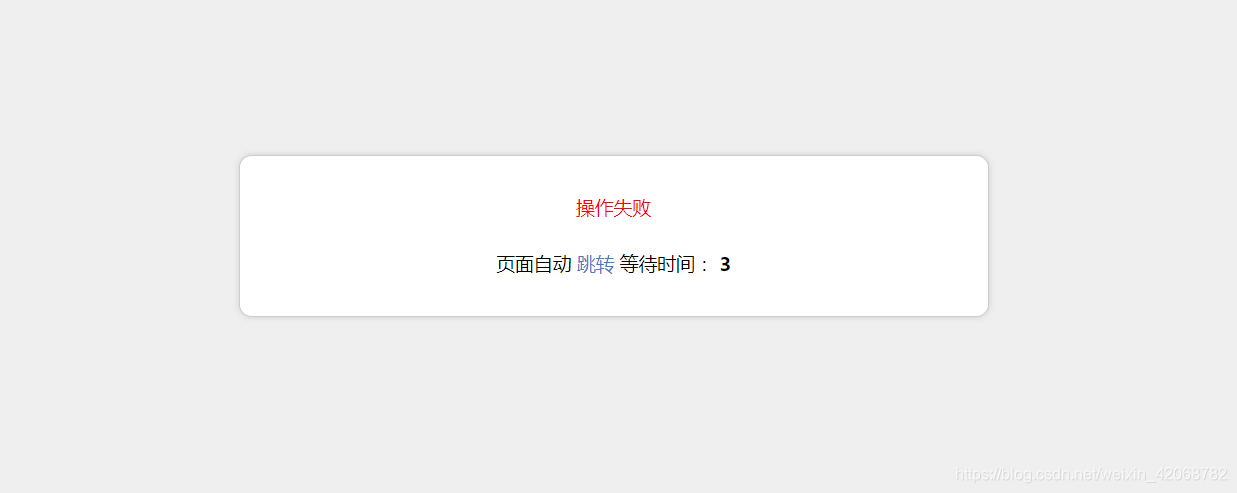
2、上干货
- 为了增加对移动设备的支持,在 /application/common.php加入以下函数:
 function isMobile()

 {

     if (isset ($_SERVER['HTTP_X_WAP_PROFILE']))

     {

         return true;

     }

     if (isset ($_SERVER['HTTP_VIA']))

     {

         return stristr($_SERVER['HTTP_VIA'], "wap") ? true : false;

     }

     if (isset ($_SERVER['HTTP_USER_AGENT']))

     {

         $clientkeywords = array ('nokia',

             'sony',

             'ericsson',

             'mot',

             'samsung',

             'htc',

             'sgh',

             'lg',

             'sharp',

             'sie-',

             'philips',

             'panasonic',

             'alcatel',

             'lenovo',

             'iphone',

             'ipod',

             'blackberry',

             'meizu',

             'android',

             'netfront',

             'symbian',

             'ucweb',

             'windowsce',

             'palm',

             'operamini',

             'operamobi',

             'openwave',

             'nexusone',

             'cldc',

             'midp',

             'wap',

             'mobile'

             );

         if (preg_match("/(" . implode('|', $clientkeywords) . ")/i", strtolower($_SERVER['HTTP_USER_AGENT'])))

         {

             return true;

         }

     }

     if (isset ($_SERVER['HTTP_ACCEPT']))

     {

         if ((strpos($_SERVER['HTTP_ACCEPT'], 'vnd.wap.wml') !== false) && (strpos($_SERVER['HTTP_ACCEPT'], 'text/html') === false || (strpos($_SERVER['HTTP_ACCEPT'], 'vnd.wap.wml') < strpos($_SERVER['HTTP_ACCEPT'], 'text/html'))))

         {

             return true;

         }

     }

     return false;

 }
替换模板( 找到文件 /thinkphp/tpl/dispatch_jump.tpl ,删除里面的全部代码,加入下面代码)
 {__NOLAYOUT__}<!DOCTYPE html PUBLIC "-//W3C//DTD XHTML 1.0 Transitional//EN" "http://www.w3.org/TR/xhtml1/DTD/xhtml1-transitional.dtd">

 <html xmlns="http://www.w3.org/1999/xhtml">

 <head>

 <meta name="viewport" content="width=device-width, initial-scale=1.0, minimum-scale=0.5, maximum-scale=2.0, user-scalable=yes" />

     <meta http-equiv="Content-Type" content="text/html; charset=utf-8" />

     <title>跳转提示</title>

     <?php if(isMobile()==true){?>

     <style type="text/css">

         body, h1, h2, p,dl,dd,dt{margin: 0;padding: 0;font: 15px/1.5 微软雅黑,tahoma,arial;}

         body{background:#efefef;}

         h1, h2, h3, h4, h5, h6 {font-size: 100%;cursor:default;}

         ul, ol {list-style: none outside none;}

         a {text-decoration: none;color:#447BC4}

         a:hover {text-decoration: underline;}

         .ip-attack{width:100%; margin:200px auto 0;}

         .ip-attack dl{ background:#fff; padding:30px; border-radius:10px;border: 1px solid #CDCDCD;-webkit-box-shadow: 0 0 8px #CDCDCD;-moz-box-shadow: 0 0 8px #cdcdcd;box-shadow: 0 0 8px #CDCDCD;}

         .ip-attack dt{text-align:center;}

         .ip-attack dd{font-size:16px; color:#333; text-align:center;}

         .tips{text-align:center; font-size:14px; line-height:50px; color:#999;}

     </style>

 <?php }else{ ?>

 <style type="text/css">

         body, h1, h2, p,dl,dd,dt{margin: 0;padding: 0;font: 15px/1.5 微软雅黑,tahoma,arial;}

         body{background:#efefef;}

         h1, h2, h3, h4, h5, h6 {font-size: 100%;cursor:default;}

         ul, ol {list-style: none outside none;}

         a {text-decoration: none;color:#447BC4}

         a:hover {text-decoration: underline;}

         .ip-attack{width:600px; margin:200px auto 0;}

         .ip-attack dl{ background:#fff; padding:30px; border-radius:10px;border: 1px solid #CDCDCD;-webkit-box-shadow: 0 0 8px #CDCDCD;-moz-box-shadow: 0 0 8px #cdcdcd;box-shadow: 0 0 8px #CDCDCD;}

         .ip-attack dt{text-align:center;}

         .ip-attack dd{font-size:16px; color:#333; text-align:center;}

         .tips{text-align:center; font-size:14px; line-height:50px; color:#999;}

     </style>

 <?php }?>

 </head>

 <body>

     <div class="ip-attack"><dl>

         <?php switch ($code) {?>

             <?php case 1:?>

             <dt style="color: green"><?php echo(strip_tags($msg));?></dt>

             <?php break;?>

             <?php case 0:?>

             <dt style="color: red"><?php echo(strip_tags($msg));?></dt>

             <?php break;?>

         <?php } ?>

         <br>

         <dt>

             页面自动 <a id="href" href="<?php echo($url);?>">跳转</a> 等待时间: <b id="wait"><?php echo($wait);?></b>

         </dt></dl>

     </div>

     <script type="text/javascript">

         (function(){

             var wait = document.getElementById('wait'),

                 href = document.getElementById('href').href;

             var interval = setInterval(function(){

                 var time = --wait.innerHTML;

                 if(time <= 0) {

                     location.href = href;

                     clearInterval(interval);

                 };

             }, 1000);

         })();

     </script>

 </body>

 </html>
over!over!over!
TP5之页面跳转样式的更多相关文章
- 【完美解决】vue,页面跳转样式错位但是刷新又好了的情况
在vue文件中,做样式分离: 将覆盖样式单独写在一个style标签内,原页面写在 scoped样式作用域下.
- 页面跳转后样式丢失js失效
2 页面跳转后样式丢失js失效 问题描述: 用ajax跳转的时候,从a.html跳转到b.html后,b.html的css以及js都失效了. 解决办法: 将当前页面需要用到的css以及js放在< ...
- jsp/servlet页面跳转丢失样式问题
问题:使用servlet,如何处理在多路径页面跳转中servlet转发页面样式丢失问题?(例如访问 http://localhost/project/listUser.action后转到http:// ...
- request.getRequestDispatcher 页面跳转,样式丢失。
在页面中引用样式和其它资源的时候,尽量不要用相对路径,因为"当前路径"这个概念在J2EE中是不稳定的. 所以最好都是绝对路径,类似于: <% String cp = requ ...
- thinkphp5(tp5)中success跳转页面和弹窗问题解决
自己做了一个form页面,对其操作后,根据$this->success('提示信息',''),执行后是通过笑脸页面跳转,而不是在本页弹框后刷新.源码里带的原来的例子是弹出框刷新,为什么我自己做的 ...
- tp5页面跳转,空控制器空方法
namespace app\index\controller; use think\Controller; class Login extends Controller{ //显示html页面 pub ...
- Controller中页面跳转完后页面的样式全消失的解决办法
问题的原因应该是在controller中进行页面跳转时当前文件的路径变了 解决办法: 1.在jsp页面中<%@ page language="java" contentTyp ...
- jquerymobile页面跳转和参数传递
http://blog.csdn.net/chen052210123/article/details/7481578 页面跳转: 页面跳转时pagebeforechange事件会被触发两次,通过$(d ...
- JQueryMobile页面跳转参数的传递解决方案
在JQueryMobile开发手机端应用使用可能需要考虑相关的页面跳转带来的参数问题.因为JQueryMobile其实也是HTML5实践的结果.HTML5中有localStorage和sessionS ...
随机推荐
- 高性能MySQL(三)
服务器性能剖析 性能优化概述 性能优化是降低CPU使用率?错误,资源就是用来消耗的,新版本MySQL的InnoDB引擎对资源的利用率还增高了,所以这不是一个好的衡量标准. 提升每秒查询量?其实就是吞吐 ...
- C语言的面向对象设计之 X264,FFMPEG 架构探讨
FFMPEG架构分析 使用面向对象的办法来设想这样一个编解码库,首先让人想到的是构造各种编解码器的类,然后对于它们的抽象基类确定运行数据流的规则,根据算法转换输入输出对象. 在实际的代码,将这些编解码 ...
- MFC学习之Radio---MFC Radio按钮组的使用例子
首先我们要完成一个功能,在一个添加新用户的场景里,通过Radio按钮来判断用户选择的是管理员还是普通用户. 要使用Radio组的功能首先我们必须作如下设置: 1.2个Radio按钮的ID号不同,但是他 ...
- 800元组装一台3D打印机全教程流程-零件清单
继前面的教程800元组装一台3D打印机全教程流程 k800是一台根据kosselmini改进的低成本3d打印机,通过改变设计,降低了成本,但损失较少性能,取得性价比. 主要改动是:底部支架改为-> ...
- ajax跨域请求的问题
使用getJson跨域请求,需要向服务器发送一个参数callback=? $.getJSON("http://appcenter.mobitide.com/admin/appSearch.p ...
- ipa验证错误问题总结
The following issues were found during validation.这个error的产生原因是因为代码中写的标示符或者方法名,与系统的命名空间冲突. 具体是哪个标示符或 ...
- ios怎样在一个UIImageButton的里面加一些自己定义的箭头
能够採用例如以下方法,写一个函数: -(UIImage*) getOneImageButtonWithArrow{ //tmpView做附控件 UIView *tmpView = [[UIView a ...
- RecyclerView 可以与CollapsingToolbarLayout一起使用
Item 布局 <?xml version="1.0" encoding="utf-8"?> <LinearLayout xmlns:and ...
- ios非UTF-8格式的网页解析
网上有很多关于ios xml解析的方法,关于非UTF-8格式的网页解析也不少,我也试着看了好几个,但都没成功.今天无意中却弄好了,所以想和大家分享下.其实很简单,下面说下怎么得到非UTF-8格式的网页 ...
- Android应用资源---动画资源(Animation Resources)
有两种类型的动画资源: 属性动画 在设定的时间内,通过修改与Animator类相关的对象的属性值来创建一个动画. 视图动画 有两种类型的视图动画框架 补间动画(Tween animation):通过执 ...