
android 之 ListView相关
ListView是一种列表视图,其将ListAdapter所提供的各个控件显示在一个垂直且可滚动的列表中。需要注意的为创建适配器并将其设置给ListView。
1.ArrayAdapter
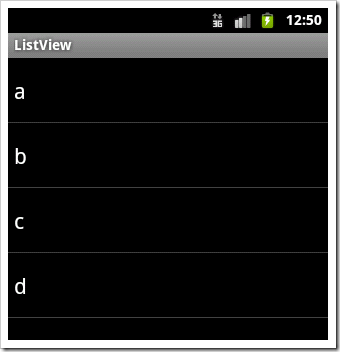
ArrayAdapter由3个参数进行构造,第一个为Context,第二个为在R文件中定义的Layout,也可用系统的R文件,第三个参数是一个数组,数组中每一项的类型没有限制。
系统默认的布局方式可通过android.R.layout.XX定义。

private static String[] data={"a","b","c","d"};
@Override
public void onCreate(Bundle savedInstanceState) {
super.onCreate(savedInstanceState);
// setContentView(R.layout.main);ListView listview=new ListView(this);
ArrayAdapter adapter=new ArrayAdapter<String>(this, android.R.layout.simple_list_item_1,data);
listview.setAdapter(adapter);
setContentView(listview);
}
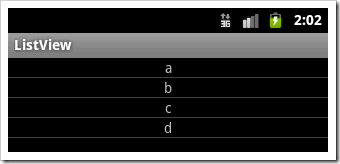
若自定义ListView中每一项TextView的样式arraylayout.xml如下:
<?xml version="1.0" encoding="utf-8"?>
<TextView xmlns:android="http://schemas.android.com/apk/res/android"
android:layout_width="fill_parent" android:layout_height="wrap_content"
android:gravity="center_horizontal" />
Activity中,指定ArrayAdapter第二个参数为arraylayout.xml:
private static String[] data={"a","b","c","d"};
@Override
public void onCreate(Bundle savedInstanceState) {
super.onCreate(savedInstanceState);
// setContentView(R.layout.main);ListView listview=new ListView(this);
ArrayAdapter adapter=new ArrayAdapter<String>(this,R.layout.arraylayout,data);
listview.setAdapter(adapter);
setContentView(listview);
}
2 SimpleAdapter
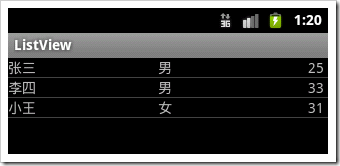
SimpleAdapter的ArrayList里的每一项都是一个Map<String,?>类型,每一项Map对象都和ListV中的一项进行数据绑定一一对应。
private ListView listview;
@Override
public void onCreate(Bundle savedInstanceState) {
super.onCreate(savedInstanceState);
listview=new ListView(this);
data2 = new ArrayList<Map<String, Object>>();
Map<String, Object> item;
item = new HashMap<String, Object>();
item.put("姓名", "张三");
item.put("性别", "男");
item.put("年龄", "25");
data2.add(item);
item = new HashMap<String, Object>();
item.put("姓名", "李四");
item.put("性别", "男");
item.put("年龄", "33");
data2.add(item);
item = new HashMap<String, Object>();
item.put("姓名", "小王");
item.put("性别", "女");
item.put("年龄", "31");
data2.add(item);
SimpleAdapter adapter = new SimpleAdapter(this, data2,
R.layout.simplelayout, new String[] { "姓名", "性别","年龄" }, new int[] {
R.id.tv01, R.id.tv02,R.id.tv03 });
listview.setAdapter(adapter);
setContentView(listview);
其中ListView中每项的布局文件如下:
<?xml version="1.0" encoding="utf-8"?>
<LinearLayout xmlns:android="http://schemas.android.com/apk/res/android"
android:layout_width="fill_parent" android:layout_height="fill_parent"
android:orientation="horizontal">
<TextView android:id="@+id/tv01" android:layout_width="wrap_content"
android:layout_height="wrap_content" android:width="150dp" />
<TextView android:id="@+id/tv02" android:layout_width="wrap_content"
android:layout_height="wrap_content" android:width="150dp"/>
<TextView android:id="@+id/tv03" android:layout_width="wrap_content"
android:layout_height="wrap_content" android:width="150dp"/>
</LinearLayout>
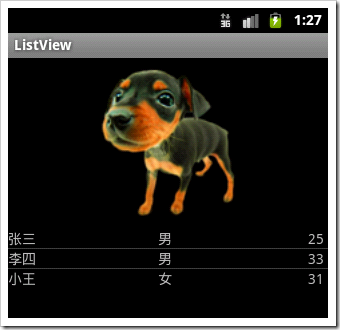
如果设置Activity的布局文件包含不仅ListView,如下:
<?xml version="1.0" encoding="utf-8"?>
<LinearLayout xmlns:android="http://schemas.android.com/apk/res/android"
android:orientation="vertical" android:layout_width="fill_parent"
android:layout_height="fill_parent">
<ImageView android:layout_width="fill_parent" android:layout_height="wrap_content"
android:src="@drawable/img01"/>
<ListView android:id="@+id/listview01" android:layout_width="fill_parent"
android:layout_height="wrap_content" android:choiceMode="singleChoice" />
</LinearLayout>
在Activity中:
setContentView(R.layout.main);
listview=(ListView) findViewById(R.id.listview01);
listview.setAdapter(adapter);
3 BaseAdapter
public class mainActivity extends Activity {
/** Called when the activity is first created. */
int [] drawableIds={R.drawable.img01,R.drawable.img02,R.drawable.img03};
int [] msgIds={R.string.str1,R.string.str2,R.string.str3};
@Override
public void onCreate(Bundle savedInstanceState) {
super.onCreate(savedInstanceState);
setContentView(R.layout.main);
ListView listview=(ListView) findViewById(R.id.listview01);
BaseAdapter ba=new BaseAdapter() {
@Override
public View getView(int position, View convertView, ViewGroup parent) {
// TODO Auto-generated method stub
LinearLayout ll=new LinearLayout(mainActivity.this);
ll.setOrientation(LinearLayout.HORIZONTAL);
ll.setPadding(5, 5, 5, 5);
ImageView ii=new ImageView(mainActivity.this);
ii.setImageDrawable(getResources().getDrawable(drawableIds[position]));
ii.setScaleType(ImageView.ScaleType.FIT_XY);
ii.setLayoutParams(new Gallery.LayoutParams(50,50));
ll.addView(ii);
TextView tv=new TextView(mainActivity.this);
tv.setText(getResources().getText(msgIds[position]));
tv.setTextSize(24);
tv.setTextColor(mainActivity.this.getResources().getColor(R.color.white));
tv.setPadding(5, 5, 5, 5);
tv.setGravity(Gravity.LEFT);
ll.addView(tv);
return ll;
}
@Override
public long getItemId(int position) {
// TODO Auto-generated method stub
return 0;
}
@Override
public Object getItem(int position) {
// TODO Auto-generated method stub
return null;
}
@Override
public int getCount() {
// TODO Auto-generated method stub
return 3;
}
};
listview.setAdapter(ba);
}
}
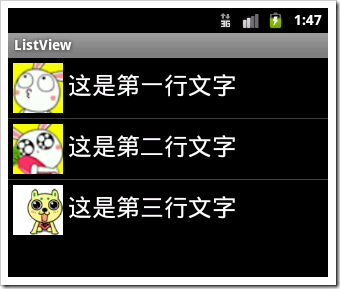
4 ListActivity
若使用ListActivity,则Activity里的ListView将充满屏幕。
在布局文件中,必须定义一个ListView,其Id为@id/android:list;另一个需要定义但并不是必须的是id为@id/android:empty的TextView,其为ListView中无数据时显示的内容。
<?xml version="1.0" encoding="utf-8"?>
<LinearLayout xmlns:android="http://schemas.android.com/apk/res/android"
android:layout_width="fill_parent" android:layout_height="fill_parent">
<ListView android:id="@id/android:list" android:layout_width="fill_parent"
android:layout_height="fill_parent" />
<TextView android:id="@id/android:empty" android:layout_width="fill_parent"
android:layout_height="fill_parent" android:text="没有任何数据" />
</LinearLayout>
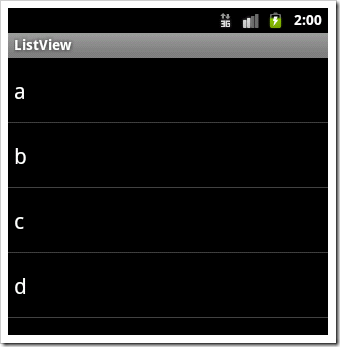
Activity中,ListView每行设置和之前方法一样。
String [] data={"a","b","c","d"};
@Override
public void onCreate(Bundle savedInstanceState) {
super.onCreate(savedInstanceState);
setContentView(R.layout.main);
setListAdapter(new ArrayAdapter<String>(this, android.R.layout.simple_list_item_1,data));
}
android 之 ListView相关的更多相关文章
- Android学习---ListView和Inflater的使用,将一个布局文件转化为一个对象
本文将介绍ListView和Inflater的使用,将接上一篇文章内容. 一.什么是ListView? 在android开发中ListView是比较常用的控件,ListView 控件可使用四种不同视图 ...
- 大叔也说Xamarin~Android篇~ListView里的Click事件并获取本行的其它元素
回到目录 我原创,我贡献,我是仓储大叔 本篇大叔原创,本着对技术的热爱去研究它,把成果分享给国人!大叔始终相信一句话:你只有选择一个感兴趣的工作,你才能更好的发挥你的潜力,而这一切都建立在你不断研究, ...
- android代码优化----ListView中自定义adapter的封装(ListView的模板写法)
[声明] 欢迎转载,但请保留文章原始出处→_→ 生命壹号:http://www.cnblogs.com/smyhvae/ 文章来源:http://www.cnblogs.com/smyhvae/p/4 ...
- android:ListView的局部刷新
1.简介 对于android中的ListView刷新机制,大多数的程序员都是很熟悉的,修改或者添加adapter中的数据源之后,然后调用notifyDataSetChanged()刷新ListView ...
- Android之ListView异步加载图片且仅显示可见子项中的图片
折腾了好多天,遇到 N 多让人崩溃无语的问题,不过今天终于有些收获了,这是实验的第一版,有些混乱,下一步进行改造细分,先把代码记录在这儿吧. 网上查了很多资料,发现都千篇一律,抄来抄去,很多细节和完整 ...
- Android的ListView
ListView ListView 是一个控件,一个在垂直滚动的列表中显示条目的一个控件,这些条目的内容来自于一个ListAdapter. 一个简单的例子 布局文件里新增ListView <Li ...
- 【Anroid】9.1 ListView相关类及其适配器
分类:C#.Android.VS2015: 创建日期:2016-02-18 一.简介 列表视图(ListView)是Android应用程序中使用最频繁的UI组件,从无处不在短菜单选项列表到冗长的联系人 ...
- android实例 listview与sqlite数据绑定
ListView与Sqlite数据库绑定步骤: 1.将Sqlite数据库的内容查询出来并放入数组列表中,形成ListView的数据源: 2.适配器绑定数据源,显示在ListView item中. 本文 ...
- Android—万能ListView适配器
ListView是开发中最常用的控件了,但是总是会写重复的代码,浪费时间又没有意义. 最近参考一些资料,发现一个万能ListView适配器,代码量少,节省时间,总结一下分享给大家. 首先有一个自定义的 ...
随机推荐
- 遍历list集合的三种方式
List<String> list1 = new ArrayList<String>(); list1.add("1"); list1.add(" ...
- 開玩樹莓派(二):配置IP,實現無顯示器局域網內Putty連接和RDP遠程
目錄: 開玩樹莓派(一):安裝Raspbian系統 開玩樹莓派(二):配置IP,實現無顯示器局域網內Putty連接和RDP遠程 開玩樹莓派(三):Python編程 開玩樹莓派(四):GPIO控制和遠程 ...
- springclould feign客户端添加全局参数
用springclould feign作为调用服务的客户端,一般来说参数可以写在feignclient的方法参数里 有时需要所有feign请求都统一添加一些参数,例如token用于鉴权等,可以这样做: ...
- Android Studio报错Unable to resolve dependency for ':app@release/compileClasspath':无法引用任何外部依赖的解决办法
Android Studio 在引用外部依赖时,发现一直无法引用外部依赖.刚开始以为是墙的问题,尝试修改Gradle配置,未解决问题. 最终发现原来是在Android Sudio安装优化配置时,将Gr ...
- DrawerLayout Demo
源码下载:http://download.csdn.net/detail/bx276626237/8882763
- sqlite的应用
对于Android平台来说,系统内置了丰富的API来供开发人员操作SQLite,我们可以轻松的完成对数据的存取.下面就向大家介绍一下SQLite常用的操作方法.本篇文章主要用到SQLiteDataba ...
- 浏览器对DIV+CSS兼容性问题大总结
浏览器对DIV+CSS兼容性问题大总结 接触DIV+CSS架构已经快两年了,个人觉得css入门不难,但要学精并非一朝一夕的,现在大部分网络公司都比较主张用div+css来布局,这就面临着一个比较难的问 ...
- Sqlserver 2012 Always on技术
使用了Sqlserver 2012 Always on技术后,假如采用的配置是默认配置,会出现Primary server CPU很高的情况发生,比如默认配置如下: 需要自定义来解决这个问题. 我们先 ...
- The Jaisalmer Desert Festival 2017/2/9
原文 India's Golden City celebrates its culture with costumes(服装),crafts(工艺品) and camels One of the fe ...
- VS 2013如何编译ASM文件
1. 左键点击解决方案下面的工程 2. 点击上面菜单中的项目,此时有个生成自定义属性 3. 勾选上masm,此时就有Microsoft Macro Assembler了 https://stac ...