
Demo+在Linux下运行(CentOS7+dotnetcore sdk)
来份ASP.NET Core尝尝
0x01、前言
略懂一二。如果有错误,还望见谅。
开发环境:win10+vs2015+sqlserver2014
0x02、demo
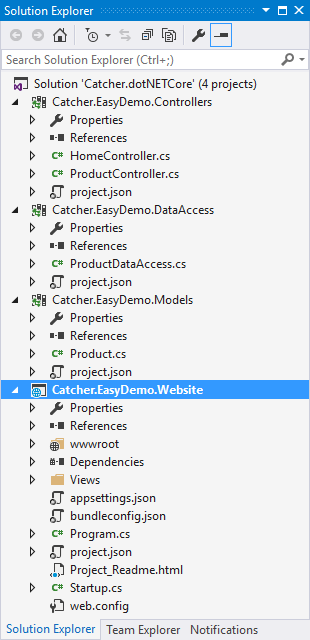
新建一个ASP.NET Core Web Application项目--Catcher.EasyDemo.Website
新建三个Class Library项目:
Catcher.EasyDemo.DataAccess:数据访问
Catcher.EasyDemo.Models:模型
Controller项目需要添加MVC的引用:"Microsoft.AspNetCore.Mvc": "1.0.0"
两种方式,一种是和平常一样的右键->添加引用,另一种是在project.json中的dependencies节点下
面添加 "Catcher.EasyDemo.Controllers": "1.0.0-*",然后就会自动restore,完成之后就能正常跑起
下面的话,在Models中添加一个Product类:

 1 namespace Catcher.EasyDemo.Models

 2 {

 3     public class Product

 4     {

 5         public int ProductId { get; set; }

 6         public string ProductName { get; set; }

 7         public string ProductSource { get; set; }

 8         public decimal ProductPrice { get; set; }

 9     }

10 }
在DataAccess中添加ProductDataAccess类,用于数据交互,里面有用到dapper,所以要添加引用,
以及用到了读取json配置的方法,所以还要添加Microsoft.Extensions.Configuration的引用,同时还要添加Models的引用,方法上面已经说过了。
这里没有用一些复杂的东西,就一个单例模式和一些简单的数据库操作。
  1 using Catcher.EasyDemo.Models;

  2 using Dapper;

  3 using Microsoft.Extensions.Configuration;

  4 using System.Collections.Generic;

  5 using System.Data;

  6 using System.Data.SqlClient;

  7 using System.IO;

  8 using System.Linq;

  9

 10 namespace Catcher.EasyDemo.DataAccess

 11 {

 12     public sealed class ProductDataAccess

 13     {

 14         public static ProductDataAccess Instance

 15         {

 16             get

 17             {

 18                 return Nested.instance;

 19             }

 20         }

 21

 22         class Nested

 23         {

 24             static Nested() { }

 25             internal static readonly ProductDataAccess instance = new ProductDataAccess();

 26         }

 27

 28         /// <summary>

 29         /// get the connection string form the appsettings.json

 30         /// </summary>

 31         /// <returns></returns>

 32         private string GetConnStr()

 33         {

 34             var builder = new ConfigurationBuilder();

 35             builder.SetBasePath(Directory.GetCurrentDirectory());

 36             builder.AddJsonFile("appsettings.json");

 37             var config = builder.Build();

 38             return config.GetConnectionString("dapperConn");

 39         }

 40

 41         /// <summary>

 42         /// open the connection

 43         /// </summary>

 44         /// <returns></returns>

 45         private SqlConnection OpenConnection()

 46         {

 47             SqlConnection conn = new SqlConnection(GetConnStr());

 48             conn.Open();

 49             return conn;

 50         }

 51

 52         /// <summary>

 53         /// get all products

 54         /// </summary>

 55         /// <returns></returns>

 56         public IList<Product> GetAll()

 57         {

 58             using (IDbConnection conn = OpenConnection())

 59             {

 60                 string sql = @"SELECT [ProductId]

 61                                   ,[ProductName]

 62                                   ,[ProductSource]

 63                                   ,[ProductPrice]

 64                               FROM [dbo].[Product]";

 65                 return conn.Query<Product>(sql).ToList();

 66             }

 67         }

 68

 69         /// <summary>

 70         /// delete the product by product's id

 71         /// </summary>

 72         /// <param name="pid">id of the product</param>

 73         /// <returns></returns>

 74         public bool Delete(int pid)

 75         {

 76             using (IDbConnection conn = OpenConnection())

 77             {

 78                 string sql = string.Format(@"DELETE FROM [dbo].[Product] WHERE [ProductId]={0} ", pid.ToString());

 79                 return conn.Execute(sql) > 0;

 80             }

 81         }

 82

 83         /// <summary>

 84         /// add the product

 85         /// </summary>

 86         /// <param name="product">entity of the product</param>

 87         /// <returns></returns>

 88         public bool Add(Product product)

 89         {

 90             using (IDbConnection conn = OpenConnection())

 91             {

 92                 string sql = string.Format(@"INSERT INTO [dbo].[Product]

 93            ([ProductName]

 94            ,[ProductSource]

 95            ,[ProductPrice])

 96      VALUES

 97            ('{0}','{1}',{2})", product.ProductName, product.ProductSource, product.ProductPrice);

 98                 return conn.Execute(sql) > 0;

 99             }

100         }

101     }

102 }
 1 using Microsoft.AspNetCore.Mvc;

 2 using Catcher.EasyDemo.Models;

 3 using Catcher.EasyDemo.DataAccess;

 4

 5 namespace Catcher.EasyDemo.Controllers

 6 {

 7     public class ProductController :  Controller

 8     {

 9         /// <summary>

10         /// Index

11         /// </summary>

12         /// <returns></returns>

13         public IActionResult Index()

14         {

15             return View(ProductDataAccess.Instance.GetAll());

16         }

17

18         /// <summary>

19         /// Add

20         /// </summary>

21         /// <returns></returns>

22         public IActionResult Add()

23         {

24             return View();

25         }

26         [HttpPost]

27         public IActionResult Add(Product product)

28         {

29             bool isOK = ProductDataAccess.Instance.Add(product);

30

31             if (isOK)

32             {

33                 return RedirectToAction("Index");

34             }

35             else

36             {

37                 TempData["err"] = "sorry!there were some errors!Please try again.";

38                 return View();

39             }

40         }

41

42         /// <summary>

43         /// Delete

44         /// </summary>

45         /// <param name="pid"></param>

46         /// <returns></returns>

47         public IActionResult Delete(int pid)

48         {

49             bool isOK = ProductDataAccess.Instance.Delete(pid);

50

51             if (isOK)

52             {

53                 return RedirectToAction("Index");

54             }

55             else

56             {

57                 TempData["err"] = "sorry!there were some errors!Please try again.";

58                 return View("Index");

59             }

60         }

61     }

62 }
添加Index.cshtml
 1 @model IEnumerable<Catcher.EasyDemo.Models.Product>

 2 @{

 3     ViewData["Title"] = "Product Index";

 4 }

 5 <a asp-action="Add" asp-controller="Product">Add a New Product</a>

 6 <div class="container">

 7     <table class="table table-responsive">

 8

 9         <thead>

10             <tr>

11                 <td>ID</td>

12                 <td>Name</td>

13                 <td>Price</td>

14                 <td>Source</td>

15                 <td>Opreation</td>

16             </tr>

17         </thead>

18

19         <tbody>

20             @foreach (var item in Model)

21             {

22                 <tr>

23                     <td>@item.ProductId</td>

24                     <td>@item.ProductName</td>

25                     <td>@item.ProductPrice</td>

26                     <td>@item.ProductSource</td>

27                     <td>

28                         <a asp-action="Delete" asp-controller="Product" asp-route-pid="@item.ProductId">Delete</a>

29                     </td>

30                 </tr>

31             }

32         </tbody>

33     </table>

34 </div>
视图与mvc用的法大致相同,不同就是TagHelper,不过大部分是一看就知道是什么意思,要做什么操作,也不做过多解释。
 1 @model Catcher.EasyDemo.Models.Product

 2 @{

 3     ViewData["Title"] = "Add";

 4 }

 5 <div class="container">

 6     <form asp-action="Add" asp-controller="Product" method="post">

 7         <div class="form-group">

 8             <label asp-for="ProductName">Name</label>

 9             <input asp-for="ProductName" type="text" placeholder="enter the product name" />

10         </div>

11         <div class="form-group">

12             <label asp-for="ProductPrice">Price</label>

13             <input asp-for="ProductPrice" type="text" placeholder="enter the product price" />

14         </div>

15         <div class="form-group">

16             <label asp-for="ProductSource">Source</label>

17             <input asp-for="ProductSource" type="text" placeholder="enter the product source" />

18         </div>

19         <div class="form-group">

20             <button type="submit" class="btn btn-primary">Add Product</button>

21         </div>

22     </form>

23 </div>
1 "connectionStrings": {

2     "dapperConn": "server=127.0.0.1;database=nancydemo;user id=sa;password=123;"

3   }
当然,这是在本地的,放到linux时,需要替换成相应的ip
0x03、Linux下运行
在CentOS上安装dotnet core的方式可以看这里,就不在累赘了
安装好了之后,运行dotnet会提示

确定dotnet core 安装成功之后,
进入到相应的目录,运行dotnet 网站对应的dll即可


总之,dotNET Core 用起来感觉不错
Demo+在Linux下运行(CentOS7+dotnetcore sdk)的更多相关文章
- Linux下运行memcached失败
Linux下运行memcached失败 1.错误信息如下 [root@localhost ~]# memcached can't run as root without the -u switch 2 ...
- Java项目打包在CMD或者Linux下运行
Java项目打包在CMD或者Linux下运行 1.在CMD下运行 在eclipse中将项目export成jar包,然后用压缩软件解压
- Linux下运行jmeter
• 我们在做测试的时候,有时候要运行很久,公司用的测试服务器一般都是linux,就可以运行在linux下面,linux下面不能像windows一样有图形化界面,那怎么运行脚本呢,就先在windows上 ...
- windows下的java项目打jar分别编写在windows与linux下运行的脚本( 本人亲测可用!)
前言: 最近公司做了一个工具,要将这个工具打包成一个可运行的程序,编写start.bat和start.sh在windows和linux下都可以运行. 在网上找了很多资料,最后终于找到一个可靠的资料,记 ...
- 终于解决了Linux下运行OCCI程序一直报Error while trying to retrieve text for error ORA-01804错误
终于解决了Linux下运行OCCI程序一直报Error while trying to retrieve text for error ORA-01804错误 http://blog.csdn.net ...
- Kali Linux下运行Sniffjoke出错的解决
Kali Linux下运行Sniffjoke出错的解决 由于Kali Linux版本的更新和Sniffjoke发布时间久远等问题,Sniffjoke在新版本的Kali Linux中运行存在各种问题.下 ...
- Linux下运行scala语言的jar包
1.新建project 2.打包 3.linux下运行jar包 #First.jar为jar包名,Test为主类名 [root@FI-2 Desktop]# spark-submit First.ja ...
- jmeter压测、操作数据库、分布式、 linux下运行的简单介绍
一.jmeter压测 1.如何压测 常规性能压测:10-15分钟 稳定性测试:一周.2天等 如果想要压测10分钟,勾选永远,勾选调度器,填写600秒.也可以使用固定启动时间. 2.tps.响应时间 ( ...
- windows下和linux下运行jar
需要在windows下运行jar,首先需要我们打包出来可执行jar idea打包可执行jar可以参考我的另一篇博客[https://mp.csdn.net/postedit/88653200] 一.w ...
随机推荐
- linux查找命令find
-1 linux的查找命令有两个: locate find locate:有一个索引库,故速度快,但是新加入的一般不再索引库中,故可能无法查到 find:搜索速度慢,但是功能及其强大,可以追加命令动作 ...
- 使用sp_configure启用 'Ad Hoc Distributed Queries'
使用sp_configure启用 'Ad Hoc Distributed Queries' 原文地址:http://blog.sina.com.cn/s/blog_531bb7630100xh88.h ...
- UVA - 10129 Play on Words(欧拉回路+并查集)
2.解题思路:本题利用欧拉回路存在条件解决.可以将所有的单词看做边,26个字母看做端点,那么本题其实就是问是否存在一条路径,可以到达所有出现过的字符端点.由于本题还要求了两个单词拼在一起的条件是前一个 ...
- 数据库的优化tips
数据库 TIPS:: 1.用于记录或者是数据分析的表创建时::使用Id作为主键,1,2,3...表示消息条数.用户账号id用于做外键.一个用户相应唯一个accountId ...
- jquery第一期:运行第一个jquery
首先下载js文件,网址jquery.com去下载,可以下载1.10版的 首先打开editplus进行编辑,添加js文件: 编写代码: <!DOCTYPE html PUBLIC "-/ ...
- 杭电 3887 Counting Offspring
根据上篇翻译的文章以及很多个帖子,都讲述了树状数组最基本的功能就是tree[i]保存的是位置i左边小于等于a[i]的数的个数. 这样也就可以解释代码中为什么有f[i]=getsum(sd[i-1])- ...
- Unity 屏幕震动效果实现
要实现震屏效果其实并不难,所谓的震屏在PC端可以简单地理解为相机(MainCamera)的抖动. 代码实现如下: using UnityEngine; using System.Collections ...
- Web安全技术(3)-浏览器的跨域访问
http://www.blogjava.net/linli/archive/2015/04/22/424584.html 一.浏览器介绍 对于Web应用来说,浏览器是最重要的客户端. 目前浏览器五花八 ...
- centos7命令行与图形界面启动模式修改
1.命令启动 systemctl set-default multi-user.target 2.图形界面模式 systemctl set-default graphical.target
- WinForm RDLC SubReport Step by step
最近在做的一个PO管理系统,因为要用到订单打印,没有用水晶报表,直接使用VS2010的Reporting.参考了网上的一些文章,但因为找到的数据是用于WebForm的,适配到WinForm有点区别,竟 ...