
VS快捷编码方式
概念:
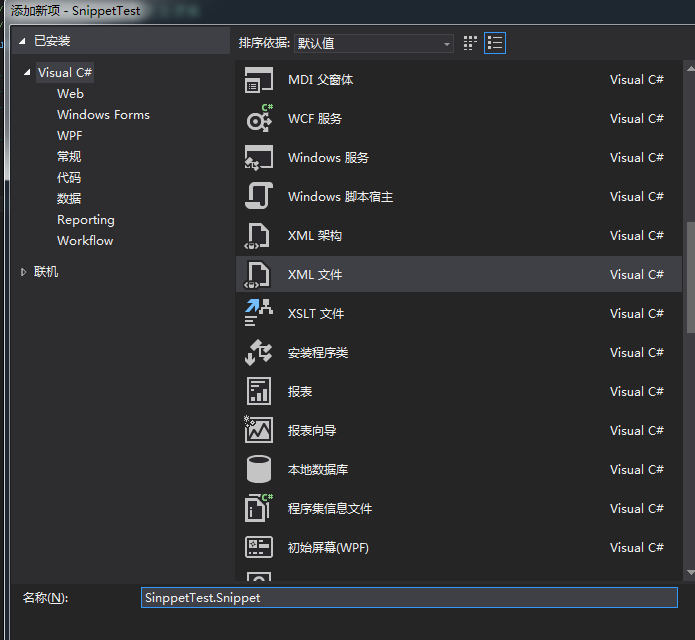

<CodeSnippet Format="1.0.0" xmlns="http://schemas.microsoft.com/VisualStudio/2005/CodeSnippet">

  <Header>

    <Title>标题</Title>

    <Author>作者</Author>

    <Shortcut>快捷方式</Shortcut>

    <Description>说明</Description>

    <SnippetTypes>

      <SnippetType>SurroundsWith</SnippetType>

      <SnippetType>Expansion</SnippetType>

    </SnippetTypes>

  </Header>

  <Snippet>

    <Declarations>

      <Literal>

        <ID>名称</ID>

        <Default>值</Default>

      </Literal>

    </Declarations>

    <Code Language="XML">

      <![CDATA[<test>

      <name>$名称$</name>

      $selected$ $end$</test>]]>

    </Code>

  </Snippet>

</CodeSnippet>
|
<Header>子元素
|
定义
|
|
<Title>
|
显示标题
|
|
<Shortcut>
|
为代码段定义的快捷方式。 在IDE中,输入快捷方式名称然后通过tab键选择下面的代码段,如果你输入部分快捷方式 名称(例如“cla”而不是“class”),你将需要按两次tab键;一次完成名称扩展,另外 一次插入代码段 |
|
<Description>
|
关于代码段的描述信息
|
|
<SnippetType>
|
指定代码段所属的类别(扩展,围绕,或重构)。注意,一个代码段可能属于多个组。 微软IDE根据这个值决定使用哪个显示代码段的上下文菜单 |
|
<Literal>的子节点
|
定义节点
|
|
<ID>
|
变量名称,生成后用于统一替换代码段中的内容
|
|
<ToolTip>
|
鼠标移动到上面的提示信息
|
|
<Default>
|
变量的默认值
|
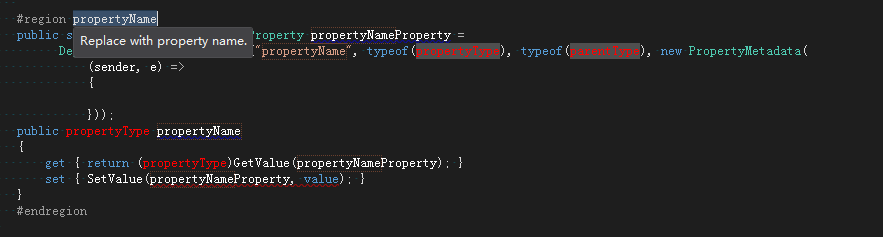
<CodeSnippet Format="1.0.0" xmlns="http://schemas.microsoft.com/VisualStudio/2005/CodeSnippet">

  <Header>

    <Title>MySnippet</Title>

    <Author>infly</Author>

    <Shortcut>dprop</Shortcut>

    <Description>自动生成依赖属性</Description>

    <SnippetTypes>

      <SnippetType>SurroundsWith</SnippetType>

      <SnippetType>Expansion</SnippetType>

      <SnippetType>Refactoring</SnippetType>

    </SnippetTypes>

  </Header>

  <Snippet>

    <Declarations>

      <Literal>

        <ID>PropertyName</ID>

        <Default>propertyName</Default>

        <ToolTip>Replace with property name.</ToolTip>

      </Literal>

      <Literal>

        <ID>PropertyType</ID>

        <Default>propertyType</Default>

        <ToolTip>Replace with property type.</ToolTip>

      </Literal>

      <Literal>

        <ID>ParentType</ID>

        <Default>parentType</Default>

        <ToolTip>Replace with property's parent type.</ToolTip>

      </Literal>

    </Declarations>

    <Code Language="CSharp">

      <![CDATA[

      #region $PropertyName$

      public static readonly DependencyProperty $PropertyName$Property =

            DependencyProperty.Register("$PropertyName$", typeof ($PropertyType$), typeof ($ParentType$), new PropertyMetadata(

                (sender, e) =>

                {

                }));

        public $PropertyType$ $PropertyName$

        {

            get { return ($PropertyType$) GetValue($PropertyName$Property); }

            set { SetValue($PropertyName$Property, value); }

        }

      #endregion

      ]]>

    </Code>

  </Snippet>

</CodeSnippet>
VS快捷编码方式的更多相关文章
- Redis与KV存储(RocksDB)融合之编码方式
Redis与KV存储(RocksDB)融合之编码方式 简介 Redis 是目前 NoSQL 领域的当红炸子鸡,它象一把瑞士军刀,小巧.锋利.实用,特别适合解决一些使用传统关系数据库难以解决的问题.Re ...
- Java不同编码方式,中英文字符所占字节数
测试代码 public class Test { public static void main(String[] args){ String[] charsetNames={ "UTF-8 ...
- form表单编码方式设置为multipart/form-data,后台参数出现乱码情况
一般在上传图片过程中,form中的编码方式一般采用multipart/form-data方式编码,但是后台这取参数时,可能会出现乱码情况:这里后台要采用转换编码方式: 页面: 后台:获取表单元素时,
- servlet获取表单数据的方式和编码方式
.在servlet中获取表单的数据的几种方式 1>request.getParameter(“name”)://获取指定名称的值,返回值类型是一个字符串 2>request.getPa ...
- python 改变字符串的编码方式
字符串str的编码方式为utf-8,转化为gbk,分为两步 1. str=str.decode('utf-8') 2. str=str.encode('gbk')
- [No000040]取得一个文本文件的编码方式
using System; using System.IO; using System.Text; /// <summary> /// 用于取得一个文本文件的编码方式(Encoding). ...
- Java文件读写操作指定编码方式防乱码
读文件:BufferedReader 从字符输入流中读取文本,缓冲各个字符,从而提供字符.数组和行的高效读取. 可以指定缓冲区的大小,或者可使用默认的大小.大多数情况下,默认值就足够大了. 通常,Re ...
- zzy:java采用的是16位的Unicode字符集作为编码方式------理解
java语言使用16位的Unicode字符集作为编码方式,是疯狂Java中的原话. 1,编码方式只是针对字符类型的(不包括字符串类,数值类型int等,这些只是在解释[执行]的时候放到Jvm的不同内存块 ...
- Oracle EBS在编码方式为AL32UTF8时的注意事项
现如今的EBS系统中,为了推进国际化的进程,以及系统向全球化的扩展,在Oracle数据库的编码方式上渐渐从支持中国本土简体中文的ZHS16GBK转向了更趋于国际化的AL32UTF8编码方式.但随之而来 ...
随机推荐
- C# Excel导入、导出
本篇主要介绍C#的Excel导入.导出. 目录 1. 介绍:描述第三方类库NPOI以及Excel结构 2. Excel导入:介绍C#如何调用NPOI进行Excel导入,包含:流程图.NOPI以及C#代 ...
- Web Service工作原理
Web Service基本概念 Web Service也叫XML Web Service WebService是一种可以接收从Internet或者Intranet上的其它系统中传递过来的请求,轻量级的 ...
- android调试系列--使用ida pro调试so
1.工具介绍 IDA pro: 反汇编神器,可静态分析和动态调试. 模拟机或者真机:运行要调试的程序. 样本:阿里安全挑战赛第二题:http://pan.baidu.com/s/1eS9EXIM 2. ...
- iOS9TableView分割线默认不显示,只有滑动的时候才显示 解决办法
只有iOS9和iPhone6 plus模拟器上TableView分割线不会显示,后来终于找到了原因: 由于iPhone6 plus的分辨率较高,开发的时候同常都使用command + 3 或者 com ...
- C# 参数按照ASCII码从小到大排序(字典序)
在对接第三方支付的时候,第三方会要求参数按照ASCII码从小到大排序.如下: public static void requestPay() { Dictionary<string, strin ...
- adb安装和卸载apk的方式
昨天在使用adb卸载程序,结果死活卸载不了.我输入的命令和系统提示如下: D:\testApk>adb uninstall HelloWorld Failure 后来发现原来卸载程序时,只adb ...
- linux 安装中文支持包及中文字符集配置
由于某些原因系统安装时未安装中文支持,导致后续应用出现中文方块乱码现象,解决方法很简单,当然不是重装,只需以下三步即可搞定. 1.安装中文包: #yum -y groupinstall chinese ...
- php json_encode数据格式化2种格式[]和{}
在php中,json格式化数据后,会出现2种形式数据: 1.当array是一个从0开始的连续数组时,json_encode的结果是一个由[]括起来的字符串 $arr = array('a' , 'b' ...
- 转载 50种方法优化SQL Server数据库查询
原文地址 http://www.cnblogs.com/zhycyq/articles/2636748.html 50种方法优化SQL Server数据库查询 查询速度慢的原因很多,常见如下几种: 1 ...
- DataTable中数据针对某列数据去重
//针对这些数据进行去重,取某一列就用这一列字段,把重复的去掉 DataSet ds = dao.get(); DataTable dt = ds.Table[0] DataView dv = dt. ...