
tracker-store and tracker-miner-fs eating up my CPU on every startup
Tracker is a synergy of technologies that are designed to provide a highly sophisticated, innovative and integrated desktop.

Tracker provides the following:

Indexer for desktop search (for more details see this spec : https://wiki.ubuntu.com/IntegratedDesktopSearch)
Tag database for doing keyword tagging of any object
Extensible metadata database for apps like gedit and rhythmbox which need to add custom metadata to files
Database for first class objects allows using tracker's database for storage and implementation of First Class Objects and the Gnome 3.0 Model.
How to get rid of processes?

Disabling tracker for globally (for all users)
Edit /etc/xdg/autostart/trackerd.desktop file with root privileges (sudo -i gedit /etc/xdg/autostart/trackerd*.desktop)
Add Hidden=true to the end of the file
tracker-extract.desktop
tracker-miner-user-guides.desktop
tracker-miner-apps.desktop
tracker-store.desktop
tracker-miner-fs.desktop
Do the same for /etc/xdg/autostart/tracker-applet.desktop if you want
Disabling tracker for your user only
Enter the directory ~/.config/autostart, create it if it does not exist
Create a file named trackerd.desktop
Paste the following into the file, save and exit:
[Desktop Entry]
Encoding=UTF-8
Name=Tracker
Hidden=true
Simply change this values using the gsettings witch will disable the constant indexing of Tracker:
gsettings set org.freedesktop.Tracker.Miner.Files crawling-interval -2
gsettings set org.freedesktop.Tracker.Miner.Files enable-monitors false
The values could be changed using dconf-editor by navigating through org > freedesktop > Tracker > Miner > Files:
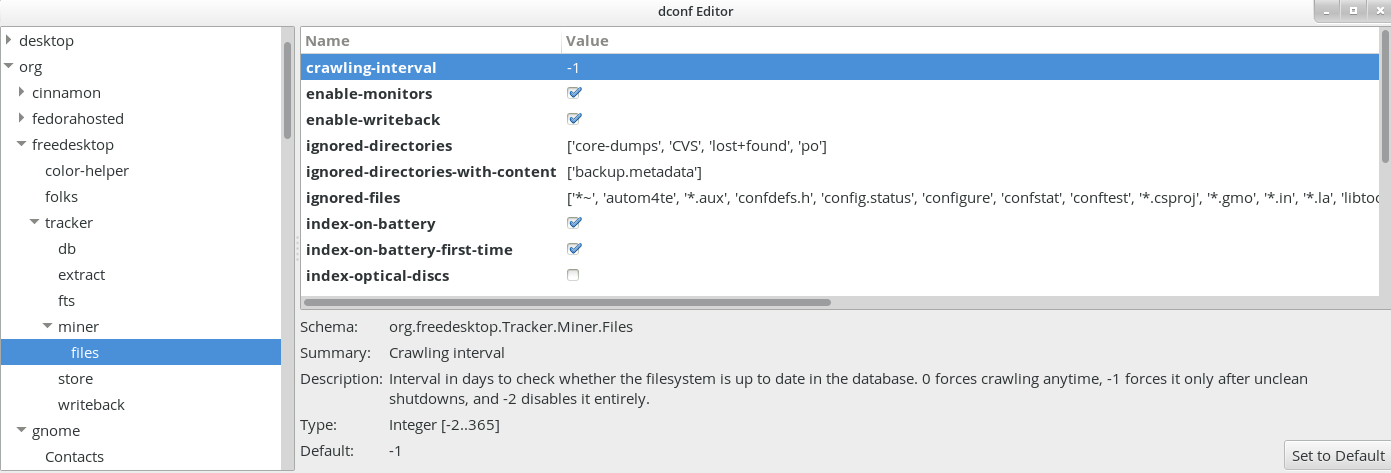
After this changes, it is highly recommended to cleanup the database to reclaim some lost space on the disk:
tracker-control -r
Tracker sucks. Thanks, Tracker.
After using Gnome 3.6.2 for a few days I have noticed a significant slow down at startup. I love where the UI is going (especially if you actually select bluebird as a theme instead of adwaita), but at every startup or in the middle of the day (including when on batteries) my hard drive was grinding away and the CPU was used up by tracker-store. iotop informed that tracker-store was using up 99% of I/O for several minutes and top reported 99% of CPU usage at the same time. Not too big a deal if this is only happening once, but it has been happening every day on my Asus laptop on GNU/Linux. This makes me feel like I'm losing control over my computing (to a certain extent.)
Free software to me means – among other things – the opportunity to understand what my computer is doing at any given time and the power to not let someone else choose what it is doing at any given time. Non-free software makes me gradually lose touch with the tool I have a right to understand and master if so I choose. That's why I decided to stay away from non-free software as much as possible.
In many ways, this issue with tracker reminds me why I switched from MS Windows to GNU/Linux initially (and also stayed away from syncing magic like iTunes, besides the nonfree issue.) It's the feeling that your computer is doing something (especially lots of read/write) you have little information about and don't know whether you want it to or not.
Even after looking up what Tracker does on GNU/Linux, I'm not completely sure what it does exactly at the moment it's running: http://projects.gnome.org/tracker/
You can also find more practical information on tracker at the url below and how it is concretely used and the advantages for users, but this is still not what I'd expect from a PC for my work projects:https://wiki.ubuntu.com/Tracker
While the idea of indexing content and the practical examples offered in the Ubuntu link are interesting, it's only beneficial if you don't keep a tight control of your files. For instance, who needs to get their mp3s indexed automatically when they keep them in their Music directory and if they are using MOC.
Using grep and find for all of my search needs has been a great experience so far: endlessly indexing content when I'm trying to work is a real waste of time and productivity.
Frustratingly, disabling everything using /usr/bin/tracker-preferences didn't actually stop tracker from running amok at the next reboot. Killing the tracker-store process actually doesn't kill it for very long...
Finally, uninstalling tracker with apt-get (sudo apt-get remove tracker) actually removed a bunch of other packages (including tracker-extract, tracker-gui, tracker-miner-fs, tracker-utils.)
I was afraid of not being able to use Gnome Shell properly after that, but the next reboot was much faster, and my hard drive doesn't have to run its daily marathons anymore! I have not noticed any negative side effect.
In a sense, it's great that you don't need tracker to use Gnome 3 efficiently. That's yet another benefit of free software: You don't end up being locked with a single solution as is often the case with proprietary software. For this I am grateful to all the developers of free software I dislike and choose not to use.
tracker-store and tracker-miner-fs eating up my CPU on every startup的更多相关文章
- FastDFS tracker storage 的工作原理及流程
FastDFS tracker storage 的工作原理及流程 2013 年 3 月 11 日 – 09:22 | 1,409 views | 收藏 (No Ratings Yet) FastDF ...
- 使用 .NET Core 开发 BT Tracker 服务器
一.什么是 BT Tracker ? 在 BT 下载过程当中,我们如果拿到一个种子文件,在其内部会包含一组 BT Tracker 服务器信息.在开始进行下载的时候,BT 下载工具会根据种子内的唯一 H ...
- FastDFS 双tracker负载均衡 及多组存储配置
应用场景: 三台服务器分别做三组存储,并且需要两台tracker地址做主备关系,当一台down机后需要另外一台可以提供正常的访问连接 #注:此处不考虑存储数据安全性,如果需要保障数据不丢失,可以分别每 ...
- fastdfs 有用 新增tracker或storage
FastDFS是一个开源的轻量级分布式文件系统,它对文件进行管理,功能包括:文件存储.文件同步.文件访问(文件上传.文件下载)等,解决了大容量存储和负载均衡的问题.特别适合以文件为载体的在线服务,如相 ...
- Hadoop ->> Name node/Data node和Job tracker/Task tracker的区别
刚好看到关于Name node/Data node和Job tracker/Task tracker的解释,一开始有点混淆,以为说Job tracker必须运行在Name node上,他们俩有依赖或者 ...
- centos8安装fastdfs6.06集群方式二之:tracker的安装/配置/运行
一,查看本地centos的版本 [root@localhost lib]# cat /etc/redhat-release CentOS Linux release 8.1.1911 (Core) 说 ...
- FastDFS、nginx配置手记
第一部分 FastDFS介绍 1.FastDFS是什么 FastDFS是一款类Google FS的开源分布式文件系统,它用纯C语言实现,支持Linux.FreeBSD.AIX等UNIX系统.它只能 ...
- FastDFS 分布式文件系统部署实战及基本使用
FastDFS 分布式文件系统部署实战及基本使用 作者:尹正杰 版权声明:原创作品,谢绝转载!否则将追究法律责任. FastDFS是一个开源的高性能分布式文件系统.它的主要功能包括:文件存储,文件同步 ...
- Spark大数据针对性问题。
1.海量日志数据,提取出某日访问百度次数最多的那个IP. 解决方案:首先是将这一天,并且是访问百度的日志中的IP取出来,逐个写入到一个大文件中.注意到IP是32位的,最多有个2^32个IP.同样可以采 ...
随机推荐
- Python即时网络爬虫:API说明
API说明——下载gsExtractor内容提取器 1,接口名称 下载内容提取器 2,接口说明 如果您想编写一个网络爬虫程序,您会发现大部分时间耗费在调测网页内容提取规则上,不讲正则表达式的语法如何怪 ...
- Zigbee、WiFi和433MHz无线技术各有特点
Zigbee.WiFi和433MHz无线技术都属于近距离无线通讯技术,并且都使用ISM免执照频段,但它们各具特点. ZigBee的特点是低功耗.高可靠性.强抗干扰性,布网容易,通过无线中继器可以非 ...
- #pragma pack(n) 的作用
在C语言中,结构是一种复合数据类型,其构成元素既可以是基本数据类型(如int.long.float等)的变量,也可以是一些复合数据类型(如数组.结构.联合等)的数据单元.在结构中,编译器为结构的每个成 ...
- WIN7 Wireshark: There are no interfaces on which a capture can be done
有的时候我们在Windows7的环境下使用Wireshark的时候,比如点击[Interface List]的时候,出现错误. 错误内容如下: There are no interfaces on w ...
- 悼念512汶川大地震遇难同胞――珍惜现在,感恩生活 分类: dp 2015-05-21 10:50 14人阅读 评论(0) 收藏
Description 急!灾区的食物依然短缺! 为了挽救灾区同胞的生命,心系灾区同胞的你准备自己采购一些粮食支援灾区,现在假设你一共有资金n元,而市场有m种大米,每种大米都是袋装产品,其价格不等,并 ...
- php float 转int
round(x,prec) 参数 描述 x 可选.规定要舍入的数字. prec 可选.规定小数点后的位数. <?php echo(round(0.60)); echo(round(0.50)); ...
- Java面向对象面试案例
- PHP-xml-1
SimpleXML 解析xml 假设xml没有声明encoding默认使用utf-8进行解码.终于得到的数据编码为utf-8格式. 我猜想它内部实现了iconv(encoding='utf-8', ' ...
- UVA 507 - Jill Rides Again 动态规划
Jill Rides Again Jill likes to ride her bicycle, but since the pretty city of Greenhills where sh ...
- 6T GPT 移动硬盘在linux下的挂载
实验室拿来了一个6T的移动硬盘,拿到后没有分区就直接用了,在Windows上用的好好的,插到上Linux后起初不会挂载,折腾了一会,成功挂载,很简单. 运行fdisk –l后,显示如下: 很明显,sd ...