
C# 标签打印示例 1
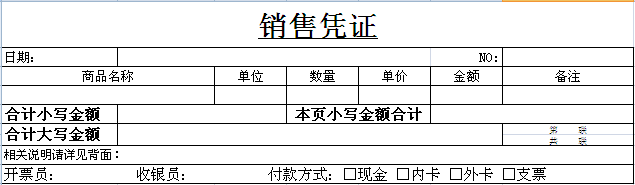
具体需求是:一个订单一页纸打印4行分录,如果超过4行,则再次按照原格式换纸打印,如果行数未满4行,则补空行。
一、实现步骤:
1、首先在EXCEL 画好模版 (后缀名是 .xlt )
2、在程序中调用EXCEL 填充数据
3、调用EXCEL打印方法打印
二、源码重点讲解:
1、List<> 泛型集合保存打印的数据,通过它可以删除已经打印过的数据
for (int i = 0; i <= list.Count; i++)

 {

        if (i > 0) i--; //每当执行完下一次的时候,将这个值初始化为0,即i--

        if (nindex == Convert.ToInt32(pagesize)) break;  //如果超过指定的行数,则跳出循环

        FitemData model = list[i];

        ..........

        list.Remove(model); //移除当前行

}
示例:
 while (list.Count > 0)

 {

        PrintExccel(ref list, damountcount.ToString(), FirstPageText.ToString(), PageCount.ToString(), PageSize.ToString(), ref strmes);

        FirstPageText++;

 }
=========================源码讲解==============================
 /// <summary>

 /// 打印方法

 /// </summary>

 /// <param name="dt">打印的数据</param>

 /// <param name="strmes">bug返回的异常信息</param>

 private void Print(DataTable dt, ref string strmes)

 {

        List<FitemData> list = new List<FitemData>();

        decimal damountcount = 0.00M; //合计小写金额

        try

        {

            foreach (DataRow dr in dt.Rows)

            {

                FitemData model = new FitemData();

                model.F_106 = dr["F_106"].ToString();

                model.FAmount = Convert.ToDecimal(dr["FAmount"].ToString()).ToString("f2");

                model.FPrice = Convert.ToDecimal(dr["FPrice"].ToString()).ToString("f2");

                model.FUnitName = dr["FUnitName"].ToString();

                model.Fdate = dr["fdate"].ToString();

                model.Fbillno = dr["fbillno"].ToString();

                model.FQty = dr["FQty"].ToString();

                damountcount += Convert.ToDecimal((model.FAmount));

                list.Add(model);

            }


            int PageSize = Convert.ToInt32(ConfigurationManager.AppSettings["PageSize"]);    //每页行数

            int PageCount = 0;  //总页数

            int FirstPageText = 1; //首页

            PageCount = list.Count % PageSize > 0 ? list.Count / PageSize + 1 : list.Count / PageSize;


            while (list.Count > 0)

            {

                PrintExccel(ref list, damountcount.ToString(), FirstPageText.ToString(), PageCount.ToString(), PageSize.ToString(), ref strmes);

                FirstPageText++;

            }

        }

        catch (Exception ex)

        {

            strmes = ex.Message;

        }

   }
/// <summary>

/// excel 打印

/// </summary>

/// <param name="list">总记录数</param>

/// <param name="damountcount">小写金额总计</param>

/// <param name="firsrpagetext">页码数</param>

/// <param name="pagesize">每页行数</param>

/// <param name="strmes">错误参数回写</param>

private void PrintExccel(ref List<FitemData> list, string damountcount, string firsrpagetext, string pagecount, string pagesize, ref string strmes)

{

        try

        {

            int rowBase = 4,colBase = 1,rowIndex = rowBase,colIndex = colBase, nindex = 0;

            decimal dfamount = 0.0M;


            Excel.Application excelapp;

            excelapp = new Microsoft.Office.Interop.Excel.Application();

            Excel.Workbook book = excelapp.Workbooks.Open(System.AppDomain.CurrentDomain.SetupInformation.ApplicationBase + @"\ReportFile\Report.xlt",

                Missing.Value, Missing.Value, Missing.Value, Missing.Value, Missing.Value, Missing.Value, Missing.Value, Missing.Value, Missing.Value, Missing.Value, Missing.Value, Missing.Value, Missing.Value, Missing.Value);


            Excel.Worksheet st1 = (Excel.Worksheet)book.Worksheets[1]; // 选择的工作表,序号默认是从1开始即(Sheet0)

            st1.Cells[2, 2] = list[0].Fdate;

            st1.Cells[2, 7] = list[0].Fbillno;

            st1.Cells[3, 1] = "商品名称";

            for (int i = 0; i <= list.Count; i++)

            {

                if (i > 0) i--;

                if (nindex == Convert.ToInt32(pagesize)) break;  //如果超过指定的行数,则跳出循环

                FitemData model = list[i];


                //复制格式 插入一个新行

                Excel.Range range = (Excel.Range)st1.Rows[rowBase, Missing.Value];

                range.Insert(Excel.XlInsertShiftDirection.xlShiftDown, Missing.Value);


                st1.Cells[rowBase, colIndex] = model.F_106;

                colIndex = colIndex + 2;

                st1.Cells[rowBase, colIndex] = model.FUnitName;

                colIndex++;

                st1.Cells[rowBase, colIndex] = "'" + model.FQty;

                colIndex++;

                st1.Cells[rowBase, colIndex] = "'" + model.FPrice;

                colIndex++;

                st1.Cells[rowBase, colIndex] = "'" + model.FAmount;


                rowBase++;

                colIndex++;

                rowIndex++;

                colIndex = colBase;

                dfamount += Convert.ToDecimal(model.FAmount);

                nindex++;

                list.Remove(model);

            }


            if (nindex < Convert.ToInt32(pagesize))

            {

                for (int i = 0; i < Convert.ToInt32(pagesize) - nindex; i++)

                {

                    //复制格式 插入一个新行

                    Excel.Range range = (Excel.Range)st1.Rows[rowBase, Missing.Value];

                    range.Insert(Excel.XlInsertShiftDirection.xlShiftDown, Missing.Value);

                    rowBase++;

                    colIndex++;

                    rowIndex++;

                    colIndex = colBase;

                }

            }


            Excel.Range rangedel = (Excel.Range)st1.Rows[rowIndex, Missing.Value];

            rangedel.EntireRow.Delete(Excel.XlDeleteShiftDirection.xlShiftUp);   //删除多余行 (即固定订单分录行数下多出的一行)


            st1.Cells[rowIndex, 2] = "'" + damountcount; //dfamount.ToString("f2");

            st1.Cells[rowIndex, 6] = "'" + dfamount.ToString("f2");

            st1.Cells[rowIndex + 1, 2] = MoneyToUpper(Convert.ToDecimal(damountcount).ToString("f2"));

            st1.Cells[rowIndex + 1, 7] = "第  " + firsrpagetext + "  联";

            st1.Cells[rowIndex + 2, 7] = "共  " + pagecount + "  联";


            excelapp.Visible = false;   //不显示出来

            string strprintpath = ConfigurationManager.AppSettings["PrinterName"]; //打印机名称

            st1.PrintOut(Type.Missing, Type.Missing, Type.Missing, Type.Missing, strprintpath, Type.Missing, Type.Missing, Type.Missing);  //直接打印


            book.Saved = true;

            excelapp.Workbooks.Close();

            excelapp.Visible = false;

            excelapp.Quit();

            GC.Collect();

            //++++++++++++++++++++++++++++++++++++++++++++++++++++++++++++++++++++++++++++

        }

        catch (Exception ex)

        {

            strmes = ex.Message;

        }

}
C# 标签打印示例 1的更多相关文章
- PHPCMS 标签与示例
一.SEO优化: 获取栏目的关键字:{$SEO['keyword']} 获取栏目的描述:{$SEO['description']} 判断栏目的title是否存在或为空,如果是的话,则用站点的title ...
- Virgo标签打印
去年刚换新的公司,熟悉新的业务和代码,在修改公司打印标签的时候,感觉到无比烦躁与头痛.只因为不好维护,所有的标签打印,全部是GDI+绘制,每次修改微调,都只能全部运行才能看到效果.程序过大,编译过慢, ...
- 生鲜配送管理系统_升鲜宝V2.0 小标签打印功能【代配送商品打印小标签功能】说明_15382353715
小标签打印说明 小标签打印可以打印本系统的订单商品数量,也可以把外部的订单商品导入本系统进行打印. 打印本系统中的订单商品操作说明[上篇文章已经讲解相关的操作说明] 打印本系统之外的订单商品明细清单 ...
- 生鲜配送管理系统_升鲜宝V2.0 小标签打印功能说明_15382353715
小标签打印说明 小标签打印可以打印本系统的订单商品数量,也可以把外部的订单商品导入本系统进行打印. 打印本系统中的订单商品操作说明 1.1 界面说明 1.2 查询条件 1.2.1 ...
- java continue break 关键字 详解 区别 用法 标记 标签 使用 示例 联系
本文关键词: java continue break 关键字 详解 区别 用法 标记 标签 使用 示例 联系 跳出循环 带标签的continue和break 嵌套循环 深入continue ...
- JSTL中forEach标签应用示例【转】【补】
forEach样例 <%@ page language="java" import="java.util.*" pageEncoding="ut ...
- 使用FastReport报表工具生成标签打印文档
在我们实际开发报表的时候,我们需要按一定的业务规则组织好报表的模板设计,让报表尽可能的贴近实际的需求,在之前的随笔中<使用FastReport报表工具生成报表PDF文档>介绍了FastRe ...
- jsp的三种自定义标签 写法示例
1.自定义方法标签 引入方式示例: <%@ taglib prefix="fns" uri="/WEB-INF/tlds/fns.tld" %> 写 ...
- 让pre标签自动换行示例代码
pre 元素可定义预格式化的文本.被包围在 pre 元素中的文本通常会保留空格和换行符.而文本也会呈现为等宽字体. <pre> 标签的一个常见应用就是用来表示计算机的源代码.对于技术博客经 ...
随机推荐
- asp.net验证控件注意事项
1.如果触发某个控件事件是只对指定验证控件进行验证,可以将验证控件和被触发控件放到到一个ValidationGroup中.比如点提交按钮的时候,验证文本框,可以将提交按钮和验证控件放到一个Valida ...
- EasyUI 1.4.4 DataGrid(大数据量) bufferview滚动时不加载下一页数据解决方案
在使用Easyui DataGrid 过程中,发现若单页数据量超过300,IE浏览器加载速度很慢.也通过网上找寻了很多解决方案,最典型的就是去掉datagrid的自动列宽以及自动行高判断. 1.解决自 ...
- js_day2
1)<script src="dsad.js"> 不是 scr= 2)
- Codeforces Round #318(Div 1) 573A, 573B,573C
转载请注明出处: http://www.cnblogs.com/fraud/ ——by fraud 这场的前两题完全是手速题...A题写了7分钟,交的时候已经500+了,好在B题出的 ...
- 翻译:《What can I hold you with?》—— 博尔赫斯《英文诗两首》之一。
What can I hold you with? 我拿什么才能留住你? I offer you lean streets, desperate sunsets, the moon of the ja ...
- 有n人围成一圈,顺序排号。从第1个人开始报数(从1到3报数),凡报到3的人退出圈子,问最后留下的是原来的第几号的那位。
#include <iostream> using namespace std; int main() { int i,j,n,m,k,*p,num[100];k=m=0; cin&g ...
- php-fpm:fastcgi_finish_request()
开始研究php-fpm, 在php-fpm的官网上发现一些很有用的功能,记录一下 1.支持php脚本执行慢的log记录 ; The timeout for serving a single reque ...
- MSIL
公共字段Add 将两个值相加并将结果推送到计算堆栈上. Add_Ovf 将两个整数相加,执行溢出检查,并且将结果推送到计算堆栈上. Add_Ovf_Un 将两个无符号整数值相加,执行溢出检查,并且将结 ...
- 面试题 46 1+ 2+3+...+n
class Temp{ public: Temp(){ ++N; sum+=N; } static void Reset(){ N = ; sum = ; } static int getSum(){ ...
- Qt浅谈之四十九俄罗斯方块(代码来自网络)
一.简介 从网上下载了一个Qt实现的俄罗斯方块单机版的源码,觉得非常有意思,故以博客形式记录下来,以便慢慢来研究.在centos6.6下编译运行(注意程序运行需要读取pro目录的配置文件,若把编译目录 ...