
ASP.NET MVC5 学习笔记-4 OWIN和Katana
1. Owin
OWIN全名:Open Web Interface for .NET. 它是一个说明,而非一个框架,该声明用来实现Web服务器和框架的松耦合。它提供了模块化、轻量级和便携的设计。类似Node.js, WSGI.
Katana是微软实现的OWIN组件的集合。包含基础设施组件和功能性组件。并且暴露出了OWIN管道用来添加组件。可以在IIS、OwinHost.exe或者自定义的服务器中托管。
比如OWIN提供了新的登录模式,比如,打开Web.config文件,我们看到:
<system.web>

    <authentication mode="None" />

    <compilation debug="true" targetFramework="4.5" />

    <httpRuntime targetFramework="4.5" />

</system.web>
我们看到<authentication mode="None"/>,这里我们不在使用传统的Form认证,而是使用Owin的认证。我们打开Startup.cs文件,看到如下内容:
public partial class Startup

{

    public void Configuration(IAppBuilder app)

    {

        ConfigureAuth(app);

    }

}
这里我们使用ConfigureAuth(app)来配置认证,打开这个方法的定义,可以看到如下方法:
public void ConfigureAuth(IAppBuilder app)

{

    // 使应用程序可以使用 Cookie 来存储已登录用户的信息

    app.UseCookieAuthentication(new CookieAuthenticationOptions

    {

        AuthenticationType = DefaultAuthenticationTypes.ApplicationCookie,

        LoginPath = new PathString("/Account/Login")

    });

    // Use a cookie to temporarily store information about a user logging in with a third party login provider

    app.UseExternalSignInCookie(DefaultAuthenticationTypes.ExternalCookie);

    // 取消注释以下行可允许使用第三方登录提供程序登录

    //app.UseMicrosoftAccountAuthentication(

    //    clientId: "",

    //    clientSecret: "");

    //app.UseTwitterAuthentication(

    //   consumerKey: "",

    //   consumerSecret: "");

    //app.UseFacebookAuthentication(

    //   appId: "",

    //   appSecret: "");

    //app.UseGoogleAuthentication();

}
2. 本地认证Local Authentication
默认就是本地认证:
// 使应用程序可以使用 Cookie 来存储已登录用户的信息

app.UseCookieAuthentication(new CookieAuthenticationOptions

{

    AuthenticationType = DefaultAuthenticationTypes.ApplicationCookie,

    LoginPath = new PathString("/Account/Login")

});

// Use a cookie to temporarily store information about a user logging in with a third party login provider

app.UseExternalSignInCookie(DefaultAuthenticationTypes.ExternalCookie);
3. 添加Facebook认证
// 取消注释以下行可允许使用第三方登录提供程序登录

//app.UseMicrosoftAccountAuthentication(

//    clientId: "",

//    clientSecret: "");

//app.UseTwitterAuthentication(

//   consumerKey: "",

//   consumerSecret: "");

//app.UseFacebookAuthentication(

//   appId: "",

//   appSecret: "");

//app.UseGoogleAuthentication();
取消注释对应的行,并且添加appId和appSecret。
第二步,如果在创建账户后需要做一些其他的操作,修改AccountController.cs中的ExternalLoginConfirmation方法。
4. Identity身份
4.1 使用Claim添加自定义的字段
Identity 是第一个产生出来为每个用户识别身份的。Account的Register方法先生成创建一个IdentityResult,然后再使用SignInAsync。
Claim是一个关于用户的声明,由Identity provider提供,比如用户1有Admin角色。
Asp.Net生成的数据库中有AspNetUsers,AspNetUserRoles和AspNetUserClaims表,其中AspNetUserClaims用来存储用户自定义的一些信息。
比如给用户在注册时添加一个名称:
public async Task<ActionResult> Register(RegisterViewModel model)

{

    if (ModelState.IsValid)

    {

        var user = new ApplicationUser() { UserName = model.Email, Email = model.Email};

        var result = await UserManager.CreateAsync(user, model.Password);

        if (result.Succeeded)

        {

            //添加Claims

            UserManager.AddClaim(user.Id, new Claim(ClaimTypes.GivenName, model.FirstName));

            var service = new CheckingAccountService(HttpContext.GetOwinContext()

                .Get<ApplicationDbContext>());

            service.CreateCheckingAccount(model.FirstName, model.LastName,

                user.Id, 0);

            await SignInAsync(user, isPersistent: false);

            return RedirectToAction("Index", "Home");

        }

        else

        {

            AddErrors(result);

        }

    }

    // 如果我们进行到这一步时某个地方出错,则重新显示表单

    return View(model);

}
获取Claims
var identity = (ClaimsIdentity) User.Identity;

var name = identity.FindFirstValue(ClaimTypes.GivenName) ?? identity.GetUserName();
4.2 在model中添加自定义的字段
打开IdentityModels.cs,在ApplicationUser中添加:
public class ApplicationUser : IdentityUser

{

    public async Task<ClaimsIdentity> GenerateUserIdentityAsync(UserManager<ApplicationUser> manager)

    {

        var userIdentity = await manager.CreateIdentityAsync(this, DefaultAuthenticationTypes.ApplicationCookie);

        return userIdentity;

    }

    public string Pin { get; set; }

}
5 基于角色的认证
5.1 为每个用户添加余额显示
每个Controller都有一个User属性,获取当前UserId的方法如下:
var userId = User.Identity.GetUserId();
比如,我们要获取之前定义的账户余额,可以打开CheckingAccountController.cs中添加下面的代码
private ApplicationDbContext db = new ApplicationDbContext();

//

// GET: /CheckingAccount/Details/

public ActionResult Details()

{

    var userId = User.Identity.GetUserId();

    var checkingAccount = db.CheckoutAccounts.First(c => c.ApplicationUserId == userId);

    return View(checkingAccount);

}
这样每个用户就都能看到自己的账户余额了。
5.2 显示用户账户余额列表
在CheckingAccountController.cs中添加:
public ActionResult List()

{

    return View(db.CheckoutAccounts.ToList());

}
现在,我们为List添加视图,右键:
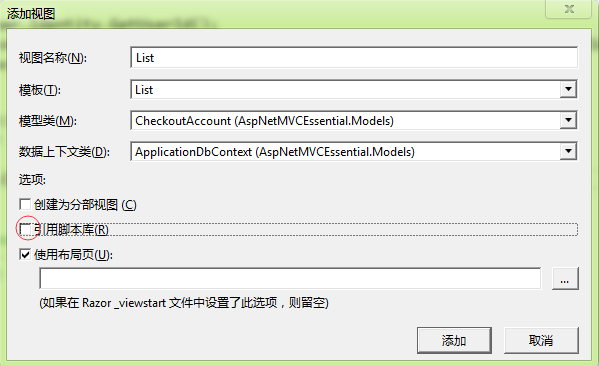
注意,如果按照上图配置发生错误,并且错误是“运行所选代码生成器时出错”,那么应该将数据上下文类留空,这样就可以了。
然后编辑生成的模板,将编辑改为:
@Html.ActionLink("详细", "DetailsForAdmin", new { id=item.Id }) |
并且,在CheckingAccountController.cs中添加:
[Authorize(Roles = "Admin")]

public ActionResult DetailsForAdmin(int id)

{

    var checkingAccount = db.CheckoutAccounts.First(c => c.Id == id);

    return View("Details", checkingAccount);

}
请注意,我们添加了[Authorize(Roles="Admin")]来限定只有Admin组的才能访问,下一节我们讲介绍如何使用角色分配。
6 给用户赋值角色
打开Migrations\Configurations,在Seed方法中添加如下:
protected override void Seed(AspNetMVCEssential.Models.ApplicationDbContext context)

{

    //UserStore一定要使用context作为参数

    var userStore = new UserStore<ApplicationUser>(context);

    var userManager = new UserManager<ApplicationUser>(userStore);

    if (!context.Users.Any(u => u.UserName == "liulixiang1988"))

    {

        //1、创建用户

        var user = new ApplicationUser { UserName = "liulixiang1988", Email = "liulixiang1988@gmail.com" };

        //下面这句会创建一个用户并且会立即执行,不需调用SaveChanges

        userManager.Create(user, "passW0rd");

        //2、创建用户相关的账户

        var service = new CheckingAccountService(context);

        service.CreateCheckingAccount("liulixiang1988", "管理员", user.Id, 1000);

        //3、添加角色并保存

        context.Roles.AddOrUpdate(r => r.Name, new IdentityRole { Name = "Admin" });

        context.SaveChanges();

        //4、给用户添加角色,指定Id和角色名

        userManager.AddToRole(user.Id, "Admin");

    }

}
ASP.NET MVC5 学习笔记-4 OWIN和Katana的更多相关文章
- ASP.NET MVC5学习笔记01
由于之前在项目中也使用MVC进行开发,但是具体是那个版本就不是很清楚了,但是我觉得大体的思想是相同的,只是版本高的在版本低的基础上增加了一些更加方便操作的东西.下面是我学习ASP.NET MVC5高级 ...
- ASP.NET MVC5学习笔记之Filter提供体系
前面我们介绍了Filter的基本使用,但各种Filter要在合适的时机运行起来,需要预先准备好,现在看看ASP.NET MVC框架是怎么做的. 一.Filter集合 在ControlerActionI ...
- ASP.NET MVC5学习笔记之Controller同步执行架构分析
在开始之前,声明一下,由于ASP.NET MVC5正式发布了,后面的分析将基于ASP.NET MVC5最新的源代码.在前面的内容我们分析了怎样根据路由信息来确定Controller的类型,并最终生成C ...
- ASP.NET MVC5 学习笔记-1 控制器、路由、返回类型、选择器、过滤器
[TOC] 1. Action 1.1 新建项目 新建项目->Web->Asp.net Web应用程序,选择MVC,选择添加测试. 在解决方案上右键,选择"管理NuGet程序包& ...
- ASP.NET MVC5学习笔记之Filter基本介绍
Filter是ASP.NET MVC框架提供的基于AOP(面向方面)设计,提供在Action执行前后做一些非业务逻辑通用处理,如用户验证,缓存等.现在来看看Filter相关的一些类型信息. 一.基本类 ...
- ASP.NET MVC5 学习笔记-2 Razor
1. Razor @*注释*@ 你在用 @Request.Browser.Browser, 发送邮件给support@qq.com, 转义@@qq @{ var amounts = new List& ...
- ASP.NET MVC5学习笔记之Action参数模型绑定之模型元数据和元数据提供
一. 元数据描述类型ModelMetadata 模型元数据是对Model的描述信息,在ASP.NET MVC框架中有非常重要的作用,在模型绑定,模型验证,模型呈现等许多地方都有它的身影.描述Model ...
- ASP.NET MVC5学习笔记之Action参数模型绑定基本过程
当我们在Controller中定义一个Action,通常会定义一个或多个参数,每个参数称为一个模型,ASP.NET MVC框架提供了一种机制称为模型绑定,会尝试自动从请求的信息中实例化每一个模型并赋值 ...
- ASP.NET MVC5 学习笔记-3 Model
1. Model 1.1 添加一个模型 注意,添加属性时可以输入"prop",会自动输入代码段. public class CheckoutAccount { public int ...
随机推荐
- 【leetcode系列】Valid Parentheses
非常经典的问题,使用栈来解决,我这里自己实现了一个栈,当然也能够直接用java自带的Stack类. 自己实现的栈代码: import java.util.LinkedList; class Stack ...
- HDU 1879 继续畅通工程 (Prim(普里姆算法)+Kruskal(克鲁斯卡尔))
继续畅通工程 Time Limit: 2000/1000 MS (Java/Others) Memory Limit: 32768/32768 K (Java/Others) Total Sub ...
- css3动画工具
去年,我刚刚开始学习css3时候,看到了腾讯的这个工具,引起了我对css3的兴趣. 配合着书本上的知识写了一些效果,感觉不错. http://www.f2e.name/case/css3/tools. ...
- BZOJ 4311: 向量( 按时间分治 + 线段树 )
离线, 然后按时间分治, 每个向量都有出现时间[l, r], 直接插入时间线段树(一个向量只会影响O(logN)数量级的线段树节点). 在线段树每个节点弄出凸壳然后二分. 时间复杂度O(Nlog^2N ...
- ROS使用rqt_console
打开一个新的终端在里面输入: sudo apt-get install ros-hydro-rqt ros-hydro-rqt-common-plugins ros-hydro-turtlesim 安 ...
- HBase shell 操作命令记录
创建表:create 'tablename','column cluseter:column1,column2...columnn','column cluster:column1,column2.. ...
- RedHat升级内核成功
升级前 uname -aLinux localhost.localdomain 2.6.18-194.el5 #1 SMP Tue Mar 16 21:52:39 EDT 2010 x86_64 x8 ...
- Android SharedPreference最佳实践
Android提供多种方式保存应用数据,其中一种方式是SharedPreferences,使用键值对保存私有基本的数据.所有的逻辑仅基于以下三个类: SharedPreferences SharedP ...
- css 自适应布局阮一峰
转载一篇文章: 自适应网页设计(Responsive Web Design) 作者: 阮一峰 移动设备正超过桌面设备,成为访问互联网的最常见终端.于是,网页设计师不得不面对一个难题:如何才能在不同大小 ...
- 什么是epoll
什么是epoll epoll是什么?按照man手册的说法:是为处理大批量句柄而作了改进的poll.当然,这不是2.6内核才有的,它是在2.5.44内核中被引进的(epoll(4) is a new A ...