
自定义UITableViewCell实现左滑动多菜单功能LeftSwipe
今天愚人节,小伙们,愚人节快乐!
实现一个小功能,滑动菜单,显示隐藏的功能菜单, 先上图:
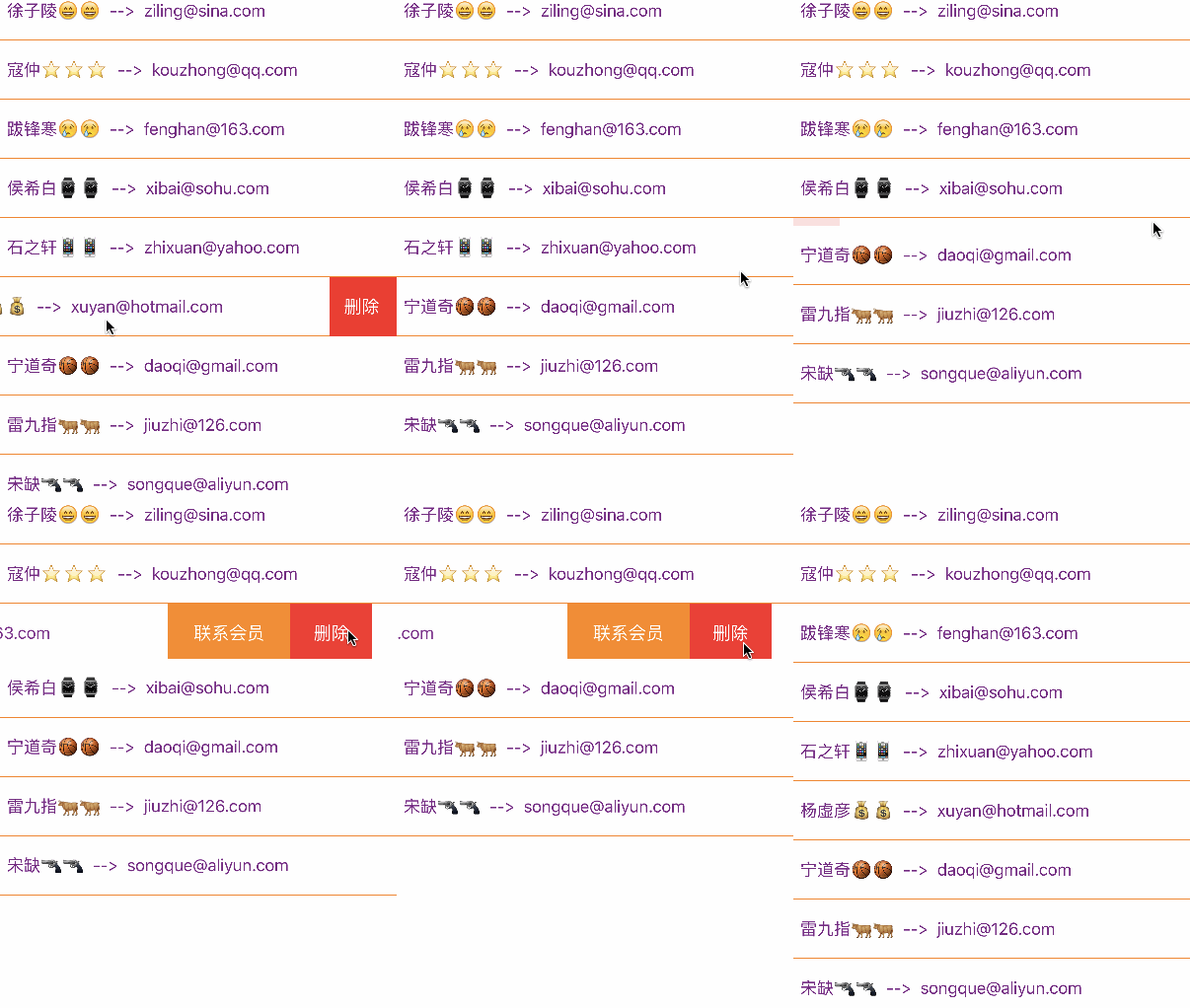
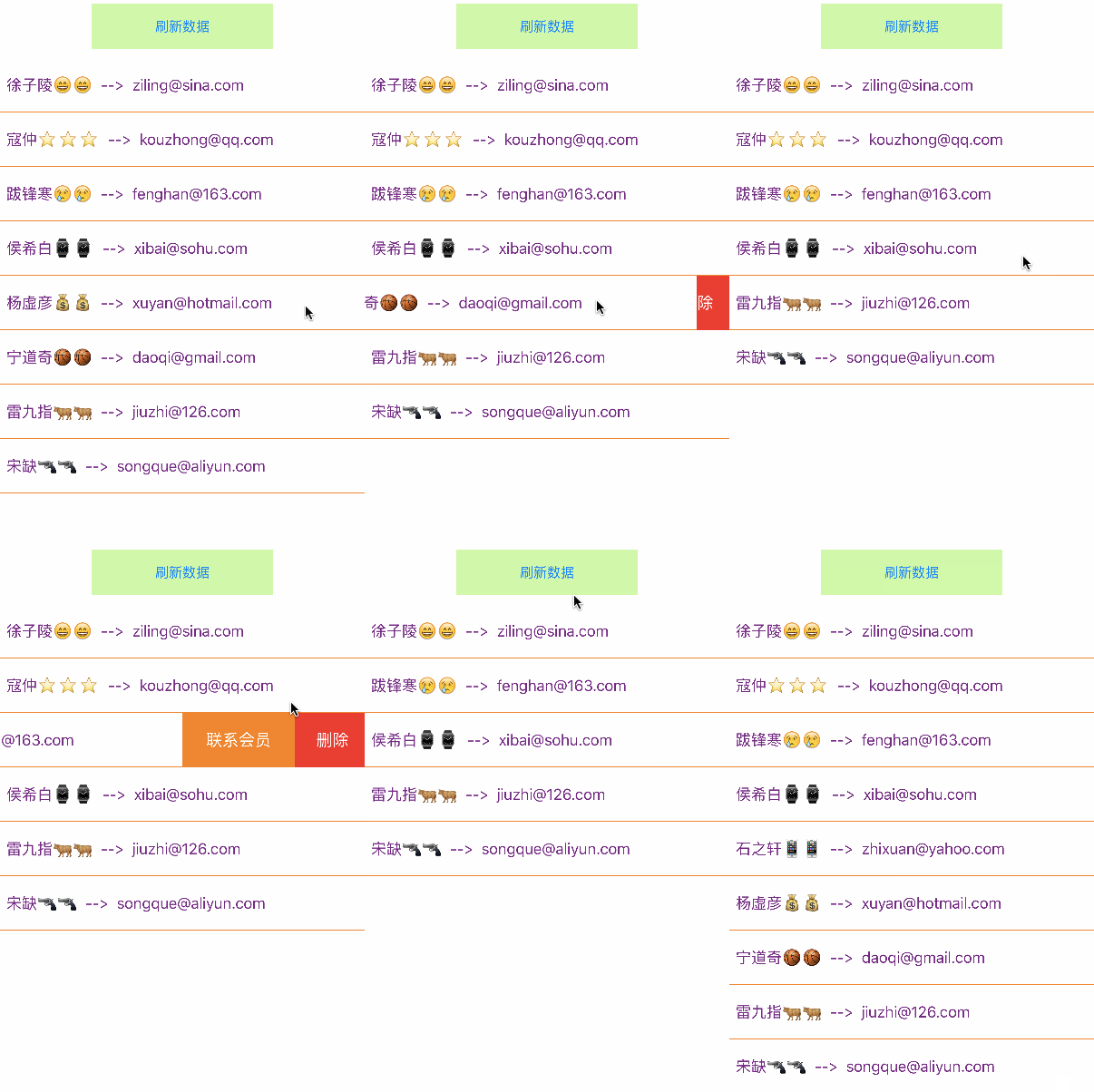
这里尝试用了下使用三个方式来实现了这个功能:
1、使用自定义UITableViewCell + UISwipeGestureRecognizer + 代理 实现;
2、使用自定义UITableViewCell + UIPanGestureRecognizer + 代理 实现;
3、使用自定义UITableViewCell + UISwipeGestureRecognizer + block 实现。
注意点: 使用UIPanGestureRecognizer手势实现左滑的时候,由于拖拽手势的方向随意性,导致与UITableViewController的下拉刷新手势冲突了!
感觉还是用UISwipeGestureRecognizer清扫手势实现好点!
部分代码:
1、使用UISwipeGestureRecognizer + Delegate
自定义UITableViewCell部分代码:
 //

 //  TanTableViewCell.h

 //  Tan_SwipeTableViewCell

 //

 //  Created by PX_Mac on 16/3/25.

 //  Copyright © 2016年 PX_Mac. All rights reserved.

 //

 #import <UIKit/UIKit.h>

 @class MemberModel;

 @class TanTableViewCell;

 @protocol TanTableViewCellDelegate <NSObject>

 @optional

 - (void)deleteMember: (TanTableViewCell *)cell; //协议方法:删除会员

 - (void)closeOtherCellLeftSwipe;  //关闭其他单元格的左滑

 @end

 @interface TanTableViewCell : UITableViewCell

 //静态构造方法

 + (instancetype)cellWithTableView: (UITableView *)tableView;

 @property (nonatomic, strong) MemberModel *model; //模型属性

 @property (nonatomic, weak) id<TanTableViewCellDelegate> delegate; //代理

 - (void)setData: (MemberModel *)model; //设置要显示的数据

 - (void)closeSwipe; //关闭滑动,恢复原样(用于在滑动当前单元格时,把其他已经左滑的单元格关闭)

 @end
@implementation TanTableViewCell

+ (instancetype)cellWithTableView:(UITableView *)tableView{

    static NSString *reuseIdentity = @"tanCell";

    TanTableViewCell *cell = [tableView dequeueReusableCellWithIdentifier:reuseIdentity];

    if (cell == nil){

        cell = [[TanTableViewCell alloc] initWithStyle:UITableViewCellStyleDefault reuseIdentifier:reuseIdentity];

    }

    return cell;

}

- (instancetype)initWithStyle:(UITableViewCellStyle)style reuseIdentifier:(NSString *)reuseIdentifier{

    if (self = [super initWithStyle:style reuseIdentifier:reuseIdentifier]){

        [self initSubControls]; //初始化子控件

    }

    return self;

}

//初始化子控件

- (void)initSubControls{

/*....... */

//3、给容器containerView绑定左右滑动清扫手势

    UISwipeGestureRecognizer *leftSwipe = [[UISwipeGestureRecognizer alloc] initWithTarget:self action:@selector(swipe:)];

    leftSwipe.direction = UISwipeGestureRecognizerDirectionLeft; //设置向左清扫

    [self.containerView addGestureRecognizer:leftSwipe];

    UISwipeGestureRecognizer *rightSwipe = [[UISwipeGestureRecognizer alloc] initWithTarget:self action:@selector(swipe:)];

    rightSwipe.direction = UISwipeGestureRecognizerDirectionRight;//设置向右清扫

    [self.containerView addGestureRecognizer:rightSwipe];

    self.selectionStyle = UITableViewCellSelectionStyleNone; //设置单元格选中样式

    [self.contentView bringSubviewToFront:self.containerView]; //设置containerView显示在最上层

}

//左滑动和右滑动手势

- (void)swipe: (UISwipeGestureRecognizer *)sender

{

    if (sender.direction == UISwipeGestureRecognizerDirectionLeft){

        if (self.isOpenLeft) return; //已经打开左滑,不再执行

        //开始左滑: 先调用代理关闭其他cell的左滑

        if ([self.delegate respondsToSelector:@selector(closeOtherCellLeftSwipe)])

            [self.delegate closeOtherCellLeftSwipe];

        [UIView animateWithDuration:0.5 animations:^{

            sender.view.center = CGPointMake(, CELLHEIGHT * 0.5);

        }];

        self.isOpenLeft = YES;

    }

    else if (sender.direction == UISwipeGestureRecognizerDirectionRight){

        [self closeSwipe]; //关闭左滑

    }

}

//关闭左滑,恢复原状

- (void)closeSwipe{

    if (!self.isOpenLeft) return; //还未打开左滑,不需要执行右滑

    [UIView animateWithDuration:0.5 animations:^{

        self.containerView.center = CGPointMake(SCREENWIDTH * 0.5, CELLHEIGHT * 0.5);

    }];

    self.isOpenLeft = NO;

}

//.....

@end
控制器部分代码:
#pragma mark - UITableViewDataSource

- (NSInteger)tableView:(UITableView *)tableView numberOfRowsInSection:(NSInteger)section{

    return self.dataArr.count;

}

- (UITableViewCell *)tableView:(UITableView *)tableView cellForRowAtIndexPath:(NSIndexPath *)indexPath{

    TanTableViewCell *cell = [TanTableViewCell cellWithTableView:tableView];

    cell.delegate = self;

    MemberModel *model = [self.dataArr objectAtIndex:indexPath.row];

    [cell setData:model];

    return cell;

}

#pragma mark - cell代理方法

//删除单元格

- (void)deleteMember:(TanTableViewCell *)cell{

    NSIndexPath *path = [self.tableView indexPathForCell:cell]; //获取cell所在位置

    //删除数组中数据

    [self.dataArr removeObjectAtIndex:path.row];

    //删除单元格

    [self.tableView deleteRowsAtIndexPaths:@[path] withRowAnimation:UITableViewRowAnimationLeft];

}

//关闭其他cell的左滑

- (void)closeOtherCellLeftSwipe{

    //循环显示的cell

    for (TanTableViewCell *item in self.tableView.visibleCells) {

        [item closeSwipe];

    }

}
2、UIPanGestureRecognizer + 代理
自定义UITableViewCell部分代码:
 //初始化子控件

 - (void)initSubControls{

     /* ...... */

     //3、给容器containerView绑定拖动手势

     UIPanGestureRecognizer *panGes = [[UIPanGestureRecognizer alloc] initWithTarget:self action:@selector(pan:)];

     [self.containerView addGestureRecognizer:panGes];

     self.panGes = panGes;

     self.selectionStyle = UITableViewCellSelectionStyleNone; //设置单元格选中样式

     [self.contentView bringSubviewToFront:self.containerView]; //设置containerView显示在最上层

 }

 //拖动手势(拖拽手势和UITableView的下拉刷新手势有冲突,造成下拉刷新不能使用)

 - (void)pan: (UIPanGestureRecognizer *)sender

 {

     //动画结束时修正位置

     if (sender.state == UIGestureRecognizerStateEnded){

         //关闭其他cell的左拖拽

         if ([self.delegate respondsToSelector:@selector(closeOtherCellLeftPan:)])

             [self.delegate closeOtherCellLeftPan: self];

         if (sender.view.frame.origin.x < -SCREENWIDTH * 0.25){

             sender.view.transform = CGAffineTransformMakeTranslation(-SCREENWIDTH * 0.5, );

             [sender setTranslation:CGPointZero inView:sender.view];  //必须归0

         }

         else{

             [self closeLeftPan];

         }

     }

     CGPoint point = [sender translationInView:self.contentView];

     CGFloat tx = sender.view.transform.tx;

     if (tx < - SCREENWIDTH * 0.5 || tx > ) return;

     //形变

     sender.view.transform = CGAffineTransformTranslate(sender.view.transform, point.x, );

     [sender setTranslation:CGPointZero inView:sender.view];  //必须归0

 }

 //关闭左拖拽

 - (void)closeLeftPan{

     self.panGes.view.transform = CGAffineTransformMakeTranslation(, );

     [self.panGes setTranslation:CGPointZero inView:self.panGes.view];  //必须归0

 }
3、UISwipeGestureRecognizer + block
自定义UITableViewCell部分代码:
 //

 //  TanTableViewCell.h

 //  Tan_SwipeTableViewCell

 //

 //  Created by PX_Mac on 16/3/25.

 //  Copyright © 2016年 PX_Mac. All rights reserved.

 //

 #import <UIKit/UIKit.h>

 @class MemberModel;

 @interface TanTableViewCell : UITableViewCell

 //静态构造方法

 + (instancetype)cellWithTableView: (UITableView *)tableView;

 @property (nonatomic, strong) MemberModel *model; //模型属性

 - (void)setData: (MemberModel *)model; //设置要显示的数据

 @property (nonatomic, copy) void (^deleteMember)(); //删除会员block回调方法

 @property (nonatomic, copy) void (^closeOtherCellSwipe)(); //关闭其他cell的左滑

 - (void)closeLeftSwipe; //关闭左滑

 @end
 //左滑动和右滑动手势

 - (void)swipe: (UISwipeGestureRecognizer *)sender

 {

     if (sender.direction == UISwipeGestureRecognizerDirectionLeft){

         if (self.isOpenLeft) return; //已经打开左滑,不再执行

         //开始左滑: 先调用block关闭其他可能左滑的cell

         if (self.closeOtherCellSwipe)

             self.closeOtherCellSwipe();

         [UIView animateWithDuration:0.5 animations:^{

             sender.view.center = CGPointMake(, CELLHEIGHT * 0.5);

         }];

         self.isOpenLeft = YES;

     }

     else if (sender.direction == UISwipeGestureRecognizerDirectionRight){

         [self closeLeftSwipe]; //关闭左滑

     }

 }

 //关闭左滑,恢复原状

 - (void)closeLeftSwipe{

     if (!self.isOpenLeft) return; //还未打开左滑,不需要执行右滑

     [UIView animateWithDuration:0.5 animations:^{

         self.containerView.center = CGPointMake(SCREENWIDTH * 0.5, CELLHEIGHT * 0.5);

     }];

     self.isOpenLeft = NO;

 }
控制器部分代码:
 #pragma mark - 代理方法

 - (NSInteger)tableView:(UITableView *)tableView numberOfRowsInSection:(NSInteger)section{

     return self.dataArr.count;

 }

 - (UITableViewCell *)tableView:(UITableView *)tableView cellForRowAtIndexPath:(NSIndexPath *)indexPath{

     TanTableViewCell *cell = [TanTableViewCell cellWithTableView:tableView];

     MemberModel *model = [self.dataArr objectAtIndex:indexPath.row];

     [cell setData:model]; //设置数据

     __weak typeof(self) tempSelf = self;

     __weak typeof(cell) tempCell = cell;

     //设置删除cell回调block

     cell.deleteMember = ^{

         NSIndexPath *tempIndex = [tempSelf.tablView indexPathForCell:tempCell];

         [tempSelf.dataArr removeObject:tempCell.model];

         [tempSelf.tablView deleteRowsAtIndexPaths:@[tempIndex] withRowAnimation:UITableViewRowAnimationLeft];

     };

     //设置当cell左滑时,关闭其他cell的左滑

     cell.closeOtherCellSwipe = ^{

         for (TanTableViewCell *item in tempSelf.tablView.visibleCells) {

             if (item != tempCell) [item closeLeftSwipe];

         }

     };

     return cell;

 }
DEMO下载:
github地址:https://github.com/xiaotanit/Tan_UITableViewCellLeftSwipe
csdn地址:http://download.csdn.net/detail/tandaxia/9479428
原文链接:http://www.cnblogs.com/tandaxia/p/5346659.html
自定义UITableViewCell实现左滑动多菜单功能LeftSwipe的更多相关文章
- 自定义uitableviewcell通过加上滑动手势进行删除对应的行。PS:用代理来实现
#import <UIKit/UIKit.h> @class ZSDCustomCell; //协议 @protocol ZSDCustomCellDelegate <NSObjec ...
- IOS uitableviewcell 向左滑动删除编辑等
主要实现这个方法就好了 -(NSArray<UITableViewRowAction *> *)tableView:(UITableView *)tableView editActions ...
- Android自定义组件——四个方向滑动的菜单实现
今天无意中实现了一个四个方向滑动的菜单,感觉挺好玩,滑动起来很顺手,既然已经做出来了就贴出来让大家也玩弄一下. 一.效果演示 (说明:目前没有安装Android模拟器,制作的动态图片太卡了,就贴一下静 ...
- Android自定义组件系列【15】——四个方向滑动的菜单实现
今天无意中实现了一个四个方向滑动的菜单,感觉挺好玩,滑动起来很顺手,既然已经做出来了就贴出来让大家也玩弄一下. 一.效果演示 (说明:目前没有安装Android模拟器,制作的动态图片太卡了,就贴一下静 ...
- 使用Java语言开发微信公众平台(八)——自定义菜单功能
随着上一篇文章的结束,我们已经实现了所有消息的类型的回复功能.今天,我们来学习更加高大上,也更加重要的自定义菜单功能. 一.了解自定义菜单 自定义菜单是微信公众平台最常用也是最重要的功能之一.根据微信 ...
- 仿EXCEL插件,智表ZCELL产品V1.7 版本发布,增加自定义右键菜单功能
详细请移步 智表(ZCELL)官网www.zcell.net 更新说明 这次更新主要应用户要求,主要解决了自定义右键菜单事件的支持,并新增了公式中自定义函数传参.快捷键剪切等功能,欢迎大家体验使用. ...
- iOS之UITableView带滑动操作菜单的Cell
制作一个可以滑动操作的 Table View Cell 本文翻译自 http://www.raywenderlich.com/62435/make-swipeable-table-view-cell- ...
- iOS之UI--使用SWRevealViewController实现侧边菜单功能详解实例
使用SWRevealViewController实现侧边菜单功能详解 下面通过两种方法详解SWRevealViewController实现侧边菜单功能: 1.使用StoryBoard实现 2.纯代 ...
- iOS之UI--使用SWRevealViewController 实现侧边菜单功能详解实例
iOS之UI--使用SWRevealViewController 实现侧边菜单功能详解实例 使用SWRevealViewController实现侧边菜单功能详解 下面通过两种方法详解SWReveal ...
随机推荐
- test
http://img.ivsky.com/img/bizhi/pic/201009/07/fangaoyouhua-015.jpghttp://desk.fd.zol-img.com.cn/t_s16 ...
- Dubbo学习小记
前言 周一入职的新公司,到了公司第一件事自然是要熟悉新公司使用的各种技术,搭建本地的环境. 熟悉新公司技术的过程中,首先就是Maven,这个前面已经写过文章了,然后就是Dubbo----公司的服务都是 ...
- Chrome插件(Extensions)开发攻略
本文将从个人经验出发,讲述为什么需要Chrome插件,如何开发,如何调试,到哪里找资料,会遇到怎样的问题以及如何解决等,同时给出一个个人认为的比较典型的例子——获取网页内容,和服务器交互,再把信息反馈 ...
- Spring Boot -- 配置切换指南
一般在一个项目中,总是会有好多个环境.比如: 开发环境 -> 测试环境 -> 预发布环境 -> 生产环境 每个环境上的配置文件总是不一样的,甚至开发环境中每个开发者的环境可能也会有一 ...
- React Native 环境搭建
1,安装 HomeBrew /usr/bin/ruby -e "$(curl -fsSL https://raw.githubusercontent.com/Homebrew/install ...
- python支持mysql
MySQLdb只支持Python2.,还不支持3. 可以用PyMySQL代替.安装方法:pip install PyMySQL 然后在需要的项目中,把 init.py中添加两行: import pym ...
- Happy New Year 2016
大学之前的时间都是按天来过的,期盼着一天一天地快快长大,期盼着过年穿新衣,阖家团聚,其乐融融: 大学的时间都是按周来过的,根据每周的课表周而复始,虽然单调但也是自由自在,简单充实: 刚工作的几年时间是 ...
- HTTP的长连接和短连接
本文总结&分享网络编程中涉及的长连接.短连接概念. 关键字:Keep-Alive,并发连接数限制,TCP,HTTP 一.什么是长连接 HTTP1.1规定了默认保持长连接(HTT ...
- Web缓存杂谈
一.概述 缓存通俗点,就是将已经得到的‘东东’存放在一个相对于自己而言,尽可能近的地方,以便下次需要时,不会再二笔地跑到起始点(很远的地方)去获取,而是就近解决,从而缩短时间和节约金钱(坐车要钱嘛). ...
- 关于gitignore文件的创建与使用
在我们使用github提交本地代码时,有些库文件和日志文件是不必要提交的,那如何处理这个问题呢?这个时候我们就会用到.gitignore文件了. 该篇博客我会介绍如何创建.gitignore,以及如何 ...