
配置Kestrel 网址Urls
配置Kestrel 网址Urls
ASP.NET Core中如何配置Kestrel Urls呢,大家可能都知道使用UseUrls() 方法来配置。
今天给介绍全面的ASP.NET Core 配置 Urls,使用多种方式配置Urls。
让你了解ASP.NET Core Kestrel 的地址设置。
下面我们就来了解如何配置。我将介绍4种方式来配置Urls。
首先我们新建一个ASP.NET Core 空应用程序。
UseUrls
大家最熟悉的一种也就是使用UseUrls 。下面我们就来实际使用。
UseUrls 方法可以使用多个地址,也可以使用一个地址。
单个网址
UseUrls("http://localhost:5001")
多个网址
UseUrls("http://localhost:5001", "http://localhost:5002", "http://*:5003")//多个地址 *代表绑定所有本机地址 可以局域网访问,拥有外网ip 就可以外网访问
所有的代码都在 Program.cs Main 方法里

        public static void Main(string[] args)

        {

            var host = new WebHostBuilder()

                .UseKestrel()

                .UseContentRoot(Directory.GetCurrentDirectory())

                .UseIISIntegration()

                .UseUrls("http://localhost:5001", "http://localhost:5002", "http://*:5003")

                .UseStartup<Startup>()

                .Build();

            host.Run();

        }
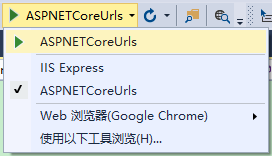
使用Kestrel运行程序,http://localhost:5001 http://localhost:5002 http://localhost:5003 均可访问。
配置文件
下面使用配置文件来设置网址。
首先在项目中添加一个ASP.NET 配置文件hosting.json,在配置文件中加入server.urls 节点。
{

  "server.urls": "http://localhost:5001;http://localhost:5002;http://*:5003"

}
这里首先需要添加两个引用
    "Microsoft.Extensions.Configuration.FileExtensions": "1.0.0",

    "Microsoft.Extensions.Configuration.Json": "1.0.0"
然后Program.cs
        public static void Main(string[] args)

        {

            var config = new ConfigurationBuilder()

                .SetBasePath(Directory.GetCurrentDirectory())

                .AddJsonFile("hosting.json", optional: true)

                .Build();

            var host = new WebHostBuilder()

                .UseConfiguration(config)

                .UseKestrel()

                .UseContentRoot(Directory.GetCurrentDirectory())

                .UseIISIntegration()

                .UseStartup<Startup>()

                .Build();

            host.Run();

        }
使用Kestrel运行程序,http://localhost:5001 http://localhost:5002 http://localhost:5003 均可访问。
命令行参数
下面使用命令行参数来设置网址。
首先我们需要添加
"Microsoft.Extensions.Configuration.CommandLine": "1.0.0"
然后Program.cs
        public static void Main(string[] args)

        {

            var config = new ConfigurationBuilder()

                .AddCommandLine(args)

                .Build();

            var host = new WebHostBuilder()

                .UseConfiguration(config)

                .UseKestrel()

                .UseContentRoot(Directory.GetCurrentDirectory())

                .UseIISIntegration()

                .UseStartup<Startup>()

                .Build();

            host.Run();

        }
我们到项目目录使用命令
dotnet run --server.urls "http://localhost:5001;http://localhost:5002;http://*:5003"
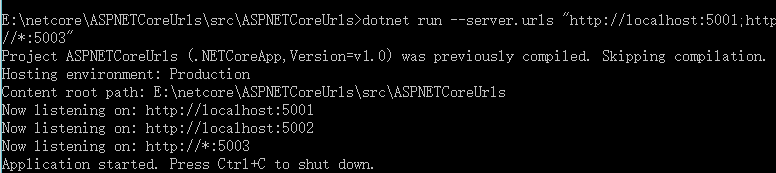
然后访问 http://localhost:5001 http://localhost:5002 http://localhost:5003 均可访问。
环境变量
这里我们可以通过环境变量来设置网址。
我们可以设置系统的环境变量,也可以在VS里设置只用于调试。
首先更改Program.cs
        public static void Main(string[] args)

        {

            //环境变量

            var config = new ConfigurationBuilder()

                .AddEnvironmentVariables("LineZero_")

                .Build();

            var host = new WebHostBuilder()

                .UseConfiguration(config)

                .UseKestrel()

                .UseContentRoot(Directory.GetCurrentDirectory())

                .UseIISIntegration()

                .UseStartup<Startup>()

                .Build();

            host.Run();

        }
在项目右键属性-》调试 ,这里我们添加变量。
添加一个名称为: LineZero_SERVER.URLS 值为:http://localhost:5001;http://localhost:5002;http://*:5003

然后启动程序,http://localhost:5001 http://localhost:5002 http://localhost:5003 均可访问。
这里我是直接在VS 里添加环境变量,只作用调试环境,如果大家希望系统级别可以使用,就在系统下设置环境变量。
配置Kestrel 网址Urls的更多相关文章
- ASP.NET Core开发-如何配置Kestrel 网址Urls
ASP.NET Core中如何配置Kestrel Urls呢,大家可能都知道使用UseUrls() 方法来配置. 今天给介绍全面的ASP.NET Core 配置 Urls,使用多种方式配置Urls. ...
- ASP.NET Core配置Kestrel 网址Urls
ASP.NET Core中如何配置Kestrel Urls呢,大家可能都知道使用UseUrls() 方法来配置. 今天给介绍全面的ASP.NET Core 配置 Urls,使用多种方式配置Urls.让 ...
- Net Core -- 配置Kestrel端口
Net Core -- 配置Kestrel端口 Kestrel介绍 在Asp.Net Core中,我们的web application 其实是运行在Kestrel服务上,它是一个基于libuv开源的跨 ...
- ASP.NET Core中配置监听URLs的五种方式
原文: 5 ways to set the URLs for an ASP.NET Core app 作者: Andrew Lock 译者: Lamond Lu 默认情况下,ASP. NET Core ...
- Do you kown Asp.Net Core -- 配置Kestrel端口
Kestrel介绍 在Asp.Net Core中,我们的web application 其实是运行在Kestrel服务上,它是一个基于libuv开源的跨平台可运行 Asp.Net Core 的web服 ...
- Django视图层之路由配置系统(urls)
视图层之路由配置系统(urls) URL配置(URLconf)就像Django 所支撑网站的目录.它的本质是URL与要为该URL调用的视图函数之间的映射表:你就是以这种方式告诉Django,对于这个U ...
- 在.NET 6.0上使用Kestrel配置和自定义HTTPS
大家好,我是张飞洪,感谢您的阅读,我会不定期和你分享学习心得,希望我的文章能成为你成长路上的垫脚石,让我们一起精进. 本章是<定制ASP NET 6.0框架系列文章>的第四篇.在本章,我们 ...
- ASP.NET Core的Kestrel服务器
原文地址----Kestrel server for ASP.NET Core By Tom Dykstra, Chris Ross, and Stephen Halter Kestrel是一个基于l ...
- 【原生态跨平台:ASP.NET Core 1.0(非Mono)在 Ubuntu 14.04 服务器上一对一的配置实现-篇幅1】
鸡冻人心的2016,微软高产年. build 2016后 各种干货层出不穷. 1 Win10 集成了bash ,实现了纳德拉的成诺,Microsoft Love Linux!!! 2 跨平台 ,收 ...
随机推荐
- BZOJ1635: [Usaco2007 Jan]Tallest Cow 最高的牛
1635: [Usaco2007 Jan]Tallest Cow 最高的牛 Time Limit: 5 Sec Memory Limit: 64 MBSubmit: 346 Solved: 184 ...
- hdu4778:状压dp+博弈
题目大意: 有g种不同颜色的小球,b个袋子,每个袋子里面有若干个每种小球 两人轮流取袋子,当袋子里面的同色小球有s个时,会合并成一个魔法球,并被此次取袋子的人获得 成功获得魔法球的人可以再次取 求二者 ...
- socketFunction
socket socket() 我们使用系统调用socket()来获得文件描述符: #include<sys/types.h> #include<sys/socket.h&g ...
- 解决 在IE与firefox宽度不一致的问题
浏览器默认不同的字体问题,字体分为“等宽”和“不等宽”字体,所以 在IE与firefox内间距是不等的. 解决办法: body{font-family: 宋体, simsun; ...
- linux shell在while中用read从键盘输入
系统是ubuntu 14.04 64bit,之前曾想安装Stream来玩dota2,但最终没成功.由于Stream只有32bit,安装Stream时也安装了大量32bit的库.删除Stream后,这些 ...
- hibernate错题解析
01 Hibernate错题分析 解析: 此题目考查的是对Hibernate中交叉连接的理解.HQL支持SQL风格的交叉连接查询,交叉连接适用于两个类之间没有定义任何关联时.在where字句中,通 ...
- HTML5新增的一些属性和功能之一
大致可以分为10个方面: HTML5表单元素和属性 表单2.0 视音频处理 canvas绘图 SVG绘图 地理定位 拖放技术 web work web storage web socket 一.新的i ...
- EBS-PAC成本更新事务处理
PAC成本更新事务处理 DECLARE l_itfs_rec mtl_transactions_interface% ROWTYPE; BEGIN --插入接口表 SELECT mt ...
- atitit。自己定义uml MOF EMF体系eclipse emf 教程o7t
atitit.自己定义uml MOF EMF体系eclipse emf 教程o7t 1. 元对象机制(MOF,Meta-Object Facility)and 结构 1 2. 元模型图.模型图.对 ...
- Network 20Q--Q2 How does Google sell ad spaces?
在使用Google搜索的时候会发现,搜索出来的页面除了在左边显示搜索结果以外,还会页面的右边推荐一些广告.那么Google是怎么从这些广告挣钱以及广告商可以通过Google广告获得什么利益呢? Goo ...