
配置Kestrel 网址Urls
配置Kestrel 网址Urls
ASP.NET Core中如何配置Kestrel Urls呢,大家可能都知道使用UseUrls() 方法来配置。
今天给介绍全面的ASP.NET Core 配置 Urls,使用多种方式配置Urls。
让你了解ASP.NET Core Kestrel 的地址设置。
下面我们就来了解如何配置。我将介绍4种方式来配置Urls。
首先我们新建一个ASP.NET Core 空应用程序。
UseUrls
大家最熟悉的一种也就是使用UseUrls 。下面我们就来实际使用。
UseUrls 方法可以使用多个地址,也可以使用一个地址。
单个网址
UseUrls("http://localhost:5001")
多个网址
UseUrls("http://localhost:5001", "http://localhost:5002", "http://*:5003")//多个地址 *代表绑定所有本机地址 可以局域网访问,拥有外网ip 就可以外网访问
所有的代码都在 Program.cs Main 方法里

        public static void Main(string[] args)

        {

            var host = new WebHostBuilder()

                .UseKestrel()

                .UseContentRoot(Directory.GetCurrentDirectory())

                .UseIISIntegration()

                .UseUrls("http://localhost:5001", "http://localhost:5002", "http://*:5003")

                .UseStartup<Startup>()

                .Build();

            host.Run();

        }
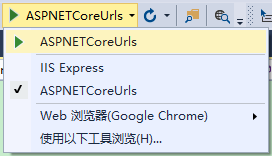
使用Kestrel运行程序,http://localhost:5001 http://localhost:5002 http://localhost:5003 均可访问。
配置文件
下面使用配置文件来设置网址。
首先在项目中添加一个ASP.NET 配置文件hosting.json,在配置文件中加入server.urls 节点。
{

  "server.urls": "http://localhost:5001;http://localhost:5002;http://*:5003"

}
这里首先需要添加两个引用
    "Microsoft.Extensions.Configuration.FileExtensions": "1.0.0",

    "Microsoft.Extensions.Configuration.Json": "1.0.0"
然后Program.cs
        public static void Main(string[] args)

        {

            var config = new ConfigurationBuilder()

                .SetBasePath(Directory.GetCurrentDirectory())

                .AddJsonFile("hosting.json", optional: true)

                .Build();

            var host = new WebHostBuilder()

                .UseConfiguration(config)

                .UseKestrel()

                .UseContentRoot(Directory.GetCurrentDirectory())

                .UseIISIntegration()

                .UseStartup<Startup>()

                .Build();

            host.Run();

        }
使用Kestrel运行程序,http://localhost:5001 http://localhost:5002 http://localhost:5003 均可访问。
命令行参数
下面使用命令行参数来设置网址。
首先我们需要添加
"Microsoft.Extensions.Configuration.CommandLine": "1.0.0"
然后Program.cs
        public static void Main(string[] args)

        {

            var config = new ConfigurationBuilder()

                .AddCommandLine(args)

                .Build();

            var host = new WebHostBuilder()

                .UseConfiguration(config)

                .UseKestrel()

                .UseContentRoot(Directory.GetCurrentDirectory())

                .UseIISIntegration()

                .UseStartup<Startup>()

                .Build();

            host.Run();

        }
我们到项目目录使用命令
dotnet run --server.urls "http://localhost:5001;http://localhost:5002;http://*:5003"
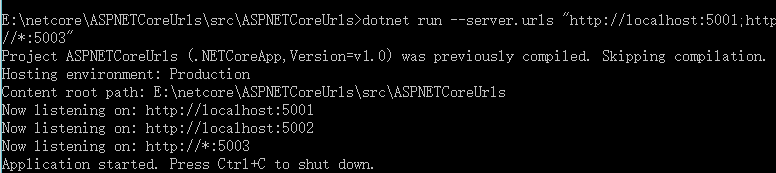
然后访问 http://localhost:5001 http://localhost:5002 http://localhost:5003 均可访问。
环境变量
这里我们可以通过环境变量来设置网址。
我们可以设置系统的环境变量,也可以在VS里设置只用于调试。
首先更改Program.cs
        public static void Main(string[] args)

        {

            //环境变量

            var config = new ConfigurationBuilder()

                .AddEnvironmentVariables("LineZero_")

                .Build();

            var host = new WebHostBuilder()

                .UseConfiguration(config)

                .UseKestrel()

                .UseContentRoot(Directory.GetCurrentDirectory())

                .UseIISIntegration()

                .UseStartup<Startup>()

                .Build();

            host.Run();

        }
在项目右键属性-》调试 ,这里我们添加变量。
添加一个名称为: LineZero_SERVER.URLS 值为:http://localhost:5001;http://localhost:5002;http://*:5003

然后启动程序,http://localhost:5001 http://localhost:5002 http://localhost:5003 均可访问。
这里我是直接在VS 里添加环境变量,只作用调试环境,如果大家希望系统级别可以使用,就在系统下设置环境变量。
配置Kestrel 网址Urls的更多相关文章
- ASP.NET Core开发-如何配置Kestrel 网址Urls
ASP.NET Core中如何配置Kestrel Urls呢,大家可能都知道使用UseUrls() 方法来配置. 今天给介绍全面的ASP.NET Core 配置 Urls,使用多种方式配置Urls. ...
- ASP.NET Core配置Kestrel 网址Urls
ASP.NET Core中如何配置Kestrel Urls呢,大家可能都知道使用UseUrls() 方法来配置. 今天给介绍全面的ASP.NET Core 配置 Urls,使用多种方式配置Urls.让 ...
- Net Core -- 配置Kestrel端口
Net Core -- 配置Kestrel端口 Kestrel介绍 在Asp.Net Core中,我们的web application 其实是运行在Kestrel服务上,它是一个基于libuv开源的跨 ...
- ASP.NET Core中配置监听URLs的五种方式
原文: 5 ways to set the URLs for an ASP.NET Core app 作者: Andrew Lock 译者: Lamond Lu 默认情况下,ASP. NET Core ...
- Do you kown Asp.Net Core -- 配置Kestrel端口
Kestrel介绍 在Asp.Net Core中,我们的web application 其实是运行在Kestrel服务上,它是一个基于libuv开源的跨平台可运行 Asp.Net Core 的web服 ...
- Django视图层之路由配置系统(urls)
视图层之路由配置系统(urls) URL配置(URLconf)就像Django 所支撑网站的目录.它的本质是URL与要为该URL调用的视图函数之间的映射表:你就是以这种方式告诉Django,对于这个U ...
- 在.NET 6.0上使用Kestrel配置和自定义HTTPS
大家好,我是张飞洪,感谢您的阅读,我会不定期和你分享学习心得,希望我的文章能成为你成长路上的垫脚石,让我们一起精进. 本章是<定制ASP NET 6.0框架系列文章>的第四篇.在本章,我们 ...
- ASP.NET Core的Kestrel服务器
原文地址----Kestrel server for ASP.NET Core By Tom Dykstra, Chris Ross, and Stephen Halter Kestrel是一个基于l ...
- 【原生态跨平台:ASP.NET Core 1.0(非Mono)在 Ubuntu 14.04 服务器上一对一的配置实现-篇幅1】
鸡冻人心的2016,微软高产年. build 2016后 各种干货层出不穷. 1 Win10 集成了bash ,实现了纳德拉的成诺,Microsoft Love Linux!!! 2 跨平台 ,收 ...
随机推荐
- os8 location authorization 错误.
今天在XCode6上打开之前写的地图时,给我报这个错 location authorization 去网上查了一番,才知道Xcode6对地图的设置稍有修改 在stackoverflow上找到了答案 i ...
- Unity3D中C#编写脚本
1.继承MonoBehaviour类:任何一个游戏脚本都需要去继承MonoBehaviour这个类,只是在创建javascript脚本的时候,系统会将其类名与继承关系隐藏起来. 2.声明变量:使用Ja ...
- Mysql unix_timestamp() FROM_UNIXTIME和DATE_FORMAT(date,format)
mysql 中:UNIX_TIMESTAMP(), UNIX_TIMESTAMP(date) 若无参数调用,则返回一个 Unix timestamp ('1970-01-01 00:00:00' GM ...
- bzoj 1193
http://www.lydsy.com/JudgeOnline/problem.php?id=1193 大范围贪心,小范围宽搜. 膜拜大神 http://blog.csdn.net/u0129155 ...
- .net常考面试题
1. 简述 private. protected. public. internal 修饰符的访问权限. 答 . private : 私有成员, 在类的内部才可以访问. protected : 保护成 ...
- java实现矩阵连乘的动态规划
package com.cjs.algorithm; public class DynamicPlan { /** * 此方法用来求解矩阵连乘的最小数乘次数 * * @param p * 传入的要连乘 ...
- <s:iterator> 序号
<s:iterator />的序号,解决这个问题有两种办法. 方法一:通过set标签实现: <s:set name="a" value=1/> <s: ...
- 讲解版的自动轮播(新手福利)样式和js就不分离了为了看的方便
<!DOCTYPE html><html lang="en"><head> <meta charset="UTF-8" ...
- 奔五的人学IOS:swift练手与csdn,最近学习总结
早在五月份就准备開始学习ios开发,当时还是oc,学习了几天,最终不得其法.到了ios8开放,再加swift的出现.从10月份開始.最终找到了一些技巧,学习起来还算略有心得. 今天把我在学习swift ...
- Git实现从本地加入项目到远程仓库
Git是如今最流行的版本号控制系统之中的一个了,今天也试试了.成功了上传了远程仓库,接下来看看我是怎么做的. 1.首先,要有git的账号.点击查看怎么注冊? 2.注冊成功之后.登陆GitHub.然后, ...