
Latex公式导出word,Latex转换MathML使用POI导出公式可编辑的Word文件
背景
之前在 使用spire.doc导出支持编辑Latex公式的标准格式word 博客中写过,使用spire.doc来生成word,不得不说spire.doc的api操作起来还是比较方便,但是使用的过程中还是发生了一些异常,如∑求和公式会报错,类似 \limit \widehat \sideset \overline \leqslant \geqslant \textcircled 均遇到了问题,类似解析失败无法渲染、求和公式设置上下限报空指针异常等,使用同样的方式转换MathML之后还是同样的问题,无法解决,一个两个还能以图片的形式显示,随着这么多问题的出现,终究不是办法
POI导出Latex至word
POI转Latex转WORD过程是 Latex → MathML(数学标记语言) → OMML(Word公式)
Latex转MathML问题
POI支持MathML,我基本上生成的都是数学试卷,Latex公式有了,但是需要转换为MathML,一开始准备使用fmath三件套,这里需要吐槽一下,这个官网的下载链接已经失效,搜了一下看到很久没去的CSDN有资源,一下载50积分没了,貌似不管啥资源都是50分起步,看来CSDN已经不是我等P民可以混迹的存在了
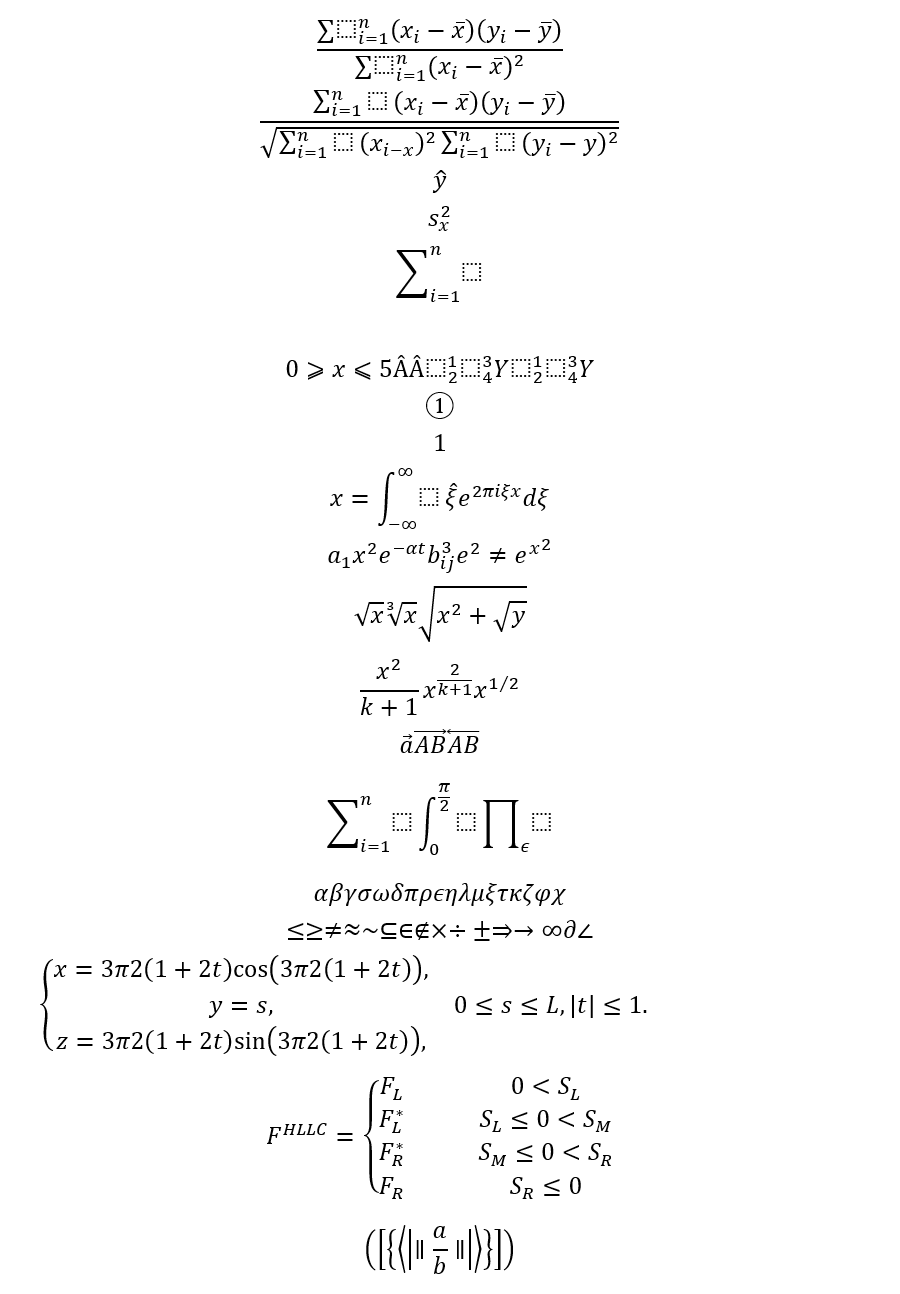
但是实验了一下,fmath导出的复杂公式在word中显示偶尔有问题,可能是因为版本太老了,在StackOverflow上看到有人推荐使用snuggletex-core这个类库,我就更换了实现方式,我来找了大量的数学公式latex,先看下效果
POM依赖
<!-- https://mvnrepository.com/artifact/de.rototor.snuggletex/snuggletex-core -->

<dependency>

    <groupId>de.rototor.snuggletex</groupId>

    <artifactId>snuggletex-core</artifactId>

    <version>1.3.0</version>

</dependency>

<!-- https://mvnrepository.com/artifact/org.apache.poi/poi -->

<dependency>

    <groupId>org.apache.poi</groupId>

    <artifactId>poi</artifactId>

    <version>4.1.2</version>

</dependency>

<!-- https://mvnrepository.com/artifact/org.apache.poi/ooxml-schemas -->

<dependency>

    <groupId>org.apache.poi</groupId>

    <artifactId>ooxml-schemas</artifactId>

    <version>1.4</version>

</dependency>

<!-- https://mvnrepository.com/artifact/org.apache.poi/poi-ooxml -->

<dependency>

    <groupId>org.apache.poi</groupId>

    <artifactId>poi-ooxml</artifactId>

    <version>4.1.2</version>

</dependency>

<dependency>

    <groupId>commons-io</groupId>

    <artifactId>commons-io</artifactId>

    <version>2.11.0</version>

</dependency>
snuggletex-core转换Latex为MathML
注意:这里的latex必须用$$包裹,否则在转换MathML的时候会报错
@SneakyThrows

public static void addLatex(String latex, XWPFParagraph paragraph) {

    paragraph.setAlignment(ParagraphAlignment.LEFT);

    paragraph.setFontAlignment(ParagraphAlignment.LEFT.getValue());

    SnuggleEngine engine = new uk.ac.ed.ph.snuggletex.SnuggleEngine();

    SnuggleSession session = engine.createSession();

    SnuggleInput input = new uk.ac.ed.ph.snuggletex.SnuggleInput(latex);

    session.parseInput(input);

    String mathML = session.buildXMLString();

    CTOMath ctOMath = getOMML(mathML);

    CTP ctp = paragraph.getCTP();

    CTOMath ctoMath = ctp.addNewOMath();

    ctoMath.set(ctOMath);

}
MathML转OMML
MML2OMML.XSL在windows的Office安装目录里面直接搜就能拿到
private static File stylesheet = new File("D:\\MML2OMML.XSL");

private static TransformerFactory tFactory = TransformerFactory.newInstance();

private static StreamSource stylesource = new StreamSource(stylesheet);

private static CTOMath getOMML(String mathML) throws Exception {

    Transformer transformer = tFactory.newTransformer(stylesource);

    StringReader stringreader = new StringReader(mathML);

    StreamSource source = new StreamSource(stringreader);

    StringWriter stringwriter = new StringWriter();

    StreamResult result = new StreamResult(stringwriter);

    transformer.transform(source, result);

    String ooML = stringwriter.toString();

    stringwriter.close();

    CTOMathPara ctOMathPara = CTOMathPara.Factory.parse(ooML);

    CTOMath ctOMath = ctOMathPara.getOMathArray(0);

    //for making this to work with Office 2007 Word also, special font settings are necessary

    XmlCursor xmlcursor = ctOMath.newCursor();

    while (xmlcursor.hasNextToken()) {

        XmlCursor.TokenType tokentype = xmlcursor.toNextToken();

        if (tokentype.isStart()) {

            if (xmlcursor.getObject() instanceof CTR) {

                CTR cTR = (CTR) xmlcursor.getObject();

                cTR.addNewRPr2().addNewRFonts().setAscii("Cambria Math");

                cTR.getRPr2().getRFonts().setHAnsi("Cambria Math"); // up to apache poi 4.1.2

                //cTR.getRPr2().getRFontsArray(0).setHAnsi("Cambria Math"); // since apache poi 5.0.0

            }

        }

    }

    return ctOMath;

}
已发现无法识别的符号(目前没有找到解决方案)
尝试了很多中组件,spire.doc 、fmath 等都无法渲染 \textcircled ,这个是latex标准支持的公式,效果文本外面圈一个圈类似①这样的效果,这里尝试无果之后只能暂时以比较恶心的方式解决这个问题,方法latexFilter,我这里只有①②③④这个四个出现的比较多,其他的都没有出现,如果要使用这个地方需要注意一下
private static String latexFilter(String latex){

    if(!latex.contains("textcircled")){

        return latex;

    }

    return TextCircledEnum.replaceTextCircled(latex);

}

private enum TextCircledEnum{

    Zero("\\\\textcircled\\{0\\}","⓪"),

    One("\\\\textcircled\\{1\\}","①"),

    Two("\\\\textcircled\\{2\\}","②"),

    Three("\\\\textcircled\\{3\\}","③"),

    Four("\\\\textcircled\\{4\\}","④"),

    Five("\\\\textcircled\\{5\\}","⑤"),

    Six("\\\\textcircled\\{6\\}","⑥"),

    Seven("\\\\textcircled\\{7\\}","⑦"),

    Eight("\\\\textcircled\\{8\\}","⑧"),

    Nine("\\\\textcircled\\{9\\}","⑨"),

    Ten("\\\\textcircled\\{10\\}","⑩")

    ;

    TextCircledEnum(String code, String v) {

        this.code = code;

        this.v = v;

    }

    public final String code;

    public final String v;

    public static String replaceTextCircled(String latex){

        for (TextCircledEnum c : TextCircledEnum.values()) {

            latex = latex.replaceAll(c.code,c.v);

        }

        return latex;

    }

}
测试代码,附带大量latex公式
public static void main(String[] args) throws Exception {

    XWPFDocument document = new XWPFDocument();

    XWPFParagraph paragraph = document.createParagraph();

    paragraph.setAlignment(ParagraphAlignment.LEFT);

    List<String> latexList = Arrays.asList("$\\frac{\\sum\\limits_{i=1}^{n}({x}_{i}−\\overline{x})({y}_{i}−\\overline{y})}{\\sum\\limits_{i=1}^{n}({x}_{i}−\\overline{x}{)}^{2}}$"

        , "$\\frac{ \\sum _{i=1}^{n} (x_ {i}-\\overline {x})(y_ {i}-\\overline {y})}{\\sqrt { \\sum _{i=1}^{n} (x_ {i-x})^ {2} \\sum _{i=1}^{n} (y_ {i}-y)^ {2}}}$"

        , "$\\widehat{y}$"

        , "$s_{x}^ {2}$"

        , "$\\sum _{i=1}^{n}$"

        , "$\\frac%…7B(a+b)(c+d)(a+c)(b+d)}$"

        , "$0 \\geqslant x\\leqslant 5 \\widehat{A} \\hat{A} \\sideset{^1_2}{^3_4}Y \\sideset{^1_2}{^3_4}Y $"

        , "$\\textcircled{1}$"

        , "$\\textcircled1$"

        , "$\\f\\relax{x} = \\int_{-\\infty}^\\infty   \\f\\hat\\xi\\,e^{2 \\pi i \\xi x} \\,d\\xi$"

        , "$a_{1} \\quad  x^2 \\quad e^{- \\alpha t}  \\quad b^{3}_{ij} \\quad e^{2}\\neq {e^x}^2$"

        , "$\\sqrt{x} \\quad \\sqrt[3]{x} \\quad \\sqrt{x^{2}+ \\sqrt{y}}$"

        , "$\\frac{x^2}{k+1} \\quad  x^{\\frac{2}{k+1}} \\quad x^{1/2}$"

        , "$\\vec a  \\qquad  \\overrightarrow{AB}  \\qquad  \\overleftarrow{AB}$"

        , "$\\sum_{i=1}^{n} \\quad \\int_{0}^{\\frac{\\pi}{2}} \\quad \\prod_{\\epsilon}$"

        , "$\\alpha \\beta \\gamma \\sigma \\omega \\delta \\pi \\rho \\epsilon \\eta \\lambda \\mu \\xi \\tau \\kappa \\zeta \\phi \\chi$"

        , "$\\le  \\ge  \\ne  \\approx  \\sim  \\subseteq  \\in  \\notin  \\times  \\div  \\pm  \\Rightarrow  \\rightarrow  \\infty  \\partial  \\angle  \\triangle$"

        , "$\\left\\{  \n" +

            "             \\begin{array}{**lr**}  \n" +

            "             x=\\dfrac{3\\pi}{2}(1+2t)\\cos(\\dfrac{3\\pi}{2}(1+2t)), &  \\\\  \n" +

            "             y=s, & 0\\leq s\\leq L,|t|\\leq1.\\\\  \n" +

            "             z=\\dfrac{3\\pi}{2}(1+2t)\\sin(\\dfrac{3\\pi}{2}(1+2t)), &    \n" +

            "             \\end{array}  \n" +

            "\\right.  \n$"

        ,"$F^{HLLC}=\\left\\{\n" +

            "\\begin{array}{rcl}\n" +

            "F_L       &      & {0      <      S_L}\\\\\n" +

            "F^*_L     &      & {S_L \\leq 0 < S_M}\\\\\n" +

            "F^*_R     &      & {S_M \\leq 0 < S_R}\\\\\n" +

            "F_R       &      & {S_R \\leq 0}\n" +

            "\\end{array} \\right. $"

        ,"$\\Bigg ( \\bigg [ \\Big \\{\\big \\langle \\left \\vert \\parallel \\frac{a}{b} \\parallel \\right \\vert \\big \\rangle \\Big \\} \\bigg ] \\Bigg )$"

    );

    latexList.forEach(latex -> addLatex(latexFilter(latex), document.createParagraph()));

    FileOutputStream out = new FileOutputStream("CreateWordFormulaFromMathML.docx");

    document.write(out);

    out.close();

    document.close();

}
fmath转换Latex为MathML(弃用)
上面的公式用fmath三件套的转换的时候有报错地方,而且转换后的效果有不及预期的,所以就弃用了,下面是fmath转换的代码
@SneakyThrows

public static void addLatexByFMath(String latex, XWPFParagraph paragraph) {

    String mathML = fmath.conversion.ConvertFromLatexToMathML.convertToMathML(latex);

    mathML = mathML.replaceFirst("<math ", "<math xmlns=\"http://www.w3.org/1998/Math/MathML\" ");

    mathML = mathML.replaceAll("±", "±");

    CTOMath ctOMath = getOMML(mathML);

    CTP ctp = paragraph.getCTP();

    CTOMath ctoMath = ctp.addNewOMath();

    ctoMath.set(ctOMath);

}
POI生成Word代码API介绍
生成段落
private XWPFParagraph newParagraph(XWPFDocument document) {

    XWPFParagraph paragraph = document.createParagraph();

    paragraph.setSpacingLineRule(LineSpacingRule.AUTO);

    paragraph.setSpacingBefore(30);

    paragraph.setAlignment(ParagraphAlignment.LEFT);

    return paragraph;

}
添加文字
注:POI不支持 \r \n 之类的换行符,如果需要换行显示调用 xwpfRun.addBreak() 来实现换行
public void addText(String text, XWPFParagraph paragraph) {

    if (StringUtils.isEmpty(text)) {

        return;

    }

    XWPFRun xwpfRun = paragraph.createRun();

    String[] lines = text.split("\n");

    if (lines.length < 1) {

        return;

    }

    xwpfRun.setText(lines[0], 0);

    for (int m = 1; m < lines.length; m++) {

        xwpfRun.addBreak();

        xwpfRun.setText(lines[m]);

    }

    if (text.endsWith("\n")) {

        xwpfRun.addBreak();

    }

}
Table渲染
注:这里在渲染的时候把table行数和列数全部都已计算好(这个不涉及单元格合并功能),table.setWidth() 也是POI4.X版本才支持传入字符串设置百分比
private void parse2Table(WordInnerPojo innerPojo, XWPFParagraph paragraph) {

    XWPFTable table = paragraph.getDocument().createTable(innerPojo.rows, innerPojo.lines);

    table.setWidth("100%");

    for (int i = 0; i < innerPojo.rowLines.size(); i++) {

        List<String> rowLine = innerPojo.rowLines.get(i);

        for (int j = 0; j < rowLine.size(); j++) {

            XWPFTableCell cell = table.getRow(i).getCell(j);

            XWPFParagraph innerParagraph = cell.getParagraphs().size() > 0 ? cell.getParagraphs().get(0) : cell.addParagraph();

            innerParagraph.setSpacingBefore(0);

            innerParagraph.setVerticalAlignment(TextAlignment.CENTER);

            innerParagraph.setAlignment(ParagraphAlignment.LEFT);

            addContent(rowLine.get(j), innerParagraph);

        }

    }

    paragraph.getDocument().createParagraph();

}
插入图片
注:单位需要转换为em,直接调用org.apache.poi.util.Units的toEMU方法即可,这样的写法直接在文本的后面增加图片,不换行
paragraph.createRun().addPicture(new ByteArrayInputStream(innerPojo.image),

    XWPFDocument.PICTURE_TYPE_JPEG, "",

    Units.toEMU(width.intValue()),

    Units.toEMU(height.intValue()));
word公式渲染POJO类和渲染逻辑
一段原始的html文本需要分段解析的,文本、公式、表格、图片等,需要解析抽象生成一个POJO类,把这些非文本的类型提出来并标记好占位符,用于替换和渲染
POJO类
private static class WordInnerPojo {

    protected static final int LATEX_TYPE = 0;

    protected static final int IMG_TYPE = 1;

    protected static final int TABLE_TYPE = 2;

    private int type;

    private byte[] image;

    private String latex;

    private String imageUrl;

    private int rows;

    private int lines;

    private List<List<String>> rowLines;

    private BufferedImage imageTemp;

    @SneakyThrows

    BufferedImage readImage() {

        if (this.imageTemp == null) {

            this.imageTemp = ImageIO.read(new ByteArrayInputStream(this.image));

        }

        return imageTemp;

    }

    private Integer getImageWidth() {

        return readImage().getWidth();

    }

    private Integer getImageHeight() {

        return readImage().getHeight();

    }

}
渲染逻辑
@SneakyThrows

private void appendWordInnerPojo(WordInnerPojo innerPojo, XWPFParagraph paragraph) {

    switch (innerPojo.type) {

        case WordInnerPojo.LATEX_TYPE:

            addLatex(latexFilter(MessageFormat.format("${0}$", URLDecoder.decode(innerPojo.latex, "UTF-8")))), paragraph);

            break;

        case WordInnerPojo.IMG_TYPE:

            log.info("imageUrl:{}", innerPojo.imageUrl);

            /* 控制word中的图片渲染大小,不要太大 */

            Float width = Float.valueOf(innerPojo.getImageWidth());

            Float height = Float.valueOf(innerPojo.getImageHeight());

            if (width > 300 && width > height) {

                BigDecimal rate = BigDecimal.valueOf(300).divide(BigDecimal.valueOf(width), 8, BigDecimal.ROUND_DOWN);

                height = height * rate.floatValue();

                width = 300f;

            } else if (height > 200 && height > width) {

                BigDecimal rate = BigDecimal.valueOf(200).divide(BigDecimal.valueOf(height), 8, BigDecimal.ROUND_DOWN);

                width = width * rate.floatValue();

                height = 200f;

            }

            paragraph.createRun().addPicture(new ByteArrayInputStream(innerPojo.image), XWPFDocument.PICTURE_TYPE_JPEG, "", Units.toEMU(width.intValue()), Units.toEMU(height.intValue()));

            paragraph.createRun().addBreak();

            break;

        case WordInnerPojo.TABLE_TYPE:

            parse2Table(innerPojo, paragraph);

            break;

    }

}
搞定!导出的部分样例如下:
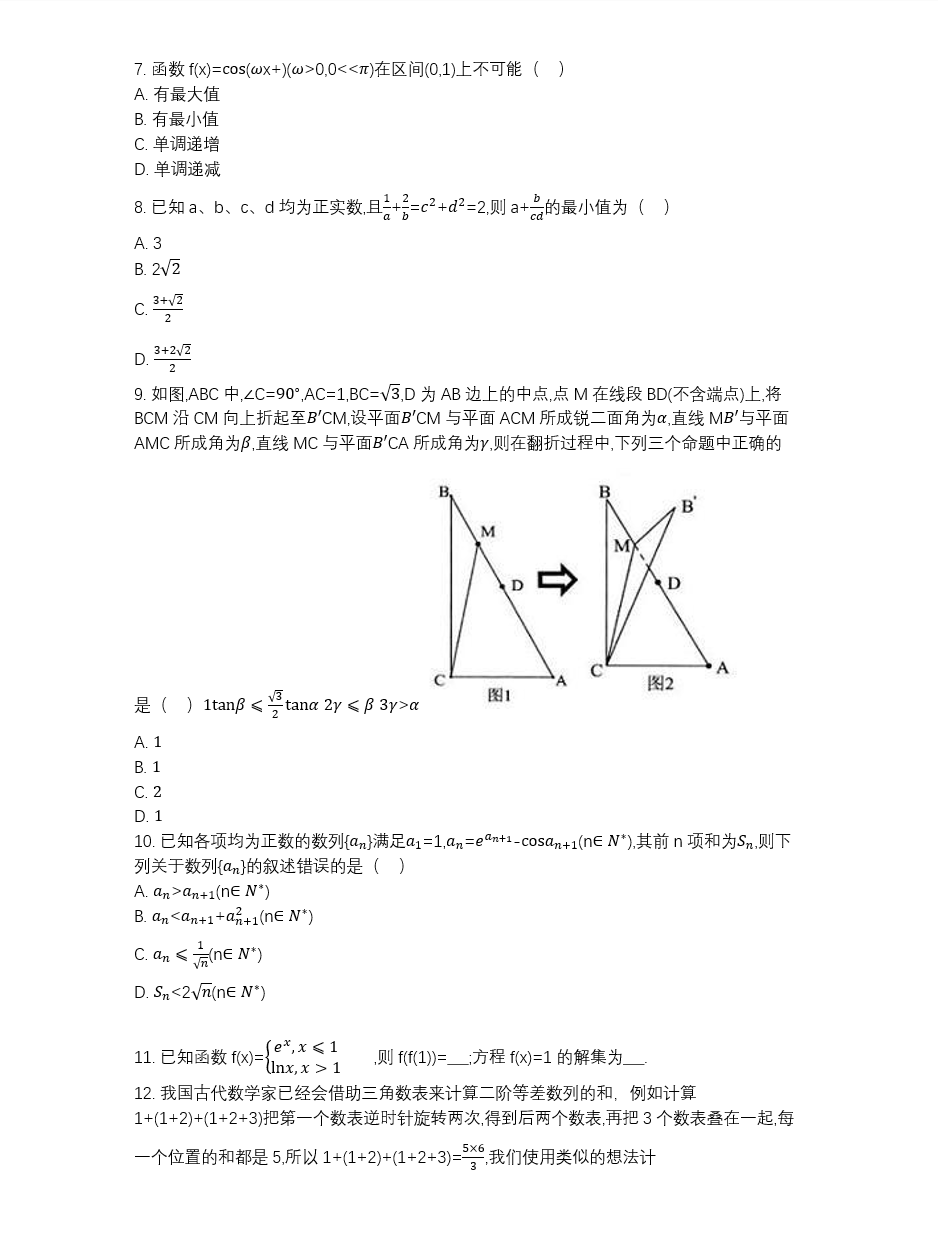
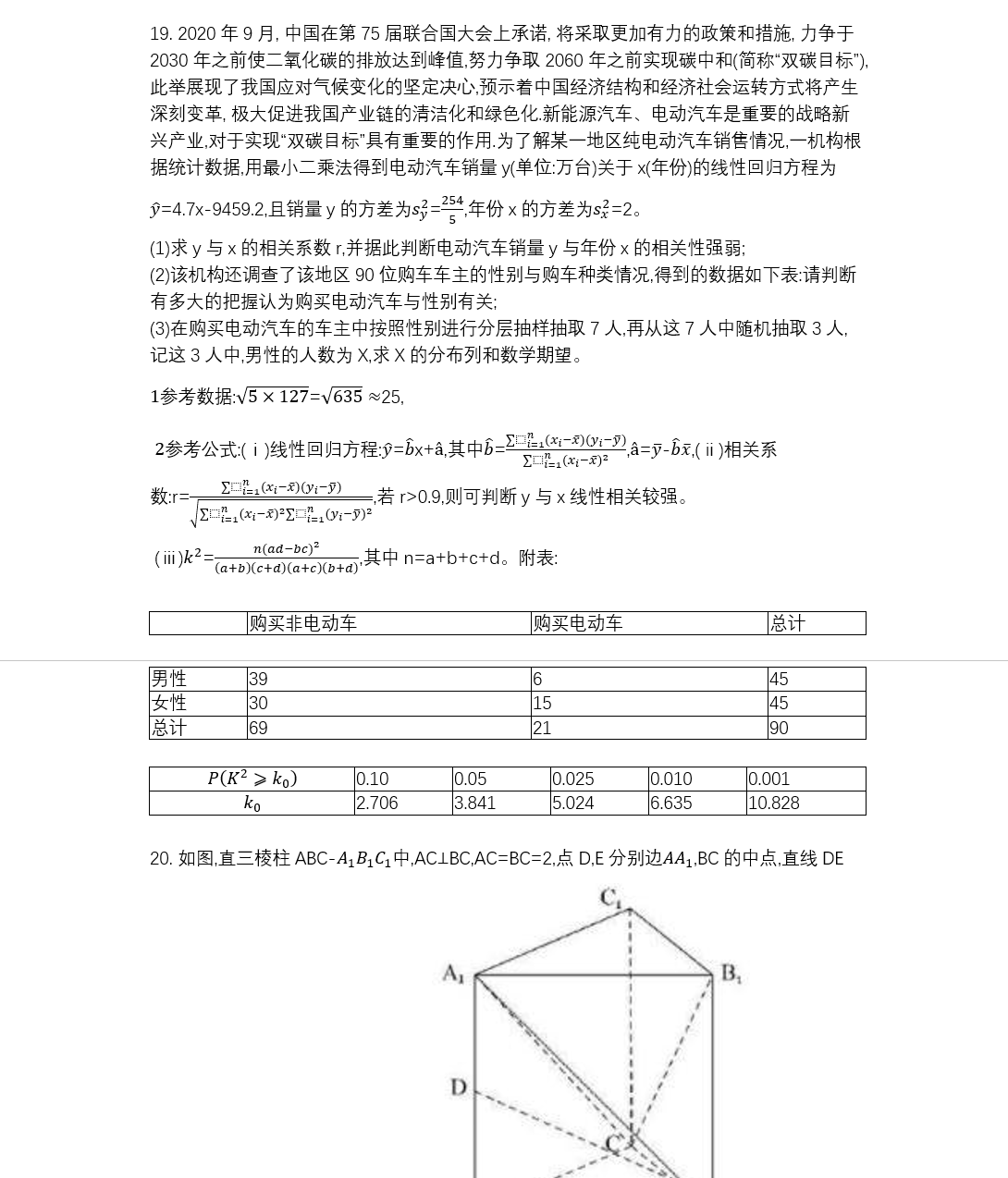
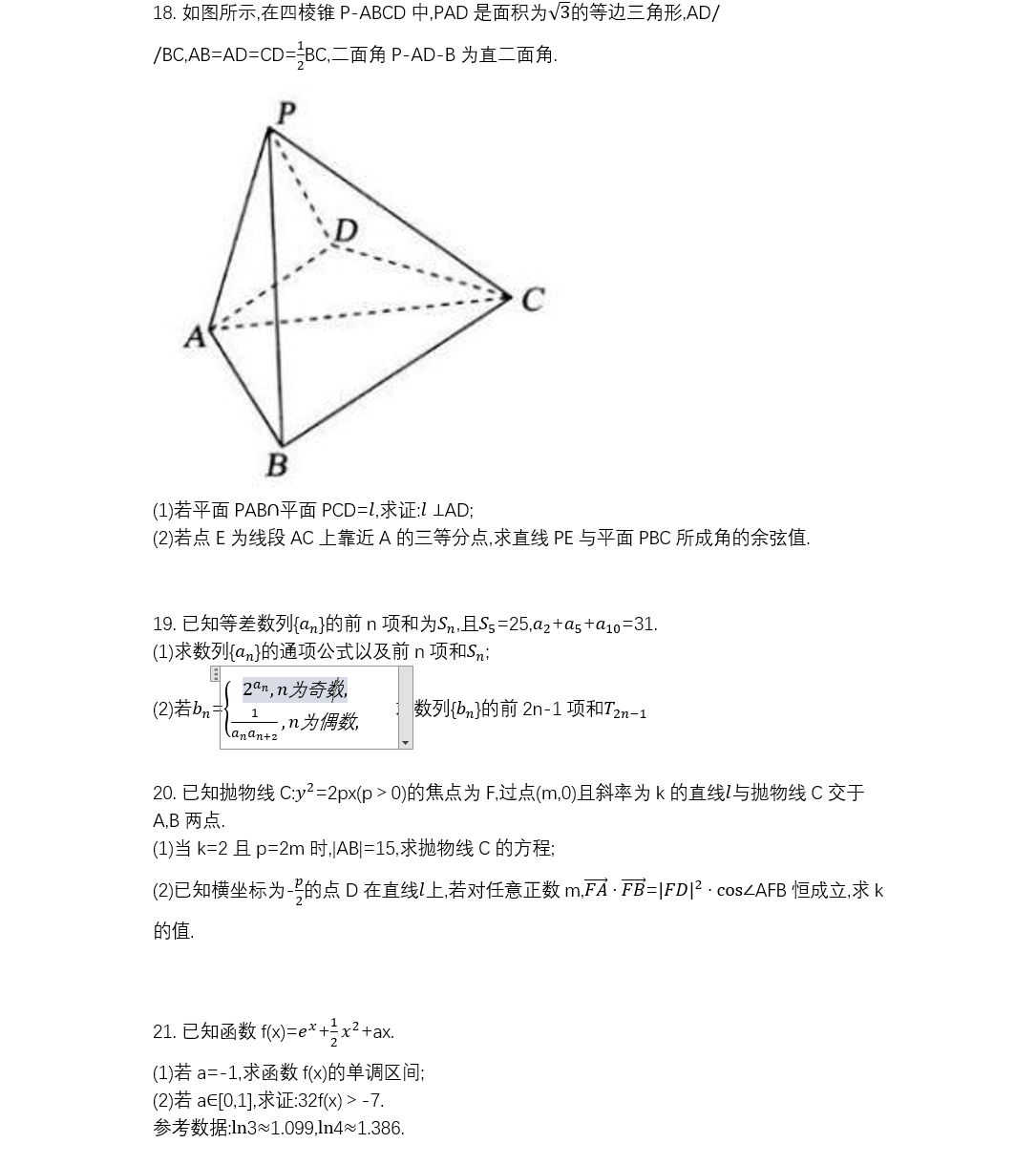
参考链接
https://stackoverflow.com/questions/46623554/add-latex-type-equation-in-word-docx-using-apache-poi
Latex公式导出word,Latex转换MathML使用POI导出公式可编辑的Word文件的更多相关文章
- 使用Apache POI导出Excel小结--导出XLS格式文档
使用Apache POI导出Excel小结 关于使用Apache POI导出Excel我大概会分三篇文章去写 使用Apache POI导出Excel小结--导出XLS格式文档 使用Apache POI ...
- 百闻不如一试——公式图片转Latex代码
写博客时,数学公式的编辑比较占用时间,在上一篇中详细介绍了如何在Markdown中编辑数学符号与公式. https://www.cnblogs.com/bytesfly/p/markdown-form ...
- 详解在Word文档中常见的各种公式编辑问题
正常情况下,我们在安装完成MathType之后会直接加载在Word文档中,Word文档中的MathType比较复杂,新手操作遇到麻烦也是常有的事,今天就来给大家详解下Word文档中常见的MathTyp ...
- 【LaTeX】记录一下LaTeX的安装和使用
由于排版论文的需要,了解了一些LaTeX的相关内容,下面简单记录关于LaTeX的安装和使用 维基百科: LaTeX(/ˈlɑːtɛx/,常被读作/ˈlɑːtɛk/或/ˈleɪtɛk/),文字形式写作L ...
- .net mvc 站点自带简易SSL加密传输 Word报告自动生成(例如 导出数据库结构) 微信小程序:动画(Animation) SignalR 设计理念(一) ASP.NET -- WebForm -- ViewState ASP.NET -- 一般处理程序ashx 常用到的一些js方法,记录一下 CryptoJS与C#AES加解密互转
.net mvc 站点自带简易SSL加密传输 因项目需要,传输数据需要加密,因此有了一些经验,现简易抽出来分享! 请求:前端cryptojs用rsa/aes 或 rsa/des加密,后端.net ...
- LaTeX技巧96:LaTeX 图片控制命令,位置控制
LaTeX技巧96:LaTeX 图片控制命令,位置控制 2012-04-05 17:25:44 zd0303 阅读数 28512更多 分类专栏: Latex LaTeX 控制图片的位置,就是加感叹 ...
- 把word文档中的所有图片导出
把word文档中的所有图片导出 end
- poi导出word
最近做了个poi导出word的功能 下面是代码: 一个可以参考的例子: package com.lzb.crm.web; import java.io.FileOutputStream; import ...
- Word报告自动生成(例如 导出数据库结构)
将很早之前写的一个小组件重新整理优化一下,做成一个通用的功能.适用于导出数据库的结构(表.字段等)到Word或将体检数据自动生成Word版的体检报告等.代码:Github 一.主要需要完成功能: 1. ...
随机推荐
- HDU分拆素数和
https://acm.hdu.edu.cn/showproblem.php?pid=2098 时间复杂度 #include<bits/stdc++.h> using namespace ...
- Web开发之Servlet
当一个请求到达服务端,服务器怎么处理? 当一个请求到达服务端时,由服务端的引擎来进行分析.它根据工程名找到工程, 然后拿到URL的资源地址和web.XML文件的所有的进行对比,和哪一个对比上就找到了具 ...
- window10教育版激活失败
问题 输入完key之后显示无法连接服务器 再次输入密钥无效,而且家庭版密钥激活也没了 使用命令行消除过去的key,使用新的教育版key后,显示运行在运行microsoft windows 非核心版本的 ...
- git命令,github
1.git原理 2.git和svn的区别 SVN是集中式版本控制系统,版本库是集中放在中央服务器的,而干活的时候,用的都是自己的电脑,所以首先要从中央服务器哪里得到最新的版本,然后干活,干完后,需要把 ...
- while...break 实例
// 输出1-100内前5个可以被3整除的数 public class Demo { public static void main(String[] args) { int num = 0; for ...
- 【webpack4.0】---webpack的基本使用(三)
一.webpack-dev-server 1.安装 cnpm install webpack-dev-server -D 2.作用 开启一个web服务,监听文件的变化并自动刷新网页,做到实时预 ...
- 001 研发同学必学哪些 Linux 命令?
01 研发同学为啥要掌握 Linux 命令? 身为研发同学,Linux 是绕不过去的一个小山包,不是说要掌握的十分精通,在程序员界里做个极客,也不是说要抢了 Devops 同学的饭碗,但至少要做到摆脱 ...
- super之mro列表牵引出c3算法
目录 一:super的使用 二:super之mro列表牵引出c3算法 三:mro列表总结使用 一:super的使用 class Person(object): def __init__(self, n ...
- 笔记:Bridging the Gap Between Relevance Matching and Semantic Matching for Short Text Similarity Modeling
笔记:Bridging the Gap Between Relevance Matching and Semantic Matching for Short Text Similarity Model ...
- vs2012 error: package 'visual c++ package' failed to load
某天打开Visual Studio突然出现了"error: package 'visual c++ package' failed to load",解决方案如下: 1. 依此顺序 ...