
flink-----实时项目---day05-------1. ProcessFunction 2. apply对窗口进行全量聚合 3使用aggregate方法实现增量聚合 4.使用ProcessFunction结合定时器实现排序
1. ProcessFunction
ProcessFunction是一个低级的流处理操作,可以访问所有(非循环)流应用程序的基本构建块:
- event(流元素)
- state(容错,一致性,只能在Keyed流中使用)
- timers(事件时间和处理时间,只能在keyed流中使用)
ProcessFunction可以被认为是增加了keyed state和timers功能的FlatMapFunction。ProcesseFunction可以通过RuntimeContext访问Flink中的Keyed State,通过processElement方法中的Context实例访问流元素的时间戳,以及timerServer(注册定时器),如果watermark大于等于注册定时器的时间,就会调用onTimer方法(此处相当于一个回调函数),在调用期间,所有state的范围再次限定在创建定时器的key上,从而允许定时器操作keyed state。
注意:如果我们想要使用keyed state和timers(定时器),我们必须在一个keyed stream上应用ProcessFunction,如下所示
stream.keyBy(...).process(new MyProcessFunction())
案例1:使用ProcessFunction注册定时器
此处要实现的功能就是使用定时器定时输出一些数据,不能使用窗口函数,数据的类型为:时间戳,单词(123422,hello)
ProcessFunctionWithTimerDemo


package cn._51doit.flink.day09;

import org.apache.flink.api.common.functions.MapFunction;

import org.apache.flink.api.common.state.ListState;

import org.apache.flink.api.common.state.ListStateDescriptor;

import org.apache.flink.api.common.typeinfo.TypeHint;

import org.apache.flink.api.common.typeinfo.TypeInformation;

import org.apache.flink.api.java.tuple.Tuple;

import org.apache.flink.api.java.tuple.Tuple2;

import org.apache.flink.configuration.Configuration;

import org.apache.flink.streaming.api.TimeCharacteristic;

import org.apache.flink.streaming.api.datastream.DataStreamSource;

import org.apache.flink.streaming.api.datastream.KeyedStream;

import org.apache.flink.streaming.api.datastream.SingleOutputStreamOperator;

import org.apache.flink.streaming.api.environment.StreamExecutionEnvironment;

import org.apache.flink.streaming.api.functions.KeyedProcessFunction;

import org.apache.flink.streaming.api.functions.timestamps.BoundedOutOfOrdernessTimestampExtractor;

import org.apache.flink.streaming.api.windowing.time.Time;

import org.apache.flink.util.Collector;

public class ProcessFunctionWithTimerDemo {

    public static void main(String[] args) throws Exception {

        StreamExecutionEnvironment env = StreamExecutionEnvironment.getExecutionEnvironment();

        DataStreamSource<String> lines = env.socketTextStream("feng05", 8888);

        env.setStreamTimeCharacteristic(TimeCharacteristic.EventTime);

        // 得到watermark,并没有对原始数据进行处理

        SingleOutputStreamOperator<String> lineWithWaterMark = lines.assignTimestampsAndWatermarks(new BoundedOutOfOrdernessTimestampExtractor<String>(Time.seconds(0)) {

            @Override

            public long extractTimestamp(String element) {

                return Long.parseLong(element.split(",")[0]);

            }

        });

        // 处理数据,获取指定字段

        SingleOutputStreamOperator<Tuple2<String, Integer>> wordAndOne = lineWithWaterMark.map(new MapFunction<String, Tuple2<String, Integer>>() {

            @Override

            public Tuple2<String, Integer> map(String value) throws Exception {

                String[] fields = value.split(",");

                return Tuple2.of(fields[1], 1);

            }

        });

        //调用keyBy进行分组

        KeyedStream<Tuple2<String, Integer>, Tuple> keyed = wordAndOne.keyBy(0);

        // 没有划分窗口,直接调用底层的process方法

        keyed.process(new KeyedProcessFunction<Tuple, Tuple2<String, Integer>, Tuple2<String,Integer>>() {

            private transient ListState<Tuple2<String, Integer>> bufferState;

            // 定义状态描述器

            @Override

            public void open(Configuration parameters) throws Exception {

                ListStateDescriptor<Tuple2<String, Integer>> listStateDescriptor = new ListStateDescriptor<>(

                        "list-state",

                        TypeInformation.of(new TypeHint<Tuple2<String, Integer>>() {})

                );

                bufferState = getRuntimeContext().getListState(listStateDescriptor);

            }

            // 不划分窗口的话,该方法是来一条数据处理一条数据,这样输出端的压力会很大

            @Override

            public void processElement(Tuple2<String, Integer> value, Context ctx, Collector<Tuple2<String, Integer>> out) throws Exception {

                //out.collect(value);

                bufferState.add(value);

                //获取当前的event time

                Long timestamp = ctx.timestamp();

                System.out.println("current event time is : " + timestamp);

                //注册定时器,如果注册的是EventTime类型的定时器,当WaterMark大于等于注册定时器的实际,就会触发onTimer方法

                ctx.timerService().registerEventTimeTimer(timestamp+10000);

            }

            @Override

            public void onTimer(long timestamp, OnTimerContext ctx, Collector<Tuple2<String, Integer>> out) throws Exception {

                Iterable<Tuple2<String, Integer>> iterable = bufferState.get();

                for (Tuple2<String, Integer> tp : iterable) {

                    out.collect(tp);

                }

            }

        }).print();

        env.execute();

    }

}
由于定时器中的时间为timestamp+10000,当输入分别输入1000,spark;11000,spark(该条数据触发定时器,调用onTimer()方法),输出如下结果
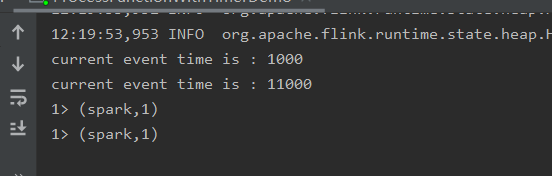
同时其还会产生一个新的定时器:21000触发的定时器
注意
1.processElement()方法处理数据时一条一条进行处理的
2. 该案例实现了滚动窗口的功能,而滚动窗口的底层实现原理与此相似:processElement()方法+onTimer()方法
案例二:使用定时器实现类似滚动窗口的功能
ProcessFunctionWithTimerDemo2
package cn._51doit.flink.day09;

import org.apache.flink.api.common.functions.MapFunction;

import org.apache.flink.api.common.state.ListState;

import org.apache.flink.api.common.state.ListStateDescriptor;

import org.apache.flink.api.common.typeinfo.TypeHint;

import org.apache.flink.api.common.typeinfo.TypeInformation;

import org.apache.flink.api.java.tuple.Tuple;

import org.apache.flink.api.java.tuple.Tuple2;

import org.apache.flink.configuration.Configuration;

import org.apache.flink.streaming.api.TimeCharacteristic;

import org.apache.flink.streaming.api.datastream.DataStreamSource;

import org.apache.flink.streaming.api.datastream.KeyedStream;

import org.apache.flink.streaming.api.datastream.SingleOutputStreamOperator;

import org.apache.flink.streaming.api.environment.StreamExecutionEnvironment;

import org.apache.flink.streaming.api.functions.KeyedProcessFunction;

import org.apache.flink.streaming.api.functions.timestamps.BoundedOutOfOrdernessTimestampExtractor;

import org.apache.flink.streaming.api.windowing.time.Time;

import org.apache.flink.util.Collector;

/**

 * 只有keyedStream在使用ProcessFunction时可以使用State和Timer定时器

 */

public class ProcessFunctionWithTimerDemo2 {

    public static void main(String[] args) throws Exception {

        StreamExecutionEnvironment env = StreamExecutionEnvironment.getExecutionEnvironment();

        env.setStreamTimeCharacteristic(TimeCharacteristic.EventTime);

        //1000,hello

        DataStreamSource<String> lines = env.socketTextStream("localhost", 8888);

        SingleOutputStreamOperator<String> linesWithWaterMark = lines.assignTimestampsAndWatermarks(new BoundedOutOfOrdernessTimestampExtractor<String>(Time.seconds(0)) {

            @Override

            public long extractTimestamp(String element) {

                return Long.parseLong(element.split(",")[0]);

            }

        });

        SingleOutputStreamOperator<Tuple2<String, Integer>> wordAndOne = linesWithWaterMark.map(new MapFunction<String, Tuple2<String, Integer>>() {

            @Override

            public Tuple2<String, Integer> map(String line) throws Exception {

                String word = line.split(",")[1];

                return Tuple2.of(word, 1);

            }

        });

        //调用keyBy进行分组

        KeyedStream<Tuple2<String, Integer>, Tuple> keyed = wordAndOne.keyBy(0);

        //没有划分窗口,直接调用底层的process方法

        keyed.process(new KeyedProcessFunction<Tuple, Tuple2<String, Integer>, Tuple2<String, Integer>>() {

            private transient ListState<Tuple2<String, Integer>> bufferState;

            @Override

            public void open(Configuration parameters) throws Exception {

                ListStateDescriptor<Tuple2<String, Integer>> listStateDescriptor = new ListStateDescriptor<Tuple2<String, Integer>>(

                        "list-state",

                        TypeInformation.of(new TypeHint<Tuple2<String, Integer>>(){})

                );

                bufferState = getRuntimeContext().getListState(listStateDescriptor);

            }

            @Override

            public void processElement(Tuple2<String, Integer> value, Context ctx, Collector<Tuple2<String, Integer>> out) throws Exception {

                //out.collect(value);

                bufferState.add(value);

                //获取当前的event time

                Long timestamp = ctx.timestamp();

                //10:14:13   ->   10:15:00

                //输入的时间 [10:14:00, 10:14:59) 注册的定时器都是 10:15:00

                System.out.println("current event time is : " + timestamp);

                //注册定时器,如果注册的是EventTime类型的定时器,当WaterMark大于等于注册定时器的时间,就会触发onTimer方法

                long timer = timestamp - timestamp % 60000 + 60000;

                System.out.println("next timer is: " + timer);

                ctx.timerService().registerEventTimeTimer(timer);

            }

            @Override

            public void onTimer(long timestamp, OnTimerContext ctx, Collector<Tuple2<String, Integer>> out) throws Exception {

                Iterable<Tuple2<String, Integer>> iterable = bufferState.get();

                for (Tuple2<String, Integer> tp : iterable) {

                    out.collect(tp);

                }

                //请求当前ListState中的数据

                bufferState.clear();

            }

        }).print();

        env.execute();

    }

}
注意的代码
//注册定时器,如果注册的是EventTime类型的定时器,当WaterMark大于等于注册定时器的时间,就会触发onTimer方法

                long timer = timestamp - timestamp % 60000 + 60000;

                System.out.println("next timer is: " + timer);

                ctx.timerService().registerEventTimeTimer(timer);
改变:使用Process Time
ProcessFunctionWithTimerDemo3
package cn._51doit.flink.day09;

import org.apache.flink.api.common.functions.MapFunction;

import org.apache.flink.api.common.state.ListState;

import org.apache.flink.api.common.state.ListStateDescriptor;

import org.apache.flink.api.common.typeinfo.TypeHint;

import org.apache.flink.api.common.typeinfo.TypeInformation;

import org.apache.flink.api.java.tuple.Tuple;

import org.apache.flink.api.java.tuple.Tuple2;

import org.apache.flink.configuration.Configuration;

import org.apache.flink.streaming.api.TimeCharacteristic;

import org.apache.flink.streaming.api.datastream.DataStreamSource;

import org.apache.flink.streaming.api.datastream.KeyedStream;

import org.apache.flink.streaming.api.datastream.SingleOutputStreamOperator;

import org.apache.flink.streaming.api.environment.StreamExecutionEnvironment;

import org.apache.flink.streaming.api.functions.KeyedProcessFunction;

import org.apache.flink.streaming.api.functions.timestamps.BoundedOutOfOrdernessTimestampExtractor;

import org.apache.flink.streaming.api.windowing.time.Time;

import org.apache.flink.util.Collector;

/**

 * 只有keyedStream在使用ProcessFunction时可以使用State和Timer定时器

 *

 * Processing Time类型的定时器

 *

 */

public class ProcessFunctionWithTimerDemo3 {

    public static void main(String[] args) throws Exception {

        StreamExecutionEnvironment env = StreamExecutionEnvironment.getExecutionEnvironment();

        //hello

        DataStreamSource<String> lines = env.socketTextStream("localhost", 8888);

        SingleOutputStreamOperator<Tuple2<String, Integer>> wordAndOne = lines.map(new MapFunction<String, Tuple2<String, Integer>>() {

            @Override

            public Tuple2<String, Integer> map(String word) throws Exception {

                return Tuple2.of(word, 1);

            }

        });

        //调用keyBy进行分组

        KeyedStream<Tuple2<String, Integer>, Tuple> keyed = wordAndOne.keyBy(0);

        //没有划分窗口,直接调用底层的process方法

        keyed.process(new KeyedProcessFunction<Tuple, Tuple2<String, Integer>, Tuple2<String, Integer>>() {

            private transient ListState<Tuple2<String, Integer>> bufferState;

            @Override

            public void open(Configuration parameters) throws Exception {

                ListStateDescriptor<Tuple2<String, Integer>> listStateDescriptor = new ListStateDescriptor<Tuple2<String, Integer>>(

                        "list-state",

                        TypeInformation.of(new TypeHint<Tuple2<String, Integer>>(){})

                );

                bufferState = getRuntimeContext().getListState(listStateDescriptor);

            }

            @Override

            public void processElement(Tuple2<String, Integer> value, Context ctx, Collector<Tuple2<String, Integer>> out) throws Exception {

                bufferState.add(value);

                //获取当前的processing time

                long currentProcessingTime = ctx.timerService().currentProcessingTime();

                //10:14:13   ->   10:15:00

                //输入的时间 [10:14:00, 10:14:59) 注册的定时器都是 10:15:00

                System.out.println("current processing time is : " + currentProcessingTime);

                //注册定时器,如果注册的是ProcessingTime类型的定时器,当SubTask所在机器的ProcessingTime大于等于注册定时器的时间,就会触发onTimer方法

                long timer = currentProcessingTime - currentProcessingTime % 60000 + 60000;

                System.out.println("next timer is: " + timer);

                //注册ProcessingTime的定时器

                ctx.timerService().registerProcessingTimeTimer(timer);

            }

            @Override

            public void onTimer(long timestamp, OnTimerContext ctx, Collector<Tuple2<String, Integer>> out) throws Exception {

                Iterable<Tuple2<String, Integer>> iterable = bufferState.get();

                for (Tuple2<String, Integer> tp : iterable) {

                    out.collect(tp);

                }

                //请求当前ListState中的数据

                bufferState.clear();

            }

        }).print();

        env.execute();

    }

}
2. apply方法对窗口进行全量聚合
窗口每触发一次时,会调用一次apply方法,相当于是对窗口中的全量数据进行计算
package cn._51doit.flink.day09;

import com.alibaba.fastjson.JSON;

import org.apache.flink.api.java.tuple.Tuple;

import org.apache.flink.streaming.api.TimeCharacteristic;

import org.apache.flink.streaming.api.datastream.DataStreamSource;

import org.apache.flink.streaming.api.datastream.KeyedStream;

import org.apache.flink.streaming.api.datastream.SingleOutputStreamOperator;

import org.apache.flink.streaming.api.datastream.WindowedStream;

import org.apache.flink.streaming.api.environment.StreamExecutionEnvironment;

import org.apache.flink.streaming.api.functions.ProcessFunction;

import org.apache.flink.streaming.api.functions.timestamps.BoundedOutOfOrdernessTimestampExtractor;

import org.apache.flink.streaming.api.functions.windowing.WindowFunction;

import org.apache.flink.streaming.api.windowing.assigners.SlidingEventTimeWindows;

import org.apache.flink.streaming.api.windowing.time.Time;

import org.apache.flink.streaming.api.windowing.windows.TimeWindow;

import org.apache.flink.util.Collector;

/**

 * apply是在窗口内进行全量的聚合,浪费资源

 */

public class HotGoodsTopN {

    public static void main(String[] args) throws Exception{

        StreamExecutionEnvironment env = StreamExecutionEnvironment.getExecutionEnvironment();

        env.setStreamTimeCharacteristic(TimeCharacteristic.EventTime);

        env.enableCheckpointing(60000);

        env.setParallelism(1);

        //json字符串

        DataStreamSource<String> lines = env.socketTextStream("localhost", 8888);

        SingleOutputStreamOperator<MyBehavior> behaviorDataStream = lines.process(new ProcessFunction<String, MyBehavior>() {

            @Override

            public void processElement(String value, Context ctx, Collector<MyBehavior> out) throws Exception {

                try {

                    MyBehavior behavior = JSON.parseObject(value, MyBehavior.class);

                    //输出

                    out.collect(behavior);

                } catch (Exception e) {

                    //e.printStackTrace();

                    //TODO 记录出现异常的数据

                }

            }

        });

        //提取EventTime生成WaterMark

        SingleOutputStreamOperator<MyBehavior> behaviorDataStreamWithWaterMark = behaviorDataStream.assignTimestampsAndWatermarks(new BoundedOutOfOrdernessTimestampExtractor<MyBehavior>(Time.seconds(0)) {

            @Override

            public long extractTimestamp(MyBehavior element) {

                return element.timestamp;

            }

        });

        //按照指定的字段进行分组

        KeyedStream<MyBehavior, Tuple> keyed = behaviorDataStreamWithWaterMark.keyBy("itemId", "type");

        //窗口长度为10分组,一分钟滑动一次

        WindowedStream<MyBehavior, Tuple, TimeWindow> window = keyed.window(SlidingEventTimeWindows.of(Time.minutes(10), Time.minutes(1)));

        //SingleOutputStreamOperator<MyBehavior> sum = window.sum("counts");

        SingleOutputStreamOperator<ItemViewCount> sum = window.apply(new WindowFunction<MyBehavior, ItemViewCount, Tuple, TimeWindow>() {

            //当窗口触发是,会调用一次apply方法,相当于是对窗口中的全量数据进行计算

            @Override

            public void apply(Tuple tuple, TimeWindow window, Iterable<MyBehavior> input, Collector<ItemViewCount> out) throws Exception {

                //窗口的起始时间

                long start = window.getStart();

                //窗口的结束时间

                long end = window.getEnd();

                //获取分组的key

                String itemId = tuple.getField(0);

                String type = tuple.getField(1);

                int count = 0;

                for (MyBehavior myBehavior : input) {

                    count++;

                }

                //输出结果

                out.collect(ItemViewCount.of(itemId, type, start, end, count++));

            }

        });

        sum.print();

        env.execute();

    }

}
此处的计算是全量计算,效率不高,因为其要等到窗口数据攒足了才触发定时器,执行apply方法,这个apply方法相当于对窗口中的全量数据进行计算。假设窗口一直不触发,其会将数据缓存至窗口内存中,其实就是state中,窗口内部会有state,无需自己定义。窗口若是很长的话,缓存在内存中的数据就会很多。,解决办法是,窗口来一条数据就进行一次累加计算,即增量计算(效率更高,内存中存的知识次数)
3. 使用aggregate方法实现增量聚合
HotGoodsTopNAdv
package cn._51doit.flink.day09;

import com.alibaba.fastjson.JSON;

import org.apache.flink.api.common.functions.AggregateFunction;

import org.apache.flink.api.common.state.ValueState;

import org.apache.flink.api.common.state.ValueStateDescriptor;

import org.apache.flink.api.common.typeinfo.TypeHint;

import org.apache.flink.api.common.typeinfo.TypeInformation;

import org.apache.flink.api.java.tuple.Tuple;

import org.apache.flink.configuration.Configuration;

import org.apache.flink.streaming.api.TimeCharacteristic;

import org.apache.flink.streaming.api.datastream.DataStreamSource;

import org.apache.flink.streaming.api.datastream.KeyedStream;

import org.apache.flink.streaming.api.datastream.SingleOutputStreamOperator;

import org.apache.flink.streaming.api.datastream.WindowedStream;

import org.apache.flink.streaming.api.environment.StreamExecutionEnvironment;

import org.apache.flink.streaming.api.functions.KeyedProcessFunction;

import org.apache.flink.streaming.api.functions.ProcessFunction;

import org.apache.flink.streaming.api.functions.timestamps.BoundedOutOfOrdernessTimestampExtractor;

import org.apache.flink.streaming.api.functions.windowing.WindowFunction;

import org.apache.flink.streaming.api.windowing.assigners.SlidingEventTimeWindows;

import org.apache.flink.streaming.api.windowing.time.Time;

import org.apache.flink.streaming.api.windowing.windows.TimeWindow;

import org.apache.flink.util.Collector;

import java.util.ArrayList;

import java.util.Comparator;

import java.util.List;

/**

 * 在窗口内增量聚合,效率更高

 */

public class HotGoodsTopNAdv {

    public static void main(String[] args) throws Exception{

        StreamExecutionEnvironment env = StreamExecutionEnvironment.getExecutionEnvironment();

        env.setStreamTimeCharacteristic(TimeCharacteristic.EventTime);

        env.enableCheckpointing(60000);

        env.setParallelism(1);

        //json字符串

        DataStreamSource<String> lines = env.socketTextStream("localhost", 8888);

        SingleOutputStreamOperator<MyBehavior> behaviorDataStream = lines.process(new ProcessFunction<String, MyBehavior>() {

            @Override

            public void processElement(String value, Context ctx, Collector<MyBehavior> out) throws Exception {

                try {

                    MyBehavior behavior = JSON.parseObject(value, MyBehavior.class);

                    //输出

                    out.collect(behavior);

                } catch (Exception e) {

                    //e.printStackTrace();

                    //TODO 记录出现异常的数据

                }

            }

        });

        //提取EventTime生成WaterMark

        SingleOutputStreamOperator<MyBehavior> behaviorDataStreamWithWaterMark = behaviorDataStream.assignTimestampsAndWatermarks(new BoundedOutOfOrdernessTimestampExtractor<MyBehavior>(Time.seconds(0)) {

            @Override

            public long extractTimestamp(MyBehavior element) {

                return element.timestamp;

            }

        });

        //按照指定的字段进行分组

        KeyedStream<MyBehavior, Tuple> keyed = behaviorDataStreamWithWaterMark.keyBy("itemId", "type");

        //窗口长度为10分组,一分钟滑动一次

        WindowedStream<MyBehavior, Tuple, TimeWindow> window = keyed.window(SlidingEventTimeWindows.of(Time.minutes(10), Time.minutes(1)));

        //SingleOutputStreamOperator<MyBehavior> counts = window.sum("counts");

        //自定义窗口聚合函数

        SingleOutputStreamOperator<ItemViewCount> aggDataStream = window.aggregate(new MyWindowAggFunction(), new MyWindowFunction());

        //按照窗口的start、end进行分组,将窗口相同的数据进行排序

        aggDataStream.keyBy("type", "windowStart", "windowEnd")

                .process(new KeyedProcessFunction<Tuple, ItemViewCount, List<ItemViewCount>>() {

                    private transient ValueState<List<ItemViewCount>> valueState;

                    @Override

                    public void open(Configuration parameters) throws Exception {

                        ValueStateDescriptor<List<ItemViewCount>> stateDescriptor = new ValueStateDescriptor<List<ItemViewCount>>(

                                "list-state",

                                TypeInformation.of(new TypeHint<List<ItemViewCount>>() {})

                        );

                        valueState = getRuntimeContext().getState(stateDescriptor);

                    }

                    @Override

                    public void processElement(ItemViewCount value, Context ctx, Collector<List<ItemViewCount>> out) throws Exception {

                        //将数据添加到State中缓存

                        List<ItemViewCount> buffer = valueState.value();

                        if(buffer == null) {

                            buffer = new ArrayList<>();

                        }

                        buffer.add(value);

                        valueState.update(buffer);

                        //注册定时器

                        ctx.timerService().registerEventTimeTimer(value.windowEnd + 1);

                    }

                    @Override

                    public void onTimer(long timestamp, OnTimerContext ctx, Collector<List<ItemViewCount>> out) throws Exception {

                        //将ValueState中的数据取出来

                        List<ItemViewCount> buffer = valueState.value();

                        //按照次数降序排序

                        buffer.sort(new Comparator<ItemViewCount>() {

                            @Override

                            public int compare(ItemViewCount o1, ItemViewCount o2) {

                                return -(int)(o1.viewCount - o2.viewCount);

                            }

                        });

                        //清空State

                        valueState.update(null);

                        out.collect(buffer);

                    }

                }).print(); //打印结果

        env.execute();

    }

    //三个泛型:

    //第一个:输入的数据类型

    //第二个:计数/累加器的类型

    //第三个:输出的数据类型

    public static class MyWindowAggFunction implements AggregateFunction<MyBehavior, Long, Long> {

        //初始化一个计数器

        @Override

        public Long createAccumulator() {

            return 0L;

        }

        //每输入一条数据就调用一次add方法

        @Override

        public Long add(MyBehavior value, Long accumulator) {

            return accumulator + value.counts;

        }

        @Override

        public Long getResult(Long accumulator) {

            return accumulator;

        }

        //只针对SessionWindow有效,对应滚动窗口、滑动窗口不会调用此方法

        @Override

        public Long merge(Long a, Long b) {

            return null;

        }

    }

    //传入4个泛型

    //第一个:输入的数据类型(Long类型的次数)

    //第二个:输出的数据类型(ItemViewCount)

    //第三个:分组的key(分组的字段)

    //第四个:窗口对象(起始时间、结束时间)

    public static class MyWindowFunction implements WindowFunction<Long, ItemViewCount, Tuple, TimeWindow> {

        @Override

        public void apply(Tuple tuple, TimeWindow window, Iterable<Long> input, Collector<ItemViewCount> out) throws Exception {

            //输入的Key

            String itemId = tuple.getField(0);

            String type = tuple.getField(1);

            //窗口的起始时间

            long start = window.getStart();

            //窗口结束时间

            long end = window.getEnd();

            //窗口集合的结果

            Long count = input.iterator().next();

            //输出数据

            out.collect(ItemViewCount.of(itemId, type, start, end, count));

        }

    }

}
涉及的重要知识点:
- 自定义聚合函数:
    //三个泛型:

    //第一个:输入的数据类型

    //第二个:计数/累加器的类型

    //第三个:输出的数据类型

    public static class MyWindowAggFunction implements AggregateFunction<MyBehavior, Long, Long> {

        //初始化一个计数器

        @Override

        public Long createAccumulator() {

            return 0L;

        }

        //每输入一条数据就调用一次add方法

        @Override

        public Long add(MyBehavior value, Long accumulator) {

            return accumulator + value.counts;

        }

        @Override

        public Long getResult(Long accumulator) {

            return accumulator;

        }

        //只针对SessionWindow有效,对应滚动窗口、滑动窗口不会调用此方法

        @Override

        public Long merge(Long a, Long b) {

            return null;

        }

    }
- 自定义WindowFunction
    //传入4个泛型

    //第一个:输入的数据类型(Long类型的次数)

    //第二个:输出的数据类型(ItemViewCount)

    //第三个:分组的key(分组的字段)

    //第四个:窗口对象(起始时间、结束时间)

    public static class MyWindowFunction implements WindowFunction<Long, ItemViewCount, Tuple, TimeWindow> {

        @Override

        public void apply(Tuple tuple, TimeWindow window, Iterable<Long> input, Collector<ItemViewCount> out) throws Exception {

            //输入的Key

            String itemId = tuple.getField(0);

            String type = tuple.getField(1);

            //窗口的起始时间

            long start = window.getStart();

            //窗口结束时间

            long end = window.getEnd();

            //窗口集合的结果

            Long count = input.iterator().next();

            //输出数据

            out.collect(ItemViewCount.of(itemId, type, start, end, count));

        }

    }
4.使用ProcessFunction结合定时器实现排序
package cn._51doit.flink.day09;

import com.alibaba.fastjson.JSON;

import org.apache.flink.api.common.functions.AggregateFunction;

import org.apache.flink.api.common.state.ValueState;

import org.apache.flink.api.common.state.ValueStateDescriptor;

import org.apache.flink.api.common.typeinfo.TypeHint;

import org.apache.flink.api.common.typeinfo.TypeInformation;

import org.apache.flink.api.java.tuple.Tuple;

import org.apache.flink.configuration.Configuration;

import org.apache.flink.streaming.api.TimeCharacteristic;

import org.apache.flink.streaming.api.datastream.DataStreamSource;

import org.apache.flink.streaming.api.datastream.KeyedStream;

import org.apache.flink.streaming.api.datastream.SingleOutputStreamOperator;

import org.apache.flink.streaming.api.datastream.WindowedStream;

import org.apache.flink.streaming.api.environment.StreamExecutionEnvironment;

import org.apache.flink.streaming.api.functions.KeyedProcessFunction;

import org.apache.flink.streaming.api.functions.ProcessFunction;

import org.apache.flink.streaming.api.functions.timestamps.BoundedOutOfOrdernessTimestampExtractor;

import org.apache.flink.streaming.api.functions.windowing.WindowFunction;

import org.apache.flink.streaming.api.windowing.assigners.SlidingEventTimeWindows;

import org.apache.flink.streaming.api.windowing.time.Time;

import org.apache.flink.streaming.api.windowing.windows.TimeWindow;

import org.apache.flink.util.Collector;

import java.util.ArrayList;

import java.util.Comparator;

import java.util.List;

/**

 * 在窗口内增量聚合,效率更高

 */

public class HotGoodsTopNAdv {

    public static void main(String[] args) throws Exception{

        StreamExecutionEnvironment env = StreamExecutionEnvironment.getExecutionEnvironment();

        env.setStreamTimeCharacteristic(TimeCharacteristic.EventTime);

        env.enableCheckpointing(60000);

        env.setParallelism(1);

        //json字符串

        DataStreamSource<String> lines = env.socketTextStream("localhost", 8888);

        SingleOutputStreamOperator<MyBehavior> behaviorDataStream = lines.process(new ProcessFunction<String, MyBehavior>() {

            @Override

            public void processElement(String value, Context ctx, Collector<MyBehavior> out) throws Exception {

                try {

                    MyBehavior behavior = JSON.parseObject(value, MyBehavior.class);

                    //输出

                    out.collect(behavior);

                } catch (Exception e) {

                    //e.printStackTrace();

                    //TODO 记录出现异常的数据

                }

            }

        });

        //提取EventTime生成WaterMark

        SingleOutputStreamOperator<MyBehavior> behaviorDataStreamWithWaterMark = behaviorDataStream.assignTimestampsAndWatermarks(new BoundedOutOfOrdernessTimestampExtractor<MyBehavior>(Time.seconds(0)) {

            @Override

            public long extractTimestamp(MyBehavior element) {

                return element.timestamp;

            }

        });

        //按照指定的字段进行分组

        KeyedStream<MyBehavior, Tuple> keyed = behaviorDataStreamWithWaterMark.keyBy("itemId", "type");

        //窗口长度为10分组,一分钟滑动一次

        WindowedStream<MyBehavior, Tuple, TimeWindow> window = keyed.window(SlidingEventTimeWindows.of(Time.minutes(10), Time.minutes(1)));

        //SingleOutputStreamOperator<MyBehavior> counts = window.sum("counts");

        //自定义窗口聚合函数

        SingleOutputStreamOperator<ItemViewCount> aggDataStream = window.aggregate(new MyWindowAggFunction(), new MyWindowFunction());

        //按照窗口的start、end进行分组,将窗口相同的数据进行排序

        aggDataStream.keyBy("type", "windowStart", "windowEnd")

                .process(new KeyedProcessFunction<Tuple, ItemViewCount, List<ItemViewCount>>() {

                    private transient ValueState<List<ItemViewCount>> valueState;

                    @Override

                    public void open(Configuration parameters) throws Exception {

                        ValueStateDescriptor<List<ItemViewCount>> stateDescriptor = new ValueStateDescriptor<List<ItemViewCount>>(

                                "list-state",

                                TypeInformation.of(new TypeHint<List<ItemViewCount>>() {})

                        );

                        valueState = getRuntimeContext().getState(stateDescriptor);

                    }

                    @Override

                    public void processElement(ItemViewCount value, Context ctx, Collector<List<ItemViewCount>> out) throws Exception {

                        //将数据添加到State中缓存

                        List<ItemViewCount> buffer = valueState.value();

                        if(buffer == null) {

                            buffer = new ArrayList<>();

                        }

                        buffer.add(value);

                        valueState.update(buffer);

                        //注册定时器

                        ctx.timerService().registerEventTimeTimer(value.windowEnd + 1);

                    }

                    @Override

                    public void onTimer(long timestamp, OnTimerContext ctx, Collector<List<ItemViewCount>> out) throws Exception {

                        //将ValueState中的数据取出来

                        List<ItemViewCount> buffer = valueState.value();

                        //按照次数降序排序

                        buffer.sort(new Comparator<ItemViewCount>() {

                            @Override

                            public int compare(ItemViewCount o1, ItemViewCount o2) {

                                return -(int)(o1.viewCount - o2.viewCount);

                            }

                        });

                        //清空State

                        valueState.update(null);

                        out.collect(buffer);

                    }

                }).print(); //打印结果

        env.execute();

    }

    //三个泛型:

    //第一个:输入的数据类型

    //第二个:计数/累加器的类型

    //第三个:输出的数据类型

    public static class MyWindowAggFunction implements AggregateFunction<MyBehavior, Long, Long> {

        //初始化一个计数器

        @Override

        public Long createAccumulator() {

            return 0L;

        }

        //每输入一条数据就调用一次add方法

        @Override

        public Long add(MyBehavior value, Long accumulator) {

            return accumulator + value.counts;

        }

        @Override

        public Long getResult(Long accumulator) {

            return accumulator;

        }

        //只针对SessionWindow有效,对应滚动窗口、滑动窗口不会调用此方法

        @Override

        public Long merge(Long a, Long b) {

            return null;

        }

    }

    //传入4个泛型

    //第一个:输入的数据类型(Long类型的次数)

    //第二个:输出的数据类型(ItemViewCount)

    //第三个:分组的key(分组的字段)

    //第四个:窗口对象(起始时间、结束时间)

    public static class MyWindowFunction implements WindowFunction<Long, ItemViewCount, Tuple, TimeWindow> {

        @Override

        public void apply(Tuple tuple, TimeWindow window, Iterable<Long> input, Collector<ItemViewCount> out) throws Exception {

            //输入的Key

            String itemId = tuple.getField(0);

            String type = tuple.getField(1);

            //窗口的起始时间

            long start = window.getStart();

            //窗口结束时间

            long end = window.getEnd();

            //窗口集合的结果

            Long count = input.iterator().next();

            //输出数据

            out.collect(ItemViewCount.of(itemId, type, start, end, count));

        }

    }

}
flink-----实时项目---day05-------1. ProcessFunction 2. apply对窗口进行全量聚合 3使用aggregate方法实现增量聚合 4.使用ProcessFunction结合定时器实现排序的更多相关文章
- 5.Flink实时项目之业务数据准备
1. 流程介绍 在上一篇文章中,我们已经把客户端的页面日志,启动日志,曝光日志分别发送到kafka对应的主题中.在本文中,我们将把业务数据也发送到对应的kafka主题中. 通过maxwell采集业务数 ...
- 10.Flink实时项目之订单维度表关联
1. 维度查询 在上一篇中,我们已经把订单和订单明细表join完,本文将关联订单的其他维度数据,维度关联实际上就是在流中查询存储在 hbase 中的数据表.但是即使通过主键的方式查询,hbase 速度 ...
- 4.Flink实时项目之数据拆分
1. 摘要 我们前面采集的日志数据已经保存到 Kafka 中,作为日志数据的 ODS 层,从 kafka 的ODS 层读取的日志数据分为 3 类, 页面日志.启动日志和曝光日志.这三类数据虽然都是用户 ...
- 6.Flink实时项目之业务数据分流
在上一篇文章中,我们已经获取到了业务数据的输出流,分别是dim层维度数据的输出流,及dwd层事实数据的输出流,接下来我们要做的就是把这些输出流分别再流向对应的数据介质中,dim层流向hbase中,dw ...
- 3.Flink实时项目之流程分析及环境搭建
1. 流程分析 前面已经将日志数据(ods_base_log)及业务数据(ods_base_db_m)发送到kafka,作为ods层,接下来要做的就是通过flink消费kafka 的ods数据,进行简 ...
- 7.Flink实时项目之独立访客开发
1.架构说明 在上6节当中,我们已经完成了从ods层到dwd层的转换,包括日志数据和业务数据,下面我们开始做dwm层的任务. DWM 层主要服务 DWS,因为部分需求直接从 DWD 层到DWS 层中间 ...
- 9.Flink实时项目之订单宽表
1.需求分析 订单是统计分析的重要的对象,围绕订单有很多的维度统计需求,比如用户.地区.商品.品类.品牌等等.为了之后统计计算更加方便,减少大表之间的关联,所以在实时计算过程中将围绕订单的相关数据整合 ...
- 11.Flink实时项目之支付宽表
支付宽表 支付宽表的目的,最主要的原因是支付表没有到订单明细,支付金额没有细分到商品上, 没有办法统计商品级的支付状况. 所以本次宽表的核心就是要把支付表的信息与订单明细关联上. 解决方案有两个 一个 ...
- 1.Flink实时项目前期准备
1.日志生成项目 日志生成机器:hadoop101 jar包:mock-log-0.0.1-SNAPSHOT.jar gmall_mock |----mock_common |----mock ...
随机推荐
- hdu 3032 Nim or not Nim? (SG,然后找规律)
题意: n堆石头,每堆石头个数:s[1]...s[n]. 每人每次可以选择在一堆中取若干个(不能不取),或者把一堆石头分成两堆(两堆要都有石头). 无法操作者负. 数据范围: (1 ≤ N ≤ 10^ ...
- java线程同步以及对象锁和类锁解析(多线程synchronized关键字)
一.关于线程安全 1.是什么决定的线程安全问题? 线程安全问题基本是由全局变量及静态变量引起的. 若每个线程中对全局变量.静态变量只有读操作,而无写操作,一般来说,这个全局变量是线程安全的:若有多个线 ...
- 『动善时』JMeter基础 — 57、Linux系统中运行JMeter脚本
目录 1.Linux系统中安装Java环境 (1)解压Java安装包 (2)配置Java环境变量 (3)验证Java环境是否配置成功 2.Linux系统中安装JMeter (1)下载JMeter (2 ...
- 为什么Hashtab的大小通常取远离2^n 的素数
举个栗子 在Hashtab中我们通常 Hash(key) % M 来确定 key 所需要存放的位置 M就是Hashtab的大小,假设下面的两个场景 Hash(key1) = 108 Hash(key2 ...
- 好久没更新了,我回来了---Ajax
1.Ajax概念以及优势 * 什么是AJAX * AJAX(Asynchronous JavaScript And XML),(异步 JavaScript 和 XML),中文名:阿贾克斯.是指一种创建 ...
- MarkDown学习内容总结
MarkDown学习内容 标题 使用方法:通过 # 的个数实现多级标题. 举例如下: 一级标题格式为:# + 空格 + 标题名: 二级标题格式为:## + 空格 + 标题名: 三级标题格式为:### ...
- [第二章]c++学习笔记2(类和对象的基础3)
隐藏的概念 隐藏的作用 使用例 成员函数的重载与缺省(附使用例) 注意事项
- GitHub 12个实用技巧-从projiect项目管理、代码链接到博客wiki全过程
1 在GitHub.com上编辑代码 2 粘贴图片 3 美化代码 4 在PRs中巧妙关闭issues 5 链接到评论 6 链接到代码 7 灵活使用GitHub地址栏 8 创建复选框列表 9 在GitH ...
- WPF嵌入Unity3D之后,unity3D程序的键盘和鼠标事件无法触发(3D程序的焦点无法激活)的解决方案
目前最通用的客户端调用3D的方式,就是WPF程序通过Process启动Unity3D的exe进程,直接上代码: //开启3D进程 internal void Create3DProcess(strin ...
- [loj2469]最小方差生成树
2018年论文题 约定:令点集$V=[1,n]$.边集$E=[1,m]$,记$m$条边依次为$e_{i}=(x_{i},y_{i},c_{i})$(其中$1\le i\le m$),将其按照$c_{i ...