
centos7安装google-chrome
完整的安装步骤:https://www.tecmint.com/install-google-chrome-on-redhat-centos-fedora-linux/
1.简单安装测试版:sudo yum install chromium
2.简单安装稳定版:sudo yum install chrome
Google Chrome is a freeware web browser developed by Google Inc. Google Chrome team proudly announced the release of Google Chrome 60 on August 2, 2017.
The actual version is 60.0.3112.90 for Linux and Mac OS X/Windows operating system. This new version bundled with a number of exciting fixes, features and improvements.
If you would like to know more other cool features of this release, please visit at Google’s Chrome Features.
In this tutorial we will show you how we have practically installed Google Chrome 60 browser in one of our CentOS 7.3 server using Google’s own repository with Yum tool and a third party script from Richard Lloyd, which installs latest chrome version on older RHEL/CentOS and Fedora versions.
Important: Google Chrome support for all 32-bit Linux distributions is deprecated from March, 2016.
By using Google’s official repository you will keep your Chrome browser up-to-date.
# yum update google-chrome-stable
However, same instructions should also work on RHEL 7.x/6.x, CentOS 7.x/6.x and Fedora 26-20 versions as well.
Step 1: Enable Google YUM repository
Create a file called /etc/yum.repos.d/google-chrome.repo and add the following lines of code to it.
[google-chrome]

name=google-chrome

baseurl=http://dl.google.com/linux/chrome/rpm/stable/$basearch

enabled=1

gpgcheck=1

gpgkey=https://dl-ssl.google.com/linux/linux_signing_key.pub
Step 2: Installing Chrome Web Browser
First, check whether the latest version available from the Google’s own repository using following yum command.
# yum info google-chrome-stable
Sample Output
Loading mirror speeds from cached hostfile

* base: centos.myfahim.com

* epel: ir.mirror.rasanegar.com

* extras: centos.myfahim.com

* remi-safe: ftp.arnes.si

* rpmforge: mirrors.neusoft.edu.cn

* updates: centos.myfahim.com

adobe-linux-x86_64                                                                                                                                                      3/3

google-chrome                                                                                                                                                           3/3

Available Packages

Name        : google-chrome-stable

Arch        : x86_64

Version     : 60.0.3112.90

Release     : 1

Size        : 54 M

Repo        : google-chrome

Summary     : Google Chrome

URL         : https://chrome.google.com/

License     : Multiple, see https://chrome.google.com/

Description : The web browser from Google

:

: Google Chrome is a browser that combines a minimal design with sophisticated technology to make the web faster, safer, and easier.
Do you see the highlighted output in the above, that clearly telling that the latest version of chrome is available from repository. So, let’s install it using yum command as shown below, which will automatically install all needed dependencies.
# yum install google-chrome-stable
Sample Output
Loaded plugins: fastestmirror, langpacks, product-id, search-disabled-repos, subscription-manager, versionlock

Loading mirror speeds from cached hostfile

* base: mirror.fibergrid.in

* epel: ftp.riken.jp

* extras: mirrors.viethosting.vn

* remi-safe: ftp.arnes.si

* rpmforge: mirror.team-cymru.org

* updates: mirror.fibergrid.in

Resolving Dependencies

--> Running transaction check

---> Package google-chrome-stable.x86_64 0:60.0.3112.90 will be installed

--> Finished Dependency Resolution

Dependencies Resolved

======================================================================================================================================================================

Package                    Arch                     Version                 Repository                     Size

======================================================================================================================================================================

Installing:

google-chrome-stable      x86_64                  60.0.3112.90          google-chrome                    54 M

Transaction Summary

======================================================================================================================================================================

Install  1 Package

Total download size: 54 M

Installed size: 205 M

Is this ok [y/d/N]: y
Update : Sadly, the Google Chrome browser no longer supports the most famous commercial distribution RHEL 6.x and its free clones such as CentOS and Scientific Linux.
Yes, they’ve discontinued support for RHEL 6.X version as of Google Chrome and on other side, latest Firefox and Opera browsers run successfully on the same platforms.
Luckily, there is a script developed by Richard Lloyd, that automatically download and install latest Google Chrome browser by picking libraries from a more recent released distro and put those libraries in (/opt/google/chrome/lib) directory and then you can able to run Google Chrome on RHEL/CentOS 6.x versions.
# wget http://chrome.richardlloyd.org.uk/install_chrome.sh

# chmod u+x install_chrome.sh

# ./install_chrome.sh
Sample Output
Google Chrome Installer 7.50 on the x86_64 platform

(C) Richard K. Lloyd 2016 <rklloyd@gmail.com>

*** Creating temporary directory /tmp/chrome_install ...

*** Changing working directory to /tmp/chrome_install ...

*** Generating a list of out-of-date packages (please wait) ...

*** Checking for an update to install_chrome.sh ...

*** Downloading version.dat (please wait) ...

--2017-08-10 02:11:44--  https://chrome.richardlloyd.org.uk/version.dat

Resolving chrome.richardlloyd.org.uk (chrome.richardlloyd.org.uk)... 193.110.246.232

Connecting to chrome.richardlloyd.org.uk (chrome.richardlloyd.org.uk)|193.110.246.232|:443... connected.

HTTP request sent, awaiting response... 200 OK

Length: 5

Saving to: ‘version.dat’

100%[=====================================================================================================================================================>] 5           --.-K/s   in 0s

2017-08-10 02:11:44 (335 KB/s) - ‘version.dat’ saved [5/5]

*** install_chrome.sh is already the latest version (7.50) - continuing ...

*** Determining latest Google Chrome version number (please wait) ...

*** Downloading chrome_versions.csv (please wait) ...

--2017-08-10 02:11:46--  http://omahaproxy.appspot.com/all?os=linux&channel=stable

Resolving omahaproxy.appspot.com (omahaproxy.appspot.com)... 216.58.220.177, 2404:6800:4009:801::2011

Connecting to omahaproxy.appspot.com (omahaproxy.appspot.com)|216.58.220.177|:80... connected.

HTTP request sent, awaiting response... 200 OK

Length: 318 [text/plain]

Saving to: ‘chrome_versions.csv’

100%[=====================================================================================================================================================>] 318         --.-K/s   in 0s

2017-08-10 02:11:46 (39.1 MB/s) - ‘chrome_versions.csv’ saved [318/318]

*** Latest google-chrome-stable version number is 60.0.3112.90 ...

*** Downloading google-chrome-stable_current_x86_64.rpm (please wait) ...

--2017-08-10 02:11:46--  https://dl.google.com/linux/direct/google-chrome-stable_current_x86_64.rpm

Resolving dl.google.com (dl.google.com)... 216.58.199.142, 2404:6800:4009:806::200e

Connecting to dl.google.com (dl.google.com)|216.58.199.142|:443... connected.

HTTP request sent, awaiting response... 200 OK

Length: 43781619 (54M) [application/x-rpm]

Saving to: ‘google-chrome-stable_current_x86_64.rpm’

100%[=====================================================================================================================================================>] 5,47,81,619 3.40MB/s   in 14s

2017-08-10 02:12:00 (3.42 MB/s) - ‘google-chrome-stable_current_x86_64.rpm’ saved [54781619/54781619]

*** Google Chrome 60.0.3112.90 downloaded successfully ...

*** Installing Google Chrome 60.0.3112.90 RPM (please wait) ...

Preparing...                          ################################# [100%]

Updating / installing...

1:google-chrome-stable-60.0.3112.90################################# [100%]

Redirecting to /bin/systemctl start  atd.service

*** Google Chrome 60.0.3112.90 was installed successfully ...

*** /opt/google/chrome tree contains 87 files totalling 181 MB ...

*** /tmp/chrome_install tree contains 1 files totalling 47 MB ...

Google Chrome 60.0.3112.90 was installed successfully.

Please run the browser via the 'google-chrome' command as a non-root user.

To update Google Chrome, run "yum update google-chrome-stable" or

simply re-run this script with "./install_chrome.sh".

To uninstall Google Chrome,

run "yum remove google-chrome-stable " or "./install_chrome.sh -u".
Step 3: Starting Chrome Web Browser
Start browser with non-root user.
# google-chrome &
Welcome screen of Chrome web browser.
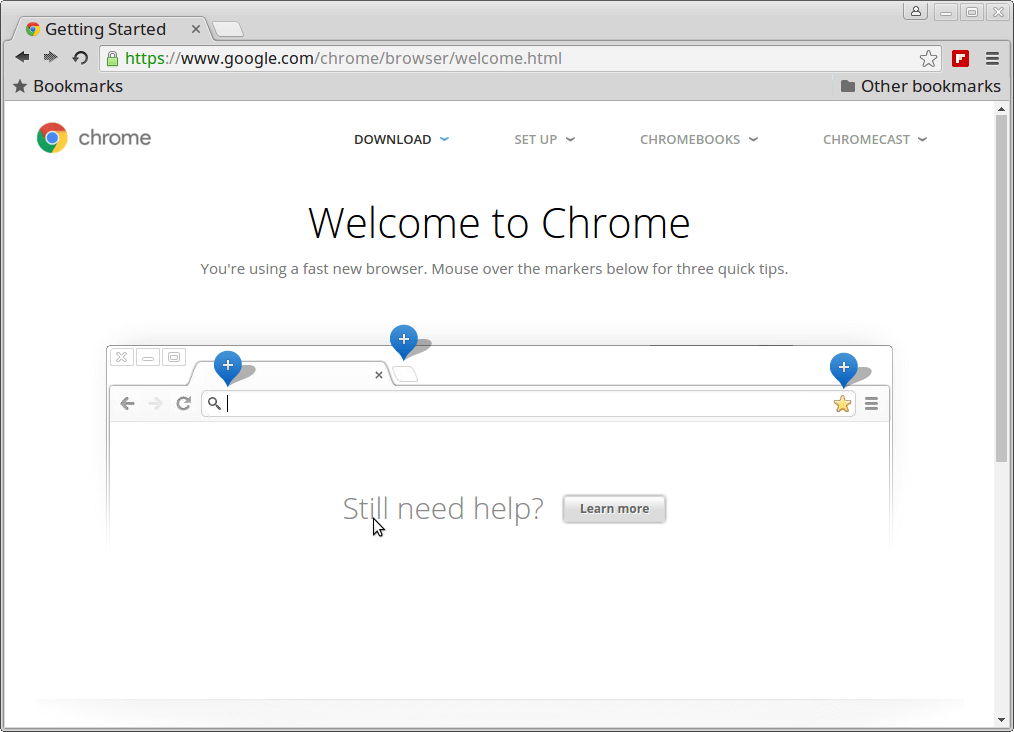
Welcome Google Chrome
Exploring www.tecmint.com with cool Chrome web browser.

Google Chrome Preview on CentOS 7
Download Two Free Google Chrome eBooks
Google Chrome Cheat Sheet: This free ebook contains dozens of other helpful keyboard shortcuts that will help you on how to use Google Chrome efficiently.
 10 Essential Chrome Tips: This free ebook provides certain useful but overlooked Chrome tips that have the potential to significantly enhance a Chrome user’s everyday experience.
 That’s it, enjoy browsing with Chrome and do let me know your browsing experience with Chrome via comments.
如果安装失败,那么在安装命令后加参数 --nogpgcheck ,即执行命令:sudo yum install google-chrome-stable --nogpgcheck
centos7安装google-chrome的更多相关文章
- CentOS7安装google chrome浏览器
1,下载离线包 rpm 2,rpm -ivh ** 报错: lsb_release被chrome依赖 libXss.so被chrome依赖 libappindicator3被chrome依赖 yum ...
- Ubuntu 14.04 LTS下安装Google Chrome浏览器
在Ubuntu 14.04下安装Google Chrome浏览器非常简单,只要到Chrome的网站下载Deb安装包并进行安装即可.当然你也可以使用APT软件包管理器来安装Google Chrome浏览 ...
- 在ubuntu下安装google chrome
由于手上有两台电脑,再加上我那个选择困难症加上纠结劲.所以果断把其中一台电脑只装linux系统,另一台电脑只装windows了.免得我老纠结!于是linux便选择了ubuntu. 由于浏览器一直用的是 ...
- Ubuntu安装google chrome过程
Ubuntu安装google chrome过程: # wget https://dl.google.com/linux/direct/google-chrome-stable_current_amd6 ...
- centos7安装google浏览器
1. 配置yum源 在目录 /etc/yum.repos.d/ 下新建文件 google-chrome.repo cd /ect/yum.repos.d/ vim google-chrome.repo ...
- ubuntu14.04安装google chrome
安装好Ubuntu14.04之后安装google chrome浏览器 1.按下 Ctrl + Alt + t 键盘组合键,启动终端 2.在终端中,输入以下命令 (将下载源加入到系统的源列表.命令的反馈 ...
- 【教程】linux下安装Google Chrome
google chrome google浏览器一直都是深受大家喜爱的一个浏览器,而且其跨平台性比较好,这对于书签同步来说是非常重要的.但是在linux下,默认的是火弧浏览器,而google ...
- Ubuntu 12.04安装Google Chrome(转)
下载google chrome deb包,下载地址:https://www.google.com/chrome/browser/desktop/index.html,google的网站被墙了,如果你下 ...
- Ubuntu 12.04 怎样安装 Google Chrome
方法一: http://www.360doc.com/content/14/0723/19/4338_396584130.shtml 方法2: How to Install Google Chrome ...
- ubuntu16.04 英文环境安装google chrome
1.下载google wget https://dl.google.com/linux/direct/google-chrome-stable_current_amd64.deb 2.安装缺少的依赖 ...
随机推荐
- Go-25-文件管理
FileInfo接口 package main import ( "fmt" "os" ) // FileInfo 接口文件的信息包括文件名.文件大小.修改权限 ...
- Mybatis3源码笔记(七)Plugin
1.Mybatis3的插件其实主要是用到了责任链和动态代理两种模式相结合而生成的.下面我们看一个例子,在执行所有update操作时,执行一个小小的测试输出. @Intercepts({@Signatu ...
- 0609-搭建ResNet网络
0609-搭建ResNet网络 目录 一.ResNet 网络概述 二.利用 torch 实现 ResNet34 网络 三.torchvision 中的 resnet34网络调用 四.第六章总结 pyt ...
- 概A第二章测试
以下判断题全是(√) 问题 1 得 10 分,满分 10 分 问题 2 得 10 分,满分 10 分 0-1分布相当于一个特殊的二项分布b(1,p) ...
- Mybatis的简单增删改查
刚开始学习Mybatis可以先看下官方文档,MyBatis是支持定制化SQL.存储过程以及高级映射的优秀的持久层框架.MyBatis避免了几乎所有的JDBC代码和手工设置参数以及抽取结果集.MyBat ...
- 【原创】Centos8安装ansible
1.安装步骤 # 安装epel扩展源 dnf install https://dl.fedoraproject.org/pub/epel/epel-release-latest-8.noarch.rp ...
- GNU C++的符号改编机制介绍(函数的名称粉碎格式解析)
转载:http://blog.csdn.net/roland_sun/article/details/43233565 众所周知,强大的C++相较于C增添了许多功能.这其中就包括类.命名空间和重载这些 ...
- Linux中的SSH服务
目录 SSH 使用scp在两台Linux间传数据: 基于SSH做远程访问,可以使用ftp服务的相关指令sftp root@192.168.10.10 Openssh公私钥验证: SSH SSH(Sec ...
- Linux-鸟菜-2-主机规划与磁盘分区
Linux-鸟菜-2-主机规划与磁盘分区 开机流程: 1. BIOS:開機主動執行的韌體,會認識第一個可開機的裝置: 2. MBR:第一個可開機裝置的第一個磁區內的主要開機記錄區塊,內含開機管理程式: ...
- XCTF-unfinish
unfinish 之前做过这个题,这是之前写的WP:链接