
ELK实战部署
环境 :
一台 centos 6.7
IP地址:
192.168.88.250
软件版本 :
ElasticSearch 2.1.0 Logstash 2.1.1 Kibana 4.3.1 JDK 1.8.0.77
JDK 我这里没有地址 就不连接了
下载好JDK 放在路径/usr/local/java
编辑配置文件 /etc/profile
export JAVA_HOME=/usr/local/java/jdk1.8.0_77
export PATH=$JAVA_HOME/bin:$PATH
加入这两句以后 然后 source /etc/profile
确认生效 java -version
[root@master ~]# java -version
java version "1.8.0_77"
Java(TM) SE Runtime Environment (build 1.8.0_77-b03)
Java HotSpot(TM) 64-Bit Server VM (build 25.77-b03, mixed mode)
1、 搭建 ElasticSearch
wget https://download.elasticsearch.org/elasticsearch/release/org/elasticsearch/distribution/tar/elasticsearch/2.1.0/elasticsearch-2.1.0.tar.gz
tar xf elasticsearch-2.1.0.tar.gz
cd /usr/local/elasticsearch-2.1.0/bin
./plugin  -install mobz/elasticsearch-head  # web集群管理插件  安装好了以后可以在plugin文件发现多了一个head
./elasticsearch  -Des.insecure.allow.root=true  #加这个参数才可以root启动

curl -X GET 192.168.88.250:9200   #curl 测试
{
 "name" : "Reeva Payge",
 "cluster_name" : "elasticsearch",
 "version" : {
   "number" : "2.1.0",
   "build_hash" : "72cd1f1a3eee09505e036106146dc1949dc5dc87",
   "build_timestamp" : "2015-11-18T22:40:03Z",
   "build_snapshot" : false,
   "lucene_version" : "5.3.1"
 },
 "tagline" : "You Know, for Search"
}
web地址  http://192.168.88.250:9200/_plugin/head/
2、搭建NGINX
wget   搭建nginx之前需要安装 pcre
tar xf nginx-1.7.8.tar.gz
cd /usr/local/nginx
vim /usr/local/nginx/conf/nginx.conf
#user  nobody;
worker_processes  1;

#error_log  logs/error.log  notice;
#error_log  logs/error.log  info;

#pid        logs/nginx.pid;

events {
  worker_connections  1024;
}

http {

upstream kibana4 {  #对Kibana做代理
       server 127.0.0.1:5601 fail_timeout=0;
}
   include       mime.types;
   default_type  application/octet-stream;

   #log_format  main  '$remote_addr - $remote_user [$time_local] "$request" '
   #                  '$status $body_bytes_sent "$http_referer" '
   #                  '"$http_user_agent" "$http_x_forwarded_for"';

    log_format json '{"@timestamp":"$time_iso8601",'   #配置NGINX的日志格式 json
                       '"host":"$server_addr",'
                       '"clientip":"$remote_addr",'
                       '"size":$body_bytes_sent,'
                       '"responsetime":$request_time,'
                       '"upstreamtime":"$upstream_response_time",'
                       '"upstreamhost":"$upstream_addr",'
                       '"http_host":"$host",'
                       '"url":"$uri",'
                       '"xff":"$http_x_forwarded_for",'
                       '"referer":"$http_referer",'
                       '"agent":"$http_user_agent",'
                       '"status":"$status"}';
    access_log /var/log/nginx/access.log_json json;   #配置日志路径 json格式
    error_log /var/log/nginx/error.log;

   sendfile        on;
   #tcp_nopush     on;

   #keepalive_timeout  0;
   keepalive_timeout  65;

   #gzip  on;

   server {
       listen       80;
       server_name  localhost;

       #charset koi8-r;

       #access_log  logs/host.access.log  main;

       location / {
           root   html;
           index  index.html index.htm;
       }

       #error_page  404              /404.html;

       # redirect server error pages to the static page /50x.html
       #
       error_page   500 502 503 504  /50x.html;
       location = /50x.html {
           root   html;
       }

       # proxy the PHP scripts to Apache listening on 127.0.0.1:80
       #
       #location ~ \.php$ {
       #    proxy_pass   http://127.0.0.1;
       #}

       # pass the PHP scripts to FastCGI server listening on 127.0.0.1:9000
       #
       #location ~ \.php$ {
       #    root           html;
       #    fastcgi_pass   127.0.0.1:9000;
       #    fastcgi_index  index.php;
       #    fastcgi_param  SCRIPT_FILENAME  /scripts$fastcgi_script_name;
       #    include        fastcgi_params;
       #}

       # deny access to .htaccess files, if Apache's document root
       # concurs with nginx's one
       #
       #location ~ /\.ht {
       #    deny  all;
       #}
   }

   # another virtual host using mix of IP-, name-, and port-based configuration
   #
   #server {
   #    listen       8000;
   #    listen       somename:8080;
   #    server_name  somename  alias  another.alias;

   #    location / {
   #        root   html;
   #        index  index.html index.htm;
   #    }
   #}

   # HTTPS server
   #
   #server {
   #    listen       443 ssl;
   #    server_name  localhost;

   #    ssl_certificate      cert.pem;
   #    ssl_certificate_key  cert.key;

   #    ssl_session_cache    shared:SSL:1m;
   #    ssl_session_timeout  5m;

   #    ssl_ciphers  HIGH:!aNULL:!MD5;
   #    ssl_prefer_server_ciphers  on;

   #    location / {
   #        root   html;
   #        index  index.html index.htm;
   #    }
   #}


server {
   listen               *:80;
   server_name          kibana_server;
   access_log           /var/log/nginx/kibana.srv-log-dev.log;
   error_log            /var/log/nginx/kibana.srv-log-dev.error.log;

   location / {
       root   /var/www/kibana;
       index  index.html  index.htm;
   }

   location ~ ^/kibana4/.* {
       proxy_pass           http://kibana4;
       rewrite             ^/kibana4/(.*)  /$1 break;       proxy_set_header     X-Forwarded-For $proxy_add_x_forwarded_for;       proxy_set_header     Host            $host;       auth_basic           "Restricted";       auth_basic_user_file /etc/nginx/conf.d/kibana.myhost.org.htpasswd;   }}}
3、搭建 Logstash
wget https://download.elastic.co/logstash/logstash/logstash-2.1.1.tar.gz
tar xf logstash-2.1.1.tar.gz
cd /usr/local/logstash-2.1.1/bin
vim stdin.conf #编写配置文件
input{
       file {
               path => "/var/log/nginx/access.log_json"  #NGINX日志地址 json格式
              codec => "json"  json编码
       }
}
filter {
       mutate {
               split => ["upstreamtime", ","]
       }
       mutate {
               convert => ["upstreamtime", "float"]
       }
}
output{

       elasticsearch {
               hosts => ["192.168.88.250:9200"]   #elasticsearch地址
               index => "logstash-%{type}-%{+YYYY.MM.dd}"   #索引
               document_type => "%{type}"
               workers => 1
               flush_size => 20000        #传输数量 默认500
               idle_flush_time => 10      #传输秒数  默认1秒
               template_overwrite => true
       }
}
./logstash -f stdin.conf &  #后台启动
启动成功以后 打开刚才搭建的web服务器  es就能看到数据
4、搭建Kibana
wget https://download.elastic.co/kibana/kibana/kibana-4.3.1-linux-x64.tar.gz
tar xf kibana-4.3.1-linux-x64.tar.gz
cd /usr/local/kibana-4.3.1-linux-x64/
vim ./config/kibana.yml

elasticsearch.url: "   只需要修改URL为ElasticSearch的IP地址
./kibana &  后台启动

启动成功以后 会监听 5601端口
全部搭建好了以后就可以用Kibana查看
地址 : 192.168.88.250:5601
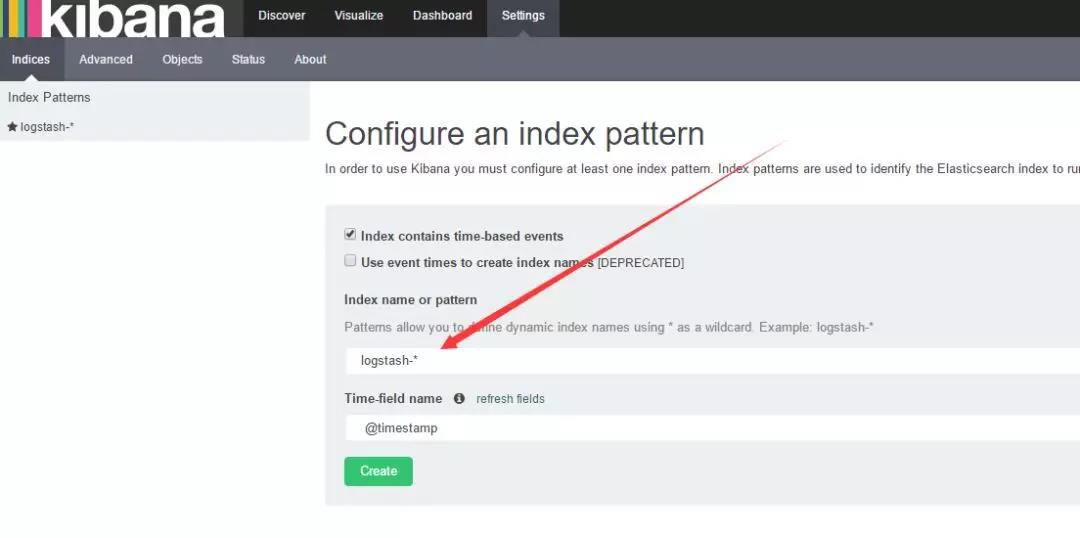
如果create灰色的 说明没有创建索引 打开你的nginx服务器 刷新几下 采集一下数据
然后 选择 左上角的 Discover
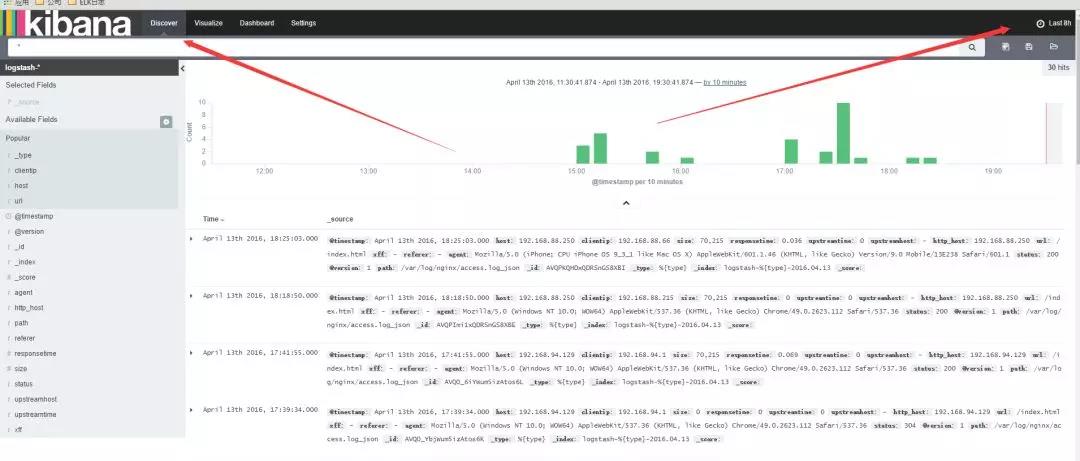
数据可能会出不来 那是因为 Kibana 是根据时间来匹配的 并且 因为 Logstash的采集时间使用的UTC 永远早8个小时
所以设置时间 要设置晚8个小时以后

设置好了时间以后 。数据基本就会看的到
这里可以设置你想看到的任意 数据 选择 add 就能看到的 不想看 可以remove
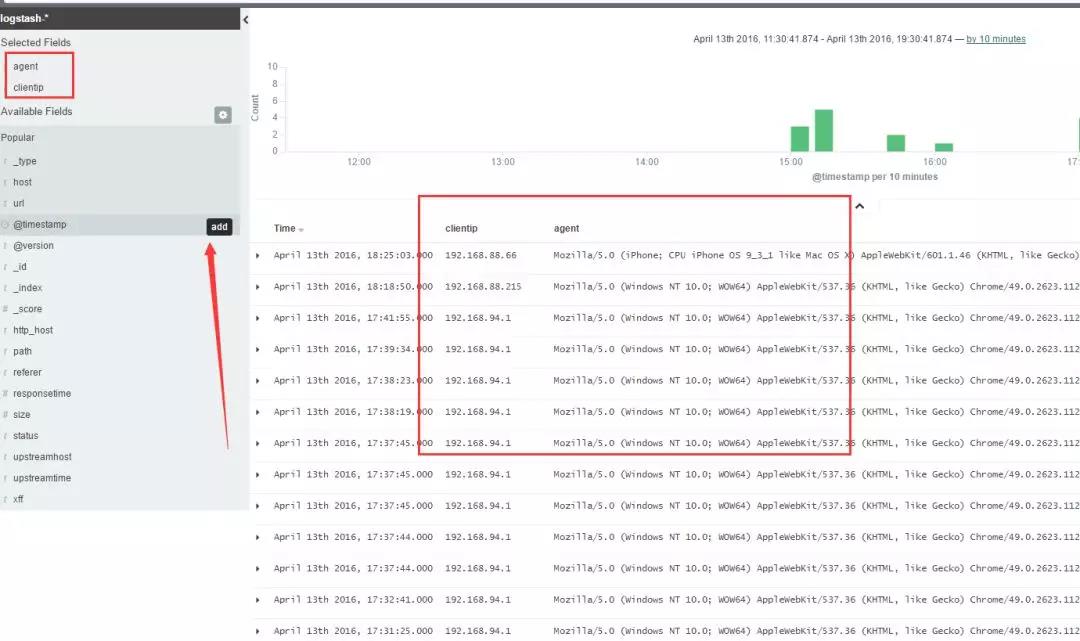
还有后面的 Visualize 也可以个性化定制图标

基本就到此结束了,另外如果 Kibana出不来数据 一般都是因为时间设置不正确。
ELK实战部署的更多相关文章
- ELK 安装部署实战 (最新6.4.0版本)
一.实战背景 根据公司平台的发展速度,对于ELK日志分析日益迫切.主要的需求有: 1.用户行为分析 2.运营活动点击率分析 作为上述2点需求,安装最新版本6.4.0是非常有必要的,大家可根据本人之前博 ...
- elk实战分析nginx日志文档
elk实战分析nginx日志文档 架构: kibana <--- es-cluster <--- logstash <--- filebeat 环境准备:192.168.3.1 no ...
- Docker环境 ELK 快速部署
Docker环境 ELK快速部署 环境 Centos 7.4 , Docker version 17.12 Docker至少3GB内存: #内核配置 echo ' vm.max_map_count = ...
- Zookeeper+Kafka完全分布式实战部署
Zookeeper+Kafka完全分布式实战部署 作者:尹正杰 版权声明:原创作品,谢绝转载!否则将追究法律责任. 其实我之前部署过kafak和zookeeper的完全分布式,集群是可以正常使用没错, ...
- Docker swarm 实战-部署wordpress
Docker swarm 实战-部署wordpress 创建一个overlay的网络 docker network create -d overlay demo 6imq8da3vcwvj2n499k ...
- mfs分布式系统从理论简介到实战部署
文章前面想说的话:这篇博客写出来真是有点累到了,本来昨天就基本就写好了,放在草稿里面,今天打开就没有了!!唉,就尼玛离我而去了,只有重写,然后中间虚拟机还“爆炸”重启又搞了一会,不容易呀!!希望各位博 ...
- 精讲 使用ELK堆栈部署Kafka
使用ELK堆栈部署Kafka 通过优锐课的java架构学习分享,在本文中,我将展示如何使用ELK Stack和Kafka部署建立弹性数据管道所需的所有组件. 在发生生产事件后,恰恰在你最需要它们时,日 ...
- K8S(13)监控实战-部署prometheus
k8s监控实战-部署prometheus 目录 k8s监控实战-部署prometheus 1 prometheus前言相关 1.1 Prometheus的特点 1.2 基本原理 1.2.1 原理说明 ...
- ELK快速部署及使用~
Elastic Stack 开发人员不能登陆线上服务器查看详细日志 各个系统都有日志,日志数据分散难以查找 日志数据量大,查询速度慢,或者数据不够实时 官网地址:https://www.elastic ...
随机推荐
- STM32—IIC通信(软件实现底层函数)
使用GPIO引脚模拟SDA和SCL总线实现软件模拟IIC通信,IIC的具体通信协议层和物理层链接:IIC #ifndef __BSP_IIC_H #define __BSP_IIC_H #includ ...
- Liunx搭建Rlogin服务
实验环境为 centos7 第一步:安装服务:yum -y install rsh rsh-server xinetd 第二步:启动服务: systemctl restart rsh.sockets ...
- NOIP 模拟 $31\; \rm Time$
题解 \(by\;zj\varphi\) 考虑如何才能最优. 每次一定把当前最小值移动到边界上,那么看它向左还是向右移更优. 用树状数组维护一下即可,复杂度 \(\mathcal O\rm (nlog ...
- Java线程池中submit()和execute()方法有什么区别
两个方法都可以向线程池提交任务,execute()方法的返回类型是void,它定义在Executor接口中,而submit()方法返回有计算结构的Future对象,它定义在ExecutorServic ...
- git flow版本
feature 分支:开发者进行功能开发的分支. develop 分支:对开发的功能进行集成的分支. release 分支:负责版本发布的分支. hotfix 分支:对线上缺陷进行修复工作的分支,热修 ...
- Spring详解------概述
1.什么是 Spring ? Spring是一个开源框架,Spring是于2003 年兴起的一个轻量级的Java 开发框架,由Rod Johnson 在其著作Expert One-On-One J2E ...
- vue去掉一些烦人的校验规则
例如:括号前没有加空格报错,很难受 如何处理呢,故意犯错,然后打开页面出现错误信息,如下图复制错误 space-before-function-paren 找到项目中的.eslintrc.js 添加一 ...
- MediaWiki定制化改动
Linux下面安装MediaWiki环境的方法,可以参照我上一篇文章linux使用xampp安装MediaWiki环境 重置用户密码 使用维护脚本 可以使用maintenance/changePass ...
- python操作图片
时间:2018-11-30 记录:byzqy 标题:python实现图片操作 地址:https://blog.csdn.net/baidu_34045013/article/details/79187 ...
- cs_play
# -*-coding:utf-8-*-__author__ = "logan.xu"###构造函数#class Role:# n = 123# # 类变量 比如 n = 123# ...