
改善深层神经网络-week1编程题(Initializaion)
Initialization
如何选择初始化方式,不同的初始化会导致不同的结果
好的初始化方式:
加速梯度下降的收敛(Speed up the convergence of gradient descent)
增加梯度下降 收敛成 一个低错误训练(和 普遍化)的几率(Increase the odds of gradient descent converging to a lower training (and generalization) error)
To get started, run the following cell to load the packages and the planar dataset you will try to classify.
import numpy as np

import matplotlib.pyplot as plt

import sklearn

import sklearn.datasets

from init_utils import sigmoid, relu, compute_loss, forward_propagation, backward_propagation

from init_utils import update_parameters, predict, load_dataset, plot_decision_boundary, predict_dec

%matplotlib inline

plt.rcParams['figure.figsize'] = (7.0, 4.0) # set default size of plots

plt.rcParams['image.interpolation'] = 'nearest'

plt.rcParams['image.cmap'] = 'gray'

# load image dataset: blue/red dots in circles

train_X, train_Y, test_X, test_Y = load_dataset()
1 - Neural Network model
你将使用一个3-layer的神经网络。有一些初始化方法你需要实现:
Zeros initialization -- setting
initialization = "zeros"in the input argument.Random initialization --
setting initialization = "random"in the input argument. This initializes the weights to large random values.(这个初始化权重为较大的随机值)He initialization --
setting initialization = "he"in the input argument. This initializes the weights to random values scaled according to a paper by He et al., 2015.
Instructions: Please quickly read over the code below, and run it. In the next part you will implement the three initialization methods that this model() calls.
def model(X, Y, learning_rate = 0.01, num_iterations = 15000, print_cost = True, initialization = "he"):

    """

    Implements a three-layer neural network: LINEAR->RELU->LINEAR->RELU->LINEAR->SIGMOID.

    Arguments:

    X -- input data, of shape (2, number of examples)

    Y -- true "label" vector (containing 0 for red dots; 1 for blue dots), of shape (1, number of examples)

    learning_rate -- learning rate for gradient descent

    num_iterations -- number of iterations to run gradient descent

    print_cost -- if True, print the cost every 1000 iterations

    initialization -- flag to choose which initialization to use ("zeros","random" or "he")

    Returns:

    parameters -- parameters learnt by the model

    """

    grads = {}

    costs = [] # to keep track of the loss

    m = X.shape[1] # number of examples

    layers_dims = [X.shape[0], 10, 5, 1]

    # Initialize parameters dictionary.

    if initialization == "zeros":

        parameters = initialize_parameters_zeros(layers_dims)

    elif initialization == "random":

        parameters = initialize_parameters_random(layers_dims)

    elif initialization == "he":

        parameters = initialize_parameters_he(layers_dims)

    # Loop (gradient descent)

    for i in range(0, num_iterations):

        # Forward propagation: LINEAR -> RELU -> LINEAR -> RELU -> LINEAR -> SIGMOID.

        a3, cache = forward_propagation(X, parameters)

        # Loss

        cost = compute_loss(a3, Y)

        # Backward propagation.

        grads = backward_propagation(X, Y, cache)

        # Update parameters.

        parameters = update_parameters(parameters, grads, learning_rate)

        # Print the loss every 1000 iterations

        if print_cost and i % 1000 == 0:

            print("Cost after iteration {}: {}".format(i, cost))

            costs.append(cost)

    # plot the loss

    plt.plot(costs)

    plt.ylabel('cost')

    plt.xlabel('iterations (per hundreds)')

    plt.title("Learning rate =" + str(learning_rate))

    plt.show()

    return parameters
2 - Zero initialization
There are two types of parameters to initialize in a neural network:
- the weight matrices \((W^{[1]}, W^{[2]}, W^{[3]}, ..., W^{[L-1]}, W^{[L]})\)
- the bias vectors \((b^{[1]}, b^{[2]}, b^{[3]}, ..., b^{[L-1]}, b^{[L]})\)
Exercise: Implement the following function to initialize all parameters to zeros. (这个不好,会"打破对称")You'll see later that this does not work well since it fails to "break symmetry", but lets try it anyway and see what happens. Use np.zeros((..,..)) with the correct shapes.
# GRADED FUNCTION: initialize_parameters_zeros

def initialize_parameters_zeros(layers_dims):

    """

    Arguments:

    layer_dims -- python array (list) containing the size of each layer.

    Returns:

    parameters -- python dictionary containing your parameters "W1", "b1", ..., "WL", "bL":

                    W1 -- weight matrix of shape (layers_dims[1], layers_dims[0])

                    b1 -- bias vector of shape (layers_dims[1], 1)

                    ...

                    WL -- weight matrix of shape (layers_dims[L], layers_dims[L-1])

                    bL -- bias vector of shape (layers_dims[L], 1)

    """

    parameters = {}

    L = len(layers_dims)            # number of layers in the network

    for l in range(1, L):

        ### START CODE HERE ### (≈ 2 lines of code)

        parameters['W' + str(l)] = np.zeros((layers_dims[l], layers_dims[l-1]))

        parameters['b' + str(l)] = np.zeros((layers_dims[l], 1))

        ### END CODE HERE ###

    return parameters
测试:
parameters = initialize_parameters_zeros([3,2,1])

print("W1 = " + str(parameters["W1"]))

print("b1 = " + str(parameters["b1"]))

print("W2 = " + str(parameters["W2"]))

print("b2 = " + str(parameters["b2"]))
输出:
W1 = [[0. 0. 0.]

 [0. 0. 0.]]

b1 = [[0.]

 [0.]]

W2 = [[0. 0.]]

b2 = [[0.]]
Expected Output:
| **W1** |
[[ 0. 0. 0.] [ 0. 0. 0.]] |
| **b1** |
[[ 0.] [ 0.]] |
| **W2** | [[ 0. 0.]] |
| **b2** | [[ 0.]] |
parameters = model(train_X, train_Y, initialization = "zeros")

print ("On the train set:")

predictions_train = predict(train_X, train_Y, parameters)

print ("On the test set:")

predictions_test = predict(test_X, test_Y, parameters)
输出:
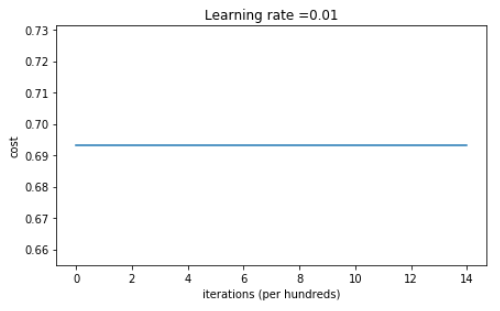
Cost after iteration 0: 0.6931471805599453
Cost after iteration 1000: 0.6931471805599453
Cost after iteration 2000: 0.6931471805599453
Cost after iteration 3000: 0.6931471805599453
Cost after iteration 4000: 0.6931471805599453
Cost after iteration 5000: 0.6931471805599453
Cost after iteration 6000: 0.6931471805599453
Cost after iteration 7000: 0.6931471805599453
Cost after iteration 8000: 0.6931471805599453
Cost after iteration 9000: 0.6931471805599453
Cost after iteration 10000: 0.6931471805599455
Cost after iteration 11000: 0.6931471805599453
Cost after iteration 12000: 0.6931471805599453
Cost after iteration 13000: 0.6931471805599453
Cost after iteration 14000: 0.6931471805599453
On the train set:
Accuracy: 0.5
On the test set:
Accuracy: 0.5
表现的非常糟糕,代价没有正真的下降,我们来看一下预测的细节 和 决策边界
print ("predictions_train = " + str(predictions_train))

print ("predictions_test = " + str(predictions_test))
predictions_train = [[0 0 0 0 0 0 0 0 0 0 0 0 0 0 0 0 0 0 0 0 0 0 0 0 0 0 0 0 0 0 0 0 0 0 0 0
0 0 0 0 0 0 0 0 0 0 0 0 0 0 0 0 0 0 0 0 0 0 0 0 0 0 0 0 0 0 0 0 0 0 0 0
0 0 0 0 0 0 0 0 0 0 0 0 0 0 0 0 0 0 0 0 0 0 0 0 0 0 0 0 0 0 0 0 0 0 0 0
0 0 0 0 0 0 0 0 0 0 0 0 0 0 0 0 0 0 0 0 0 0 0 0 0 0 0 0 0 0 0 0 0 0 0 0
0 0 0 0 0 0 0 0 0 0 0 0 0 0 0 0 0 0 0 0 0 0 0 0 0 0 0 0 0 0 0 0 0 0 0 0
0 0 0 0 0 0 0 0 0 0 0 0 0 0 0 0 0 0 0 0 0 0 0 0 0 0 0 0 0 0 0 0 0 0 0 0
0 0 0 0 0 0 0 0 0 0 0 0 0 0 0 0 0 0 0 0 0 0 0 0 0 0 0 0 0 0 0 0 0 0 0 0
0 0 0 0 0 0 0 0 0 0 0 0 0 0 0 0 0 0 0 0 0 0 0 0 0 0 0 0 0 0 0 0 0 0 0 0
0 0 0 0 0 0 0 0 0 0 0 0]]
predictions_test = [[0 0 0 0 0 0 0 0 0 0 0 0 0 0 0 0 0 0 0 0 0 0 0 0 0 0 0 0 0 0 0 0 0 0 0 0
0 0 0 0 0 0 0 0 0 0 0 0 0 0 0 0 0 0 0 0 0 0 0 0 0 0 0 0 0 0 0 0 0 0 0 0
0 0 0 0 0 0 0 0 0 0 0 0 0 0 0 0 0 0 0 0 0 0 0 0 0 0 0 0]]
plt.title("Model with Zeros initialization")

axes = plt.gca()

axes.set_xlim([-1.5,1.5])

axes.set_ylim([-1.5,1.5])

plot_decision_boundary(lambda x: predict_dec(parameters, x.T), train_X, np.squeeze(train_Y))
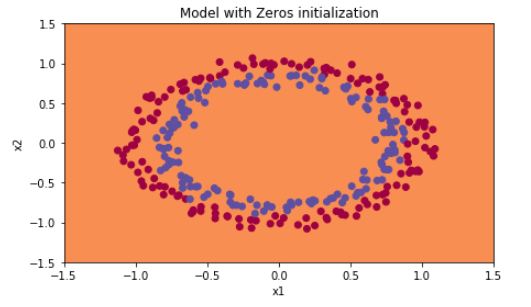
初始化0,没有能打破对称,相当于每一层神经元做着同样一件事,和 \(n^{[l]}=1\)一样
What you should remember:
- The weights \(W^{[l]}\) should be initialized randomly to break symmetry.
- It is however okay to initialize the biases \(b^{[l]}\) to zeros. Symmetry is still broken so long as \(W^{[l]}\) is initialized randomly.
3 - Random initialization
To break symmetry, lets intialize the weights randomly. Following random initialization, each neuron can then proceed to learn a different function of its inputs. In this exercise, you will see what happens if the weights are intialized randomly, but to very large values.
Exercise: Implement the following function to initialize your weights to large random values (scaled by *10) and your biases to zeros. Use np.random.randn(..,..) * 10 for weights and np.zeros((.., ..)) for biases. We are using a fixed np.random.seed(..) to make sure your "random" weights match ours, so don't worry if running several times your code gives you always the same initial values for the parameters.
# GRADED FUNCTION: initialize_parameters_random

def initialize_parameters_random(layers_dims):

    """

    Arguments:

    layer_dims -- python array (list) containing the size of each layer.

    Returns:

    parameters -- python dictionary containing your parameters "W1", "b1", ..., "WL", "bL":

                    W1 -- weight matrix of shape (layers_dims[1], layers_dims[0])

                    b1 -- bias vector of shape (layers_dims[1], 1)

                    ...

                    WL -- weight matrix of shape (layers_dims[L], layers_dims[L-1])

                    bL -- bias vector of shape (layers_dims[L], 1)

    """

    np.random.seed(3)               # This seed makes sure your "random" numbers will be the as ours

    parameters = {}

    L = len(layers_dims)            # integer representing the number of layers

    for l in range(1, L):

        ### START CODE HERE ### (≈ 2 lines of code)

        parameters['W' + str(l)] = np.random.randn(layers_dims[l], layers_dims[l-1]) * 10

        parameters['b' + str(l)] = np.zeros((layers_dims[l], 1))

        ### END CODE HERE ###

    return parameters
测试:
parameters = initialize_parameters_random([3, 2, 1])

print("W1 = " + str(parameters["W1"]))

print("b1 = " + str(parameters["b1"]))

print("W2 = " + str(parameters["W2"]))

print("b2 = " + str(parameters["b2"]))
W1 = [[ 17.88628473 4.36509851 0.96497468]
[-18.63492703 -2.77388203 -3.54758979]]
b1 = [[0.]
[0.]]
W2 = [[-0.82741481 -6.27000677]]
b2 = [[0.]]
Run the following code to train your model on 15,000 iterations using random initialization.
parameters = model(train_X, train_Y, initialization = "random")

print ("On the train set:")

predictions_train = predict(train_X, train_Y, parameters)

print ("On the test set:")

predictions_test = predict(test_X, test_Y, parameters)
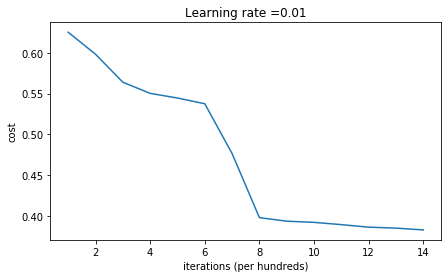
Cost after iteration 0: inf
Cost after iteration 1000: 0.6250982793959966
Cost after iteration 2000: 0.5981216596703697
Cost after iteration 3000: 0.5638417572298645
Cost after iteration 4000: 0.5501703049199763
Cost after iteration 5000: 0.5444632909664456
Cost after iteration 6000: 0.5374513807000807
Cost after iteration 7000: 0.4764042074074983
Cost after iteration 8000: 0.39781492295092263
Cost after iteration 9000: 0.3934764028765484
Cost after iteration 10000: 0.3920295461882659
Cost after iteration 11000: 0.38924598135108
Cost after iteration 12000: 0.3861547485712325
Cost after iteration 13000: 0.384984728909703
Cost after iteration 14000: 0.3827828308349524
On the train set:
Accuracy: 0.83
On the test set:
Accuracy: 0.86
If you see "inf" as the cost after the iteration 0, this is because of numerical roundoff; a more numerically sophisticated implementation would fix this. But this isn't worth worrying about for our purposes.
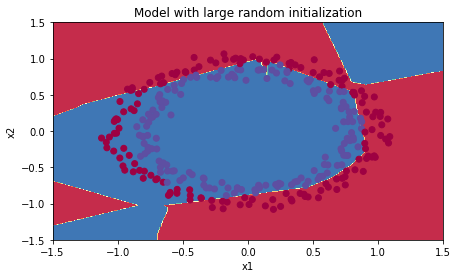
Anyway, it looks like you have broken symmetry, and this gives better results. than before. The model is no longer outputting all 0s.
print (predictions_train)

print (predictions_test)
[[1 0 1 1 0 0 1 1 1 1 1 0 1 0 0 1 0 1 1 0 0 0 1 0 1 1 1 1 1 1 0 1 1 0 0 1 1
1 1 1 1 1 1 0 1 1 1 1 0 1 0 1 1 1 1 0 0 1 1 1 1 0 1 1 0 1 0 1 1 1 1 0 0 0
0 0 1 0 1 0 1 1 1 0 0 1 1 1 1 1 1 0 0 1 1 1 0 1 1 0 1 0 1 1 0 1 1 0 1 0 1
1 0 0 1 0 0 1 1 0 1 1 1 0 1 0 0 1 0 1 1 1 1 1 1 1 0 1 1 0 0 1 1 0 0 0 1 0
1 0 1 0 1 1 1 0 0 1 1 1 1 0 1 1 0 1 0 1 1 0 1 0 1 1 1 1 0 1 1 1 1 0 1 0 1
0 1 1 1 1 0 1 1 0 1 1 0 1 1 0 1 0 1 1 1 0 1 1 1 0 1 0 1 0 0 1 0 1 1 0 1 1
0 1 1 0 1 1 1 0 1 1 1 1 0 1 0 0 1 1 0 1 1 1 0 0 0 1 1 0 1 1 1 1 0 1 1 0 1
1 1 0 0 1 0 0 0 1 0 0 0 1 1 1 1 0 0 0 0 1 1 1 1 0 0 1 1 1 1 1 1 1 0 0 0 1
1 1 1 0]]
[[1 1 1 1 0 1 0 1 1 0 1 1 1 0 0 0 0 1 0 1 0 0 1 0 1 0 1 1 1 1 1 0 0 0 0 1 0
1 1 0 0 1 1 1 1 1 0 1 1 1 0 1 0 1 1 0 1 0 1 0 1 1 1 1 1 1 1 1 1 0 1 0 1 1
1 1 1 0 1 0 0 1 0 0 0 1 1 0 1 1 0 0 0 1 1 0 1 1 0 0]]
plt.title("Model with large random initialization")

axes = plt.gca()

axes.set_xlim([-1.5,1.5])

axes.set_ylim([-1.5,1.5])

plot_decision_boundary(lambda x: predict_dec(parameters, x.T), train_X, np.squeeze(train_Y))
Observations:
- The cost starts very high. This is because with large random-valued weights, the last activation (sigmoid) outputs results that are very close to 0 or 1 for some examples, and when it gets that example wrong it incurs a very high loss for that example. Indeed, when \(\log(a^{[3]}) = \log(0)\), the loss goes to infinity.
- Poor initialization can lead to vanishing/exploding gradients(梯度消失/梯度爆炸), which also slows down the optimization algorithm.(减缓了优化算法)
- If you train this network longer you will see better results, but initializing with overly large random numbers slows down the optimization.(用过大的随机数初始化 减缓了 优化)
In summary:
- Initializing weights to very large random values does not work well. (用过大的随机数初始化工作的不是很好)
- Hopefully intializing with small random values does better. The important question is: how small should be these random values be? Lets find out in the next part! (找到,比较小的数 随机初始化)
4 - He initialization(可以解决梯度爆炸/梯度消失)
Finally, try "He Initialization"; this is named for the first author of He et al., 2015. (If you have heard of "Xavier initialization", this is similar except Xavier initialization uses a scaling factor for the weights \(W^{[l]}\) of sqrt(1./layers_dims[l-1]) where He initialization would use sqrt(2./layers_dims[l-1]).)
Exercise: Implement the following function to initialize your parameters with He initialization.
Hint: This function is similar to the previous initialize_parameters_random(...). The only difference is that instead of multiplying np.random.randn(..,..) by 10, you will multiply it by \(\sqrt{\frac{2}{\text{dimension of the previous layer}}}\), which is what He initialization recommends for layers with a ReLU activation. (每个W不是*10, 而是 * \(\sqrt{\frac{2.}{layerdims[l-1]}}\)
# GRADED FUNCTION: initialize_parameters_he

def initialize_parameters_he(layers_dims):

    """

    Arguments:

    layer_dims -- python array (list) containing the size of each layer.

    Returns:

    parameters -- python dictionary containing your parameters "W1", "b1", ..., "WL", "bL":

                    W1 -- weight matrix of shape (layers_dims[1], layers_dims[0])

                    b1 -- bias vector of shape (layers_dims[1], 1)

                    ...

                    WL -- weight matrix of shape (layers_dims[L], layers_dims[L-1])

                    bL -- bias vector of shape (layers_dims[L], 1)

    """

    np.random.seed(3)

    parameters = {}

    L = len(layers_dims) - 1 # integer representing the number of layers

    for l in range(1, L + 1):

        ### START CODE HERE ### (≈ 2 lines of code)

        parameters['W' + str(l)] = np.random.randn(layers_dims[l], layers_dims[l-1]) * (np.sqrt(2. / layers_dims[l-1]))

        parameters['b' + str(l)] = np.zeros((layers_dims[l], 1))

        ### END CODE HERE ###

    return parameters
测试:
parameters = initialize_parameters_he([2, 4, 1])

print("W1 = " + str(parameters["W1"]))

print("b1 = " + str(parameters["b1"]))

print("W2 = " + str(parameters["W2"]))

print("b2 = " + str(parameters["b2"]))
W1 = [[ 1.78862847 0.43650985]
[ 0.09649747 -1.8634927 ]
[-0.2773882 -0.35475898]
[-0.08274148 -0.62700068]]
b1 = [[0.]
[0.]
[0.]
[0.]]
W2 = [[-0.03098412 -0.33744411 -0.92904268 0.62552248]]
b2 = [[0.]]
Run the following code to train your model on 15,000 iterations using He initialization.
parameters = model(train_X, train_Y, initialization = "he")

print ("On the train set:")

predictions_train = predict(train_X, train_Y, parameters)

print ("On the test set:")

predictions_test = predict(test_X, test_Y, parameters)
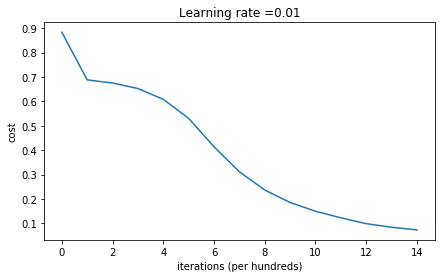
On the train set:
Accuracy: 0.9933333333333333
On the test set:
Accuracy: 0.96
plt.title("Model with He initialization")

axes = plt.gca()

axes.set_xlim([-1.5,1.5])

axes.set_ylim([-1.5,1.5])

plot_decision_boundary(lambda x: predict_dec(parameters, x.T), train_X, np.squeeze(train_Y))
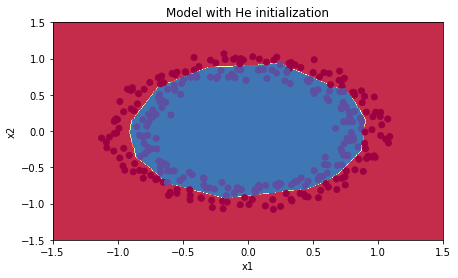
Observations:
- The model with He initialization separates the blue and the red dots very well in a small number of iterations.(工作的很好)
5 - Conclusions
You have seen three different types of initializations. For the same number of iterations and same hyperparameters the comparison is:
| **Model** | **Train accuracy** | **Problem/Comment** |
| 3-layer NN with zeros initialization | 50% | fails to break symmetry |
| 3-layer NN with large random initialization | 83% | too large weights |
| 3-layer NN with He initialization | 99% | recommended method |
What you should remember from this notebook:
- 不同初始化导致不同的结果
- Random initialization 能够打破对称,可以确保不同的隐藏层直接学习不同的东西
- 不要用太大的数,初始化
- He initialization works well for networks with ReLU activations.
改善深层神经网络-week1编程题(Initializaion)的更多相关文章
- 改善深层神经网络-week1编程题(GradientChecking)
1. Gradient Checking 你被要求搭建一个Deep Learning model来检测欺诈,每当有人付款,你想知道是否该支付可能是欺诈,例如该用户的账户可能已经被黑客掉. 但是,反向传 ...
- 改善深层神经网络-week1编程题(Regularization)
Regularization Deep Learning models have so much flexibility and capacity that overfitting can be a ...
- 改善深层神经网络-week2编程题(Optimization Methods)
1. Optimization Methods Gradient descent goes "downhill" on a cost function \(J\). Think o ...
- 改善深层神经网络-week3编程题(Tensorflow 实现手势识别 )
TensorFlow Tutorial Initialize variables Start your own session Train algorithms Implement a Neural ...
- deeplearning.ai 改善深层神经网络 week1 深度学习的实用层面 听课笔记
1. 应用机器学习是高度依赖迭代尝试的,不要指望一蹴而就,必须不断调参数看结果,根据结果再继续调参数. 2. 数据集分成训练集(training set).验证集(validation/develop ...
- deeplearning.ai 改善深层神经网络 week1 深度学习的实用层面
1. 应用机器学习是高度依赖迭代尝试的,不要指望一蹴而就,必须不断调参数看结果,根据结果再继续调参数. 2. 数据集分成训练集(training set).验证集(validation/develop ...
- 改善深层神经网络_优化算法_mini-batch梯度下降、指数加权平均、动量梯度下降、RMSprop、Adam优化、学习率衰减
1.mini-batch梯度下降 在前面学习向量化时,知道了可以将训练样本横向堆叠,形成一个输入矩阵和对应的输出矩阵: 当数据量不是太大时,这样做当然会充分利用向量化的优点,一次训练中就可以将所有训练 ...
- [DeeplearningAI笔记]改善深层神经网络_深度学习的实用层面1.10_1.12/梯度消失/梯度爆炸/权重初始化
觉得有用的话,欢迎一起讨论相互学习~Follow Me 1.10 梯度消失和梯度爆炸 当训练神经网络,尤其是深度神经网络时,经常会出现的问题是梯度消失或者梯度爆炸,也就是说当你训练深度网络时,导数或坡 ...
- deeplearning.ai 改善深层神经网络 week3 超参数调试、Batch正则化和程序框架 听课笔记
这一周的主体是调参. 1. 超参数:No. 1最重要,No. 2其次,No. 3其次次. No. 1学习率α:最重要的参数.在log取值空间随机采样.例如取值范围是[0.001, 1],r = -4* ...
随机推荐
- Linux内核编译配置脚本
环境 宿主机平台:Ubuntu 16.04.6 目标机:iMX6ULL Linux内核编译配置脚本 在linux开发过程中熟练使用脚本可以大大简化命令行操作,同时对于需要经常重复操作的指令也是一种备忘 ...
- Mysql常用sql语句(7)- order by 对查询结果进行排序
测试必备的Mysql常用sql语句系列 https://www.cnblogs.com/poloyy/category/1683347.html 前言 通过select出来的结果集是按表中的顺序来排序 ...
- Vue组件传值(一)之 父子之间如何传值
Vue中组件之间是如何实现通信的? 1.父传子: 父传子父组件通过属性进行传值,子组件通过 props 进行接受: 1 父组件中: 2 3 <template> 4 <div id= ...
- [转]SpringBoot系列——花里胡哨的banner.txt
Creating ASCII Text Banners from the Linux Command Line In Ubuntu, Debian, Linux Mint etc. $ sudo ap ...
- Vue组件封装之无限滚动列表
无限滚动列表:分为单步滚动和循环滚动两种方式 <template> <div class="box" :style="{width:widthX,hei ...
- Java基础系列(2)- Java开发环境搭建
JDK下载与安装 安装JDK 1.百度搜素JDK8,找到下载地址 2.下载电脑对应的版本 3.双击安装JDK 4.记住安装的路径,可以自定义,默认路径如图 卸载JDK 删除Java安装目录 删除环境变 ...
- Linux系列(38) - 源码包安装(2)
安装前准备 安装C语言编译器"gcc" yum -y install gcc --c 源码包语言编译器 下载源码包 安装注意事项 源代码保存位置:/usr/local/src/ 软 ...
- 博客主题-Next风格
适配方法 下载压缩包,按照文件名将内容复制粘贴到对应框中即可. 注意事项 请将主题设置为custom 禁用默认css 下载连接 Next.rar version:2020-07-10 next.rar ...
- Windows环境下实现WireShark抓取HTTPS
https 加密传输,Wireshark 没有设置的情况下是没有办法抓到包的 https 的数据包. 设置系统环境变量(SSLKEYLOGFILE) WireShark 设置 SSL 选项 参考文章: ...
- EasyExcel无法用转换器或者注解将java字段写入为excel的数值格式
需求: 在用easyExcel导出报表时,碰到需要将数据转换为数值or货币格式的需求 过程: 1.首先采取转换器的形式 @Override public CellData convertToExcel ...