
springmvc笔记(来自慕课网)
1.准备工作:springmvc相关的jar包.
2.这里我们先用eclipse来操作.
首先看一个接口编程,后面的所有知识点都是通过这个接口编程引出的.

OneInterface.java
 package gys;

 public interface OneInterface {

     String hello(String world);

 }
OneInterfaceImpl.java
 package gys;

 public class OneInterfaceImpl implements OneInterface{

     @Override

     public String hello(String world) {

         return "从接口返回的是:"+world;

     }

 }
Run.java
package gys;

public class Run{

    public static void main(String[] args) {

        OneInterface oif=new OneInterfaceImpl();

        System.out.println(oif.hello("思思博士"));

    }

}
这个地方可以通过接口的形式跑起来了.
下面看看使用springmc方式如何来跑起来这个项目
因为我们不是web项目,没有通过配置web.xml来配置,读取springmvc配置文件.
只能手写读取配置文件.
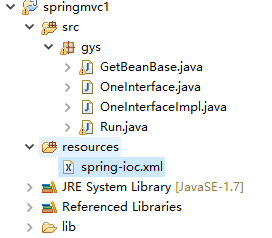
getBeanBase.java
 package gys;

 import org.springframework.context.support.ClassPathXmlApplicationContext;

 //创建springmvc容器,获取配置文件中的bean.

 public class GetBeanBase {

     private ClassPathXmlApplicationContext context;

     private String springXmlpath;

     public GetBeanBase(){};

     public GetBeanBase(String springXmlPath){

         this.springXmlpath=springXmlPath;

     }

     public void start(){

         if(springXmlpath.equals("")||springXmlpath==null||springXmlpath.isEmpty()){

             springXmlpath="classpath*:spring-*.xml";

         }

         try {

             //创建spring容器

             context=new ClassPathXmlApplicationContext(springXmlpath.split("[,\\s]+"));

             context.start();

         } catch (Exception e) {

             e.printStackTrace();

         }

     }

     public void end(){

         context.destroy();

     }

     @SuppressWarnings("unchecked")

     protected <T extends Object> T getBen(String beanId){

         return (T) context.getBean(beanId);

     }

     protected <T extends Object> T GetBeanBase(Class<T> clazz){

         return context.getBean(clazz);

     }

 }
spring-ioc.xml
 <?xml version="1.0" encoding="UTF-8"?>

 <beans xmlns="http://www.springframework.org/schema/beans" xmlns:xsi="http://www.w3.org/2001/XMLSchema-instance" xmlns:p="http://www.springframework.org/schema/p" xmlns:context="http://www.springframework.org/schema/context"

     xmlns:mvc="http://www.springframework.org/schema/mvc" xmlns:tx="http://www.springframework.org/schema/tx" xmlns:aop="http://www.springframework.org/schema/aop"

     xsi:schemaLocation="

         http://www.springframework.org/schema/beans

         http://www.springframework.org/schema/beans/spring-beans.xsd

         http://www.springframework.org/schema/context

         http://www.springframework.org/schema/context/spring-context.xsd

         http://www.springframework.org/schema/mvc

         http://www.springframework.org/schema/mvc/spring-mvc-3.2.xsd

         http://www.springframework.org/schema/tx

         http://www.springframework.org/schema/tx/spring-tx.xsd

         http://www.springframework.org/schema/aop

         http://www.springframework.org/schema/aop/spring-aop.xsd">

         <bean id="oneInterface" class="gys.OneInterfaceImpl"></bean>

 </beans>
Run.java
 package gys;

 public class Run extends GetBeanBase{

     public Run(){

         super("classpath*:spring-ioc.xml");

         start();

     }

     public void testHello(){

         OneInterface oneInterface=super.getBen("oneInterface");

         System.out.println(oneInterface.hello("传入的参数"));

         end();

     }

     public static void main(String[] args) {

         Run run=new Run();

         run.testHello();

     }

 }
通过这个方式也是可以做到同样的输出.这里的GetBeanBase在后面很多地方使用.
spring注入:在启动Spring容器加载bean配置的时候,完成对变量的赋值行为
常用的两种注入方式:
设置注入
构造注入
1.设置注入:
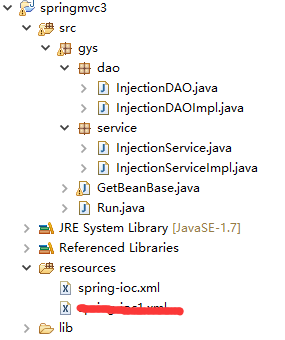
InjectionDao.java
package gys.dao;

public interface InjectionDAO {

    void save(String info);

}
InjectionDAOImpl.java
package gys.dao;

public class InjectionDAOImpl implements InjectionDAO{

    @Override

    public void save(String info) {

        System.out.println("保存数据:"+info);

    }

}
InjectionService.java
package gys.service;

public interface InjectionService {

    public void save(String info);

}
InjectionServiceImpl.java
 package gys.service;

 import gys.dao.InjectionDAO;

 public class InjectionServiceImpl implements InjectionService{

     private InjectionDAO injectionDAO;

     //设置注入,这里的set方法spring会自动调用,无需手动调用

     public void setInjectionDAO(InjectionDAO injectionDAO) {

         this.injectionDAO = injectionDAO;

     }

     @Override

     public void save(String info) {

         System.out.println("service接受参数:"+info);

         info=info+":"+this.hashCode();

         injectionDAO.save(info);

     }

 }
spring-ioc.xml
 <?xml version="1.0" encoding="UTF-8"?>

 <beans xmlns="http://www.springframework.org/schema/beans" xmlns:xsi="http://www.w3.org/2001/XMLSchema-instance" xmlns:p="http://www.springframework.org/schema/p" xmlns:context="http://www.springframework.org/schema/context"

     xmlns:mvc="http://www.springframework.org/schema/mvc" xmlns:tx="http://www.springframework.org/schema/tx" xmlns:aop="http://www.springframework.org/schema/aop"

     xsi:schemaLocation="

         http://www.springframework.org/schema/beans

         http://www.springframework.org/schema/beans/spring-beans.xsd

         http://www.springframework.org/schema/context

         http://www.springframework.org/schema/context/spring-context.xsd

         http://www.springframework.org/schema/mvc

         http://www.springframework.org/schema/mvc/spring-mvc-3.2.xsd

         http://www.springframework.org/schema/tx

         http://www.springframework.org/schema/tx/spring-tx.xsd

         http://www.springframework.org/schema/aop

         http://www.springframework.org/schema/aop/spring-aop.xsd">

     <!-- 设置注入 -->

     <bean id="injectionService" class="gys.service.InjectionServiceImpl">

     <!--InjectionServiceImpl类中必须有一个属性name,类型是ref,springmvc会自动调用这个属性的set方法. -->

         <property name="injectionDAO" ref="injectionDAO"></property>

     </bean>

     <bean id="injectionDAO" class="gys.dao.InjectionDAOImpl"></bean>

 </beans>
Run.java
 package gys;

 import gys.service.InjectionService;

 public class Run extends GetBeanBase{

     public Run(){

         super("classpath*:spring-ioc.xml");

         start();

     }

     public void testSetter(){

         InjectionService service=super.getBen("injectionService");

         service.save("这是要保存的数据");

         end();

     }

     public static void main(String[] args) {

         Run run=new Run();

         run.testSetter();

     }

 }
2.构造注入:
对上面的代码做一下改变:
InjectionServiceImpl.java
 package gys.service;

 import gys.dao.InjectionDAO;

 public class InjectionServiceImpl implements InjectionService{

     private InjectionDAO injectionDAO;

     //构造器注入

     public InjectionServiceImpl(InjectionDAO injectionDAO){

         this.injectionDAO=injectionDAO;

     }

     @Override

     public void save(String info) {

         System.out.println("service接受参数:"+info);

         info=info+":"+this.hashCode();

         injectionDAO.save(info);

     }

 }
spring-ioc.xml
 <?xml version="1.0" encoding="UTF-8"?>

 <beans xmlns="http://www.springframework.org/schema/beans" xmlns:xsi="http://www.w3.org/2001/XMLSchema-instance" xmlns:p="http://www.springframework.org/schema/p" xmlns:context="http://www.springframework.org/schema/context"

     xmlns:mvc="http://www.springframework.org/schema/mvc" xmlns:tx="http://www.springframework.org/schema/tx" xmlns:aop="http://www.springframework.org/schema/aop"

     xsi:schemaLocation="

         http://www.springframework.org/schema/beans

         http://www.springframework.org/schema/beans/spring-beans.xsd

         http://www.springframework.org/schema/context

         http://www.springframework.org/schema/context/spring-context.xsd

         http://www.springframework.org/schema/mvc

         http://www.springframework.org/schema/mvc/spring-mvc-3.2.xsd

         http://www.springframework.org/schema/tx

         http://www.springframework.org/schema/tx/spring-tx.xsd

         http://www.springframework.org/schema/aop

         http://www.springframework.org/schema/aop/spring-aop.xsd">

     <!-- 构造注入 -->

     <bean id="injectionService" class="gys.service.InjectionServiceImpl">

     <!--在类InjectionServiceImpl中有一个属性name,还必须必须有一个构造器,这个构造器的参数是name值   类型是ref -->

         <constructor-arg name="injectionDAO" ref="injectionDAO" />

     </bean>

     <bean id="injectionDAO" class="gys.dao.InjectionDAOImpl"></bean>

 </beans>
Run.java
 package gys;

 import gys.service.InjectionService;

 public class Run extends GetBeanBase{

     public Run(){

         super("classpath*:spring-ioc.xml");

         start();

     }

     public void testCons(){

         InjectionService service=super.getBen("injectionService");

         service.save("这是要保存的数据");

         end();

     }

     public static void main(String[] args) {

         Run run=new Run();

         run.testCons();

     }

 }
下班了,未完待续......
springmvc笔记(来自慕课网)的更多相关文章
- jq1.6版本前后,attr()和prop()的区别,来自慕课网的回答
jQuery 1.6之前 ,.attr()方法在取某些 attribute 的值时,会返回 property 的值,这就导致了结果的不一致.从 jQuery 1.6 开始, .prop()方法 方法返 ...
- 网站优化之-SEO在网页制作中的应用(信息来自慕课网课程笔记)
一.SEO基本介绍. 1.搜索引擎工作原理. 2.seo简介:SEarch Engine Optimization,搜索引擎优化.为了提升网页在搜索引擎自然搜索结果中的收录数量及排序位置而做的优化行为 ...
- PHP性能优化学习笔记--PHP周边性能优化--来自慕课网Pangee http://www.imooc.com/learn/205
PHP一般运行于Linux服务器中,周边主要包括:Linux运行环境.文件存储.数据库.缓存.网络 常见PHP场景的开销次序: 读写内存<<读写数据库(使用内存作为缓存.异步处理)< ...
- PHP性能优化学习笔记--语言级性能优化--来自慕课网Pangee http://www.imooc.com/learn/205
使用ab进行压力测试 ab -n行数 -c并发数 url 重点关注下面两点: 1.Request per secend : 每秒可接收的请求数 2.Time per request : 每次请求所耗费 ...
- 安卓开发_慕课网_Fragment实现Tab(App主界面)
学习内容来自“慕课网” 这里用Fragment来实现APP主界面 思路: 底部横向排列4个LinearLayout,每个LinearLayout包含一个图片按钮和一个文字 1.默认显示第一个功能(微信 ...
- 安卓开发_慕课网_ViewPager与FragmentPagerAdapter实现Tab实现Tab(App主界面)
学习内容来自“慕课网” ViewPager与FragmentPagerAdapter实现Tab 将这两种实现Tab的方法结合起来.效果就是可以拖动内容区域来改变相应的功能图标亮暗 思路: Fragme ...
- 安卓开发_慕课网_ViewPager实现Tab(App主界面)
学习内容来自“慕课网” 网站上一共有4种方法来实现APP主界面的TAB方法 这里学习第一种 ViewPager实现Tab 布局文件有7个, 主界面acitivity.layout <Linear ...
- es6 Object.assign ECMAScript 6 笔记(六) ECMAScript 6 笔记(一) react入门——慕课网笔记 jquery中动态新增的元素节点无法触发事件解决办法 响应式图像 弹窗细节 微信浏览器——返回操作 Float 的那些事 Flex布局 HTML5 data-* 自定义属性 参数传递的四种形式
es6 Object.assign 目录 一.基本用法 二.用途 1. 为对象添加属性 2. 为对象添加方法 3. 克隆对象 4. 合并多个对象 5. 为属性指定默认值 三.浏览器支持 ES6 O ...
- react入门——慕课网笔记
一. jsx 1. 被称为语法糖:糖衣语法,计算机语言中添加的某种语法,对语言的功能没有影响,更方便程序员使用,增加程序的可读性,降低出错的可能性 类似的还有(coffeescript,typescr ...
随机推荐
- JavaScript 札记(数据类型和变量、)
1. 变量名由:字母.下划线.$.数字组成,只可以字母.下划线.$开头. 2.JavaScript区分大小写! 3.命名规范:匈牙利命名法(不论是变量名还是函数名). 4.基本类型(3种):字符串.数 ...
- SLA了解
许多企业正要求服务品质协议(SLA),SLA 可以保证企业为之付费的 IT 服务的可靠性.随着 Web 服务成为主流,客户将要求保证服务质量的 SLA.在本文中,Judith M. Myerson 说 ...
- generator函数
function* helloWordGenerator() { yield "hello"; yield "world"; return "endi ...
- 【Reporting Services 报表开发】— 数据表存储格式修改
文本框 Format属性:日期:输入d(表示简易日期).2007/5/1 0:00:00 输入d之后 变成 2007/5/1 金额:输入C0(表示货币),系统会根据设定值产生对应的货币符号,至于0 ...
- xshell 5连接linux服务器的技巧
1.用sttp 方式连接服务器,命令识别不了,用ssh方式才能有效
- [原]在Fedora 20环境下安装系统内核源代码
1.安装Kernel Headers(头文件) 通过安装kernel-devel RPM包就可以得到Kernel Headers,但默认情况下没有被Fedora 20安装.通过DVD ISO 或者 y ...
- Struts2 - Interceptor中取得ActionName、Namespace、Method
在Struts2的Interceptor中取得当前执行对应的ActionName.Namespace.Method方法: 可以使用: System.out.println(invocation.get ...
- PowerShell连接中国Azure
由于China Azure与Global Azure属于不同的服务,适用于Global Azure的命令并不完全适用于China Azure.目前,Add-AzureAccount命令地址指向Glob ...
- 黄聪:WordPress根目录(Root)
index.php:WordPress核心索引文件,即博客输出文件. license.txt:WordPress GPL许可证文件. my-hacks.php:定义了博客输出之前处理的追加程序.默认安 ...
- 偷懒小工具 - SSO单点登录通用类(可跨域)(上)
目的 目的很明确,就是搭建单点登录的帮助类,并且是一贯的极简风格(调用方法保持5行以内). 并且与其他类库,关联性降低.所以,不使用WebAPI或者WebService等. 思路 因为上次有朋友 ...