
使用GoodFeaturesToTrack进行关键点检测---29
原创博客:转载请标明出处:http://www.cnblogs.com/zxouxuewei/
关键点:是多个方向上亮度变化强的区域。
opencv:版本是2.4.
侦测器:opencv有大量的关键点侦测器,我们本次采用goodFeaturesToTrack()。
相应的启动文件为:good_features.launch
侦测器返回的关键点变量:
maxCorners : 设置最多返回的关键点数量。
qualityLevel : 反应一个像素点强度有多强才能成为关键点。
minDistance : 关键点之间的最少像素点。
blockSize : 计算一个像素点是否为关键点时所取的区域大小。
useHarrisDetector :使用原声的 Harris 角侦测器或最小特征值标准。
k : 一个用在Harris侦测器中的自由变量。
首先确保你的kinect驱动或者uvc相机驱动能正常启动:(如果你使用的是kinect,请运行openni驱动)
roslaunch openni_launch openni.launch
如果你没有安装kinect深度相机驱动,请看我前面的博文。
然后运行下面的launch文件:
roslaunch rbx1_vision good_features.launch
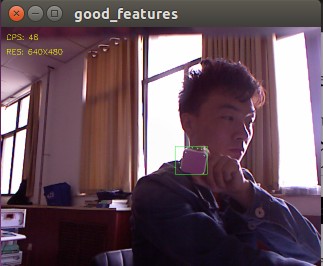
当视频出现时,通过鼠标画矩形将图像中的某个对象框住。这个矩形表示所选的区域,你会看到这个区域中会出现一些绿色的小圆点,他们是goodFeaturesToTrack()。侦测器在该区域中发现的关键点,
以下是我的运行结果:
下面我们看看代码,主要是good_features.py脚本。
#!/usr/bin/env python

""" good_features.py - Version 1.1 2013-12-20

    Locate the Good Features To Track in a video stream.

    Created for the Pi Robot Project: http://www.pirobot.org

    Copyright (c)  Patrick Goebel.  All rights reserved.

    This program is free software; you can redistribute it and/or modify

    it under the terms of the GNU General Public License as published by

    the Free Software Foundation; either version  of the License, or

    (at your option) any later version.

    This program is distributed in the hope that it will be useful,

    but WITHOUT ANY WARRANTY; without even the implied warranty of

    MERCHANTABILITY or FITNESS FOR A PARTICULAR PURPOSE.  See the

    GNU General Public License for more details at:

    http://www.gnu.org/licenses/gpl.html

"""

import rospy

import cv2

import cv2.cv as cv

from rbx1_vision.ros2opencv2 import ROS2OpenCV2

import numpy as np

class GoodFeatures(ROS2OpenCV2):

    def __init__(self, node_name):

        super(GoodFeatures, self).__init__(node_name)

        # Do we show text on the display?

        self.show_text = rospy.get_param("~show_text", True)

        # How big should the feature points be (in pixels)?

        self.feature_size = rospy.get_param("~feature_size", )

        # Good features parameters

        self.gf_maxCorners = rospy.get_param("~gf_maxCorners", )

        self.gf_qualityLevel = rospy.get_param("~gf_qualityLevel", 0.02)

        self.gf_minDistance = rospy.get_param("~gf_minDistance", )

        self.gf_blockSize = rospy.get_param("~gf_blockSize", )

        self.gf_useHarrisDetector = rospy.get_param("~gf_useHarrisDetector", True)

        self.gf_k = rospy.get_param("~gf_k", 0.04)

        # Store all parameters together for passing to the detector

        self.gf_params = dict(maxCorners = self.gf_maxCorners,

                       qualityLevel = self.gf_qualityLevel,

                       minDistance = self.gf_minDistance,

                       blockSize = self.gf_blockSize,

                       useHarrisDetector = self.gf_useHarrisDetector,

                       k = self.gf_k)

        # Initialize key variables

        self.keypoints = list()

        self.detect_box = None

        self.mask = None

    def process_image(self, cv_image):

        try:

            # If the user has not selected a region, just return the image

            if not self.detect_box:

                return cv_image

            # Create a greyscale version of the image

            grey = cv2.cvtColor(cv_image, cv2.COLOR_BGR2GRAY)

            # Equalize the histogram to reduce lighting effects

            grey = cv2.equalizeHist(grey)

            # Get the good feature keypoints in the selected region

            keypoints = self.get_keypoints(grey, self.detect_box)

            # If we have points, display them

            if keypoints is not None and len(keypoints) > :

                for x, y in keypoints:

                    cv2.circle(self.marker_image, (x, y), self.feature_size, (, , , ), cv.CV_FILLED, , )

            # Process any special keyboard commands

            if self.keystroke != -:

                try:

                    cc = chr(self.keystroke & ).lower()

                    if cc == 'c':

                        # Clear the current keypoints

                        keypoints = list()

                        self.detect_box = None

                except:

                    pass

        except:

            pass

        return cv_image

    def get_keypoints(self, input_image, detect_box):

        # Initialize the mask with all black pixels

        self.mask = np.zeros_like(input_image)

        # Get the coordinates and dimensions of the detect_box

        try:

            x, y, w, h = detect_box

        except:

            return None

        # Set the selected rectangle within the mask to white

        self.mask[y:y+h, x:x+w] =

        # Compute the good feature keypoints within the selected region

        keypoints = list()

        kp = cv2.goodFeaturesToTrack(input_image, mask = self.mask, **self.gf_params)

        if kp is not None and len(kp) > :

            for x, y in np.float32(kp).reshape(-, ):

                keypoints.append((x, y))

        return keypoints

if __name__ == '__main__':

    try:

        node_name = "good_features"

        GoodFeatures(node_name)

        rospy.spin()

    except KeyboardInterrupt:

        print "Shutting down the Good Features node."

        cv.DestroyAllWindows()
使用GoodFeaturesToTrack进行关键点检测---29的更多相关文章
- OpenCV实战:人脸关键点检测(FaceMark)
Summary:利用OpenCV中的LBF算法进行人脸关键点检测(Facial Landmark Detection) Author: Amusi Date: 2018-03-20 ...
- PCL—低层次视觉—关键点检测(NARF)
关键点检测本质上来说,并不是一个独立的部分,它往往和特征描述联系在一起,再将特征描述和识别.寻物联系在一起.关键点检测可以说是通往高层次视觉的重要基础.但本章节仅在低层次视觉上讨论点云处理问题,故所有 ...
- PCL—低层次视觉—关键点检测(rangeImage)
关键点又称为感兴趣的点,是低层次视觉通往高层次视觉的捷径,抑或是高层次感知对低层次处理手段的妥协. ——三维视觉关键点检测 1.关键点,线,面 关键点=特征点: 关键线=边缘: 关键面=foregro ...
- dlib人脸关键点检测的模型分析与压缩
本文系原创,转载请注明出处~ 小喵的博客:https://www.miaoerduo.com 博客原文(排版更精美):https://www.miaoerduo.com/c/dlib人脸关键点检测的模 ...
- 用keras实现人脸关键点检测(2)
上一个代码只能实现小数据的读取与训练,在大数据训练的情况下.会造内存紧张,于是我根据keras的官方文档,对上一个代码进行了改进. 用keras实现人脸关键点检测 数据集:https://pan.ba ...
- keras实现简单CNN人脸关键点检测
用keras实现人脸关键点检测 改良版:http://www.cnblogs.com/ansang/p/8583122.html 第一步:准备好需要的库 tensorflow 1.4.0 h5py ...
- 『计算机视觉』Mask-RCNN_从服装关键点检测看KeyPoints分支
下图Github地址:Mask_RCNN Mask_RCNN_KeyPoints『计算机视觉』Mask-RCNN_论文学习『计算机视觉』Mask-RCNN_项目文档翻译『计算机视觉』Mas ...
- 机器学习进阶-人脸关键点检测 1.dlib.get_frontal_face_detector(构建人脸框位置检测器) 2.dlib.shape_predictor(绘制人脸关键点检测器) 3.cv2.convexHull(获得凸包位置信息)
1.dlib.get_frontal_face_detector() # 获得人脸框位置的检测器, detector(gray, 1) gray表示灰度图, 2.dlib.shape_predict ...
- PCL—低层次视觉—关键点检测(iss&Trajkovic)
关键点检测往往需要和特征提取联合在一起,关键点检测的一个重要性质就是旋转不变性,也就是说,物体旋转后还能够检测出对应的关键点.不过说实话我觉的这个要求对机器人视觉来说是比较鸡肋的.因为机器人采集到的三 ...
随机推荐
- https://docs.mongodb.org/manual/reference/operator/aggregation/unwind/#examples
https://docs.mongodb.org/manual/reference/operator/aggregation/unwind/#examples http://www.clusterdb ...
- angular-xeditable
http://vitalets.github.io/angular-xeditable/#text-simple ng-repeat="user in users" e-rows= ...
- jQuery 其他操作
1. 样式操作 1.1 获取 class 和设置 class : class 是元素的一个属性, 所以获取 class 和设置 class 都可以使用 attr() 方法来完成. 1.2 追加样式: ...
- Java 时间、日期类
1. System类 currentTimeMillis():返回当前时间的long型值.此long值是从1970年1月1日0点0分00秒开始到当前的毫秒数. 此方法常用来计算时间差. 2. Date ...
- Linux的三种特殊权限
1.Suid Set位权限 ●对文件以文件的拥有者身份执行文件 ●对目录无影响 权限设置: ●suid=u+s 2.Sgid Set位权限 ●对文件以文件的组身份执行文件 ●对目录在目录中最新创建的文 ...
- 最大联通子数组之和(dfs,记忆化搜索,状态压缩)
最大联通子数组,这次的题目,我采用的方法为dfs搜索,按照已经取到的数v[][],来进行搜索过程的状态转移,每次对v[][]中标记为1的所有元素依次取其相邻的未被标记为1的元素,将其标记为1,然而,这 ...
- CodeForces 546B-Soldier and Badges
题意: 给出一些数字,要求每个数字都不一样需要增加几 思路: 先排序,然后一个个增加,最后求总和差 代码如下: #include <iostream> #include <cstdi ...
- 图解Nosql(hbase)与传统数据库的区别
图解Nosql(hbase)与传统数据库的区别http://www.aboutyun.com/thread-7804-1-1.html(出处: about云开发) 问题导读:1.nosql数据库能否删 ...
- 千寻浏览器 1.0 Beta 1(524)(2014年5月27日)
千寻浏览器--又一款新生浏览器今天进入各位浏览迷的视野.千寻浏览器基于IE内核,据传是由百度浏览器的上海团队操刀,在功能定位上,与目前的QQ浏览器有些相似. 千寻来自官方的解释:寻,追寻,探索,又是古 ...
- 数组的filter方法
filter()函数用于过滤序列,filter()把传入的函数依次作用于每个元素,然后根据返回值是True还是False决定保留还是丢弃该元素. eg: var arr=[10,11,12,13,14 ...