
(WPF) MVVM: ComboBox Binding, XML 序列化
基本思路还是在View的Xmal里面绑定ViewModel的属性,虽然在View的后台代码中也可以实现binding,但是还是在Xmal里面相对的代码量要少一些。
此例子要实现的效果就是将一个List<Customer> 绑定到一个ComboBox,并将选择后的Customer的Age显示在一个TextBlock中。
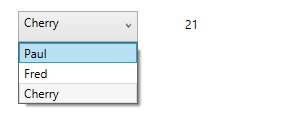
1. Model
    public class Customer

    {

        public string Name

        {

            get;

            set;

        }

        public int Age

        {

            get;

            set;

        }

    }
2. ViewModel
    public class CustomerViewModel : ViewModelBase

    {

        private List<Customer> customers;

        private Customer selectedCustomer;

        public CustomerViewModel()

        {

            this.customers = new List<Customer>()

            {

                new Customer { Name = "Paul", Age =  },

                new Customer { Name = "Fred", Age =  },

                new Customer { Name = "Cherry", Age =  },

            };

            this.selectedCustomer = new Customer();

        }

        public List<Customer> Customers

        {

            get

            {

                return this.customers;

            }

            set

            {

                if (!this.customers.Equals(value))

                {

                    this.customers = value;

                    base.OnPropertyChanged("Customers");

                }

            }

        }

        public Customer SelectedCustomer

        {

            get

            {

                return this.selectedCustomer;

            }

            set

            {

                if (!this.selectedCustomer.Equals(value))

                {

                    this.selectedCustomer = value;

                    base.OnPropertyChanged("SelectedCustomer");

                }

            }

        }

    }
3. View.
<UserControl x:Class="WpfApplication1.View.CustomerView"

             xmlns="http://schemas.microsoft.com/winfx/2006/xaml/presentation"

             xmlns:x="http://schemas.microsoft.com/winfx/2006/xaml"

             xmlns:mc="http://schemas.openxmlformats.org/markup-compatibility/2006"

             xmlns:d="http://schemas.microsoft.com/expression/blend/2008"

             xmlns:vm="clr-namespace:WpfApplication1.ViewModel"

             mc:Ignorable="d"

             Height="308.072"

             Width="457.399">

    <UserControl.DataContext>

        <vm:CustomerViewModel/>

    </UserControl.DataContext>

    <Grid>

        <ComboBox HorizontalAlignment="Left"

                  Margin="45,47,0,0"

                  VerticalAlignment="Top"

                  Width=""

                  Height=""

                  ItemsSource="{Binding Customers}"

                  SelectedItem="{Binding SelectedCustomer}"

                  DisplayMemberPath="Name"/>

        <TextBlock HorizontalAlignment="Left"

                   Margin="212,52,0,0"

                   TextWrapping="Wrap"

                   Text="{Binding SelectedCustomer.Age}"

                   VerticalAlignment="Top"

                   Height=""

                   Width="" />

    </Grid>

</UserControl>
还有其他供选择的binding方式如下:
    <TextBlock Text="Example 1" VerticalAlignment="Center"/>

            <ComboBox ItemsSource="{Binding MyStringOptions}" Grid.Column="" SelectedItem="{Binding SelectedOption1}" Margin=""/>

            <TextBlock Text="{Binding SelectedOption1}" Grid.Column="" Margin="10,5,5,0" VerticalAlignment="Center"/>

            <TextBlock Grid.Row="" Text="Example 2" VerticalAlignment="Center"/>

            <ComboBox Grid.Row="" Grid.Column="" ItemsSource="{Binding MyClassOptions}" SelectedItem="{Binding SelectedClass}" DisplayMemberPath="Name" Margin=""/>

            <TextBlock Grid.Row="" Grid.Column="" Margin="10,5,5,0" VerticalAlignment="Center"><Run Text="{Binding SelectedClass.Name}"/><Run Text=" - "/><Run Text="{Binding SelectedClass.Age}"/></TextBlock>

            <TextBlock Grid.Row="" Text="Example 3" VerticalAlignment="Center"/>

            <ComboBox Grid.Row="" Grid.Column="" ItemsSource="{Binding MyClassOptions}" SelectedValuePath="Age" SelectedValue="{Binding SelectedAge}" DisplayMemberPath="Name" Margin=""/>

            <TextBlock Grid.Row="" Grid.Column="" Margin="10,5,5,0" VerticalAlignment="Center"><Run Text="Selected age: "/><Run Text="{Binding SelectedAge}"/></TextBlock>

            <TextBlock Grid.Row="" Text="Example 4" VerticalAlignment="Center"/>

            <ComboBox Grid.Row="" Grid.Column="" ItemsSource="{Binding MyClassOptions}" SelectedValuePath="Age" SelectedValue="{Binding SelectedAge}" ItemTemplate="{StaticResource Example4ItemTemplate}" Margin=""/>

            <TextBlock Grid.Row="" Grid.Column="" Margin="10,5,5,0" VerticalAlignment="Center"><Run Text="Selected age: "/><Run Text="{Binding SelectedAge}"/></TextBlock>
再深入一步,在实际的程序中,是务必要减少那些Hardcode的,所以我们可以把数据存放在一个单独的xml文件中。
并通过对xml的文件的序列化解析,正确的获取里面的数据。
另外,还可以binding ComboBox 到 enum 和 dictionary
绑定到 Enum
http://blog.163.com/cloud_thegreat/blog/static/10367215620115233941346/
(WPF) MVVM: ComboBox Binding, XML 序列化的更多相关文章
- (WPF, MVVM) Slider Binding.
对于Button的Command的绑定可以通过实现ICommand接口来进行,但是Slider并没有Command属性. 另外如果要实现MVVM模式的话,需要将一些Method和Slider的Even ...
- (WPF, MVVM) Textbox Binding
参考:http://msdn.microsoft.com/en-us/library/system.windows.data.updatesourcetrigger(v=vs.110).aspx Te ...
- (WPF) MVVM: DataGrid Binding
Binding到DataGrid的时候,需要用到ObservableCollection. public ObservableCollection<Customer> Customers ...
- WPF XML序列化保存数据 支持Datagrid 显示/编辑/添加/删除数据
XML序列化保存数据 using System; using System.Collections.Generic; using System.Linq; using System.Text; usi ...
- wpf mvvm使用问题集锦
问题一.usercontrol1控件使用了mvvm数据绑定,usercontrol2也使用了mvvm数据绑定,则 以下是伪代码 <usercontrol2 datacontent="{ ...
- A WPF/MVVM Countdown Timer
Introduction This article describes the construction of a countdown timer application written in C# ...
- 使用Prism提供的类实现WPF MVVM点餐Demo
使用Prism提供的类实现WPF MVVM点餐Demo 由于公司开发的技术需求,近期在学习MVVM模式开发WPF应用程序.进过一段时间的学习,感受到:学习MVVM模式,最好的方法就是用MVVM做几个D ...
- WPF MVVM从入门到精通3:数据绑定
原文:WPF MVVM从入门到精通3:数据绑定 WPF MVVM从入门到精通1:MVVM模式简介 WPF MVVM从入门到精通2:实现一个登录窗口 WPF MVVM从入门到精通3:数据绑定 WPF ...
- C# WPF - MVVM实现OPC Client管理系统
前言 本文主要讲解采用WPF MVVM模式设计OPC Client的过程,算作对于WPF MVVM架构的学习记录吧!不足之处请不吝赐教,感谢! 涉及知识点 C#基础 Xaml基础 命令.通知和数据绑定 ...
随机推荐
- JAVA导入包
在package **;下面写入 import java.**.**; 1.使用Scanner工具类来获取用户输入的成绩信息 Scanner类位于java.util包中,使用时需要导入此包 1.1. ...
- hdu5442(2015长春赛区网络赛1006)后缀数组+KMP /最小表示法?
题意:给定一个由小写字母组成的长度为 n 的字符串,首尾相连,可以从任意一个字符开始,顺时针或逆时针取这个串(长度为 n),求一个字典序最大的字符串的开始字符位置和顺时针或逆时针.如果有多个字典序最大 ...
- freeswitch 挂断前执行脚本
通道变量名 api_hangup_hook 介绍在挂断时执行指定API命令 示例 <action application="set" data="api_hangu ...
- DDD, MVC & Entity Framework
https://digitalpolis.co.uk/software-thoughts/ddd-mvc-entity-framework/ Data Points - Coding for Doma ...
- HTML5 拖放(Drag 和 Drop)
拖放是一种常见的特性,即抓取对象以后拖到另一个位置. 在 HTML5 中,拖放是标准的一部分,任何元素都能够拖放. <!DOCTYPE HTML> <html> <hea ...
- Unicode基本概念
Unicode是计算机可以支持这个星球上多种语言的秘密武器.通过使用一个或者多个字节来表示一个字符的方法突破了ASCII的限制.Unicode可以表示超过90000个字符. 使用方式:a=u'hell ...
- 如何让div水平垂直居中
引子 我们经常遇到需要把div中的内容进行水平和垂直居中.所以,这里介绍一种方法,可以使div水平居中和垂直居中. 代码: <!DOCTYPE html> <html lang=&q ...
- linux安全
http://drops.wooyun.org/ 最专业的安全知识分享平台 http://www.freebuf.com/ 关注黑客与极客 http://book.beifabook.com/prod ...
- OpenJudge计算概论-字符串排序
/*====================================================================== 字符串排序 总时间限制: 1000ms 内存限制: 6 ...
- SQL SERVER 生成MYSQL建表脚本
/****** Object: StoredProcedure [dbo].[GET_TableScript_MYSQL] Script Date: 06/15/2012 13:05:14 ***** ...