
SQLite数据库与Contentprovider(1)
SQlite:类似mysql的数据库。把数据保存到.db文件夹中。
Contentprovider:一般用于不同进程之间的数据共享(两个APP)。
手动建库:http://www.runoob.com/sqlite/sqlite-drop-table.html(命令集手册)
创建/打开DB文件:
- 打开CMD命令行窗口。
- Sqlite3 D:/mydb.db

确保有sqlite3.exe文件(D:\sdk\tools\sqlite3.exe)
创建Table:
sqlite> create table peopleinfo (_id integer primary key autoincrement,name text not null,age integer,height float);
查看Table:
sqlite>.tables

插入数据到Table中:
    sqlite> insert into peopleinfo values(null,'Tom',,1.81);

    sqlite> insert into peopleinfo values(null,'Jim',,1.78);

    sqlite> insert into peopleinfo values(null,'Lily',,1.68);
查看Table中的数据:
select * from peopleinfo;

然后也可以用一些where语句后like之类的去过滤数据。
也可以事先通过.mode column之类的设置一下输出格式。
相关命令可以通过.help去看看。
更新Table中的数据:
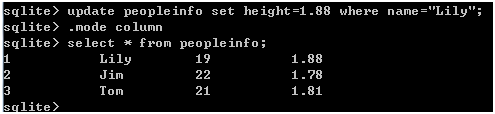
    sqlite> update peopleinfo set height=1.88 where name="Lily";

    sqlite> select * from peopleinfo;
删除Table中的单个数据:
    sqlite> delete from peopleinfo where _id=;

    sqlite> select * from peopleinfo;

删除Table中的所有数据:
sqlite> delete from peopleinfo
删除Table:
sqlite> drop table peopleinfo

修改Table名:
sqlite> ALTER TABLE peopleinfo RENAME TO newtable;

sqlite3工具还支持大量的命令:

代码建库:
只要记住以下两个类就可以:
SQLiteDatabase:类封装了非常多的方法,用以建立、删除数据库,执行SQL命令,对数据进行管理等实质性操作工作。
SQLiteOpenHelper:这个帮助类可以辅助建立、更新和打开数据库。
*SQLiteOpenHelper的onUpgrade()是当在数据库需要升级时被调用,一般用来删除旧的数据库表,并将数据转移到新版本的数据库表中。第一次建立(onCreate())数据库时调用。
*调用SQLiteOpenHelper类的getWritableDatabase()函数和getReadableDatabase()函数。这个两个函数会根据数据库是否存在、版本号和是否可写等情况,决定在返回数据库对象前,是否需要建立数据库。
*SQLiteDatabase中也封装了打开数据库的函数openDatabases()和创建数据库函数openOrCreateDatabases(),
因为代码中使用了帮助类SQLiteOpenHelper,从而避免直接调用SQLiteDatabase中的打开和创建数据库的方法,简化了数据库打开过程中繁琐的逻辑判断过程。
SQLiteOpenHelper的getWritableDatabase():用来建立或打开可读写的数据库对象,一旦函数调用成功,数据库对象将被缓存,任何需要使用数据库对象时,都可以调用这个方法获取到数据库对象,
但一定要在不使用时调用close()函数关闭数据库。
SQLiteOpenHelper的getReadableDatabase():如果保存数据库文件的磁盘空间已满,调用getWritableDatabase()函数则无法获得可读写的数据库对象,这时可以调用getReadableDatabase()函数,获得一个只读的数据库对象。
数据库操作:
也就是增删改查。
ContentValues:把数据已Map的形式打包起来用于数据库的insert,update等操作时以参数形式传递。
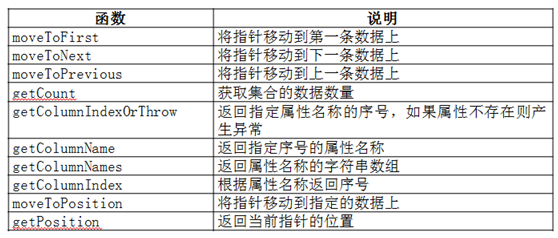
Cursor:在Android系统中,数据库查询结果的返回值并不是数据集合的完整拷贝,而是返回数据集的指针,这个指针就是Cursor类。
Cursor类的方法和说明:
其他操作相关方法可以直接看实例来了解,就说明一个参数较多的query():
Cursor android.database.sqlite.SQLiteDatabase.query(String table, String[] columns, String selection, String[] selectionArgs, String groupBy, String having, String orderBy)

下面是实例代码:
package com.example.demo_sql;

import android.content.ContentValues;

import android.content.Context;

import android.database.Cursor;

import android.database.sqlite.SQLiteDatabase;

import android.database.sqlite.SQLiteDatabase.CursorFactory;

import android.database.sqlite.SQLiteException;

import android.database.sqlite.SQLiteOpenHelper;

public class DBAdapter {

    private static final String DB_NAME = "people.db";

    private static final String DB_TABLE = "peopleinfo";

    private static final int DB_VERSION = 2;

    public static final String KEY_ID = "_id";

    public static final String KEY_NAME = "name";

    public static final String KEY_AGE = "age";

    public static final String KEY_HEIGHT = "height";

    private static SQLiteDatabase db;

    private final Context context;

    private static DBOpenHelper dbOpenHelper;

    private static class DBOpenHelper extends SQLiteOpenHelper {

        public DBOpenHelper(Context context, String name,

                CursorFactory factory, int version) {

            super(context, name, factory, version);

        }

        private static final String DB_CREATE = "create table " + DB_TABLE

                + " (" + KEY_ID + " integer primary key autoincrement, "

                + KEY_NAME + " text not null, " + KEY_AGE + " integer,"

                + KEY_HEIGHT + " float);";

        @Override

        public void onCreate(SQLiteDatabase _db) {

            _db.execSQL(DB_CREATE);

        }

        @Override

        public void onUpgrade(SQLiteDatabase _db, int _oldVersion,

                int _newVersion) {

            _db.execSQL("DROP TABLE IF EXISTS " + DB_TABLE);

            onCreate(_db);

        }

    }

    public DBAdapter(Context _context) {

        context = _context;

    }

    public void open() throws SQLiteException {

        dbOpenHelper = new DBOpenHelper(context, DB_NAME, null, DB_VERSION);

        try {

            db = dbOpenHelper.getWritableDatabase();

        } catch (SQLiteException ex) {

            db = dbOpenHelper.getReadableDatabase();

        }

    }

    /*

     * public void read() { db = dbOpenHelper.getReadableDatabase(); Cursor

     * cursor = db.query(DB_TABLE, new String[] { KEY_ID, KEY_NAME, KEY_AGE,

     * KEY_HEIGHT }, null, null, null, null, null, null);

     *

     * while (cursor.moveToNext()) { int id = cursor.getInt(0); //

     * 获取第一列的值,第一列的索引从0开始 String name = cursor.getString(1);// 获取第二列的值 int age =

     * cursor.getInt(2);// 获取第三列的值 float height = cursor.getFloat(3);

     * System.out.println("id:" + id + "  " + "name: " + name + "  " + "age: " +

     * age + "  " + "height: " + height); } cursor.close(); db.close(); }

     *

     * public static void write() { db = dbOpenHelper.getWritableDatabase();

     * db.execSQL("insert into " + DB_TABLE + "(" + KEY_NAME + "," + KEY_AGE +

     * "," + KEY_HEIGHT + ") values('bb',20,17.6)"); // 使用insert方法向表中插入数据

     * ContentValues values = new ContentValues(); values.put(KEY_NAME, "xh");

     * values.put(KEY_AGE, 5); values.put(KEY_HEIGHT, 5.2); // 调用方法插入数据

     * db.insert(DB_TABLE, null, values); // 关闭SQLiteDatabase对象 db.close(); }

     */

    public long insert(People people) {

        ContentValues newValues = new ContentValues();

        newValues.put(KEY_NAME, people.Name);

        newValues.put(KEY_AGE, people.Age);

        newValues.put(KEY_HEIGHT, people.Height);

        return db.insert(DB_TABLE, null, newValues);

    }

    public long deleteAllData() {

        return db.delete(DB_TABLE, null, null);

    }

    public long deleteOneData(long id) {

        return db.delete(DB_TABLE, KEY_ID + "=" + id, null);

    }

    public People[] queryAllData() {

        Cursor results = db.query(DB_TABLE, new String[] { KEY_ID, KEY_NAME,

                KEY_AGE, KEY_HEIGHT }, null, null, null, null, null);

        return ConvertToPeople(results);

    }

    public People[] queryOneData(long id) {

        Cursor results = db.query(DB_TABLE, new String[] { KEY_ID, KEY_NAME,

                KEY_AGE, KEY_HEIGHT }, KEY_ID + "=" + id, null, null, null,

                null);

        return ConvertToPeople(results);

    }

    public long updateOneData(long id, People people) {

        ContentValues updateValues = new ContentValues();

        updateValues.put(KEY_NAME, people.Name);

        updateValues.put(KEY_AGE, people.Age);

        updateValues.put(KEY_HEIGHT, people.Height);

        return db.update(DB_TABLE, updateValues, KEY_ID + "=" + id, null);

    }

    private People[] ConvertToPeople(Cursor cursor) {

        int resultCounts = cursor.getCount();

        if (resultCounts == 0 || !cursor.moveToFirst()) {

            return null;

        }

        People[] peoples = new People[resultCounts];

        for (int i = 0; i < resultCounts; i++) {

            peoples[i] = new People();

            peoples[i].ID = cursor.getInt(0);

            peoples[i].Name = cursor.getString(cursor.getColumnIndex(KEY_NAME));

            peoples[i].Age = cursor.getInt(cursor.getColumnIndex(KEY_AGE));

            peoples[i].Height = cursor.getFloat(cursor

                    .getColumnIndex(KEY_HEIGHT));

            cursor.moveToNext();

        }

        return peoples;

    }

    public void close() {

        if (db != null) {

            db.close();

            db = null;

        }

    }

}
package com.example.demo_sql;

import android.app.Activity;

import android.os.Bundle;

import android.view.View;

import android.view.View.OnClickListener;

import android.widget.Button;

import android.widget.EditText;

import android.widget.Toast;

public class MainActivity extends Activity implements OnClickListener {

    private DBAdapter dbadapter;

    private EditText et_id;

    private EditText et_name;

    private EditText et_age;

    private EditText et_height;

    private Button bt_insert;

    private Button bt_query;

    private Button bt_clear;

    private Button bt_delete;

    private Button bt_deleteById;

    private Button bt_queryById;

    private Button bt_updateById;

    private EditText displayView;

    @Override

    protected void onCreate(Bundle savedInstanceState) {

        super.onCreate(savedInstanceState);

        setContentView(R.layout.activity_main);

        dbadapter = new DBAdapter(this);

        et_id = (EditText) findViewById(R.id.et_id);

        et_name = (EditText) findViewById(R.id.et_name);

        et_age = (EditText) findViewById(R.id.et_age);

        et_height = (EditText) findViewById(R.id.et_height);

        bt_insert = (Button) findViewById(R.id.insert_data);

        bt_query = (Button) findViewById(R.id.query_all);

        bt_clear = (Button) findViewById(R.id.clear_all);

        bt_delete = (Button) findViewById(R.id.delete_all);

        bt_insert.setOnClickListener(this);

        bt_query.setOnClickListener(this);

        bt_clear.setOnClickListener(this);

        bt_delete.setOnClickListener(this);

        bt_deleteById = (Button) findViewById(R.id.deleteById);

        bt_queryById = (Button) findViewById(R.id.queryById);

        bt_updateById = (Button) findViewById(R.id.updateById);

        bt_deleteById.setOnClickListener(this);

        bt_queryById.setOnClickListener(this);

        bt_updateById.setOnClickListener(this);

        displayView = (EditText) findViewById(R.id.displayview);

    }

    @Override

    protected void onStart() {

        // TODO Auto-generated method stub

        super.onStart();

        dbadapter.open();

    }

    @Override

    public void onClick(View v) {

        // TODO Auto-generated method stub

        if (v.getId() == R.id.insert_data) {

            People people = getInsertData();

            if (people != null) {

                dbadapter.insert(people);

                printall();

            } else

                Toast.makeText(this, "Error:Empty data!Please insert data", 0)

                        .show();

        } else if (v.getId() == R.id.query_all) {

            printall();

        } else if (v.getId() == R.id.clear_all) {

            displayView.setText(" ");

        } else if (v.getId() == R.id.delete_all) {

            dbadapter.deleteAllData();

            displayView.setText(" ");

        } else if (v.getId() == R.id.deleteById) {

            long id = Long.valueOf(et_id.getText().toString().trim());

            if (id > 0) {

                dbadapter.deleteOneData(id);

                printall();

            }

        } else if (v.getId() == R.id.queryById) {

            long id = Long.valueOf(et_id.getText().toString().trim());

            if (id > 0) {

                People[] peoples = dbadapter.queryOneData(id);

                if (peoples != null)

                    printOneData(peoples);

                else

                    Toast.makeText(this, "Error:not found Exception!", 0)

                            .show();

            }

        } else if (v.getId() == R.id.updateById) {

            long id = Long.valueOf(et_id.getText().toString().trim());

            if (id > 0) {

                People people = getInsertData();

                if (people != null)

                    dbadapter.updateOneData(Long.valueOf(id), people);

                else

                    Toast.makeText(this, "Error:Empty data!Please insert data",

                            0).show();

                printall();

            }

        }

    }

    private void printOneData(People[] peoples) {

        // TODO Auto-generated method stub

        displayView.setText(" ");

        StringBuffer sb = new StringBuffer();

        for (int i = 0; i < peoples.length; i++) {

            sb.append(peoples[i].toString() + "\r\n");

        }

        displayView.setText(sb);

    }

    private People getInsertData() {

        // TODO Auto-generated method stub

        People people = new People();

        people.setName(et_name.getText().toString());

        people.setAge(Integer.valueOf(et_age.getText().toString()));

        people.setHeight(Float.valueOf(et_height.getText().toString()));

        return people;

    }

    private void printall() {

        // TODO Auto-generated method stub

        displayView.setText(" ");

        People[] peoples = dbadapter.queryAllData();

        if (peoples != null) {

            StringBuffer sb = new StringBuffer();

            for (int i = 0; i < peoples.length; i++) {

                sb.append(peoples[i].toString() + "\r\n");

            }

            displayView.setText(sb);

        } else

            Toast.makeText(this, "Error:Empty data!", 0).show();

    }

    @Override

    protected void onDestroy() {

        // TODO Auto-generated method stub

        super.onDestroy();

        dbadapter.close();

    }

}
package com.example.demo_sql;

public class People {

    public int ID = -1;

    public String Name;

    public int Age;

    public int getID() {

        return ID;

    }

    public void setID(int iD) {

        ID = iD;

    }

    public String getName() {

        return Name;

    }

    public void setName(String name) {

        Name = name;

    }

    public int getAge() {

        return Age;

    }

    public void setAge(int age) {

        Age = age;

    }

    public float getHeight() {

        return Height;

    }

    public void setHeight(float height) {

        Height = height;

    }

    public float Height;

    @Override

    public String toString() {

        String result = "";

        result += "ID:" + this.ID + ",";

        result += "姓名:" + this.Name + ",";

        result += "年龄:" + this.Age + ", ";

        result += "身高:" + this.Height + ";";

        return result;

    }

}
布局文件代码也贴上:
<RelativeLayout xmlns:android="http://schemas.android.com/apk/res/android"

    xmlns:tools="http://schemas.android.com/tools"

    android:layout_width="match_parent"

    android:layout_height="match_parent"

    android:textAlignment="viewStart"

    tools:context=".MainActivity" >

    <EditText

        android:id="@+id/et_name"

        android:layout_width="wrap_content"

        android:layout_height="wrap_content"

        android:layout_alignParentRight="true"

        android:layout_alignParentTop="true"

        android:layout_toRightOf="@+id/tv_name"

        android:ems="10"

        android:text=" " >

        <requestFocus />

    </EditText>

    <EditText

        android:id="@+id/et_age"

        android:layout_width="wrap_content"

        android:layout_height="wrap_content"

        android:layout_alignLeft="@+id/et_name"

        android:layout_alignParentRight="true"

        android:layout_below="@+id/et_name"

        android:ems="10"

        android:text="0" />

    <TextView

        android:id="@+id/tv_name"

        android:layout_width="wrap_content"

        android:layout_height="wrap_content"

        android:layout_alignBaseline="@+id/et_name"

        android:layout_alignBottom="@+id/et_name"

        android:layout_alignParentLeft="true"

        android:text="姓名:" />

    <TextView

        android:id="@+id/tv_age"

        android:layout_width="wrap_content"

        android:layout_height="wrap_content"

        android:layout_alignBaseline="@+id/et_age"

        android:layout_alignBottom="@+id/et_age"

        android:layout_alignParentLeft="true"

        android:text="年龄:" />

    <EditText

        android:id="@+id/et_height"

        android:layout_width="wrap_content"

        android:layout_height="wrap_content"

        android:layout_alignLeft="@+id/et_age"

        android:layout_alignParentRight="true"

        android:layout_below="@+id/et_age"

        android:ems="10"

        android:text="0" />

    <TextView

        android:id="@+id/tv_height"

        android:layout_width="wrap_content"

        android:layout_height="wrap_content"

        android:layout_alignBaseline="@+id/et_height"

        android:layout_alignBottom="@+id/et_height"

        android:layout_alignParentLeft="true"

        android:text="身高:" />

    <Button

        android:id="@+id/insert_data"

        android:layout_width="wrap_content"

        android:layout_height="wrap_content"

        android:layout_alignParentLeft="true"

        android:layout_below="@+id/tv_height"

        android:minWidth="50dp"

        android:text="添加数据"

        android:textSize="14sp" />

    <Button

        android:id="@+id/query_all"

        android:layout_width="wrap_content"

        android:layout_height="wrap_content"

        android:layout_alignBaseline="@+id/insert_data"

        android:layout_alignBottom="@+id/insert_data"

        android:layout_toRightOf="@+id/insert_data"

        android:text="全部显示"

        android:textSize="14sp" />

    <Button

        android:id="@+id/clear_all"

        android:layout_width="wrap_content"

        android:layout_height="wrap_content"

        android:layout_alignBaseline="@+id/query_all"

        android:layout_alignBottom="@+id/query_all"

        android:layout_toRightOf="@+id/query_all"

        android:text="清除显示"

        android:textSize="14sp" />

    <Button

        android:id="@+id/delete_all"

        android:layout_width="wrap_content"

        android:layout_height="wrap_content"

        android:layout_alignTop="@+id/clear_all"

        android:layout_toRightOf="@+id/clear_all"

        android:text="全部删除"

        android:textSize="14sp" />

    <EditText

        android:id="@+id/et_id"

        android:layout_width="wrap_content"

        android:layout_height="wrap_content"

        android:layout_below="@+id/insert_data"

        android:layout_toLeftOf="@+id/deleteById"

        android:layout_toRightOf="@+id/tv_id"

        android:ems="10"

        android:hint="insert id"

        android:text="0" />

    <TextView

        android:id="@+id/tv_id"

        android:layout_width="wrap_content"

        android:layout_height="wrap_content"

        android:layout_alignBaseline="@+id/et_id"

        android:layout_alignBottom="@+id/et_id"

        android:layout_alignParentLeft="true"

        android:text="ID:" />

    <Button

        android:id="@+id/deleteById"

        style="?android:attr/buttonStyleSmall"

        android:layout_width="wrap_content"

        android:layout_height="wrap_content"

        android:layout_alignBaseline="@+id/et_id"

        android:layout_alignBottom="@+id/et_id"

        android:layout_toLeftOf="@+id/queryById"

        android:text="ID删除" />

    <Button

        android:id="@+id/queryById"

        style="?android:attr/buttonStyleSmall"

        android:layout_width="wrap_content"

        android:layout_height="wrap_content"

        android:layout_alignBaseline="@+id/deleteById"

        android:layout_alignBottom="@+id/deleteById"

        android:layout_toLeftOf="@+id/updateById"

        android:text="ID查询" />

    <Button

        android:id="@+id/updateById"

        style="?android:attr/buttonStyleSmall"

        android:layout_width="wrap_content"

        android:layout_height="wrap_content"

        android:layout_alignBaseline="@+id/queryById"

        android:layout_alignBottom="@+id/queryById"

        android:layout_alignParentRight="true"

        android:text="ID更新" />

    <EditText

        android:id="@+id/displayview"

        android:layout_width="wrap_content"

        android:layout_height="wrap_content"

        android:layout_alignParentBottom="true"

        android:layout_alignParentLeft="true"

        android:layout_alignParentRight="true"

        android:layout_below="@+id/deleteById"

        android:ems="10"

        android:gravity="top|left"

        android:inputType="textMultiLine"

        android:textSize="10sp" />

</RelativeLayout>
运行结果:

下一节再讲ContentProvider。。。
SQLite数据库与Contentprovider(1)的更多相关文章
- Android开发8:数据存储(二)——SQLite数据库和ContentProvider的使用
前言 啦啦啦各位小伙伴们许久不见了~学期末和过年期间自己忙着做其他事没能及时更新Android开发系列课程的博客,实在是罪过罪过~ 好啦~废话不多说,进入我们今天的主题.今天我们将和大家学习其他的数据 ...
- Android开发8:数据存储(二)——SQLite数据库和ContentProvider的使用
前言 啦啦啦各位小伙伴们许久不见了~学期末和过年期间自己忙着做其他事没能及时更新Android开发系列课程的博客,实在是罪过罪过~ 好啦~废话不多说,进入我们今天的主题.今天我们将和大家学习其他的数据 ...
- SQLite数据库与Contentprovider(2)
ContentProvider: 在创建ContentProvider时,需要首先使用数据库.文件系统或网络实现底层存储功能, 然后在继承ContentProvider的类中实现基本数据操作的接口函数 ...
- 利用SQLiteOpenHelper来管理SQLite数据库 (转)
转载自 利用SQLiteOpenHelper来管理SQLite数据库 http://blog.csdn.net/conowen/article/details/7306545 Android学习笔记( ...
- Android基础总结+SQlite数据库【申明:来源于网络】
Android基础总结+SQlite数据库[申明:来源于网络] 基础总结篇之一:Activity生命周期:http://blog.csdn.net/liuhe688/article/details/6 ...
- SQLite数据库学习小结——Frameworks层实现
3. SQLite的Frameworks层实现 3.1 Frameworks层架构 Android系统方便应用使用,在Frameworks层中封装了一套Content框架,之所以叫Content框架而 ...
- Android数据存储之SQLite 数据库学习
Android提供了五种存取数据的方式 (1)SharedPreference,存放较少的五种类型的数据,只能在同一个包内使用,生成XML的格式存放在设备中 (2) SQLite数据库,存放各种数据, ...
- Android 创建SQLite数据库(一)
Android内置了轻量级的数据库SQLite,这里将自己理解作个记录,方便自己复习. 一.首先,创建SQLite数据库比较常见的方式是通过Android提供的SQLiteOpenHelper来实现, ...
- Android中数据存储(三)——SQLite数据库存储数据
当一个应用程序在Android中安装后,我们在使用应用的过程中会产生很多的数据,应用都有自己的数据,那么我们应该如何存储数据呢? 数据存储方式 Android 的数据存储有5种方式: 1. Share ...
随机推荐
- Android开发-API指南-<compatible-screens>
<compatible-screens> 英文原文:http://developer.android.com/guide/topics/manifest/compatible-screen ...
- spark streaming 实时计算
spark streaming 开发实例 本文将分以下几部分 spark 开发环境配置 如何创建spark项目 编写streaming代码示例 如何调试 环境配置: spark 原生语言是scala, ...
- 简单几步优化技巧令你的Windows7系统加速
就算有再高的硬件配置,系统用久了还是会变慢,xp如此,win7同样是如此.其实系统用的如何完全在于个人使用习惯,只要掌握了以下三种方法,就可以让你的win7运行速度大大提升. 1.修改启动项程序 在你 ...
- spring batch学习笔记
Spring Batch是什么? Spring Batch是一个基于Spring的企业级批处理框架,按照我师父的说法,所有基于Spring的框架都是使用了spring的IoC特性,然后加上 ...
- 如何用ASPxTreeView建立三级树(显示及数据绑定)
示例如图: //设置treeviw默认为第一个菜单打开if (ASPxTreeView1.SelectedNode == null)ASPxTreeView1.SelectedNode = ASPxT ...
- ubuntu13.10无有线网卡驱动
装上双系统win8+ubuntu13.10后,设置网络后,发现连不上网,重启电脑N次(N > 3),重新设置网络也不行 网上搜索设置网络的方式,都是那样设置的啊(本来以前装过N(N>5)次 ...
- chrome浏览器设置小于12号的字体不起作用?
在某些chrome浏览器下,css里设置的10号字体竟然不起作用!仍显示12号大小,对比firefox.ie6.7.8.9,他们的显示都是好的. 要是你也碰到这问题,可以这样解决: -webkit-t ...
- c# winform 关于DataGridView的一些操作(很全,绝对够用)
转自:http://heisetoufa.iteye.com/blog/405317 设置字段名 设置字段值 设定单元格表示 Error图标 设定当前单元格 取得当前单元格内容 取得当前单元格的列 I ...
- 4种kill某个用户所有进程的方法
在linux系统管理中,我们有时候需要kill掉某个用户的所有进程,初学者一般先查询出用户的所有pid,然后一条条kill掉,或者写好一个脚本,实际上方法都有现成的,这边有4种方法,我们以kill用户 ...
- leetcode 7
此题实现比较简单,但是边界处理比较麻烦.题目要求是以32位考虑,所以可表达的数的范围是-2147483648~2147483648. 我们需要判断当前的数翻转之后是否在这个范围中,我的思路是首先对当前 ...