
android学习笔记33——资源ShapeDrawable
ShapeDrawable
ShapeDrawable用于定义一个基本的几何图像(如,矩形、圆形、线条.......)。
定义ShapeDrawable的XML文件的根元素是<shape.../>,该元素可指定如下属性:
android:shape=["rectangle"|"oval"|"ling"|"ring"]——指定定义那种类型的几何图形。

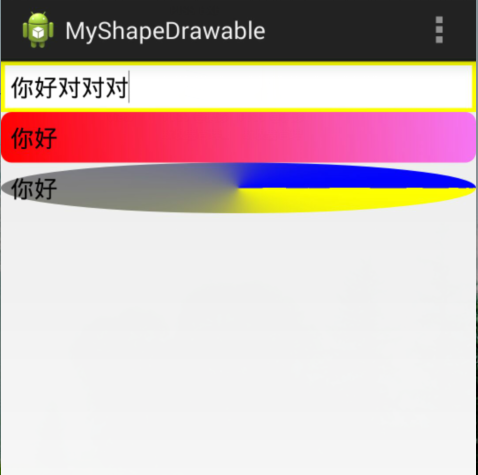
实例如下:椭圆、渐变背景的文本框
drawable资源文件==》

myshape1.xml==>

<?xml version="1.0" encoding="utf-8"?>

<shape xmlns:android="http://schemas.android.com/apk/res/android"

    android:shape="rectangle" >

    <!-- 设置填充颜色 -->

    <solid android:color="#fff" />

    <!-- 设置四周的内边距 -->

    <padding

        android:bottom="7dp"

        android:left="7dp"

        android:right="7dp"

        android:top="7dp" />

    <!-- 设置边框 -->

    <stroke

        android:width="3dip"

        android:color="#ff0" />

</shape>

myshape2.xml==>

<?xml version="1.0" encoding="utf-8"?>

<shape xmlns:android="http://schemas.android.com/apk/res/android"

    android:shape="rectangle" >

    <!-- 定义填充渐变色 angle,角度 -->

    <gradient

        android:angle="45"

        android:endColor="#80FF00FF"

        android:startColor="#FFFF0000" />

    <!-- 设置四周的内边距 -->

    <padding

        android:bottom="7dp"

        android:left="7dp"

        android:right="7dp"

        android:top="7dp" />

    <!-- 设置圆角矩形 -->

    <corners android:radius="8dp" />

</shape>

myshape3.xml==>

<?xml version="1.0" encoding="utf-8"?>

<shape xmlns:android="http://schemas.android.com/apk/res/android"

    android:shape="oval" >

    <!-- 定义填充渐变色 -->

    <gradient

        android:angle="45"

        android:endColor="#00f"

        android:startColor="#ff0"

        android:type="sweep" />

    <!-- 设置四周的内边距 -->

    <padding

        android:bottom="7dp"

        android:left="7dp"

        android:right="7dp"

        android:top="7dp" />

 <!-- 设置圆角矩形 -->

    <corners android:radius="8dp" />

</shape>

布局文件==》

<LinearLayout xmlns:android="http://schemas.android.com/apk/res/android"

    xmlns:tools="http://schemas.android.com/tools"

    android:layout_width="match_parent"

    android:layout_height="match_parent"

    android:orientation="vertical"

    tools:context=".MainActivity" >

    <EditText

        android:layout_width="match_parent"

        android:layout_height="wrap_content"

        android:background="@drawable/myshape1" />

 <EditText

     android:layout_width="match_parent"

     android:layout_height="wrap_content"

     android:background="@drawable/myshape2" />

  <EditText

        android:layout_width="match_parent"

        android:layout_height="wrap_content"

        android:background="@drawable/myshape3" />

</LinearLayout>
运行效果:
android学习笔记33——资源ShapeDrawable的更多相关文章
- android学习笔记32——资源
Android应用资源 资源分类: 1.无法直接访问的原生资源,保存于asset目录下 2.可通过R资源清单类访问的资源,保存于res目录下 资源的类型以及存储方式 android要求在res目录下用 ...
- Android学习笔记菜单资源文件
创建菜单资源 menu_one.xml <?xml version="1.0" encoding="utf-8"?> <menu xmlns: ...
- Android学习笔记样式资源文件
样式资源和主题资源都是写在styles.xml文件里面的 <style name="title"> <item name="android:textSi ...
- Android学习笔记数组资源文件
在android中我们可以通过数组资源文件,定义数组元素. 数组资源文件是位于values目录下的 array.xml <?xml version="1.0" encodin ...
- Android学习笔记尺寸资源
尺寸资源语法 dp:设备独立资源像素 会根据设备匹配大小 一般用于设置边距和组件大小 sp : 可伸缩像素 根据用户手机字体大小首选项进行缩放 使用尺寸资源 定义尺寸资源 dimens <?xm ...
- Android学习笔记颜色资源文件
资源文件目录 颜色资源文件格式 colors.xml <?xml version="1.0" encoding="utf-8"?> <reso ...
- 【转】Pro Android学习笔记(四):了解Android资源(下)
处理任意的XML文件 自定义的xml文件放置在res/xml/下,可以通过R.xml.file_name来获取一个XMLResourceParser对象.下面是xml文件的例子: <rootna ...
- 【转】Pro Android学习笔记(三):了解Android资源(上)
在Android开发中,资源包括文件或者值,它们和执行应用捆绑,无需在源代码中写死,因此我们可以改变或替换他们,而无需对应用重新编译. 了解资源构成 参考阅读Android学习笔记(三八):资源res ...
- Android学习笔记36:使用SQLite方式存储数据
在Android中一共提供了5种数据存储方式,分别为: (1)Files:通过FileInputStream和FileOutputStream对文件进行操作.具体使用方法可以参阅博文<Andro ...
随机推荐
- hdu 5203
题目大意: 有n根连续的木棒,其中有m根是坏的,现在要求将木棒切成连续的四段,使得其中三段中都不包含坏的木棒,且三段木棒的长度和最大,在最长的前提下看这三段木棒能否拼成三角形,如果能的话,问最多有多少 ...
- Mac中Fn键技巧
此文适用:Mac自带苹果键盘或外接有Fn键的普通键盘 上一页=Fn+⬅️ 下一页=Fn+➡️ 向上卷动=Fn+⬆️ 向下卷动=Fn+⬇️
- jquery商城购物车右侧悬浮加入购物车动画效果
<script type="text/javascript" src="js/jquery-1.7.min.js"></script> ...
- Hibernate--Enum类型的set集合映射到数据库(xml配置文件实现方式)
使用enum 存储Permission的值 package demo; public enum Permission { CREATE,DELETE,UPDATE;} Role与Permissi ...
- JavaWeb学习记录(十九)——jstl自定义标签库之传统标签
一.传统标签 (1)JSP引擎将遇到自定义标签时,首先创建标签处理器类的实例对象,然后按照JSP规范定义的通信规则依次调用它的方法. public void setPageContext(PageCo ...
- vsftpd搭建及配置参数
一.FTP简介 FTP:File Transger Protocol(文件传输协议) 文件共享服务:工作在应用层 NFS:Network File System(RPC:Remote Procedur ...
- 解决dede搜索页面只能显示10条信息解决方案
解决dede搜索页面只能显示10条信息解决方案,感觉显示的信息太少,这时就要想办法去解决一下.看看有什么好办法来解决一下这个问题. dede搜索页模板中,默认只能显示10条记录. 打开dede搜索页模 ...
- InputStreamReader/OutputStreamWriter乱码问题解决
/* *InputStreamReader参数charset要跟文件编码格式一致. InputStreamReader读的时候才不会乱码. *OutputStreamWriter参数charset设置 ...
- 解决方法:loadrunner 场景下执行webservice脚本是---报错10492 Error: Exception was raised when calling per-process-init function in extens
在vug下执行时,脚本无异常,但是在controller下执行时报下面错误,网上查了下,解决方法千奇百怪,但无一可行. 分析了下错误,似乎是初始化进程有关.想到rts中的设置习惯时以线程方式执行. 遂 ...
- ExtJs 入门教程
http://www.cnblogs.com/iamlilinfeng/archive/2012/12/31/2840663.html