
【解决】ValueError: Memory growth cannot differ between GPU devices
在ubuntu系统下双显卡运行TensorFlow代码报错:
ValueError: Memory growth cannot differ between GPU devices
报错的代码位置为: tf.config.experimental.set_memory_growth(physical_devices[0], True)
全部代码:
import os

import tensorflow as tf

from tensorflow.keras.applications import resnet50

physical_devices = tf.config.list_physical_devices('GPU')

print(physical_devices)

tf.config.experimental.set_memory_growth(physical_devices[0], True)

#加载预训练模型

model = resnet50.ResNet50(weights='imagenet')

#save_model方式保存模型

tf.saved_model.save(model, "resnet/1/")
报错:

===============================================
查了网上的各种说法,有的说是TensorFlow的版本问题,有的说是TensorFlow的bug问题,有的说的gpu的版本问题(只有rtx2070和rtx2080的双显卡才会报错)
于是我就换了在服务器上运行,服务器为4卡泰坦,运行结果与上面的相同。
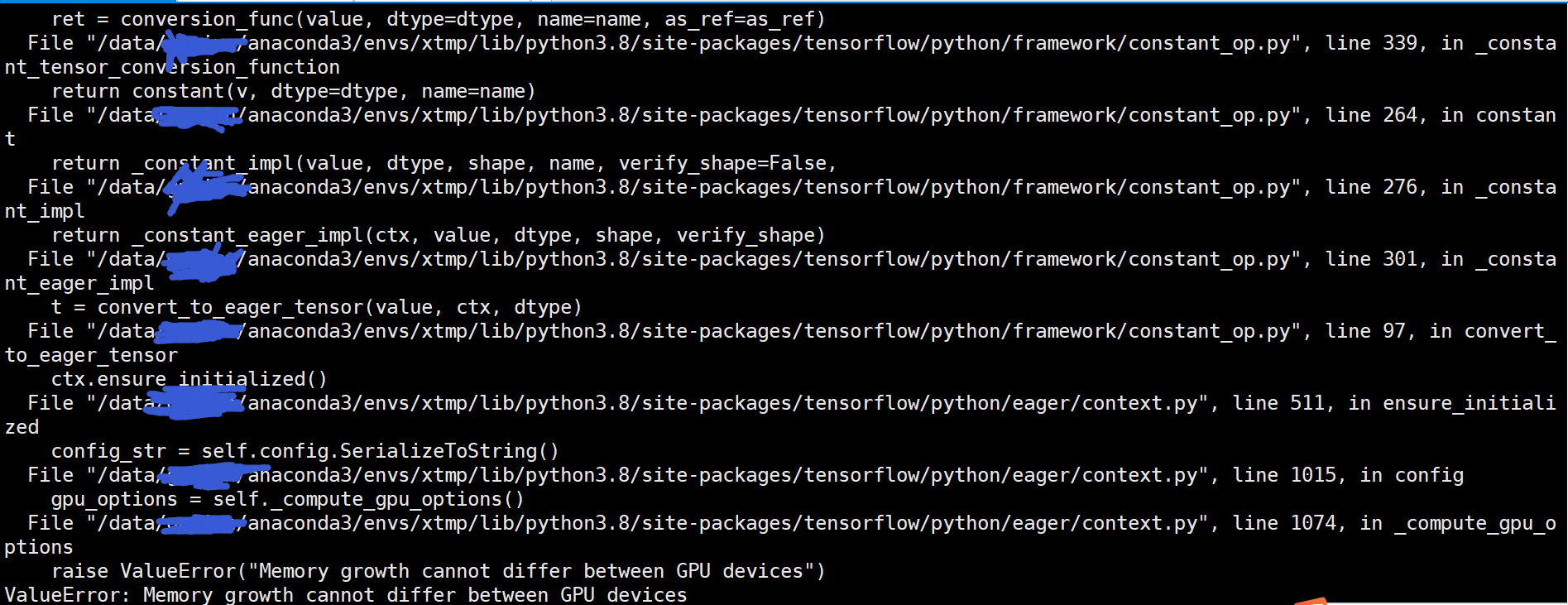
通过这样的对比实验我们可以得出结论,那就是这个并不是TensorFlow版本问题或是显卡版本问题,而是对于多显卡的运行模式下上面的写法并不是很正确,这本身就是TensorFlow的预先设定。
=====================================================
如果代码修改下就可以不报错,也就是添加内容:os.environ['CUDA_VISIBLE_DEVICES']='0'
import os

import tensorflow as tf

from tensorflow.keras.applications import resnet50

os.environ['CUDA_VISIBLE_DEVICES']='0'

physical_devices = tf.config.list_physical_devices('GPU')

print(physical_devices)

tf.config.experimental.set_memory_growth(physical_devices[0], True)

#加载预训练模型

model = resnet50.ResNet50(weights='imagenet')

#save_model方式保存模型

tf.saved_model.save(model, "resnet/1/")
运行正常不报错:

如果修改成下面这样,依然报同样的错误。
import os

import tensorflow as tf

from tensorflow.keras.applications import resnet50

#os.environ['CUDA_VISIBLE_DEVICES']='0'

physical_devices = tf.config.list_physical_devices('GPU')

print(physical_devices)

#os.environ['CUDA_VISIBLE_DEVICES']='0'

tf.config.experimental.set_memory_growth(physical_devices[0], True)

#加载预训练模型

model = resnet50.ResNet50(weights='imagenet')

#save_model方式保存模型

tf.saved_model.save(model, "resnet/1/")
回过头我们再仔细研究下报错的信息:

其实之所以报错就是因为主机有多块显卡,我们默认进行计算的时候是使用所有的显卡的,但是我们设置set_memory_growth时只为了部分显卡做设定,这样就造成了所要调用的显卡中部分显卡为set_memory_growth模式而部分不是,这样就造成了显卡与显卡之间的模式不已配的问题,因此也就报错了:
ValueError: Memory growth cannot differ between GPU devices
解决这个问题也是简单只要我们把所有用到的显卡模式设置为统一,如果设置set_memory_growth模式就为所有显卡都进行设定,也或者我们指定只使用部分显卡然后对这部分指定的显卡设置set_memory_growth模式。而设定只使用部分显卡的写法为:
os.environ['CUDA_VISIBLE_DEVICES']='0'
os.environ['CUDA_VISIBLE_DEVICES']='0,1'
而且需要知道一点,那就是os.environ['CUDA_VISIBLE_DEVICES']='0'这样的设置必须在调用TensorFlow框架之前声明否则不生效,这样同样会报错,就像上面的对比实验一样。
如下面:
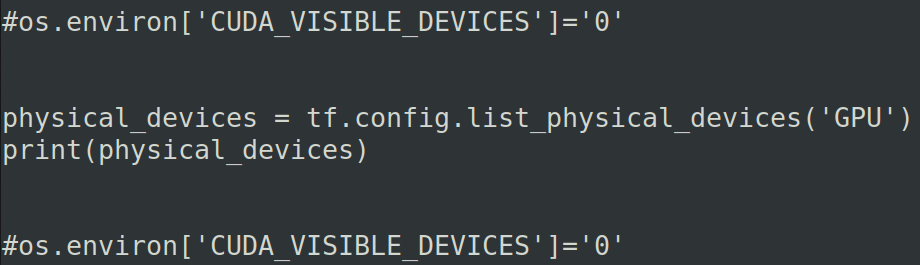
为了方便我们可以直接把os.environ['CUDA_VISIBLE_DEVICES']='0'写在文件的最前面。
===============================================
如果我们想使用多块显卡进行计算,并且想使用set_memory_growth设置,那么我们就需要对这些显卡都进行set_memory_growth模式设置,具体如下代码:
import os

import tensorflow as tf

from tensorflow.keras.applications import resnet50

os.environ['CUDA_VISIBLE_DEVICES']='0,1'

physical_devices = tf.config.list_physical_devices('GPU')

print(physical_devices)

tf.config.experimental.set_memory_growth(physical_devices[0], True)

tf.config.experimental.set_memory_growth(physical_devices[1], True)

#加载预训练模型

model = resnet50.ResNet50(weights='imagenet')

#save_model方式保存模型

tf.saved_model.save(model, "resnet/1/")
关键的设置为:


==================================================
【解决】ValueError: Memory growth cannot differ between GPU devices的更多相关文章
- Allowing GPU memory growth
By default, TensorFlow maps nearly all of the GPU memory of all GPUs (subject to CUDA_VISIBLE_DEVICE ...
- 【转】简单内存泄漏检测方法 解决 Detected memory leaks! 问题
我的环境是: XP SP2 . VS2003 最近在一个项目中,程序退出后都出现内存泄漏: Detected memory leaks! Dumping objects -> {98500} n ...
- _CrtSetBreakAlloc简单内存泄漏检测方法,解决Detected memory leaks!问题
我的环境是: XP SP2 . VS2003 最近在一个项目中,程序退出后都出现内存泄漏: Detected memory leaks! Dumping objects -> {98500} n ...
- 【Visual Studio】简单内存泄漏检测方法 解决 Detected memory leaks! 问题(转)
原文转自 http://blog.csdn.net/u011430225/article/details/47840647 我的环境是: XP SP2.VS2003 最近在一个项目中, 程序退出后都出 ...
- [已解决]ValueError: row index was 65536, not allowed by .xls format
报错: ValueError: row index was 65536, not allowed by .xls format 解决方案: xlrd和xlwt处理的是xls文件,单个sheet最大行数 ...
- 吴裕雄--天生自然TensorFlow高层封装:解决ValueError: Invalid backend. Missing required entry : placeholder
找到对应的keras配置文件keras.json 将里面的内容修改为以下就可以了
- cmd 【已解决】windows连接手机,运行adb devices提示“unauthorized”
报错截图如下: 问题原因:电脑连接手机.手机未授权 解决方式: 设置----开发者选项-----打开USB调试,出现如下弹框,点击"确定"即可解决问题.
- Tensorflow2对GPU内存的分配策略
一.问题源起 从以下的异常堆栈可以看到是BLAS程序集初始化失败,可以看到是执行MatMul的时候发生的异常,基本可以断定可能数据集太大导致memory不够用了. 2021-08-10 16:38:0 ...
- 解决TensorFlow程序无限制占用GPU
今天遇到一个奇怪的现象,使用tensorflow-gpu的时候,出现内存超额~~如果我训练什么大型数据也就算了,关键我就写了一个y=W*x.......显示如下图所示: 程序如下: import te ...
- 【Udacity并行计算课程笔记】- Lesson 3 Fundamental GPU Algorithms (Reduce, Scan, Histogram)
本周主要内容如下: 如何分析GPU算法的速度和效率 3个新的基本算法:归约.扫描和直方图(Reduce.Scan.Histogram) 一.评估标准 首先介绍用于评估GPU计算的两个标准: ste ...
随机推荐
- Linux设置时区
引言 在linux安装好了过后,如果时区不正确,需要手动地对它设置我们需要的时区 设置 控制台输入tzselect,回车 tzselect 2.然后选择 5 "Asia" 亚州,回 ...
- Spring源码——@Component,@Service是如何被解析?
引言 在Spring中,Component.Service是在工作中经常被使用到的注解,为了加深对Spring运行机制的理解,今天我们一起来看一下Spring中对Component等注解的处理方式 C ...
- Go 语言中的异常处理简单实践 panic、recover【GO 基础】
〇.Go 中的异常处理简介 Golang 没有结构化异常,使用 panic 抛出错误,recover 捕获错误. panic.recover 参数类型为 interface{},因此可抛出任何类型对象 ...
- Gradle查看依赖及排除依赖的方法
查看项目的编译依赖,同时写入文件aa.txt F:\sts4\order-test>gradlew :order-test-api:dependencies --configuration co ...
- python + pytest多进程、多线程执行用例生成报告总结
背景: 使用多进程.多线程执行测试用例,生成测试报告:不使用多进程.多线程,以下两种方式都可生成报告 两种生成报告的形式 1. pytestreport(pytest_session_finish时生 ...
- 基于 SQLite 3 的 C 学习:1-开发流程 与 基本函数
背景 SQLite 是 一个 常用于 嵌入式平台的 轻量级的 关系型数据库. 我们已经介绍了 移植 SQLite 3 ,这一讲我们来介绍它的开发,这里仅仅涉及最基本的开发. 高级api:https:/ ...
- FM20S用户手册--Linux系统启动卡制作及系统固化
- 请查收“国产化率认证报告”(100%)——RK3568J工业核心板
创龙科技RK3568J核心板获得"100%国产化"认证日前,创龙科技"国产化率100%认证"的核心板再添一员!RK3568J工业核心板(SOM-TL3568)获 ...
- 国产自主架构!龙芯2K1000LA工业核心板正式发布!
国产自主架构!龙芯2K1000LA工业核心板正式发布! 原创 Tronlong创龙科技 Tronlong创龙科技 2024-06-13 07:50 广东 Tronlong创龙科技 ,赞18 (点击视频 ...
- java 提取证书指纹
正文 用到的依赖 <dependency> <groupId>org.bouncycastle</groupId> <artifactId>bcprov ...