
Structured Streaming 的异常处理 【Concurrent update to the log. Multiple streaming jobs detected】
版本号:
spark 2.3
structured streaming代码
异常信息
KafkaSource[Subscribe[test]]

	at org.apache.spark.sql.execution.streaming.StreamExecution.org$apache$spark$sql$execution$streaming$StreamExecution$$runStream(StreamExecution.scala:295)

	at org.apache.spark.sql.execution.streaming.StreamExecution$$anon$1.run(StreamExecution.scala:189)

Caused by: java.lang.AssertionError: assertion failed: Concurrent update to the log. Multiple streaming jobs detected for 1470

	at scala.Predef$.assert(Predef.scala:170)

	at org.apache.spark.sql.execution.streaming.MicroBatchExecution$$anonfun$org$apache$spark$sql$execution$streaming$MicroBatchExecution$$constructNextBatch$1.apply$mcV$sp(MicroBatchExecution.scala:339)

	at org.apache.spark.sql.execution.streaming.MicroBatchExecution$$anonfun$org$apache$spark$sql$execution$streaming$MicroBatchExecution$$constructNextBatch$1.apply(MicroBatchExecution.scala:338)

	at org.apache.spark.sql.execution.streaming.MicroBatchExecution$$anonfun$org$apache$spark$sql$execution$streaming$MicroBatchExecution$$constructNextBatch$1.apply(MicroBatchExecution.scala:338)

	at org.apache.spark.sql.execution.streaming.ProgressReporter$class.reportTimeTaken(ProgressReporter.scala:271)

	at org.apache.spark.sql.execution.streaming.StreamExecution.reportTimeTaken(StreamExecution.scala:58)

	at org.apache.spark.sql.execution.streaming.MicroBatchExecution.org$apache$spark$sql$execution$streaming$MicroBatchExecution$$constructNextBatch(MicroBatchExecution.scala:338)

	at org.apache.spark.sql.execution.streaming.MicroBatchExecution$$anonfun$runActivatedStream$1$$anonfun$apply$mcZ$sp$1.apply$mcV$sp(MicroBatchExecution.scala:128)

	at org.apache.spark.sql.execution.streaming.MicroBatchExecution$$anonfun$runActivatedStream$1$$anonfun$apply$mcZ$sp$1.apply(MicroBatchExecution.scala:121)

	at org.apache.spark.sql.execution.streaming.MicroBatchExecution$$anonfun$runActivatedStream$1$$anonfun$apply$mcZ$sp$1.apply(MicroBatchExecution.scala:121)

	at org.apache.spark.sql.execution.streaming.ProgressReporter$class.reportTimeTaken(ProgressReporter.scala:271)

	at org.apache.spark.sql.execution.streaming.StreamExecution.reportTimeTaken(StreamExecution.scala:58)

	at org.apache.spark.sql.execution.streaming.MicroBatchExecution$$anonfun$runActivatedStream$1.apply$mcZ$sp(MicroBatchExecution.scala:121)

	at org.apache.spark.sql.execution.streaming.ProcessingTimeExecutor.execute(TriggerExecutor.scala:56)

	at org.apache.spark.sql.execution.streaming.MicroBatchExecution.runActivatedStream(MicroBatchExecution.scala:117)

	at org.apache.spark.sql.execution.streaming.StreamExecution.org$apache$spark$sql$execution$streaming$StreamExecution$$runStream(StreamExecution.scala:279)

	... 1 more
一.异常表象原因
1.异常源码:
          currentBatchId,

          availableOffsets.toOffsetSeq(sources, offsetSeqMetadata)),

          s"Concurrent update to the log. Multiple streaming jobs detected for $currentBatchId")

        logInfo(s"Committed offsets for batch $currentBatchId. " +

          s"Metadata ${offsetSeqMetadata.toString}")
这是一个断言,assert,其中
          currentBatchId,

          availableOffsets.toOffsetSeq(sources, offsetSeqMetadata))
这个函数返回一个布尔值,如果返回为false将抛出目前这样的异常。
那么,这个函数是干嘛的?
    require(metadata != null, "'null' metadata cannot written to a metadata log")

    get(batchId).map(_ => false).getOrElse {

      // Only write metadata when the batch has not yet been written

      writeBatch(batchId, metadata)

      true

    }

  }
从注释中可以看出,当一个structured streaming程序启动时,会去判断当前batch批次是否已经store。如果当前批次的元存储信息已经被存储,那么将返回false,程序将异常退出。
/**
- Store the metadata for the specified batchId and return
trueif successful. If the batchId's - metadata has already been stored, this method will return
false.
*/
2.打个断点
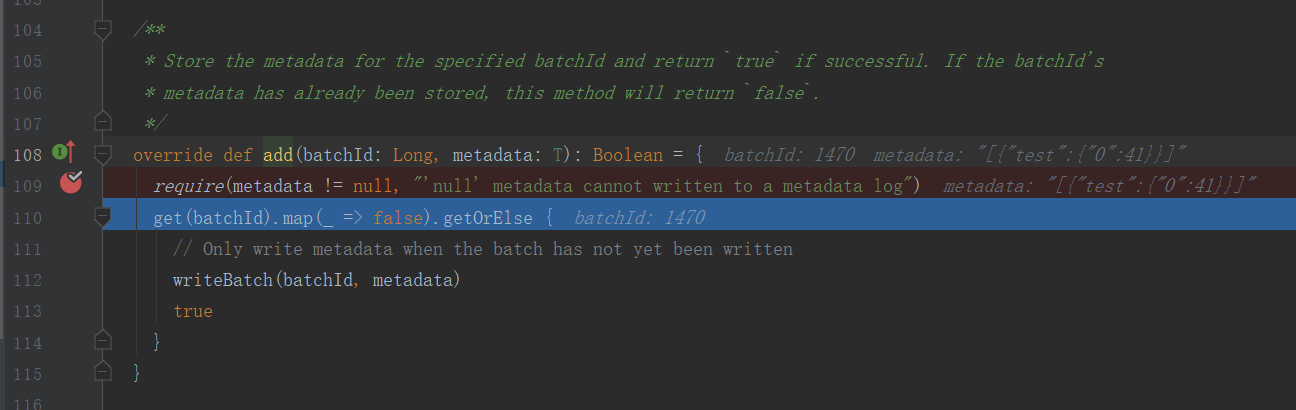
通过断点可以看到:
1.当前batchId = 1470
2.当前kafka里的最新offset是41
然后查看本地checkpoint里的消息
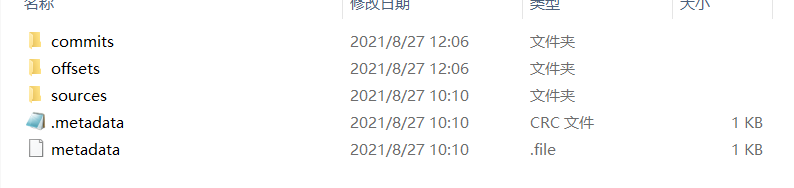
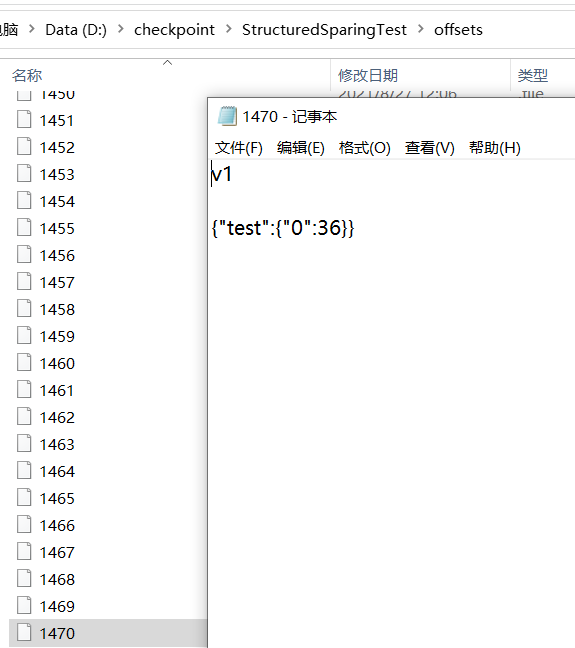
通过checkpoint可以看到
1.在offset文件里,确实存在1470的批次。表面当前批次的元信息已经被存储了。
2.打开1470文件可以看到,里面的最新消息offset为36
二.解决方案
最简单粗暴的就是直接删除checkpoint文件夹。但这样的话,会丢失中间部份数据。即36到41这向条数据。
Current Committed Offsets: {KafkaSource[Subscribe[test]]: {"test":{"0":36}}}
Current Available Offsets: {KafkaSource[Subscribe[test]]: {"test":{"0":41}}}
然后可以指定开始offset.
1.可以通过代码指定各分区的开始offset
.option("startingOffsets", """{"test":{"0":36,"1":-2},"topic2":{"0":-2}}""")
这种方式需要改代码,不推荐。
2.不删除而是更改checkpoint offset下的批次文件
如本例中,删除1470,并将1470里的信息复制到1469.用1470替代前一个批次1469的信息。
三.异常背后的原因
目前只是解决了这个问题。但背后的原因呢?
首先是什么情况导致的?
根据字面意思【Concurrent update to the log. Multiple streaming jobs detected】,在写checkpoint日志时,系统认为有多个streaming程序在写。系统认为不行。不管是不是有多个streaming任务在执行,既然系统有这么判断,那就去看checkpoint日志。
在这之前,先弄清structured streaming的checkpoint机制。
1). StreamExecution 通过 Source.getOffset() 获取最新的 offsets,即最新的数据进度;
2). StreamExecution 将 offsets 等写入到 offsetLog 里, 这里的 offsetLog 是一个持久化的 WAL (Write-Ahead-Log),是将来可用作故障恢复;
3). StreamExecution 构造本次执行的 LogicalPlan
(3a) 将预先定义好的逻辑(即 StreamExecution 里的 logicalPlan 成员变量)制作一个副本出来
(3b) 给定刚刚取到的 offsets,通过 Source.getBatch(offsets) 获取本执行新收到的数据的 Dataset/DataFrame 表示,并替换到 (3a) 中的副本里
经过 (3a), (3b) 两步,构造完成的 LogicalPlan 就是针对本执行新收到的数据的 Dataset/DataFrame 变换(即整个处理逻辑)了
4). 触发对本次执行的 LogicalPlan 的优化,得到 IncrementalExecution
逻辑计划的优化:通过 Catalyst 优化器完成
物理计划的生成与选择:结果是可以直接用于执行的 RDD DAG
逻辑计划、优化的逻辑计划、物理计划、及最后结果 RDD DAG,合并起来就是 IncrementalExecution
5). 将表示计算结果的 Dataset/DataFrame (包含 IncrementalExecution) 交给 Sink,即调用 Sink.add(ds/df)
6). 计算完成后的 commit
(6a) 通过 Source.commit() 告知 Source 数据已经完整处理结束;Source 可按需完成数据的 garbage-collection
(6b) 将本次执行的批次 id 写入到 batchCommitLog 里
注意2和6。前面我们知道,checkpoint下面的有三个文件commit,offset,source。在2的步骤,接收到kafka消息时,会将当前Batch的信息写入offset。直到当前batch处理完毕,再通过6的步骤commit到检查点。
如果2->6正常执行,这是一种正常情况,offset.maxBatchid>commit.maxBatchid。不做讨论。
如果2和6的步骤之间出现异常,执行了2,而没有执行6呢?
这种情况下又分为二种情况:
1.offset.maxBatchid>commit.maxBatchid 这种情况最为常见。表示接收到了kafka消息,但处理过程中异常退出。那么下次重启时,首先从offset.maxBatchId作为开始offset.
2.offset.maxBatchid>commit.maxBatchid 如果仅有一个strutured streaming任务在写checkpoint目录的话,永远不可能出现这种情况。因为2->6顺序执行的。如果出现了这种情况,那么系统就认为有多个任务使用了同一个检查点。这种情况是不被允许的,直接抛出异常。
所以,之所以出现这种异常,就是上述第2种情况。
四验证
反向验证上述猜测。
在检查点目录下,手动保留一个commit/1679的文件,手动删除offset/1679文件,这样offset下最大的batchid将小于commit下的最大batchid.
具体验证程序就不放上来了。有兴趣的可以自行测试一下。
结果是成功复现此异常。
spark官方为什么这样设计?
首先这肯定不是一个BUG。spark问题链接

我的猜测,这是官方的一种保护机制。多个任务使用同一个检查点,相当于多个spark streaming设置了同一个group.id,将会造成kafka数据源混乱。
五后续
同样的代码,保留同一样的checkpoint结构,即commit.maxBatchid>offset.maxBatchid,将系统升级到2.4版本,然后异常消失了!
所以这是打脸了吗?
加了断点,看了一下。
关键代码在
MicroBatchExecution.class line 547
commitLog.add(currentBatchId, CommitMetadata(watermarkTracker.currentWatermark))
在这里和2.3版本一样,调用了这段代码,检查了commit offset目录。
/**

   * Store the metadata for the specified batchId and return `true` if successful. If the batchId's

   * metadata has already been stored, this method will return `false`.

   */

  override def add(batchId: Long, metadata: T): Boolean = {

    require(metadata != null, "'null' metadata cannot written to a metadata log")

    get(batchId).map(_ => false).getOrElse {

      // Only write metadata when the batch has not yet been written

      writeBatchToFile(metadata, batchIdToPath(batchId))

      true

    }

  }
只不过,当文件存在时,并没有抛出异常,放过了,过了,了。。。。。。

Structured Streaming 的异常处理 【Concurrent update to the log. Multiple streaming jobs detected】的更多相关文章
- InvalidOperationException: Operations that change non-concurrent collections must have exclusive access. A concurrent update was performed on this collection and corrupted its state. The collection's
InvalidOperationException: Operations that change non-concurrent collections must have exclusive acc ...
- abap异常处理 , update module
1:异常 https://www.cnblogs.com/rainysblog/p/6665455.html 2:update module https://www.cnblogs.com/cindy ...
- Team Foundation Server 2013 with Update 3 Install LOG
[Info @10:14:58.155] ====================================================================[Info @ ...
- 用ASP.NET Core 2.0 建立规范的 REST API -- DELETE, UPDATE, PATCH 和 Log
本文所需的一些预备知识可以看这里: http://www.cnblogs.com/cgzl/p/9010978.html 和 http://www.cnblogs.com/cgzl/p/9019314 ...
- 论文阅读计划1(Benchmarking Streaming Computation Engines: Storm, Flink and Spark Streaming & An Enforcement of Real Time Scheduling in Spark Streaming & StyleBank: An Explicit Representation for Neural Ima)
Benchmarking Streaming Computation Engines: Storm, Flink and Spark Streaming[1] 简介:雅虎发布的一份各种流处理引擎的基准 ...
- 大batch任务对structured streaming任务影响
信念,你拿它没办法,但是没有它你什么也做不成.—— 撒姆尔巴特勒 前言 对于spark streaming而言,大的batch任务会导致后续batch任务积压,对于structured streami ...
- Structured Streaming Programming Guide结构化流编程指南
目录 Overview Quick Example Programming Model Basic Concepts Handling Event-time and Late Data Fault T ...
- Structured Streaming教程(2) —— 常用输入与输出
上篇了解了一些基本的Structured Streaming的概念,知道了Structured Streaming其实是一个无下界的无限递增的DataFrame.基于这个DataFrame,我们可以做 ...
- Kafka:ZK+Kafka+Spark Streaming集群环境搭建(十六)Structured Streaming中ForeachSink的用法
Structured Streaming默认支持的sink类型有File sink,Foreach sink,Console sink,Memory sink. ForeachWriter实现: 以写 ...
- Apache Spark 2.2.0 中文文档 - Structured Streaming 编程指南 | ApacheCN
Structured Streaming 编程指南 概述 快速示例 Programming Model (编程模型) 基本概念 处理 Event-time 和延迟数据 容错语义 API 使用 Data ...
随机推荐
- Goravel ORM 新增模型关联,用 Golang 写关联也可以跟 Laravel 一样简单
关于 Goravel Goravel 是一个功能完备.具有良好扩展能力的 Web 应用程序框架.作为一个起始脚手架帮助 Golang 开发者快速构建自己的应用.框架风格与 Laravel 保持一致,让 ...
- 【CS231n assignment 2022】Assignment 2 - Part 2,优化器,批归一化以及层归一化
前言 博客主页:睡晚不猿序程 首发时间:2022.7.23 最近更新时间:2022.7.23 本文由 睡晚不猿序程 原创 作者是蒻蒟本蒟,如果文章里有任何错误或者表述不清,请 tt 我,万分感谢!or ...
- Java面试——缓存
一.什么是缓存 [1]缓存就是数据交换的缓冲区(称作:Cache),当某一硬件要读取数据时,会首先从缓存中查询数据,有则直接执行,不存在时从磁盘中获取.由于缓存的数据比磁盘快的多,所以缓存的作用就是帮 ...
- 面试突击:MVCC 和间隙锁有什么区别?
MVCC 和间隙锁是两种完全不同的机制,但它们的目的都是相同的,都是用来保证数据库并发访问的,我们先来看二者的定义. MVCC 定义 MVCC 是多版本并发控制(Multi-Version Concu ...
- 势如破竹的雷霆两招,微服务进阶Serverless
在应用开发中,服务器的开发一直是最重要的部分之一.在服务器开发不断演进过程中,我们可以将它简单分为5个阶段: 物理机阶段->虚拟机阶段->云计算阶段->容器阶段->当前的Se ...
- webrtc QOS笔记二 音频buffer数据不足生成很多gap的问题
webrtc QOS笔记二 音频buffer数据不足生成很多gap的问题 目录 webrtc QOS笔记二 音频buffer数据不足生成很多gap的问题 记录个iusse. 插入音频数据后,GetAu ...
- 数据挖掘关联分析—R实现
关联分析 关联分析又称关联挖掘,就是在交易数据.关系数据或其他信息载体中,查找存在于项目集合或对象集合之间的频繁模式.关联.相关性或因果结构.或者说,关联分析是发现交易数据库中不同商品(项)之间的联系 ...
- MySQL 8.0:无锁可扩展的 WAL 设计
这篇文章整理自MySQL官方文档,介绍了8.0在预写式日志上实现上的修改,观点总结如下: 在8.0以前,为了保证flush list的顺序,redo log buffer写入过程需要加锁,无法实现并行 ...
- Web前端开发必看的100道大厂面试题
1. 说说gulp和webpack的区别 开放式题目 Gulp强调的是前端开发的工作流程.我们可以通过配置一系列的task,定义task处理的事务(例如文件压缩合并.雪碧图.启动server.版本控制 ...
- [Linux]VMware启动CENOTS7时报"welcome to emergency mode!"【转载】
1 问题描述 由于通过VMwaer快速克隆了一台CENTOS7.9的虚拟机. 但启动时报如下错误信息 welcome to emergency mode!after logging in ,type ...