
Asp.Net MVC<八>:View的呈现
ActionResult
原则上任何类型的响应都可以利用当前的HttpResponse来完成。但是MVC中我们一般将针对请求的响应实现在一个ActionResult对象中。
public abstract class ActionResult

{

    protected ActionResult();

    public abstract void ExecuteResult(ControllerContext context);

}
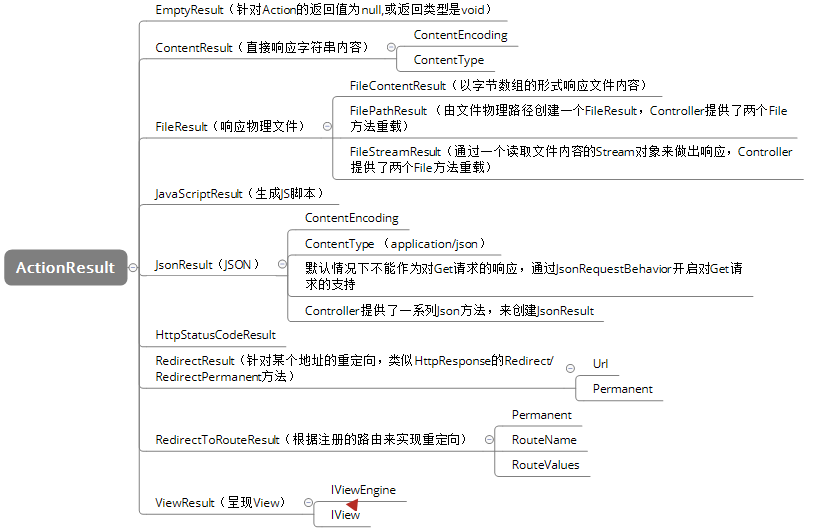
ViewResult和ViewEngine
IViewEngine
viewResult通过ViewEngine实现对View的获取、激活和呈现。
public interface IViewEngine

{

    ViewEngineResult FindPartialView(ControllerContext controllerContext, string partialViewName, bool useCache);

    ViewEngineResult FindView(ControllerContext controllerContext, string viewName, string masterName, bool useCache);

    void ReleaseView(ControllerContext controllerContext, IView view);

}
现有两种实现:WebFormViewEngine(.aspx,.ascx),RazorViewEngine(.cshtml/vbhtml)
public void Index()

{

    ViewEngineResult result = ViewEngines.Engines.FindView(ControllerContext, "NonExistView", null);

    foreach (var item in result.SearchedLocations)

    {

        Response.Write(item + "<br/>");

    }

}
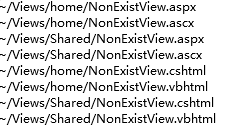
因为WebFormViewEngine排在RazorViewEngine之前,所以前者被优先使用。可以用 ViewEngines.Engines.RemoveAt(0);来移除对WebFormViewEngine的调用。
ViewResult
public class ViewResult : ViewResultBase

{

    public string MasterName { get; set; }

    protected override ViewEngineResult FindView(ControllerContext context);

}
ViewResultBase
public abstract class ViewResultBase: ActionResult

{

    public object Model { get; }

    //     临时数据。

    public TempDataDictionary TempData { get; set; }

    //     视图。

    public IView View { get; set; }

    //     视图包

    public dynamic ViewBag { get; }

    //     视图数据。

    public ViewDataDictionary ViewData { get; set; }

    //     视图引擎的集合。

    public ViewEngineCollection ViewEngineCollection { get; set; }

    //     视图的名称。

    public string ViewName { get; set; }

    //     视图引擎。

    protected abstract ViewEngineResult FindView(ControllerContext context);

    public override void ExecuteResult(ControllerContext context)

    {

        if (string.IsNullOrEmpty(this.ViewName))

        {

            this.ViewName = context.RouteData.GetRequiredString("action");

        }

        ViewEngineResult result = null;

        if(this.View == null)

        {

            result = this.FindView(context);

            this.View = result.View;

        }

        TextWriter output = context.HttpContext.Response.Output;

        ViewContext viewContext = new ViewContext(context, this.View, this.ViewData, this.TempData, output);

        this.View.Render(viewContext, output);

        if(result != null)

        {

            result.ViewEngine.ReleaseView(context, this.View);

        }

    }

}
抽象类Controller中的几个重载方法

View的编译原理
Asp.net mvc默认情况下采用动态编译的方式对View文件实施编译。当我们在部署的时候,需要对.cshtml或.vbhtml文件进行打包。
针对某个文件的第一次访问会触发针对它的编译,一个View会被编译成一个具体的类型。View文件的每一次修改都会导致再一次编译。和.aspx页面一样的编译方式,默认是以目录为单位的,也就是同一个目录下的多个View被编译到同一个程序集中。
View程序集
public static class HtmlHelperExtensions

{

    public static MvcHtmlString ListViewAssemblies(this HtmlHelper helper)

    {

        TagBuilder ul = new TagBuilder("ul");

        foreach (var assembly in AppDomain.CurrentDomain.GetAssemblies().Where(a => a.FullName.StartsWith("App_Web_")))

        {

            TagBuilder li = new TagBuilder("li");

            li.InnerHtml = assembly.FullName;

            ul.InnerHtml += li.ToString();

        }

        return new MvcHtmlString(ul.ToString());

    }

}
View:
<div>当前View类型:@this.GetType().AssemblyQualifiedName</div>

<div>当前加载的View程序集:</div>

@Html.ListViewAssemblies()
页面展示:

BuildManager
Response.Write(BuildManager.GetCompiledType("~/Views/Bar/Action1.cshtml") + "<br/>");
Response.Write(BuildManager.GetCompiledType("~/Views/Bar/Action2.cshtml") + "<br/>");
Response.Write(BuildManager.TargetFramework.FullName+ "<br/>");
Response.Write(BuildManager.GetCompiledCustomString("~/Views/Foo/Action1.cshtml") + "<br/>");
Response.Write(BuildManager.GetCompiledAssembly("~/Views/Foo/Action1.cshtml").Location + "<br/>");
页面展示:

WebViewPage的继承树
由.cshtml文件编译后产生的类文件
namespace ASP

{

    using System;

    using System.Collections.Generic;

    using System.IO;

    using System.Linq;

    using System.Net;

    using System.Web;

    using System.Web.Helpers;

    using System.Web.Security;

    using System.Web.UI;

    using System.Web.WebPages;

    using System.Web.Mvc;

    using System.Web.Mvc.Ajax;

    using System.Web.Mvc.Html;

    using System.Web.Optimization;

    using System.Web.Routing;

    using MvcApp;

    public class _Page_Views_Foo_Action1_cshtml : System.Web.Mvc.WebViewPage<dynamic>

    {

        protected ASP.global_asax ApplicationInstance

        {

            get

            {

                return ((ASP.global_asax)(Context.ApplicationInstance));

            }

        }

        public override void Execute()

        {

            BeginContext("~/Views/Foo/Action1.cshtml", 0, 14, true);

            WriteLiteral("<div>当前View类型:");

            EndContext("~/Views/Foo/Action1.cshtml", 0, 14, true);

            BeginContext("~/Views/Foo/Action1.cshtml", 15, 36, false);

            Write(this.GetType().AssemblyQualifiedName);

            EndContext("~/Views/Foo/Action1.cshtml", 15, 36, false);

            BeginContext("~/Views/Foo/Action1.cshtml", 51, 34, true);

            WriteLiteral("</div>\r\n<div>当前加载的View程序集:</div>\r\n");

            EndContext("~/Views/Foo/Action1.cshtml", 51, 34, true);

            BeginContext("~/Views/Foo/Action1.cshtml", 86, 25, false);

            Write(Html.ListViewAssemblies());

            EndContext("~/Views/Foo/Action1.cshtml", 86, 25, false);

            BeginContext("~/Views/Foo/Action1.cshtml", 111, 2, true);

            WriteLiteral("\r\n");

            EndContext("~/Views/Foo/Action1.cshtml", 111, 2, true);

        }

    }

}
View编译后的生成的类型是WebViewPage<TModel>的子类,WebViewPage<TModel>是WebViewPage的子类,泛型TModel是View的Model类型。
WebPageExecutingBase
public abstract class WebPageExecutingBase

{

    public virtual dynamic App { get; }

    public virtual HttpApplicationStateBase AppState { get; }

    public virtual HttpContextBase Context { get; set; }

    public virtual string VirtualPath { get; set; }

    public virtual IVirtualPathFactory VirtualPathFactory { get; set; }

    public abstract void Execute();

    public virtual string Href(string path, params object[] pathParts);

    public virtual string NormalizePath(string path);

    protected internal virtual TextWriter GetOutputWriter();

    protected internal virtual string NormalizeLayoutPagePath(string layoutPagePath);

    //动态内容

    public abstract void Write(object value);

    public abstract void Write(HelperResult result);

    public static void WriteTo(TextWriter writer, object content);

    public static void WriteTo(TextWriter writer, HelperResult content);

    //静态内容

    public abstract void WriteLiteral(object value);

    public static void WriteLiteralTo(TextWriter writer, object content);

    public virtual void WriteAttribute(string name, PositionTagged<string> prefix, PositionTagged<string> suffix, params AttributeValue[] values);

    public virtual void WriteAttributeTo(TextWriter writer, string name, PositionTagged<string> prefix, PositionTagged<string> suffix, params AttributeValue[] values);

    protected internal virtual void WriteAttributeTo(string pageVirtualPath, TextWriter writer, string name, PositionTagged<string> prefix, PositionTagged<string> suffix, params AttributeValue[] values);

    protected internal void BeginContext(int startPosition, int length, bool isLiteral);

    protected internal void BeginContext(string virtualPath, int startPosition, int length, bool isLiteral);

    protected internal void BeginContext(TextWriter writer, int startPosition, int length, bool isLiteral);

    protected internal void BeginContext(TextWriter writer, string virtualPath, int startPosition, int length, bool isLiteral);

    protected internal void EndContext(int startPosition, int length, bool isLiteral);

    protected internal void EndContext(string virtualPath, int startPosition, int length, bool isLiteral);

    protected internal void EndContext(TextWriter writer, int startPosition, int length, bool isLiteral);

    protected internal void EndContext(TextWriter writer, string virtualPath, int startPosition, int length, bool isLiteral);

}
WebPageRenderingBase
public abstract class WebPageRenderingBase : WebPageExecutingBase, ITemplateFile

{

    public virtual Cache Cache { get; }

    public string Culture { get; set; }

    public virtual bool IsAjax { get; }

    public virtual bool IsPost { get; }

    public abstract string Layout { get; set; }

    //     An object that contains page data.

    public abstract dynamic Page { get; }

    public abstract IDictionary<object, dynamic> PageData { get; }

    public WebPageContext PageContext { get; }

    public ProfileBase Profile { get; }

    public virtual HttpRequestBase Request { get; }

    public virtual HttpResponseBase Response { get; }

    public virtual HttpServerUtilityBase Server { get; }

    public virtual HttpSessionStateBase Session { get; }

    public virtual TemplateFileInfo TemplateInfo { get; }

    public string UICulture { get; set; }

    public virtual IList<string> UrlData { get; }

    public virtual IPrincipal User { get; internal set; }

    protected internal IDisplayMode DisplayMode { get; }

    public abstract void ExecutePageHierarchy();

    public abstract HelperResult RenderPage(string path, params object[] data);

}
ExecutePageHierarchy负责整个页面内容的输出,
View自身内容通过重写Execute方法来输出。
WebPageBase
public abstract class WebPageBase : WebPageRenderingBase

{

    //其他成员……

    //     Gets or sets the path of a layout page.

    public override string Layout { get; set; }

    public TextWriter Output { get; }

	//     Returns the text writer instance that is used to render the page.

    protected internal override TextWriter GetOutputWriter();

    //     Gets the stack of System.IO.TextWriter objects for the current page context.

    public Stack<TextWriter> OutputStack { get; }

	//     Returns and removes the context from the top of the System.Web.WebPages.WebPageBase.OutputStack

    //     instance.

    public void PopContext();

	//     Inserts the specified context at the top of the System.Web.WebPages.WebPageBase.OutputStack

    //     instance.

    public void PushContext(WebPageContext pageContext, TextWriter writer);

    //     Executes the code in a set of dependent web pages.

    public override void ExecutePageHierarchy();

    //     Executes the code in a set of dependent web pages by using the specified parameters.

    public void ExecutePageHierarchy(WebPageContext pageContext, TextWriter writer);

    //     Executes the code in a set of dependent web pages by using the specified context,

    //     writer, and start page.

    public void ExecutePageHierarchy(WebPageContext pageContext, TextWriter writer, WebPageRenderingBase startPage);

    //     Returns a value that indicates whether the specified section is defined in the

    //     page.

    public bool IsSectionDefined(string name);

    //     Called by content pages to create named content sections.

    public void DefineSection(string name, SectionWriter action);

    //     In layout pages, renders the portion of a content page that is not within a named

    //     section.

    public HelperResult RenderBody();

    //     Renders the content of one page within another page.

    public override HelperResult RenderPage(string path, params object[] data);

    //     In layout pages, renders the content of a named section.

    public HelperResult RenderSection(string name);

    //     In layout pages, renders the content of a named section and specifies whether

    //     the section is required.

    public HelperResult RenderSection(string name, bool required);

    //     Writes the specified object as an HTML-encoded string.

    public override void Write(object value);

    //     Writes the specified System.Web.WebPages.HelperResult object as an HTML-encoded

    //     string.

    public override void Write(HelperResult result);

    //     Writes the specified object without HTML-encoding it first.

    public override void WriteLiteral(object value);

}
WebPageBase 实现了抽象方法ExecutePageHierarchy,定义了额外的两个ExecutePageHierarchy方法重载,参数startPage表示定义在“_ViewStart.cshtml”文件的开始页面。
最初呈现的内容来源于3个部分:布局文件,开始页面和View自身的内容。完整页面内容的呈现通过调用ExecutePageHierarchy方法来完成。
WebPageBase 实现了抽象方法Write/WriteLiteral和抽象属性 Layout。
定义了在布局文件上输出Section的方法。
WebViewPage
public abstract class WebViewPage : WebPageBase, IViewDataContainer, IViewStartPageChild

{

    //     The System.Web.Mvc.AjaxHelper object that is used to render HTML using Ajax.

    public AjaxHelper<object> Ajax { get; set; }

    //     The System.Web.HttpContext object that is associated with the page.

    public override HttpContextBase Context { get; set; }

    //     The System.Web.Mvc.HtmlHelper object that is used to render HTML elements.

    public HtmlHelper<object> Html { get; set; }

    public object Model { get; }

    public TempDataDictionary TempData { get; }

    public UrlHelper Url { get; set; }

    public dynamic ViewBag { get; }

    public ViewContext ViewContext { get; set; }

    public ViewDataDictionary ViewData { get; set; }

    //     Runs the page hierarchy for the ASP.NET Razor execution pipeline.

    public override void ExecutePageHierarchy();

    //     Initializes the System.Web.Mvc.AjaxHelper, System.Web.Mvc.HtmlHelper,

    //     and System.Web.Mvc.UrlHelper classes.

    public virtual void InitHelpers();

    //     Sets the view context and view data for the page.

    protected override void ConfigurePage(WebPageBase parentPage);

    protected virtual void SetViewData(ViewDataDictionary viewData);

}
WebViewPage<TModel>
public abstract class WebViewPage<TModel> : WebViewPage

{

    public AjaxHelper<TModel> Ajax { get; set; }

    public HtmlHelper<TModel> Html { get; set; }

    public TModel Model { get; }

    public ViewDataDictionary<TModel> ViewData { get; set; }

    public override void InitHelpers();

    protected override void SetViewData(ViewDataDictionary viewData);

}
提供针对泛型参数TModel的属性Ajax, Html, Model, ViewData, 而初始化它们的InitHelpers和SetViewData方法也被重写
View的呈现
IView
对应View引擎来说,View通过IView来表示
public interface IView

{

    void Render(ViewContext viewContext, TextWriter writer);

}
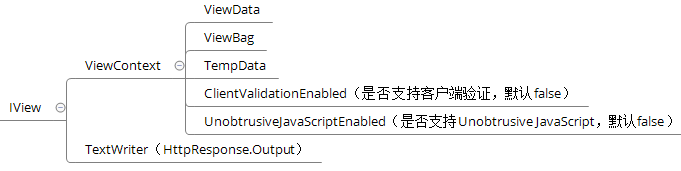
View的呈现体现在对WebViewPage对象的激活上。
在Asp.net mvc 中Razor引擎下的View通过RazorView对象来表示,WebForm引擎的View则通过WebFormView对象表示,二者都继承自BuildManagerCompiledView。
RazorView 实现
BuildManagerCompiledView
public abstract class BuildManagerCompiledView : IView

{

    internal IViewPageActivator ViewPageActivator;

    private IBuildManager _buildManager;

    private ControllerContext _controllerContext;

    internal IBuildManager BuildManager

    {

        get

        {

            if (this._buildManager == null)

            {

                this._buildManager = new BuildManagerWrapper();

            }

            return this._buildManager;

        }

        set

        {

            this._buildManager = value;

        }

    }

    public string ViewPath { get; protected set; }

    protected BuildManagerCompiledView(ControllerContext controllerContext, string viewPath) : this(controllerContext, viewPath, null)

    {

    }

    protected BuildManagerCompiledView(ControllerContext controllerContext, string viewPath, IViewPageActivator viewPageActivator) : this(controllerContext, viewPath, viewPageActivator, null)

    {

    }

    internal BuildManagerCompiledView(ControllerContext controllerContext, string viewPath, IViewPageActivator viewPageActivator, IDependencyResolver dependencyResolver)

    {

        if (controllerContext == null)

        {

            throw new ArgumentNullException("controllerContext");

        }

        if (string.IsNullOrEmpty(viewPath))

        {

            throw new ArgumentException(MvcResources.Common_NullOrEmpty, "viewPath");

        }

        this._controllerContext = controllerContext;

        this.ViewPath = viewPath;

        this.ViewPageActivator = (viewPageActivator ?? new BuildManagerViewEngine.DefaultViewPageActivator(dependencyResolver));

    }

    public virtual void Render(ViewContext viewContext, TextWriter writer)

    {

        if (viewContext == null)

        {

            throw new ArgumentNullException("viewContext");

        }

        object obj = null;

        Type compiledType = this.BuildManager.GetCompiledType(this.ViewPath);

        if (compiledType != null)

        {

            obj = this.ViewPageActivator.Create(this._controllerContext, compiledType);

        }

        if (obj == null)

        {

            throw new InvalidOperationException(string.Format(CultureInfo.CurrentCulture, MvcResources.CshtmlView_ViewCouldNotBeCreated, new object[]

            {

            this.ViewPath

            }));

        }

        this.RenderView(viewContext, writer, obj);

    }

    protected abstract void RenderView(ViewContext viewContext, TextWriter writer, object instance);

}
RazorView
/// <summary>Represents the class used to create views that have Razor syntax.</summary>

public class RazorView : BuildManagerCompiledView

{

    public string LayoutPath { get; private set; }

    public bool RunViewStartPages { get; private set; }

    internal StartPageLookupDelegate StartPageLookup { get; set; }

    internal IVirtualPathFactory VirtualPathFactory { get; set; }

    internal DisplayModeProvider DisplayModeProvider { get; set; }

    public IEnumerable<string> ViewStartFileExtensions { get; private set; }

    public RazorView(ControllerContext controllerContext, string viewPath, string layoutPath, bool runViewStartPages, IEnumerable<string> viewStartFileExtensions) : this(controllerContext, viewPath, layoutPath, runViewStartPages, viewStartFileExtensions, null)

    {

    }

    /// <summary>Initializes a new instance of the <see cref="T:System.Web.Mvc.RazorView" /> class using the view page activator.</summary>

    /// <param name="controllerContext">The controller context.</param>

    /// <param name="viewPath">The view path.</param>

    /// <param name="layoutPath">The layout or master page.</param>

    /// <param name="runViewStartPages">A value that indicates whether view start files should be executed before the view.</param>

    /// <param name="viewStartFileExtensions">The set of extensions that will be used when looking up view start files.</param>

    /// <param name="viewPageActivator">The view page activator.</param>

    public RazorView(ControllerContext controllerContext, string viewPath, string layoutPath, bool runViewStartPages, IEnumerable<string> viewStartFileExtensions, IViewPageActivator viewPageActivator) : base(controllerContext, viewPath, viewPageActivator)

    {

        this.LayoutPath = (layoutPath ?? string.Empty);

        this.RunViewStartPages = runViewStartPages;

        this.StartPageLookup = new StartPageLookupDelegate(StartPage.GetStartPage);

        this.ViewStartFileExtensions = (viewStartFileExtensions ?? Enumerable.Empty<string>());

    }

    /// <summary>Renders the specified view context by using the specified writer and <see cref="T:System.Web.Mvc.WebViewPage" /> instance.</summary>

    /// <param name="viewContext">The view context.</param>

    /// <param name="writer">The writer that is used to render the view to the response.</param>

    /// <param name="instance">The <see cref="T:System.Web.Mvc.WebViewPage" /> instance.</param>

    protected override void RenderView(ViewContext viewContext, TextWriter writer, object instance)

    {

        if (writer == null)

        {

            throw new ArgumentNullException("writer");

        }

        WebViewPage webViewPage = instance as WebViewPage;

        if (webViewPage == null)

        {

            throw new InvalidOperationException(string.Format(CultureInfo.CurrentCulture, MvcResources.CshtmlView_WrongViewBase, new object[]

            {

                base.ViewPath

            }));

        }

        webViewPage.OverridenLayoutPath = this.LayoutPath;

        webViewPage.set_VirtualPath(base.ViewPath);

        webViewPage.ViewContext = viewContext;

        webViewPage.ViewData = viewContext.ViewData;

        webViewPage.InitHelpers();

        if (this.VirtualPathFactory != null)

        {

            webViewPage.set_VirtualPathFactory(this.VirtualPathFactory);

        }

        if (this.DisplayModeProvider != null)

        {

            webViewPage.set_DisplayModeProvider(this.DisplayModeProvider);

        }

        WebPageRenderingBase webPageRenderingBase = null;

        if (this.RunViewStartPages)

        {

            webPageRenderingBase = this.StartPageLookup(webViewPage, RazorViewEngine.ViewStartFileName, this.ViewStartFileExtensions);

        }

        webViewPage.ExecutePageHierarchy(new WebPageContext(viewContext.HttpContext, null, null), writer, webPageRenderingBase);

    }

}
以IoC的方式激活View
RazorView 的构造函数中有用到IViewPageActivator,IViewPageActivator旨在View对象的激活。当没有指定一个具体的ViewPageActivator时,默认采用 DefaultViewPageActivator对象。
internal class DefaultViewPageActivator : IViewPageActivator

{

    private Func<IDependencyResolver> _resolverThunk;

    public DefaultViewPageActivator() : this(null)

    {

    }

    public DefaultViewPageActivator(IDependencyResolver resolver)

    {

        if (resolver == null)

        {

            this._resolverThunk = (() => DependencyResolver.Current);

            return;

        }

        this._resolverThunk = (() => resolver);

    }

    public object Create(ControllerContext controllerContext, Type type)

    {

        object result;

        try

        {

            result = (this._resolverThunk().GetService(type) ?? Activator.CreateInstance(type));

        }

        catch (MissingMethodException originalException)

        {

            MissingMethodException ex = TypeHelpers.EnsureDebuggableException(originalException, type.FullName);

            if (ex != null)

            {

                throw ex;

            }

            throw;

        }

        return result;

    }

}
扩展
扩展WebViewPage
IDependencyResolver 是Asp.net mvc提供的IoC接入口,所以这里可以介入到具体某个WebViewPage<TModel>类型的实例化。
下面的例子是向View中注入一个属性,用于在页面中便捷地读取资源文件信息。
public abstract class LocalizableViewPage<TModel> : WebViewPage<TModel>

{

    [Inject]

    public ResourceReader ResourceReader { get; set; }

}
public class DefaultResourceReader : ResourceReader

{

    public override string GetString(string name)

    {

        return Resources.ResourceManager.GetString(name);

    }

}
在View 顶部 添加命令 @inherits LocalizableViewPage<>
@inherits LocalizableViewPage<object>

<html>

<head>

    <title></title>

</head>

<body>

    <h2>@ResourceReader.GetString("HelloWorld")</h2>

</body>

</html>
或者修改View文件夹下的Web.config配置
<system.web.webPages.razor>

  <host factoryType="System.Web.Mvc.MvcWebRazorHostFactory, System.Web.Mvc, Version=5.0.0.0, Culture=neutral, PublicKeyToken=31BF3856AD364E35" />

  <pages pageBaseType="LocalizableViewPage">

    <namespaces>

      <add namespace="System.Web.Mvc" />

      <add namespace="System.Web.Mvc.Ajax" />

      <add namespace="System.Web.Mvc.Html" />

      <add namespace="System.Web.Optimization"/>

      <add namespace="System.Web.Routing" />

      <add namespace="MvcApp" />

    </namespaces>

  </pages>

</system.web.webPages.razor>
扩展RazorViewEngine
public class MyViewEngine : RazorViewEngine

{

    public MyViewEngine()

    {

        ViewLocationFormats = new[]

        {

            "~/Views/{1}/{0}.cshtml",

            "~/Views/Shared/{0}.cshtml",

            "~/Views/Areas/{1}/{0}.cshtml"

        };

        AreaViewLocationFormats = new[]

        {

            "~/Areas/{2}/Views/{1}/{0}.cshtml",

            "~/Areas/{2}/Views/Shared/{0}.cshtml",

            "~/Areas/{2}/Views/Config/{1}/{0}.cshtml",

            "~/Areas/{2}/Views/User/{1}/{0}.cshtml",

            "~/Areas/{2}/Views/Case/{1}/{0}.cshtml",

            "~/Areas/{2}/Views/Config/Shared/{0}.cshtml",

            "~/Areas/{2}/Views/User/Shared/{0}.cshtml",

            "~/Areas/{2}/Views/Case/Shared/{0}.cshtml"

        };

    }

    public override ViewEngineResult FindView(ControllerContext controllerContext, string viewName, string masterName, bool useCache)

    {

        return base.FindView(controllerContext, viewName, masterName, useCache);

    }

}

ViewEngines.Engines.Clear();

ViewEngines.Engines.Add(new MyViewEngine());
Asp.Net MVC<八>:View的呈现的更多相关文章
- Asp.net mvc 中View 的呈现(二)
[toc] 上一节介绍了 Asp.net mvc 中除 ViewResult 外的所有的 ActionResult,这一节介绍 ViewResult. ViewResultBase ViewResul ...
- Asp.net mvc 中View的呈现(一)
[toc] 我们知道针对客户端的请求,最终都会转换为对 Controller 中的一个 Action 方法的调用,指定的 Action 方法会返回一个 ActionResult 类型的实例来响应该请求 ...
- 白话学习MVC(九)View的呈现一
一.概述 本节来看一下ASP.NET MVC[View的呈现]的内容,View的呈现是在Action执行之后进行,Action的执行生成一个ActionResult,[View的呈现]的功能就是:通过 ...
- 白话学习MVC(十)View的呈现二
本节将接着<白话学习MVC(九)View的呈现一>来继续对ViewResult的详细执行过程进行分析! 9.ViewResult ViewResult将视图页的内容响应给客户端! 由于Vi ...
- 返璞归真 asp.net mvc (4) - View/ViewEngine
原文:返璞归真 asp.net mvc (4) - View/ViewEngine [索引页] [源码下载] 返璞归真 asp.net mvc (4) - View/ViewEngine 作者:web ...
- ASP.NET MVC 之Model的呈现
ASP.NET MVC 之Model的呈现(仅此一文系列三) 本文目的 我们来看一个小例子,在一个ASP.NET MVC项目中创建一个控制器Home,只有一个Index: public class H ...
- ASP.NET MVC 中 View 的设计
1. 前言 感觉有好长时间没有接触View 了,周末闲来无事,翻翻书桌上的书来回顾回顾ASP.NET MVC中View的相关内容. 2. View概述 View 通过应用程序在Action 中返回 ...
- 仅此一文让你明白ASP.NET MVC 之Model的呈现(仅此一文系列三)
本文目的 我们来看一个小例子,在一个ASP.NET MVC项目中创建一个控制器Home,只有一个Index: public class HomeController : Controller { pu ...
- ASP.NET MVC 之View
仅此一文让你明白ASP.NET MVC 之View的显示(仅此一文系列二) 题外话 一周之前写的<仅此一文让你明白ASP.NET MVC原理>受到了广大学习ASP.NET MVC同学的 ...
- 预热ASP.NET MVC 的View
ASP.NET MVC 的View 预设是Load on Demand(按需加载),也就是说View 第一次要Render 的时候才会去载入跟编译,这个就会造成一个现象,即使Web 应用程式已经完成启 ...
随机推荐
- Sharepoint学习笔记—习题系列--70-576习题解析 -(Q131-Q134)
Question 131 You are designing multiple SharePoint 2010 features. You have the following requiremen ...
- Fragment配合RadioGroup实现点击切换布局
这里用了 compile 'com.jakewharton:butterknife:7.0.1' compile 'org.greenrobot:eventbus:3.0.0' MainActivit ...
- sql 判断 函数 存储过程是否存在的方法
下面为您介绍sql下用了判断各种资源是否存在的代码,需要的朋友可以参考下,希望对您学习sql的函数及数据库能够有所帮助.库是否存在if exists(select * from master..sys ...
- SqlServer主键和外键
*主键 主键就是数据行的唯一标识.不会重复的列才能当主键.一个表可以没有主键,但是会非常难以处理,因此没有特殊理由表都要设定主键. *主键特点:1不能重复的列.2主键不能为null. *同名时如何处理 ...
- Memcache学习整理
一.Memcache 是什么? 组成:程序进程管理.Socket 程序进程:Memcache把内存先分成几个大份,每一份分成多个小份.例如:小份中有5M...0.9M.0.8M.....0.1M,一份 ...
- 非root用户的SSH免密登录
在网上找到的教程一般是这样说的 cd ~/.ssh/ # 若没有该目录,请先执行一次ssh localhost ssh-keygen -t rsa # 会有提示,都按回车就可以 cat id_rsa. ...
- nodejs 使用Google浏览器进行可视化调试——Node Inspector工具
1.npm安装Node Inspector工具,全局安装 命令行执行npm install -g node-inspector 2.启动Node Inspector工具,命令行执行 node-insp ...
- 曲演杂坛--当ROW_NUMBER遇到TOP
值班期间研发同事打来电话,说应用有超时,上服务器上检查发现有SQL大批量地执行,该SQL消耗IO资源较多,导致服务器存在IO瓶颈,细看SQL,发现自己都被整蒙了,不知道这SQL是要干啥,处理完问题赶紧 ...
- 看php手册2015-03-19版后备注
类与对象->基本概念:1,#############################::class 自 PHP 5.5 起,关键词 class 也可用于类名的解析.使用 ClassName::c ...
- 片元着色器(Fragment Shader)被称为像素着色器(Pixel Shader),但
片元着色器(Fragment Shader)被称为像素着色器(Pixel Shader),但片元着色器是一个更合适的名字, 因为此时的片元并不是一个真正意义上的像素.