
clickhouse 安装启动报<Error> Application: DB::Exception: There is no profile 'default' in configuration file. 以及常见的错误的总结
1、启动时报错<Error> Application: DB::Exception: There is no profile 'default' in configuration file.
2021.08.07 15:05:30.719723 [ 1 ] {} <Information> : Starting ClickHouse 19.4.5.35 with revision 54416

2021.08.07 15:05:30.723015 [ 1 ] {} <Information> Application: starting up

2021.08.07 15:05:30.725499 [ 1 ] {} <Trace> Application: Will mlockall to prevent executable memory from being paged out. It may take a few seconds.

2021.08.07 15:05:30.765438 [ 1 ] {} <Trace> Application: The memory map of clickhouse executable has been mlock'ed

2021.08.07 15:05:30.765680 [ 1 ] {} <Debug> Application: rlimit on number of file descriptors is 128000

2021.08.07 15:05:30.765701 [ 1 ] {} <Debug> Application: Initializing DateLUT.

2021.08.07 15:05:30.765718 [ 1 ] {} <Trace> Application: Initialized DateLUT with time zone `PRC'.

2021.08.07 15:05:30.769868 [ 1 ] {} <Debug> ConfigReloader: Loading config `/etc/clickhouse-server/config.xml'

2021.08.07 15:05:30.773574 [ 1 ] {} <Information> Application: Shutting down storages.

2021.08.07 15:05:30.773606 [ 1 ] {} <Debug> Application: Shutted down storages.

2021.08.07 15:05:30.774008 [ 1 ] {} <Debug> Application: Destroyed global context.

2021.08.07 15:05:30.774584 [ 1 ] {} <Error> Application: DB::Exception: There is no profile 'default' in configuration file.

2021.08.07 15:05:30.774617 [ 1 ] {} <Information> Application: shutting down

2021.08.07 15:05:30.774630 [ 1 ] {} <Debug> Application: Uninitializing subsystem: Logging Subsystem

2021.08.07 15:05:30.774735 [ 2 ] {} <Information> BaseDaemon: Stop SignalListener thread
这是因为在config.xml中设置了<default_profile>default</default_profile> 但是并没有在 config.xml中指定 <users_config>users.xml</users_config> 这个标签元素,导致
default_profile无法和users.xml 中的default profile 关联起来。
config.xml 配置参考:
<?xml version=""1.0""?>

    <yandex>

    <!--日志-->

    <logger>

    <level>error</level>

    <log>/data/clickhouse/logs/clickhouse.log</log>

    <errorlog>/data/clickhouse/logs/error.log</errorlog>

    <size>500M</size>

    <count>5</count>

    </logger>

    <!--本地节点信息-->

    <http_port>8123</http_port>

    <tcp_port>9000</tcp_port>

    <interserver_http_port>9009</interserver_http_port>

    <interserver_http_host>本机IP</interserver_http_host>  <!--本机域名或IP-->

    <!--本地配置-->

    <listen_host>0.0.0.0</listen_host>

    <max_connections>4096</max_connections>

    <receive_timeout>800</receive_timeout>

    <send_timeout>800</send_timeout>

    <keep_alive_timeout>300</keep_alive_timeout>

    <max_concurrent_queries>1000</max_concurrent_queries>

     <uncompressed_cache_size>8589934592</uncompressed_cache_size>

    <mark_cache_size>5368709120</mark_cache_size>

    <path>/data/clickhouse/</path>

    <tmp_path>/data/clickhouse/tmp/</tmp_path>

    <users_config>users.xml</users_config>

    <default_profile>default</default_profile>

    <log_queries>1</log_queries>

    <default_database>default</default_database>

    <!--集群相关配置-->

    <remote_servers incl=""clickhouse_remote_servers""  />

    <zookeeper incl=""zookeeper-servers""  optional=""true""   />

    <macros incl=""macros""  optional=""true"" />

    <builtin_dictionaries_reload_interval>3600</builtin_dictionaries_reload_interval>

    <max_session_timeout>3600</max_session_timeout>

    <default_session_timeout>300</default_session_timeout>

    <max_table_size_to_drop>0</max_table_size_to_drop>

    <merge_tree>

    <parts_to_delay_insert>300</parts_to_delay_insert>

    <parts_to_throw_insert>600</parts_to_throw_insert>

    <max_delay_to_insert>2</max_delay_to_insert>

    </merge_tree>

    <max_table_size_to_drop>0</max_table_size_to_drop>

     <max_partition_size_to_drop>0</max_partition_size_to_drop>

    <distributed_ddl>

    <!-- Path in ZooKeeper to queue with DDL queries -->

    <path>/clickhouse/task_queue/ddl</path>

    </distributed_ddl>

     <include_from>/etc/clickhouse-server/metrika.xml</include_from>

    </yandex>
user.xml配置参考:
<?xml version="1.0"?>

    <yandex>

    <profiles>

    <default>

    <max_memory_usage>10000000000</max_memory_usage>

    <use_uncompressed_cache>0</use_uncompressed_cache>

    <load_balancing>random</load_balancing>

    </default>

    <readonly>

    <max_memory_usage>10000000000</max_memory_usage>

    <use_uncompressed_cache>0</use_uncompressed_cache>

    <load_balancing>random</load_balancing>

    <readonly>1</readonly>

    </readonly>

    </profiles>

    <quotas>

    <!-- Name of quota. -->

    <default>

    <interval>

    <queries>0</queries>

    <errors>0</errors>

    <result_rows>0</result_rows>

    <read_rows>0</read_rows>

    <execution_time>0</execution_time>

    </interval>

    </default>

    </quotas>

    <users>

    <default>

    <!-- PASSWORD=$(base64 < /dev/urandom | head -c8); echo  "$PASSWORD"; echo -n  "$PASSWORD" | sha256sum | tr -d '-'   -->

    <!-- password UHXQQmhb -->

     <password_sha256_hex>65b84b497ef843f7c9629251a64e307caecbf7327975af4d18f83261239e1460</password_sha256_hex>

    <networks>

    <ip>::/0</ip>

    </networks>

    <profile>default</profile>

    <quota>default</quota>

    </default>

    <ck>

    <password_sha256_hex>65b84b497ef843f7c9629251a64e307caecbf7327975af4d18f83261239e1460</password_sha256_hex>

    <networks>

    <ip>::/0</ip>

    </networks>

    <profile>readonly</profile>

    <quota>default</quota>

    </ck>

    </users>

    </yandex>
metrika.xml 集群信息配置文件参考:
<yandex>

    <!--ck集群节点-->

    <clickhouse_remote_servers>

    <clickhouse_cluster_name>

    <!--分片1-->

    <shard>

    <internal_replication>true</internal_replication>

    <replica>

    <host>192.68.1.1</host>

    <port>9000</port>

    <user>default</user>

    <password>password</password>

    </replica>

    <!--复制集1-->

    <replica>

    <host>192.68.1.2</host>

    <port>9000</port>

    <user>default</user>

    <password>password</password>

    </replica>

    </shard>

    <!--分片2-->

    <shard>

    <internal_replication>true</internal_replication>

    <replica>

    <host>192.68.1.3</host>

    <port>9000</port>

    <user>default</user>

    <password>password</password>

    </replica>

    <!--复制集2-->

    <replica>

    <host>192.68.1.4</host>

    <port>9000</port>

    <user>default</user>

    <password>password</password>

    </replica>

    </shard>

    </clickhouse_cluster_name>

    </clickhouse_remote_servers>

    <!--zookeeper相关配置-->

    <zookeeper-servers>

    <node index=""""1"""">

    <host>192.68.1.5</host>

    <port>2181</port>

    </node>

    <node index=""""2"""">

    <host>192.68.1.6</host>

    <port>2181</port>

    </node>

    <node index=""""3"""">

    <host>192.68.1.7</host>

    <port>2181</port>

    </node>

    </zookeeper-servers>

    <macros>

    <layer>01</layer>

    <shard>01</shard> <!--分片号-->

    <replica>192.68.1.1</replica> <!--当前节点IP-->

    </macros>

    <networks>

    <ip>::/0</ip>

    </networks>

    <!--压缩相关配置-->

    <clickhouse_compression>

    <case>

    <min_part_size>10000000000</min_part_size>

    <min_part_size_ratio>0.01</min_part_size_ratio>

    <method>lz4</method> <!--压缩算法lz4压缩比zstd快, 更占磁盘-->

    </case>

    </clickhouse_compression>

    </yandex>
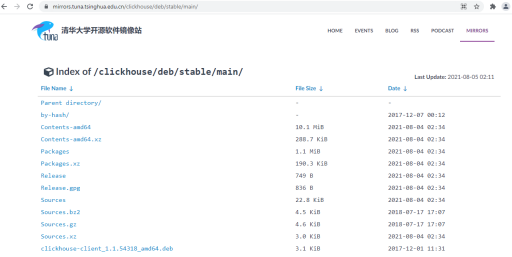
2、ubuntu上安装时,可以从如下国内网站下载相关的lib:https://mirrors.tuna.tsinghua.edu.cn/clickhouse/deb/stable/main/
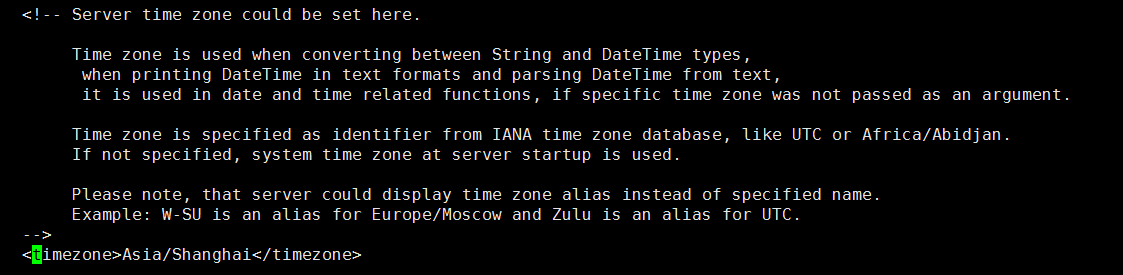
3、如何修改时区 config.xml
4、对外开放连接:取消<listen_host>::</listen_host> 注释( config.xml)

5、报错:<Error> Application: DB::Exception: Effective user of the process (root) does not match the owner of the data (clickhouse). Run under 'sudo -u clickhouse'.
更改目录/etc/clickhouse-server: chown -R clickhouse:clickhouse /etc/clickhouse-server
更改目录/var/log/clickhouse-server:chown -R clickhouse:clickhouse /var/log/clickhouse-server
使用sudo -u clickhouse clickhouse-server --config-file=/etc/clickhouse-server/config.xml & 进行启动。
6、centos7 安装clickhouse
1)、纯rpm安装:
wget --content-disposition https://packagecloud.io/Altinity/clickhouse/packages/el/7/clickhouse-server-common-20.3.12.112-1.el7.x86_64.rpm/download.rpm

wget --content-disposition https://packagecloud.io/Altinity/clickhouse/packages/el/7/clickhouse-server-20.3.12.112-1.el7.x86_64.rpm/download.rpm

wget --content-disposition https://packagecloud.io/Altinity/clickhouse/packages/el/7/clickhouse-common-static-20.3.12.112-1.el7.x86_64.rpm/download.rpm

wget --content-disposition https://packagecloud.io/Altinity/clickhouse/packages/el/7/clickhouse-client-20.3.12.112-1.el7.x86_64.rpm/download.rpm

rpm -ivh ./*.rpm
2)、yum 安装
- 下载仓库
curl -s

https://packagecloud.io/install/repositories/altinity/clickhouse/script.rpm.sh

| sudo os=centos dist=7 bash
- 查看安装包
sudo yum list 'clickhouse*'- 安装服务
sudo yum install -y clickhouse-server clickhouse-client- 查看安装列表
sudo yum list installed 'clickhouse*'- 控制台输出
Installed Packages

clickhouse-client.noarch

clickhouse-common-static.x86_64

clickhouse-server.noarch
7、centos8 安装clickhouse
第一步:安装 clickhouse-server 和 clickhouse-client
yum install yum-utils
rpm --import https://repo.clickhouse.tech/CLICKHOUSE-KEY.GPG
yum-config-manager --add-repo https://repo.clickhouse.tech/rpm/clickhouse.repo
yum install clickhouse-server clickhouse-client -y
第二步:启动服务
systemctl status clickhouse-server.service
第三步:设置用户名和密码
设置用户名密码
PASSWORD=$(base64 < /dev/urandom | head -c8); echo "$PASSWORD"; echo -n "$PASSWORD" | sha1sum | tr -d '-' | xxd -r -p | sha1sum | tr -d '-'
生成如下:第一行明文、第二行密文
BOWrM6eD
dc1f916aa271ba4147cfc9eb7116195d6d7c2b69920a7fd2b356f09f201cd924
修改配置文件
vim /etc/clickhouse-server/users.xml
找到 users --> default --> 标签下的password修改成password_sha256_hex,并把密文填进去
第四步:使用密码重新登陆
clickhouse-client -h 127.0.0.1 -d default -m -u default --password BOWrM6eD
第五步:开放外网访问
vim /etc/clickhouse-server/config.xml
找到 listen_host 标签,修改为以下
<listen_host>::</listen_host>
# 重启一下clickhouse服务
systemctl restart clickhouse-server
8、参考资料:
如何搭建ClickHouse 分布式高可用集群搭建:https://www.bbsmax.com/A/ke5j0nNozr/
clickhouse配置文件说明:https://www.cnblogs.com/gentlescholar/p/15043234.html
clickhouse 安装启动报<Error> Application: DB::Exception: There is no profile 'default' in configuration file. 以及常见的错误的总结的更多相关文章
- 解决软件启动报error while loading shared libraries: libgd.so.2: cannot open shared object错误
解决软件启动报error while loading shared libraries: libgd.so.2: cannot open shared object错误 今天安装启动nginx的时候报 ...
- springboot 配置jpa启动报Error processing condition on org.springframework.boot.autoconfigure.data.web.SpringDataWebAutoConfiguration.pageableCustomizer
springboot +gradle 配置jpa启动报Error processing condition on org.springframework.boot.autoconfigure.data ...
- spring mvc 框架启动报错:nested exception is java.lang.NoClassDefFoundError: org/w3c/dom/ElementTraversal 解决办法
今天准备将以前自己搭建的一个框架拿出来用一下,结果发现启动报错:nested exception is java.lang.NoClassDefFoundError: org/w3c/dom/Elem ...
- 【spring data jpa】启动报错:nested exception is java.util.NoSuchElementException
spring boot项目中 使用spring data jpa 启动报错: org.springframework.beans.factory.UnsatisfiedDependencyExcept ...
- Hadoop启动报Error: JAVA_HOME is not set and could not be found解决办法
Hadoop安装完后,启动时报Error: JAVA_HOME is not set and could not be found. 解决办法: 修改/etc/hadoop/hadoop-env.sh ...
- Mysql 5.7源码编译启动 报error问题:The server quit without updating PID file (/data/data_mysql/mysql.pid).
一般是报error问题就是我们的mysql没有权限,这里主要是指三点:一个是mysql的安装主目录要设为mysql用户和用户组.一个是logs目录设置为mysql用户以及用户组.还有一个是data目录 ...
- Tomcat7启动报Error listenerStart错误--转载
原文地址:http://www.cnblogs.com/nayitian/p/3439336.html 问题 Tomcat7在启动时报错,详细信息如下: 十一月 23, 2013 7:21:58 下午 ...
- windows服务安装启动报错误1053:服务没有及时响应启动或控制请求
<startup><supportedRuntime version="v4.0" sku=".NETFramework,Version=v4.0&qu ...
- R安装package报ERROR: a 'NAMESPACE' file is required
R安装package报错: [root@Hadoop-NN-01 mysofts]# R CMD INSTALL trimcluster_0.1-1.tar.gz * installing to li ...
- Tomcat7启动报Error listenerStart错误
问题 Tomcat7在启动时报错,详细信息如下: 十一月 23, 2013 7:21:58 下午 org.apache.catalina.core.StandardContext startInter ...
随机推荐
- ETL之apache/hop-web 2.5安装和简单入门
一.使用Docker 安装部署 1.拉取镜像 推荐使用下面的web版本 docker pull apache/hop:latest docker pull apache/hop-web:latest ...
- 【云原生】为什么要虚拟化,为什么要容器,为什么要Docker,为什么要K8S?
前言 如标题中的问题所提到的虚拟化,容器,Docker和K8s那样,我们不妨这样问:这些技术到底适用于哪些场景,有没有别的技术可以替代?这些技术的优劣在哪里? 下面我将针对性地从以上几个问题的出发点, ...
- 百度飞桨:ERNIE 3.0 、通用信息抽取 UIE、paddleNLP的安装使用[一]
相关文章: 基础知识介绍: [一]ERNIE:飞桨开源开发套件,入门学习,看看行业顶尖持续学习语义理解框架,如何取得世界多个实战的SOTA效果?_汀.的博客-CSDN博客_ernie模型 百度飞桨: ...
- 【五】AI Studio 项目详解【VisualDL工具、环境使用说明、脚本任务、图形化任务、(五)在线部署及预测】PARL
相关文章 [一]-环境配置+python入门教学 [二]-Parl基础命令 [三]-Notebook.&pdb.ipdb 调试 [四]-强化学习入门简介 [五]-Sarsa&Qlear ...
- 【九】强化学习之TD3算法四轴飞行器仿真---PaddlePaddlle【PARL】框架
相关文章: [一]飞桨paddle[GPU.CPU]安装以及环境配置+python入门教学 [二]-Parl基础命令 [三]-Notebook.&pdb.ipdb 调试 [四]-强化学习入门简 ...
- 2.13 PE结构:实现PE代码段加密
代码加密功能的实现原理,首先通过创建一个新的.hack区段,并对该区段进行初始化,接着我们向此区段内写入一段具有动态解密功能的ShellCode汇编指令集,并将程序入口地址修正为ShellCode地址 ...
- vi / vim编辑器的使用 [补档-2023-07-01]
vi/vim编辑器 vi/vim编辑器是linux中的文本编辑器,其中vim比vi的功能更加强大,可以编辑shell程序,推荐使用vim,下面也将介绍vim如何使用. 2-1 vi/vim的三种工 ...
- 谁更适合搭配甜点显卡?i7-13700KF、锐龙7 7800X3D对比:游戏相当 生产力Intel强了50%
一.前言:如果搭配2000元甜点显卡 i7-13700KF和锐龙7 7800X3D谁更有性价比? 现在AMD最受欢迎的处理器无疑是拥有96MB三级缓存的锐龙7 7800X3D,这是一颗专为游戏而生的处 ...
- Florr 从新手到大佬
Florr 从新手到大佬 新手上路 首先在这里,你会遇到一些简单的教程.按照教程完成,也可以参考链接里的内容. 装备分为一下几种: $ \color{#7eef6D} \text{Common} $ ...
- Redis Desktop Manager 0.9.3.817 最后一版免费版,新版要收费
链接: https://pan.baidu.com/s/1wyELUhOn_rumFecNAS7L0A 提取码: 1631 版本是两三个月前,我从官网下载的,然后顺便存到了我的移动硬盘上.0 ...