
ElkStack-MACOS搭建
简介
Elasticsearch
Elasticsearch是一个实时的分布式搜索分析引擎, 它能让你以一个之前从未有过的速度和规模,去探索你的数据。它被用作全文检索、结构化搜索、分析以及这三个功能的组合。支持集群配置。
Logstash/Filebeats
Logstash是一款强大的数据处理工具,它可以实现数据传输,格式处理,格式化输出,还有强大的插件功能,常用于日志处理。。
Kibana
kibana是一个开源和免费的工具,它可以为Logstash和ElasticSearch提供的日志分析友好的Web界面,可以帮助您汇总、分析和搜索重要数据日志。
架构流程
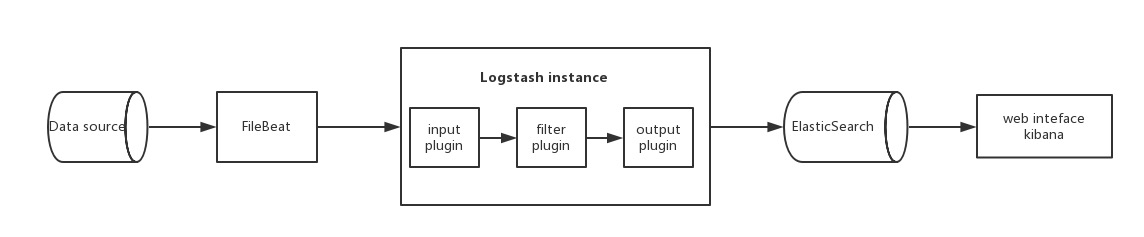
安装配置
版本
Elasticsearch
Logstash
Kibana
Filebeats
先决条件
java8
mac软件管理工具 brew
brew
    # 安装软件

    brew install your-software

    # 查看软件安装信息

    brew info your-software

    # 管理服务,没怎么用它,ELK都有自己的启动脚本在安装目录的bin/下面,且基本上都会携带参数启动

    brew services start/stop your-service
Elasticsearch
mac安装elasticsearch
    #mac安装elasticsearch

    brew install elasticsearch
elasticsearch的相关安装位置
    安装目录:/usr/local/Cellar/elasticsearch/{elasticsearch-version}/

    日志目录:/usr/local/var/log/elasticsearch/

    插件目录:/usr/local/var/elasticsearch/plugins/

    配置目录:/usr/local/etc/elasticsearch/
启动
    brew services start elasticsearch

    首次启动,默认的端口号是9200,用户名是elastic,密码我也不知道(资料上查到的都是6.0以前的版本,密码是changeme,6.0以后不清楚),通过调用_xpack接口修改默认密码:
版本
    elasticsearch --version

    Version: 6.6.1, Build: oss/tar/1fd8f69/2019-02-13T17:10:04.160291Z, JVM: 1.8.0_131
Kibana
mac安装kibana
brew install kibana
安装位置
    安装目录:/usr/local/Cellar/kibana/{kibana-version}/

    配置目录:/usr/local/etc/kibana/
备注
启动kibana之前,需要先修改一下配置文件/usr/local/etc/kibana/kibana.yml,取消elasticsearch.name和elasticsearch.password的注释,并将值改为上面修改过的用户名密码username: elastic, password: 123456,请参考下面的kibana.yml片段
# kibana.yml

# If your Elasticsearch is protected with basic authentication, these settings provide

# the username and password that the Kibana server uses to perform maintenance on the Kibana

# index at startup. Your Kibana users still need to authenticate with Elasticsearch, which

# is proxied through the Kibana server.

elasticsearch.username: "elastic"

elasticsearch.password: "changeme"
启动
brew services start kibana

首次启动,默认端口号是5601,打开浏览器访问http://localhost:5601访问kibana管理页面,会弹框要求输入用户名密码,输入elastic和123456即可。

注:这里的kibana.yml中配置的用户名密码是kibana访问elasticsearch需要用到的,而web页面手动输入的用户名密码是我们登录kibana管理页面的密码,它们为什么能共用一个密码,不太清楚。
版本
   kibana  --version

   6.6.1
Logstash
mac安装logstash
brew install logstash
logstash的相关安装位置
安装目录:/usr/local/Cellar/logstash/{logstash-version}/

配置目录:/usr/local/etc/logstash
配置
vim ./first-pipeline.conf
- 支持Filebeat作为输入源
# Sample Logstash configuration for creating a simple

# Beats -> Logstash -> Elasticsearch pipeline.

input {

  beats {

    host =>"127.0.0.1"

    port => "5044"

  }

}

output {

  elasticsearch {

    hosts => ["http://localhost:9200"]

    index => "%{[@metadata][beat]}-%{[@metadata][version]}-%{+YYYY.MM.dd}"

    #user => "elastic"

    #password => "changeme"

  }

}
- logstash 配置文件输入支持文件输入,例如:
[root@access-1 logstash-7.2.1]# cat logstash_809.conf

input {

    file{

        path => ['/opt/access-server-1.0.5/log/akka-gb809.log'] #读取日志文件路径

 type => "akka-gb809" #一个标签

 stat_interval => "2" #每隔几秒读取日志文件,默认为1秒

    }

    file{

 path => ['/opt/access-server-1.0.5/log/akka-gb808.log']

 type => "akka-gb808"

 stat_interval => "2"

    }

    file{

 path => ['/opt/access-server-1.0.5/log/akka.log']

 type => "akka"

 stat_interval => "2"

    }

    file{

 path => ['/opt/access-server-1.0.5/log/all_error.log']

 type => "all_error"

 stat_interval => "2"

 codec => multiline { #将换行的日志打印出来

  pattern => "(^\d{2}\:\d{2}\:\d{2}\.\d{3})UTC" #匹配的正则

  negate => true

  what => "previous"

 }

    }

}

filter {

      date {

         match => [ "timestamp" , "yyyy-MM-dd HH:mm:ss.SSS" ]

      }

}

output {

 if [type] == "akka-gb809" { #要匹配的日志文件标签

    elasticsearch {

       hosts => "192.168.108.151:9200" #es节点地址

       index => "access-1-akka-gb809" #生成的索引,用于kibana展示

     }

  }

 if [type] == "akka-gb808" {

    elasticsearch {

       hosts => "192.168.108.151:9200"

       index => "access-1-akka-gb808"

     }

  }

 if [type] == "akka" {

    elasticsearch {

       hosts => "192.168.108.151:9200"

       index => "access-1-akka"

     }

  }

 if [type] == "all_error" {

    elasticsearch {

       hosts => "192.168.108.151:9200"

       index => "access-1-all_error"

     }

  }

}
启动
logstash -e 'input { stdin { } } output { stdout {} }'
或
logstash -f config/first-pipeline.conf --config.test_and_exit
此条命令检验配置文件是否正确
logstash -f config/first-pipeline.conf --config.reload.automatic
此条命令是启动logstash,并且在first-pipeline.conf文件变更时自动重启。
后台启动
nohup logstash -f config/first-pipeline.conf --config.reload.automatic & > /dev/null
版本
logstash 6.6.1
Filebeats'
安装
#mac安装Filebeats'

brew install filebeat
位置
安装目录:/usr/local/Cellar/filebeat/{filebeat-version}/

配置目录:/usr/local/etc/filebeat/

缓存目录:/usr/local/var/lib/filebeat/
配置
vim /usr/local/etc/filebeat//filebeat.yml
###################### Filebeat Configuration Example #########################

# This file is an example configuration file highlighting only the most common

# options. The filebeat.reference.yml file from the same directory contains all the

# supported options with more comments. You can use it as a reference.

#

# You can find the full configuration reference here:

# https://www.elastic.co/guide/en/beats/filebeat/index.html

# For more available modules and options, please see the filebeat.reference.yml sample

# configuration file.

#=========================== Filebeat prospectors =============================

filebeat.prospectors:

# Each - is a prospector. Most options can be set at the prospector level, so

# you can use different prospectors for various configurations.

# Below are the prospector specific configurations.

- type: log

  # Change to true to enable this prospector configuration.

  enabled: true

  # Paths that should be crawled and fetched. Glob based paths.

  paths:

    - /apps/intelligent-family-console/intelligentFamilyConsole/*.log

    #- c:\programdata\elasticsearch\logs\*

  # Exclude lines. A list of regular expressions to match. It drops the lines that are

  # matching any regular expression from the list.

  #exclude_lines: ['^DBG']

  # Include lines. A list of regular expressions to match. It exports the lines that are

  # matching any regular expression from the list.

  #include_lines: ['^ERR', '^WARN']

  # Exclude files. A list of regular expressions to match. Filebeat drops the files that

  # are matching any regular expression from the list. By default, no files are dropped.

  #exclude_files: ['.gz$']

  # Optional additional fields. These fields can be freely picked

  # to add additional information to the crawled log files for filtering

  #fields:

  # level: debug

  # review: 1

  ### Multiline options

  # Mutiline can be used for log messages spanning multiple lines. This is common

  # for Java Stack Traces or C-Line Continuation

  # The regexp Pattern that has to be matched. The example pattern matches all lines starting with [

  #multiline.pattern: ^\[

  # Defines if the pattern set under pattern should be negated or not. Default is false.

  #multiline.negate: false

  # Match can be set to "after" or "before". It is used to define if lines should be append to a pattern

  # that was (not) matched before or after or as long as a pattern is not matched based on negate.

  # Note: After is the equivalent to previous and before is the equivalent to to next in Logstash

  #multiline.match: after

#============================= Filebeat modules ===============================

filebeat.config.modules:

  # Glob pattern for configuration loading

  path: ${path.config}/modules.d/*.yml

  # Set to true to enable config reloading

  reload.enabled: false

  # Period on which files under path should be checked for changes

  #reload.period: 10s

#==================== Elasticsearch template setting ==========================

setup.template.settings:

  index.number_of_shards: 3

  #index.codec: best_compression

  #_source.enabled: false

#================================ General =====================================

# The name of the shipper that publishes the network data. It can be used to group

# all the transactions sent by a single shipper in the web interface.

#name:

# The tags of the shipper are included in their own field with each

# transaction published.

#tags: ["service-X", "web-tier"]

# Optional fields that you can specify to add additional information to the

# output.

#fields:

# env: staging

#============================== Dashboards =====================================

# These settings control loading the sample dashboards to the Kibana index. Loading

# the dashboards is disabled by default and can be enabled either by setting the

# options here, or by using the `-setup` CLI flag or the `setup` command.

#setup.dashboards.enabled: false

# The URL from where to download the dashboards archive. By default this URL

# has a value which is computed based on the Beat name and version. For released

# versions, this URL points to the dashboard archive on the artifacts.elastic.co

# website.

#setup.dashboards.url:

#============================== Kibana =====================================

# Starting with Beats version 6.0.0, the dashboards are loaded via the Kibana API.

# This requires a Kibana endpoint configuration.

setup.kibana:

  # Kibana Host

  # Scheme and port can be left out and will be set to the default (http and 5601)

  # In case you specify and additional path, the scheme is required: http://localhost:5601/path

  # IPv6 addresses should always be defined as: https://[2001:db8::1]:5601

  #host: "localhost:5601"

#============================= Elastic Cloud ==================================

# These settings simplify using filebeat with the Elastic Cloud (https://cloud.elastic.co/).

# The cloud.id setting overwrites the `output.elasticsearch.hosts` and

# `setup.kibana.host` options.

# You can find the `cloud.id` in the Elastic Cloud web UI.

#cloud.id:

# The cloud.auth setting overwrites the `output.elasticsearch.username` and

# `output.elasticsearch.password` settings. The format is `<user>:<pass>`.

#cloud.auth:

#================================ Outputs =====================================

# Configure what output to use when sending the data collected by the beat.

#-------------------------- Elasticsearch output ------------------------------

#output.elasticsearch:

  # Array of hosts to connect to.

  #hosts: ["localhost:9200"]

  # Optional protocol and basic auth credentials.

  #protocol: "https"

  #username: "elastic"

  #password: "changeme"

#----------------------------- Logstash output --------------------------------

output.logstash:

  # The Logstash hosts

  hosts: ["localhost:5044"]

  # Optional SSL. By default is off.

  # List of root certificates for HTTPS server verifications

  #ssl.certificate_authorities: ["/etc/pki/root/ca.pem"]

  # Certificate for SSL client authentication

  #ssl.certificate: "/etc/pki/client/cert.pem"

  # Client Certificate Key

  #ssl.key: "/etc/pki/client/cert.key"

#================================ Logging =====================================

# Sets log level. The default log level is info.

# Available log levels are: error, warning, info, debug

logging.level: debug

# At debug level, you can selectively enable logging only for some components.

# To enable all selectors use ["*"]. Examples of other selectors are "beat",

# "publish", "service".

#logging.selectors: ["*"]

#============================== Xpack Monitoring ===============================

# filebeat can export internal metrics to a central Elasticsearch monitoring

# cluster. This requires xpack monitoring to be enabled in Elasticsearch. The

# reporting is disabled by default.

# Set to true to enable the monitoring reporter.

#xpack.monitoring.enabled: false

# Uncomment to send the metrics to Elasticsearch. Most settings from the

# Elasticsearch output are accepted here as well. Any setting that is not set is

# automatically inherited from the Elasticsearch output configuration, so if you

# have the Elasticsearch output configured, you can simply uncomment the

# following line.

#xpack.monitoring.elasticsearch:
主要是配置filebeat.inputs,采集哪些日志;关闭output.elasticsearch,打开output.logstash,将收集到的信息推送到logstash。
启动
filebeat -e -c ./filebeat6.3.2/filebeat.yml
或
nohup filebeat -e -c ./filebeat6.3.2/filebeat.yml & >/dev/null
版本
filebeat --version

lag --version has been deprecated, version flag has been deprecated, use version subcommand

filebeat version 6.2.4 (amd64), libbeat 6.2.4
Kibana案例
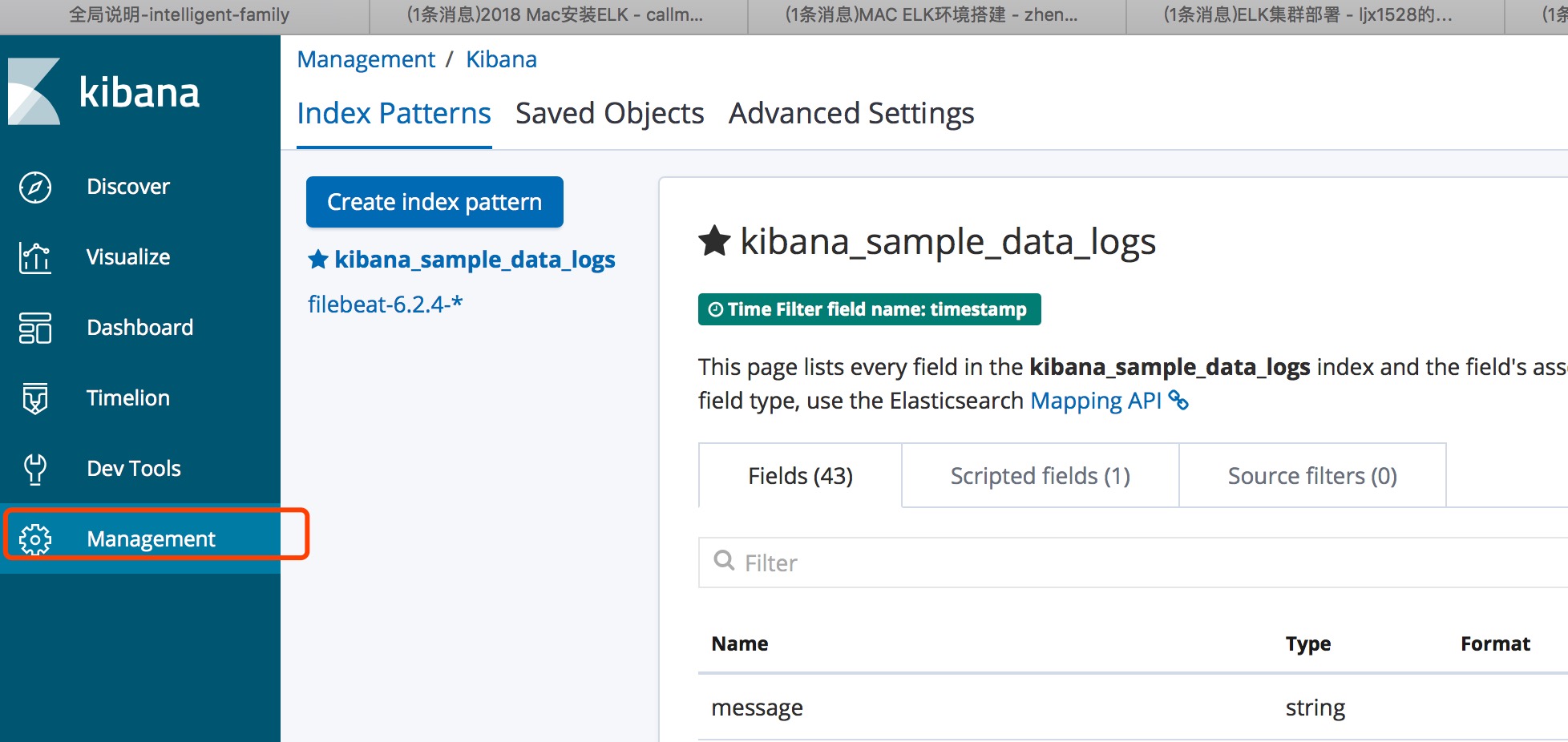
创建Index patterns
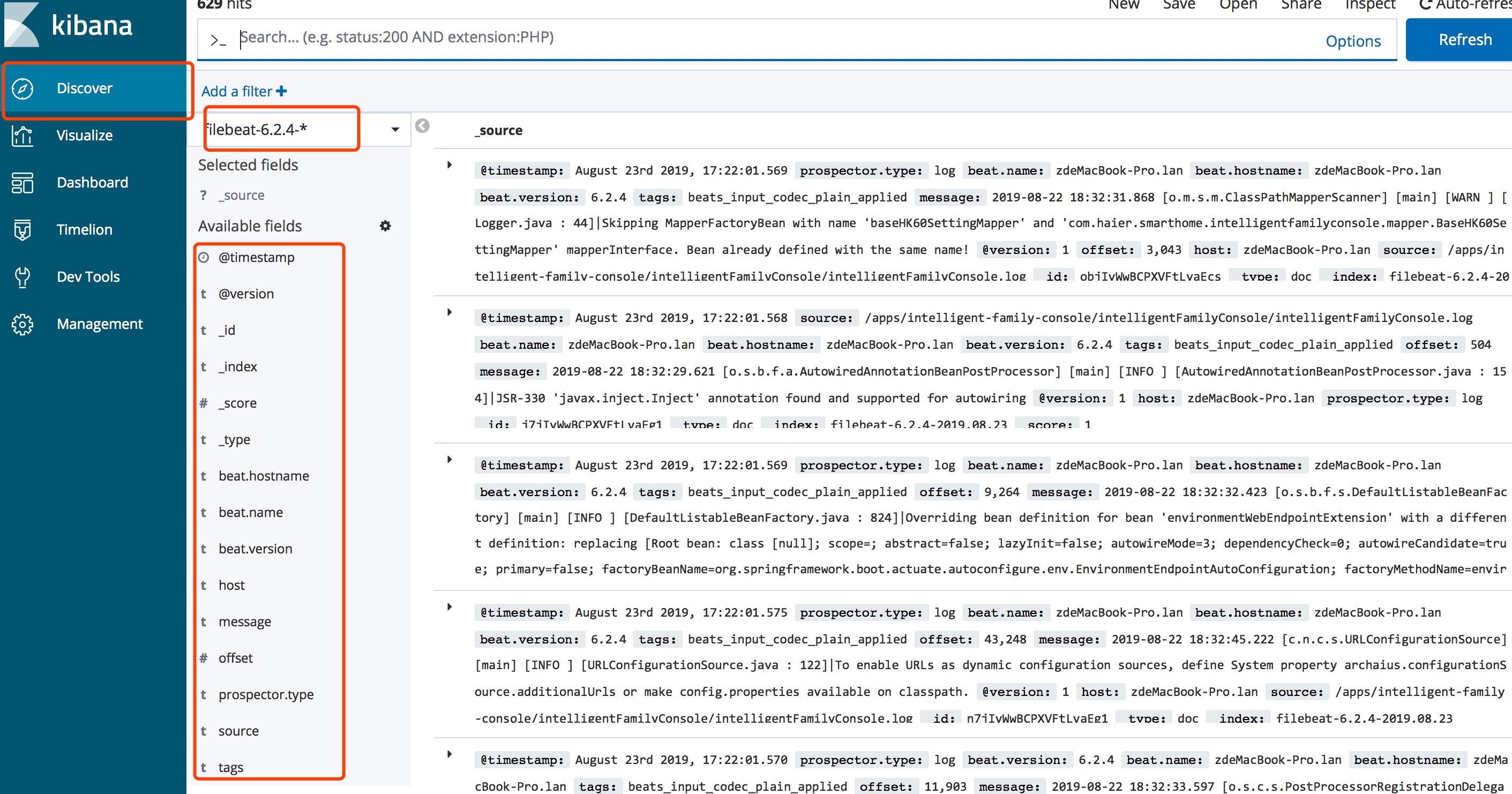
检索界面
- 左侧为可检索条件
后续跟进
日志定时删除问题
Elasticsearch集群部署
下载解压
wget https://artifacts.elastic.co/downloads/elasticsearch/elasticsearch-7.2.1-linux-x86_64.tar.gz

tar -zvxf elasticsearch-7.2.1-linux-x86_64.tar.gz -C /usr/local/elk
创建用户及授权
ElasticSerach要求以非root身份启动,在每个节点创建用户及用户组
[root@elk-1 ~]# groupadd elasticsearch

[root@elk-1 ~]# useradd elasticsearch -g elasticsearch
在每个节点上创建数据data和logs目录:
[root@elk-1 ~]# mkdir -p /data/elasticsearch/{data,logs}

[root@elk-1 ~]# chown -R elasticsearch. /data/elasticsearch/

[root@elk-1 ~]# chown -R elasticsearch. /home/elk/elasticsearch/elasticsearch-7.2.1
修改elasticsearch.yml配置文件
- master节点配置文件
[root@elk-1 config]# grep -Ev "^$|^[#;]" elasticsearch.yml

cluster.name: master-node

node.name: master

node.master: true

node.data: true

http.cors.enabled: true

http.cors.allow-origin: /.*/

path.data: /home/elk/data

network.host: 0.0.0.0

http.port: 9200

discovery.seed_hosts: ["192.168.108.151", "192.168.108.152", "192.168.108.153"]

cluster.initial_master_nodes: ["master", "data-node1","data-node2"]
- node1节点配置文件
[root@elk-2 config]# grep -Ev "^$|^[#;]" elasticsearch.yml

cluster.name: master-node

node.name: data-node1

node.master: true

node.data: true

path.data: /home/elk/data

network.host: 0.0.0.0

http.port: 9200

discovery.seed_hosts: ["192.168.108.151", "192.168.108.152", "192.168.108.153"]

cluster.initial_master_nodes: ["master-node", "data-node1","data-node2"]
- node2节点配置文件
[root@elk-3 config]# grep -Ev "^$|^[#;]" elasticsearch.yml

cluster.name: master-node

node.name: data-node2

node.master: true

node.data: true

path.data: /home/elk/data

network.host: 0.0.0.0

http.port: 9200

discovery.seed_hosts: ["192.168.108.151", "192.168.108.152", "192.168.108.153"]

cluster.initial_master_nodes: ["master", "data-node1","data-node2"]
- 修改elasticsearch的JVM内存
[root@elk-1 config]# grep -Ev "^$|^[#;]" jvm.options -Xms1g -Xmx1g
- 启动elasticsearch
[root@ELK1 elk]# su - elasticsearch

Last login: Mon Aug 12 09:58:23 CST 2019 on pts/1

[elasticsearch@ELK1 ~]$ cd /home/elk/elasticsearch-7.2.1/bin/

[elasticsearch@ELK1 bin]$ ./elasticsearch -d
- 查看端口号,分别为9200和9300
[root@elk-1 config]# ss -tlunp|grep java

tcp LISTEN 0 128 :::9200 :::* users:(("java",pid=50257,fd=263))

tcp LISTEN 0 128 :::9300 :::* users:(("java",pid=50257,fd=212))
- es集群基本操作
#查看集群的健康信息

curl 'localhost:9200/_cluster/health?pretty'

#查看集群的详细信息

curl ' localhost:9200/_cluster/state?pretty'

#查询索引列表

curl -XGET http:// localhost:9200/_cat/indices?v

#创建索引

curl -XPUT http:// localhost:9200/customer?pretty

#查询索引

curl -XGET http:// localhost:9200/customer/external/1?pretty

#删除索引

curl -XDELETE http:// localhost:9200/customer?pretty

#删除指定索引

curl -XDELETE localhost:9200/nginx-log-2019.08

#删除多个索引

curl -XDELETE localhost:9200/system-log-2019.0606,system-log-2019.0607

#删除所有索引

curl -XDELETE localhost:9200/_all

#在删除数据时,通常不建议使用通配符,误删后果会很严重,所有的index都可能被删除,为了安全起见需要禁止通配符,可以在elasticsearch.yml配置文件中设置禁用_all和*通配符

action.destructive_requires_name: true
Elasticsearch Head插件
参考
https://blog.csdn.net/ljx1528/article/details/100031330
https://blog.csdn.net/zhengdesheng19930211/article/details/80249919
https://blog.csdn.net/callmepls1/article/details/79441505
http://www.mamicode.com/info-detail-2344537.html
https://blog.csdn.net/Ahri_J/article/details/79609444
https://www.dgstack.cn/archives/2363.html
https://www.jqhtml.com/49585.html
ElkStack-MACOS搭建的更多相关文章
- MacOS搭建本地服务器
MacOS搭建本地服务器 一,需求分析 1.1,开发app(ios android)时通常需往app中切入web页面,直接导入不行,故需搭建本地的测试网站服务,通过IP嵌入访问页面. 1.2,开发小程 ...
- macOS搭建开发环境
1.包管理器Homebrew使用下面的命令安装: ruby -e "$(curl -fsSL https://raw.githubusercontent.com/Homebrew/insta ...
- macOS搭建Hugo
Hugo 是一个用Go语言编写的静态网站生成器.类似的静态网站生成器还有Jekyll.hexo等等. Hugo官方主页:https://gohugo.io/ 1.安装homebrew: https:/ ...
- 搭建一个舒适的 .NET Core 开发环境
最近,一直在往.Net Core上迁移,随着工作的深入,发现.Net Core比.Net Framework好玩多了.不过目前还在windows下开发,虽然VisualStudio是宇宙第一神器,但是 ...
- NET Core 开发环境
NET Core 开发环境 最近,一直在往.Net Core上迁移,随着工作的深入,发现.Net Core比.Net Framework好玩多了.不过目前还在windows下开发,虽然VisualSt ...
- K8s 开始
Kubernetes 是用于自动部署,扩展和管理容器化应用程序的开源系统.本文将介绍如何快速开始 K8s 的使用. 了解 K8s Kubernetes / Overview 搭建 K8s 本地开发测试 ...
- 在macOS Sierra 10.12搭建PHP开发环境
macOS Sierra 11.12 已经帮我们预装了 Ruby.PHP(5.6).Perl.Python 等常用的脚本语言,以及 Apache HTTP 服务器.由于 nginx 既能作为 HTTP ...
- Redis环境搭建(MacOS)
Redis是一个开源的key-value类型的存储系统,大部分数据存在于内存中,所有读写速度十分快.其支持的存储value数据类型有多种,如:strings.hashes.lists.sets.sor ...
- MacOS下Rails+Nginx+SSL环境的搭建(上)
这里把主要的步骤写下来,反正我是走了不少弯路,希望由此需求的朋友们别再走类似的弯路.虽说环境是在MacOS下搭建,但是基本上和linux下的很相像,大家可以举一反三. 一.安装Rails 这个是最简单 ...
- AI应用开发实战 - 从零开始搭建macOS开发环境
AI应用开发实战 - 从零开始搭建macOS开发环境 本视频配套的视频教程请访问:https://www.bilibili.com/video/av24368929/ 建议和反馈,请发送到 https ...
随机推荐
- [转载]Linux常用的可插拔认证模块(PAM)pam_limits.so、pam_rootok.so和pam_userdb.so的详解
Linux常用的可插拔认证模块(PAM)pam_limits.so.pam_rootok.so和pam_userdb.so的详解 https://blog.51cto.com/udb1680/1846 ...
- 公司内部Oracle RAC测试环境的简单使用说明.
1. 公司内部要测试Oracle RAC系统的创建与测试工作. 因为Oracle RAC 主要需要 多个网段以及共享存储, 直接使用ESXi搭建比较复杂 所以我这边使用vagrant的方式搭建Orac ...
- 自建邮箱服务器 EwoMail 发送邮件的办法
总结来源: http://doc.ewomail.com/docs/ewomail/changguipeizhi 1. 首先这个机器不能安装dovecot等软件,不然安装脚本会失败. 2. 下载安装文 ...
- js中toString方法的三个作用
toString方法的三个作用: 1.返回一个[表示对象]的[字符串] 2.检测对象的类型 Object.prototype.toString.call(arr)==="[object Ar ...
- 原生js判断某个区域的滚动条滚动到了底部
原生js判断某个区域的滚动条滚动到了底部### 讲解==> 关系公式:element.scrollHeight - element.scrollTop === element.clientHei ...
- 【解决了一个小问题】macbook m2 下交叉编译 musl-gcc 支持的 gozstd 库
作者:张富春(ahfuzhang),转载时请注明作者和引用链接,谢谢! cnblogs博客 zhihu Github 公众号:一本正经的瞎扯 我的 golang 项目中使用了 gozstd, 在 ma ...
- 如何计算一个uint64类型的二进制值的尾部有多少个0
作者:张富春(ahfuzhang),转载时请注明作者和引用链接,谢谢! cnblogs博客 zhihu 公众号:一本正经的瞎扯 正文 这实在是一个很简单的问题,用代码可以表示如下: func Coun ...
- 【JS 逆向百例】XHR 断点调试,Steam 登录逆向
声明 本文章中所有内容仅供学习交流,抓包内容.敏感网址.数据接口均已做脱敏处理,严禁用于商业用途和非法用途,否则由此产生的一切后果均与作者无关,若有侵权,请联系我立即删除! 逆向目标 目标:Steam ...
- c++基础之字符串、向量和数组
上一次整理完了<c++ primer>的第二章的内容.这次整理本书的第3章内容. 这里还是声明一下,我整理的主要是自己不知道的或者需要注意的内容,以我本人的主观意志为准,并不具备普适性. ...
- SqlSugar导航查询/多级查询
1.导航查询特点 作用:主要处理主对象里面有子对象这种层级关系查询 1.1 无外键开箱就用 其它ORM导航查询 需要 各种配置或者外键,而SqlSugar则开箱就用,无外键,只需配置特性和主键就能使用 ...