
布匹瑕疵检测数据集EDA分析
分析数据集中 train 集的每个类别的 bboxes 数量分布情况。因为训练集分了两个:train1,train2。先根据两个数据集的 anno_train.json 文件分析类别分布。数据集:布匹瑕疵检测数据集-阿里云天池 (aliyun.com)
| 数据集 | bbox数量 | 缺陷图片数量 | 正常图片数量 |
|---|---|---|---|
| train1 | 7728 | 4774 | 2538 |
| train2 | 1795 | 1139 | 1125 |
| 总共 | 9523 | 5823 | 3663 |
EDA.py
import json

import os

import matplotlib.pyplot as plt

import seaborn as sns

#########################################

# 定义文件路径,修改成自己的anno文件路径

EDA_dir = './EDA/'

if not os.path.exists(EDA_dir):

    # shutil.rmtree(EDA_dir)

    os.makedirs(EDA_dir)

root_path = os.getcwd()

train1_json_filepath = os.path.join(root_path, "smartdiagnosisofclothflaw_round1train1_datasets",

                          "guangdong1_round1_train1_20190818", "Annotations",'anno_train.json')

train2_json_filepath = os.path.join(root_path, "smartdiagnosisofclothflaw_round1train2_datasets",

                          "guangdong1_round1_train2_20190828", "Annotations",'anno_train.json')

#########################################

# 准备数据

data1 = json.load(open(train1_json_filepath, 'r'))

data2 = json.load(open(train2_json_filepath, 'r'))

category_all = []

category_dis = {}

for i in data1:

    category_all.append(i["defect_name"])

    if i["defect_name"] not in category_dis:

        category_dis[i["defect_name"]] = 1

    else:

        category_dis[i["defect_name"]] += 1

for i in data2:

    category_all.append(i["defect_name"])

    if i["defect_name"] not in category_dis:

        category_dis[i["defect_name"]] = 1

    else:

        category_dis[i["defect_name"]] += 1

#########################################

# 配置绘图的参数

sns.set_style("whitegrid")

plt.figure(figsize=(15, 9))  # 图片的宽和高,单位为inch

# 绘制第一个子图:类别分布情况

plt.xlabel('class', fontsize=14)  # x轴名称

plt.ylabel('counts', fontsize=14)  # y轴名称

plt.xticks(rotation=90)  # x轴标签竖着显示

plt.title('Train category distribution')  # 标题

category_num = [category_dis[key] for key in category_dis]  # 制作一个y轴每个条高度列表

for x, y in enumerate(category_num):

    plt.text(x, y + 10, '%s' % y, ha='center', fontsize=10)  # x轴偏移量,y轴偏移量,数值,居中,字体大小。

ax = sns.countplot(x=category_all, palette="PuBu_r")  # 绘制直方图,palette调色板,蓝色由浅到深渐变。

# palette样式:https://blog.csdn.net/panlb1990/article/details/103851983

plt.savefig(EDA_dir + 'category_distribution.png', dpi=500)

plt.show()
可视化结果展示:
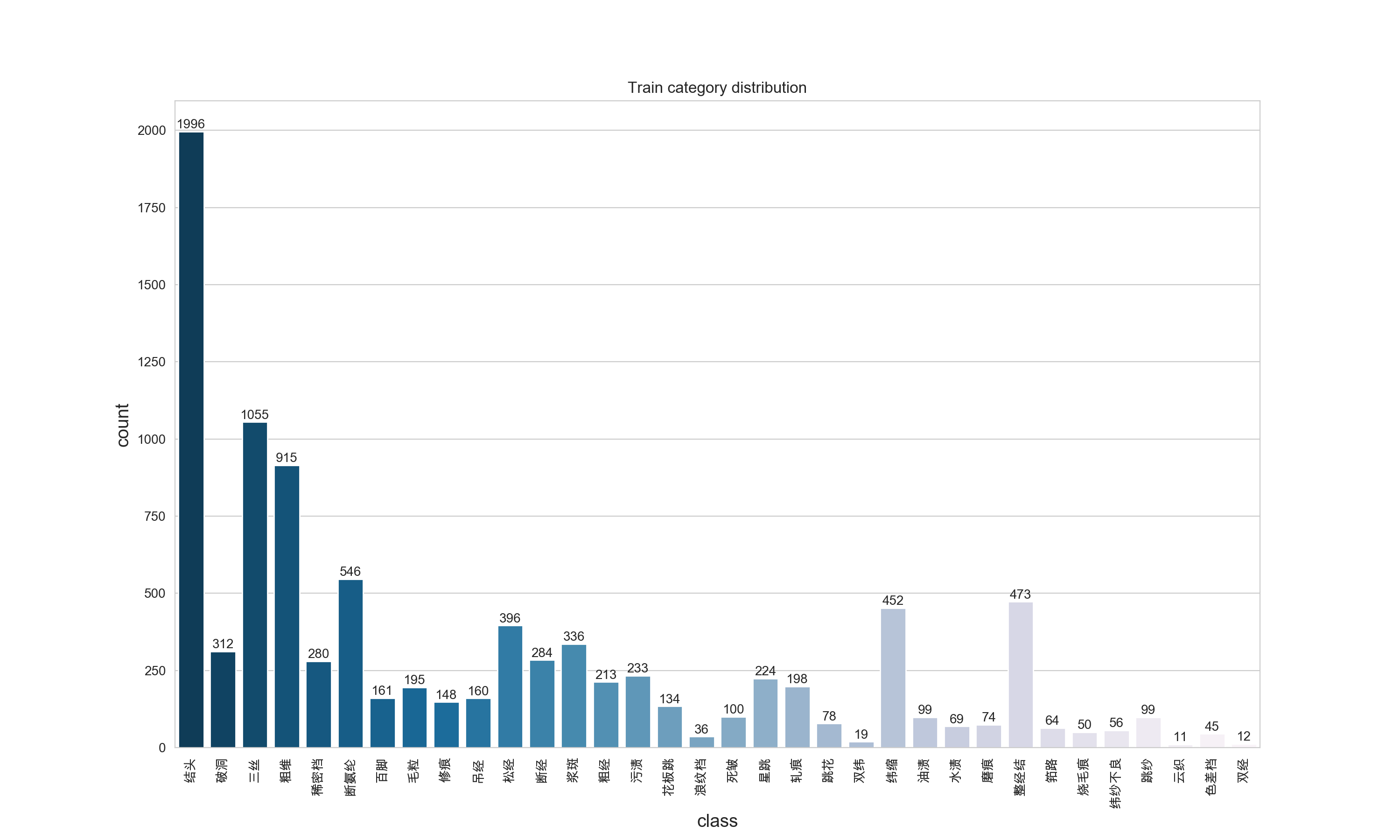
如果你的可视化结果,matplotlib和seaborn不能显示中文,参考这里:解决python中matplotlib与seaborn画图时中文乱码的根本问题 ,亲测有用。
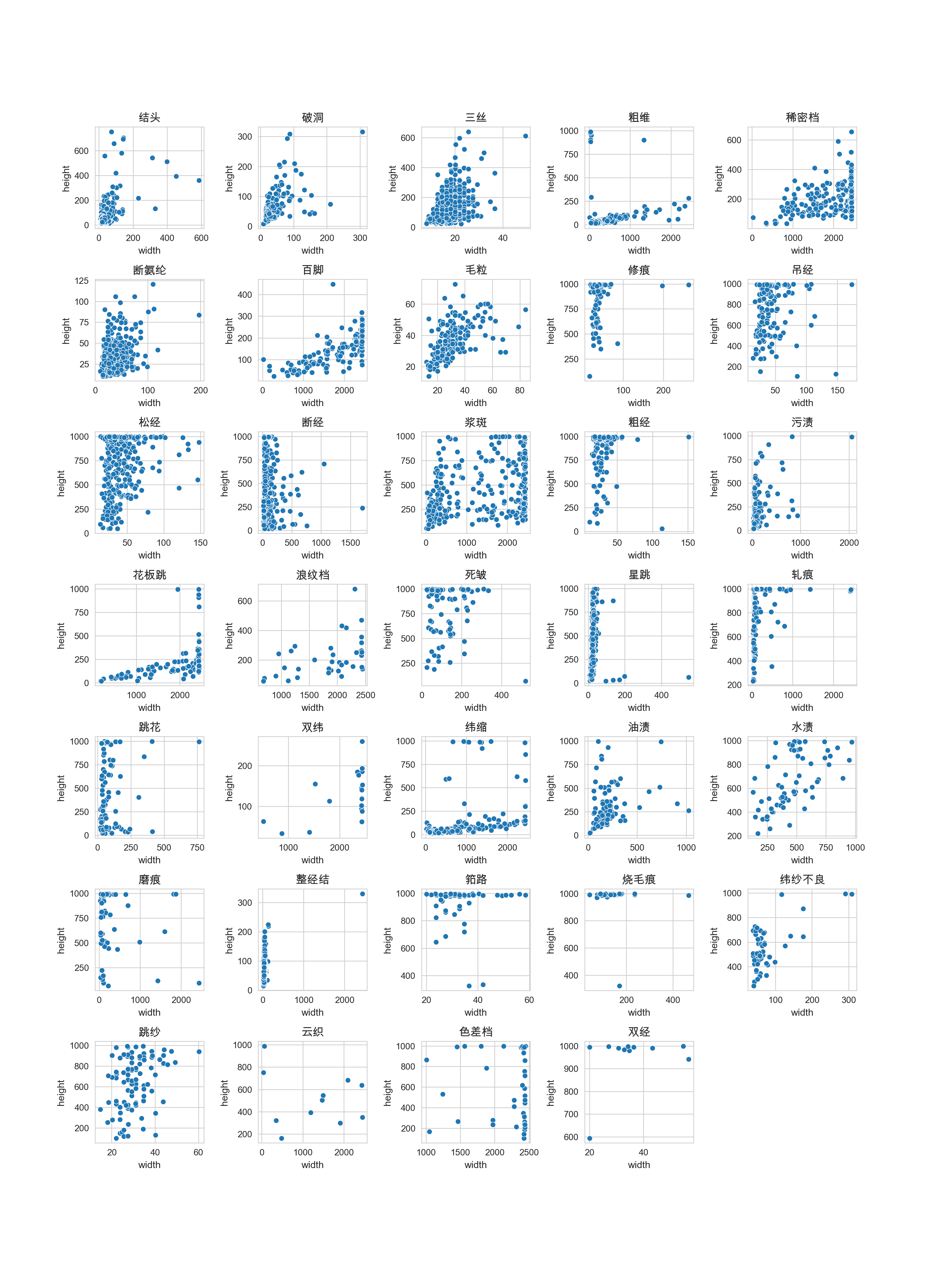
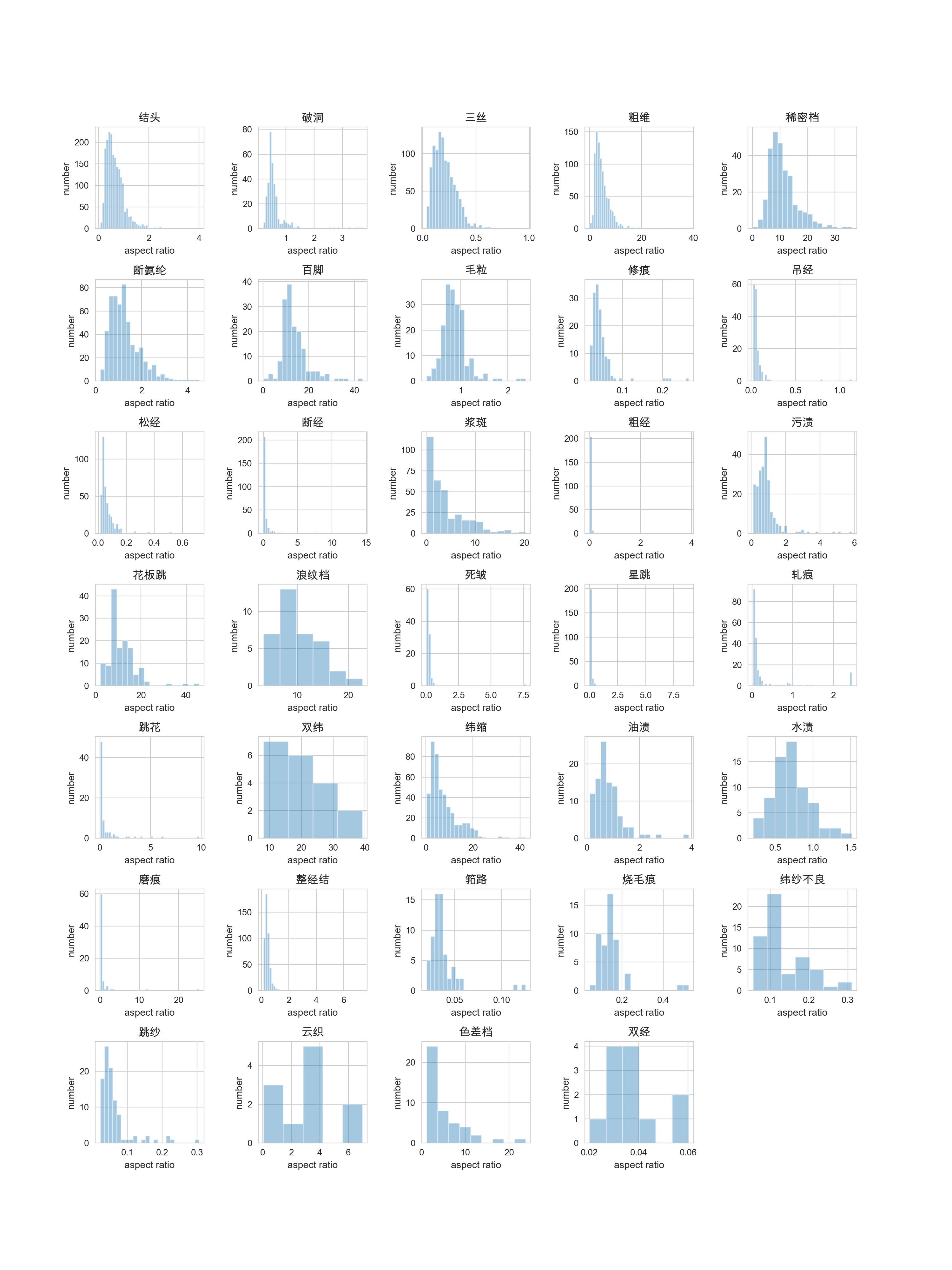
通过可视化结果,我们可以看出数据集中类别极不平衡,最高的1996,最低的11。接下来我们继续分析一下每个类别的宽高分布情况,以及bbox的宽高比分布情况。
EDA.py
import json

import os

import matplotlib.pyplot as plt

import seaborn as sns

#########################################

# 定义文件路径,修改成自己的anno文件路径

EDA_dir = './EDA/'

if not os.path.exists(EDA_dir):

    # shutil.rmtree(EDA_dir)

    os.makedirs(EDA_dir)

root_path = os.getcwd()

train1_json_filepath = os.path.join(root_path, "smartdiagnosisofclothflaw_round1train1_datasets",

                                    "guangdong1_round1_train1_20190818", "Annotations", 'anno_train.json')

train2_json_filepath = os.path.join(root_path, "smartdiagnosisofclothflaw_round1train2_datasets",

                                    "guangdong1_round1_train2_20190828", "Annotations", 'anno_train.json')

#########################################

# 准备数据

data1 = json.load(open(train1_json_filepath, 'r'))

data2 = json.load(open(train2_json_filepath, 'r'))

category_dis = {}

bboxes = {}

widths = {}

heights = {}

aspect_ratio={}

for i in data1:

    if i["defect_name"] not in category_dis:

        category_dis[i["defect_name"]] = 1

        bboxes[i["defect_name"]] = [i["bbox"], ]

    else:

        category_dis[i["defect_name"]] += 1

        bboxes[i["defect_name"]].append(i['bbox'])

for i in data2:

    if i["defect_name"] not in category_dis:

        category_dis[i["defect_name"]] = 1

        bboxes[i["defect_name"]] = [i["bbox"], ]

    else:

        category_dis[i["defect_name"]] += 1

        bboxes[i["defect_name"]].append(i['bbox'])

for i in bboxes:

    widths[i]=[]

    heights[i]=[]

    aspect_ratio[i]=[]

    for j in bboxes[i]:

        x1,y1,x2,y2=j

        widths[i].append(x2-x1)

        heights[i].append(y2-y1)

        aspect_ratio[i].append((x2-x1)/(y2-y1))

#########################################

# 配置绘图的参数

sns.set_style("whitegrid")

plt.figure(figsize=(15, 20))  # 图片的宽和高,单位为inch

plt.subplots_adjust(left=0.1,bottom=0.1,right=0.9,top=0.9,wspace=0.5,hspace=0.5)    # 调整子图间距

# 绘制bbox宽度和高度分布情况

for idx,i in enumerate(bboxes):

    plt.subplot(7,5,idx+1)

    plt.xlabel('width', fontsize=11)  # x轴名称

    plt.ylabel('height', fontsize=11)  # y轴名称

    plt.title(i, fontsize=13)  # 标题

    sns.scatterplot(widths[i],heights[i])

plt.savefig(EDA_dir + 'width_height_distribution.png', dpi=500, pad_inches=0)

plt.show()

# 绘制宽高比分布情况

plt.figure(figsize=(15, 20))  # 图片的宽和高,单位为inch

plt.subplots_adjust(left=0.1,bottom=0.1,right=0.9,top=0.9,wspace=0.5,hspace=0.5)    # 调整子图间距

for idx,i in enumerate(bboxes):

    plt.subplot(7,5,idx+1)

    plt.xlabel('aspect ratio', fontsize=11)  # x轴名称

    plt.ylabel('number', fontsize=11)  # y轴名称

    plt.title(i, fontsize=13)  # 标题

    sns.distplot(aspect_ratio[i],kde=False)

plt.savefig(EDA_dir + 'aspect_ratio_distribution.png', dpi=500, pad_inches=0)

plt.show()
可视化结果展示:bbox宽度和高度分布情况
可视化结果展示:bbox宽高比的分布情况
做完所有的EDA后,可以得到以下分析:
- bbox的类别分布极不平衡。
- bbox的形状差异很大,粗维,稀密档,百脚等宽高比数值很大,部分大于10,说明bbox呈细条状。需要针对此进行修改,生成特殊比例的anchor。
布匹瑕疵检测数据集EDA分析的更多相关文章
- KDD Cup 99网络入侵检测数据的分析
看论文 该数据集是从一个模拟的美国空军局域网上采集来的 9 个星期的网络连接数据, 分成具有标识的训练数据和未加标识的测试数据.测试数据和训练数据有着不同的概率分布, 测试数据包含了一些未出现在训练数 ...
- dlib人脸关键点检测的模型分析与压缩
本文系原创,转载请注明出处~ 小喵的博客:https://www.miaoerduo.com 博客原文(排版更精美):https://www.miaoerduo.com/c/dlib人脸关键点检测的模 ...
- 阿里系产品Xposed Hook检测机制原理分析
阿里系产品Xposed Hook检测机制原理分析 导语: 在逆向分析android App过程中,我们时常用的用的Java层hook框架就是Xposed Hook框架了.一些应用程序厂商为了保护自家a ...
- 目标检测数据集The Object Detection Dataset
目标检测数据集The Object Detection Dataset 在目标检测领域,没有像MNIST或Fashion MNIST这样的小数据集.为了快速测试模型,我们将组装一个小数据集.首先,我们 ...
- IRIS数据集的分析-数据挖掘和python入门-零门槛
所有内容都在python源码和注释里,可运行! ########################### #说明: # 撰写本文的原因是,笔者在研究博文“http://python.jobbole.co ...
- opencv: 角点检测源码分析;
以下6个函数是opencv有关角点检测的函数 ConerHarris, cornoerMinEigenVal,CornorEigenValsAndVecs, preConerDetect, coner ...
- Linux下利用Valgrind工具进行内存泄露检测和性能分析
from http://www.linuxidc.com/Linux/2012-06/63754.htm Valgrind通常用来成分析程序性能及程序中的内存泄露错误 一 Valgrind工具集简绍 ...
- 用python将MSCOCO和Caltech行人检测数据集转化成VOC格式
代码:转换用的代码放在这里 之前用Tensorflow提供的object detection API可以很方便的进行fine-tuning实现所需的特定物体检测模型(看这里).那么现在的主要问题就是数 ...
- faster-rcnn 目标检测 数据集制作
本文的目标是制作目标检测的数据集 使用的工具是 python + opencv 实现目标 1.批量图片重命名,手动框选图片中的目标,将目标框按照一定格式保存到txt中 图片名格式(批量) .jpg . ...
- FDDB人脸检测数据集 生成ROC曲线
看了好多博客,踩了很多坑,终于把FDDB数据集的ROC曲线绘制出来了.记录一下. 环境:ubuntu18.04 1.数据集准备 去FDDB官网:http://vis-www.cs.umass.edu/ ...
随机推荐
- Codeforces Round #851 (Div. 2) 题解
Codeforces Round #851 (Div. 2) 题解 A. One and Two 取 \(\log_2\),变成加号,前缀和枚举 \(s[i]=\dfrac{s[n]}{2}\). B ...
- Spring事务(六)-只读事务
@Transactional(readOnly=true)就可以把事务方法设置成只读事务.设置了只读事务,事务从开始到结束,将看不见其他事务所提交的数据.这在某种程度上解决了事务并发的问题.一个方法内 ...
- TLSR8258方案开发之BLE协议接口代码解析
一 前言 这里的代码是在原厂基础上修改了不少.虽然代码复杂了不少,但是逻辑也清晰了不少. 二 广播协议 想要熟悉并修改ble的广播协议和内容,请查阅结构体: static const attribu ...
- 【目标检测】Faster R-CNN算法实现
一.前言 继2014年的R-CNN.2015年的Fast R-CNN后,2016年目标检测领域再次迎来Ross Girshick大佬的神作Faster R-CNN,一举解决了目标检测的实时性问题.相较 ...
- System.out.print重定向到文件实例
该代码可以实现让System.out.print输出内容不再打印到控制台,而是输出到指定的文件中 <strong><span style="font-size:24px;& ...
- union all 优化案例
遇到个子查询嵌套 UNION ALL 的SQL语句很慢,谓词过滤条件不能内推进去,需要优化这段 UNION ALL这块的内容. UNION ALL 慢SQL: SELECT * FROM ((SELE ...
- 使用 LogProperties source generator 丰富日志
Nuget包 Microsoft.Extensions.Telemetry.Abstractions 包含的新的日志记录source generator,它支持使用[LogProperties]将整个 ...
- 记录--不做码农而做 DJ 😎
这里给大家分享我在网上总结出来的一些知识,希望对大家有所帮助 Coding 一定很累吧,快来跟我一起 Djing !!! 我的思路是通过监听键盘按下事件,在用户按下对应键时,找到相应的按键元素和音频元 ...
- 重新记录一下ArcGisEngine安装的过程
前言 好久不用Arcgis,突然发现想用时,有点不会安装了,所以这里记录一下安装过程. 下载Arcgis 首先,下载一个arcgis版本,我这里下的是10.1. 推荐[ gis思维(公众号)],[麻辣 ...
- 优化Mysql配置调整内存
1.查看Mysql版本 # mysql -V 示例: [root@root /]# mysql -V mysql Ver 14.14 Distrib 5.7.44, for Linux (x86_64 ...