
css零散笔记——修改input样式input:-internal-autofill-selected背景色
闲聊:
小颖项目中的登录页需将 input 背景色设为透明,小颖将 input 的背景色设置后,发现表单自动填充后还是会有背景色,然后发现 浏览器 自带了背景色:
效果图:
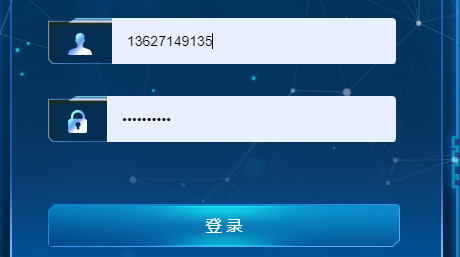

虽然小颖也设置了其背景色为透明,但表单自动填充后还是有背景色,问度娘后解决了。
解决方案:
  .el-input {

    height: 46px;

    background: url(("../assets/largeS/login_input.png"));

    background-size: 100% 100%;

    .el-input-group__prepend,

    .el-input__inner,

    .el-input__inner:hover,

    .el-input__inner:focus {

      background-color: transparent !important;

      border-width: 0;

    }

    // 解决回填后带背景色问题

    .el-input__inner:-webkit-autofill,

    .el-input__inner:-webkit-autofill:hover,

    .el-input__inner:-webkit-autofill:focus,

    .el-input__inner:-webkit-autofill:active {

      -webkit-transition-delay: 99999s;

      -webkit-transition: color 99999s ease-out,

        background-color 99999s ease-out;

    }

    input {

      height: 46px;

      box-shadow: inset 0 0 0 1000px transparent !important;

    }

    .user_icon {

      width: 24px;

      height: 22px;

      display: inline-block;

      margin-top: 8px;

      background: url(("../assets/largeS/login_user.png"));

    }

    .password_icon {

      width: 19px;

      height: 23px;

      display: inline-block;

      margin-top: 8px;

      background: url(("../assets/largeS/login_pwd.png"));

    }

  }
参考:
chrome浏览器中自带input样式input:-internal-autofill-selected(修改input背景色)
表单信息:
    <div class="form_box">

      <el-form

        ref="loginForm"

        :model="loginForm"

        :rules="loginRules"

        class="login-form"

      >

        <h3 class="title">欢迎登录</h3>

        <el-form-item prop="username">

          <el-input

            v-model="loginForm.username"

            type="text"

            auto-complete="off"

            placeholder="账号"

          >

            <span slot="prepend" class="user_icon"></span>

          </el-input>

        </el-form-item>

        <el-form-item prop="password">

          <el-input

            v-model="loginForm.password"

            type="password"

            auto-complete="off"

            placeholder="密码"

            @keyup.enter.native="handleLogin"

          >

            <span slot="prepend" class="password_icon"></span>

          </el-input>

        </el-form-item>

        <el-form-item style="width: 100%">

          <el-button

            :loading="loading"

            size="medium"

            type="primary"

            class="login_btn"

            @click.native.prevent="handleLogin"

          >

            <span v-if="!loading" style="font-size: 16px">登 录</span>

            <span v-else>登 录 中...</span>

          </el-button>

          <div style="float: right" v-if="register">

            <router-link class="link-type" :to="'/register'"

              >立即注册</router-link

            >

          </div>

        </el-form-item>

      </el-form>

    </div>
css零散笔记——修改input样式input:-internal-autofill-selected背景色的更多相关文章
- CSS 小结笔记之三种样式表
CSS 引入共有三种方式:内部样式表,内联样式(行内样式)表,外部样式表,当然也可以使用多重样式 内联样式 <div style="color:red;font-size:20px&q ...
- CSS如何修改placeholder样式
项目用经常遇到修改input的placeholder的颜色的需求,这里来看一下placeholder如何用css设置: 原文发布与我的个人博客>> 首先来看一下chrome默认的input ...
- [CSS] input样式定制
input样式 定制一个泥团input,想怎么捏就怎么捏 appearance: none 所有主流浏览器都不支持 appearance 属性. Firefox 支持替代的 -moz-appearan ...
- React 项目中修改 Ant Design 的默认样式(Input Checkbox 等等
修改样式更符合项目的需求特别是在 Input 和 Checkbox 等等一系列 试过很的方式都有问题, 比如直接在行内添加样式会无法传递到特定的层级 最好的办法是添加 id 可行 渲染部分代码 < ...
- HTML+CSS学习笔记 (7) - CSS样式基本知识
HTML+CSS学习笔记 (7) - CSS样式基本知识 内联式css样式,直接写在现有的HTML标签中 CSS样式可以写在哪些地方呢?从CSS 样式代码插入的形式来看基本可以分为以下3种:内联式.嵌 ...
- css实现 当鼠标移到input的时候,input框出现阴影,当移动到button的时候,input框的阴影消失,button框出现阴影
<meta charset="utf-8" /> <style type="text/css"> div{overflow: hidde ...
- 使用jquery修改css中带有!important的样式属性
当CSS中含有!important的样式属性时,普通的修改方式是会出现失败的.如下: <div class="test">使用jquery修改css中带有!import ...
- html中如何修改选中 用input做的搜索框 的边框颜色
html中如何修改选中 用input做的搜索框 的边框颜色 如图,当我鼠标选中输入框时,内边框会变成蓝色 我的问题是: 1.如何把蓝色去掉? 2.如何改成别的颜色? 首先感谢 UI设计师提出的需求,解 ...
- 如何利用 jQuery 修改 css 中带有 !important 的样式属性?
使用 jQuery 修改 css 中带有 !important 的样式属性 外部样式为: div.test { width:auto !important; overflow:auto !import ...
- 自定义带图标input样式
<!DOCTYPE html> <html> <head> <meta charset="UTF-8"> <title> ...
随机推荐
- 仅三天,我用 GPT-4 生成了性能全网第一的 Golang Worker Pool,轻松打败 GitHub 万星项目
目录 1. 我写了一个超牛的开源项目 1.1 你看看这性能 1.2 你看看这功能 1.3 你猜我这一百天都经历了啥 2. 你有多久没写并发程序了? 3. 问:一个 Worker Pool 程序需要包含 ...
- 来会会babel这个重要且神奇的工具
babel 在前端工程化开发中发挥着至关重要的作用,它能将较高级的语法转成浏览器可识别的代码,无论中 es6 中 const .promise 还是 React.TypeScript. 以下babel ...
- 从头到尾说一次 Spring 事务管理(器)
事务管理,一个被说烂的也被看烂的话题,还是八股文中的基础股之一. 本文会从设计角度,一步步的剖析 Spring 事务管理的设计思路(都会设计事务管理器了,还能玩不转?) 为什么需要事务管理? 先看看 ...
- Java NIO 图解 Netty 服务端启动的过程
一.启动概述 了解整体Netty常用的核心组件后,并且对比了传统IO模式.在对比过程中,找到了传统IO对应Netty中是如何实现的.最后我们了解到在netty中常用的那些组件. 本文在了解下这些核心组 ...
- c++中的宏#define用途
宏的一些作用,包括但不限于这些 定义一个变量.字符串.类型 定义一个函数.条件表达式 条件编译.调试信息,异常类 定义结构体.命名空间 定义模版.枚举.函数对象 #define宏定义在C++中用于定义 ...
- Storm整合Kafka Java API源码
1.Maven项目的pom.xml源码如下: <project xmlns="http://maven.apache.org/POM/4.0.0" xmlns:xsi=&qu ...
- minio 支持object搜索方案
minio支持上传时对object打标签,查询时可以根据标签做筛选.但是有ftp上传文件的需求,导致无法给object打标签.并且也不清楚minio对于根据标签的筛选性能如何,因此我们打算将objec ...
- python一键过杀软
python过杀软新 利用python加载shellcode过360.火绒等杀软 先上代码 将以下代码保存到 mt.py import base64 import os import shutil b ...
- POWERBI_1分钟学会_连续上升或下降指标监控
一:数据源 模拟数据为三款奶茶销量的日销售数据源,日期是23.8.24-23.8.31.A产品为连续7天,日环比下降,B产品为连续3天,日环比下降,C产品为连续2天,日环比下降. 二:建立基础度量值 ...
- 8月Node服务的3场事故
有句话叫每一起严重事故的背后,必然有 29 次轻微事故和 300 起未遂先兆以及 1000 起事故隐患. 而我最近更是碰到了 3 起比较严重的线上事故,都是大意惹的祸. 一.数据库锁死 第一起事故发生 ...